作者 | 生0101
来源 | juejin.im/post/5c622fb5e51d457f9f2c2381
前端工具和环境:
Node.js V10.15.0 Vue.js V2.5.21 yarn: V1.13.0 IDE:VScode
后端工具和环境:
Maven: 3.52 jdk: 1.8 MySql: 14.14 IDE: IDEA Spring Boot: 2.0+ Zookeeper:3.4.13
前后端分离 (服务端渲染、浏览器渲染)
Vue.js
Vue 介绍
1、Vue 是一套用于构建用户界面的渐进式框架,网址:cn.vuejs.org/
2、Vue 在 Github 的欢迎度
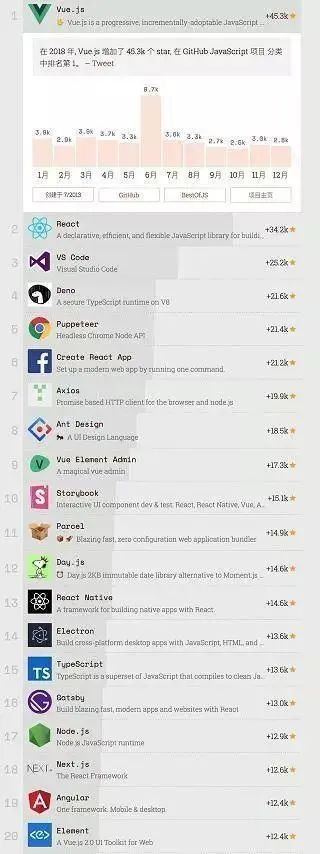
3、不需要操作 Dom,实现了 MVVM
// jquery的操作
$("#test3").val("Dolly Duck");

// Vue的操作
MVVM,实现了双向绑定
4、学习成本低,文档浅显易懂
Vue 建项目
1、Vue 提供了一个官方的 CLI,为单页面应用 (SPA) 快速搭建繁杂的脚手架。基于 Vue cli 项目脚手架,网址:cli.vuejs.org/zh/guide/
2、运行以下命令其一来创建一个新项目,有默认选默认即可
vue create vue-hello-world (命令行)
vue ui (界面)
3、在创建好项目以后,运行以下命令将能看到初次项目创建的界面
cd vue-hello-world
yarn serve
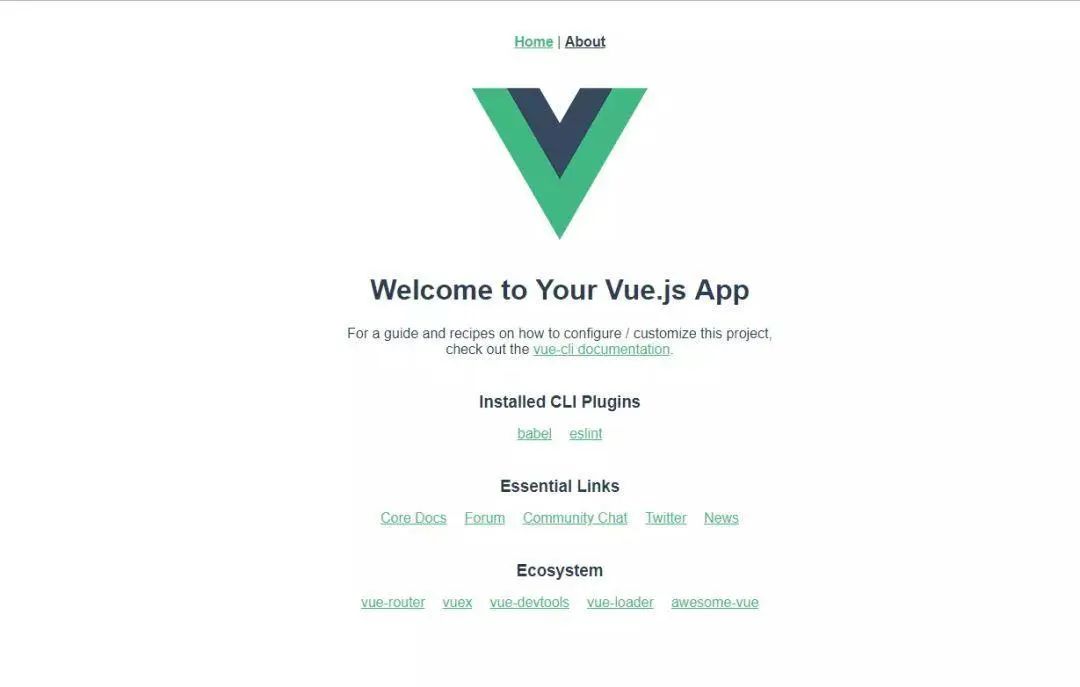
4、默认情况下,在 浏览器访问 http://localhost:8080/ 将能看到如下界面:
Vue 相关结构和生命周期介绍
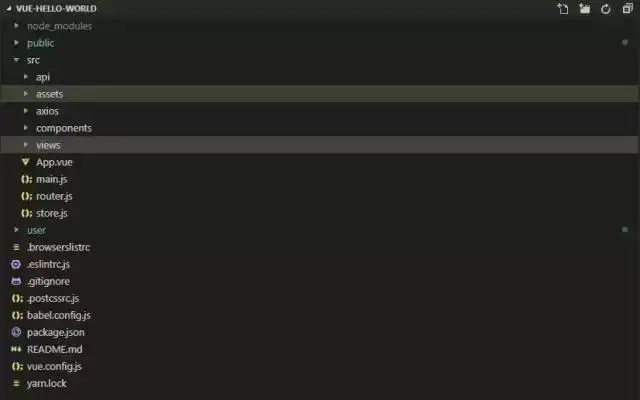
1、目录结构如下图:
2、单个.vue 文件的组成介绍
<template>
<!--html-->
</template>

<script>
//js
</script>

<style>
/* css style */
</style>
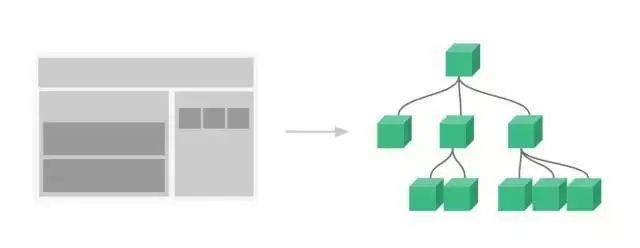
3、组件化应用构建
使用小型、独立和通常可复用的组件构建大型应用,一个页面如搭积木一样
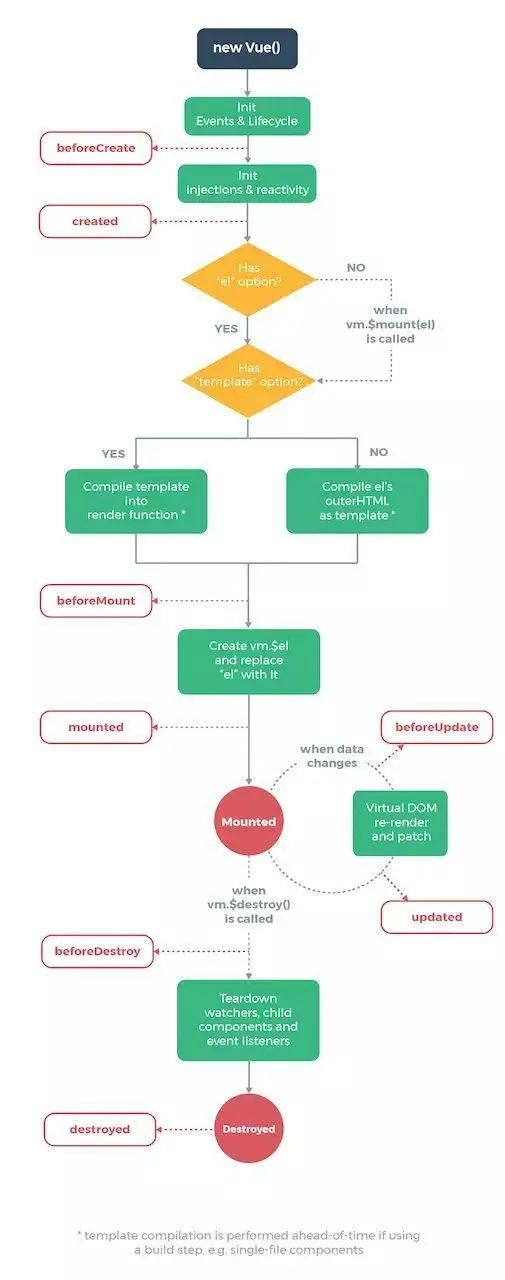
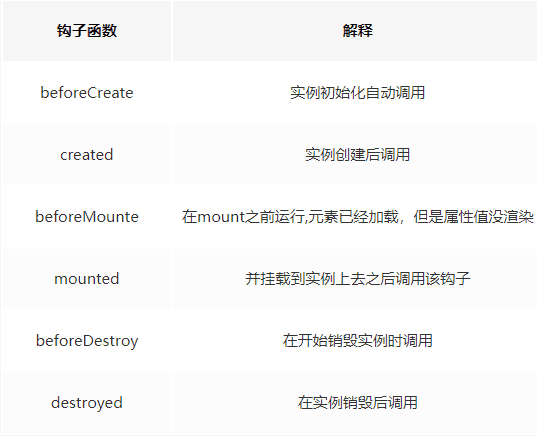
4、Vue 的生命周期如下图:
Vue 常用指令
声明式渲染
<div id="app">
  {{ message }}
</div>
data: {
    message: 'Hello Vue!'
}
条件渲染
<div id="app-3">
  <p v-if="seen">现在你看到我了</p>
</div>
data: {
    seen: true
}
循环渲染
<div id="app-4">
  <ol>
    <li v-for="todo in todos">
      {{ todo.text }}
    </li>
  </ol>
</div>
data: {
  todos: [
    { text: '学习 JavaScript' },
    { text: '学习 Vue' },
    { text: '整个牛项目' }
  ]
}
监听事件
可以用 v-on 指令监听 DOM 事件,并在触发时运行一些 JavaScript 代码。
<div id="example-2">
<!-- `greet` 是在下面定义的方法名 -->
<button v-on:click="greet">Greet</button>
</div>
methods: {
  greet: function () {
    // `this` 在方法里指向当前 Vue 实例
    alert('Hello ' + this.name + '!')
  }
}
计算属性缓存 vs 方法
<div id="example">
  <p>Original message: "{{ message }}"</p>
  <p>Computed reversed message: "{{ reversedMessage }}"</p>
</div>
var vm = new Vue({
  el: '#example',
  data: {
    message: 'Hello'
  },
  computed: {
     计算属性的 getter
    reversedMessage: function () {
       `this` 指向 vm 实例
      return this.message.split('').reverse().join('')
    }
  },
  methods: {
     方法
    reversedMessage: function () {
    return this.message.split('').reverse().join('')
    }
  }
})
数据变化,watch
var vm = new Vue({
  el: '#demo',
  data: {
    firstName: 'Foo',
    lastName: 'Bar'
  },
  computed: {
     当两个值变化时,将会触发此函数
    fullName: function () {
      return this.firstName + ' ' + this.lastName
    }
  }
})
表单输入绑定
<input v-model="message" placeholder="edit me">
缩写
v-bind 缩写
<input v-model="message" placeholder="edit me">
<p>Message is: {{ message }}</p>
v-on 缩写
<!-- 完整语法 -->
<a v-bind:href="url">...</a>

<!-- 缩写 -->
<a :href="url">...</a>
路由
// 可提供加载
const router = new VueRouter({
routes: [
  {
    path: '/user/:userId',
    name: 'user',
    component: User
  }
]
})
<!--html跳转-->
<router-link :to="{ name: 'user', params: { userId: 123 }}">User</router-link>
// js跳转
router.push({ name: 'user', params: { userId: 123 }})
使用 axios 访问 API
// get请求
axios.get('/user', {
  params: {
  ID: 12345
  }
})
.then(function (response) {
  console.log(response);
})
.catch(function (error) {
  console.log(error);
});
// post 请求
axios.post('/user', {
  firstName: 'Fred',
  lastName: 'Flintstone'
})
.then(function (response) {
  console.log(response);
})
.catch(function (error) {
  console.log(error);
});
在学习完以上知识以后,将能使用 Vue 做出简单的页面运用
扩展:
相关:
https://github.com/SimulatedGREG/electron-vue https://muse-ui.org/#/zh-CN/list http://mpvue.com/ https://www.iviewui.com/components/page
Spring Boot
在讲 Spring Boot 之前,需要大概了解下 Java 的一些相关
Java 的工作原理
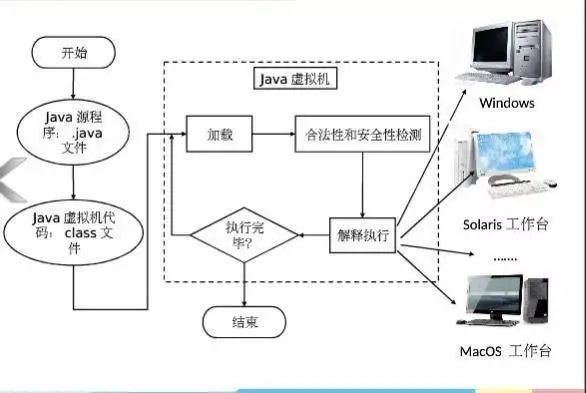
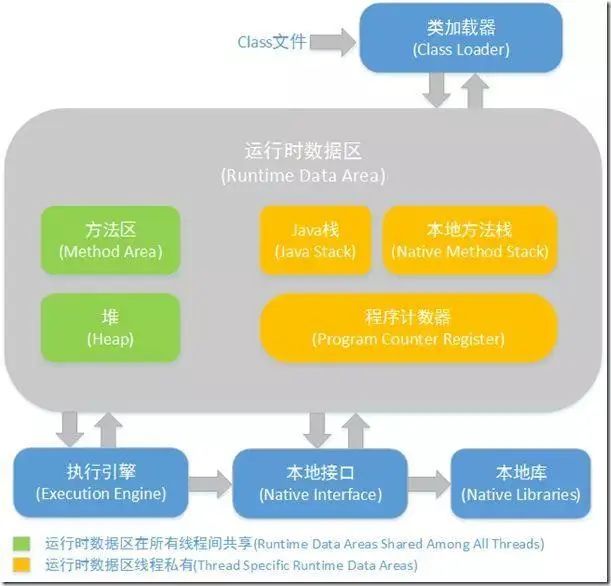
JVM 虚拟机
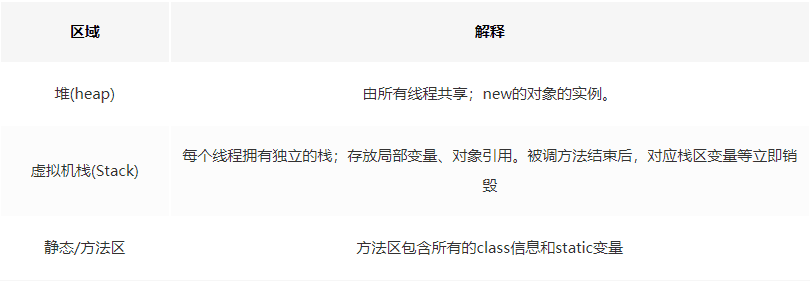
介绍
使用 Spring Boot 开发单个 RESTful 服务
https://blog.csdn.net/small_mouse0/article/details/77800737
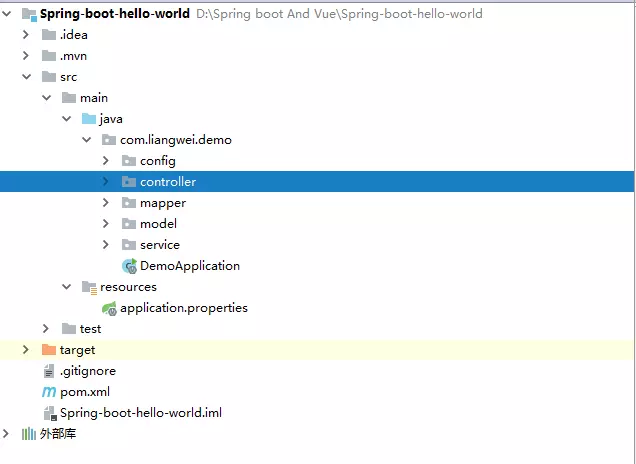
项目目录结构
和前端交互
// 如: /api/user 的get请求将会被 UserQry() 函数处理

@RequestMapping("/api")
public class UserController {

    @RequestMapping(value ="/user", method = RequestMethod.GET)
    public List<User> UserQry() {
        return userService.getUser();
    }
}
2、在框架经过处理以后,最终调用的是 mapper 层。
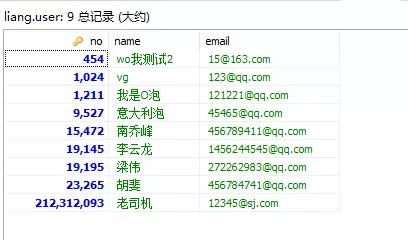
@Select("select * from user")
List<User> getUser();
概念
spring ioc 容器:,主要用来管理对象和依赖,以及依赖的注入 依赖注入:不用 new,让 Spring 控制 new 过程 控制反转:不是用 new 方式实例化对象,实质的控制权已经交由程序管理 面向切面:把一些功能抽离出来,再通过 “动态” 的方式掺入到业务中
Bean
bean 是一个对象,由 ioc 容器生成的对象就是一个 bean
配置 VS 注解
// Spring 的操作
package com.yiibai.common;

public class Customer
{
    private Person person;

    public Customer(Person person) {
        this.person = person;
    }

    public void setPerson(Person person) {
        this.person = person;
    }
    //...
}

package com.yiibai.common;

public class Person
{
  //...
}
// Spring 的配置Bean的xml
<bean id="customer" class="com.yiibai.common.Customer">
  <property name="person" ref="person" />
</bean>

<bean id="person" class="com.yiibai.common.Person" />
// Spring 的注解方式
public class Customer {
  @Autowired
  private Person person;
}
注解
跨域
RESTful 风格
// 非RESTful接口
api/getfile.php - 获取文件信息,下载文件
api/uploadfile.php - 上传创建文件
api/deletefile.php - 删除文件

// 只需要api/users这一个接口
GET http://localhost:8080/api/users (查询用户)
POST http://localhost:8080/api/users (新增用户)
PUT http://localhost:8080/api/users (更新用户)
DELETE http://localhost:8080/api/users (删除用户)
Restful 好处:
URL 具有很强可读性的,具有自描述性 规范化请求过程和返回结果 资源描述与视图的松耦合 可提供 OpenAPI,便于第三方系统集成,提高互操作性 提供无状态的服务接口,降低复杂度,可提高应用的水平扩展性
扩展
Spring Cloud 的分布式
Spring Boot 和 Spring Cloud 的关系
Dubbo
Dubbo 是一款高性能 Java RPC 框架,地址:dubbo.apache.org/zh-cn/
Dubbo 的微服务的一些概念
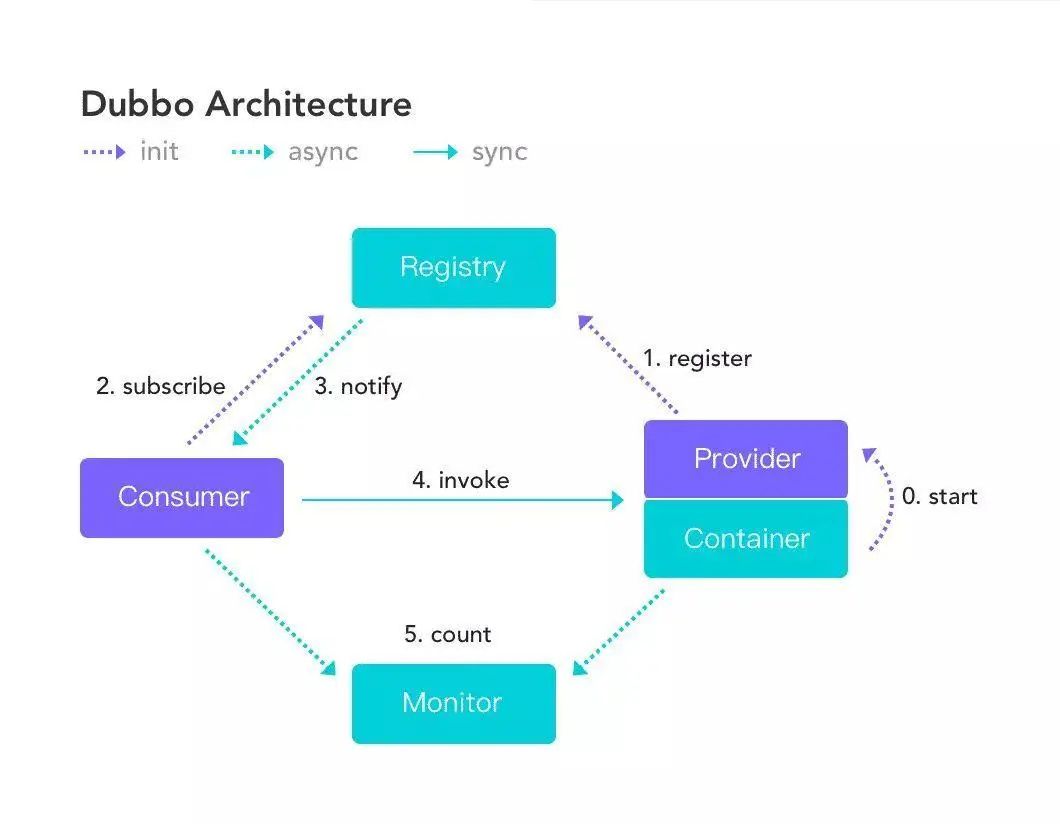
生产者发布服务到服务注册中心中 消费者在服务注册中心中订阅服务 消费者调用已经注册的服务
Dubbo 的实现单个微服务
// 定义服务接口标准
public interface DemoService {

    String sayHello(String name);
}
// 生产者项目引用并实现
@Service
public class DemoServiceImpl implements DemoService {

  @Override
  public String sayHello(String name) {
    return "Hello, " + name + " (from Spring Boot)";
  }
}
// 消费者引用然后调用
@RestController
public class DemoConsumerController {

  @Reference
  private DemoService demoService;

  @RequestMapping("/sayHello/{name}")
  public String sayHello(@PathVariable("name") String name) {
    return demoService.sayHello(name);
  }
}
分布式的基础套件介绍
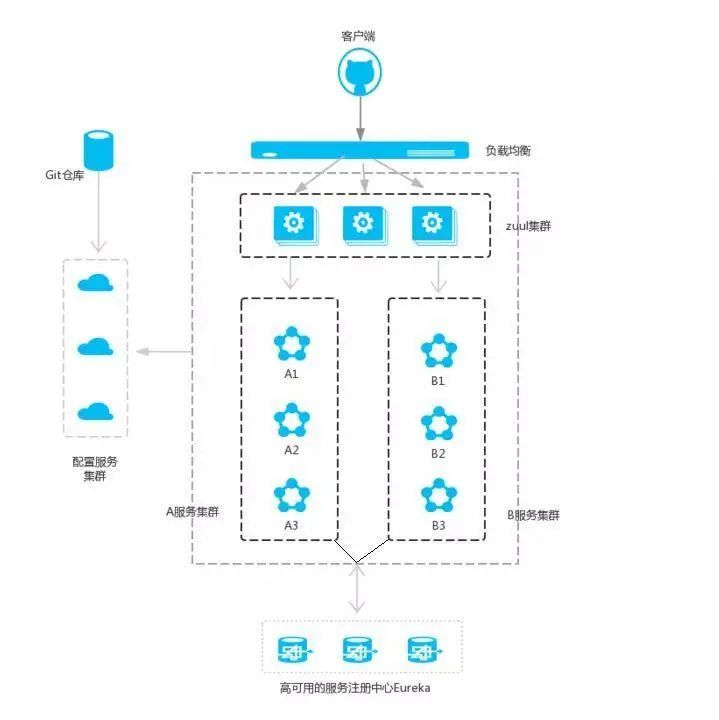
Spring Cloud 和 Dubbo 对比
基础套件对比
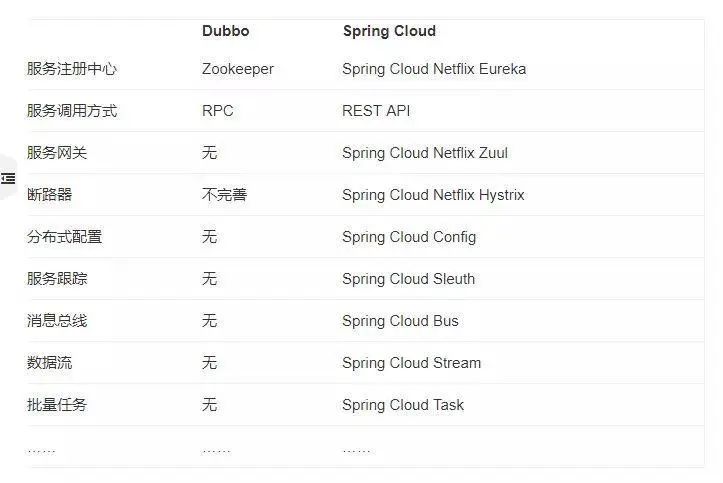
分布式配置:可以使用淘宝的 diamond、百度的 disconf 来实现分布式配置管理; 服务跟踪:可以使用京东开源的 Hydra,或者扩展 Filter 用 Zippin 来做服务跟踪; 批量任务:可以使用当当开源的 Elastic-Job、tbschedule。
性能比较
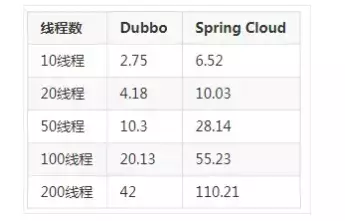
服务依赖方式
源代码地址
Spring Boot + Vue 代码地址:
https://github.com/liangwei0101/Spring-Boot-And-Vue
Dubbo-Spring-Boot 代码地址:
https://github.com/liangwei0101/Dubbo-Spring-Boot