



在生产环境有DDL真实使用经验的同学,会发现一个情况,有的时候执行一个ALTER TABLE ... 操作很快就完成了,但是有的时候执行就要耗费很长时间,发生这样的原因是为什么呢,今天我们来一探究竟。
为什么快 OR 为什么慢
为什么快?
有的ALTER TABLE ... 执行速度很快,是因为涉及的变更没有涉及到真实存放的数据,即只修改了元数据信息,何为元数据(MetaData)?元数据,是指定义数据结构的数据。例如数据库中的数据库名、表名、 列名、用户名、版本名以及从SQL语句得到的结果中的大部分字符串是元数据。举例来看一下:

[172.xx.xx.xxx:root@sz-pg-backup-zookeeper-003:/mysql/mysql3307/employees]# usr/bin/mysqlfrm --diagnostic mysql/mysql3307/employees/employee_test.frm
# WARNING: Cannot generate character set or collation names without the --server option.
# CAUTION: The diagnostic mode is a best-effort parse of the .frm file. As such, it may not identify all of the components of the table correctly. This is especially true for damaged files. It will also not read the default values for the columns and the resulting statement may not be syntactically correct.
# Reading .frm file for /mysql/mysql3307/employees/employee_test.frm:
# The .frm file is a TABLE.
# CREATE TABLE Statement:

CREATE TABLE `employees`.`employee_test` (
  `emp_no` int(11) NOT NULL,
  `birth_date` date NOT NULL,
  `first_name` varchar(42) NOT NULL,
  `last_name` varchar(48) NOT NULL,
  `gender` enum('M','F') NOT NULL,
  `hire_date` date NOT NULL,
PRIMARY KEY `PRIMARY` (`emp_no`),
KEY `idx_birth_date` (`birth_date`)
) ENGINE=InnoDB;

#...done.
[root@localhost][employees]> SELECT current_timestamp();
+---------------------+
| current_timestamp() |
+---------------------+
| 2021-08-16 11:48:45 |
+---------------------+
1 row in set (0.00 sec)

[root@localhost][employees]> ALTER TABLE `employee_test` COMMENT '雇员测试表';
Query OK, 0 rows affected (0.01 sec)
Records: 0 Duplicates: 0 Warnings: 0

[172.xx.xx.xxx:root@sz-pg-backup-zookeeper-003:/mysql/mysql3307/employees]# usr/bin/mysqlfrm --diagnostic mysql/mysql3307/employees/employee_test.frm
# WARNING: Cannot generate character set or collation names without the --server option.
# CAUTION: The diagnostic mode is a best-effort parse of the .frm file. As such, it may not identify all of the components of the table correctly. This is especially true for damaged files. It will also not read the default values for the columns and the resulting statement may not be syntactically correct.
# Reading .frm file for /mysql/mysql3307/employees/employee_test.frm:
# The .frm file is a TABLE.
# CREATE TABLE Statement:

CREATE TABLE `employees`.`employee_test` (
  `emp_no` int(11) NOT NULL,
  `birth_date` date NOT NULL,
  `first_name` varchar(42) NOT NULL,
  `last_name` varchar(48) NOT NULL,
  `gender` enum('M','F') NOT NULL,
  `hire_date` date NOT NULL,
PRIMARY KEY `PRIMARY` (`emp_no`),
KEY `idx_birth_date` (`birth_date`)
) ENGINE=InnoDB COMMENT '雇员测试表';

#...done.
为什么慢?
[root@localhost][employees]> SELECT current_timestamp();
+---------------------+
| current_timestamp() |
+---------------------+
| 2021-08-16 11:59:31 |
+---------------------+
1 row in set (0.00 sec)

[root@localhost][employees]> ALTER TABLE `employee_test` ENGINE=InnoDB;
Query OK, 0 rows affected (3.19 sec)
Records: 0 Duplicates: 0 Warnings: 0

小提示
# 从官网中下载mysql-utilities工具包安装包
wget -q https://downloads.mysql.com/archives/get/p/30/file/mysql-utilities-1.6.5.tar.gz
# 解压
tar xf mysql-utilities-1.6.5.tar.gz
# 进入解压目录
cd mysql-utilities-1.6.5
# 通过Python构建
python setup.py build
# 通过Python安装
python setup.py install
# 查看工具包中都有哪些工具
ll usr/bin/mysql*
lrwxrwxrwx 1 root root 30 4月 19 15:45 usr/bin/mysql3306 -> usr/local/mysql3306/bin/mysql
lrwxrwxrwx 1 root root 30 7月 14 18:11 usr/bin/mysql3307 -> usr/local/mysql3307/bin/mysql
lrwxrwxrwx 1 root root 30 5月 12 19:06 usr/bin/mysql3386 -> usr/local/mysql3386/bin/mysql
-rwxr-xr-x 1 root root 11969 8月 3 11:15 usr/bin/mysqlauditadmin
-rwxr-xr-x 1 root root 12210 8月 3 11:15 usr/bin/mysqlauditgrep
-rwxr-xr-x 1 root root 15941 8月 3 11:15 usr/bin/mysqlbinlogmove
-rwxr-xr-x 1 root root 7996 8月 3 11:15 usr/bin/mysqlbinlogpurge
-rwxr-xr-x 1 root root 3764 8月 3 11:15 usr/bin/mysqlbinlogrotate
-rwxr-xr-x 1 root root 17960 8月 3 11:15 usr/bin/mysqldbcompare
-rwxr-xr-x 1 root root 16196 8月 3 11:15 usr/bin/mysqldbcopy
-rwxr-xr-x 1 root root 14793 8月 3 11:15 usr/bin/mysqldbexport
-rwxr-xr-x 1 root root 14163 8月 3 11:15 usr/bin/mysqldbimport
-rwxr-xr-x 1 root root 12371 8月 3 11:15 usr/bin/mysqldiff
-rwxr-xr-x 1 root root 7386 8月 3 11:15 usr/bin/mysqldiskusage
-rwxr-xr-x 1 root root 17249 8月 3 11:15 usr/bin/mysqlfailover
-rwxr-xr-x 1 root root 18222 8月 3 11:15 usr/bin/mysqlfrm
-rwxr-xr-x 1 root root 10957 8月 3 11:15 usr/bin/mysqlgrants
-rwxr-xr-x 1 root root 6462 8月 3 11:15 usr/bin/mysqlindexcheck
-rwxr-xr-x 1 root root 5358 8月 3 11:15 usr/bin/mysqlmetagrep
-rwxr-xr-x 1 root root 5975 8月 3 11:15 usr/bin/mysqlprocgrep
-rwxr-xr-x 1 root root 7695 8月 3 11:15 usr/bin/mysqlreplicate
-rwxr-xr-x 1 root root 16913 8月 3 11:15 usr/bin/mysqlrpladmin
-rwxr-xr-x 1 root root 6408 8月 3 11:15 usr/bin/mysqlrplcheck
-rwxr-xr-x 1 root root 15548 8月 3 11:15 usr/bin/mysqlrplms
-rwxr-xr-x 1 root root 6696 8月 3 11:15 usr/bin/mysqlrplshow
-rwxr-xr-x 1 root root 12066 8月 3 11:15 usr/bin/mysqlrplsync
-rwxr-xr-x 1 root root 8984 8月 3 11:15 usr/bin/mysqlserverclone
-rwxr-xr-x 1 root root 5962 8月 3 11:15 usr/bin/mysqlserverinfo
-rwxr-xr-x 1 root root 6415 8月 3 11:15 usr/bin/mysqlslavetrx
-rwxr-xr-x 1 root root 6959 8月 3 11:15 usr/bin/mysqluc
-rwxr-xr-x 1 root root 8049 8月 3 11:15 usr/bin/mysqluserclone
/usr/bin/mysqlfrm --help
重建表的两种方式:Copy & Inplace
相比起执行时间短、处理速度快只修改元数据信息的DDL而言,我们更在意的是会调整真实数据、执行速度慢、影响范围广的DDL语句。何为“调整数据”?我们知道,InnoDB存储引擎的数据是以B+树数据结构进行组织存储的,当然还有很多如B*树等数据结构,比如我们调整字段字符编码或排序规则,因为调整了字符编码和排序规则,所以我们不得不对现有数据进行重新排序来保证B+树结构的顺序性,这个调整的过程我们称为表的重建,另外,重建的过程还会对表空间做“瘦身”,即让表空间变得更紧凑,释放更多的空余空间。在MySQL 5.5版本之前,重建表都是通过Copy的方式来实现的。
何为Copy?
COPY: Operations are performed on a copy of the original table, and table data is copied from the original table to the new table row by row. Concurrent DML is not permitted.
# COPY:对原表的一个副本进行操作,将表数据从原表逐行复制到新表中。不允许并发DML。
[root@localhost][employees]> ALTER TABLE `employee_test` ENGINE=InnoDB, ALGORITHM=copy;
Query OK, 299962 rows affected (3.27 sec)
Records: 299962 Duplicates: 0 Warnings: 0

何为Inplace?
INPLACE: Operations avoid copying table data but may rebuild the table in place. An exclusive metadata lock on the table may be taken briefly during preparation and execution phases of the operation. Typically, concurrent DML is supported.
# INPLACE:操作避免复制表数据,但可能会就地重建表。在操作的准备和执行阶段可能会短暂地对表进行独占元数据锁定。通常,支持并发DML。
小提示
其实,支持Inplace的DDL也有有两种情况,一种情况是会重建表,即会rebuild,就是说,即使没有Server层创建临时表、转存数据、更换表名,删除旧表等一系列麻烦操作,但InnoDB存储引擎层也会保证B+树数据结构的顺序性而“原地”重建一次表数据。还有一种情况是不会重建表,比如,刚开始介绍的只修改元数据的DDL操作,即为no-rebuild。
Online DDL的执行过程 & 注意事项
从上面的介绍中我们得知,Copy重建表方式的DDL会阻塞DML操作。那么,不会阻塞DML操作的Online DDL又是怎么工作的,我们一起来揭晓。在MySQL 5.5版本之前,重建表都是通过Copy的方式来实现的。MySQL 5.6版本开始引入的Online DDL,对这个操作流程做了优化。具体的过程如下:
1、建立一个临时文件,扫描源表主键的所有数据页;
2、用数据页中源表的记录生成B+树,存储到临时文件中;
3、生成临时文件的过程中,将所有对源表的操作记录在一个日志文件(row log)中;
4、临时文件生成后,将日志文件中的操作应用到临时文件,得到一个逻辑数据上与源表相同的数据文件;
5、用临时文件替换源表的数据文件。
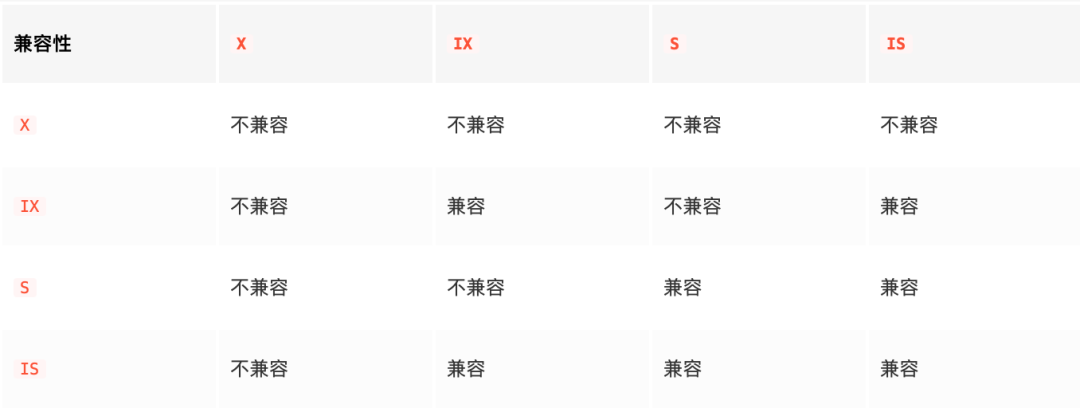
还有一个问题需要注意,在MySQL 5.5版本中引入了MDL(MetaData Lock),MDL不需要显式使用,在访问一个表的时候会被自动加上。MDL的作用是,维护元数据的一致性、保证读写的正确性。MDL锁是表级锁,是Server层的锁,主要用于隔离DML和DDL操作之间的干扰。当对一个表做增删改查操作的时候,加MDL读锁;当要对表做结构变更操作的时候,加MDL写锁。根据锁兼容矩阵来看:
* PREPARE阶段:
a. 创建新的临时.frm文件;
b. 持有MDL写锁(EXCLUSIVE-MDL),禁止读写;
c. 根据ALTER类型确定执行方式(copy、online-rebuild、online-norebuild);
d. 更新数据字典的内存对象;
e. 分配row_log对象用来记录增量;
f. 生成新的临时ibd文件;

* DDL阶段:
g. 降级MDL写锁(EXCLUSIVE-MDL)为MDL读锁(SHARED_UPGRADABLE-MDL);
h. 扫描old_table的聚簇索引每一条记录record,并遍历新表的索引进行处理;
i. 根据record构造对应的索引项,将构造索引项插入soft_buffer块排序;
j. 将sort_buffer块更新到新的索引上;
k. 记录DDL执行过程中产生的增量并在新表上重放;
l. 记录DDL执行过程中产生的增量(仅rebuild类型需要);
m. 重放row_log间产生DML操作append到row_log最后一个block;

* COMMIT阶段:
n. 当前block为row_log最后一个时,禁止读写,升级到MDL写锁(EXCLUSIVE-MDL);
o. 重做row_log中最后一部分增量;
p. 更新InnoDB的数据字典表;
q. 提交事务(刷事务的redo日志);
r. 修改统计信息;
s. rename临时.ibd文件、.frm文件。
1、仍然存在排他锁,有锁等待的风险;
2、增量日志大小是有限制的;
[root@localhost][(none)]> SHOW VARIABLES LIKE 'innodb_online_alter_log_max_size';
+----------------------------------+-----------+
| Variable_name                    | Value     |
+----------------------------------+-----------+
| innodb_online_alter_log_max_size | 134217728 |
+----------------------------------+-----------+
1 row in set (0.00 sec)
4、无法暂停,只能中断;
小提示
在使用Online DDL的时候,建议在业务低峰期执行,每次操作前,一定要去查看一下官档,因为DDL语句种类繁多,有些情况理论上的不重建,也许还是会重建,官档中也给出了详细说明:
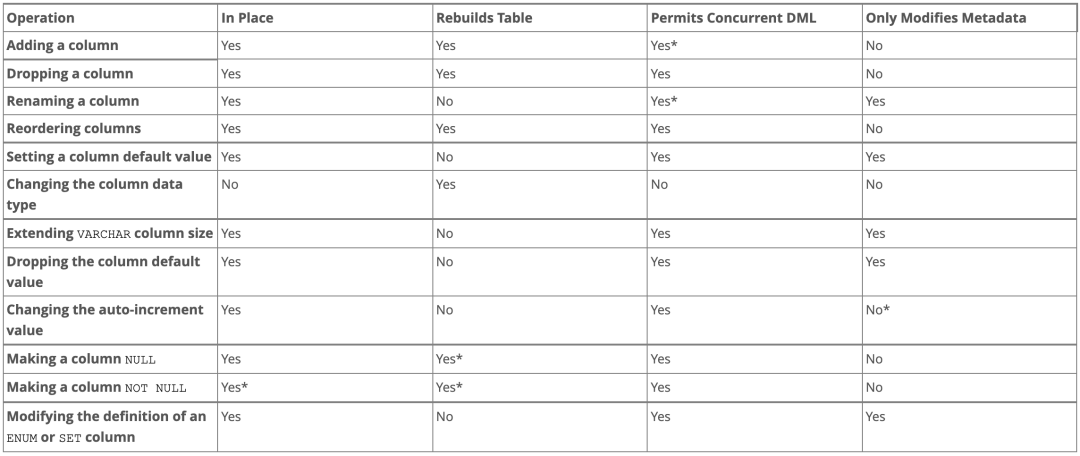
* 表示含有不确定因素,所以使用对应语法前一定要做好测试,数据量不大的时候,可以直接使用,如果数据量很大,还是不建议使用Online DDL,推荐使用pt-osc或者gh-ost,这是两个不错的开源工具,后面会开辟单独的文章进行讲解。
※ Online和Inplace的关系:
DDL过程如果是Online的,就一定是Inplace的;
反过来未必,也就是说Inplace的DDL,有可能不是Online的。截止到MySQL 8.0,添加全文索引(FULLTEXT INDEX)和空间索引 (SPATIAL INDEX) 就属于这种情况。
ALTER TABLE `t` ADD FULLTEXT(`field_name`);
这个过程是Inplace的,但会阻塞增删改操作,是非Online的。
※ 总结一些元数据锁信息:
| 名称 | 类型 | 优先级 | 说明 |
|---|---|---|---|
| SHARED_UPGRADABLE | 共享升级锁 | 0 | 一般在执行DDL时在Online情况下会产生该锁 |
| EXCLUSIVE | 排他锁X | 1 | 一般在执行DDL时会产生该锁 |
| SHARED_NO_READ_WRITE | 排他锁X | 1 | 执行lock tables xxx write产生该锁 |
| SHARED_WRITE | 意向排他锁IX | 2 | 一般执行DML的更新语句 或 select ... for update产生该锁 |
| SHARED_READ | 意向共享锁IS | 2.5 | select ... lock in share mode产生该锁(8.0版本以后使用select...for share) |
| SHARED_READ_ONLY | 共享锁S | 3 | 执行lock tables xxx read产生该锁 |
SHARED_UPGRADABLE:(ALTER TABLE语句)本身为读锁,但是有特殊,优先级为0;
并不受队列中的写锁等待而阻塞,只和当前持锁的SESSION比对,当前持锁SESSION为排他锁X,则等待,反之则获得锁; 为了保证一张表同时只有一个DDL操作进行,SHARED_UPGRADABLE之间是互斥的,一个时间只能有一个SHARED_UPGRADABLE的状态是GRANTED ,其余被阻塞;
EXCLUSIVE、SHARED_NO_READ_WRITE级别相同,先进先出; SHARED_WRITE(DML)和SHARED_READ(SELECT)兼容,但SHARED_WRITE_ONLY优先级高于SHARED_READ(LOCK TABLE T READ)且不兼容; SHARED_WRITE_ONLY优先级最低,主要是因为被SHARED_WRITE互斥,但如果只有SHARED_READ则他们的优先级是兼容的。
小结
今天,我们知道了有的DDL会触发rebuild操作,而rebuild又分为Copy和Inplace两种方式。同时我们也学习了Online DDL的原理、执行流程和注意事项,通过讲解,可以在以后使用起来游刃有余。同时,我们也知道了Online和Inplace的关系:如果DDL过程是Online的,则一定是Inplace的,反之则不是,添加全文索引和空间索引就是个例,他们是Inplace的,但不是Online的。同时,也扩展介绍了一些元数据锁的信息。本章内容工作中使用比重较大,使用过程中一定要谨慎。每天进步一点点!~

end
