




1、官网下载地址 推荐下载 prometheus 1.8以后的版本,根据不同的操作系统选择自己需要的下载包
https://prometheus.io/download/
2、创建数据目录 及系统目录
mkdir -p data/setupmkdir -p data/prometheus/mkdir -p data/alertmanager/
3,下载安装包
cd data/setupwget https://github.com/prometheus/prometheus/releases/download/v2.11.1/prometheus-2.11.1.linux-amd64.tar.gzwget https://github.com/prometheus/alertmanager/releases/download/v0.18.0/alertmanager-0.18.0.linux-amd64.tar.gztar -xzvf prometheus-2.11.1.linux-amd64.tar.gz -C data/prometheus/tar -xzvf alertmanager-0.18.0.linux-amd64.tar.gz -C data/alertmanager/
4、启动
4.1首先添加服务
prometheus 启动服务
#vim usr/lib/systemd/system/alertmanager.service
#vim /usr/lib/systemd/system/prometheus.service
注意web.external-url 该参数用于alertmanager等第三方调用时候使用
[Unit]Description=PrometheusAfter=network.target[Service]Type=simpleUser=rootExecStart=/data/prometheus/prometheus \--config.file=/data/prometheus/prometheus.yml \--web.external-url=http://prometheus.zhimajx.comRestart=on-failure[Install]WantedBy=multi-user.target
alertmanager 启动服务
[Unit]Description=AlertmanagerAfter=network.target[Service]Type=simpleUser=rootExecStart=/data/alertmanager-0.18.0.linux-amd64/alertmanager \--config.file=/data/alertmanager-0.18.0.linux-amd64/alertmanager.yml \--storage.path=/data/alertmanager-0.18.0.linux-amd64/data \$ALERTMANAGER_OPTSRestart=on-failure[Install]WantedBy=multi-user.target
4.2 启动并配置自动加载
systemctl enable alertmanager.servicesystemctl start alertmanager.service
5、访问页面
默认地址为:
prometheushttp://localhost:9090alertmanagerhttp://localhost:9093
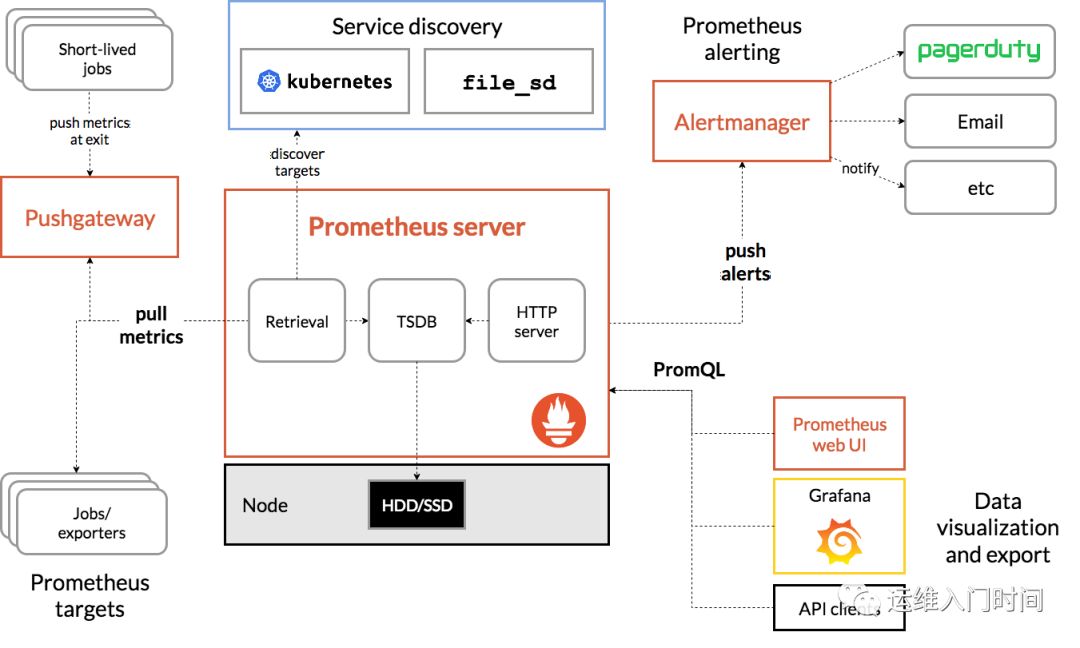
至此部署完成并送上prometheus架构 !后篇在讲解如何配置监控及报警
文章转载自运维入门时间,如果涉嫌侵权,请发送邮件至:contact@modb.pro进行举报,并提供相关证据,一经查实,墨天轮将立刻删除相关内容。
