



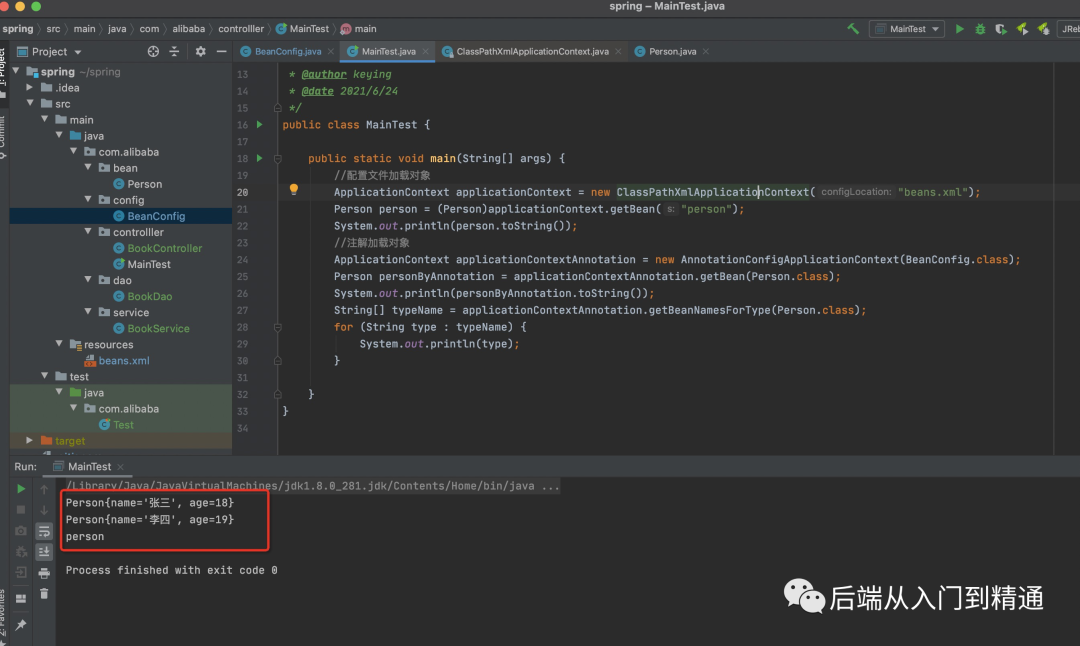
1、配置文件getBean
传统的spring,建立Person实体类,beans.xml文件,在里面指定bean,指定id,property指定实体类的name和age,实例类记得写上get,set方法,有参构造函数和无参构造函数,toString方法。之后写个mainTest类就可以测试从配置文件获取bean。下面附上代码:
<?xml version="1.0" encoding="UTF-8"?><beans default-lazy-init="true" xmlns="http://www.springframework.org/schema/beans"xmlns:xsi="http://www.w3.org/2001/XMLSchema-instance"xsi:schemaLocation="http://www.springframework.org/schema/beans http://www.springframework.org/schema/beans/spring-beans.xsd"xmlns:context="http://www.springframework.org/schema/context"><bean class="com.alibaba.bean.Person" id="person" scope="singleton"><property name="age" value="18"></property><property name="name" value="张三"></property></bean><!--包扫描,只要标注:@Controller,@Service,@Repository,@Component都能扫到--><!--1、可以在配置文件配置扫描路径2、可以用注解@ComponentScan--><!-- <context:component-scan base-package="com.alibaba"></context:component-scan>--></beans>
/*** 人** @author keying* @date 2021/6/24*/public class Person {private String name;private Integer age;@Overridepublic String toString() {return "Person{" +"name='" + name + '\'' +", age=" + age +'}';}public Person() {}public Person(String name, Integer age) {this.name = name;this.age = age;}public String getName() {return name;}public void setName(String name) {this.name = name;}public Integer getAge() {return age;}public void setAge(Integer age) {this.age = age;}}
main方法getBean:通过classPathXmlApplicationContext对象加载配置文件,之后getBean强转成之前写的person实体类,打印出来【Person{name='张三', age=18}】。
public class MainTest {public static void main(String[] args) {//配置文件加载对象ApplicationContext applicationContext = new ClassPathXmlApplicationContext("beans.xml");Person person = (Person)applicationContext.getBean("person");System.out.println(person.toString());}}
2、通过DI注解getBean
/*** 配置文件* @Configuration 告诉spring这是一个配置类*** @author keying* @date 2021/6/24*/@Configurationpublic class BeanConfig {/*** @Bean吧对象注入给spring容器* 1、id默认是方法名,value方法可以指定方法名* @return Person*/@Bean(value = "person")public Person getPerson(){return new Person("李四",19);}}
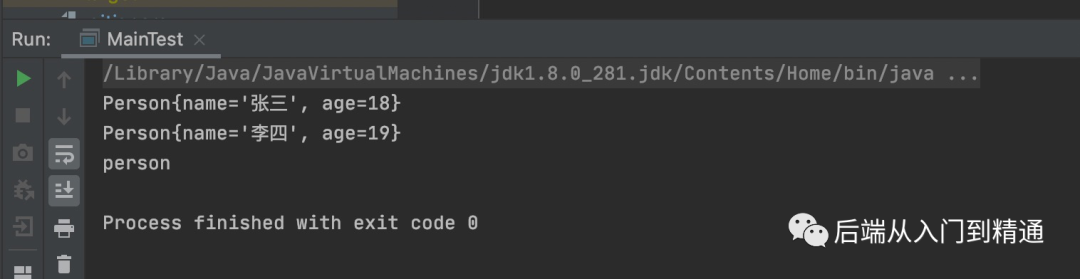
然后在main方法里通过配置文件获取对象:用AnnotationConfigApplicationContext获取刚刚写的配置类BeanConfig,在获取对象并打印出来【Person{name='李四', age=19}】,还可以用下面的getBeanNamesForType方法打印他的id;
public class MainTest {public static void main(String[] args) {//配置文件加载对象ApplicationContext applicationContext = new ClassPathXmlApplicationContext("beans.xml");Person person = (Person)applicationContext.getBean("person");System.out.println(person.toString());//注解加载对象ApplicationContext applicationContextAnnotation = new AnnotationConfigApplicationContext(BeanConfig.class);Person personByAnnotation = applicationContextAnnotation.getBean(Person.class);System.out.println(personByAnnotation.toString());String[] typeName = applicationContextAnnotation.getBeanNamesForType(Person.class);for (String type : typeName) {System.out.println(type);}}}
打印结果:
最后,看到这里的读者,喜欢的话安排一波(点赞,收藏,关注),原创不易,每周定期分享编程笔记。
文章转载自后端从入门到精通,如果涉嫌侵权,请发送邮件至:contact@modb.pro进行举报,并提供相关证据,一经查实,墨天轮将立刻删除相关内容。
