



1.mysqldump介绍
mysqldump客户端实用程序执行的是逻辑备份,生成一组SQL语句,可以执行这些语句来重新生成原始数据库对象定义和表数据。它转储一个或多个MySQL数据库的备份或转移到另一个SQL服务器。mysqldump命令还可以生成CSV、其他分隔文本或XML格式的输出。
mysqldump默认不转储INFORMATION_SCHEMA、performance_schema和sys schema。要转储这些文件,请在命令行中显式地命名它们。您还可以使用——databases选项来命名它们。对于INFORMATION_SCHEMA和performance_schema,也可以使用–skip-lock-tables选项。
2.mysqldump使用
2.1使用语法,可以用mysqldump --help
Dumping structure and contents of MySQL databases and tables.
Usage: mysqldump [OPTIONS] database [tables]
OR mysqldump [OPTIONS] --databases [OPTIONS] DB1 [DB2 DB3…]
OR mysqldump [OPTIONS] --all-databases [OPTIONS]
2.2 一般使用会加–single-transaction,这个参数对于innodb来说,不会锁表,对于非innodb来说,会锁表。
备份整个库
[root@localhost rsandbox_8_0_22]# /root/opt/mysql/8.0.22/bin/mysqldump -uroot -p -S/tmp/mysql_sandbox21223.sock --databases sbtest --single-transaction > sbtest.sql
Enter password:
查看sql文件,会发现有lock table和unlock table, 如果LOCK TABLES sbtest1 WRITE;很久,一样会锁表。
– Table structure for table sbtest1
DROP TABLE IF EXISTS sbtest1;
/*!40101 SET @saved_cs_client = @@character_set_client /;
/!50503 SET character_set_client = utf8mb4 /;
CREATE TABLE sbtest1 (
id int NOT NULL AUTO_INCREMENT,
k int NOT NULL DEFAULT ‘0’,
c char(120) NOT NULL DEFAULT ‘’,
pad char(60) NOT NULL DEFAULT ‘’,
x int DEFAULT NULL,
PRIMARY KEY (id),
UNIQUE KEY k (k)
) ENGINE=InnoDB AUTO_INCREMENT=13 DEFAULT CHARSET=utf8mb4 COLLATE=utf8mb4_0900_ai_ci;
/!40101 SET character_set_client = @saved_cs_client */;
–
– Dumping data for table sbtest1
LOCK TABLES sbtest1 WRITE;
/*!40000 ALTER TABLE sbtest1 DISABLE KEYS /;
INSERT INTO sbtest1 VALUES (1,1,’’,‘hjpreplace1’,NULL),(3,0,’’,‘hjpreplace3’,NULL),(4,4,‘h44’,‘paa224431’,4),(5,2,’’,‘hjpreplace2’,NULL),(6,6,‘increment’,‘maaaa’,6),(7,7,‘increment’,‘maaaa’,6),(8,8,‘increment2’,‘maaaa’,8),(9,9,‘increment2’,‘maaaa’,9),(11,10,‘increment3’,‘maaaa’,10),(12,11,‘increment4’,‘maaaa’,11);
/!40000 ALTER TABLE sbtest1 ENABLE KEYS /;
UNLOCK TABLES;
SET @@SESSION.SQL_LOG_BIN = @MYSQLDUMP_TEMP_LOG_BIN;
/!40103 SET TIME_ZONE=@OLD_TIME_ZONE */;
恢复整个库
/root/opt/mysql/8.0.22/bin/mysql -uroot -p -S/tmp/mysql_sandbox21223.sock sbtest < 1.sql
3.mysqlpump介绍
mysqlpump是逻辑备份工具,具有如下特性:
1.并行导出,加快备份速度
2.更好地控制转储哪些数据库和数据库对象(表、存储程序、用户帐户)
3.将用户帐户转储为帐户管理语句(CREATE user, GRANT),而不是插入mysql系统数据库
4.创建压缩输出的能力
5.备份进度条显示
6.为了重新加载转储文件,通过在插入行之后添加索引,可以更快地为InnoDB表创建二级索引
4.mysqlpump使用
4.1备份sbtest库
[root@localhost rsandbox_5_7_26]# /root/opt/mysql/8.0.22/bin/mysqlpump -uroot -pmsandbox -S/tmp/mysql_sandbox21223.sock --databases sbtest --single-transaction --default-parallelism=4 --set-gtid-purged=off --watch-progress > sbtest_pup.sql
mysqlpump: [Warning] Using a password on the command line interface can be insecure.
Dump progress: 0/2 tables, 250/4925301 rows
Dump progress: 40/100 tables, 345750/5406405 rows
Dump progress: 46/100 tables, 424500/5406405 rows
Dump progress: 55/100 tables, 509750/5406405 rows
Dump progress: 68/100 tables, 624000/5406405 rows
Dump progress: 73/100 tables, 722250/5406405 rows
Dump progress: 81/100 tables, 780750/5406405 rows
Dump progress: 92/100 tables, 881250/5406405 rows
Dump progress: 99/100 tables, 964750/5406405 rows
Dump progress: 99/100 tables, 1078000/5406405 rows
Dump progress: 99/100 tables, 1186500/5406405 rows
Dump progress: 99/100 tables, 1304250/5406405 rows
Dump progress: 99/100 tables, 1435000/5406405 rows
Dump progress: 99/100 tables, 1561500/5406405 rows
Dump progress: 99/100 tables, 1687750/5406405 rows
Dump progress: 99/100 tables, 1806750/5406405 rows
Dump progress: 99/100 tables, 1934250/5406405 rows
Dump progress: 99/100 tables, 2061250/5406405 rows
Dump progress: 99/100 tables, 2187250/5406405 rows
Dump progress: 99/100 tables, 2309250/5406405 rows
Dump progress: 99/100 tables, 2424500/5406405 rows
Dump progress: 99/100 tables, 2529750/5406405 rows
Dump progress: 99/100 tables, 2652500/5406405 rows
Dump progress: 99/100 tables, 2761250/5406405 rows
Dump progress: 99/100 tables, 2868000/5406405 rows
Dump progress: 99/100 tables, 2983250/5406405 rows
Dump progress: 99/100 tables, 3111750/5406405 rows
Dump progress: 99/100 tables, 3230750/5406405 rows
Dump progress: 99/100 tables, 3348750/5406405 rows
Dump progress: 99/100 tables, 3462500/5406405 rows
Dump progress: 99/100 tables, 3588500/5406405 rows
Dump progress: 99/100 tables, 3706250/5406405 rows
Dump progress: 99/100 tables, 3825250/5406405 rows
Dump progress: 99/100 tables, 3937750/5406405 rows
Dump progress: 99/100 tables, 4066750/5406405 rows
Dump progress: 99/100 tables, 4192750/5406405 rows
Dump progress: 99/100 tables, 4298500/5406405 rows
Dump progress: 99/100 tables, 4417750/5406405 rows
Dump progress: 99/100 tables, 4536500/5406405 rows
Dump progress: 99/100 tables, 4660250/5406405 rows
Dump progress: 99/100 tables, 4776250/5406405 rows
Dump progress: 99/100 tables, 4888000/5406405 rows
Dump progress: 99/100 tables, 4976500/5406405 rows
Dump progress: 99/100 tables, 5096250/5406405 rows
Dump progress: 99/100 tables, 5222250/5406405 rows
Dump progress: 99/100 tables, 5351000/5406405 rows
Dump progress: 99/100 tables, 5463750/5406405 rows
Dump progress: 99/100 tables, 5590000/5406405 rows
恢复sbtest库
/root/opt/mysql/8.0.22/bin/mysql -uroot -pmsandbox -S/tmp/mysql_sandbox21223.sock < sbtest_pup.sql
4.2备份表sbtest1
不开并行
time /root/opt/mysql/8.0.22/bin/mysqlpump -uroot -pmsandbox -S/tmp/mysql_sandbox21223.sock sbtest sbtest1 --default-parallelism=1 --single-transaction --set-gtid-purged=off --watch-progress > sbtest_noparal_test1.sql
mysqlpump: [Warning] Using a password on the command line interface can be insecure.
Dump progress: 0/1 tables, 250/4920461 rows
Dump progress: 0/1 tables, 435250/4920461 rows
Dump progress: 0/1 tables, 751500/4920461 rows
Dump progress: 0/1 tables, 1064750/4920461 rows
Dump progress: 0/1 tables, 1375500/4920461 rows
Dump progress: 0/1 tables, 1642500/4920461 rows
Dump progress: 0/1 tables, 1931500/4920461 rows
Dump progress: 0/1 tables, 2220750/4920461 rows
Dump progress: 0/1 tables, 2509250/4920461 rows
Dump progress: 0/1 tables, 2771500/4920461 rows
Dump progress: 0/1 tables, 3059250/4920461 rows
Dump progress: 0/1 tables, 3405000/4920461 rows
Dump progress: 0/1 tables, 3751500/4920461 rows
Dump progress: 0/1 tables, 4154750/4920461 rows
Dump progress: 0/1 tables, 4534250/4920461 rows
Dump progress: 0/1 tables, 4898250/4920461 rows
Dump completed in 16481
real 0m16.492s
user 0m5.253s
sys 0m11.403s
开并行
[root@localhost rsandbox_8_0_22]# time /root/opt/mysql/8.0.22/bin/mysqlpump -uroot -pmsandbox -S/tmp/mysql_sandbox21223.sock sbtest sbtest1 --default-parallelism=4 --single-transaction --set-gtid-purged=off --watch-progress > sbtest_paral_para.sql
Dump progress: 0/1 tables, 250/4920461 rows
Dump progress: 0/1 tables, 383750/4920461 rows
Dump progress: 0/1 tables, 833500/4920461 rows
Dump progress: 0/1 tables, 1247750/4920461 rows
Dump progress: 0/1 tables, 1714250/4920461 rows
Dump progress: 0/1 tables, 2138500/4920461 rows
Dump progress: 0/1 tables, 2513000/4920461 rows
Dump progress: 0/1 tables, 2911750/4920461 rows
Dump progress: 0/1 tables, 3305000/4920461 rows
Dump progress: 0/1 tables, 3663250/4920461 rows
Dump progress: 0/1 tables, 4065750/4920461 rows
Dump progress: 0/1 tables, 4462750/4920461 rows
Dump progress: 0/1 tables, 4958500/4920461 rows
Dump completed in 13054
real 0m13.081s
user 0m6.833s
sys 0m6.932s
对于单表备份,不开并行反而比开并行快,mysqlpump其实对单个表是开不了并行的。
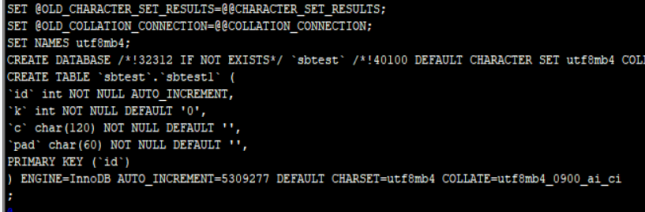
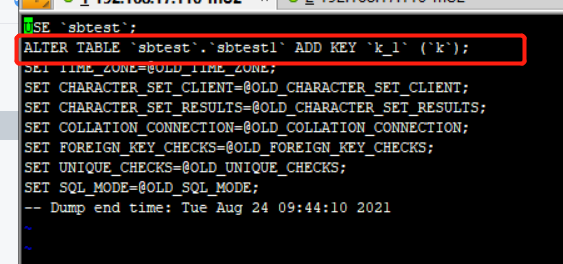
查看表的转储文件,会发现二级索引是在数据导入完成后,再建立索引的。
5.总结
1、mysqldump与mysqlpump都是官方逻辑备份工具,功能大部分相同,但myslpump功能比mysqldump强一些,有并行备份,备份进度显示。
2、mysqlpump的并行是以表为粒度的,单表是做不了并行,如果表要并行导出,建议用mydumper.
