



数据库架构和设计正成为一种越来越失落的艺术。随着新技术和加快开发周期的推动,人们继续走捷径,这往往会损害长期性能、可扩展性和安全性。设计应用程序如何存储、访问和处理数据非常重要,不容忽视。我希望人们了解早期的设计选择会对他们的应用产生深远的影响。为此,我将探索数据库设计原则和实践。我从每个开发人员最喜欢的数据格式开始:JSON!
似乎在过去几年中几乎每个数据库都引入了对直接存储 JSON 对象和与 JSON 对象交互的不同程度的支持。虽然这些功能旨在让应用程序开发人员更容易更快地编写代码,但每个实现的实现往往千差万别,可能会导致一些奇怪的现象。在接下来的几周/几个月里,我将向您展示一些方法、错误和开发人员存储 JSON 的常见方式。仅仅因为您可以使用数据库的本机 JSON 支持并不总是意味着您应该!我希望向您展示哪些最适合哪些用例。
对于本系列的第一部分,我将重点介绍 MySQL。MySQL 对 JSON 数据类型的实现是在 5.7(2015 年末/2016 年初时间范围)中引入的。从那时起,一些小的改进使实现更宜居。当前迭代 MySQL 8 提供了 JSON 函数和特性的全功能实现。让我向您展示一些示例,说明如何在 MySQL 中存储 JSON 文档并与之交互。
设置
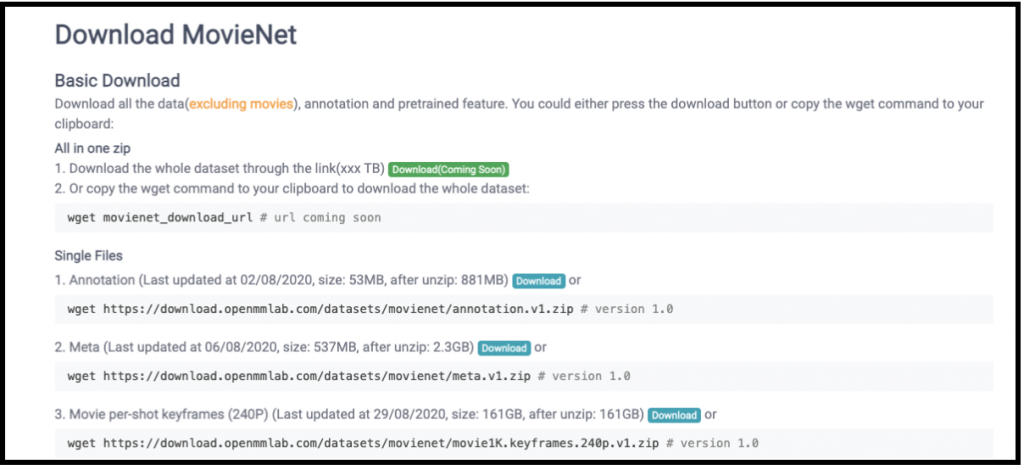
对于我的所有测试,我需要合理数量的数据来测试某些功能的性能影响。我选择使用来自http://movienet.site/的元数据 JSON ,大约 2.3GB 的单个 JSON 文件(每部电影一个)。
我编写了一个小的python 脚本来加载和遍历 JSON 文件并将它们加载到 MySQL 中。
我将通过示例向您展示我如何看到许多开发人员使用 MySQL 与 JSON 交互,并指出为什么其中一些可能不正确或导致您可能不知道的问题。我还将向您展示一些您可能想要研究和探索的其他功能,并提供一些设计建议。让我们从以下简单的表定义开始:
create table movies_json (
   ai_myid int AUTO_INCREMENT primary key,
   imdb_id varchar(255),
   json_column json
) engine = innodb;

create unique index imdb_idx on movies_json(imdb_id);
{
  "imdb_id": "tt8408760",
  "tmdb_id": null,
  "douban_id": null,
  "title": "Rubes (2019)",
  "genres": [
    "Short",
    "Comedy",
    "Horror"
  ],
  "country": "USA",
  "version": [
    {
      "runtime": "7 min",
      "description": ""
    }
  ],
  "imdb_rating": null,
  "director": [
    {
      "id": "nm3216042",
      "name": "Nathan Alan Bunker"
    }
  ],
  "writer": null,
  "cast": [
    {
      "id": "nm1899908",
      "name": "Brendan Jennings",
      "character": "Milton"
    },
    {
      "id": "nm2384265",
      "name": "Ben Begley",
      "character": "Paul"
    },
    {
      "id": "nm2287013",
      "name": "Jerry Marr",
      "character": "Professor Henson"
    },
    {
      "id": "nm7529700",
      "name": "Allene Prince",
      "character": "Margaret"
    }
  ],
  "overview": null,
  "storyline": "Two disgruntled teachers use a Rube Goldberg machine to exact revenge on the people who have wronged them.",
  "plot": null,
  "synopsis": null
}
你可以看到一个 JSON 格式的例子
101:MySQL 中的简单 JSON 交互
是的,表中的单个列带有一两个键。每行将在下载的 JSON 文件中存储一部电影。我在加载过程中从 JSON 中提取了一个 auto_increment 键和 IMDB ID。这种结构和设置是一种简单的设计,只需最少的努力。但是,这种设计也意味着您通常只依赖 MySQL 作为数据的存储。如果您通过 imdb_id 键访问所有内容,您可以使用以下命令轻松获取和更新您的 JSON 到您的应用程序:
select json_column from movies_json where imdb_id = ‘tt4154796’;

update movies_json set json_column = ‘<new JSON>’ where imdb_id = ‘tt4154796’;
但是,最终您会希望在 JSON 中进行搜索,或者只是返回 JSON 文档的一部分。例如,假设您只想查找指定电影的标题和 IMDB 评级。您可以使用内置功能执行此操作:
mysql> select json_column->>'$.title', json_column->>'$.imdb_rating' from movies_json where json_column->>'$.imdb_id'='tt2395427';
+--------------------------------+-------------------------------+
| json_column->>'$.title'        | json_column->>'$.imdb_rating' |
+--------------------------------+-------------------------------+
| Avengers: Age of Ultron (2015) | 7.5                           |
+--------------------------------+-------------------------------+
1 row in set (0.77 sec)


mysql> select json_column->>'$.title', json_column->>'$.imdb_rating' from movies_json where json_column->>'$.imdb_id'='tt4154796';
+--------------------------+-------------------------------+
| json_column->>'$.title'  | json_column->>'$.imdb_rating' |
+--------------------------+-------------------------------+
| Avengers: Endgame (2019) | null                          |
+--------------------------+-------------------------------+
1 row in set (0.75 sec)
在这里,您可以看到我们可以使用特殊语法“ ->>’$.key '”在 JSON 列中进行交互,就像我们通过 SQL 与标准数据进行交互一样。你可以看到复仇者联盟:终局之战的评分为空!那不好,这是一部比那好得多的电影。MySQL 提供了一个JSON_SET 函数来设置文档中的元素,而不是再次更新和存储整个 JSON文档。
mysql>  update movies_json
       set json_column = JSON_SET(json_column, "$.imdb_rating", 9)
       where json_column->>'$.imdb_id'='tt4154796';
 Query OK, 1 row affected (0.93 sec)
 Rows matched: 1  Changed: 1  Warnings: 0

 mysql> select json_column->>'$.title', json_column->>'$.imdb_rating' from movies_json where json_column->>'$.imdb_id'='tt4154796';
 +--------------------------+-------------------------------+
 | json_column->>'$.title'  | json_column->>'$.imdb_rating' |
 +--------------------------+-------------------------------+
 | Avengers: Endgame (2019) | 9                             |
 +--------------------------+-------------------------------+
 1 row in set (0.80 sec)
我们现在已经修复了 Endgame 缺失的评分!但是我们在搜索时可能不知道IMDB ID。就像使用标准数据类型一样,您可以在 where 子句中使用文档中的数据。在这种情况下,我们将查找所有以“复仇者联盟”开头的电影。
我们现在已经修复了 Endgame 缺失的评分!但是我们在搜索时可能不知道IMDB ID。就像使用标准数据类型一样,您可以在 where 子句中使用文档中的数据。在这种情况下,我们将查找所有以“复仇者联盟”开头的电影。
在 where 子句中使用“json_column->’$.title’”为我们提供了一个很好的复仇者联盟电影和电视节目列表。但是,你可以从这个查询中看到,我们得到的不仅仅是重磅炸弹的复仇者联盟电影。假设您想进一步完善这一点,并在演员阵容中找到小罗伯特唐尼的复仇者联盟电影。老实说,这有点困难,因为我们的 JSON 文档的格式为演员使用了一个数组。
这是 JSON 的样子:
{
  "imdb_id": "tt2395427",
  "tmdb_id": "99861",
  "douban_id": "10741834",
  "title": "Avengers: Age of Ultron (2015)",
  "genres": [
    "Action",
    "Adventure",
    "Sci-Fi"
  ],
  "country": "USA",
  "version": [
    {
      "runtime": "141 min",
      "description": ""
    }
  ],
  "imdb_rating": 7.5,
  "director": [
    {
      "id": "nm0923736",
      "name": "Joss Whedon"
    }
  ],
  "writer": [
    {
      "id": "nm0923736",
      "name": "Joss Whedon",
      "description": "written by"
    },
    {
      "id": "nm0498278",
      "name": "Stan Lee",
      "description": "based on the Marvel comics by and"
    },
    {
      "id": "nm0456158",
      "name": "Jack Kirby",
      "description": "based on the Marvel comics by"
    }
  ],
  "cast": [
    {
      "id": "nm0000375",
      "name": "Robert Downey Jr.",
      "character": "Tony Stark"
    },
    {
      "id": "nm1165110",
      "name": "Chris Hemsworth",
      "character": "Thor"
    },
    {
      "id": "nm0749263",
      "name": "Mark Ruffalo",
      "character": "Bruce Banner"
    },
    {
      "id": "nm0262635",
      "name": "Chris Evans",
      "character": "Steve Rogers"
    },
    {
      "id": "nm0424060",
      "name": "Scarlett Johansson",
      "character": "Natasha Romanoff"
    },
    {
      "id": "nm0719637",
      "name": "Jeremy Renner",
      "character": "Clint Barton"
您可以通过引用所需元素的特定索引(即 [0].name )来访问 JSON 文档中的数组,但是,如果您不知道哪个包含您要查找的数据,则需要搜索它. MySQL 有函数[json_search](https://dev.mysql.com/doc/refman/8.0/en/json-search-functions.html#function_json-search来帮助解决这个问题(还有其他函数,例如 json_contains)。json_search 搜索提供的值,如果找到则返回位置,如果未找到则返回 null:
mysql> select json_column->>'$.title',
json_column->>'$.imdb_rating',
json_column->>'$.imdb_id' from movies_json
where json_column->>'$.title' like 'Avengers%' and json_search(json_column->>'$.cast', 'one','Robert Downey Jr.', NULL,'$[*].name' ) is not null;

+--------------------------------+-------------------------------+---------------------------+
| json_column->>'$.title'        | json_column->>'$.imdb_rating' | json_column->>'$.imdb_id' |
+--------------------------------+-------------------------------+---------------------------+
| Avengers: Endgame (2019)       | 9                             | tt4154796                 |
| Avengers: Age of Ultron (2015) | 7.5                           | tt2395427                 |
| Avengers: Infinity War (2018)  | null                          | tt4154756                 |
+--------------------------------+-------------------------------+---------------------------+
3 rows in set (0.79 sec)
1
2
3
4
5
6
7
8
9
10
11
12
13
mysql> select json_column->>’.imdb_rating’,
json_column->>’.title’ like ‘Avengers%’ and json_search(json_column->>’[*].name’ ) is not null;
±-------------------------------±------------------------------±--------------------------+
| json_column->>’.imdb_rating’ | json_column->>’$.imdb_id’ |
±-------------------------------±------------------------------±--------------------------+
| Avengers: Endgame (2019) | 9 | tt4154796 |
| Avengers: Age of Ultron (2015) | 7.5 | tt2395427 |
| Avengers: Infinity War (2018) | null | tt4154756 |
±-------------------------------±------------------------------±--------------------------+
3 rows in set (0.79 sec)
您会注意到我使用了参数 ‘one’,它可以找到第一个值。您还可以使用 ‘all’ 返回匹配的每个值。如果您对 json_search 实际返回的内容感到好奇,这里的输出是:
1
2
3
4
5
6
7
8
9
10
11
12
13
mysql> select json_column->>'$.title',
json_column->>'$.imdb_rating',
json_column->>'$.imdb_id' from movies_json
where json_column->>'$.title' like 'Avengers%' and json_search(json_column->>'$.cast', 'one','Robert Downey Jr.', NULL,'$[*].name' ) is not null;

+--------------------------------+-------------------------------+---------------------------+
| json_column->>'$.title'        | json_column->>'$.imdb_rating' | json_column->>'$.imdb_id' |
+--------------------------------+-------------------------------+---------------------------+
| Avengers: Endgame (2019)       | 9                             | tt4154796                 |
| Avengers: Age of Ultron (2015) | 7.5                           | tt2395427                 |
| Avengers: Infinity War (2018)  | null                          | tt4154756                 |
+--------------------------------+-------------------------------+---------------------------+
3 rows in set (0.79 sec)
您会注意到我使用了参数 'one',它可以找到第一个值。您还可以使用 'all' 返回匹配的每个值。如果您对 json_search 实际返回的内容感到好奇,这里的输出是:
您可以看到它返回位置和包含该值的属性。出于多种原因,此输出很有用。一种是您是否需要查找包含该特定文本的索引值。在搜索 Robert Downey JR 电影的例子中,我们可以使用这个索引信息来返回他在每部电影中扮演的角色。我看到的第一种方法需要一些邪恶的争论,但是:
mysql> select json_column->>'$.title' as title,
    json_column->>'$.imdb_rating' as Rating,
    json_column->>'$.imdb_id' as IMDB_ID,
json_extract(json_column->>'$.cast',concat(substr(json_unquote(json_search(json_column->>'$.cast', 'one','Robert Downey Jr.')),1,
    -> locate('.',json_unquote(json_search(json_column->>'$.cast', 'one','Robert Downey Jr.')))),'character')) as Char_played
    from movies_json  where json_column->>'$.title' like 'Avengers%' and json_search(json_column->>'$.cast', 'one','Robert Downey Jr.') is not null;


+--------------------------------+--------+-----------+--------------------------------------+
| title                          | Rating | IMDB_ID   | Char_played                          |
+--------------------------------+--------+-----------+--------------------------------------+
| Avengers: Endgame (2019)       | 9      | tt4154796 | "Tony Stark /              Iron Man" |
| Avengers: Age of Ultron (2015) | 7.5    | tt2395427 | "Tony Stark"                         |
| Avengers: Infinity War (2018)  | null   | tt4154756 | "Tony Stark /              Iron Man" |
+--------------------------------+--------+-----------+--------------------------------------+
3 rows in set (0.68 sec)
在这里,我找到了 Robert Downey Jr 文档中列出的位置,然后提取索引并将其与 JSON Extract 函数一起使用以提取“[0].character”而不是“[0].name”的值”。虽然这有效,但它很丑陋。MySQL 通过使用json_table提供了一种替代方法。
mysql> select json_column->>'$.title',  json_column->>'$.imdb_rating', t.* from movies_json, json_table(json_column, '$.cast[*]' columns(
       V_name varchar(200) path '$.name',
       V_character varchar(200) path '$.character')
       ) t where t.V_name like 'Robert Downey Jr.%' and json_column->>'$.title' like 'Avengers%';


+--------------------------------+-------------------------------+-------------------+------------------------------------+
| json_column->>'$.title'        | json_column->>'$.imdb_rating' | V_name            | V_character                        |
+--------------------------------+-------------------------------+-------------------+------------------------------------+
| Avengers: Endgame (2019)       | 9                             | Robert Downey Jr. | Tony Stark /              Iron Man |
| Avengers: Age of Ultron (2015) | 7.5                           | Robert Downey Jr. | Tony Stark                         |
| Avengers: Infinity War (2018)  | null                          | Robert Downey Jr. | Tony Stark /              Iron Man |
+--------------------------------+-------------------------------+-------------------+------------------------------------+
3 rows in set (0.74 sec)
基本上, json_table 接受一个数组并将其转换为 table 对象,允许您加入和查询它。您还可以使用它来列出演员在其职业生涯中的任何电影中扮演的所有角色。
