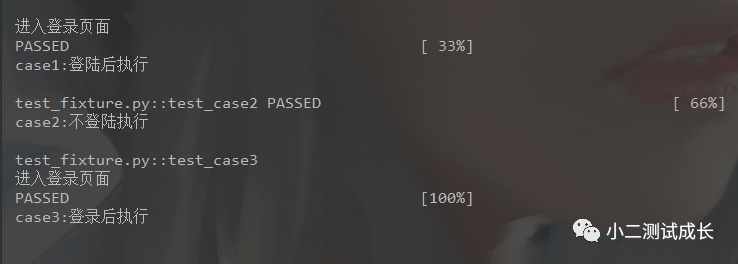
如果某些用例要执行fixture的方法,使用装饰器的方法加上@pytest.mark.usefixtures("方法")@pytest.fixture()
print("\n进入登录页面")
@pytest.mark.usefixtures("login") print("\ncase1:登陆后执行")
print("\ncase2:不登陆执行")
@pytest.mark.usefixtures("login") print("\ncase3:登录后执行")
if __name__ == '__main__': pytest.main(["-s","test_fixture.py"])
二、fixture带参数传递
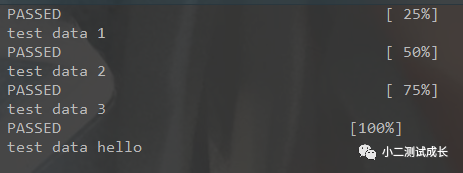
@pytest.fixtue(params=1,2,3,"hello")import pytest
@pytest.fixture(params=[1,2,3,"hello"]) return request.param
def test_case1(test_data): print(f"test data {test_data}")
if __name__ == '__main__': pytest.main(['-s', 'test_request.py'])当然,也可以定义一个变量,写一个列表,把列表传进去也是可以的@pytest.fixture(params= data)def test_case1(test_data): print(f"\ntest data {test_data}")if __name__ == '__main__': pytest.main(['-s', 'test_request.py'])
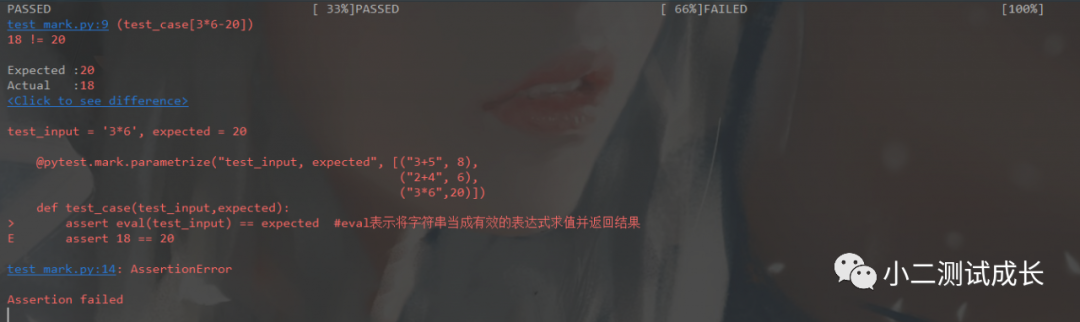
三、mark.parametrize参数化
使用方法:@pytest.mark.parametrize("变量1,变量2",[待传的数据1,待传的数据2])#将'3+5','2+4'和'3*6'传入到test_input中,8,6,20传入到expected中@pytest.mark.parametrize("test_input, expected", [("3+5", 8),def test_case(test_input,expected): assert eval(test_input) == expected #eval表示将字符串当成有效的表达式求值并返回结果
四、跳过测试用例
使用@pytest.mark.skip跳过测试用例,可以加条件skipif,在满足某些条件下才希望通过,否则跳过这个测试使用@pytest.mark.xfail预计会失败的测试用例,它是一个xpass,将在测试摘要中报告
使用方法:在测试用例方法上加@pytest.mark.case1-s参数:输出所有测试的print信息 -m:执行自定义标记的相关用例pytest -s test_mark.py -m=case1pytest -s test_mark.py -m case2pytest -s test_mark.py -m "case3"import pytest
print("case1")
print("case2")
print("case3")
六、通过文件名类名方法及组合调用部分测试用例执行
pytest -v test_class.py::TestClass pytest -v test_class.py::TestClass::test_one pytest -k "TestClass and test_one" pytest -k "TestClass or test_one"TestClass是类名,and是运算符,test_one是方法中含有的信息
pytest -x test_class.py --maxfail=2pytest -x test_class.py 默认--maxfail=1
安装pip install pytest-rerunfailurespytest --reruns 3 -v -s test_class.py 3代表失败就运行,3次都没成功就停止pytest -v --reruns 5 --reruns-delay 1
安装:pip install pytest-assume把assert断言改为pytest.assume 例如: pytest.assume(2==4)
安装:pip install pytest-xdist多个cpu并行执行用例,直接加-n x,x代表并行数量:pytets -n 3
运行:pytest -v -s --html=report.html
1、安装allure:https://github.com/allure-framework/allure2/releases2、下载完成后解压,bin目录里面有两个文件,windows请双击allure.bat4、安装:pip install allure-pytestpytest -s -q --alluredir=./result/