作者 | JiekeXu
来源 | JiekeXu DBA之路(ID: JiekeXu_IT)
大家好,我是 JiekeXu,很高兴又和大家见面了,今天和大家一起来看看 ORA-39511 问题处理,欢迎点击上方蓝字关注我,标星或置顶,更多干货第一时间到达!
事情是这么个事,看官慢慢听我道来,从上周开始,便陆陆续续的安装操作系统准备安装 RAC,上周五安装好系统,设置好一些参数及基础配置,便解压 GI 安装软件准备安装。
这里也暂时不说详细的配置过程,只说明与本次问题相关的配置,以后再说详细安装过程。本次 IP 及主机名规划如下 hosts 文件所示,公网使用 192.168.75 网段,私网使用 10.10.10 网段。VMware 16 虚拟机使用 VMnet8 和 VMnet1 本地虚拟网卡。
[grid@jiekexu-r1:/home/grid]$ cat etc/hosts127.0.0.1 localhost localhost.localdomain localhost4 localhost4.localdomain4::1 localhost localhost.localdomain localhost6 localhost6.localdomain6#public ip192.168.75.128 jiekexu-r1192.168.75.129 jiekexu-r2#private ip10.10.10.128 jiekexu-r1-priv10.10.10.129 jiekexu-r2-priv#vip192.168.75.130 jiekexu-r1-vip192.168.75.131 jiekexu-r2-vip#scanip192.168.75.132 jiekexu-racscan
而 Linux 虚拟机的两块网卡 ens32 ens33 分别配置如下
[root@jiekexu-r1 network-scripts]# more ifcfg-ens32TYPE="Ethernet"PROXY_METHOD="none"BROWSER_ONLY="no"BOOTPROTO="dhcp"DEFROUTE="yes"IPV4_FAILURE_FATAL="yes"IPV6INIT="yes"IPV6_AUTOCONF="yes"IPV6_DEFROUTE="yes"IPV6_FAILURE_FATAL="no"IPV6_ADDR_GEN_MODE="stable-privacy"NAME="ens32"UUID="e8332396-7724-410f-9887-1fc0e27fc818"DEVICE="ens32"ONBOOT="yes"GATEWAY="192.168.75.2"IPADDR="192.168.75.128"PREFIX="24"IPV6_PRIVACY="no"[root@jiekexu-r1 network-scripts]# more ifcfg-ens33TYPE=EthernetPROXY_METHOD=noneBROWSER_ONLY=noBOOTPROTO=staticDEFROUTE=yesIPV4_FAILURE_FATAL=noIPV6INIT=yesIPV6_AUTOCONF=yesIPV6_DEFROUTE=yesIPV6_FAILURE_FATAL=noIPV6_ADDR_GEN_MODE=stable-privacyNAME=ens33DEVICE=ens33HWADDR="00:0C:29:2C:79:D8"uuid="c96bc909-188e-ec64-3a96-6a90982b08ad"ONBOOT=yesGATEWAY="10.10.10.1"IPADDR="10.10.10.128"PREFIX="8"
然后解压 GI 软件,解压 RU 补丁 32900083 ,替换 OPatch,配置互信。
分别使用grid和oracle用户调用sshUserSetup.sh脚本配置SSH connectivity,根据提示输入密码。$ cd $ORACLE_HOME/oui/prov/resources/scripts<grid>$ ./sshUserSetup.sh -user grid -hosts "jiekexu-r1 jiekexu-r2" -advanced -confirm -noPromptPassphrasecd /u01/app/19.0.0/grid/oui/prov/resources/scripts<oracle>$ ./sshUserSetup.sh -user oracle -hosts "jiekexu-r1 jiekexu-r2" -advanced -confirm -noPromptPassphrase--分别使用grid和oracle用户验证 SSH connectivity:<grid>$ for h in jiekexu-r1 jiekexu-r1-priv jiekexu-r2 jiekexu-r2-priv;dossh -l grid -o StrictHostKeyChecking=no $h date;done<oracle>$ for h in jiekexu-r1 jiekexu-r1-priv jiekexu-r2 jiekexu-r2-priv;dossh -l oracle -o StrictHostKeyChecking=no $h date;done
GI 安装配置预检查
$/u01/app/19.0.0/grid/runcluvfy.sh stage -pre crsinst -n jiekexu-r1,jiekexu-r2 -method root
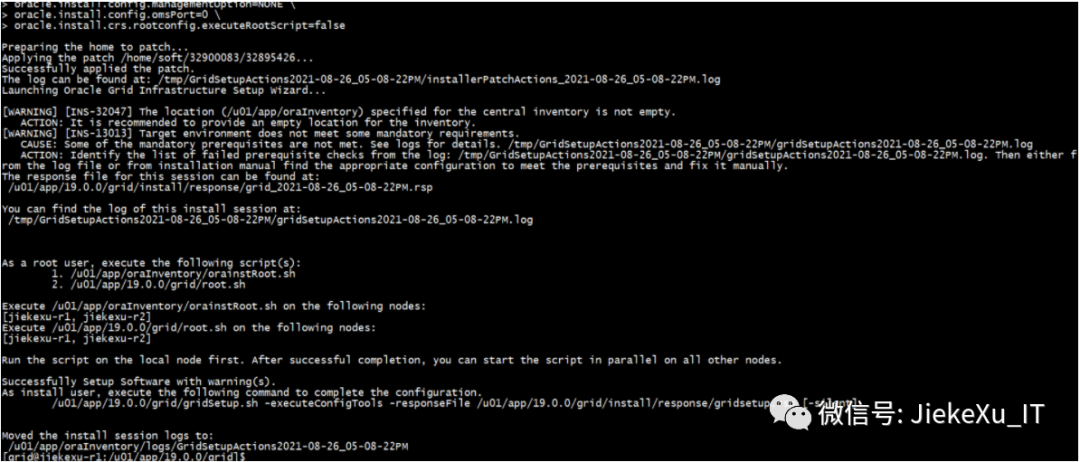
执行补丁和 GI 安装
#### 执行补丁和 GI 安装$ORACLE_HOME/gridSetup.sh -silent -applyRU home/soft/32900083/32895426 -force -noconfig -ignorePrereq -waitforcompletion \-responseFile ${ORACLE_HOME}/install/response/gridsetup.rsp \INVENTORY_LOCATION=/u01/app/oraInventory \ORACLE_BASE=/u01/app/grid \ORACLE_HOME=/u01/app/19.0.0/grid \oracle.install.asm.OSDBA=asmdba \oracle.install.asm.OSOPER=asmoper \oracle.install.asm.OSASM=asmadmin \oracle.install.crs.config.storageOption=ASM \oracle.install.crs.config.useIPMI=false \oracle.install.asm.diskGroup.name=OCR \oracle.install.asm.diskGroup.AUSize=4 \oracle.install.asm.diskGroup.redundancy=NORMAL \oracle.install.crs.config.ClusterConfiguration=STANDALONE \oracle.install.crs.config.configureAsExtendedCluster=false \oracle.install.crs.config.gpnp.scanPort=1521 \oracle.install.crs.config.gpnp.configureGNS=false \oracle.install.option=CRS_CONFIG \oracle.install.asm.SYSASMPassword=Oracle19C \oracle.install.asm.monitorPassword=Oracle19C \oracle.install.asm.diskGroup.diskDiscoveryString=/dev/asm_* \oracle.install.asm.diskGroup.disks=/dev/asm_ocr01,/dev/asm_ocr02,/dev/asm_ocr03 \oracle.install.crs.config.gpnp.scanName=jiekexu-racscan \oracle.install.crs.config.clusterName=jiekexu-racscan \oracle.install.crs.config.autoConfigureClusterNodeVIP=false \oracle.install.crs.config.clusterNodes=jiekexu-r1:jiekexu-r1-vip,jiekexu-r2:jiekexu-r2-vip \oracle.install.crs.config.networkInterfaceList=ens32:192.168.75.0:1,ens33:10.10.10.0:5 \oracle.install.asm.configureGIMRDataDG=false \oracle.install.crs.configureRHPS=false \oracle.install.crs.config.ignoreDownNodes=false \oracle.install.config.managementOption=NONE \oracle.install.config.omsPort=0 \oracle.install.crs.rootconfig.executeRootScript=false
一、出现问题
完成此步骤后,则需要执行 root.sh ,当在节点一执行 root.sh 时便出现了报错。
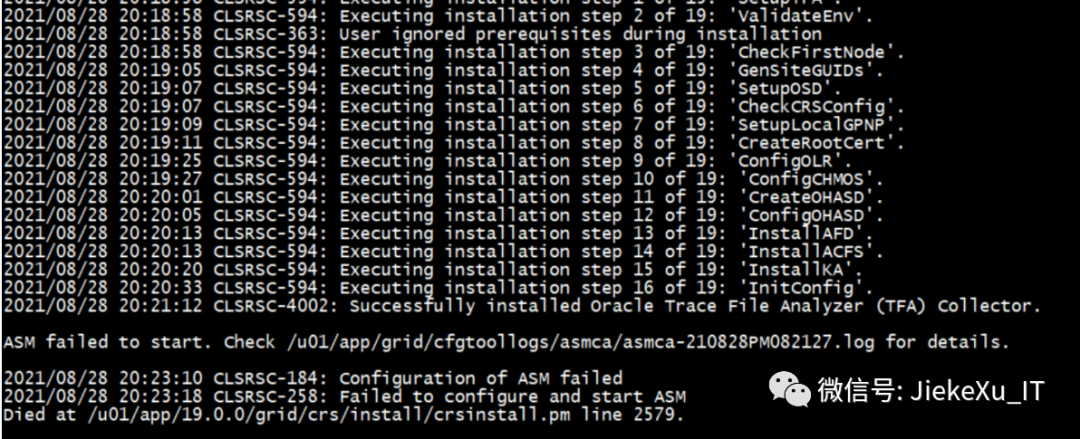
查看上图中 asmca 日志 ORA-39511 haip 无法启动,查看 mos 说与网卡有问题,则将网卡删除重建,甚至怀疑节点一主机的问题,弃用节点一主机,使用节点二主机复制新生成主机一,然后重新安装 GI。
ORA-39511: Start of CRS resource for instance ‘215’ failed with error:[CRS-2672: Attempting to start ‘ora.cluster_interconnect.haip’ on ‘jiekexu-r1’
即使这样,当到这一步执行 root.sh 时报错还是一样,删网卡,加网卡,来来回回折腾了不下十次,花费了几天的时间,直到今天早上又重新配置了网卡删除了残余的 GI ,使用 ssh-keygen 配置互信,又来了一遍可还是同样的错误,真让人头疼,欲哭无泪了。。。
这里贴一下删除过程,以备不时之需。
**如果脚本执行错误,重复执行也无法修复时,则需要使用 deinstall 卸载重新安装。**cd $ORACLE_HOME/deinstall./deinstall--根据提示输入和执行脚本n n y 另开会话执行脚本 ./rootcrs.sh -force -deconfig -paramfile ……,等待十几分钟rm -rf /opt/ORCLfmaprm -rf /etc/oraInst.loc--检查所有节点的配置文件/etc/oraInst.loc、/etc/oratab是否存在相关配置,若有,则删除之。--使用 root 用户登录所有节点,执行:rm -rf /etc/oracle /tmp/.oracle /var/tmp/.oracle /u01/app/oraInventory /u01/app/grid/* /tmp/GridSetupActions*--卸载后新建 mkdir -p /u01/app/19.0.0/gridchown -R grid:oinstall /u01chmod -R 775 /u01chown -R oracle:oinstall /u01/app/oracle另一节点如果还没执行 root.sh 则直接 /u01/app/19.0.0/grid :cd $ORACLE_HOMErm -rf * rm -rf .opatchauto_storage rm -rf .patch_storagecd /u01/app/gridrm -rf *rm -rf /u01/app/oraInventory
在这期间,修改了 VMware 虚拟网卡 VMnet1 的配置,这是关键的一步.由于之前虚拟机没有使用过 10.10.10 网段的地址,VMnet1 还是原来的 192.168 网段地址。这里将其修改为 10.10.10.0 网段,注意子网掩码改为 255.255.255.0
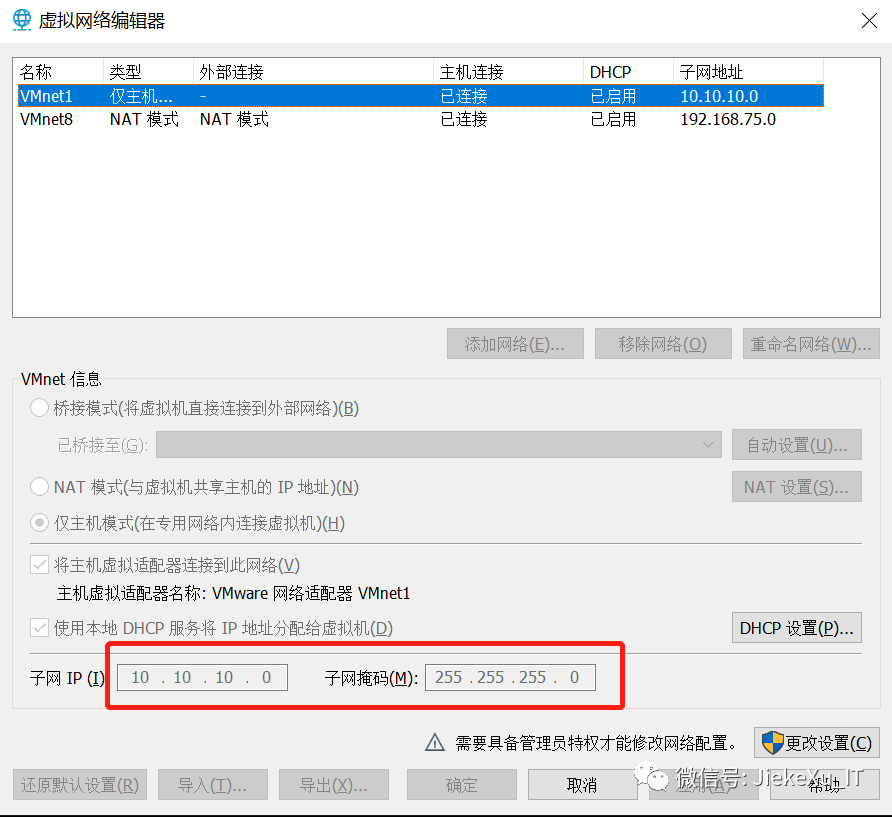
然后下午排查问题时将 ens32 ens33 两块网卡配置为如下:
cat > etc/sysconfig/network-scripts/ifcfg-ens32 <<"EOF"DEVICE=ens32NAME=ens32IPADDR=192.168.75.128NETMASK=255.255.255.0GATEWAY=192.168.75.2ONBOOT=yesUSERCTL=noBOOTPROTO=staticHWADDR=00:0c:29:e4:ce:69TYPE=EthernetIPV6INIT=noDNS1=114.114.114.114DNS2=8.8.8.8NM_CONTROLLED=noEOF--注意第二块网卡不配置网关,否则系统默认网关就变成了第二块网卡的网关,从而导致系统不能上外网。cat > /etc/sysconfig/network-scripts/ifcfg-ens33 <<"EOF"DEVICE=ens33NAME=ens33IPADDR=10.10.10.128NETMASK=255.0.0.0ONBOOT=yesUSERCTL=noBOOTPROTO=staticHWADDR=00:0c:29:e4:ce:73TYPE=EthernetIPV6INIT=noDNS1=114.114.114.114DNS2=8.8.8.8NM_CONTROLLED=noEOF
顺便使用 kfod 排查了共享磁盘的配置是否正确的问题
[grid@jiekexu-r1:/home/grid]$ kfod disks=all status=trueDisk Size Header Path User Group1: 10240 MB CANDIDATE dev/asm_arch01 grid asmadmin2: 10240 MB CANDIDATE dev/asm_data01 grid asmadmin3: 10240 MB CANDIDATE dev/asm_data02 grid asmadmin4: 3072 MB CANDIDATE dev/asm_ocr01 grid asmadmin5: 3072 MB CANDIDATE dev/asm_ocr02 grid asmadmin6: 3072 MB CANDIDATE dev/asm_ocr03 grid asmadminKFOD-00313: No ASM instances available. CSS group services were successfully initialized by kgxgncin.--直接使用 asmca 静默创建 OCR 也是同样的错误[grid@jiekexu-r1:/home/grid]$ u01/app/19.0.0/grid/bin/asmca -silent -diskGroupName OCR -diskList '/dev/asm_ocr03,/dev/asm_ocr01,/dev/asm_ocr02' -redundancy NORMAL -diskString '/dev/asm_*' -configureLocalASM -passwordFileLocation +OCR/orapwASM -au_size 4ASM failed to start. Check u01/app/grid/cfgtoollogs/asmca/asmca-210831PM030816.log for details.[grid@jiekexu-r1:/home/grid]$ more u01/app/grid/cfgtoollogs/asmca/asmca-210831PM030816.log[USMInstance.configureLocalASM:3413] ORA-39511: Start of CRS resource for instance '215' failed with error:[CRS-2672: Attempting to start 'ora.cluster_interconnect.haip' on 'jiekexu-r1'
二、下午定位问题
既然是 HAIP 问题,那么能不能将其禁用掉,然后再执行 root.sh 呢?死马当活马医吧!!!
cd u01/app/19.0.0/grid/bin[root@jiekexu-r1 bin]# ./crsctl modify res ora.cluster_interconnect.haip -attr "ENABLED=0" -init[root@jiekexu-r1 bin]# ./crsctl modify res ora.asm -attr "START_DEPENDENCIES='hard(ora.cssd,ora.ctssd)pullup(ora.cssd,ora.ctssd)weak(ora.drivers.acfs)',STOP_DEPENDENCIES='hard(intermediate:ora.cssd)'" -init[root@jiekexu-r1 bin]#[root@jiekexu-r1 bin]# u01/app/19.0.0/grid/root.sh
禁用掉后执行 root.sh 如下报错: ORA-27504
[main] [ 2021-08-31 17:57:27.543 CST ] [UsmcaLogger.logException:187] ORA-27504: IPC error creating OSD contextORA-27300: OS system dependent operation:if_not_found failed with status: 0ORA-27301: OS failure message: Error 0ORA-27302: failure occurred at: skgxpvaddr9ORA-27303: additional information: requested interface 48.0.0.0 not found. Check output from ifconfig command
看情况还是网卡相关的问题,按照 MOS 上的文章(Doc ID 2356980.1)尝试了一下还是一样的报错:
Error ORA-27504: IPC error creating OSD context - ASM Failed to Start After OS Kernel Patching (Doc ID 2356980.1)
[root@jiekexu-r1 grid]# cd u01/app/19.0.0/grid/bin[root@jiekexu-r1 bin]# cd ..[root@jiekexu-r1 grid]# cd crs/install/[root@jiekexu-r1 install]# ./rootcrs.sh -unlock[grid@jiekexu-r1:/home/grid]$ make -f $ORACLE_HOME/rdbms/lib/ins_rdbms.mk ipc_g ioracle[root@jiekexu-r1 install]# ./rootcrs.sh -lock
报错一样,则先将禁用的 HAIP 回退掉。
[root@jiekexu-r1 bin]# ./crsctl modify res ora.cluster_interconnect.haip -attr "ENABLED=1" -init[root@jiekexu-r1 bin]# ./crsctl modify res ora.asm -attr "START_DEPENDENCIES='hard(ora.cssd,ora.ctssd)pullup(ora.cssd,ora.ctssd)weak(ora.cluster_interconnect.haip,ora.drivers.acfs)',STOP_DEPENDENCIES='hard(intermediate:ora.cssd,shutdown:ora.cluster_interconnect.haip)'" -init
思来想去,还是在看看日志吧,除了安装时看的 rootcrs 日志和 asmca-210831PM061542.log 日志外,需要再看看 gipcd.trc日志,由于 19c 日志发生变化,则需要到如下路径下查看。日志发生变化的新特新之前也写过一篇文章,感兴趣的小伙伴可戳此查看。
/u01/app/grid/diag/crs/jiekexu-r1/crs/trace
tail -30f gipcd.trc2021-08-31 18:06:58.778 :GIPCDCLT:3717416704: gipcdClientInterfaceQueryToMonitor: enqueue local interface query (2) to worklist2021-08-31 18:06:58.778 :GIPCDCLT:3717416704: gipcdClientInterfaceRequest: sent local interface query2021-08-31 18:06:58.827 : CLSINET:3717416704: (:CLSINE0018:)WARNING: failed to find interface available for interface definition ens33(:.*)?:10.10.10.02021-08-31 18:06:58.829 :GIPCDCLT:3717416704: gipcdUpdateLocalClient: successfully sent the inf update2021-08-31 18:06:58.829 :GIPCDCLT:3717416704: gipcdClientInterfaceRequest: sent local interface list back to client2021-08-31 18:06:58.830 : CLSINET:3713214208: (:CLSINE0018:)WARNING: failed to find interface available for interface definition ens33(:.*)?:10.10.10.02021-08-31 18:06:59.267 :GIPCDCLT:3717416704: gipcdClientThread: req from local client of type gipcdmsgtypeInterfaceRequest, endp 00000000000003952021-08-31 18:06:59.267 :GIPCDCLT:3717416704: gipcdClientInterfaceRequest: Received type(gipcdmsgtypeInterfaceRequest), endp(0000000000000395), len(1024), buf(0x7fd2c432c4a8):[hostname(jiekexu-r1), retStatus(gipcretSuccess)]2021-08-31 18:06:59.267 :GIPCDCLT:3717416704: gipcdClientInterfaceQueryToMonitor: enqueue local interface query (2) to worklist2021-08-31 18:06:59.267 :GIPCDCLT:3717416704: gipcdClientInterfaceRequest: sent local interface query2021-08-31 18:06:59.315 : CLSINET:3717416704: (:CLSINE0018:)WARNING: failed to find interface available for interface definition ens33(:.*)?:10.10.10.02021-08-31 18:06:59.317 :GIPCDCLT:3717416704: gipcdUpdateLocalClient: successfully sent the inf update2021-08-31 18:06:59.317 :GIPCDCLT:3717416704: gipcdClientInterfaceRequest: sent local interface list back to client2021-08-31 18:06:59.831 :GIPCDMON:3713214208: gipcdMonitorCheckXfer: set new infQuery2021-08-31 18:06:59.831 :GIPCDMON:3713214208: gipcdMonitorCheckXfer: set new infQuery2021-08-31 18:06:59.932 : CLSINET:3713214208: (:CLSINE0018:)WARNING: failed to find interface available for interface definition ens33(:.*)?:10.10.10.
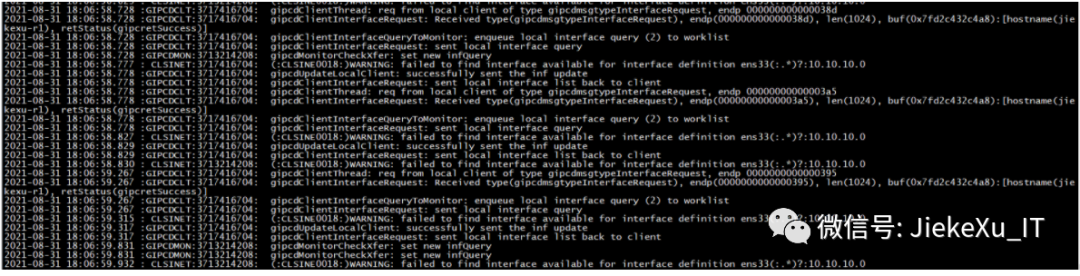
failed to find interface available for interface definition ens33(:.*)?:10.10.10.0
果然报错 ens33 网卡接口的问题,那么到底什么问题呢?网卡都重建过,还有哪里的问题???抱着尝试的心态想到好心的网友说的将子网掩码改为 24 试试,那就试试吧。
cd etc/sysconfig/network-scripts/
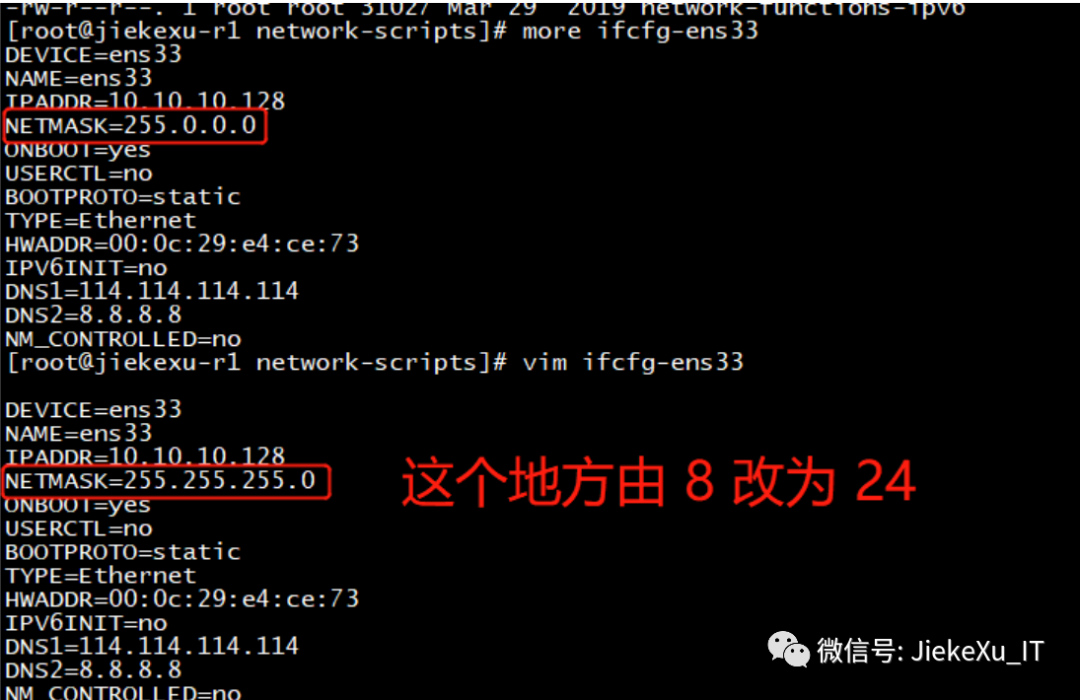
--重启网卡后查看 gipcd.trc 文件则已经没有报错了ifdown ens33ifup ens33
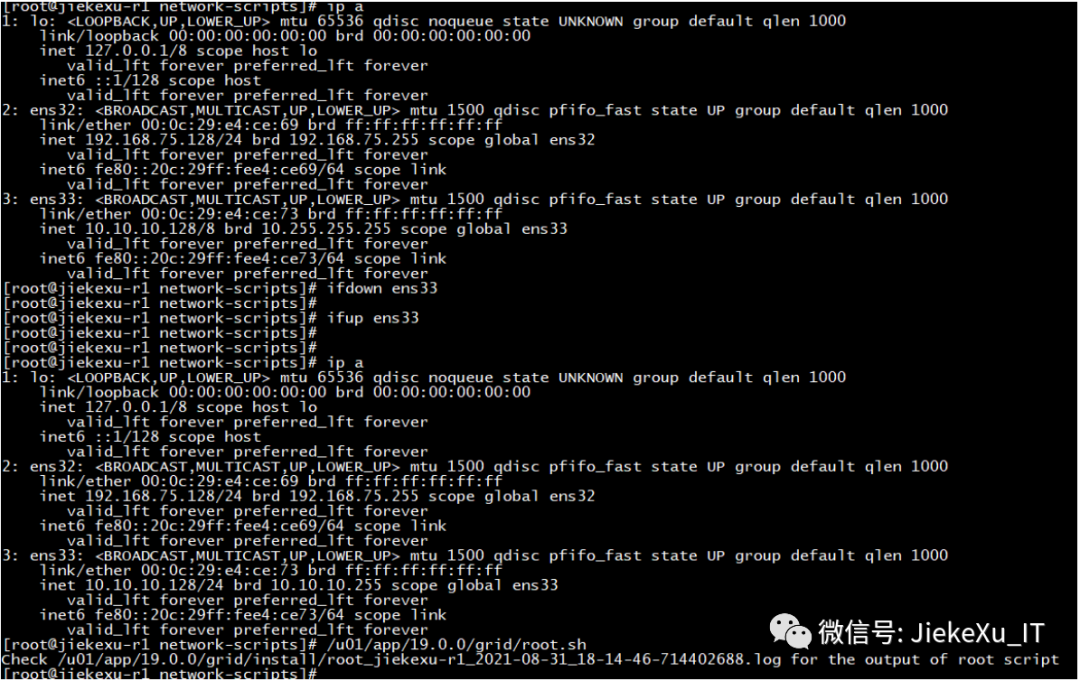
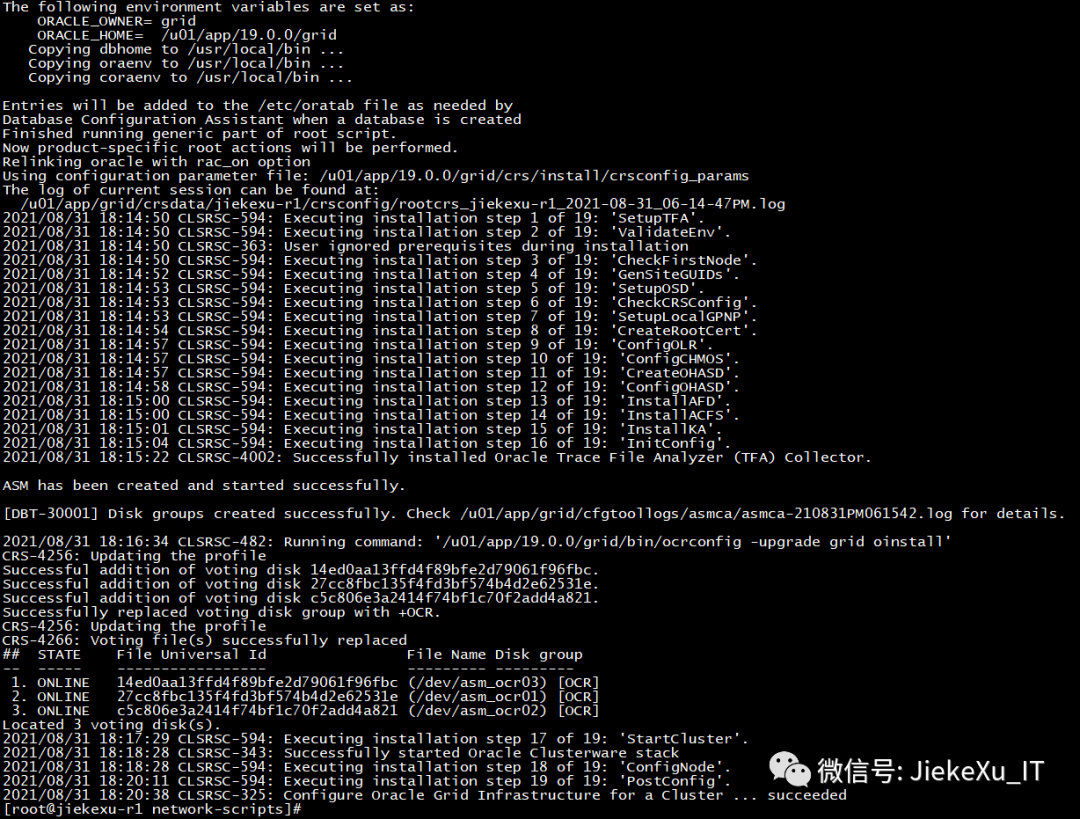
--执行 root.sh 脚本成功,历时八天终于成功了[root@jiekexu-r1 network-scripts]# cat u01/app/19.0.0/grid/install/root_jiekexu-r1_2021-08-31_18-14-46-714402688.logPerforming root user operation.The following environment variables are set as:ORACLE_OWNER= gridORACLE_HOME= u01/app/19.0.0/gridCopying dbhome to usr/local/bin ...Copying oraenv to usr/local/bin ...Copying coraenv to usr/local/bin ...Entries will be added to the etc/oratab file as needed byDatabase Configuration Assistant when a database is createdFinished running generic part of root script.Now product-specific root actions will be performed.Relinking oracle with rac_on optionUsing configuration parameter file: u01/app/19.0.0/grid/crs/install/crsconfig_paramsThe log of current session can be found at:u01/app/grid/crsdata/jiekexu-r1/crsconfig/rootcrs_jiekexu-r1_2021-08-31_06-14-47PM.log2021/08/31 18:14:50 CLSRSC-594: Executing installation step 1 of 19: 'SetupTFA'.2021/08/31 18:14:50 CLSRSC-594: Executing installation step 2 of 19: 'ValidateEnv'.2021/08/31 18:14:50 CLSRSC-363: User ignored prerequisites during installation2021/08/31 18:14:50 CLSRSC-594: Executing installation step 3 of 19: 'CheckFirstNode'.2021/08/31 18:14:52 CLSRSC-594: Executing installation step 4 of 19: 'GenSiteGUIDs'.2021/08/31 18:14:53 CLSRSC-594: Executing installation step 5 of 19: 'SetupOSD'.2021/08/31 18:14:53 CLSRSC-594: Executing installation step 6 of 19: 'CheckCRSConfig'.2021/08/31 18:14:53 CLSRSC-594: Executing installation step 7 of 19: 'SetupLocalGPNP'.2021/08/31 18:14:54 CLSRSC-594: Executing installation step 8 of 19: 'CreateRootCert'.2021/08/31 18:14:57 CLSRSC-594: Executing installation step 9 of 19: 'ConfigOLR'.2021/08/31 18:14:57 CLSRSC-594: Executing installation step 10 of 19: 'ConfigCHMOS'.2021/08/31 18:14:57 CLSRSC-594: Executing installation step 11 of 19: 'CreateOHASD'.2021/08/31 18:14:58 CLSRSC-594: Executing installation step 12 of 19: 'ConfigOHASD'.2021/08/31 18:15:00 CLSRSC-594: Executing installation step 13 of 19: 'InstallAFD'.2021/08/31 18:15:00 CLSRSC-594: Executing installation step 14 of 19: 'InstallACFS'.2021/08/31 18:15:01 CLSRSC-594: Executing installation step 15 of 19: 'InstallKA'.2021/08/31 18:15:04 CLSRSC-594: Executing installation step 16 of 19: 'InitConfig'.2021/08/31 18:15:22 CLSRSC-4002: Successfully installed Oracle Trace File Analyzer (TFA) Collector.ASM has been created and started successfully.[DBT-30001] Disk groups created successfully. Check u01/app/grid/cfgtoollogs/asmca/asmca-210831PM061542.log for details.2021/08/31 18:16:34 CLSRSC-482: Running command: '/u01/app/19.0.0/grid/bin/ocrconfig -upgrade grid oinstall'CRS-4256: Updating the profileSuccessful addition of voting disk 14ed0aa13ffd4f89bfe2d79061f96fbc.Successful addition of voting disk 27cc8fbc135f4fd3bf574b4d2e62531e.Successful addition of voting disk c5c806e3a2414f74bf1c70f2add4a821.Successfully replaced voting disk group with +OCR.CRS-4256: Updating the profileCRS-4266: Voting file(s) successfully replacedSTATE File Universal Id File Name Disk group-- ----- ----------------- --------- ---------1. ONLINE 14ed0aa13ffd4f89bfe2d79061f96fbc (/dev/asm_ocr03) [OCR]2. ONLINE 27cc8fbc135f4fd3bf574b4d2e62531e (/dev/asm_ocr01) [OCR]3. ONLINE c5c806e3a2414f74bf1c70f2add4a821 (/dev/asm_ocr02) [OCR]Located 3 voting disk(s).2021/08/31 18:17:29 CLSRSC-594: Executing installation step 17 of 19: 'StartCluster'.2021/08/31 18:18:28 CLSRSC-343: Successfully started Oracle Clusterware stack2021/08/31 18:18:28 CLSRSC-594: Executing installation step 18 of 19: 'ConfigNode'.2021/08/31 18:20:11 CLSRSC-594: Executing installation step 19 of 19: 'PostConfig'.2021/08/31 18:20:38 CLSRSC-325: Configure Oracle Grid Infrastructure for a Cluster ... succeeded
节点 2 执行 root.sh 也成功了,兴奋中……
[grid@jiekexu-r2:/home/grid]$ tail -30f u01/app/19.0.0/grid/install/root_jiekexu-r2_2021-08-31_18-25-18-796337893.logPerforming root user operation.The following environment variables are set as:ORACLE_OWNER= gridORACLE_HOME= /u01/app/19.0.0/gridCopying dbhome to /usr/local/bin ...Copying oraenv to /usr/local/bin ...Copying coraenv to /usr/local/bin ...Entries will be added to the /etc/oratab file as needed byDatabase Configuration Assistant when a database is createdFinished running generic part of root script.Now product-specific root actions will be performed.Relinking oracle with rac_on optionUsing configuration parameter file: /u01/app/19.0.0/grid/crs/install/crsconfig_paramsThe log of current session can be found at:/u01/app/grid/crsdata/jiekexu-r2/crsconfig/rootcrs_jiekexu-r2_2021-08-31_06-25-49PM.log2021/08/31 18:25:53 CLSRSC-594: Executing installation step 1 of 19: 'SetupTFA'.2021/08/31 18:25:53 CLSRSC-594: Executing installation step 2 of 19: 'ValidateEnv'.2021/08/31 18:25:53 CLSRSC-363: User ignored prerequisites during installation2021/08/31 18:25:53 CLSRSC-594: Executing installation step 3 of 19: 'CheckFirstNode'.2021/08/31 18:25:55 CLSRSC-594: Executing installation step 4 of 19: 'GenSiteGUIDs'.2021/08/31 18:25:55 CLSRSC-594: Executing installation step 5 of 19: 'SetupOSD'.Redirecting to /bin/systemctl restart rsyslog.service2021/08/31 18:25:56 CLSRSC-594: Executing installation step 6 of 19: 'CheckCRSConfig'.2021/08/31 18:25:58 CLSRSC-594: Executing installation step 7 of 19: 'SetupLocalGPNP'.2021/08/31 18:26:02 CLSRSC-594: Executing installation step 8 of 19: 'CreateRootCert'.2021/08/31 18:26:02 CLSRSC-594: Executing installation step 9 of 19: 'ConfigOLR'.2021/08/31 18:26:16 CLSRSC-594: Executing installation step 10 of 19: 'ConfigCHMOS'.2021/08/31 18:26:16 CLSRSC-594: Executing installation step 11 of 19: 'CreateOHASD'.2021/08/31 18:26:20 CLSRSC-594: Executing installation step 12 of 19: 'ConfigOHASD'.2021/08/31 18:26:20 CLSRSC-330: Adding Clusterware entries to file 'oracle-ohasd.service'2021/08/31 18:26:43 CLSRSC-594: Executing installation step 13 of 19: 'InstallAFD'.2021/08/31 18:26:43 CLSRSC-594: Executing installation step 14 of 19: 'InstallACFS'.2021/08/31 18:27:30 CLSRSC-594: Executing installation step 15 of 19: 'InstallKA'.2021/08/31 18:27:33 CLSRSC-594: Executing installation step 16 of 19: 'InitConfig'.2021/08/31 18:27:42 CLSRSC-594: Executing installation step 17 of 19: 'StartCluster'.2021/08/31 18:27:56 CLSRSC-4002: Successfully installed Oracle Trace File Analyzer (TFA) Collector.2021/08/31 18:28:28 CLSRSC-343: Successfully started Oracle Clusterware stack2021/08/31 18:28:29 CLSRSC-594: Executing installation step 18 of 19: 'ConfigNode'.2021/08/31 18:29:13 CLSRSC-594: Executing installation step 19 of 19: 'PostConfig'.2021/08/31 18:29:19 CLSRSC-325: Configure Oracle Grid Infrastructure for a Cluster ... succeeded
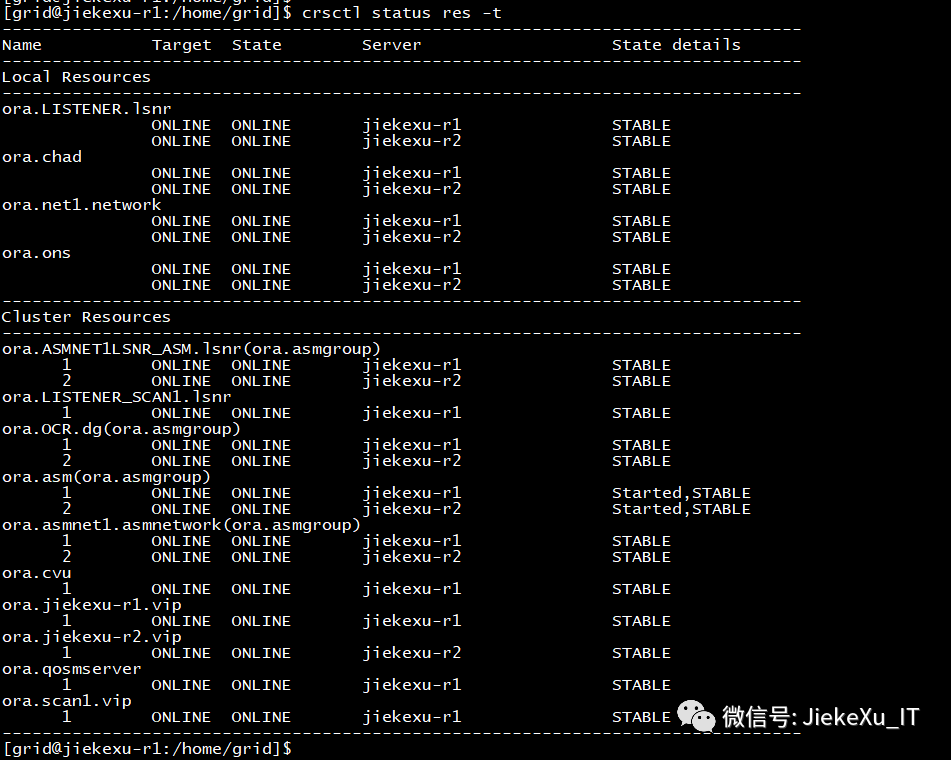
执行完毕后查看集群状态如下:
配置集群
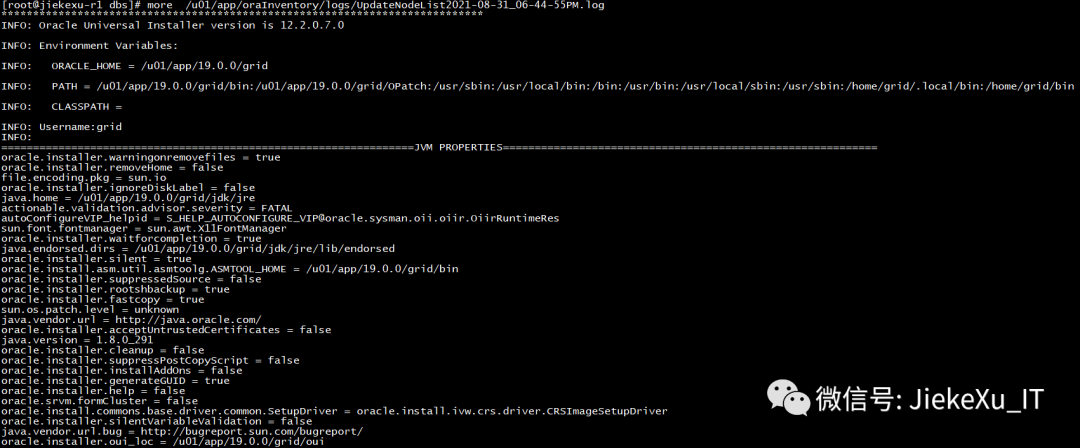
根据静默安装后的提示内容,执行完 root.sh 脚本后,需要执行 executeConfigTools 配置,更新节点信息。
/u01/app/19.0.0/grid/gridSetup.sh -silent -executeConfigTools -waitforcompletion \-responseFile /u01/app/19.0.0/grid/install/response/gridsetup.rsp \INVENTORY_LOCATION=/u01/app/oraInventory \ORACLE_BASE=/u01/app/grid \ORACLE_HOME=/u01/app/19.0.0/grid \oracle.install.asm.OSDBA=asmdba \oracle.install.asm.OSOPER=asmoper \oracle.install.asm.OSASM=asmadmin \oracle.install.crs.config.storageOption=ASM \oracle.install.crs.config.useIPMI=false \oracle.install.asm.diskGroup.name=OCR \oracle.install.asm.diskGroup.AUSize=4 \oracle.install.asm.diskGroup.redundancy=NORMAL \oracle.install.crs.config.ClusterConfiguration=STANDALONE \oracle.install.crs.config.configureAsExtendedCluster=false \oracle.install.crs.config.gpnp.scanPort=1521 \oracle.install.crs.config.gpnp.configureGNS=false \oracle.install.option=CRS_CONFIG \oracle.install.asm.SYSASMPassword=Oracle19C \oracle.install.asm.monitorPassword=Oracle19C \oracle.install.asm.diskGroup.diskDiscoveryString=/dev/asm_* \oracle.install.asm.diskGroup.disks=/dev/asm_ocr01,/dev/asm_ocr02,/dev/asm_ocr03 \oracle.install.crs.config.gpnp.scanName=jiekexu-racscan \oracle.install.crs.config.clusterName=jiekexu-racscan \oracle.install.crs.config.autoConfigureClusterNodeVIP=false \oracle.install.crs.config.clusterNodes=jiekexu-r1:jiekexu-r1-vip,jiekexu-r2:jiekexu-r2-vip \oracle.install.crs.config.networkInterfaceList=ens32:192.168.75.0:1,ens33:10.10.10.0:5 \oracle.install.asm.configureGIMRDataDG=false \oracle.install.crs.configureRHPS=false \oracle.install.crs.config.ignoreDownNodes=false \oracle.install.config.managementOption=NONE \oracle.install.config.omsPort=0 \oracle.install.crs.rootconfig.executeRootScript=falseLaunching Oracle Grid Infrastructure Setup Wizard...You can find the logs of this session at:/u01/app/oraInventory/logs/GridSetupActions2021-08-31_06-44-55PMYou can find the log of this install session at:/u01/app/oraInventory/logs/UpdateNodeList2021-08-31_06-44-55PM.logConfiguration failed.[WARNING] [INS-43080] Some of the configuration assistants failed, were cancelled or skipped.ACTION: Refer to the logs or contact Oracle Support Services.
注意:在 /u01/app/19.0.0/grid/install/response 目录下,新生成了 grid_2021-08-31_02-31-29PM.rsp 响应文件,可以使用新生成的,我这里沿用了前面的配置项也可以。
三、总结归纳
此次问题主要是出在 ens33 私网网卡上,由于在虚拟机外部的网络 VMnet1 中设置了子网掩码为 24,但在内部虚拟机中配置 ens33 时却将子网掩码写成了 8 导致 ens33 网卡不可用,不管新建网卡,还是新建虚拟机都没有想到要改 IP 这块,导致使用了原来的错误配置进行安装,故每次 root.sh 都是同样的问题。
在 RAC 安装配置过程中,每一步都很重要,都需要仔细认真,不可马虎,要做到一丝不苟。利用各种日志排查分析问题,如安装过程中产生的日志,集群启动过程中的各个进程日志以及操作系统日志等等,这些均是分析问题的关键因素,本次问题主要就是忽略了各个进程日志才导致了很多重复工作,以后需要引以为戒。
最后说一句子网掩码 (subnet mask) 又叫网络掩码、地址掩码、子网络遮罩,是一个应用于 TCP/IP 网络的 32 位二进制值。它可以屏蔽掉 IP 地址中的一部分,从而分离出 IP 地址中的网络部分与主机部分,基于子网掩码,管理员可以将网络进一步划分为若干子网。它必须结合 IP 地址一起使用。 子网掩码设置为 24 则只有 254 个可用地址,设置为 8 则有16777214 个地址可用。关于网络问题不是很懂,这里有一篇知乎上的帖子说明子网掩码是个啥?
https://www.zhihu.com/question/56895036/answer/150953183
最大踩坑,真心不易,耐心阅读,此文一定对您有帮助,欢迎点赞、在看与转发,写作不易,坚持写作更不易,您的点赞、转发,举手之劳,便是对我最大的支持,也能让更多的人看到更多的人受益,万分感谢!
———————————————————————————
公众号:JiekeXu DBA之路
墨天轮:https://www.modb.pro/u/4347
CSDN :https://blog.csdn.net/JiekeXu
腾讯云:https://cloud.tencent.com/developer/user/5645107
———————————————————————————

【安装篇】- 基于 VMWARE Oracle Linux7.9 安装 Oracle19c RAC 详细配置方案
2021年7月国产数据库排行榜:openGauss高歌猛进,GBase持续下跌
Oracle 12c 及以上版本补丁更新说明及下载方法(收藏版)
Oracle 19c 19.10DBRU 最新补丁升级看这一篇就够了
Redhat 7.7 安装最新版 MongoDB 5.0.1 手册
ASM 管理的内部工具:KFED、KFOD、AMDU
性能优化|关于数据库历史性能问题的一道面试题
一线运维 DBA 五年经验常用 SQL 大全(二)
ORA-00349|激活 ADG 备库时遇到的问题
Oracle 轻量级实时监控工具 oratop
MySQL OCP 认证考试你知道吗?
Oracle 19C RAC 安装遇到的坑
国产数据库|TiDB 5.0 快速体验
2021 年 8 月数据库英雄榜
Oracle 每日一题系列合集