



点击上方蓝色我们家Java,选择“关注”
上一篇文章中我们学会了如何使用异步的方式去执行任务,在实际的开发当中,应用服务的并发量比较大时,频繁的创建和销毁线程是非常消耗性能和资源的,并且一个进程能够创建的线程数量也是有上限的。为了解决这些问题,我们需要使用线程池来管理这些业务线程。
如果没有配置线程池,springboot会自动配置一个ThreadPoolTaskExecutor线程池到bean当中。
spring:
  task:
      execution:
        pool:
          # 核心线程数
          core-size: 8
          # 最大线程数
          max-size: 16
          # 空闲线程存活时间
          keep-alive: 60s
          # 是否允许核心线程超时
          allow-core-thread-timeout: true
          # 线程队列数量
          queue-capacity: 100
        shutdown:
          # 关闭等待
          await-termination: false
          await-termination-period:
        # 前缀名称
        thread-name-prefix: task-
自定义线程池
有时候我们希望将线程放到不同的线程池进行分类,或者有一些个性化的需求。这时我们就可以创建一个线程池配置类并配置一个任务线程池对象。
在configuration文件夹下创建TaskConfiguration.java:
package com.example.demo.configuration;

import org.springframework.context.annotation.Bean;
import org.springframework.context.annotation.Configuration;
import org.springframework.scheduling.concurrent.ThreadPoolTaskExecutor;

import java.util.concurrent.Executor;
import java.util.concurrent.ThreadPoolExecutor;

@Configuration
public class TaskConfiguration {
    @Bean("taskExecutor")
    public Executor taskExecutor() {
        // 创建线程池
        ThreadPoolTaskExecutor executor = new ThreadPoolTaskExecutor();
        // 核心线程数、线程池创建时候初始化的线程数,最小线程数
        executor.setCorePoolSize(10);
        // 线程池最大的线程数(只有在缓冲队列满了之后,才会申请超过核心线程数的线程)
        executor.setMaxPoolSize(20);
        // 用来缓冲执行任务的队列
        executor.setQueueCapacity(200);
        // 超过了核心线程之外的线程,在空闲时间到达之后,没活干的线程会被销毁
        executor.setKeepAliveSeconds(60);
        // 定位处理任务所在的线程池
        executor.setThreadNamePrefix("taskExecutor-");
        // 线程池对任务的Reject策略,当线程池运行饱和,或者线程池处于shutdown临界状态时,用来拒绝一个任务的执行
        executor.setRejectedExecutionHandler(new ThreadPoolExecutor.CallerRunsPolicy());
        return executor;
    }
}
注释中提到的Reject策略一共有四种:
AbortPolicy
将抛出RejectedExecutionException
CallerRunsPolicy
直接在execute方法的调用线程中运行被拒绝的任务
DiscardOldestPolicy
放弃最旧的未处理请求,然后重试execute
DiscardPolicy
默认情况下它将丢弃被拒绝的任务
创建AsyncExecutorTask类继承TaskMethodProvider,@Async注解需要指定前面配置的线程池的名称taskExecutor:
package com.example.demo.task;

import org.springframework.scheduling.annotation.Async;
import org.springframework.scheduling.annotation.AsyncResult;
import org.springframework.stereotype.Component;

@Component
public class AsyncExecutorTask extends TaskMethodProvider {
    @Async("taskExecutor")
    public void doTaskOneCallback() throws Exception {
        super.taskOne();
        System.out.println("任务一,当前线程:" + Thread.currentThread().getName());
        new AsyncResult<>("任务一完成");
    }

    @Async("taskExecutor")
    public void doTaskTwoCallback() throws Exception {
        super.taskTwo();
        System.out.println("任务二,当前线程:" + Thread.currentThread().getName());
        new AsyncResult<>("任务二完成");
    }

    @Async("taskExecutor")
    public void doTaskThreeCallback() throws Exception {
        super.taskThree();
        System.out.println("任务三,当前线程:" + Thread.currentThread().getName());
        new AsyncResult<>("任务三完成");
    }
}
编写单元测试:
package com.example.demo;

import com.example.demo.task.AsyncExecutorTask;
import org.junit.jupiter.api.Test;
import org.springframework.beans.factory.annotation.Autowired;
import org.springframework.boot.test.context.SpringBootTest;

import static java.lang.Thread.sleep;

@SpringBootTest
public class Task {
    @Autowired
    private AsyncExecutorTask task;

    @Test
    public void testAsyncExecutorTask() throws Exception {
        task.doTaskOneCallback();
        task.doTaskTwoCallback();
        task.doTaskThreeCallback();

        sleep(10 * 1000L);
    }
}
执行单元测试:
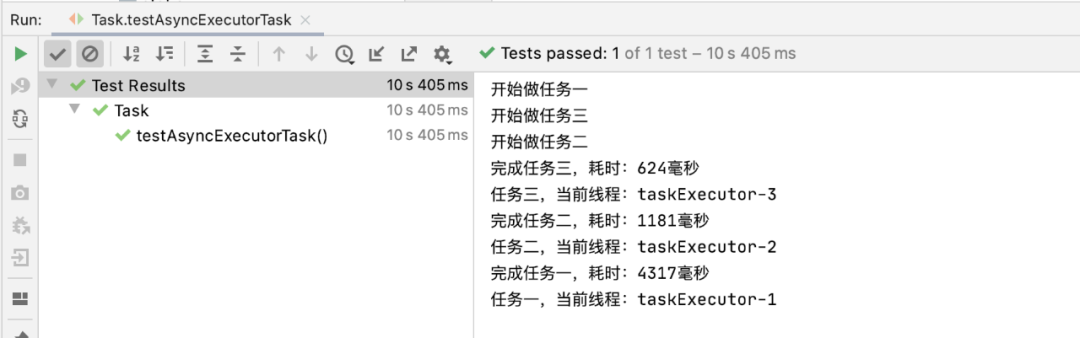
线程池成功执行异步任务。
关闭线程池
在原有TaskConfiguration.java代码的基础上添加:
executor.setWaitForTasksToCompleteOnShutdown(true);
executor.setAwaitTerminationSeconds(60);
setWaitForTasksToCompleteOnShutdown(true):
线程池关闭的时候等待所有任务都完成后,再继续销毁其他的Bean,使异步任务的销毁就会先于数据库连接池对象的销毁。
setAwaitTerminationSeconds(60):
设置线程任务等待时间,超过这个时间任务还没有销毁就强制销毁。
@Scheduled实现定时任务
@Scheduled实现定时任务是SpringBoot自身提供的功能,不需要maven依赖,只需要在启动类上添加@EnableScheduling注解,即可开启定时任务。
package com.example.demo.task;

import org.springframework.scheduling.annotation.Scheduled;
import org.springframework.stereotype.Component;

import java.util.Date;

@Component
public class ScheduledTask {
    // 方法执行完成后3秒再开始执行
    @Scheduled(fixedDelay = 3000)
    public void fixedDelayJob() throws InterruptedException {
        System.out.println("fixedDelay 开始:" + new Date());
        Thread.sleep(10 * 1000);
        System.out.println("fixedDelay 结束:" + new Date());
    }

    // 每隔2秒
    @Scheduled(fixedRate = 2000)
    public void fixedRateJob() throws InterruptedException {
        System.out.println("===========fixedRate 开始:" + new Date());
        Thread.sleep(5 * 1000);
        System.out.println("===========fixedRate 结束:" + new Date());
    }

    // 每隔7秒执行一次
    @Scheduled(cron = "0/7 * * * * ? ")
    public void cronJob() {
        System.out.println("=========================== ...>>cron...." + new Date());
    }
}
package com.example.demo.config;

import org.springframework.context.annotation.Bean;
import org.springframework.context.annotation.Configuration;
import org.springframework.scheduling.annotation.EnableScheduling;
import org.springframework.scheduling.annotation.SchedulingConfigurer;
import org.springframework.scheduling.config.ScheduledTaskRegistrar;

import java.util.concurrent.Executor;
import java.util.concurrent.Executors;

@Configuration
@EnableScheduling
public class ScheduleConfig implements SchedulingConfigurer {

    @Override
    public void configureTasks(ScheduledTaskRegistrar taskRegistrar) {
        taskRegistrar.setScheduler(scheduledTaskExecutor());
    }

    @Bean
    public Executor scheduledTaskExecutor() {
        // 线程池的大小为3
        return Executors.newScheduledThreadPool(3);
    }
}
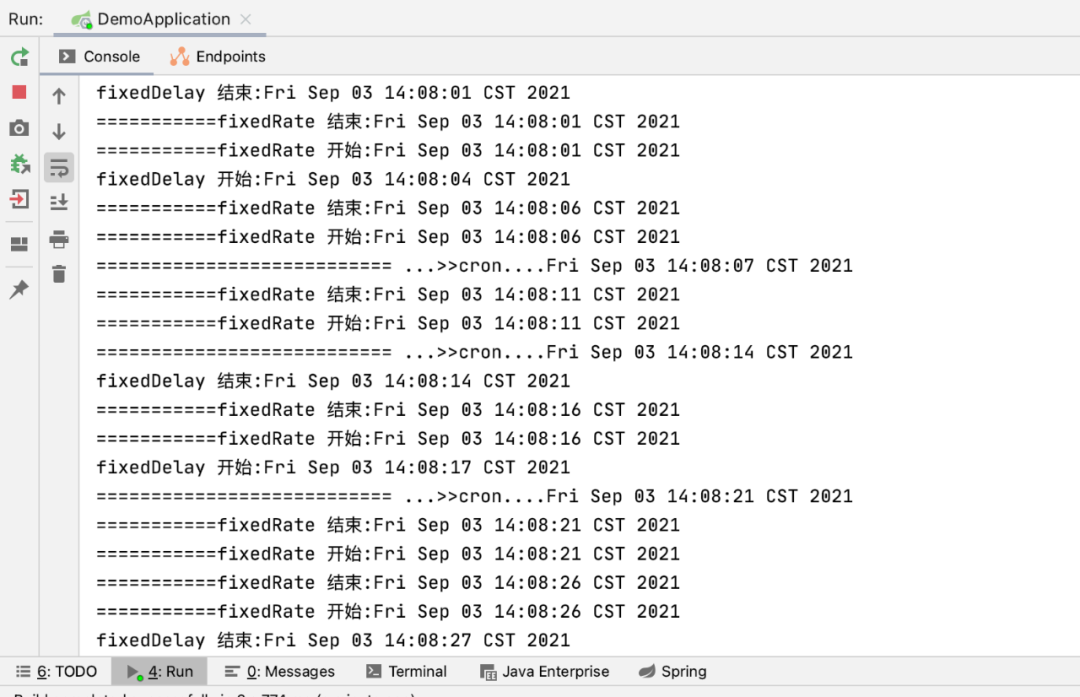
执行代码,得到打印信息:
@Scheduled标签中还可以使用cron表达式:
| 第一位 | 秒(0-59) |
| 第二位 | 分(0-59) |
| 第三位 | 小时(0-23) |
| 第四位 | 日(1-31) |
| 第五位 | 月份(1-12) |
| 第六位 | 星期几(1-7) |
| 第七位 | 年(1970-2099,也可以为空) |
cron特殊符号:
| * | 每秒,每分,每天,每月,每年.. |
| ? | 出现在日期和星期这两个位置 |
| - | 表达一个范围 |
| , | 表达一个列表值 |
| / | x/y,x是开始值,y是步长(0/3,0秒开始,每3秒...) |
点击下方阅读原文,查看上一篇
