



root@node123:/root||-->>tuned-adm list
Available profiles:
- balanced - General non-specialized tuned profile
- desktop - Optimize for the desktop use-case
- latency-performance - Optimize for deterministic performance at the cost of increased power consumption
- network-latency - Optimize for deterministic performance at the cost of increased power consumption, focused on low latency network performance
- network-throughput - Optimize for streaming network throughput, generally only necessary on older CPUs or 40G+ networks
- powersave - Optimize for low power consumption
- throughput-performance - Broadly applicable tuning that provides excellent performance across a variety of common server workloads
- virtual-guest - Optimize for running inside a virtual guest
- virtual-host - Optimize for running KVM guests
Current active profile: throughput-performance
root@node123:/root||-->>tuned-adm profile balanced
root@node123:/root||-->>tuned-adm active
Current active profile: balanced
root@node123:/root||-->>tuned-adm list
Available profiles:
- balanced - General non-specialized tuned profile
- desktop - Optimize for the desktop use-case
- latency-performance - Optimize for deterministic performance at the cost of increased power consumption
- network-latency - Optimize for deterministic performance at the cost of increased power consumption, focused on low latency network performance
- network-throughput - Optimize for streaming network throughput, generally only necessary on older CPUs or 40G+ networks
- powersave - Optimize for low power consumption
- throughput-performance - Broadly applicable tuning that provides excellent performance across a variety of common server workloads
- virtual-guest - Optimize for running inside a virtual guest
- virtual-host - Optimize for running KVM guests
Current active profile: balanced
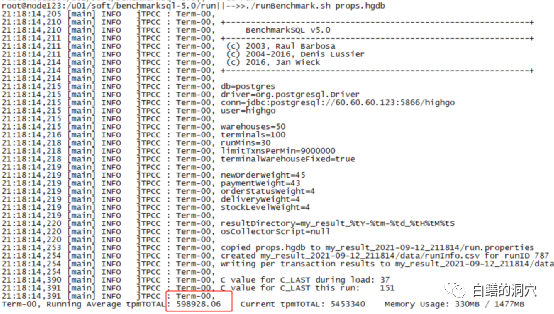
在balanced模式下,benchmark数据如下:
把模式设置为powersave,再来看看:
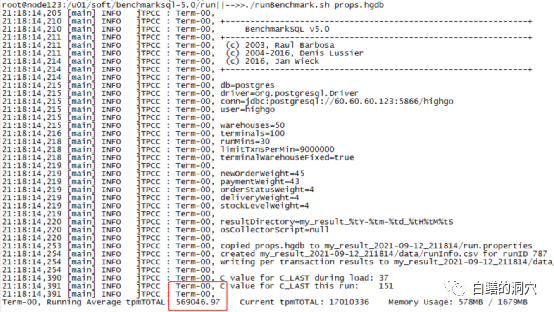
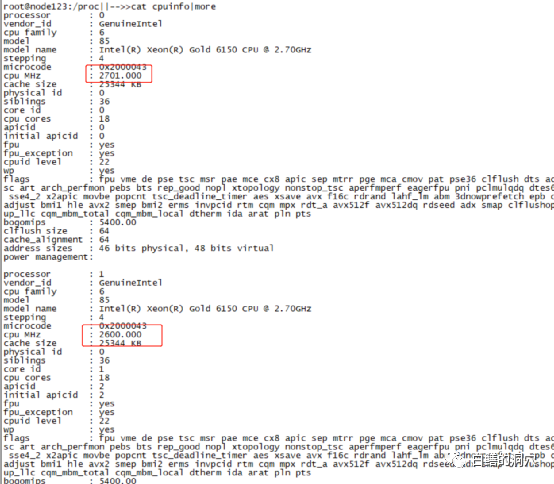
Benchmark数据降低到57万左右了。为什么会这样呢?我们看一下cpuinfo的信息,这个e8 6150的cpu的主频是2.7GHZ,此时的运行情况是,CPU0为2.7GHZ,CPU1为2.6GHZ。
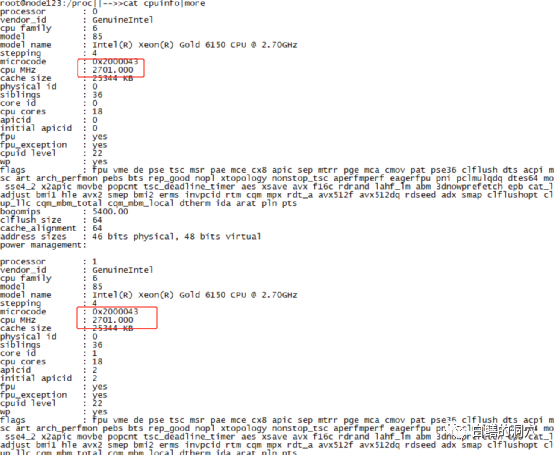
而在性能模式时,每个核的主频都是2.7GHZ:
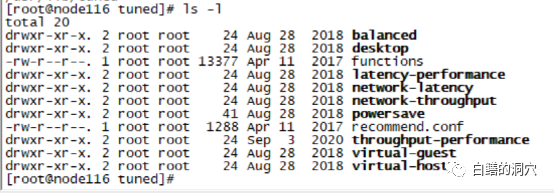
我们来看看刚才使用过的throughput-performance文件都调整了什么:
[main]
summary=Broadly applicable tuning that provides excellent performance across a variety of common server workloads
[cpu]
governor=performance
energy_perf_bias=performance
min_perf_pct=100
[disk]
readahead=>4096
[vm]
transparent_hugepages=never
[sysctl]
# ktune sysctl settings for rhel6 servers, maximizing i/o throughput
#
# Minimal preemption granularity for CPU-bound tasks:
# (default: 1 msec# (1 + ilog(ncpus)), units: nanoseconds)
kernel.sched_min_granularity_ns = 10000000
# SCHED_OTHER wake-up granularity.
# (default: 1 msec# (1 + ilog(ncpus)), units: nanoseconds)
#
# This option delays the preemption effects of decoupled workloads
# and reduces their over-scheduling. Synchronous workloads will still
# have immediate wakeup/sleep latencies.
kernel.sched_wakeup_granularity_ns = 15000000
# If a workload mostly uses anonymous memory and it hits this limit, the entire
# working set is buffered for I/O, and any more write buffering would require
# swapping, so it's time to throttle writes until I/O can catch up. Workloads
# that mostly use file mappings may be able to use even higher values.
#
# The generator of dirty data starts writeback at this percentage (system default
# is 20%)
vm.dirty_ratio = 40
# Start background writeback (via writeback threads) at this percentage (system
# default is 10%)
vm.dirty_background_ratio = 10
# PID allocation wrap value. When the kernel's next PID value
# reaches this value, it wraps back to a minimum PID value.
# PIDs of value pid_max or larger are not allocated.
#
# A suggested value for pid_max is 1024 * <# of="" cpu="" threads="" in="" system="">
# e.g., a box with 32 cpus, the default of 32768 is reasonable, for 64 cpus,
# 65536, for 4096 cpus, 4194304 (which is the upper limit possible).
#kernel.pid_max = 65536
# The swappiness parameter controls the tendency of the kernel to move
# processes out of physical memory and onto the swap disk.
# 0 tells the kernel to avoid swapping processes out of physical memory
# for as long as possible
# 100 tells the kernel to aggressively swap processes out of physical memory
# and move them to swap cache
vm.swappiness=10
