Gitlab、Gitlab Runner环境
#【Docker】搭建Gitlab & Gitlab Runner# https://mp.weixin.qq.com/s/mLx0kPHym4P3KqhPBKNBXw
自定义Maven镜像
前后端项目源码
Linux、Docker命令基础
1. 新建文件

Dockerfile
FROM maven:3.6.0-jdk-8-alpineCOPY settings.xml usr/share/maven/ref/
settings.xml
<?xml version="1.0" encoding="UTF-8"?><settings xmlns="http://maven.apache.org/SETTINGS/1.0.0"xmlns:xsi="http://www.w3.org/2001/XMLSchema-instance"xsi:schemaLocation="http://maven.apache.org/SETTINGS/1.0.0 http://maven.apache.org/xsd/settings-1.0.0.xsd"><localRepository>/.m2</localRepository><mirrors><mirror><id>nexus-aliyun</id><mirrorOf>central</mirrorOf><name>Nexus aliyun</name><url>http://maven.aliyun.com/nexus/content/groups/public</url></mirror><!-- 引入maven私库地址,根据实际情况改动 --></mirrors><profiles><profile><id>jdk18</id><activation><jdk>1.8</jdk><activeByDefault>true</activeByDefault></activation><properties><maven.compiler.source>1.8</maven.compiler.source><maven.compiler.target>1.8</maven.compiler.target><maven.compiler.compilerVersion>1.8</maven.compiler.compilerVersion></properties></profile></profiles></settings>
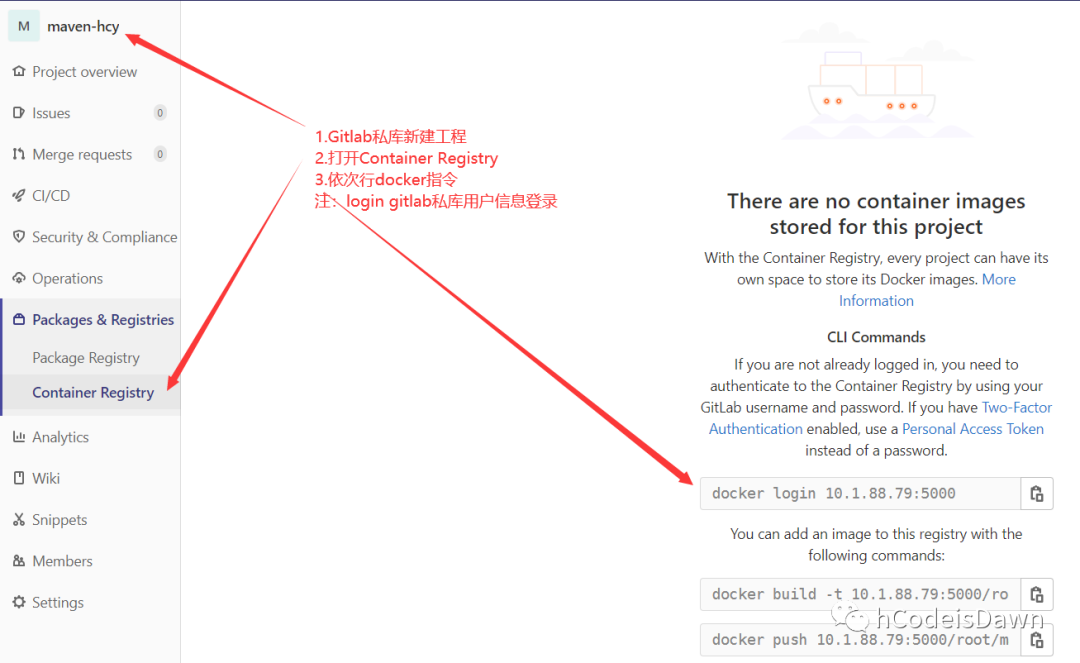
2. 提交自定义maven镜像
注:Dockerfile与settings.xml文件目录打开命令行依次执行如图命令,将自定义镜像上传至Gitlab镜像仓库
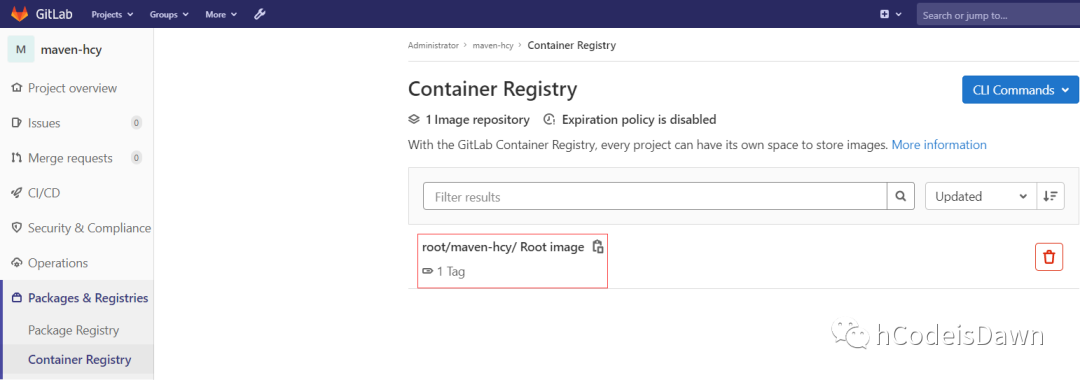
3. 查看Maven镜像
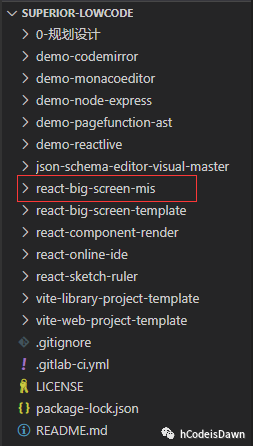
1. react-big-screen-mis 前端项目
2. nginx.conf
# 注:前端应用镜像以nginx镜像为基础,原因如下# nginx镜像包功能足够# nginx镜像包占空间小,如需保存历史镜像可减少服务器资源损耗# 无需单独搭建nginx代理,减少部署步骤worker_processes 1;events {worker_connections 1024;}http {include mime.types;default_type application/octet-stream;sendfile on;keepalive_timeout 65;# 后端映射upstream dlc {server 10.1.88.79:8180;}server {listen 8082;server_name localhost;proxy_intercept_errors on;# 前端应用location lowcode {alias usr/local/lowcode/;error_page 404 usr/local/lowcode/index.html;index index.html;try_files $uri $uri/ lowcode/index.html;}# 后端应用location dlc {proxy_pass http://dlc/;}}}
3. .gitlab-ci.yml文件
# 全局脚本:获取Docker镜像名# before_script:执行作业之前执行的一段shell脚本before_script:- export IMAGE_FULL_NAME=lowcode-fe-${CI_COMMIT_SHA}# 定义流水线(pipeline)的全部阶段(stage)或任务(job)stages:- compile- clean- build- run# 缓存文件cache:key:files:- react-big-screen-mis/package.jsonpaths:- react-big-screen-mis/node_modules# 参数variables:PROJECT: "lowcode-fe-demo"# job 编译compile编译:# React编译依赖于node环境(根据React版本选取node)image: node:14.17-alpinestage: compile# 是否允许失败allow_failure: false# 限制分支only:- master# gitlab runnertags:- runner-hcy# 任务脚本script:- cd react-big-screen-mis- npm install- npm run build# job附加文件和目录,多个job共享文件artifacts:name: $PROJECT# 保存时间expire_in: 7 dayspaths:- ./react-big-screen-mis/dist/*- ./react-big-screen-mis/nginx.conf清空镜像容器:stage: cleanonly:- mastertags:- runner-hcyscript:# 判断lowcode-fe容器运行中则移除- export lowcode_fe_container=$(docker ps -aq -f "name=$PROJECT")- echo $lowcode_fe_container- (if [ $lowcode_fe_container != "" ]; then docker rm -f $lowcode_fe_container; else echo "容器不存在"; fi);# 移除latest版本之外的工程镜像- export lowcode_fe_image=$(docker images -aq --filter=reference="lowcode-fe-*")- echo $lowcode_fe_image# 去除字符串空格,避免if语句报错- export lowcode_fe_image_trimall=$(echo $lowcode_fe_image | sed s/[[:space:]]//g)- (if [ $lowcode_fe_image_trimall != "" ]; then docker rmi -f $lowcode_fe_image; else echo "镜像不存在"; fi);构建镜像:stage: buildonly:- mastertags:- runner-hcyscript:# 跳转到工程目录- cd react-big-screen-mis# 查看artifacts缓存的文件- ls -l# 生成Dockerfile文件- rm -rf Dockerfile- touch Dockerfile- chmod 777 Dockerfile- cat Dockerfile# 镜像构造语句写入Dockerfile- echo -e "FROM nginx" > Dockerfile- echo -e "MAINTAINER hcy<2698982034@qq.com>" >> Dockerfile- echo -e "COPY nginx.conf etc/nginx/" >> Dockerfile- echo -e "COPY dist usr/local/lowcode" >> Dockerfile- echo -e "EXPOSE 8082" >> Dockerfile- echo -e "ENTRYPOINT nginx -g \"daemon off;\"" >> Dockerfile# 查看内容- cat Dockerfile# build- docker build -t $IMAGE_FULL_NAME .# 如需备份镜像,则添加docker login docker push运行:image: docker:stablestage: runonly:- mastertags:- runner-hcyscript:# 运行新镜像- docker run -d --name $PROJECT -p 8082:8082 $IMAGE_FULL_NAME
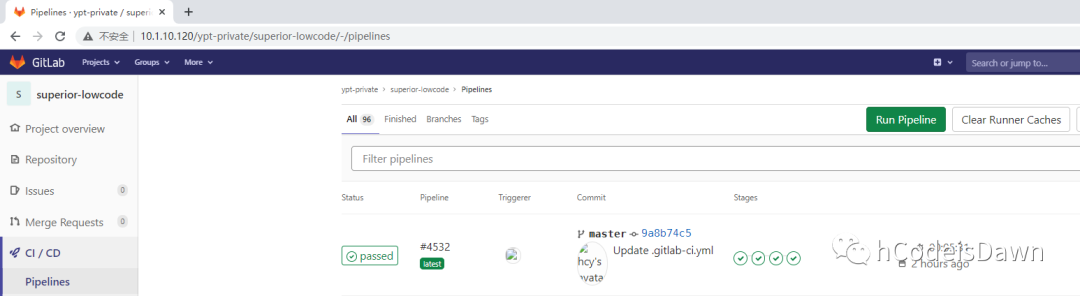
4. Gitlab CI/CD执行效果

5. 测试容器服务

1. dlc后端项目
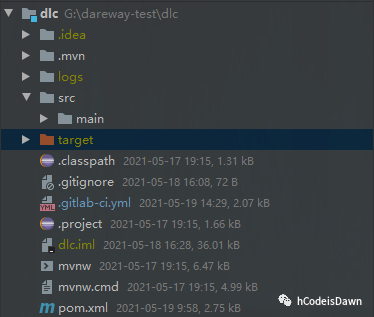
2. .gitlab-ci.yml
before_script:- export IMAGE_FULL_NAME=lowcode-rd-${CI_COMMIT_SHA}stages:- compile- clean- build- runvariables:PROJECT: "lowcode-rd-demo"编译:# 上传至Gitlab私库的自定义Maven镜像image: 10.1.88.79:5000/root/maven-hcy:lateststage: compileallow_failure: falseonly:- mastertags:- runner-dlcscript:- mvn -Dmaven.repo.local=$MAVEN_REPO clean package -Dmaven.test.skip=true# 此处删除冗余jar文件- rm -rf target/dlc-*-dependencies.jarartifacts:name: $PROJECTexpire_in: 7 dayspaths:- target/*.jar清空镜像容器:stage: cleanonly:- mastertags:- runner-dlcscript:# 判断lowcode-rd容器运行中则移除- export lowcode_rd_container=$(docker ps -aq -f "name=$PROJECT")- echo $lowcode_rd_container- (if [ $lowcode_rd_container != "" ]; then docker rm -f $lowcode_rd_container; else echo "容器不存在"; fi);# 移除latest版本之外的工程镜像- export lowcode_rd_image=$(docker images -aq --filter=reference="lowcode-rd-*")- echo $lowcode_rd_image- export lowcode_rd_image_trimall=$(echo $lowcode_rd_image | sed s/[[:space:]]//g)- (if [ $lowcode_rd_image_trimall != "" ]; then docker rmi -f $lowcode_rd_image; else echo "镜像不存在"; fi);构建镜像:stage: buildonly:- mastertags:- runner-dlcscript:- ls ./target/- rm -rf Dockerfile- touch Dockerfile- chmod 777 Dockerfile- cat Dockerfile- echo -e "FROM java:8" > Dockerfile- echo -e "MAINTAINER hcy<2698982034@qq.com>" >> Dockerfile- echo -e "COPY target/*.jar /dlc.jar" >> Dockerfile- echo -e "EXPOSE 8180" >> Dockerfile- echo -e "ENTRYPOINT [\"java\",\"-jar\",\"/dlc.jar\"]" >> Dockerfile- cat Dockerfile- docker build -t $IMAGE_FULL_NAME .运行:image: docker:stablestage: runonly:- mastertags:- runner-dlcscript:# 运行新镜像- docker run -d --name $PROJECT -p 8180:8180 $IMAGE_FULL_NAME
3. Gitlab CI/CD执行效果
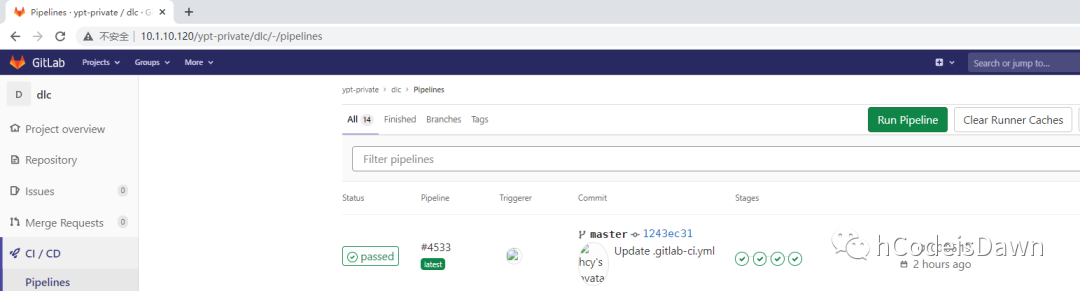

4. 测试容器服务(jar包提供的测试接口)

问题1:容器名冲突
处理:启动前移除旧容器
问题2:maven官方镜像引用pom.xml配置下载jar包报错
处理:自定义maven镜像,导入maven私库配置,使用自定义maven镜像打包SpringBoot应用
问题3:docker build命令报Dockerfile文件错误
原因:echo命令使用有误
处理:echo > 覆盖写入 改为 echo >> 追加写入
问题4:docker rm -f 命令移除不存在的容器报错
处理:移除前判断容器是否存在,存在则移除
# 容器名唯一 lowcode_rd_container仅为一条数据- export lowcode_rd_container=$(docker ps -aq -f "name=$PROJECT")- echo $lowcode_rd_container- (if [ $lowcode_rd_container != "" ]; then docker rm -f $lowcode_rd_container; else echo "容器不存在"; fi);
问题5:以下shell移除镜像失败,输出“镜像不存在”
- export lowcode_rd_image=$(docker images -aq --filter=reference="lowcode-rd-*")- echo $lowcode_rd_image- (if [ $lowcode_rd_image!= "" ]; then docker rmi -f $lowcode_rd_image; else echo "镜像不存在"; fi)
原因:reference="lowcode-rd-*"过滤出的多个镜像id以空格间隔,命令行执行if语句报too many arguments错误
处理:用剔除空格的新变量做判断条件
- export lowcode_rd_image=$(docker images -aq --filter=reference="lowcode-rd-*")- echo $lowcode_rd_image- export lowcode_rd_image_trimall=$(echo $lowcode_rd_image | sed s/[[:space:]]//g)- (if [ $lowcode_rd_image_trimall != "" ]; then docker rmi -f $lowcode_rd_image; else echo "镜像不存在"; fi);
问题6:- echo -e "COPY target/*.jar /dlc.jar" >> Dockerfile 构建后台应用镜像出错
原因:maven打包SpringBoot生成多个jar包
处理:移除多余jar包 - rm -rf target/dlc-*-dependencies.jar,保证copy到镜像中的jar包只有一个