



消息中间件是每个做后台同学必须要掌握的一类框架,这主要取决于其广泛应用于互联网项目。消息中间件在这些系统中扮演着很重要的角色,它们的主要作用是消息异步,系统解耦,高并发削峰,分布式事务等等。目前主要的消息中间件有rabbitMQ、kafka、rocketMQ、ActiveMQ等,本系列文章总结的是kafka,也算是当前市面上比较流行的消息中间件,后续的文章会从kafka的生产者、消费者、broker等来总结。除了在实际应用中,消息中间件是一个常用的框架,在面试中,消息中间件也是必问内容。由于个人能力有限,文中难免有理解不到位的地方,还请留言指导,在此谢过。本系列文章kafka版本使用最新的2.8.0。
Fetcher
在之前的文章中,我们介绍了消费者核心类中的第一个类SubscriptionState,在本文中,我们介绍poll流程中涉及的第二个类Fetcher。Fetcher是消费者源码中另一个核心的主要类,其主要的作用是组装各种发送请求到kafkaConsumerNetwork中,然后将获取到的结果进行处理。在这里需要发送的请求类型包括:待消费的消息、元数据获取、offset值等等。心跳线程和消费者poll线程都会调用该类进行处理,不过这个类通过加锁的方式保证线程安全。
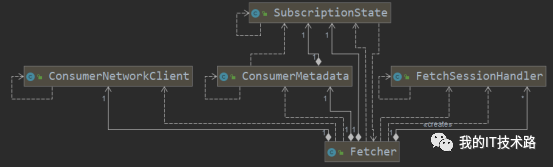
下面先看下Fetcher类的相关核心组件:
SubscriptionState:该组件是记录消费者监听的topic、partition、offset等相关操作,在上一文我们介绍过。
ConsumerNetworkClient:消费者网络客服端,将fetcher组装的请求通过网络客服端发送并返回消息
ConsumerMetadata:消费者元数据,这个类主要还是SubscriptionState,还有一个transientTopics,该变量是记录临时需要查询offset操作的topic,查询完之后就清空的。
FetchSessionHandler:记录了和服务端的session集合,并且提供处理拉取过来消息的操作。
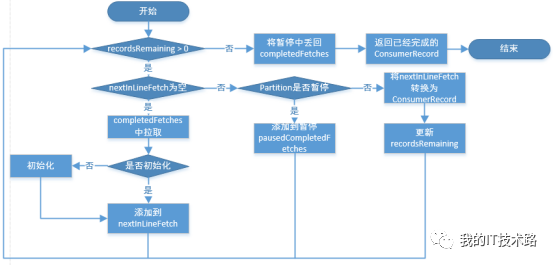
下面看下和拉取消息的操作,fetchedRecords涉及到三个CompletedFetch,分别是nextInLineFetch、completedFetches、pausedCompletedFetches。
nextInLineFetch:是和消费者拉取结果的对象,从completedFetches中转移过来,并且转换为ConsumerRecord。
completedFetches:是从服务器中拉下的结果对象,会传递给nextInLineFetch。
pausedCompletedFetches:当拉取的过程中,该partition被暂停了,会将nextInLineFetch中的丢到pausedCompletedFetches,在拉取完成之后,将pausedCompletedFetches丢回completedFetches等待下一次拉取。
了解完这三个对象之后,我们看下整个拉取的流程:
具体的拉取的代码如下:
Fetcher#fetchedRecords
public Map<TopicPartition, List<ConsumerRecord<K, V>>> fetchedRecords() {
Map<TopicPartition, List<ConsumerRecord<K, V>>> fetched = new HashMap<>();
Queue<CompletedFetch> pausedCompletedFetches = new ArrayDeque<>();
int recordsRemaining = maxPollRecords;
try {
//如果还需要拉取数据
while (recordsRemaining > 0) {
//nextInLineFetch中没有数据
if (nextInLineFetch == null || nextInLineFetch.isConsumed) {
//从completedFetches中获取
CompletedFetch records = completedFetches.peek();
//如果没有拉取的消息,退出循环
if (records == null) break;
//如果拉取的消息没有初始化
if (records.notInitialized()) {
try {
//初始化,将completedFetches 转化成nextInLineFetch
nextInLineFetch = initializeCompletedFetch(records);
} catch (Exception e) {
//发生异常,清理消息,抛出异常
FetchResponse.PartitionData<Records> partition = records.partitionData;
if (fetched.isEmpty() && (partition.records() == null || partition.records().sizeInBytes() == 0)) {
completedFetches.poll();
}
throw e;
}
} else {
//已经初始化,直接赋值给nextInLineFetch
nextInLineFetch = records;
}
//赋值完成之后,从completedFetches移除
completedFetches.poll();
} else if (subscriptions.isPaused(nextInLineFetch.partition)) {
// 当拉取消息的时候,调用了暂停的接口,将nextInLineFetch 的数据存到pausedCompletedFetches 中,并置空nextInLineFetch
pausedCompletedFetches.add(nextInLineFetch);
nextInLineFetch = null;
} else {
//如果nextInLineFetch 中存在消息,将nextInLineFetch的消息转换为ConsumerRecord
List<ConsumerRecord<K, V>> records = fetchRecords(nextInLineFetch, recordsRemaining);
//如果存在消息,开始按照partition存入fetched中
if (!records.isEmpty()) {
TopicPartition partition = nextInLineFetch.partition;
List<ConsumerRecord<K, V>> currentRecords = fetched.get(partition);
if (currentRecords == null) {
fetched.put(partition, records);
} else {
//当拉取消息的时候,发生了消费者leader变化,可能会导致发送两条拉取消息的情况,这个时候要将之前的消息累加起来
List<ConsumerRecord<K, V>> newRecords = new ArrayList<>(records.size() + currentRecords.size());
newRecords.addAll(currentRecords);
newRecords.addAll(records);
fetched.put(partition, newRecords);
}
//更新剩余拉取消息数量
recordsRemaining -= records.size();
}
}
}
} catch (KafkaException e) {
//如果拉取异常,判断是否存在消息,存在消息的话,把已经拉取的消息返回出去,防止因为异常导致消息丢失
if (fetched.isEmpty())
throw e;
} finally {
//本轮结束之后,将暂停的丢回completedFetches,等待下一次拉取
completedFetches.addAll(pausedCompletedFetches);
}
//返回结果
return fetched;
}
另一个和拉取消息相关的函数是发送拉取消息,当然发送的核心是组装数据给网络客服端发送,并异步解析返回的数据结果
Fetcher#sendFetches
public synchronized int sendFetches() {
//...
//根据不同的节点,存入发送数据
Map<Node, FetchSessionHandler.FetchRequestData> fetchRequestMap = prepareFetchRequests();
for (Map.Entry<Node, FetchSessionHandler.FetchRequestData> entry : fetchRequestMap.entrySet()) {
//...
//组装数据
final FetchRequest.Builder request = FetchRequest.Builder
//...
//发送
RequestFuture<ClientResponse> future = client.send(fetchTarget, request);
//添加到等待结果的队列中,可以用来判断是否存在已经发送,防止一个节点多次发送
this.nodesWithPendingFetchRequests.add(entry.getKey().id());
//添加返回的结果处理监听器
future.addListener(new RequestFutureListener<ClientResponse>() {
@Override
public void onSuccess(ClientResponse resp) {
synchronized (Fetcher.this) {
try {
//...
//这里做的是一个版本check的问题,如果有问题,直接返回
if (!handler.handleResponse(response)) {
return;
}
//消息记录的聚合工具类,不影响整个流程
FetchResponseMetricAggregator metricAggregator = new FetchResponseMetricAggregator(sensors, partitions);
//...
for (Map.Entry<TopicPartition, FetchResponse.PartitionData<Records>> entry : response.responseData().entrySet()) {
//...
//消息格式有问题,抛异常
if (requestData == null) {
throw new IllegalStateException(message);
} else {
//添加消息到completedFetches
completedFetches.add(new CompletedFetch(partition, partitionData,
metricAggregator, batches, fetchOffset, responseVersion));
}
}
} finally {
//移除等待结果队列
nodesWithPendingFetchRequests.remove(fetchTarget.id());
}
}
}
@Override
public void onFailure(RuntimeException e) {
synchronized (Fetcher.this) {
try {
//失败处理
FetchSessionHandler handler = sessionHandler(fetchTarget.id());
if (handler != null) {
handler.handleError(e);
}
} finally {
//移除等待结果队列
nodesWithPendingFetchRequests.remove(fetchTarget.id());
}
}
}
});
}
return fetchRequestMap.size();
}
上面的代码主要是处理结果的各种判断使得代码看起来非常的多,但实际上逻辑比较简单。下面我们看下拉取offset的相关函数:
Fetcher#fetchOffsetsByTimes:
private ListOffsetResult fetchOffsetsByTimes(Map<TopicPartition, Long> timestampsToSearch,
Timer timer,
boolean requireTimestamps) {
ListOffsetResult result = new ListOffsetResult();
if (timestampsToSearch.isEmpty())
return result;
Map<TopicPartition, Long> remainingToSearch = new HashMap<>(timestampsToSearch);
//只要还有时间,就循环拉取
do {
//发送获取的信息
RequestFuture<ListOffsetResult> future = sendListOffsetsRequests(remainingToSearch, requireTimestamps);
//发送
client.poll(future, timer);
if (!future.isDone()) {
break;
} else if (future.succeeded()) {
//将获取的结果组装,并且从剩余待获取中去除
ListOffsetResult value = future.value();
result.fetchedOffsets.putAll(value.fetchedOffsets);
remainingToSearch.keySet().retainAll(value.partitionsToRetry);
} else if (!future.isRetriable()) {
throw future.exception();
}
//带获取的为空,返回结果
if (remainingToSearch.isEmpty()) {
return result;
} else {
client.awaitMetadataUpdate(timer);
}
} while (timer.notExpired());
throw new TimeoutException("Failed to get offsets by times in " + timer.elapsedMs() + "ms");
}
该函数的功能是拉取某个截止时间之前的offset值,在KafkaConsumer中调用beginningOffsets、endOffsets等操作就会使用该函数进行拉取。
除了上面的两个功能,fetcher还提供拉取元数据的功能,下面看下拉取元数据的函数:
Fetcher#getTopicMetadata:
public Map<String, List<PartitionInfo>> getTopicMetadata(MetadataRequest.Builder request, Timer timer) {
//...空判断
do {
//发送消息
RequestFuture<ClientResponse> future = sendMetadataRequest(request);
//获取结果
client.poll(future, timer);
if (future.failed() && !future.isRetriable())
throw future.exception();
//消息处理过程,对各种异常进行判断
if (future.succeeded()) {
MetadataResponse response = (MetadataResponse) future.value().responseBody();
Cluster cluster = response.cluster();
Set<String> unauthorizedTopics = cluster.unauthorizedTopics();
if (!unauthorizedTopics.isEmpty())
throw new TopicAuthorizationException(unauthorizedTopics);
boolean shouldRetry = false;
Map<String, Errors> errors = response.errors();
if (!errors.isEmpty()) {
//存在异常
for (Map.Entry<String, Errors> errorEntry : errors.entrySet()) {
String topic = errorEntry.getKey();
Errors error = errorEntry.getValue();
if (error == Errors.INVALID_TOPIC_EXCEPTION)
throw new InvalidTopicException("Topic '" + topic + "' is invalid");
else if (error == Errors.UNKNOWN_TOPIC_OR_PARTITION)
// if a requested topic is unknown, we just continue and let it be absent
// in the returned map
continue;
else if (error.exception() instanceof RetriableException)
shouldRetry = true;
else
throw new KafkaException("Unexpected error fetching metadata for topic " + topic,
error.exception());
}
}
//是否需要重试
if (!shouldRetry) {
HashMap<String, List<PartitionInfo>> topicsPartitionInfos = new HashMap<>();
//存入结果
for (String topic : cluster.topics())
topicsPartitionInfos.put(topic, cluster.partitionsForTopic(topic));
return topicsPartitionInfos;
}
}
//休眠一下重试间隔时间
timer.sleep(retryBackoffMs);
} while (timer.notExpired());
//抛出获取超时异常
throw new TimeoutException("Timeout expired while fetching topic metadata");
}
//发送消息
private RequestFuture<ClientResponse> sendMetadataRequest(MetadataRequest.Builder request) {
final Node node = client.leastLoadedNode();
if (node == null)
return RequestFuture.noBrokersAvailable();
else
return client.send(node, request);
}
本文主要介绍了消费者poll流程中的另一个重要的组件:Fetcher。该类主要是将要发送给服务端的消息进行组装,然后传给网络客服端发送,添加异步返回结果的监听器进行结果处理。Fetcher主要处理的有三类请求,元数据、offset和record。拉取消息的流程相对复杂,本文详细介绍了源码中每一行处理逻辑,其他两种拉取过程相对简单,就是一个结果处理流程。
本文的内容就这么多,如果你觉得对你的学习和面试有些帮助,帮忙点个赞或者转发一下哈,谢谢。
