



问题:
项目中使用的是teamcenter12.4版本,用户测试发现新建流程时候发现偶尔出现指派的签审人不能移除的问题,“新建流程对话框”界面的“指派所有任务”TAB界面中,签审人员指派的“添加”、“移除”、“修改”三个按钮在有些场景会显示异常,如想对已经指派的签审人进行移除操作时候,发现界面提供的按钮却是“添加”和“修改”,导致一旦指派了签审人就没办法进行移除,已经报了IR并已确认,给出workaround方法就是取消对话框重新指派,或者流程发起后再修改审核人,所以推测tc13版本估计也会有这个问题。
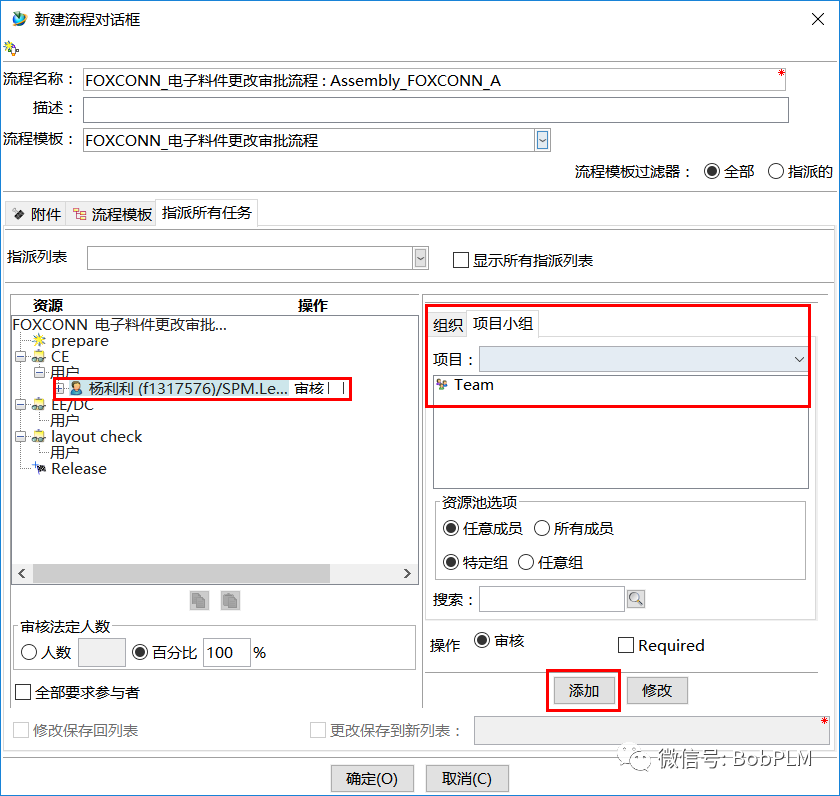
图1:指派过的签审人,没有对应的“移除”按钮,没办法对其进行移除
分析:
IR解决估计要下个版本了(等不起),自己动手分析解决下看看,通过验证及反编译ootb源码分析,发现该问题在tc12.3和tc12.4版本中界面处理这块在一些类中加入了新的方法addAllUserProjects,该方法用于获取当前登录用户所有项目以显示在项目下拉列表里,处理不严谨导致异常抛出,如果当前用户不是任何项目组成员时候,代码会数组越界异常抛出,导致后面控制“添加”、“移除”、“修改”三个按钮显示隐藏的代码语句不能执行到,而导致按钮显示错乱,经验证也确实是这样,如果用户有项目小组,则按钮不会显示错乱。
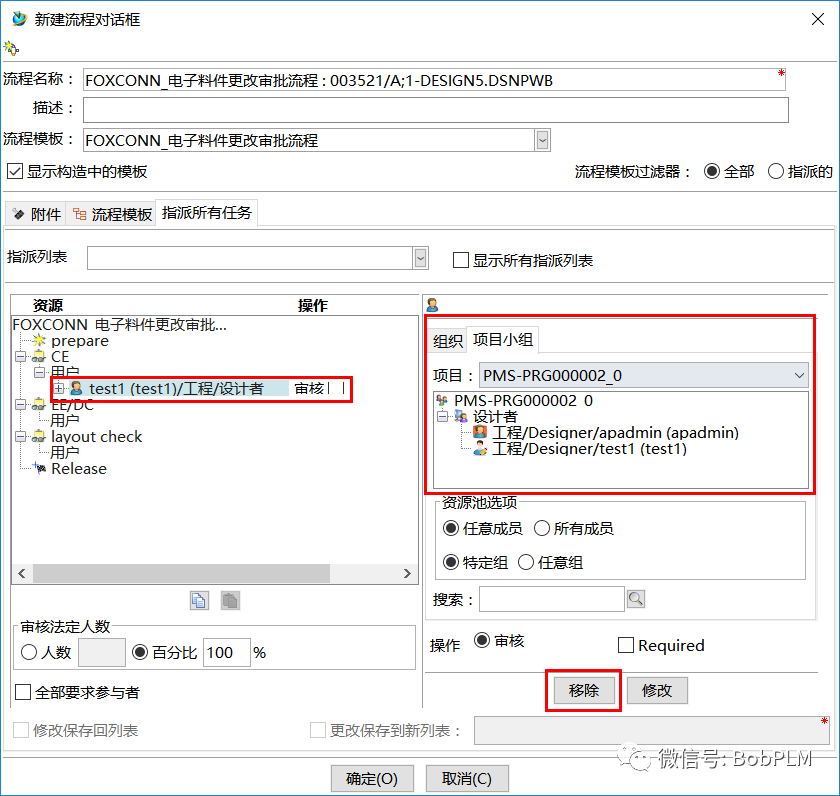
图2:如果当前登录用户有项目小组,则对应的“移除”按钮正常显示,可进行移除
错误代码:
TCComponent atccomponent[] = null;try{atccomponent = session.getUser().getRelatedComponents("user_projects");}catch(TCException tcexception){}if(atccomponent == null)return;//这里未对数组atccomponent进行是否为空数组判断,而后面直接使用atccomponent[0],导致数据越界异常TCComponentProject tccomponentproject = (TCComponentProject)(session.getCurrentProject() == null ? atccomponent[0] : session.getCurrentProject());
解决:
反编译并修复ootb代码,加入当前登录用户项目小组为空时候的场景处理代码
修复后代码:
TCComponent atccomponent[] = null;try{atccomponent = session.getUser().getRelatedComponents("user_projects");}catch(TCException tcexception){}//atccomponent数组数量为空时候同样返回,不再执行下面的代码if(atccomponent == null || atccomponent.length == 0 )return;TCComponentProject tccomponentproject = (TCComponentProject)(session.getCurrentProject() == null ? atccomponent[0] : session.getCurrentProject());
总结:
在解决该问题分析源码时候发现了一个比较好用的首选项WRKFLW_show_user_assignment_options,首选项描述如下
该首选项用于控制“新建流程对话框”界面"指派所有任务"TAB界面中"项目"和"项目小组"的显示隐藏,及默认选中哪个TAB,总共4种值
Decides which participant tabs will be shown while assigning users to dynamic participants or workflow tasks.Valid Values:* org_default: The organization tree as well as project team list will be shown for assigning users. The organization tree will be the initially selected tab. This is the default value.* project_default: The organization tree as well as project team list will be shown for assigning users. The project team list will be the initially selected tab.* org_only: Only the organization tree will be shown and project team list will be hidden.* project_only: Only the project team list will be shown and organization tree will be hidden.
org_default:默认选则"组织"
project_default:默认选则"项目小组"
org_only:只显示"组织"
project_only:只显示"项目小组"
默认值为org_default
这个首选项提供了对"组织"和"项目小组"TAB的灵活配置,也解决了项目里用户提出的默认选则固定的一个TAB页需求,比如发起流程时候,让发起者只能选则所在项目小组的用户作为签审人,则可以设置该首选项值为project_only
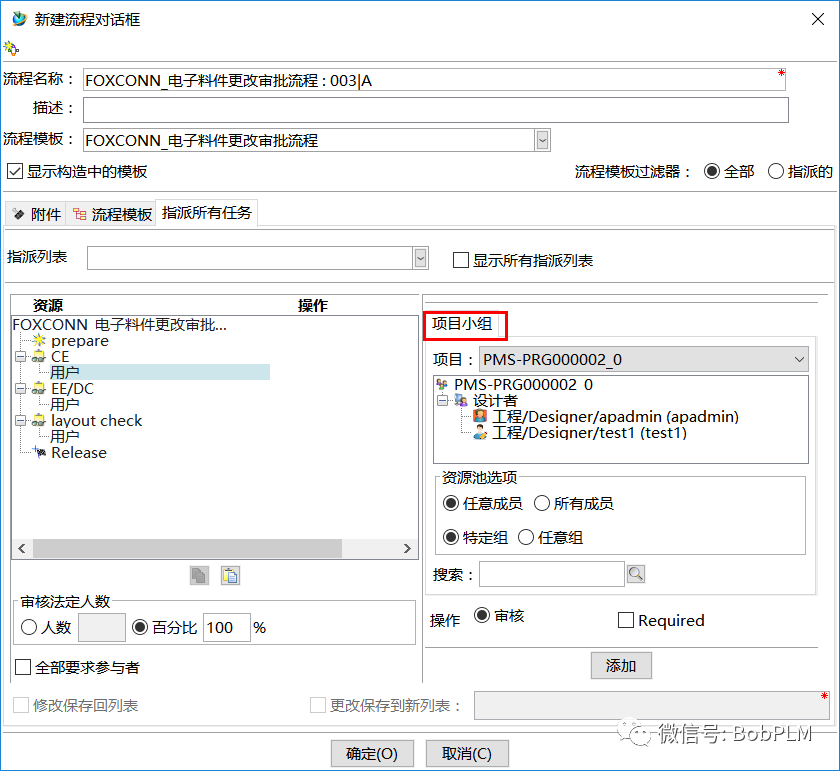
图3:WRKFLW_show_user_assignment_options值为project_only效果,只显示"项目小组"
