



问题
在Teamcenter二次开发中经常遇到需要代码调用查询去查询数据的情况,用的最多的就是TCComponentQuery的execute(String[] arrayUserEntryDisplayName,String[] arrayValue)方法,这个方法第一个数组对应的是查询的"用户条目名称"(图1),第二个数组对应的是查询的值,这个“用户条目名称”如果属性是做过本地化的,则在不同环境中会显示对应环境的本地化名称

图1:TCComponentQuery.execute第一个参数对应查询中的“用户条目名称”

这就给开发带来了麻烦,如果要支持多语言环境,写的是一种语言的本地化用户条目名称,那么程序在其它语言环境跑的时候就会导致报如下条目匹配不上错误
com.teamcenter.rac.kernel.TCException查询 无效。用户条目列表无效。at com.teamcenter.rac.kernel.TCComponent.handleException(Unknown Source)at com.teamcenter.rac.kernel.TCComponentQueryType.getExecuteResultsList(Unknown Source)at com.teamcenter.rac.kernel.TCComponentQueryType.execute(Unknown Source)at com.teamcenter.rac.kernel.TCComponentQuery.execute(Unknown Source)
分析
这个问题是因为不同环境中的用户条目名称不同导致的,只要让不同环境使用该环境对应的用户条目名称就可以解决问题
解决
解决这个问题有下面几种方案,根据实际的场景灵活使用
方案1.硬编码群举各环境的用户条目
先用一个环境去查询,如果查询报错则换其它环境去查询
TCComponent[] arrayCompQuery = null;String[] arrayAttributeDisplayName = new String[] {"名称","中文描述"};String[] arrayValue = new String[] {"*","*"};try {arrayCompQuery = compQuery.execute(arrayAttributeDisplayName,arrayValue);} catch (Exception e) {e.printStackTrace();arrayAttributeDisplayName = new String[]{"Name","Chinese Description"};arrayCompQuery = compQuery.execute(arrayAttributeDisplayName,arrayValue);}
方案2.代码判断语言环境使用对应用户条目
代码利用API判断出当前的语言环境,不同语言用不同的用户条目数组
String localIdentifier = session.getCredentials().getLocaleIdentifier();String[] arrayAttributeDisplayName = null;String[] arrayValue = new String[] {"*","*"};if(localIdentifier.equals("zh_CN")){arrayAttributeDisplayName = new String[] {"名称","中文描述"};}else if(localIdentifier.equals("en_US")){arrayAttributeDisplayName = new String[]{"Name","Chinese Description"};}TCComponent[] arrayCompQuery = compQuery.execute(arrayAttributeDisplayName,arrayValue);
方案3.使用TCTextService的getTextValue(String str)方法获取用户本地化条目(该方法如果未获取到本地化条目,则用参数自己作为本地化条目)
getTextValue可以从%TC_ROOT%\lang\<lang_dir>\qry_user_entry_names_locale.xml(如D:\Siemens\Teamcenter12\lang\textserver\zh_CN\qry_user_entry_names_locale.xml)中获取到绝大多数ootb属性用户本地化关键字对应的用户条目本地化条目
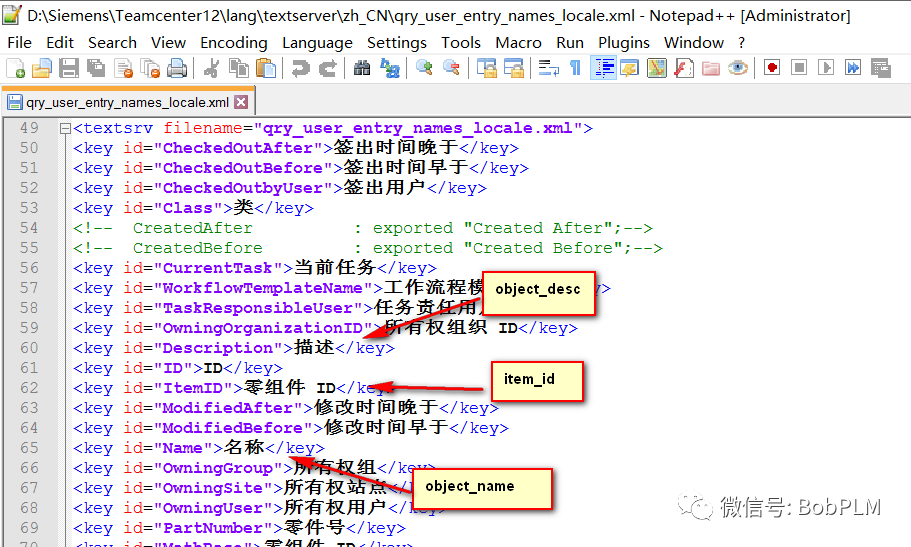
TCTextService textService = session.getTextService();//对应属性item_id和object_nameString[] arrayAttributeDisplayName = new String[] {textService.getTextValue("ItemID"),textService.getTextValue("Name")};String[] arrayValue = new String[] {"*","*"};TCComponent[] arrayCompQuery = compQuery.execute(arrayAttributeDisplayName,arrayValue);
但这个有个缺点是xml文件默认只有大部分ootb用户本地化关键字属性对应的条目,如果用户本地化关键字属性在xml里没有(属性没有、属性是自定义的、用户本地化关键字是自定义的不是属性名称),得自己在xml里维护进去(要服务器运行generate_client_meta_cache -u=infodba -p=infodba -g=dba generate textservers后才生效)
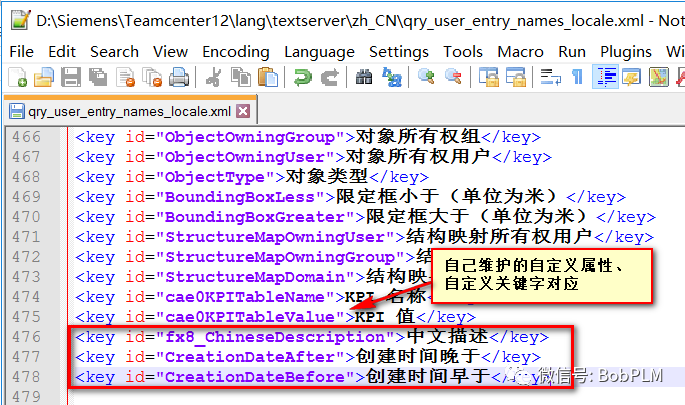
如果不想维护xml,也可以将自定义属性等在xml里没有对应用户条目名称的关键字改掉,使用户条目本地化关键字和用户条目名称相同,这样在使用getTextValue获取不到用户条目名称时候使用用户条目本地化关键字也能正确匹配上

方案4.开发包中使用properties文件,为每种语言维护不同语言使用的用户条目名称
该方法缺点是需要维护properties文件
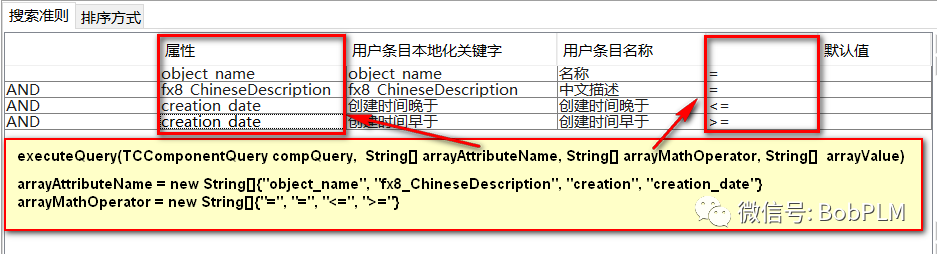
方案5.代码通过查询条件里“属性" + "运算符"组合使用获取对应的用户条目名称,再调用execute
封装的工具方法如下:
/*** 通过属性名、运算符和值查询(适用于所有场景)* @author 许连波* @param compQuery 查询对象* @param arrayAttributeName 属性名称,对应查询构建器中的“属性列”,e.g:{"item_id","object_name","owning_user.user_id"}* @param arrayMathOperator 运算符,对应查询构建器中的运算符 e.g:{"=","=","="}* @param arrayValue 查询值,e.g:{"A00001","part2"}* @return* @throws Exception* @2020年10月10日*/public static TCComponent[] executeQuery(TCComponentQuery compQuery, String[] arrayAttributeName, String[] arrayMathOperator, String[] arrayValue) throws Exception{if(arrayAttributeName.length != arrayValue.length|| arrayAttributeName.length != arrayMathOperator.length){throw new Exception("arrayAttributeName、arrayMathOperator、arrayValue length is not same");}String[] arrayAttributeDisplayName = new String[arrayAttributeName.length];TCQueryClause[] elements = compQuery.describe();for(int i = 0; i <arrayAttributeName.length ; i++){for(int j=0; j<elements.length; j++){if(elements[j]!= null&& elements[j].getAttributeName().equals(arrayAttributeName[i])&& elements[j].getMathOperator().equals(arrayMathOperator[i])){arrayAttributeDisplayName[i] = elements[j].getUserEntryNameDisplay();elements[j] = null;}}if(arrayAttributeDisplayName[i] == null || arrayAttributeDisplayName[i].equals("")){throw new Exception("Attribute\""+arrayAttributeName[i]+"\" MathOperator\"" + arrayMathOperator[i] + "\" not found user entry display name");}}return compQuery.execute(arrayAttributeDisplayName, arrayValue);}
使用方法:
String[] arrayAttributeName = new String[] {"object_name","fx8_CustomerPN"};String[] arrayMathOperator = new String[] {"=","="};String[] arrayValue = new String[] {"*","*"};TCComponent[] arrayCompQuery = executeQuery(compQuery, arrayAttributeName, arrayMathOperator, arrayValue)
总结
推荐使用方案5,适用于大多数场景
