



 点击蓝色字关注“SQL数据库运维”

对于需要行列转换的数据,平时有可能会遇到,但是很少,除非是有特殊的统计需求,才会行转列或列转行的操作,今天就先简单说下常规语法行列转换的操作。
首先,创建一个用于演示的数据表TBLZH:
create table TBLZH(年份 nvarchar(10) null,月份 nvarchar(10) null,数量 int null)
其次,将测试数据插入进数据表内:
insert into TBLZH(年份,月份,数量)select '2019','1','8956' unionselect '2019','2','4563' unionselect '2019','3','7526' unionselect '2020','1','5962' unionselect '2020','2','8953' unionselect '2020','3','5632' unionselect '2021','1','4596' unionselect '2021','2','1236' unionselect '2021','3','8960'
最后,查询下TBLZH表内的数据:
select * from TBLZH
原始数据结果如下:
| 年份 | 月份 | 数量 |
| 2019 | 1 | 8956 |
| 2019 | 2 | 4563 |
| 2019 | 3 | 7526 |
| 2020 | 1 | 5962 |
| 2020 | 2 | 8953 |
| 2020 | 3 | 5632 |
| 2021 | 1 | 4596 |
| 2021 | 2 | 1236 |
| 2021 | 3 | 8960 |

下面来实现一些具体的需求:
需求:按年份分组,不同的月份为一列。
方案一:
--按年份分组,不同的月份为一列select t.年份,sum(case t.月份 when '1' then t.数量 end) '1月份',sum(case t.月份 when '2' then t.数量 end) '2月份',sum(case t.月份 when '3' then t.数量 end) '3月份'from TBLZH tgroup by t.年份

方案二:
-- 使用左外连接查询select t.年份,t1.数量 '1月份',t2.数量 '2月份',t3.数量 '3月份' from TBLZH tleft join (select 年份,数量 from TBLZH where 月份='1') t1 on t.年份=t1.年份left join (select 年份,数量 from TBLZH where 月份='2') t2 on t.年份=t2.年份left join (select 年份,数量 from TBLZH where 月份='3') t3 on t.年份=t3.年份group by t.年份,t1.数量,t2.数量,t3.数量-- 使用自连接查询select t.年份,t1.数量 '1月份',t2.数量 '2月份',t3.数量 '3月份'from TBLZH t,(select 年份,数量 from TBLZH where 月份='1') t1,(select 年份,数量 from TBLZH where 月份='2') t2,(select 年份,数量 from TBLZH where 月份='3') t3where t.年份=t1.年份 and t.年份=t2.年份 and t.年份=t3.年份group by t.年份,t1.数量,t2.数量,t3.数量
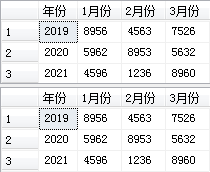
以上脚本返回的结果都是一样的,可以看见这几种方法都是可以实现的(但是有一定的局限性,假如一下七八十来年的数据,是不是就慌了),所以后续将介绍Pivot方法实现行列转换的操作。

点击关注“SQL数据库运维”,后台回复关键字:进群,带你进入高手如云的技术交流群。后台回复关键字:SQL,获取学习资料。
文章转载自SQL数据库运维,如果涉嫌侵权,请发送邮件至:contact@modb.pro进行举报,并提供相关证据,一经查实,墨天轮将立刻删除相关内容。
