



1.依赖
<dependency>
            <groupId>org.springframework.boot</groupId>
            <artifactId>spring-boot-starter</artifactId>
        </dependency>
        <dependency>
            <groupId>org.springframework.boot</groupId>
            <artifactId>spring-boot-starter-web</artifactId>
        </dependency>

        <dependency>
            <groupId>org.springframework.boot</groupId>
            <artifactId>spring-boot-starter-test</artifactId>
            <scope>test</scope>
        </dependency>

        <!-- 模板引擎 -->
        <dependency>
            <groupId>org.springframework.boot</groupId>
            <artifactId>spring-boot-starter-thymeleaf</artifactId>
        </dependency>
        <!-- websocket -->
        <dependency>
            <groupId>org.springframework.boot</groupId>
            <artifactId>spring-boot-starter-websocket</artifactId>
        </dependency>

        <!-- lombok工具 -->
        <dependency>
            <groupId>org.projectlombok</groupId>
            <artifactId>lombok</artifactId>
            <optional>true</optional>
        </dependency>
        <!-- 内置tomcat -->
        <dependency>
            <groupId>org.springframework.boot</groupId>
            <artifactId>spring-boot-starter-tomcat</artifactId>
            <scope>provided</scope>
        </dependency>
        <!-- 测试 -->
        <dependency>
            <groupId>org.springframework.boot</groupId>
            <artifactId>spring-boot-starter-test</artifactId>
            <scope>test</scope>
        </dependency>
2.配置类
package com.example.websocket.demo.socket;

import org.springframework.context.annotation.Bean;
import org.springframework.context.annotation.Configuration;
import org.springframework.web.socket.config.annotation.EnableWebSocket;
import org.springframework.web.socket.server.standard.ServerEndpointExporter;

@Configuration
@EnableWebSocket
public class MyConfig {

    @Bean
    public ServerEndpointExporter serverEndpointExporter(){
        return new ServerEndpointExporter();
    }
}
3.监听
package com.example.websocket.demo.socket;


import lombok.extern.slf4j.Slf4j;
import org.springframework.beans.factory.annotation.Autowired;
import org.springframework.stereotype.Component;


import javax.websocket.*;
import javax.websocket.server.PathParam;
import javax.websocket.server.ServerEndpoint;
import java.io.IOException;
import java.util.Map;

import static com.example.websocket.demo.socket.WebSocketHandler.createKey;
import static com.example.websocket.demo.socket.WebSocketPool.*;


@Slf4j
@Component
@ServerEndpoint("/net/websocket/{key}/{name}")//表明这是一个websocket服务的端点
public class MyEndPoint {


    //private static UserService userService;

    /*@Autowired
    public void setUserService(UserService userService){
        WebSocketEndPoint.userService = userService;
    }*/

    @OnOpen
    public void onOpen(@PathParam("key") String key, @PathParam("name") String name, Session session){
        log.info("新的连接:{}", session);
        add(createKey(key, name), session);
        WebSocketHandler.sendMessage(session,name+" on line");
        log.info("在线人数为:{}",count());
        sessionMap().keySet().forEach(item -> log.info("在线用户是:", item));
        for (Map.Entry<String, Session> item : sessionMap().entrySet()){
            log.info("12: {}", item.getKey());
        }
    }

    @OnMessage
    public void onMessage(String message){
        //当监听到前端消息,立即给所有链接的前端发送消息
        WebSocketHandler.sendMessageAll(message);
        log.info("接收到新的消息新消息: {}", message);
    }

    //链接关闭,移除在线人数
    @OnClose
    public void onClose(@PathParam("key") String key, @PathParam("name") String name,Session session){
        log.info("连接关闭: {}", session);
        remove(createKey(key, name));
        log.info("在线人数:{}",count());
        sessionMap().keySet().forEach(item -> log.info("在线用户:", (item.split("@"))[1]));
        for (Map.Entry<String, Session> item : sessionMap().entrySet()){
            log.info("12: {}", item.getKey());
        }
    }

    @OnError
    public void onError(Session session, Throwable throwable){
        try {
            session.close();
        } catch (IOException e) {
            log.error("onError Exception: {}", e);
        }
        log.info("连接出现异常: {}", throwable);
    }

}
4.发送消息
package com.example.websocket.demo.socket;

import lombok.extern.slf4j.Slf4j;

import javax.websocket.RemoteEndpoint;
import javax.websocket.Session;
import java.io.IOException;

import static com.example.websocket.demo.socket.WebSocketPool.sessionMap;


@Slf4j
public class WebSocketHandler {


    /**
     * 根据key和用户名生成一个key值,简单实现下
     * @param key
     * @param name
     * @return
     */
    public static String createKey(String key, String name){
        return key + "@" + name;
    }

    /**
     * 给指定用户发送信息
     * @param session
     * @param msg
     */
    public static void sendMessage(Session session, String msg){
        if (session == null)
            return;
        final RemoteEndpoint.Basic basic = session.getBasicRemote();
        if (basic == null)
            return;
        try {
            basic.sendText(msg);
        } catch (IOException e) {
            log.error("sendText Exception: {}", e);
        }
    }


    /**
     * 给所有的在线用户发送消息
     * @param message
     */
    public static void sendMessageAll(String message){
        log.info("广播:群发消息");
        sessionMap().forEach((key, session) -> sendMessage(session, message));
    }
}
5.统计在线人数,ConcurrentHashMap线程安全
package com.example.websocket.demo.socket;

import lombok.extern.slf4j.Slf4j;

import javax.websocket.Session;
import java.util.Map;
import java.util.concurrent.ConcurrentHashMap;

@Slf4j
public class WebSocketPool {

    //在线用户websocket连接池
    private static final Map<String, Session> ONLINE_USER_MAP = new ConcurrentHashMap<>();

    /**
     * 新增连接
     * @param key
     * @param session
     */
    public static void add(String key, Session session){
        if (!key.isEmpty() && session != null){
            ONLINE_USER_MAP.put(key, session);
        }
    }

    /**
     * 根据Key删连接
     * @param key
     */
    public static void remove(String key){
        if (!key.isEmpty()){
            ONLINE_USER_MAP.remove(key);
        }
    }

    /**
     * 获取在线人数
     * @return
     */
    public static int count(){
        return ONLINE_USER_MAP.size();
    }

    /**
     * 获取在线session池
     * @return
     */
    public static Map<String, Session> sessionMap(){
        return ONLINE_USER_MAP;
    }
}
6.html页面
<!DOCTYPE html>
<!DOCTYPE html>
<html lang="en" xmlns:th="http://www.springframework.org/schema/mvc">
<head>
<meta charset="UTF-8">
<title>chat room websocket</title>
<link rel="stylesheet" th:href="@{static/css/bootstrap.min.css}">
<script th:src="@{static/js/jquery.min.js}" ></script>
</head>
<body class="container" style="width: 60%">
<div class="form-group" ></br>
<h5>聊天室</h5>
<textarea id="message_content" class="form-control" readonly="readonly" cols="50" rows="10"></textarea>
</div>
<div class="form-group" >
<label for="in_user_name">昵称 </label>
<input id="in_user_name" value="" class="form-control" /></br>
<button id="user_join" class="btn btn-success" >进入聊天室</button>
<button id="user_exit" class="btn btn-warning" >离开聊天室</button>
</div>
<div class="form-group" >
<label for="in_room_msg" >群发消息 </label>
<input id="in_room_msg" value="" class="form-control" /></br>
<button id="user_send_all" class="btn btn-info" >发送</button>
</div>
</body>
<script type="text/javascript">
$(document).ready(function(){
var urlPrefix ='ws://localhost:8080/net/websocket/12/';
var ws = null;
$('#user_join').click(function(){
var username = $('#in_user_name').val();
var url = urlPrefix + username;
ws = new WebSocket(url);
ws.onopen = function () {
console.log("建立 连接...");
};
ws.onmessage = function(event){
//服务端发送的消息
$('#message_content').append(event.data+'\n');
};
ws.onclose = function(){
$('#message_content').append('用户['+username+'] 已经离开聊天室!' + '\n');
console.log("关闭 websocket 连接...");
}
});
//客户端发送消息到服务器
$('#user_send_all').click(function(){
var msg = $('#in_room_msg').val();
if(ws!=null){
ws.send(msg)
console.log("建立 连接...");
}
});
// 退出聊天室
$('#user_exit').click(function(){
if(ws){
ws.close();
}
});
})
</script>
</html>
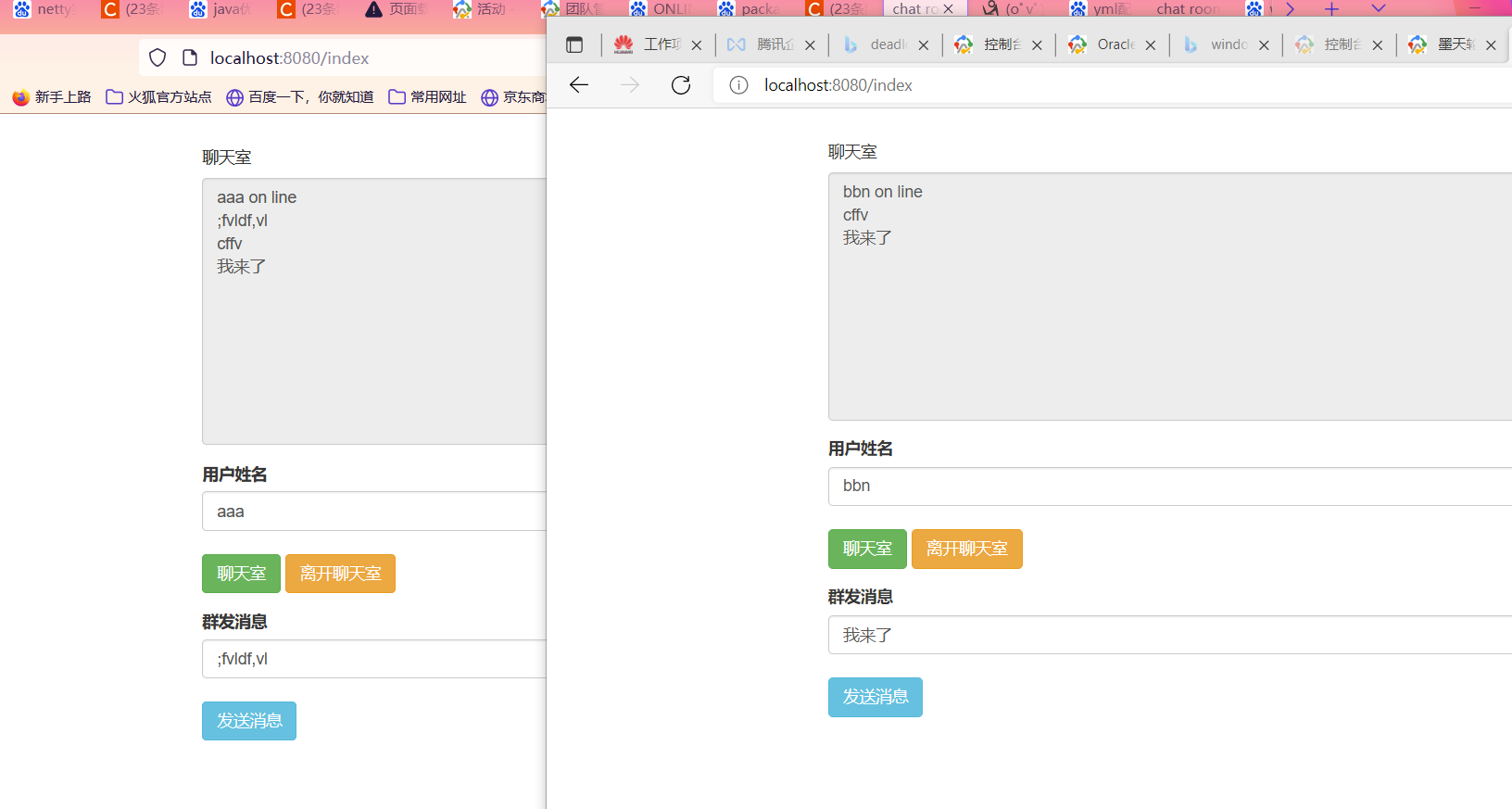
7.效果
1.依赖
<dependency>
            <groupId>org.springframework.boot</groupId>
            <artifactId>spring-boot-starter</artifactId>
        </dependency>
        <dependency>
            <groupId>org.springframework.boot</groupId>
            <artifactId>spring-boot-starter-web</artifactId>
        </dependency>

        <dependency>
            <groupId>org.springframework.boot</groupId>
            <artifactId>spring-boot-starter-test</artifactId>
            <scope>test</scope>
        </dependency>

        <!-- 模板引擎 -->
        <dependency>
            <groupId>org.springframework.boot</groupId>
            <artifactId>spring-boot-starter-thymeleaf</artifactId>
        </dependency>
        <!-- websocket -->
        <dependency>
            <groupId>org.springframework.boot</groupId>
            <artifactId>spring-boot-starter-websocket</artifactId>
        </dependency>

        <!-- lombok工具 -->
        <dependency>
            <groupId>org.projectlombok</groupId>
            <artifactId>lombok</artifactId>
            <optional>true</optional>
        </dependency>
        <!-- 内置tomcat -->
        <dependency>
            <groupId>org.springframework.boot</groupId>
            <artifactId>spring-boot-starter-tomcat</artifactId>
            <scope>provided</scope>
        </dependency>
        <!-- 测试 -->
        <dependency>
            <groupId>org.springframework.boot</groupId>
            <artifactId>spring-boot-starter-test</artifactId>
            <scope>test</scope>
        </dependency>
2.配置类
package com.example.websocket.demo.socket;

import org.springframework.context.annotation.Bean;
import org.springframework.context.annotation.Configuration;
import org.springframework.web.socket.config.annotation.EnableWebSocket;
import org.springframework.web.socket.server.standard.ServerEndpointExporter;

@Configuration
@EnableWebSocket
public class MyConfig {

    @Bean
    public ServerEndpointExporter serverEndpointExporter(){
        return new ServerEndpointExporter();
    }
}
3.监听
package com.example.websocket.demo.socket;


import lombok.extern.slf4j.Slf4j;
import org.springframework.beans.factory.annotation.Autowired;
import org.springframework.stereotype.Component;


import javax.websocket.*;
import javax.websocket.server.PathParam;
import javax.websocket.server.ServerEndpoint;
import java.io.IOException;
import java.util.Map;

import static com.example.websocket.demo.socket.WebSocketHandler.createKey;
import static com.example.websocket.demo.socket.WebSocketPool.*;


@Slf4j
@Component
@ServerEndpoint("/net/websocket/{key}/{name}")//表明这是一个websocket服务的端点
public class MyEndPoint {


    //private static UserService userService;

    /*@Autowired
    public void setUserService(UserService userService){
        WebSocketEndPoint.userService = userService;
    }*/

    @OnOpen
    public void onOpen(@PathParam("key") String key, @PathParam("name") String name, Session session){
        log.info("新的连接:{}", session);
        add(createKey(key, name), session);
        WebSocketHandler.sendMessage(session,name+" on line");
        log.info("在线人数为:{}",count());
        sessionMap().keySet().forEach(item -> log.info("在线用户是:", item));
        for (Map.Entry<String, Session> item : sessionMap().entrySet()){
            log.info("12: {}", item.getKey());
        }
    }

    @OnMessage
    public void onMessage(String message){
        //当监听到前端消息,立即给所有链接的前端发送消息
        WebSocketHandler.sendMessageAll(message);
        log.info("接收到新的消息新消息: {}", message);
    }

    //链接关闭,移除在线人数
    @OnClose
    public void onClose(@PathParam("key") String key, @PathParam("name") String name,Session session){
        log.info("连接关闭: {}", session);
        remove(createKey(key, name));
        log.info("在线人数:{}",count());
        sessionMap().keySet().forEach(item -> log.info("在线用户:", (item.split("@"))[1]));
        for (Map.Entry<String, Session> item : sessionMap().entrySet()){
            log.info("12: {}", item.getKey());
        }
    }

    @OnError
    public void onError(Session session, Throwable throwable){
        try {
            session.close();
        } catch (IOException e) {
            log.error("onError Exception: {}", e);
        }
        log.info("连接出现异常: {}", throwable);
    }

}
4.发送消息
package com.example.websocket.demo.socket;

import lombok.extern.slf4j.Slf4j;

import javax.websocket.RemoteEndpoint;
import javax.websocket.Session;
import java.io.IOException;

import static com.example.websocket.demo.socket.WebSocketPool.sessionMap;


@Slf4j
public class WebSocketHandler {


    /**
     * 根据key和用户名生成一个key值,简单实现下
     * @param key
     * @param name
     * @return
     */
    public static String createKey(String key, String name){
        return key + "@" + name;
    }

    /**
     * 给指定用户发送信息
     * @param session
     * @param msg
     */
    public static void sendMessage(Session session, String msg){
        if (session == null)
            return;
        final RemoteEndpoint.Basic basic = session.getBasicRemote();
        if (basic == null)
            return;
        try {
            basic.sendText(msg);
        } catch (IOException e) {
            log.error("sendText Exception: {}", e);
        }
    }


    /**
     * 给所有的在线用户发送消息
     * @param message
     */
    public static void sendMessageAll(String message){
        log.info("广播:群发消息");
        sessionMap().forEach((key, session) -> sendMessage(session, message));
    }
}
5.统计在线人数,ConcurrentHashMap线程安全
package com.example.websocket.demo.socket;

import lombok.extern.slf4j.Slf4j;

import javax.websocket.Session;
import java.util.Map;
import java.util.concurrent.ConcurrentHashMap;

@Slf4j
public class WebSocketPool {

    //在线用户websocket连接池
    private static final Map<String, Session> ONLINE_USER_MAP = new ConcurrentHashMap<>();

    /**
     * 新增连接
     * @param key
     * @param session
     */
    public static void add(String key, Session session){
        if (!key.isEmpty() && session != null){
            ONLINE_USER_MAP.put(key, session);
        }
    }

    /**
     * 根据Key删连接
     * @param key
     */
    public static void remove(String key){
        if (!key.isEmpty()){
            ONLINE_USER_MAP.remove(key);
        }
    }

    /**
     * 获取在线人数
     * @return
     */
    public static int count(){
        return ONLINE_USER_MAP.size();
    }

    /**
     * 获取在线session池
     * @return
     */
    public static Map<String, Session> sessionMap(){
        return ONLINE_USER_MAP;
    }
}
6.html页面
<!DOCTYPE html>
<!DOCTYPE html>
<html lang="en" xmlns:th="http://www.springframework.org/schema/mvc">
<head>
<meta charset="UTF-8">
<title>chat room websocket</title>
<link rel="stylesheet" th:href="@{static/css/bootstrap.min.css}">
<script th:src="@{static/js/jquery.min.js}" ></script>
</head>
<body class="container" style="width: 60%">
<div class="form-group" ></br>
<h5>聊天室</h5>
<textarea id="message_content" class="form-control" readonly="readonly" cols="50" rows="10"></textarea>
</div>
<div class="form-group" >
<label for="in_user_name">昵称 </label>
<input id="in_user_name" value="" class="form-control" /></br>
<button id="user_join" class="btn btn-success" >进入聊天室</button>
<button id="user_exit" class="btn btn-warning" >离开聊天室</button>
</div>
<div class="form-group" >
<label for="in_room_msg" >群发消息 </label>
<input id="in_room_msg" value="" class="form-control" /></br>
<button id="user_send_all" class="btn btn-info" >发送</button>
</div>
</body>
<script type="text/javascript">
$(document).ready(function(){
var urlPrefix ='ws://localhost:8080/net/websocket/12/';
var ws = null;
$('#user_join').click(function(){
var username = $('#in_user_name').val();
var url = urlPrefix + username;
ws = new WebSocket(url);
ws.onopen = function () {
console.log("建立 连接...");
};
ws.onmessage = function(event){
//服务端发送的消息
$('#message_content').append(event.data+'\n');
};
ws.onclose = function(){
$('#message_content').append('用户['+username+'] 已经离开聊天室!' + '\n');
console.log("关闭 websocket 连接...");
}
});
//客户端发送消息到服务器
$('#user_send_all').click(function(){
var msg = $('#in_room_msg').val();
if(ws!=null){
ws.send(msg)
console.log("建立 连接...");
}
});
// 退出聊天室
$('#user_exit').click(function(){
if(ws){
ws.close();
}
});
})
</script>
</html>
7.效果
「喜欢这篇文章,您的关注和赞赏是给作者最好的鼓励」
关注作者
【版权声明】本文为墨天轮用户原创内容,转载时必须标注文章的来源(墨天轮),文章链接,文章作者等基本信息,否则作者和墨天轮有权追究责任。如果您发现墨天轮中有涉嫌抄袭或者侵权的内容,欢迎发送邮件至:contact@modb.pro进行举报,并提供相关证据,一经查实,墨天轮将立刻删除相关内容。
