



在使用spring boot +Mysql组合的时候。遇到了连接数据库错误。信息:The server time zone value xxx
Caused by: com.mysql.cj.exceptions.InvalidConnectionAttributeException: The server time zone value '�й���ʱ��' is unrecognized or represents more than one time zone. You must configure either the server or JDBC driver (via the serverTimezone configuration property) to use a more specifc time zone value if you want to utilize time zone support.
at sun.reflect.NativeConstructorAccessorImpl.newInstance0(Native Method)
at sun.reflect.NativeConstructorAccessorImpl.newInstance(NativeConstructorAccessorImpl.java:62)
at sun.reflect.DelegatingConstructorAccessorImpl.newInstance(DelegatingConstructorAccessorImpl.java:45)
at java.lang.reflect.Constructor.newInstance(Constructor.java:423)

查看错误的数据库链接:
jdbc:mysql://127.0.0.1:3306/springbootautocode?user=root&password=123456

错误原因分析:
这是因为mysql 服务器时区问题导致的。
解决方案一:
直接在url后面添加:&serverTimezone=UTC
如果想或者添加:serverTimezone=GMT%2B8
因为中国的时区是在东八区。所以这里设置时区
解决方案二:
修改mysql 服务器的时区配置。
查看当前mysql服务器时区语句:
show variables like '%time_zone%';
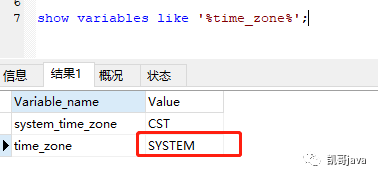
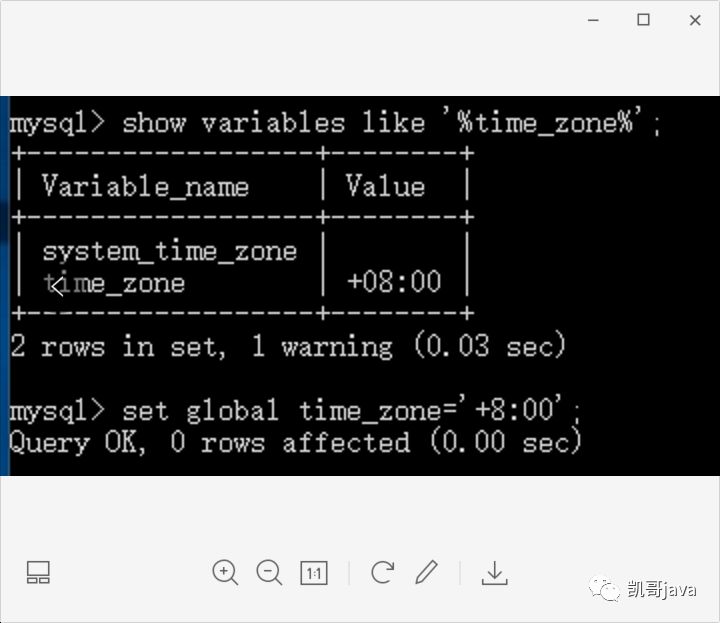
修改time_zone的值为+8:00语句:
set global time_zone='+8:00';
修改后:
这里不推荐第二种修改方式。
因为如果修改了服务器时区的话,原来老数据的时间就不比时间少8个小时。这个时候会导致很多未知的问题出现。
所以强烈推荐第一种修改方式。方便又简单。
下面看看凯哥的:
spring.datasource.url=jdbc:mysql://127.0.0.1:3306/springbootautocode?serverTimezone=GMT%2B8&useUnicode=true&characterEncoding=utf-8
修改完成后,重启服务,就可以正常访问了。
