



学更好的别人,
做更好的自己。
——《微卡智享》

前言

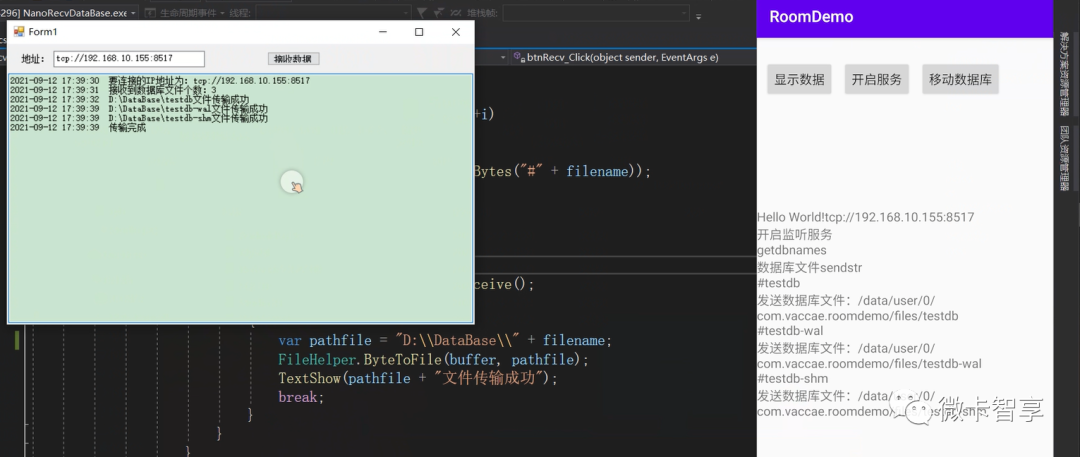
实现效果
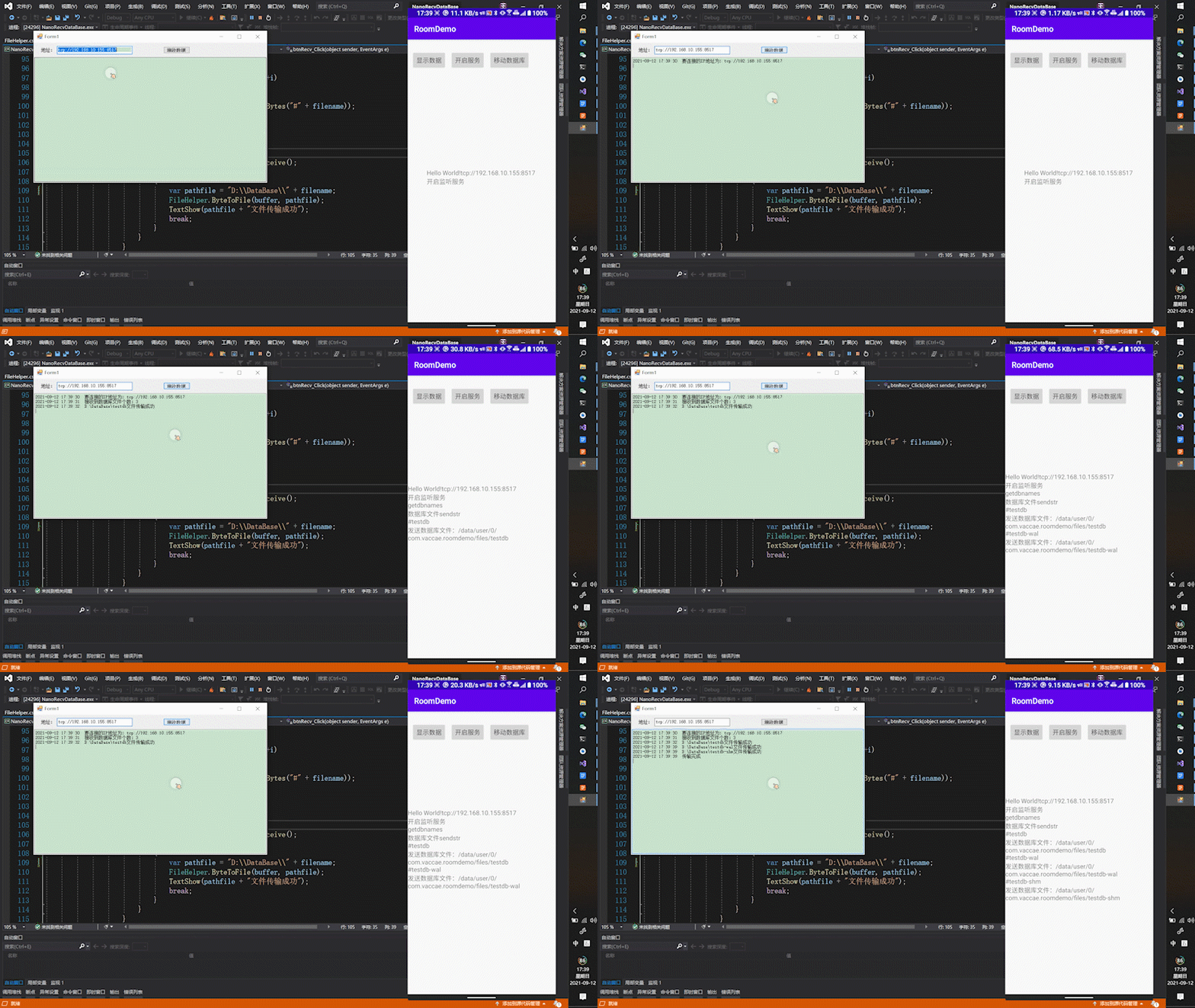
Q1
为什么要做这个东西?
文章开头也说过,开发初期做业务测试的时候,往往查询功能还没做完,需要看数据库中业务逻辑做的是否对,数据是否正常,所以需要在数据库中查询。
主要我最近开发的是在硬件设备,装的Android平板控制,要求在断网情况下单机也能运行,所以基本的业务逻辑包括数据的保存都在本地处理,后台定时通讯上传数据,除了文章开头说的开发初期可以方便传上来数据库来分析,后期也是想通过这个方式实现本地的数据库备份。于是就有了这篇文章和Demo,文章最后还是会列出源码地址,想研究的小伙伴也可直接下载。
实现方式
微卡智享
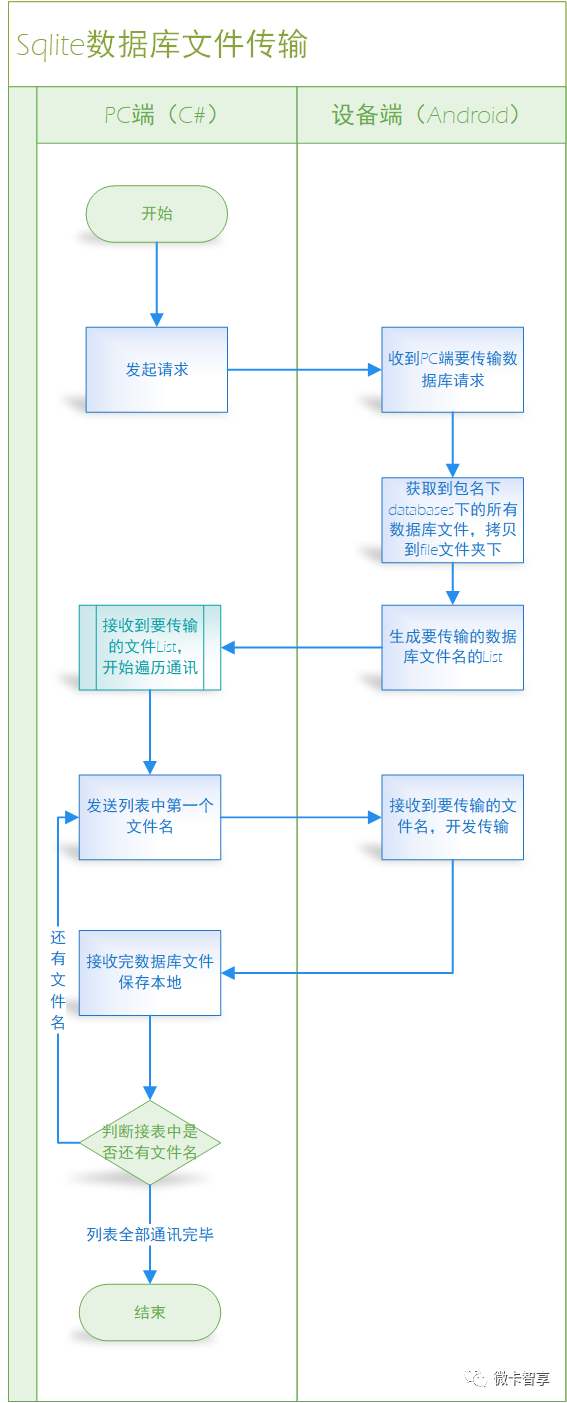
流程设计
Demo中使用的库
allprojects {repositories {google()jcenter()maven { url 'https://jitpack.io' }}}//VNanoMsg通讯库implementation 'com.github.Vaccae:VNanoMsg:1.0.4'//LiveEventBusapi 'io.github.jeremyliao:live-event-bus-x:1.8.0'//Roomdef room_version = "2.2.5"kapt "androidx.room:room-compiler:$room_version"implementation "androidx.room:room-runtime:$room_version"implementation "androidx.room:room-ktx:$room_version"

Android端Demo
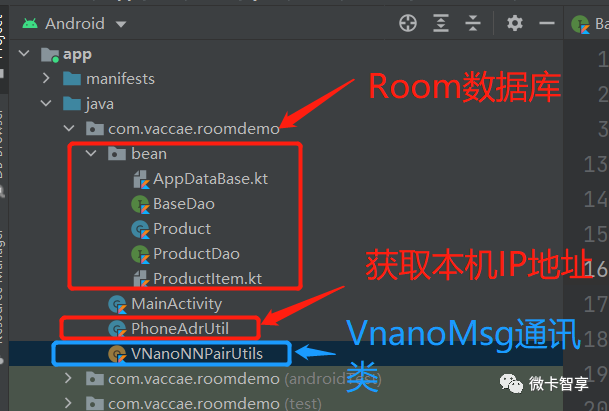
01
Room数据库创建
package com.vaccae.roomdemo.beanimport androidx.room.*@Daointerface BaseDao<T> {@Transaction@Insertfun add(vararg arr:T)@Transaction@Insertfun add(arr:ArrayList<T>)@Transaction@Updatefun upd(vararg arr:T)@Transaction@Updatefun upd(arr:ArrayList<T>)@Transaction@Deletefun del(vararg arr:T)@Transaction@Deletefun del(arr:ArrayList<T>)}
Productitem
package com.vaccae.roomdemo.beanimport androidx.room.ColumnInfoimport androidx.room.Daoimport androidx.room.Entityimport androidx.room.Query@Entity(tableName = "Body", primaryKeys = ["Code", "BarCode"])class ProductItem {@ColumnInfo(name = "Code")lateinit var code: String@ColumnInfo(name = "BarCode")lateinit var barcode: String@ColumnInfo(name = "Qty")var qty = 0}@Daointerface ProductItemDao : BaseDao<ProductItem> {@Query("select * from Body")fun getAll(): List<ProductItem>}
package com.vaccae.roomdemo.beanimport android.content.Contextimport androidx.room.Databaseimport androidx.room.Roomimport androidx.room.RoomDatabaseimport androidx.room.migration.Migrationimport androidx.sqlite.db.SupportSQLiteDatabase/*** 作者:Vaccae* 邮箱:3657447@qq.com* 创建时间:2020-04-14 14:29* 功能模块说明:*/@Database(entities = [Product::class,ProductItem::class], version = 2)abstract class AppDataBase : RoomDatabase() {abstract fun ProductDao(): ProductDaoabstract fun ProductItemDao():ProductItemDao}class DbUtil {//数据库升级var migration1_2 = object : Migration(1, 2) {override fun migrate(database: SupportSQLiteDatabase) {val sql="CREATE TABLE if not exists Body(Code TEXT NOT NULL ," +"BarCode TEXT NOT NULL,Qty INTEGER NOT NULL,PRIMARY KEY(Code,BarCode))"database.execSQL(sql)}}//创建单例private var INSTANCE: AppDataBase? = nullfun getDatabase(context: Context): AppDataBase {if (INSTANCE == null) {synchronized(lock = AppDataBase::class) {if (INSTANCE == null) {INSTANCE = Room.databaseBuilder(context.applicationContext,AppDataBase::class.java, "testdb").allowMainThreadQueries()//允许在主线程查询数据.addMigrations(migration1_2)//数据库升级时执行.fallbackToDestructiveMigration().build()}}}return INSTANCE!!}}
private fun CreateProductItem() {//定义明细列表val itemlist = ArrayList<ProductItem>()//加载AppDataBaseval db = DbUtil().getDatabase(this);//显示所有Product的明细val list = db.ProductDao().getAll()list.forEach {for (i in 1..3) {val item = ProductItem()item.code = it.codeitem.barcode = it.code + i.toString()item.qty = 1itemlist.add(item)}}db.ProductItemDao().add(itemlist)//显示明细val getlist = db.ProductItemDao().getAll()tvshow.text = ""getlist.forEach {tvshow.append(it.code + " " + it.barcode+ " " + it.qty + "\r\n")}}
02
获取本机IP地址
package com.vaccae.roomdemoimport android.content.Contextimport android.net.ConnectivityManagerimport android.net.NetworkCapabilitiesimport android.net.wifi.WifiManagerimport android.os.Buildimport androidx.annotation.RequiresApiimport java.net.Inet4Addressimport java.net.InetAddressimport java.net.NetworkInterfaceimport java.util.*/*** 作者:Vaccae* 邮箱:3657447@qq.com* 创建时间:13:14* 功能模块说明:*/class PhoneAdrUtil {companion object {fun getIpAdr(context: Context): String? {val cm = context.getSystemService(Context.CONNECTIVITY_SERVICE) as ConnectivityManagerif (Build.VERSION.SDK_INT < 23) {val networiinfo = cm.activeNetworkInfonetworiinfo?.let {if (it.type == ConnectivityManager.TYPE_WIFI) {return getWIfiIpAdr(context)} else if (it.type == ConnectivityManager.TYPE_MOBILE) {return getMobileIpAdr()}}} else {val network = cm.activeNetworknetwork?.let { it ->val networkCapabilities = cm.getNetworkCapabilities(it)networkCapabilities?.let { item ->if (item.hasTransport(NetworkCapabilities.TRANSPORT_WIFI)) {return getWIfiIpAdr(context)}else if (item.hasTransport(NetworkCapabilities.TRANSPORT_CELLULAR)) {return getMobileIpAdr()}}}}return null}private fun getMobileIpAdr():String {var ipstr = ""val en: Enumeration<NetworkInterface> = NetworkInterface.getNetworkInterfaces()while (en.hasMoreElements()) {val intf: NetworkInterface = en.nextElement()val enumIpAddr: Enumeration<InetAddress> = intf.inetAddresseswhile (enumIpAddr.hasMoreElements()) {val inetAddress: InetAddress = enumIpAddr.nextElement()if (!inetAddress.isLoopbackAddress && inetAddress is Inet4Address) {ipstr = inetAddress.hostAddress.toString()return ipstr}}}return ipstr}private fun getWIfiIpAdr(context: Context):String{val wifiManager =context.getSystemService(Context.WIFI_SERVICE) as WifiManagerval wifiinfo = wifiManager.connectionInforeturn ChangeIP2String(wifiinfo.ipAddress)}private fun ChangeIP2String(ip: Int): String {return "" + (ip and 0xFF) + "." +((ip shr 8) and 0xFF) + "." +((ip shr 16) and 0xFF) + "." +(ip shr 24 and 0xFF);}}}
03
VNanoMsg数据通讯
package com.vaccae.roomdemoimport android.R.attrimport com.jeremyliao.liveeventbus.LiveEventBusimport com.vaccae.vnanomsg.NNPAIRimport kotlinx.coroutines.*import java.io.Fileimport java.io.FileInputStreamimport java.lang.Exceptionimport android.R.attr.pathimport android.R.string.no/*** 作者:Vaccae* 邮箱:3657447@qq.com* 创建时间:09:31* 功能模块说明:*/object VNanoNNPairUtils {private var mNNPAIR: NNPAIR? = nullprivate var isOpenListen = false;fun IsRecvListen(): Boolean {return isOpenListen}fun getInstance(): VNanoNNPairUtils {mNNPAIR ?: run {synchronized(VNanoNNPairUtils::class.java) {mNNPAIR = NNPAIR()}}return VNanoNNPairUtils}fun Bind(ipadr: String): VNanoNNPairUtils {mNNPAIR?.let {//var ipstr = "tcp://192.168.10.155:8157"it.bind(ipadr)}return VNanoNNPairUtils}fun UnBind() {mNNPAIR?.let {it.shutdownbind()}}private fun byteMerger(bt1: ByteArray, bt2: ByteArray): ByteArray {val bt3 = ByteArray(bt1.size + bt2.size)System.arraycopy(bt1, 0, bt3, 0, bt1.size)System.arraycopy(bt2, 0, bt3, bt1.size, bt2.size)return bt3}fun Send(file: File) {mNNPAIR?.let {var filebytearray = ByteArray(0)var len = 0;var byteArray = ByteArray(1024)val inputStream: FileInputStream = FileInputStream(file)//判断是否读到文件末尾while (inputStream.read(byteArray).also { len = it } != -1) {//将文件循环写入fielbytearrayfilebytearray = byteMerger(filebytearray, byteArray)}it.send(filebytearray)}}fun Send(byte: ByteArray) {mNNPAIR?.let { it.send(byte) }}fun StartRecvListen() {mNNPAIR?.let {isOpenListen = true;val recvScope = CoroutineScope(Job())recvScope.launch {try {withContext(Dispatchers.IO) {while (isOpenListen) {delay(50)val recvstr = it.recv()recvstr?.let {LiveEventBus.get("NNPair", String::class.java).postOrderly(it)}}}} catch (e: Exception) {throw e}}}}fun StopRecvListen() {isOpenListen = false;}}
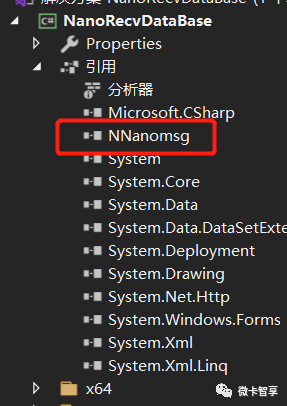
C#桌面端Demo
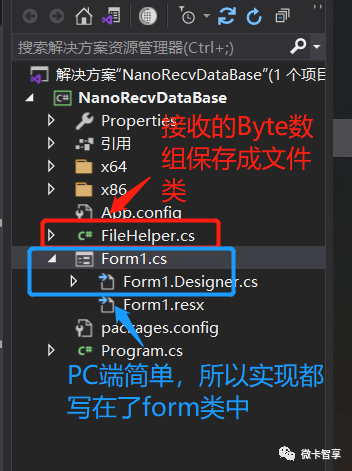
01
FileHelper文件保存
using System;using System.Collections.Generic;using System.IO;using System.Linq;using System.Text;namespace nanomsgclient{public class FileHelper{/// <summary>/// 将文件转换成byte[]数组/// </summary>/// <param name="fileUrl">文件路径文件名称</param>/// <returns>byte[]数组</returns>public static byte[] FileToByte(string fileUrl){try{using (FileStream fs = new FileStream(fileUrl, FileMode.Open, FileAccess.Read)){byte[] byteArray = new byte[fs.Length];fs.Read(byteArray, 0, byteArray.Length);return byteArray;}}catch{return null;}}/// <summary>/// 将byte[]数组保存成文件/// </summary>/// <param name="byteArray">byte[]数组</param>/// <param name="fileName">保存至硬盘的文件路径</param>/// <returns></returns>public static bool ByteToFile(byte[] byteArray, string fileName){bool result = false;try{using (FileStream fs = new FileStream(fileName, FileMode.OpenOrCreate, FileAccess.Write)){fs.Write(byteArray, 0, byteArray.Length);result = true;}}catch{result = false;}return result;}}}
02
Form界面
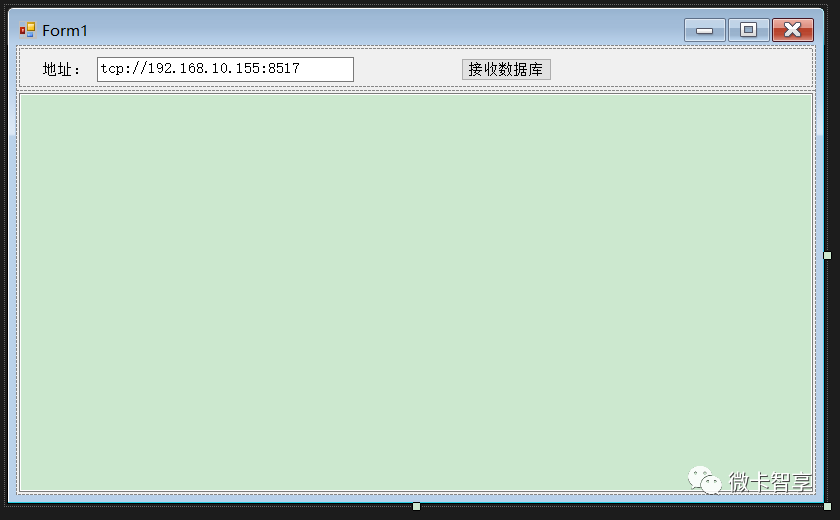
using nanomsgclient;using NNanomsg.Protocols;using System;using System.Collections.Generic;using System.ComponentModel;using System.Data;using System.Drawing;using System.Linq;using System.Text;using System.Threading;using System.Threading.Tasks;using System.Windows.Forms;namespace NanoRecvDataBase{public partial class Form1 : Form{private PairSocket pairSocket = null;public Form1(){InitializeComponent();CheckForIllegalCrossThreadCalls = false;_tbMsg = tbMsg;}#region 文本框操作//定义文本框private static TextBox _tbMsg;//定义Actionprivate Action<string> TextShowAction = new Action<string>(TextShow);//定义更新UI函数private static void TextShow(string sMsg){//当文本行数大于500后清空if (_tbMsg.Lines.Length > 500){_tbMsg.Clear();}string ShowMsg = DateTime.Now + " " + sMsg + "\r\n";_tbMsg.AppendText(ShowMsg);//让文本框获取焦点_tbMsg.Focus();//设置光标的位置到文本尾_tbMsg.Select(_tbMsg.TextLength, 0);//滚动到控件光标处_tbMsg.ScrollToCaret();}#endregionprivate void btnRecv_Click(object sender, EventArgs e){try{if (pairSocket == null){pairSocket = new PairSocket();var ipadr = tbipadr.Text;TextShow("要连接的IP地址为:" + ipadr);pairSocket.Connect(ipadr);}var res = new Task<string>(() =>{pairSocket.Send(Encoding.UTF8.GetBytes("getdbnames"));while (true){Thread.Sleep(50);//接收数据byte[] buffer = pairSocket.Receive();if (buffer != null){string recvstr = Encoding.UTF8.GetString(buffer);return recvstr;}}});res.Start();var getdbnum = res.Result;var dbnames = getdbnum.Split('#');TextShow("接收到数据库文件个数:" + dbnames.Length);var resfile = new Task<String>(() =>{for (int i = 0; i < dbnames.Length; ++i){string filename = dbnames[i];pairSocket.Send(Encoding.UTF8.GetBytes("#" + filename));while (true){Thread.Sleep(50);//接收数据byte[] buffer = pairSocket.Receive();if (buffer != null){var pathfile = "D:\\DataBase\\" + filename;FileHelper.ByteToFile(buffer, pathfile);TextShow(pathfile + "文件传输成功");break;}}}return "传输完成";});resfile.Start();TextShow(resfile.Result);}catch (Exception ex){TextShow(ex.Message);}}}}
源码地址
完
扫描二维码
获取更多精彩
微卡智享

「 往期文章 」
文章转载自微卡智享,如果涉嫌侵权,请发送邮件至:contact@modb.pro进行举报,并提供相关证据,一经查实,墨天轮将立刻删除相关内容。
