




小编有时要用matlab处理几亿条数据,程序运行很慢,为了心中有数的摸鱼,我希望Matlab告诉我程序运行到哪了,这里介绍三种方法:1.进度条 2.语音提醒 3.邮件提醒。
01.核心代码
—
1.进度条:
% waitbar功能:创建或更新等待条对话框f = waitbar(0,'1','Name','进度');set(f,'color','w');for k=1:numwaitbar(k/num,f,sprintf('%s',['已完成:',num2str(round(100*k/num)),'%']));end
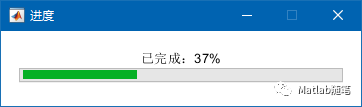
2.语音提醒:
% sound功能:将信号数据矩阵转换为声音% Fs:采样率% y:音频信号[y, Fs]=audioread('music.mp3');sound(y,Fs);
注:大家可以用“文字转语音”在线工具定制自己的语音提醒
3.邮件提醒:
% sendmail功能:发送邮件% receiver:收件人邮箱% title:邮件标题% content:邮件内容% attachments:邮件附件sendmail(receiver,title,content,attachments);
02.源代码
—
% 1.进度提醒f = waitbar(0,'1','Name','进度');set(f,'color','w');num=100;for k=1:numpause(0.1)waitbar(k/num,f,sprintf('%s',['已完成:',num2str(round(100*k/num)),'%']));end% 2.邮件提醒mysendemail% 3.语音提醒tx%% 函数function tx()[y, Fs]=audioread('music.mp3');ticwhile 1sound(y,Fs);pause(4);t=toc;if t>30 %播放30sbreak;endendendfunction mysendemail()%% 1.基础配置% 账号设置mail = '1292584987@qq.com'; % 邮箱地址password = 'abcdefg'; % 授权码% 需要在qq邮箱开启,具体操作请看下文% 服务器设置setpref('Internet','E_mail',mail);setpref('Internet','SMTP_Server','smtp.qq.com');% 选择qq邮箱setpref('Internet','SMTP_Username',mail);setpref('Internet','SMTP_Password',password);props = java.lang.System.getProperties;props.setProperty('mail.smtp.auth','true');props.setProperty('mail.smtp.socketFactory.class', 'javax.net.ssl.SSLSocketFactory');props.setProperty('mail.smtp.socketFactory.port','465');%% 2.设置邮件内容% 收件人receiver='2651056890@qq.com';% 邮件标题title='Matlab程序进度';% 邮件内容content='运行完成!';% 发送邮件sendmail(receiver,title,content);end
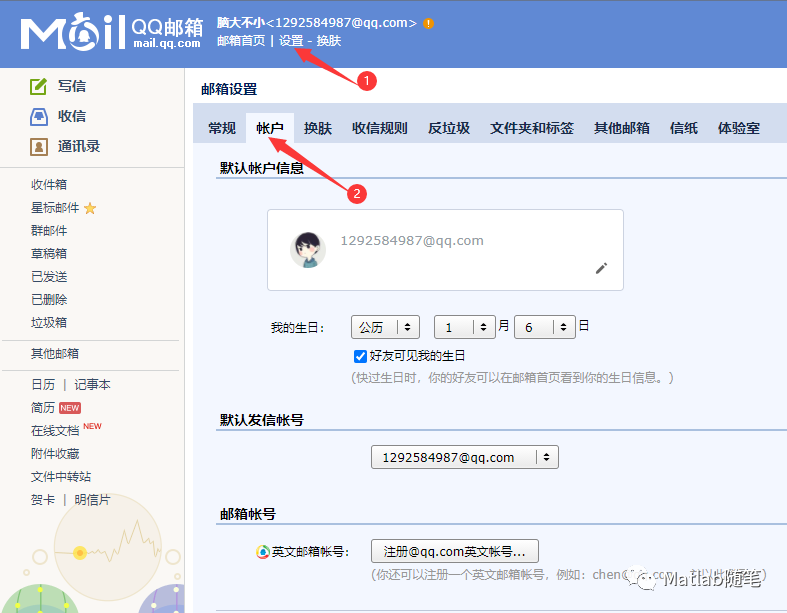
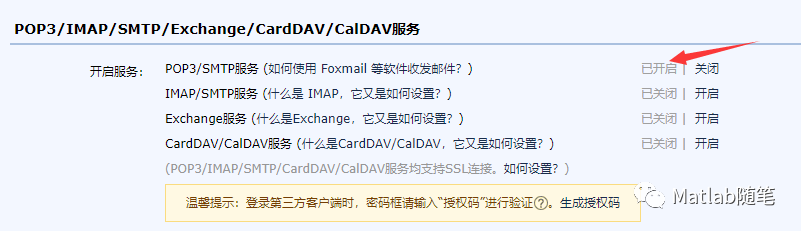
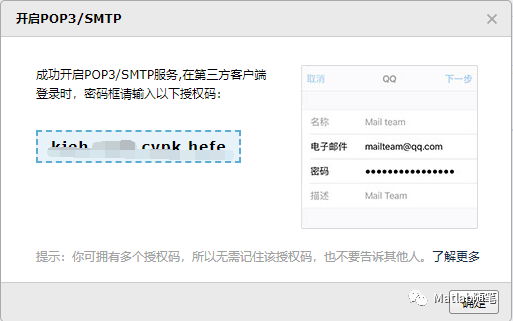
备注1:我用的Matlab2019,低版本请把函数摘出来,不要在一个脚本中运行哦~~
备注2:我另外还写了“定时发送邮件的内容”,后台回复“定时发送邮件”即可获取~~
感谢您关注我的公众号,如果您喜欢我的文章,可以“点赞”、“在看”支持我,另外,明天更新一款配色GUI哦,期待您的使用~~



点个在看你最好看

文章转载自不糊涂录,如果涉嫌侵权,请发送邮件至:contact@modb.pro进行举报,并提供相关证据,一经查实,墨天轮将立刻删除相关内容。
