一、概述
为了远程调试集群,我本地编译了一下源码,记录下Hadoop3.1.1源码编译记录和遇到的问题,只写关键步骤,其他自行百度。
软件版本:
Centos7.2 可联网
Hadoop3.1.1
Maven3.5.2
Jdk1.8
Protobuf2.5.0
cmake3.14.5
1.官网下载源码包,里面包含各个版本hadoop安装包和源码包:
https://archive.apache.org/dist/hadoop/common/
我下载的是:
https://archive.apache.org/dist/hadoop/common/hadoop-3.1.1/hadoop-3.1.1-src.tar.gz
2.上传到/opt解压,我这里在Centos7.2桌面版里面装了linux版本的Idea2018.3.6,我直接导入到了他的workspace工作空间下,以备后面源码调试使用。
cd data/ideaIU201836/Aworkspacetar -zxvf hadoop-3.1.1-src.tar.gz
3.我的机器是可以联网的,最好在联网环境编译,会依赖各种jar,不然很麻烦,先安装jdk、maven,编译之前还有一些依赖库需要安装:
yum -y install kernel-develyum -y install gcc*yum -y install cmakeyum -y install glibc-headersyum -y install gcc-c++yum -y install zip-develyum -y install openssl-develyum -y install svnyum -y install gityum -y install ncurses-develyum -y install lzo-develyum -y install autoconfyum -y install libtoolyum -y install automake
4.还需要安装ProtocolBuffer2.5.0,MapReduce和HDFS用protocol buffer来压缩和交换数据,资源在我百度网盘:
链接:https://pan.baidu.com/s/1ljoP-tLCPkVbtssEdiGTFQ
提取码:q5fe
安装命令,大体就这几步:
tar -zxf protobuf-2.5.0.tar.gzcd protobuf-2.5.0./configure --prefix=/data/protobuf-2.5.0make && make install//在/etc/profile中添加bin路径到path中export PATH=/data/protobuf-2.5.0/bin:$PATH//使配置生效source /etc/profile//安装完成查看版本protoc --version
5.下面就是编译了,这里跳过测试,编译命令有的不一样,你自己百度下:
mvn package -Pdist -DskipTests -Dtar -Dmaven.javadoc.skip=true 仅编译正常源码部分,对于native部分不进行编译,最终结果打包mvn package -Pdist,native,docs -DskipTests -Dtar 编译正常部分源码、native依赖库以及帮助文档,最终结果打包mvn -X package -Pdist,native,docs -DskipTests -Dtar -Dmaven.skip.test=true -Dmaven.javadoc.skip=true 我们使用这种去编译
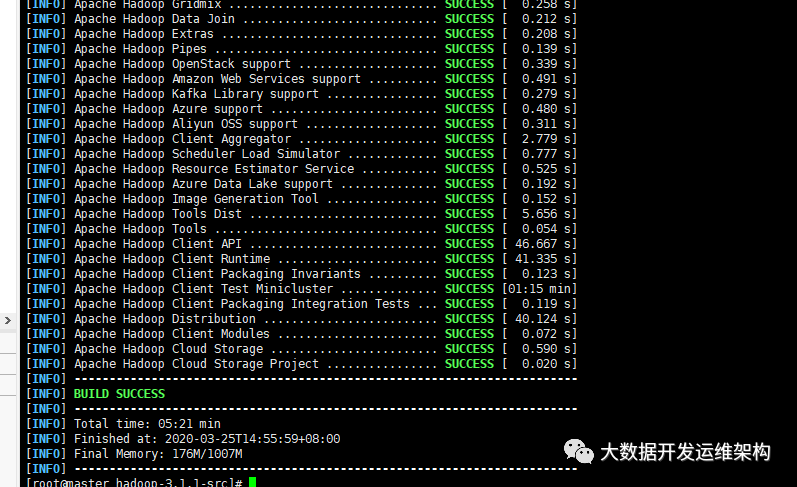
6.只要是能联网基本没啥问题,编译成功:
报错记录:
1.编译 Apache Hadoop Common 报错
[ERROR] Failed to execute goal org.apache.hadoop:hadoop-maven-plugins:3.1.1:cmake-compile (cmake-compile) on project hadoop-common: CMake failed with error code 1 -> [Help 1]org.apache.maven.lifecycle.LifecycleExecutionException: Failed to execute goal org.apache.hadoop:hadoop-maven-plugins:3.1.1:cmake-compile (cmake-compile) on project hadoop-common: CMake failed with error code 1at org.apache.maven.lifecycle.internal.MojoExecutor.execute (MojoExecutor.java:213)
上面还有一点报错信息,应该是要升级CMake版本:
[WARNING] CMake Error at CMakeLists.txt:23 (cmake_minimum_required):[WARNING] CMake 3.1 or higher is required. You are running version 2.8.12.2[WARNING][WARNING][WARNING] -- Configuring incomplete, errors occurred![WARNING] See also "/data/ideaIU201836/Aworkspace/hadoop-3.1.1-src/hadoop-common-project/hadoop-common/target/native/CMakeFiles/CMakeOutput.log".
我这里升级成了cmake-3.14.5问题解决,大体步骤如下:
先卸载原有的cmakeyum remove cmake下载cd /optwget https://github.com/Kitware/CMake/releases/download/v3.14.5/cmake-3.14.5-Linux-x86_64.tar.gzc解压:tar zxvf cmake-3.14.5-Linux-x86_64.tar.gz配置环境变量:export CMAKE_HOME=/opt/cmake-3.14.5-Linux-x86_64export PATH=$PATH:$CMAKE_HOME/bin//生效source /etc/profile//查看版本是否安装成功cmake -version
2.报错信息:Apache Hadoop Client Packaging Invariants for Test报错
[ERROR] Failed to execute goal org.apache.maven.plugins:maven-enforcer-plugin:3.0.0-M1:enforce (enforce-banned-dependencies) on project hadoop-client-check-test-invariants: Some Enforcer rules have failed. Look above for specific messages explaining why the rule failed. -> [Help 1]org.apache.maven.lifecycle.LifecycleExecutionException: Failed to execute goal org.apache.maven.plugins:maven-enforcer-plugin:3.0.0-M1:enforce (enforce-banned-dependencies) on project hadoop-client-check-test-invariants: Some Enforcer rules have failed. Look above for specific messages explaining why the rule failed.at org.apache.maven.lifecycle.internal.MojoExecutor.execute (MojoExecutor.java:213)at org.apache.maven.lifecycle.internal.MojoExecutor.execute (MojoExecutor.java:154)at org.apache.maven.lifecycle.internal.MojoExecutor.execute (MojoExecutor.java:146)at org.apache.maven.lifecycle.internal.LifecycleModuleBuilder.buildProject (LifecycleModuleBuilder.java:117)at org.apache.maven.lifecycle.internal.LifecycleModuleBuilder.buildProject (LifecycleModuleBuilder.java:81)at org.apache.maven.lifecycle.internal.builder.singlethreaded.SingleThreadedBuilder.build (SingleThreadedBuilder.java:51)at org.apache.maven.lifecycle.internal.LifecycleStarter.execute (LifecycleStarter.java:128)at org.apache.maven.DefaultMaven.doExecute (DefaultMaven.java:309)at org.apache.maven.DefaultMaven.doExecute (DefaultMaven.java:194)at org.apache.maven.DefaultMaven.execute (DefaultMaven.java:107)at org.apache.maven.cli.MavenCli.execute (MavenCli.java:955)at org.apache.maven.cli.MavenCli.doMain (MavenCli.java:290)at org.apache.maven.cli.MavenCli.main (MavenCli.java:194)at sun.reflect.NativeMethodAccessorImpl.invoke0 (Native Method)at sun.reflect.NativeMethodAccessorImpl.invoke (NativeMethodAccessorImpl.java:62)at sun.reflect.DelegatingMethodAccessorImpl.invoke (DelegatingMethodAccessorImpl.java:43)at java.lang.reflect.Method.invoke (Method.java:498)at org.codehaus.plexus.classworlds.launcher.Launcher.launchEnhanced (Launcher.java:289)at org.codehaus.plexus.classworlds.launcher.Launcher.launch (Launcher.java:229)at org.codehaus.plexus.classworlds.launcher.Launcher.mainWithExitCode (Launcher.java:415)at org.codehaus.plexus.classworlds.launcher.Launcher.main (Launcher.java:356)Caused by: org.apache.maven.plugin.MojoExecutionException: Some Enforcer rules have failed. Look above for specific messages explaining why the rule failed.at org.apache.maven.plugins.enforcer.EnforceMojo.execute (EnforceMojo.java:243)at org.apache.maven.plugin.DefaultBuildPluginManager.executeMojo (DefaultBuildPluginManager.java:134)at org.apache.maven.lifecycle.internal.MojoExecutor.execute (MojoExecutor.java:208)at org.apache.maven.lifecycle.internal.MojoExecutor.execute (MojoExecutor.java:154)at org.apache.maven.lifecycle.internal.MojoExecutor.execute (MojoExecutor.java:146)at org.apache.maven.lifecycle.internal.LifecycleModuleBuilder.buildProject (LifecycleModuleBuilder.java:117)at org.apache.maven.lifecycle.internal.LifecycleModuleBuilder.buildProject (LifecycleModuleBuilder.java:81)at org.apache.maven.lifecycle.internal.builder.singlethreaded.SingleThreadedBuilder.build (SingleThreadedBuilder.java:51)at org.apache.maven.lifecycle.internal.LifecycleStarter.execute (LifecycleStarter.java:128)at org.apache.maven.DefaultMaven.doExecute (DefaultMaven.java:309)at org.apache.maven.DefaultMaven.doExecute (DefaultMaven.java:194)at org.apache.maven.DefaultMaven.execute (DefaultMaven.java:107)at org.apache.maven.cli.MavenCli.execute (MavenCli.java:955)at org.apache.maven.cli.MavenCli.doMain (MavenCli.java:290)at org.apache.maven.cli.MavenCli.main (MavenCli.java:194)at sun.reflect.NativeMethodAccessorImpl.invoke0 (Native Method)at sun.reflect.NativeMethodAccessorImpl.invoke (NativeMethodAccessorImpl.java:62)at sun.reflect.DelegatingMethodAccessorImpl.invoke (DelegatingMethodAccessorImpl.java:43)at java.lang.reflect.Method.invoke (Method.java:498)at org.codehaus.plexus.classworlds.launcher.Launcher.launchEnhanced (Launcher.java:289)at org.codehaus.plexus.classworlds.launcher.Launcher.launch (Launcher.java:229)at org.codehaus.plexus.classworlds.launcher.Launcher.mainWithExitCode (Launcher.java:415)at org.codehaus.plexus.classworlds.launcher.Launcher.main (Launcher.java:356)[ERROR][ERROR] Re-run Maven using the -X switch to enable full debug logging.[ERROR][ERROR] For more information about the errors and possible solutions, please read the following articles:[ERROR] [Help 1] http://cwiki.apache.org/confluence/display/MAVEN/MojoExecutionException[ERROR][ERROR] After correcting the problems, you can resume the build with the command[ERROR] mvn <goals> -rf :hadoop-client-check-test-invariants
解决方法:
修改文件/data/ideaIU201836/Aworkspace/hadoop-3.1.1-src/hadoop-client-modules/pom.xml,注释掉报错工程那一行即可:
<modules><!-- Left as an empty artifact w/dep for compat --><module>hadoop-client</module><!-- Should be used at compile scope for access to IA.Public classes --><module>hadoop-client-api</module><!-- Should be used at runtime scope for remaining classes necessary for hadoop-client-api to function --><module>hadoop-client-runtime</module><!-- Should be used at test scope for those that need access to mini cluster that works with above api and runtime --><module>hadoop-client-minicluster</module><!-- Checks invariants above --><module>hadoop-client-check-invariants</module>//修改 这里注释掉这一行<!-- <module>hadoop-client-check-test-invariants</module>--><!-- Attempt to use the created libraries --><module>hadoop-client-integration-tests</module>
至此Hadoop3.1.1编译结束,我看网上很多源码调试的,但是都写的不太清楚,后面我会讲解各个组件如何进行远程调试集群。
如果觉得我的文章能帮到您,请关注微信公众号“大数据开发运维架构”,并转发朋友圈,谢谢支持!!!
相关阅读: