
最近,在脉脉上看到一个楼主提出的问题:MySQL数据量大时,delete操作无法命中索引;并且还附上了相关案例截图。
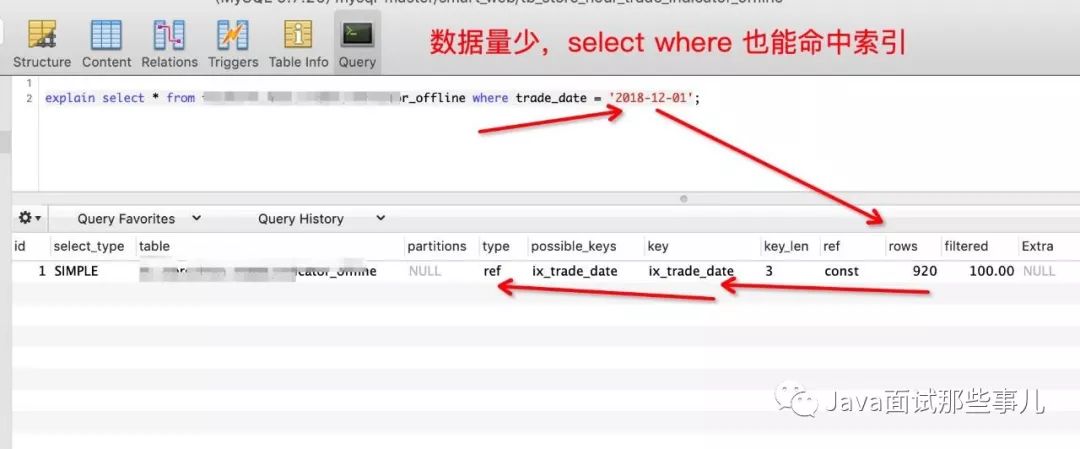
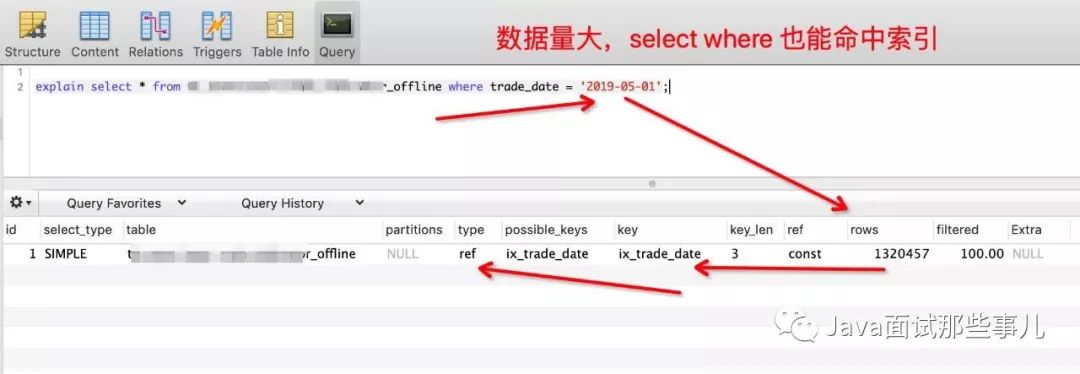
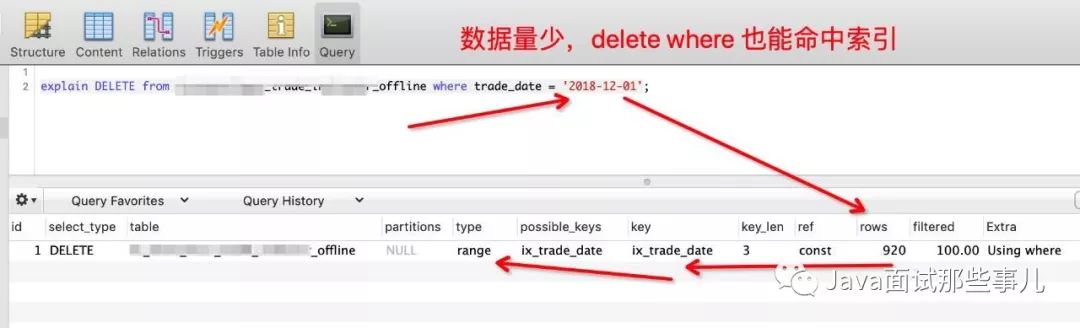
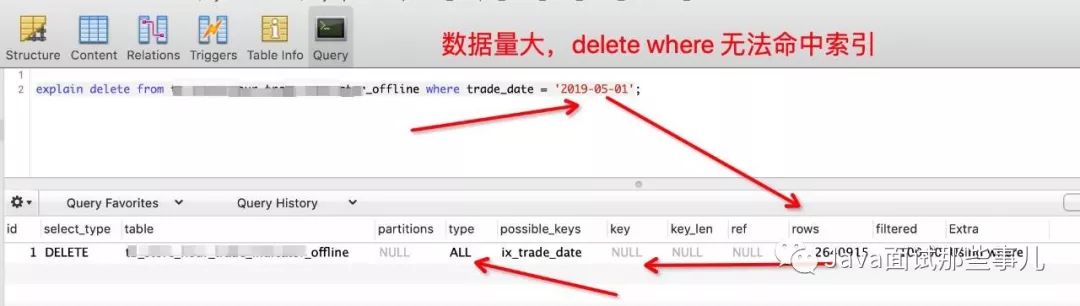
最终,楼主通过开启MySQL分析优化器追踪,定位到是优化器搞的鬼,它觉得花费时间太长。因为我这个是测试数据,究其原因是因为数据倾斜,导致计算出的数据占比较大、花费时间长。
大家要记住一点,一条SQL语句走哪条索引是通过其中的优化器和代价分析两个部分来决定的。所以,随着数据的不断变化,最优解也要跟着变化。因此,就需要DBA来不断的优化SQL。
对于查询情况,其实MySQL提供给我们一个功能来引导优化器更好的优化,那便是MySQL的查询优化提示(Query Optimizer Hints)。比如,想让SQL强制走索引的话,可以使用 FORCE INDEX 或者USE INDEX;它们基本相同,不同点:在于就算索引的实际用处不大,FORCE INDEX也得要使用索引。
EXPLAIN SELECT * FROM yp_user FORCE INDEX(idx_gender) where gender=1 ;
同样,你也可以通过IGNORE INDEX来忽略索引。
EXPLAIN SELECT * FROM yp_user IGNORE INDEX(idx_gender) where gender=1 ;
在我看来,虽然有MySQL Hints这种好用的工具,但我建议还是不要在生产环境使用,因为当数据量增长时,你压根儿都不知道这种索引的方式是否还适应于当前的环境,还是得配合DBA从索引的结构上去优化。
接下来,我来教大家如何用MySQL的trace分析优化器是如何选择执行计划的?很重要的手段,建议多实战一下。
1、什么是Trace?
关于这个问题,我觉得去最好的描述是官方文档。
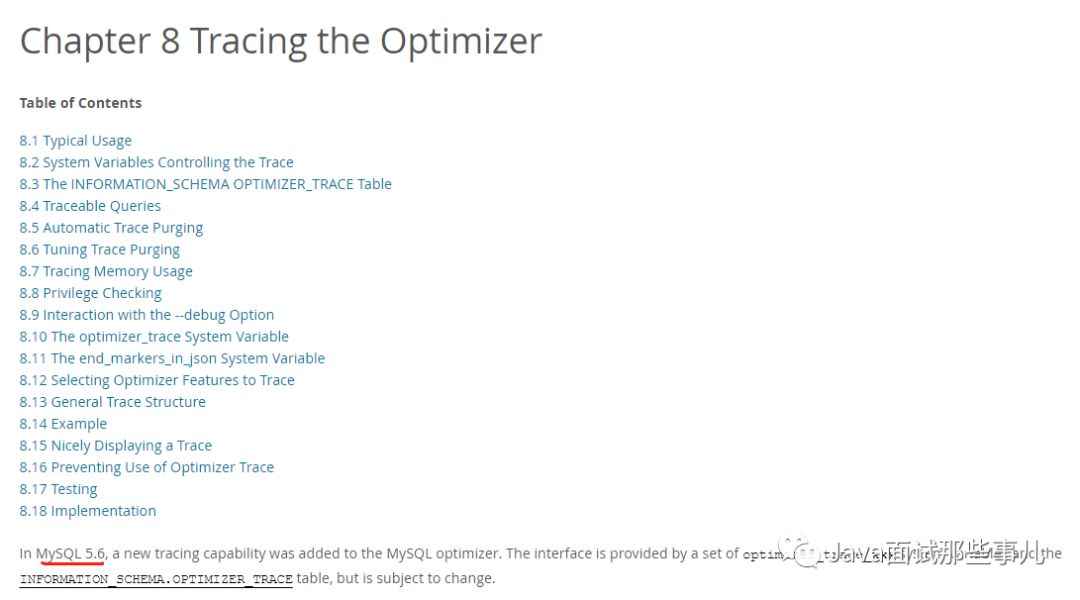
在MySQL 5.6中,MySQL优化器增加了一个新的跟踪功能。该接口由一组optimizer_trace_xxx系统变量和INFORMATION_SCHEMA.OPTIMIZER_TRACE表提供,但可能会发生变化。
通俗点,就是通过trace文件能够进一步了解为什么优化器选择A执行计划而不选择B执行计划,帮助我们更好的理解优化器的行为。
2、如何使用?
还是得看官方文档。
# 查看优化器跟踪是否状态SHOW VARIABLES LIKE '%optimizer_trace%';# 开启tracing (默认是关闭的):SET optimizer_trace="enabled=on";# 你的查询语句SELECT ...;# 查询trace json文件SELECT * FROM INFORMATION_SCHEMA.OPTIMIZER_TRACE;# 当完成后,关闭traceSET optimizer_trace="enabled=off";
3、分析trace文件
根据我本地的一个例子为例,具体文件内容如下。
SELECT * FROM yp_user where gender=1 | {"steps": [{"join_preparation": {"select#": 1,"steps": [{"expanded_query": "/* select#1 */ select `yp_user`.`open_id` AS `open_id`,`yp_user`.`avatar_url` AS `avatar_url`,`yp_user`.`city` AS `city`,`yp_user`.`country` AS `country`,`yp_user`.`create_time` AS `create_time`,`yp_user`.`gender` AS `gender`,`yp_user`.`language` AS `language`,`yp_user`.`nick_name` AS `nick_name`,`yp_user`.`province` AS `province`,`yp_user`.`skey` AS `skey`,`yp_user`.`update_time` AS `update_time`,`yp_user`.`privilege` AS `privilege` from `yp_user` where (`yp_user`.`gender` = 1)"}]}},{"join_optimization": {"select#": 1,"steps": [{"condition_processing": {"condition": "WHERE","original_condition": "(`yp_user`.`gender` = 1)","steps": [{"transformation": "equality_propagation","resulting_condition": "multiple equal(1, `yp_user`.`gender`)"},{"transformation": "constant_propagation","resulting_condition": "multiple equal(1, `yp_user`.`gender`)"},{"transformation": "trivial_condition_removal","resulting_condition": "multiple equal(1, `yp_user`.`gender`)"}]}},{"substitute_generated_columns": {}},{"table_dependencies": [{"table": "`yp_user`","row_may_be_null": false,"map_bit": 0,"depends_on_map_bits": []}]},{"ref_optimizer_key_uses": [{"table": "`yp_user`","field": "gender","equals": "1","null_rejecting": false}]},{"rows_estimation": [{"table": "`yp_user`","range_analysis": {"table_scan": {"rows": 3100,"cost": 719.1},"potential_range_indexes": [{"index": "PRIMARY","usable": false,"cause": "not_applicable"},{"index": "idx_skey","usable": false,"cause": "not_applicable"},{"index": "idx_gender","usable": true,"key_parts": ["gender","open_id"]}],"setup_range_conditions": [],"group_index_range": {"chosen": false,"cause": "not_group_by_or_distinct"},"analyzing_range_alternatives": {"range_scan_alternatives": [{"index": "idx_gender","ranges": ["1 <= gender <= 1"],"index_dives_for_eq_ranges": true,"rowid_ordered": true,"using_mrr": false,"index_only": false,"rows": 2731,"cost": 3278.2,"chosen": false,"cause": "cost"}],"analyzing_roworder_intersect": {"usable": false,"cause": "too_few_roworder_scans"}}}}]},{"considered_execution_plans": [{"plan_prefix": [],"table": "`yp_user`","best_access_path": {"considered_access_paths": [{"access_type": "ref","index": "idx_gender","rows": 2731,"cost": 837.2,"chosen": true},{"rows_to_scan": 3100,"access_type": "scan","resulting_rows": 3100,"cost": 717,"chosen": true}]},"condition_filtering_pct": 100,"rows_for_plan": 3100,"cost_for_plan": 717,"chosen": true}]},{"attaching_conditions_to_tables": {"original_condition": "(`yp_user`.`gender` = 1)","attached_conditions_computation": [],"attached_conditions_summary": [{"table": "`yp_user`","attached": "(`yp_user`.`gender` = 1)"}]}},{"refine_plan": [{"table": "`yp_user`"}]}]}},{"join_execution": {"select#": 1,"steps": []}}]}
通过这个例子,我们可以得到全表扫描的代价如下。
"table_scan": {"rows": 3100,"cost": 719.1}
分析结果:全表扫描访问的rows记录为3100,代价cost计算为719.1。
索引扫描的代价如下。
"range_scan_alternatives": [{"index": "idx_gender","ranges": ["1 <= gender <= 1"],"index_dives_for_eq_ranges": true,"rowid_ordered": true,"using_mrr": false,"index_only": false,"rows": 2731,"cost": 3278.2,"chosen": false,"cause": "cost"}]
分析结果:这里看到了通过idx_gender索引过滤时,优化器预估需要返回2731记录,访问代价cost为3278.2,大于全表扫描代价719.1;因此,优化器倾向于选择全表扫描。
今晚上就熬夜写到这里吧。
往期推荐
🔗
超赞!这款基于SpringBoot + Dubbo打造的在线IM系统功能丰富(附源码) 面经:20年裸辞!投了100多份简历,大部分都石城大海~ IDEA中如何导入Eclipse构建的Java Web项目?

点击阅读原文,获得免费编程资料!