




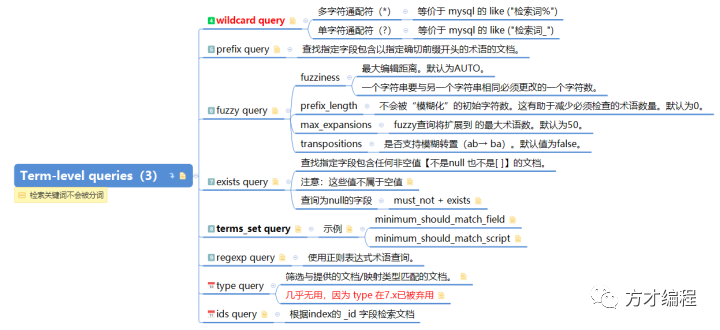
通配符 *:它匹配任何字符序列(包括空字符) 占位符 ?:它匹配任何单个字符。
GET blogs_index/_search
{
    "query": {
        "wildcard" : { "author": "方*" }
    }
}
上述DSL语句,可以检索到所有文档。等价于sql【where author like "方%”】
GET blogs_index/_search
{
    "query": {
        "wildcard" : { "author": "方?" }
    }
}
上述DSL语句,检索结果为空。等价于sql【where author like "方_”】
GET _search
{ "query": {
    "prefix" : { "author": "方" }
  }
}
该DSL等价于 wildcard query 的 "wildcard" : { "author": "方*" },等价于sql【where author like "方%”】
GET blogs_index/_search
{
    "query": {
        "fuzzy" : {
            "author": {
                "value": "方财兄",
                "fuzziness": 1,
                "prefix_length": 1,
                "max_expansions": 100
            }
        }
    }
}
fuzziness:最大编辑距离【一个字符串要与另一个字符串相同必须更改的一个字符数】。默认为AUTO。 prefix_length:不会被“模糊化”的初始字符数。这有助于减少必须检查的术语数量。默认为0。 max_expansions:fuzzy查询将扩展到的最大术语数。默认为50。 transpositions:是否支持模糊转置(ab→ ba)。默认值为false。
上述DSL等价于sql【where author like “方_兄”or author like “方财_”or author like “方_财兄”or author like “方财_兄”or author like “方财兄_”】(会根据上述的4个参数穷尽所有可能组合)
1、空字符串,例如""或"-" 2、包含null和另一个值的数组,例如[null, "foo"] 3、自定义null-value,在字段映射中定义
1、查询 title字段不为 null 的文档
GET blogs_index/_search
{
    "query": {
        "exists" : { "field" : "title" }
    }
}
GET blogs_index/_search
{
    "query": {
        "bool": {
            "must_not": {
                "exists": {
                    "field": "title"
                }
            }
        }
    }
}
ps:terms_set query 在对Array类型的字段做检索时非常有用,特别是对于每个文档,需要匹配的数量不一致时。如果所有文档需要匹配的数量一致,可以使用match query替代。
PUT term_set_index
{
  "mappings": {
    "_doc": {
      "properties": {
        "codes": {
          "type": "keyword"
        },
        "required_matches": {
          "type": "integer"
        }
      }
    }
  }
}

PUT term_set_index/_doc/1?refresh
{
    "codes": ["系统学习", "es","关注我"],
    "required_matches": 2
}
PUT term_set_index/_doc/2?refresh
{
    "codes": ["系统", "学习"],
    "required_matches": 1
}
GET term_set_index/_search
{
  "query": {
    "terms_set": {
      "codes": {
        "terms": [
          "关注我",
          "学习"
        ],
        "minimum_should_match_field": "required_matches"
      }
    }
  }
}
分析:该DSL语句可以检索到文档2。 对于文档1,需要至少匹配2个term,但是在检索terms里,只能匹配上【关注我】一个term,所以文档1不符合检索条件; 对于文档2,只需要匹配一个term,刚好能匹配上检索terms里的【学习】。
GET term_set_index/_search
{
  "query": {
    "terms_set": {
      "codes": {
        "terms": [
          "系统学习",
          "关注我"
        ],
        "minimum_should_match_script": {
          "source": " doc['required_matches'].value"
        }
      }
    }
  }
}
等价于上一句DSL。
GET term_set_index/_search
{
    "query": {
        "match": {
            "codes" : {
                "query":  "系统学习 关注我",
                "analyzer": "whitespace",
                "minimum_should_match": 2
            }
        }
    }
}
分析:DSL语句使用 "analyzer": "whitespace", 所以 query会被分词两个Token/term【系统学习】【关注我】。"minimum_should_match": 2,所以可以检索到文档1。
ps:关于Term-level queries 与 Full Text queries 的对比分析,使用场景对比,后续TeHero将详细为大家讲解!敬请期待哟!
GET _search
{
    "query": {
        "regexp":{
            "name.first": "s.*y"
        }
    }
}
注意:regexp查询的性能在很大程度上取决于所选的正则表达式。匹配所有类似的东西.*都很慢,而且使用环视正则表达式也很慢。如果可能,应在正则表达式开始之前尝试使用长前缀。【ps,正在表达式,在日志系统使用较多,后面在Logstash系列,TeHero再为大家讲解】
GET your_index/_search
{
    "query": {
        "type" : {
            "value" : "_doc"
        }
    }
}
GET /_search
{
    "query": {
        "ids" : {
            "type" : "_doc",
            "values" : ["1", "4", "100"]
        }
    }
}
1、 所有的 Term-level queries 的检索关键词都不会分词;
2、term query 等价于sql【where Token = “检索词”】;
3、terms query 等价于sql【where Token in ( 检索词List )】;
4、range query 掌握Date Math 和对 range类型字段检索的 relation参数;
5、掌握 wildcard query、prefix query、fuzzy query 这3种模糊查询;
6、terms_set query 用于检索Array类型的字段,但文档中必须定义一个数字字段——表示最低匹配的term数量;
7、exists query 用于检索为null的字段,检索不为null的字段使用 must_not + exists。
下期预告:Compound queries之Bool query【关注公众号:方才编程,系统学习ES】
待续


文章转载自方才编程,如果涉嫌侵权,请发送邮件至:contact@modb.pro进行举报,并提供相关证据,一经查实,墨天轮将立刻删除相关内容。
