




Term-level queries 与 Full text queries 的主要区别是什么? Term-level queries 有哪些查询类型?运用场景有哪些?DSL如何书写? Term-level queries 的各种查询对应到sql是怎样的
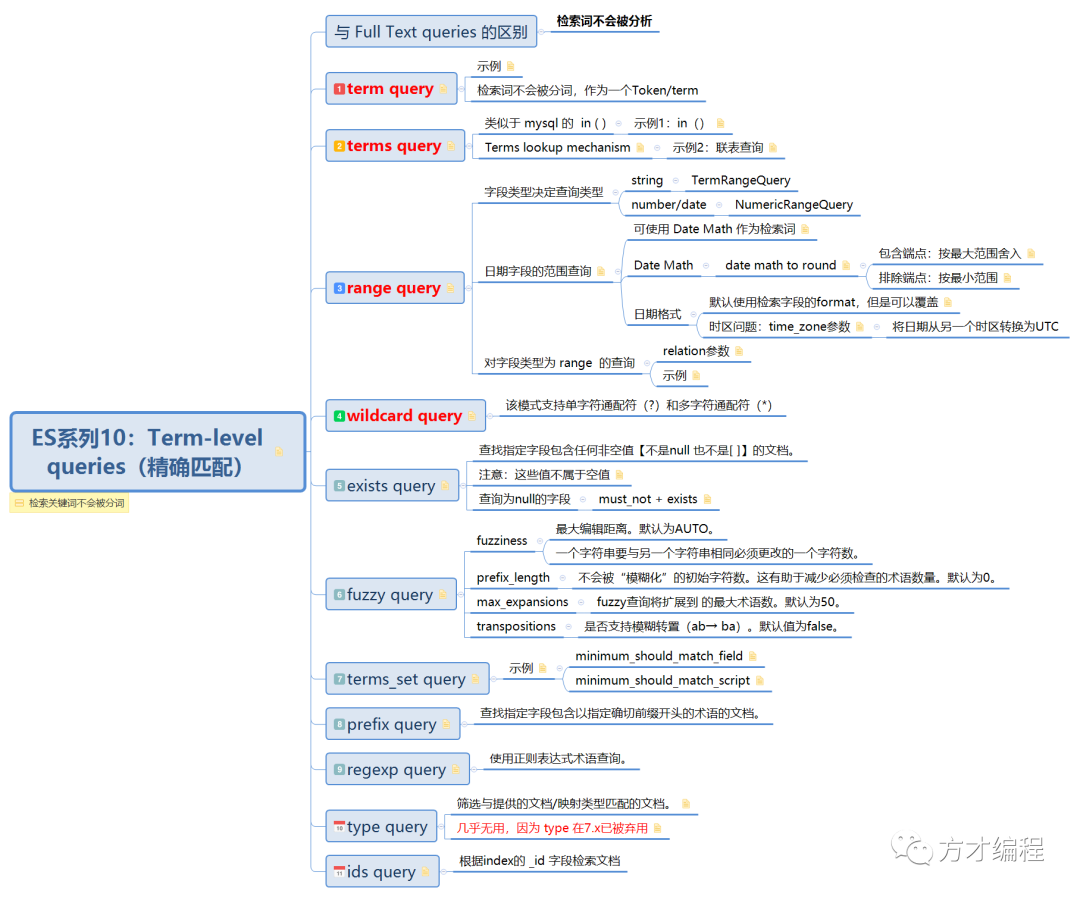
Term-level queries系列脑图
通过上图可以看到,Term-level queries 一共有11种查询类型,标红的四种查询是我们常用的查询:term query、terms query、range query、wildcard query。 本文将先介绍:term query、terms query这两种查询!Let's Go!
02 数据准备
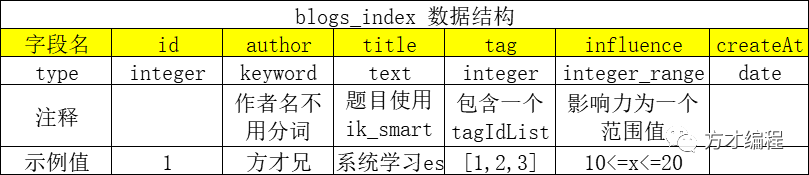
PUT blogs_index
{
  "settings": {
    "index": {
      "number_of_shards": 1,
      "number_of_replicas": 1
    }
  },
  "mappings": {
    "_doc": {
      "dynamic": false,
      "properties": {
        "id": {
          "type": "integer"
        },
        "author": {
          "type": "keyword"
        },
        "title": {
          "type": "text",
          "analyzer": "ik_smart"
        },
        "tag":{
           "type": "integer"
        },
        "influence": {
          "type": "integer_range"
        },
        "createAt": {
          "type": "date"
        }
      }
    }
  }
}

PUT tags_index
{
  "settings": {
    "index": {
      "number_of_shards": 1,
      "number_of_replicas": 1
    }
  },
  "mappings": {
    "_doc": {
      "dynamic": false,
      "properties": {
        "id": {
          "type": "integer"
        },
        "tag_name": {
          "type": "keyword"
        }
      }
    }
  }
}
POST _bulk
{"index":{"_index":"blogs_index","_type":"_doc","_id":"1"}}
{"id":1,"author":"方才兄","title":"关注我,系统学编程"}
{"index":{"_index":"blogs_index","_type":"_doc","_id":"2"}}
{"id":2,"author":"方才","title":"系统学编程,关注我"}
03 term query
3.1 通过实例理解
POST blogs_index/_doc/_search
{
  "query": {
    "term" : { "title" : "关注我,系统学编程" }
  }
}
POST blogs_index/_doc/_search
{
  "query": {
    "term" : { "title" : "编程" }
  }
}
3.2 分析DSL执行过程

1)对于title字段,我们使用的是ik_smart分词,所以这5条文档,得到的PostingList的Token列表为【关注】【我】【系统学】【编程】【方才】【兄】;
2)因为是term查询,所以语句1检索词的Token列表就是【关注我,系统学编程】;语句2检索词的Token列表为【编程】;
3)在PostingList中检索,很明显语句1等价于sql语句【where Token = “关注我,系统学编程”】;语句2等价于sql语句【where Token = “编程”】。
4)所以语句1检索不到结果,语句2是可以检索到文档1和文档2的。
GET blogs_index/_analyze
{
  "text": [ "关注我,系统学编程"],
  "field": "title"
}
{
  "tokens": [
    {
      "token": "关注",
      "start_offset": 0,
      "end_offset": 2,
      "type": "CN_WORD",
      "position": 0
    },
    {
      "token": "我",
      "start_offset": 2,
      "end_offset": 3,
      "type": "CN_CHAR",
      "position": 1
    },
    {
      "token": "系统学",
      "start_offset": 4,
      "end_offset": 7,
      "type": "CN_WORD",
      "position": 2
    },
    {
      "token": "编程",
      "start_offset": 7,
      "end_offset": 9,
      "type": "CN_WORD",
      "position": 3
    }
  ]
}
3.3 与match query的对比
POST blogs_index/_doc/_search
{
  "query": {
    "match" : { "title" : "关注我,系统学编程" }
  }
}
1)因为是match 查询,所以语句1检索词的Token列表就是【关注】【我】【系统学】【编程】;(注意和term查询时检索词的Token列表做对比【关注我,系统学编程】)
2)在PostingList中检索,该语句等价于sql语句【where Token in (“关注”,"我","系统学","编程")】;
3)所以可以检索到文档1和文档2。
POST blogs_index/_doc/_search
{
  "query": {
    "term" : { "author" : "方才兄" }
  }
}
POST blogs_index/_doc/_search
{
  "query": {
    "match" : { "author" : "方才兄" }
  }
}
3.4 term query 的使用场景
POST blogs_index/_doc/_search
{
  "query": {
    "term" : { "author" : "方才兄" }
  }
}
04 terms query
4.1 等价于mysql 的 in()
POST blogs_index/_doc/_search
{
  "query": {
    "terms" : { "author" : ["方才兄","方才"]}
  }
}
4.2 Terms lookup mechanism——等价于mysql的联表查询
POST _bulk
{"index":{"_index":"blogs_index","_type":"_doc","_id":"3"}}
{"id":3,"author":"方才兄","title":"关注我,系统学编程","tag":[1,2,3]}
{"index":{"_index":"tags_index","_type":"_doc","_id":"1"}}
{"id":1,"tag_name":"这是标签1"}
{"index":{"_index":"tags_index","_type":"_doc","_id":"2"}}
{"id":2,"tag_name":"这是标签2"}
{"index":{"_index":"tags_index","_type":"_doc","_id":"3"}}
{"id":3,"tag_name":"这是标签3"}}
GET tags_index/_search
{
  "query": {
    "terms": {
      "id": {
        "index": "blogs_index",
        "type": "_doc",
        "id": "3",
        "path": "tag"
      }
    }
  }
}
参数解释:

index:从中获取术语值的索引。

type:从中获取术语值的类型。

id:用于获取术语值的文档的ID,是源字段_id,而不是我们自定义的字段id。

path:指定为获取terms过滤器实际值的路径的字段 。
使用场景:当需要terms语句包含大量术语时,从索引中的文档中获取这些术语值将是有益的。其实这种垮索引的查询方法,在实际中很难应用到,对数据结构有强制的要求,而且针对另一个index的查询条件,只能是 _id = xx,不能像sql一样随意书写where条件。
下期预告:Term-level queries剩下的9种查询【关注公众号:方才编程,系统学习ES】
待续
 ●ES系列01:如何系统学习ES
ps:后台回复【es10】,即可获取 Term-level queries知识脑图

文章转载自方才编程,如果涉嫌侵权,请发送邮件至:contact@modb.pro进行举报,并提供相关证据,一经查实,墨天轮将立刻删除相关内容。
