



介绍
在未部署统一身份管理系统时,管理员需要分别在每一台主机上为对应的系统管理员创建、维护账号和密码,无法进行统一的管理。当主机数量增加到一定程度后,也将难以进行有效的安全管理,对账号密码泄露等问题难以进行控制。统一身份认证系统可以帮助我们解决这一问题。Windows环境下可以使用域账号进行身份管理,而在Linux环境下,FreeIPA可以快速、便捷的将linux系统接入,进行统一的身份认证和权限管理。
FreeIPA是Linux的开源安全解决方案,提供帐户管理和集中身份验证,类似于Microsoft的Active Directory。FreeIPA构建于多个开源项目之上,包括389 Directory Server,MIT Kerberos和SSSD。
FreeIPA在CentOS 7、Fedora和Ubuntu 14.04 16.04上能够非常直接地将计算机添加到您的IPA域中。其他操作系统可以使用SSSD或LDAP对FreeIPA进行身份验证。
FreeIPA的特点如下:
集成多种服务(389 Directory Server, MIT Kerberos, NTP, DNS, Dogtag certificate system, SSSD),简化安装配置
提供WEB、命令行两种管理工具,方便管理
多主复制,可扩展,高可用
接口丰富,支持CLI、 Web UI、 XMLRPC、JSONRPC API、Python SDK
安装前检查
使用ntp同步时间
防火墙关闭,或开放以下端口:TCP(80, 443,389, 636,88, 464) UDP(88, 464,123)
配置hosts文件,设置完全合格的主机名(如:192.168.1.1 freeipa1.douyu.com freeipa1)
测试环境
OS:Centos 7.5
一台机器
FreeIPA Cookie处理安全漏洞编辑
FreeIPA中存在安全漏洞,该漏洞源于不正确处理Cookie信息时,IPA客户端在发送包含验证凭据的Cookie之前没有对服务器身份进行检查。允许攻击者诱使ipa命令行客户端连接伪造的服务器,可获取敏感会话验证凭据,获得管理员访问权限.
准备
在我们开始安装之前,我们需要做一些事情来确保服务器已准备好运行FreeIPA。具体来说,我们将设置服务器主机名,更新系统包,检查准备中的DNS记录是否已记录,并确保防火墙允许FreeIPA流量。
升级软件和系统内核
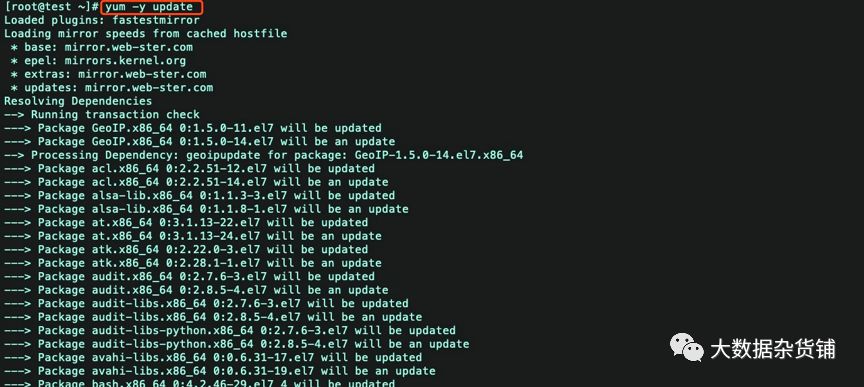
现在,用yum升级软件和系统内核。
yum update -y
设置静态IP
vi etc/sysconfig/network-scripts/ifcfg-eth0TYPE=EthernetBOOTPROTO=staticDEFROUTE=yesPEERDNS=yesPEERROUTES=yesIPV4_FAILURE_FATAL=noNAME=eth0DEVICE=eth0ONBOOT=yesIPADDR=192.168.1.133NETMASK=255.255.255.0GATEWAY=192.168.1.1DNS1=114.114.114.114DNS2=8.8.8.8
保存重启网络
systemctl restart network
设置主机名
hostnamectl set-hostname test.gld.cloudera.com
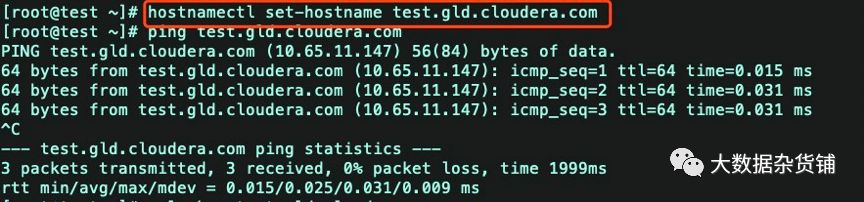
hostname test.gld.cloudera.comvi /etc/hosts

添加域名解析
10.65.11.147 test.gld.cloudera.com test

关闭防火墙
iptables -Fsystemctl stop iptablessystemctl disable iptablessystemctl stop firewalldsystemctl disable firewalld#关闭selinuxsetenforce 0
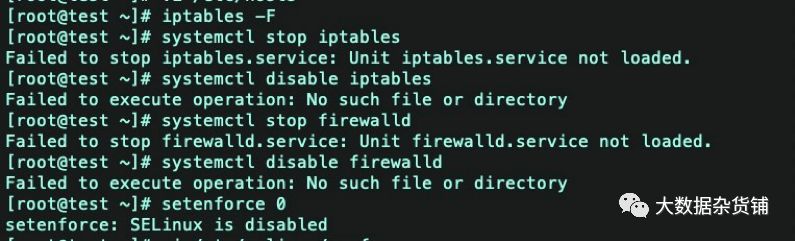
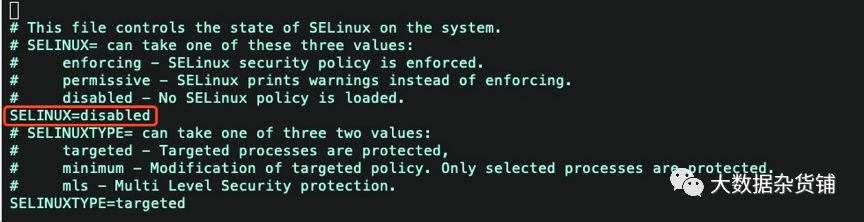
vi /etc/selinux/config
设置SELINUX=disabled
配置yum源
cd /etc/yum.repos.d/wget http://mirrors.aliyun.com/repo/epel-7.repowget http://mirrors.aliyun.com/repo/Centos-7.repo
配置随机数生成器
接下来我们将在CentOS中配置随机数生成器。这将允许FreeIPA预先形成其进行身份验证所需的加密功能。
设置FreeIPA需要大量随机数据来运行它的加密操作。默认情况下,虚拟机将很快耗尽随机数据或熵。为了解决这个问题,我们将使用rngd软件随机数生成器。rngd通过从连接到其他服务器的硬件设备获取数据并将其提供给内核的随机数生成器来工作。
首先,安装rngd。
yum -y install rng-tools
然后启用它。
systemctl start rngd
确保服务在引导时自动启动。
systemctl enable rngd
最后,验证rngd是否正在运行。
systemctl status rngd
输出应包括active (running),字体为绿色。
安装ipa-server
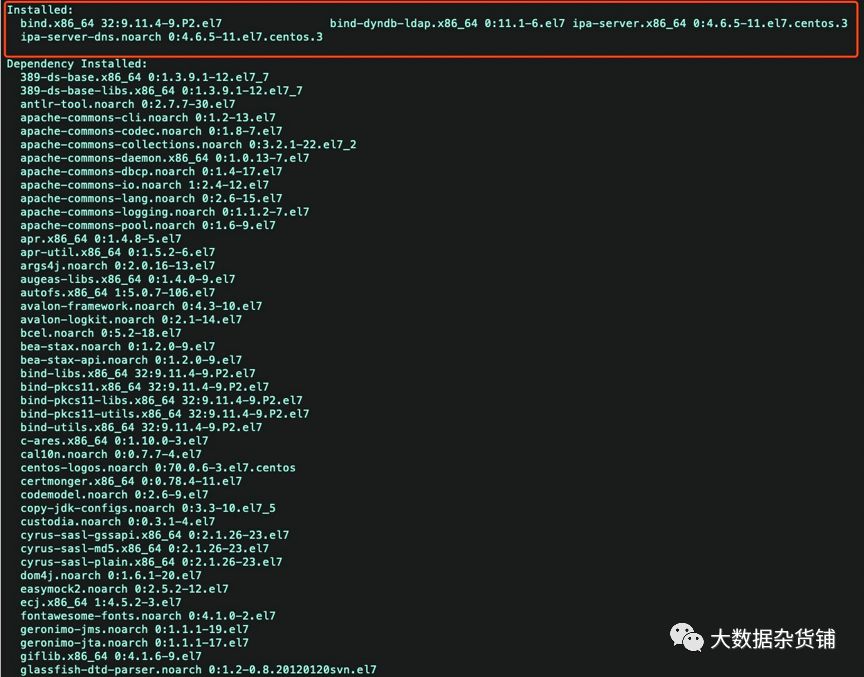
需要的包:ipa-server bind bind-dyndb-ldap ipa-server-dns
bind 提供dns服务
bind-dyndb-ldap提供dns和ldap连接
ipa-server-dns提供ipa-server与dns连接
用yum 安装
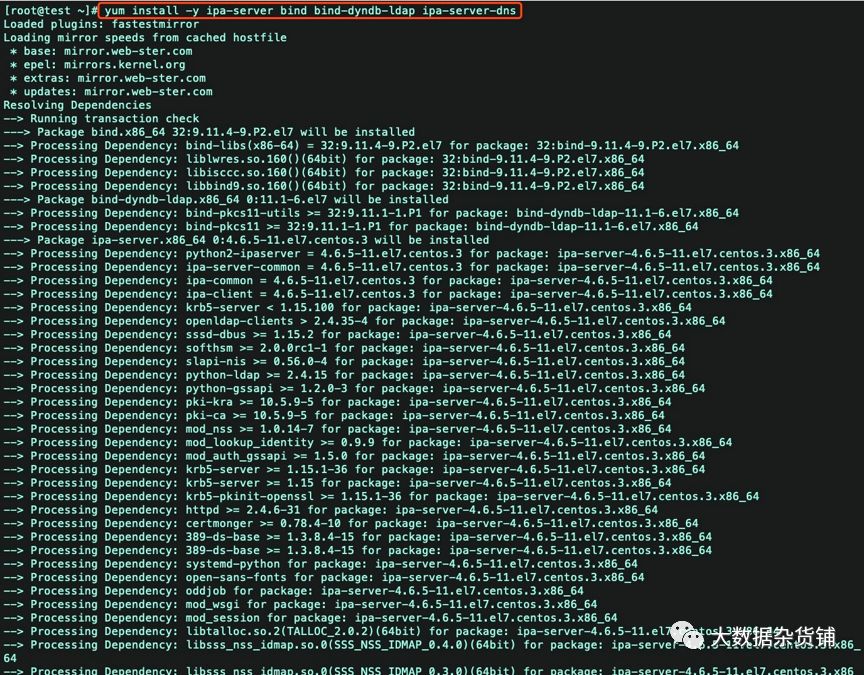
yum install -y ipa-server bind bind-dyndb-ldap ipa-server-dns
配置IPA-Server
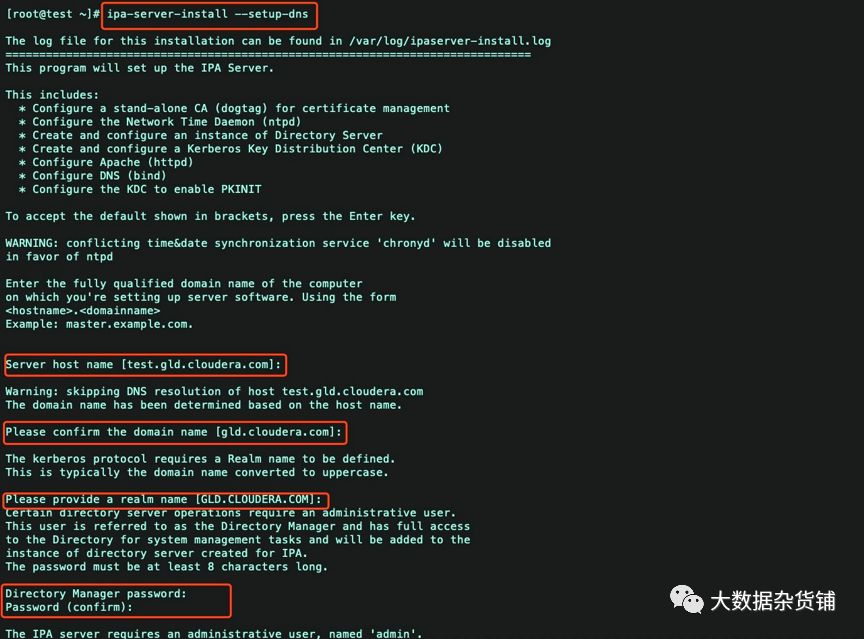
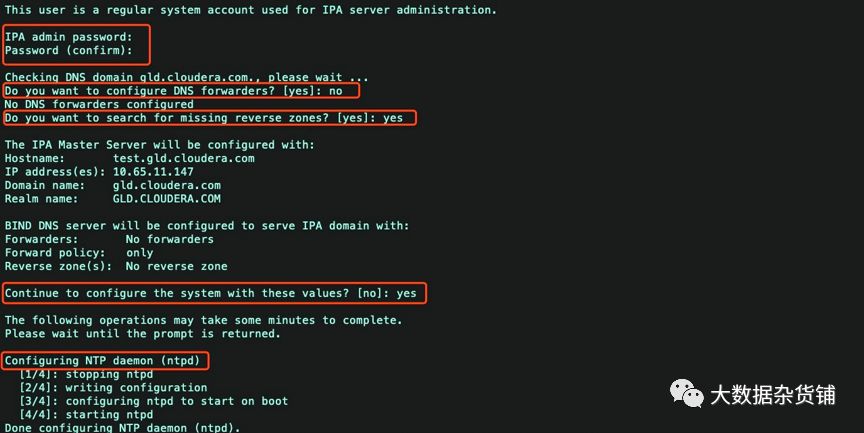
执行ipa-server-install --setup-dns
Server host name [server.test.co]: ---回车键(默认)
Please confirm the domain name [test.co]: ---回车键(默认)
Please provide a realm name [TEST.CO]: ---回车键(默认)
Directory Manager password: ---设置目录管理的密码 最少是8位
IPA admin password: ---设置ipa 管理员admin的密码 最少8位 一定要记住,后面要用到
Do you want to configure DNS forwarders? [yes]: no ---你想配置dns为转发器吗?选择no
Do you want to search for missing reverse zones? [yes]: yes --你想配置dns的反向域吗?选择yes
Continue to configure the system with these values? [no]: yes --继续配置系统其他的值?选择yes
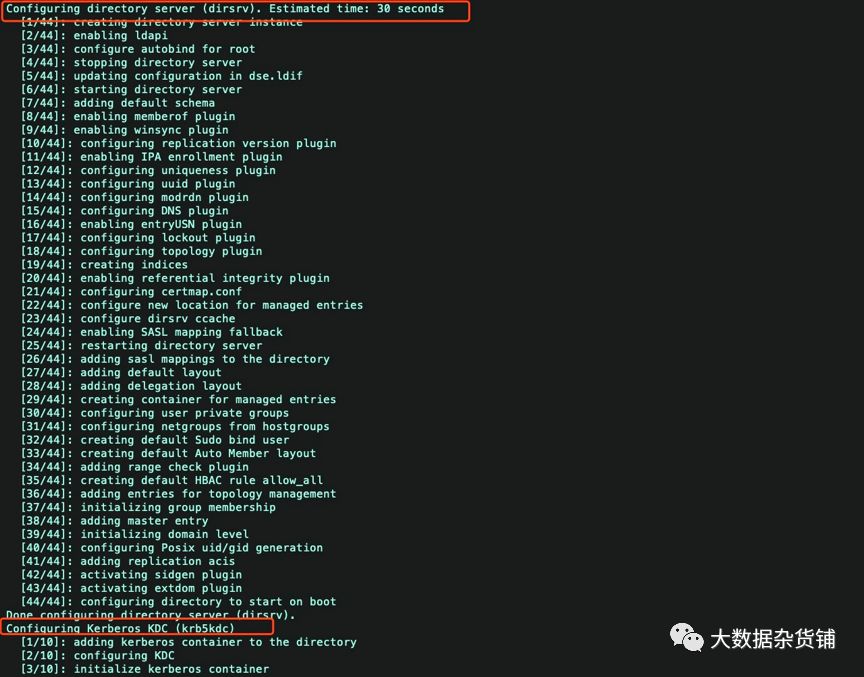
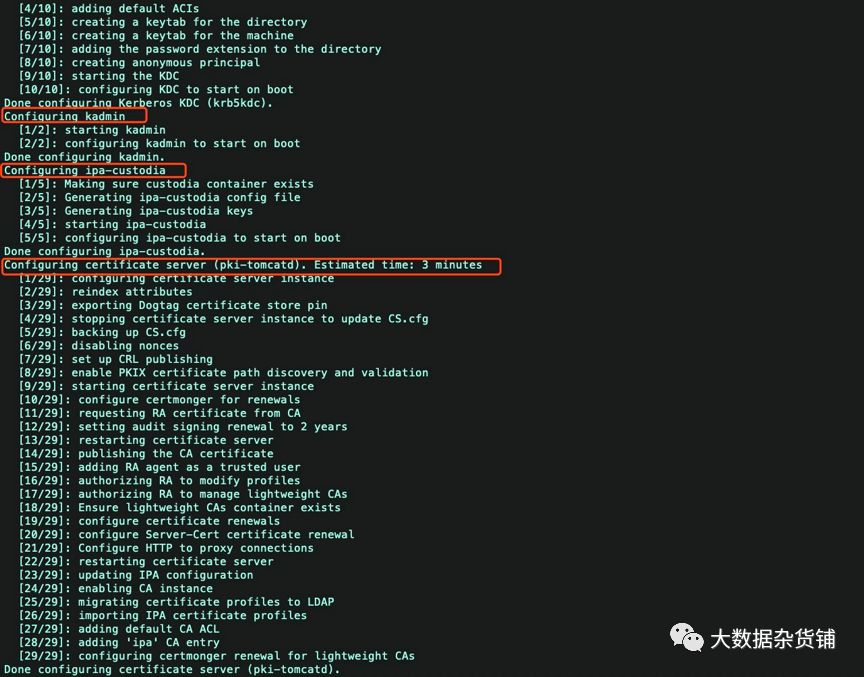
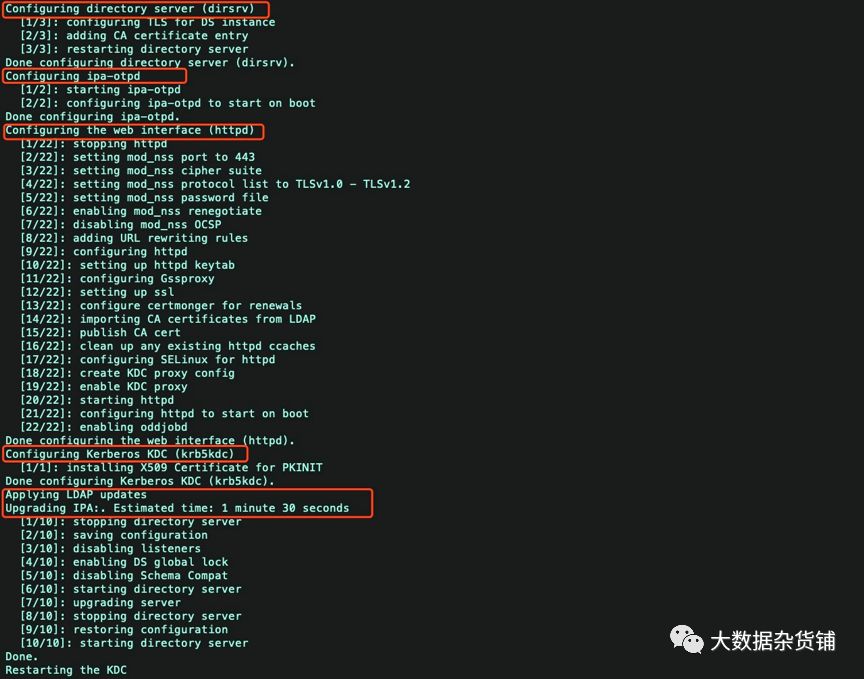
[root@test ~]# ipa-server-install --setup-dnsThe log file for this installation can be found in var/log/ipaserver-install.log==============================================================================This program will set up the IPA Server.This includes:* Configure a stand-alone CA (dogtag) for certificate management* Configure the Network Time Daemon (ntpd)* Create and configure an instance of Directory Server* Create and configure a Kerberos Key Distribution Center (KDC)* Configure Apache (httpd)* Configure DNS (bind)* Configure the KDC to enable PKINITTo accept the default shown in brackets, press the Enter key.WARNING: conflicting time&date synchronization service 'chronyd' will be disabledin favor of ntpdEnter the fully qualified domain name of the computeron which you're setting up server software. Using the form<hostname>.<domainname>Example: master.example.com.Server host name [test.gld.cloudera.com]:Warning: skipping DNS resolution of host test.gld.cloudera.comThe domain name has been determined based on the host name.Please confirm the domain name [gld.cloudera.com]:The kerberos protocol requires a Realm name to be defined.This is typically the domain name converted to uppercase.Please provide a realm name [GLD.CLOUDERA.COM]:Certain directory server operations require an administrative user.This user is referred to as the Directory Manager and has full accessto the Directory for system management tasks and will be added to theinstance of directory server created for IPA.The password must be at least 8 characters long.Directory Manager password:Password (confirm):The IPA server requires an administrative user, named 'admin'.This user is a regular system account used for IPA server administration.IPA admin password:Password (confirm):Checking DNS domain gld.cloudera.com., please wait ...Do you want to configure DNS forwarders? [yes]: noNo DNS forwarders configuredDo you want to search for missing reverse zones? [yes]:The IPA Master Server will be configured with:Hostname: test.gld.cloudera.comIP address(es): 10.65.11.147Domain name: gld.cloudera.comRealm name: GLD.CLOUDERA.COMBIND DNS server will be configured to serve IPA domain with:Forwarders: No forwardersForward policy: onlyReverse zone(s): No reverse zoneContinue to configure the system with these values? [no]: yesThe following operations may take some minutes to complete.Please wait until the prompt is returned.Configuring NTP daemon (ntpd)[1/4]: stopping ntpd[2/4]: writing configuration[3/4]: configuring ntpd to start on boot[4/4]: starting ntpdDone configuring NTP daemon (ntpd).Configuring directory server (dirsrv). Estimated time: 30 seconds[1/44]: creating directory server instance[2/44]: enabling ldapi[3/44]: configure autobind for root[4/44]: stopping directory server[5/44]: updating configuration in dse.ldif[6/44]: starting directory server[7/44]: adding default schema[8/44]: enabling memberof plugin[9/44]: enabling winsync plugin[10/44]: configuring replication version plugin[11/44]: enabling IPA enrollment plugin[12/44]: configuring uniqueness plugin[13/44]: configuring uuid plugin[14/44]: configuring modrdn plugin[15/44]: configuring DNS plugin[16/44]: enabling entryUSN plugin[17/44]: configuring lockout plugin[18/44]: configuring topology plugin[19/44]: creating indices[20/44]: enabling referential integrity plugin[21/44]: configuring certmap.conf[22/44]: configure new location for managed entries[23/44]: configure dirsrv ccache[24/44]: enabling SASL mapping fallback[25/44]: restarting directory server[26/44]: adding sasl mappings to the directory[27/44]: adding default layout[28/44]: adding delegation layout[29/44]: creating container for managed entries[30/44]: configuring user private groups[31/44]: configuring netgroups from hostgroups[32/44]: creating default Sudo bind user[33/44]: creating default Auto Member layout[34/44]: adding range check plugin[35/44]: creating default HBAC rule allow_all[36/44]: adding entries for topology management[37/44]: initializing group membership[38/44]: adding master entry[39/44]: initializing domain level[40/44]: configuring Posix uid/gid generation[41/44]: adding replication acis[42/44]: activating sidgen plugin[43/44]: activating extdom plugin[44/44]: configuring directory to start on bootDone configuring directory server (dirsrv).Configuring Kerberos KDC (krb5kdc)[1/10]: adding kerberos container to the directory[2/10]: configuring KDC[3/10]: initialize kerberos container[4/10]: adding default ACIs[5/10]: creating a keytab for the directory[6/10]: creating a keytab for the machine[7/10]: adding the password extension to the directory[8/10]: creating anonymous principal[9/10]: starting the KDC[10/10]: configuring KDC to start on bootDone configuring Kerberos KDC (krb5kdc).Configuring kadmin[1/2]: starting kadmin[2/2]: configuring kadmin to start on bootDone configuring kadmin.Configuring ipa-custodia[1/5]: Making sure custodia container exists[2/5]: Generating ipa-custodia config file[3/5]: Generating ipa-custodia keys[4/5]: starting ipa-custodia[5/5]: configuring ipa-custodia to start on bootDone configuring ipa-custodia.Configuring certificate server (pki-tomcatd). Estimated time: 3 minutes[1/29]: configuring certificate server instance[2/29]: reindex attributes[3/29]: exporting Dogtag certificate store pin[4/29]: stopping certificate server instance to update CS.cfg[5/29]: backing up CS.cfg[6/29]: disabling nonces[7/29]: set up CRL publishing[8/29]: enable PKIX certificate path discovery and validation[9/29]: starting certificate server instance[10/29]: configure certmonger for renewals[11/29]: requesting RA certificate from CA[12/29]: setting audit signing renewal to 2 years[13/29]: restarting certificate server[14/29]: publishing the CA certificate[15/29]: adding RA agent as a trusted user[16/29]: authorizing RA to modify profiles[17/29]: authorizing RA to manage lightweight CAs[18/29]: Ensure lightweight CAs container exists[19/29]: configure certificate renewals[20/29]: configure Server-Cert certificate renewal[21/29]: Configure HTTP to proxy connections[22/29]: restarting certificate server[23/29]: updating IPA configuration[24/29]: enabling CA instance[25/29]: migrating certificate profiles to LDAP[26/29]: importing IPA certificate profiles[27/29]: adding default CA ACL[28/29]: adding 'ipa' CA entry[29/29]: configuring certmonger renewal for lightweight CAsDone configuring certificate server (pki-tomcatd).Configuring directory server (dirsrv)[1/3]: configuring TLS for DS instance[2/3]: adding CA certificate entry[3/3]: restarting directory serverDone configuring directory server (dirsrv).Configuring ipa-otpd[1/2]: starting ipa-otpd[2/2]: configuring ipa-otpd to start on bootDone configuring ipa-otpd.Configuring the web interface (httpd)[1/22]: stopping httpd[2/22]: setting mod_nss port to 443[3/22]: setting mod_nss cipher suite[4/22]: setting mod_nss protocol list to TLSv1.0 - TLSv1.2[5/22]: setting mod_nss password file[6/22]: enabling mod_nss renegotiate[7/22]: disabling mod_nss OCSP[8/22]: adding URL rewriting rules[9/22]: configuring httpd[10/22]: setting up httpd keytab[11/22]: configuring Gssproxy[12/22]: setting up ssl[13/22]: configure certmonger for renewals[14/22]: importing CA certificates from LDAP[15/22]: publish CA cert[16/22]: clean up any existing httpd ccaches[17/22]: configuring SELinux for httpd[18/22]: create KDC proxy config[19/22]: enable KDC proxy[20/22]: starting httpd[21/22]: configuring httpd to start on boot[22/22]: enabling oddjobdDone configuring the web interface (httpd).Configuring Kerberos KDC (krb5kdc)[1/1]: installing X509 Certificate for PKINITDone configuring Kerberos KDC (krb5kdc).Applying LDAP updatesUpgrading IPA:. Estimated time: 1 minute 30 seconds[1/10]: stopping directory server[2/10]: saving configuration[3/10]: disabling listeners[4/10]: enabling DS global lock[5/10]: disabling Schema Compat[6/10]: starting directory server[7/10]: upgrading server[8/10]: stopping directory server[9/10]: restoring configuration[10/10]: starting directory serverDone.Restarting the KDCConfiguring DNS (named)[1/11]: generating rndc key file[2/11]: adding DNS container[3/11]: setting up our zone[4/11]: setting up our own record[5/11]: setting up records for other masters[6/11]: adding NS record to the zones[7/11]: setting up kerberos principal[8/11]: setting up named.conf[9/11]: setting up server configuration[10/11]: configuring named to start on boot[11/11]: changing resolv.conf to point to ourselvesDone configuring DNS (named).Restarting the web server to pick up resolv.conf changesConfiguring DNS key synchronization service (ipa-dnskeysyncd)[1/7]: checking status[2/7]: setting up bind-dyndb-ldap working directory[3/7]: setting up kerberos principal[4/7]: setting up SoftHSM[5/7]: adding DNSSEC containers[6/7]: creating replica keys[7/7]: configuring ipa-dnskeysyncd to start on bootDone configuring DNS key synchronization service (ipa-dnskeysyncd).Restarting ipa-dnskeysyncdRestarting namedipaserver.install.bindinstance: ERROR Named service failed to start (Command '/bin/systemctl restart named-pkcs11.service' returned non-zero exit status 1)named service failed to startUpdating DNS system recordsConfiguring client side componentsUsing existing certificate '/etc/ipa/ca.crt'.Client hostname: test.gld.cloudera.comRealm: GLD.CLOUDERA.COMDNS Domain: gld.cloudera.comIPA Server: test.gld.cloudera.comBaseDN: dc=gld,dc=cloudera,dc=comSkipping synchronizing time with NTP server.New SSSD config will be createdConfigured sudoers in etc/nsswitch.confConfigured etc/sssd/sssd.conftrying https://test.gld.cloudera.com/ipa/json[try 1]: Forwarding 'schema' to json server 'https://test.gld.cloudera.com/ipa/json'trying https://test.gld.cloudera.com/ipa/session/json[try 1]: Forwarding 'ping' to json server 'https://test.gld.cloudera.com/ipa/session/json'[try 1]: Forwarding 'ca_is_enabled' to json server 'https://test.gld.cloudera.com/ipa/session/json'Systemwide CA database updated.Adding SSH public key from etc/ssh/ssh_host_rsa_key.pubAdding SSH public key from etc/ssh/ssh_host_ecdsa_key.pubAdding SSH public key from etc/ssh/ssh_host_ed25519_key.pub[try 1]: Forwarding 'host_mod' to json server 'https://test.gld.cloudera.com/ipa/session/json'Could not update DNS SSHFP records.SSSD enabledConfigured etc/openldap/ldap.confConfigured etc/ssh/ssh_configConfigured etc/ssh/sshd_configConfiguring gld.cloudera.com as NIS domain.Client configuration complete.The ipa-client-install command was successfulipapython.dnsutil: ERROR DNS query for test.gld.cloudera.com. 1 failed: The DNS operation timed out after 30.0012700558 secondsipaserver.dns_data_management: ERROR unable to resolve host name test.gld.cloudera.com. to IP address, ipa-ca DNS record will be incompleteipapython.admintool: ERROR Command '/bin/systemctl restart ipa.service' returned non-zero exit status 1ipapython.admintool: ERROR The ipa-server-install command failed. See var/log/ipaserver-install.log for more information[root@test ~]# ipa-server-install --uninstallThis is a NON REVERSIBLE operation and will delete all data and configuration!It is highly recommended to take a backup of existing data and configuration using ipa-backup utility before proceeding.Are you sure you want to continue with the uninstall procedure? [no]: yesWARNING: Failed to connect to Directory Server to find information aboutreplication agreements. Uninstallation will continue despite the possibleexisting replication agreements.If this server is the last instance of CA,KRA, or DNSSEC master, uninstallation may result in data loss.Are you sure you want to continue with the uninstall procedure? [no]: yesShutting down all IPA servicesUnconfiguring ntpdConfiguring certmonger to stop tracking system certificates for KRAConfiguring certmonger to stop tracking system certificates for CAUnconfiguring CAUnconfiguring namedUnconfiguring ipa-dnskeysyncdUnconfiguring web serverUnconfiguring krb5kdcUnconfiguring kadminUnconfiguring directory serverUnconfiguring ipa-custodiaUnconfiguring ipa-otpdRemoving IPA client configurationRemoving Kerberos service principals from etc/krb5.keytabDisabling client Kerberos and LDAP configurationsRedundant SSSD configuration file etc/sssd/sssd.conf was moved to etc/sssd/sssd.conf.deletedRestoring client configuration filesUnconfiguring the NIS domain.nslcd daemon is not installed, skip configurationSystemwide CA database updated.Client uninstall complete.The ipa-client-install command was successful[root@test ~]# ipa-server-install --setup-dnsThe log file for this installation can be found in var/log/ipaserver-install.log==============================================================================This program will set up the IPA Server.This includes:* Configure a stand-alone CA (dogtag) for certificate management* Configure the Network Time Daemon (ntpd)* Create and configure an instance of Directory Server* Create and configure a Kerberos Key Distribution Center (KDC)* Configure Apache (httpd)* Configure DNS (bind)* Configure the KDC to enable PKINITTo accept the default shown in brackets, press the Enter key.WARNING: conflicting time&date synchronization service 'chronyd' will be disabledin favor of ntpdEnter the fully qualified domain name of the computeron which you're setting up server software. Using the form<hostname>.<domainname>Example: master.example.com.Server host name [test.gld.cloudera.com]:Warning: skipping DNS resolution of host test.gld.cloudera.comThe domain name has been determined based on the host name.Please confirm the domain name [gld.cloudera.com]:The kerberos protocol requires a Realm name to be defined.This is typically the domain name converted to uppercase.Please provide a realm name [GLD.CLOUDERA.COM]:Certain directory server operations require an administrative user.This user is referred to as the Directory Manager and has full accessto the Directory for system management tasks and will be added to theinstance of directory server created for IPA.The password must be at least 8 characters long.Directory Manager password:Password (confirm):The IPA server requires an administrative user, named 'admin'.This user is a regular system account used for IPA server administration.IPA admin password:Password (confirm):Checking DNS domain gld.cloudera.com., please wait ...Do you want to configure DNS forwarders? [yes]: noNo DNS forwarders configuredDo you want to search for missing reverse zones? [yes]: yesThe IPA Master Server will be configured with:Hostname: test.gld.cloudera.comIP address(es): 10.65.11.147Domain name: gld.cloudera.comRealm name: GLD.CLOUDERA.COMBIND DNS server will be configured to serve IPA domain with:Forwarders: No forwardersForward policy: onlyReverse zone(s): No reverse zoneContinue to configure the system with these values? [no]: yesThe following operations may take some minutes to complete.Please wait until the prompt is returned.Configuring NTP daemon (ntpd)[1/4]: stopping ntpd[2/4]: writing configuration[3/4]: configuring ntpd to start on boot[4/4]: starting ntpdDone configuring NTP daemon (ntpd).Configuring directory server (dirsrv). Estimated time: 30 seconds[1/44]: creating directory server instance[2/44]: enabling ldapi[3/44]: configure autobind for root[4/44]: stopping directory server[5/44]: updating configuration in dse.ldif[6/44]: starting directory server[7/44]: adding default schema[8/44]: enabling memberof plugin[9/44]: enabling winsync plugin[10/44]: configuring replication version plugin[11/44]: enabling IPA enrollment plugin[12/44]: configuring uniqueness plugin[13/44]: configuring uuid plugin[14/44]: configuring modrdn plugin[15/44]: configuring DNS plugin[16/44]: enabling entryUSN plugin[17/44]: configuring lockout plugin[18/44]: configuring topology plugin[19/44]: creating indices[20/44]: enabling referential integrity plugin[21/44]: configuring certmap.conf[22/44]: configure new location for managed entries[23/44]: configure dirsrv ccache[24/44]: enabling SASL mapping fallback[25/44]: restarting directory server[26/44]: adding sasl mappings to the directory[27/44]: adding default layout[28/44]: adding delegation layout[29/44]: creating container for managed entries[30/44]: configuring user private groups[31/44]: configuring netgroups from hostgroups[32/44]: creating default Sudo bind user[33/44]: creating default Auto Member layout[34/44]: adding range check plugin[35/44]: creating default HBAC rule allow_all[36/44]: adding entries for topology management[37/44]: initializing group membership[38/44]: adding master entry[39/44]: initializing domain level[40/44]: configuring Posix uid/gid generation[41/44]: adding replication acis[42/44]: activating sidgen plugin[43/44]: activating extdom plugin[44/44]: configuring directory to start on bootDone configuring directory server (dirsrv).Configuring Kerberos KDC (krb5kdc)[1/10]: adding kerberos container to the directory[2/10]: configuring KDC[3/10]: initialize kerberos container[4/10]: adding default ACIs[5/10]: creating a keytab for the directory[6/10]: creating a keytab for the machine[7/10]: adding the password extension to the directory[8/10]: creating anonymous principal[9/10]: starting the KDC[10/10]: configuring KDC to start on bootDone configuring Kerberos KDC (krb5kdc).Configuring kadmin[1/2]: starting kadmin[2/2]: configuring kadmin to start on bootDone configuring kadmin.Configuring ipa-custodia[1/5]: Making sure custodia container exists[2/5]: Generating ipa-custodia config file[3/5]: Generating ipa-custodia keys[4/5]: starting ipa-custodia[5/5]: configuring ipa-custodia to start on bootDone configuring ipa-custodia.Configuring certificate server (pki-tomcatd). Estimated time: 3 minutes[1/29]: configuring certificate server instance[2/29]: reindex attributes[3/29]: exporting Dogtag certificate store pin[4/29]: stopping certificate server instance to update CS.cfg[5/29]: backing up CS.cfg[6/29]: disabling nonces[7/29]: set up CRL publishing[8/29]: enable PKIX certificate path discovery and validation[9/29]: starting certificate server instance[10/29]: configure certmonger for renewals[11/29]: requesting RA certificate from CA[12/29]: setting audit signing renewal to 2 years[13/29]: restarting certificate server[14/29]: publishing the CA certificate[15/29]: adding RA agent as a trusted user[16/29]: authorizing RA to modify profiles[17/29]: authorizing RA to manage lightweight CAs[18/29]: Ensure lightweight CAs container exists[19/29]: configure certificate renewals[20/29]: configure Server-Cert certificate renewal[21/29]: Configure HTTP to proxy connections[22/29]: restarting certificate server[23/29]: updating IPA configuration[24/29]: enabling CA instance[25/29]: migrating certificate profiles to LDAP[26/29]: importing IPA certificate profiles[27/29]: adding default CA ACL[28/29]: adding 'ipa' CA entry[29/29]: configuring certmonger renewal for lightweight CAsDone configuring certificate server (pki-tomcatd).Configuring directory server (dirsrv)[1/3]: configuring TLS for DS instance[2/3]: adding CA certificate entry[3/3]: restarting directory serverDone configuring directory server (dirsrv).Configuring ipa-otpd[1/2]: starting ipa-otpd[2/2]: configuring ipa-otpd to start on bootDone configuring ipa-otpd.Configuring the web interface (httpd)[1/22]: stopping httpd[2/22]: setting mod_nss port to 443[3/22]: setting mod_nss cipher suite[4/22]: setting mod_nss protocol list to TLSv1.0 - TLSv1.2[5/22]: setting mod_nss password file[6/22]: enabling mod_nss renegotiate[7/22]: disabling mod_nss OCSP[8/22]: adding URL rewriting rules[9/22]: configuring httpd[10/22]: setting up httpd keytab[11/22]: configuring Gssproxy[12/22]: setting up ssl[13/22]: configure certmonger for renewals[14/22]: importing CA certificates from LDAP[15/22]: publish CA cert[16/22]: clean up any existing httpd ccaches[17/22]: configuring SELinux for httpd[18/22]: create KDC proxy config[19/22]: enable KDC proxy[20/22]: starting httpd[21/22]: configuring httpd to start on boot[22/22]: enabling oddjobdDone configuring the web interface (httpd).Configuring Kerberos KDC (krb5kdc)[1/1]: installing X509 Certificate for PKINITDone configuring Kerberos KDC (krb5kdc).Applying LDAP updatesUpgrading IPA:. Estimated time: 1 minute 30 seconds[1/10]: stopping directory server[2/10]: saving configuration[3/10]: disabling listeners[4/10]: enabling DS global lock[5/10]: disabling Schema Compat[6/10]: starting directory server[7/10]: upgrading server[8/10]: stopping directory server[9/10]: restoring configuration[10/10]: starting directory serverDone.Restarting the KDCConfiguring DNS (named)[1/11]: generating rndc key file[2/11]: adding DNS container[3/11]: setting up our zone[4/11]: setting up our own record[5/11]: setting up records for other masters[6/11]: adding NS record to the zones[7/11]: setting up kerberos principal[8/11]: setting up named.conf[9/11]: setting up server configuration[10/11]: configuring named to start on boot[11/11]: changing resolv.conf to point to ourselvesDone configuring DNS (named).Restarting the web server to pick up resolv.conf changesConfiguring DNS key synchronization service (ipa-dnskeysyncd)[1/7]: checking status[2/7]: setting up bind-dyndb-ldap working directory[3/7]: setting up kerberos principal[4/7]: setting up SoftHSM[5/7]: adding DNSSEC containers[6/7]: creating replica keys[7/7]: configuring ipa-dnskeysyncd to start on bootDone configuring DNS key synchronization service (ipa-dnskeysyncd).Restarting ipa-dnskeysyncdRestarting namedUpdating DNS system recordsConfiguring client side componentsUsing existing certificate '/etc/ipa/ca.crt'.Client hostname: test.gld.cloudera.comRealm: GLD.CLOUDERA.COMDNS Domain: gld.cloudera.comIPA Server: test.gld.cloudera.comBaseDN: dc=gld,dc=cloudera,dc=comSkipping synchronizing time with NTP server.New SSSD config will be createdConfigured sudoers in etc/nsswitch.confConfigured etc/sssd/sssd.conftrying https://test.gld.cloudera.com/ipa/json[try 1]: Forwarding 'ping' to json server 'https://test.gld.cloudera.com/ipa/json'[try 1]: Forwarding 'ca_is_enabled' to json server 'https://test.gld.cloudera.com/ipa/json'Systemwide CA database updated.Adding SSH public key from etc/ssh/ssh_host_rsa_key.pubAdding SSH public key from etc/ssh/ssh_host_ecdsa_key.pubAdding SSH public key from etc/ssh/ssh_host_ed25519_key.pub[try 1]: Forwarding 'host_mod' to json server 'https://test.gld.cloudera.com/ipa/json'SSSD enabledConfigured etc/openldap/ldap.confConfigured etc/ssh/ssh_configConfigured etc/ssh/sshd_configConfiguring gld.cloudera.com as NIS domain.Client configuration complete.The ipa-client-install command was successful==============================================================================Setup completeNext steps:1. You must make sure these network ports are open:TCP Ports:* 80, 443: HTTP/HTTPS* 389, 636: LDAP/LDAPS* 88, 464: kerberos* 53: bindUDP Ports:* 88, 464: kerberos* 53: bind* 123: ntp2. You can now obtain a kerberos ticket using the command: 'kinit admin'This ticket will allow you to use the IPA tools (e.g., ipa user-add)and the web user interface.Be sure to back up the CA certificates stored in root/cacert.p12These files are required to create replicas. The password for thesefiles is the Directory Manager password[root@test ~]#
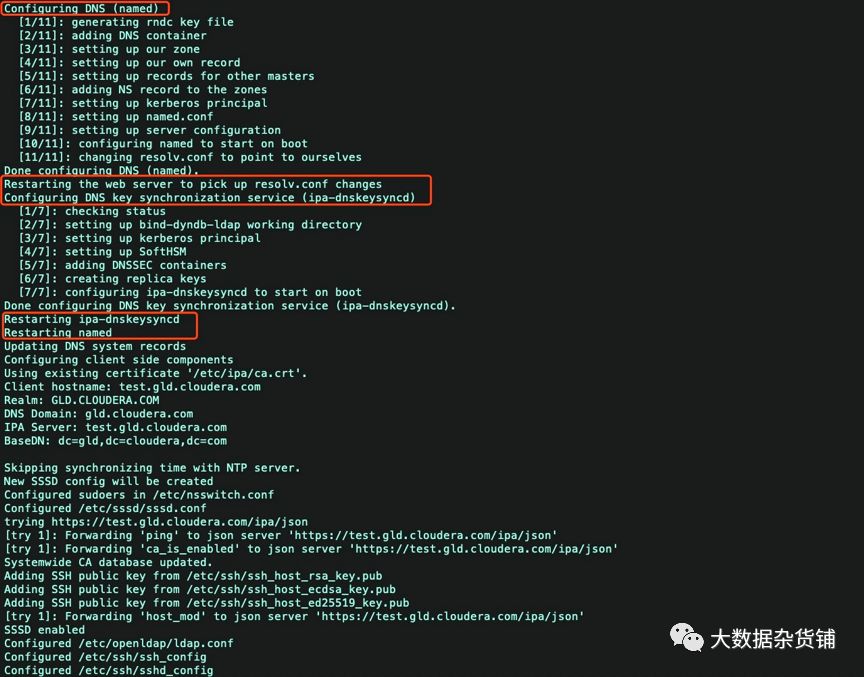
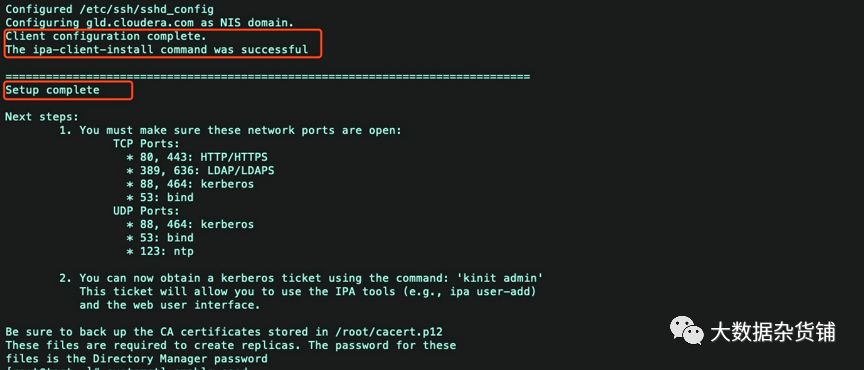
启动SSSD服务
接着执行下列命令
systemctl enable sssd #开机启动sssdsystemctl start sssd #开启服务authconfig --enablemkhomedir --update #创建用户,家目录 更新认证验证IPA-Server和DNS
验证
Kerberos验证
[root@test ~]# kinit admin #登录admin管理Password for admin@GLD.CLOUDERA.COM: #输入前面设置的admin密码[root@test ~]# klistTicket cache: KEYRING:persistent:0:0Default principal: admin@GLD.CLOUDERA.COMValid starting Expires Service principal12/14/2019 02:12:05 12/15/2019 02:12:02 krbtgt/GLD.CLOUDERA.COM@GLD.CLOUDERA.COM[root@test ~]#
查看域用户
接下来,验证IPA服务器是否正常运行。
ipa user-find admin
输出内容如下:
[root@test ~]# ipa user-find admin--------------1 user matched--------------User login: adminLast name: AdministratorHome directory: /home/adminLogin shell: /bin/bashPrincipal alias: admin@GLD.CLOUDERA.COMUID: 1721400000GID: 1721400000Account disabled: False----------------------------Number of entries returned 1
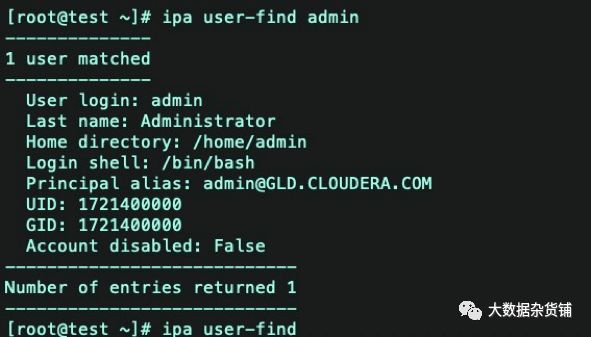
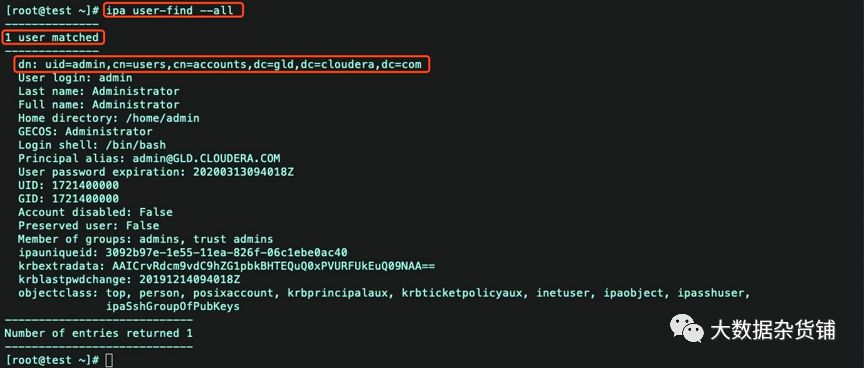
ipa user-find –all 查看所有域用户信息
[root@test ~]# ipa user-find --all--------------1 user matched--------------dn: uid=admin,cn=users,cn=accounts,dc=gld,dc=cloudera,dc=comUser login: adminLast name: AdministratorFull name: AdministratorHome directory: /home/adminGECOS: AdministratorLogin shell: /bin/bashPrincipal alias: admin@GLD.CLOUDERA.COMUser password expiration: 20200313094018ZUID: 1721400000GID: 1721400000Account disabled: FalsePreserved user: FalseMember of groups: admins, trust adminsipauniqueid: 3092b97e-1e55-11ea-826f-06c1ebe0ac40krbextradata: AAICrvRdcm9vdC9hZG1pbkBHTEQuQ0xPVURFUkEuQ09NAA==krblastpwdchange: 20191214094018Zobjectclass: top, person, posixaccount, krbprincipalaux, krbticketpolicyaux, inetuser, ipaobject, ipasshuser,ipaSshGroupOfPubKeys----------------------------Number of entries returned 1----------------------------[root@test ~]#
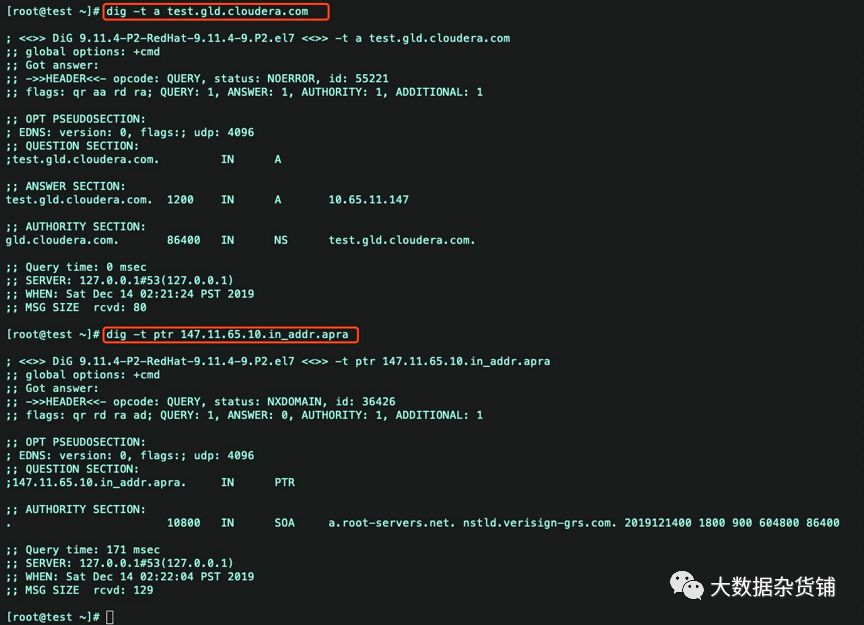
验证dns解析
dig -t a test.gld.cloudera.comdig -t ptr 147.11.65.10.in_addr.apra
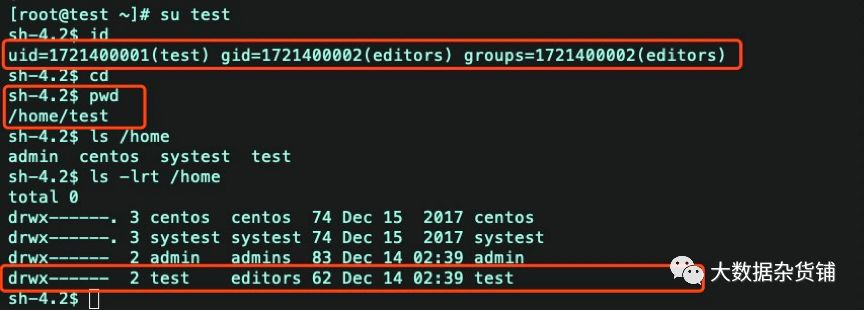
验证SSSD
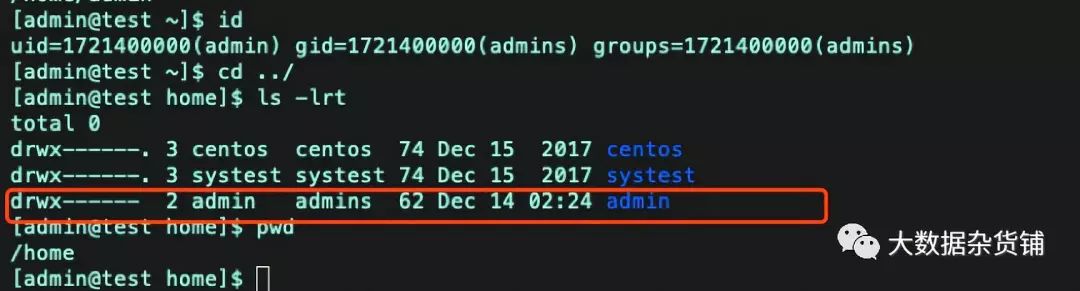
os切换到admin用户,查看用户id

用户跟目录已经自动创建
UI访问验证
访问主机配置完hosts文件后,可以访问FreeIPA的UI。
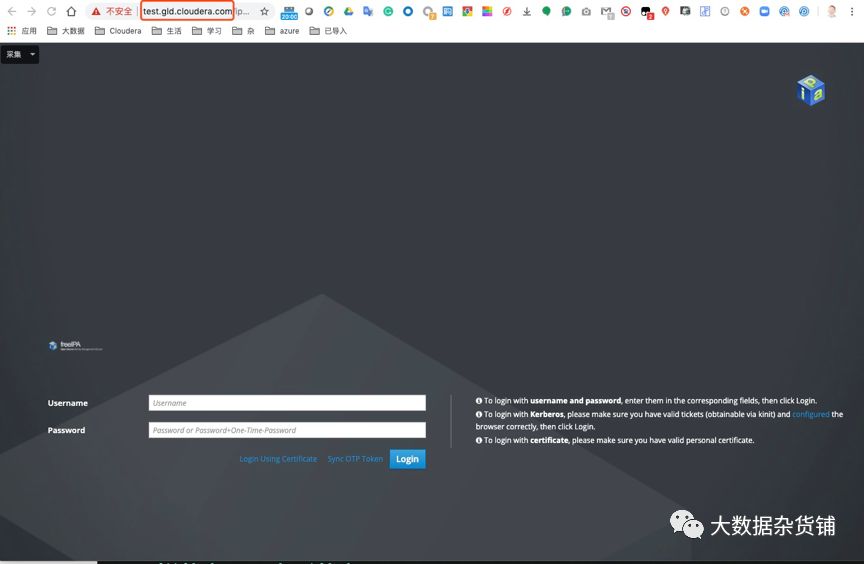
使用admin用户登陆
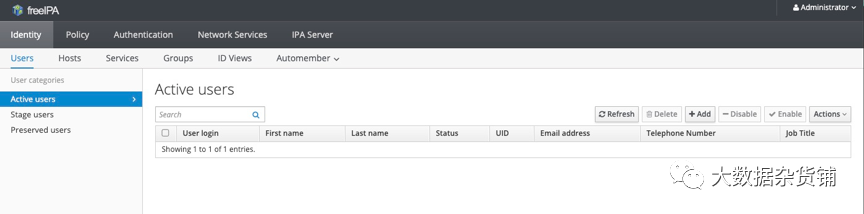
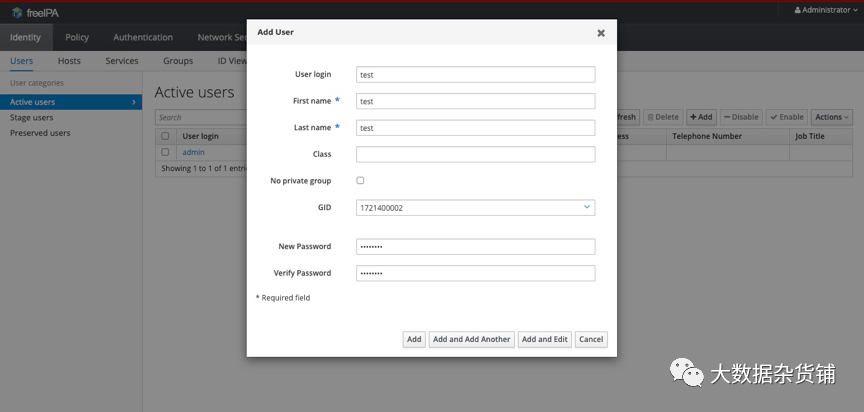
添加用户
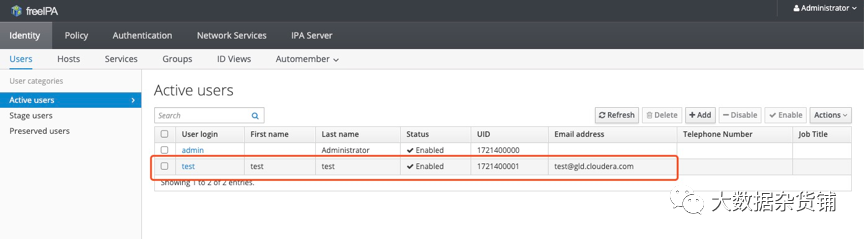
添加完用户如下:
系统自动添加用户和创建用户跟目录
问题处理
Command '/bin/systemctl start certmonger.service' returned non-zero exit status 1
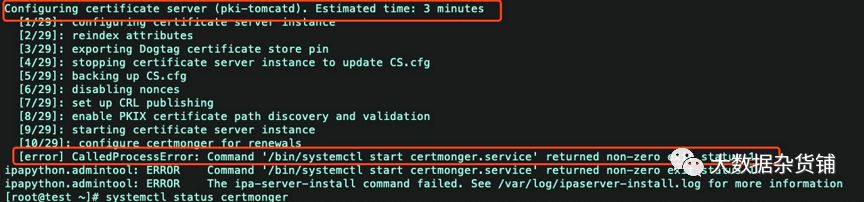
报错原因:
根据上述报错,大致的意思就是说freeIPA的“certmonger”服务没有启动成功。于是我们可以查看我们手动启动一下“certmonger”服务。发现手动去启动也失败啦!如下所示:
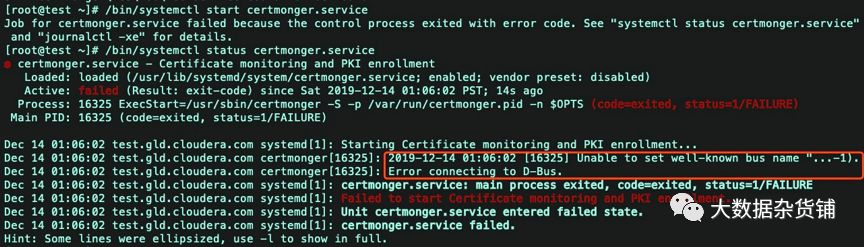
解决方案:
既然我们知道了根dbus这个服务有关,于是我们可以重启一下这个服务,具体操作如下:
systemctl restart dbus.socketsystemctl restart dbus.service
重启之后,我们需要卸载之前安装到一半的IPA-Server。然后再重新安装。具体操作如下:
ipa-server-install –uninstallAre you sure you want to continue with the uninstall procedure? [no]: yesERROR Named service failed to start
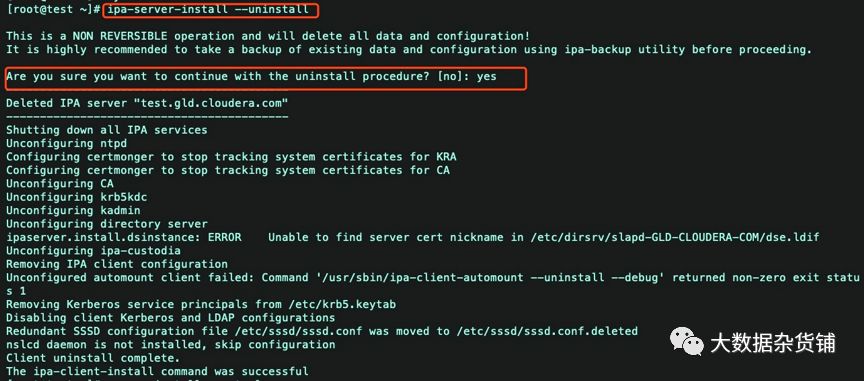 Named服务无法启动
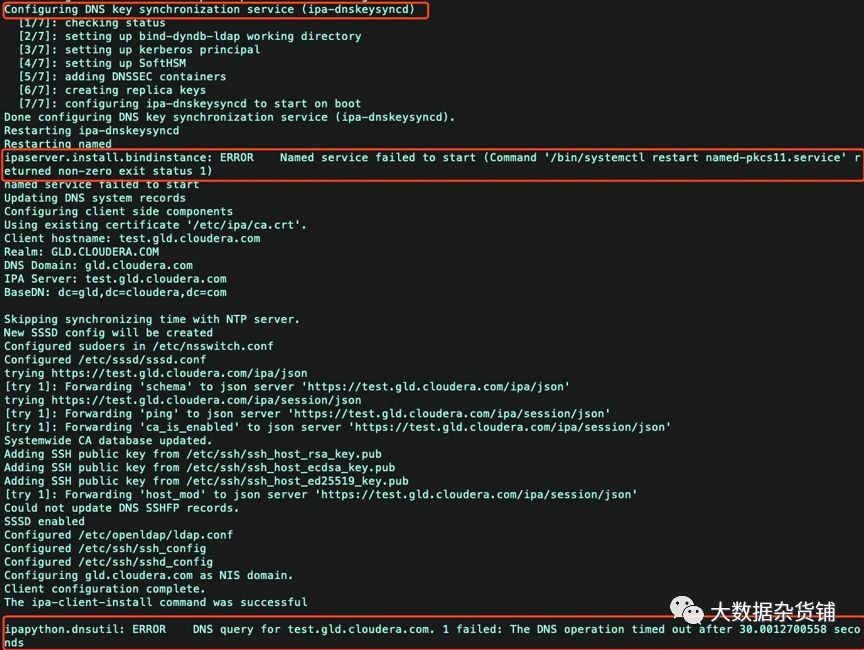
原因分析:
Named服务无法启动,手工启动一下该服务,测试是否可以启动
systemctl start named.serviceFailed to start named.service: Unit is masked.

Named服务被锁定,导致无法启动。手工对该服务解锁,然后启动该服务。
systemctl unmask named.servicesystemctl start named.servicesystemctl status named
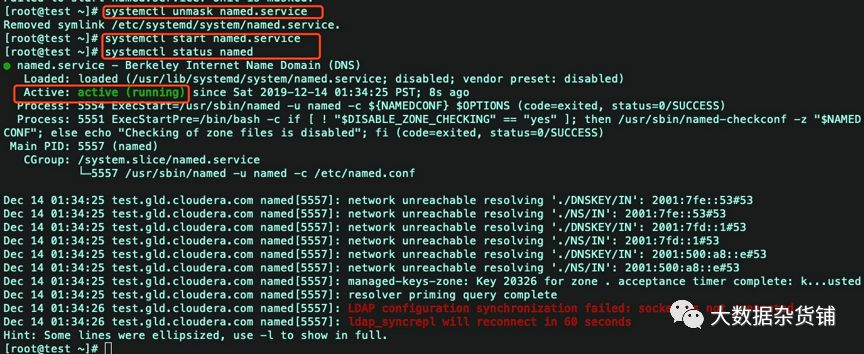
Named服务可以启动,则卸载之前安装到一半的IPA-Server。然后再重新安装。具体操作如下:
ipa-server-install –uninstallAre you sure you want to continue with the uninstall procedure? [no]: yes
参考
安装FreeIPA以及应用时报错汇总 :https://www.cnblogs.com/yinzhengjie/p/10106337.html
FREEIPA:ipa-server的部署使用:https://blog.51cto.com/superleedo/2154838
