点击关注上方“知了小巷”,
设为“置顶或星标”,第一时间送达干货。
MySQL binlog+canal(HA)+Kafka+CanalKafkaClientExample
MySQL和binlog
MySQL单机master安装部署
https://downloads.mysql.com/archives/community/
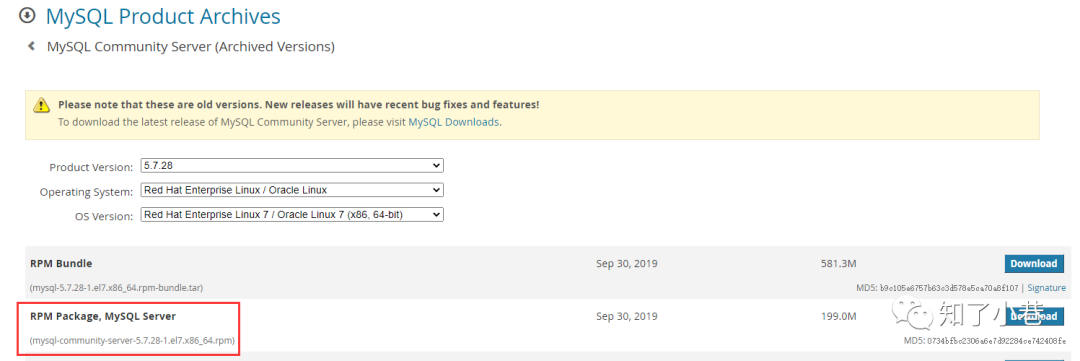
rpm包安装:
mysql-community-server-5.7.28-1.el7.x86_64.rpm
使用rpm -ivh命令
rpm -ivh mysql-community-server-5.7.28-1.el7.x86_64.rpm
MySQL配置/etc/my.cnf
# For advice on how to change settings please see
# http://dev.mysql.com/doc/refman/5.7/en/server-configuration-defaults.html

[mysqld]
#
# Remove leading # and set to the amount of RAM for the most important data
# cache in MySQL. Start at 70% of total RAM for dedicated server, else 10%.
# innodb_buffer_pool_size = 128M
#
# Remove leading # to turn on a very important data integrity option: logging
# changes to the binary log between backups.
# log_bin
#
# Remove leading # to set options mainly useful for reporting servers.
# The server defaults are faster for transactions and fast SELECTs.
# Adjust sizes as needed, experiment to find the optimal values.
# join_buffer_size = 128M
# sort_buffer_size = 2M
# read_rnd_buffer_size = 2M

# https://dev.mysql.com/doc/refman/5.7/en/server-system-variables.html#sysvar_datadir
# 目录名称,全局的系统变量,不能动态改变;MySQL Server的数据目录
# It is best to specify the datadir value as an absolute path.
datadir=/xxxxx/mysql/data
# socket文件,全局的系统变量,不能动态改变;里面是mysqld的进程号,默认值是MySQL;用于本地客户端连接
socket=/xxxxx/mysql/mysql.sock

# 创建临时文件的目录
tmpdir=/xxxxx/mysql/tmp
character_set_server= utf8mb4

# Disabling symbolic-links is recommended to prevent assorted security risks
symbolic-links=0

# 错误日志输出文件
log-error=/xxxxx/mysql/log/mysqld.log
# mysqld进程号文件
pid-file=/xxxxx/mysql/tmp/mysql.pid

# ---------------- Binlog ----------------
# Binary logging must be enabled on the source because the binary log is the basis for replicating changes from the source to its replicas.
server-id=1
# If binary logging is not enabled on the source using the log-bin option, replication is not possible.
log-bin = xxxxx/mysql/binlog/mysql-bin
# binlog的索引文件,里面存储的是binlog文件的文件名列表
log-bin-index = xxxxx/mysql/binlog/mysql-bin.index
binlog_format = row
# binlog文件的移除时间,超过7天就会被删除
expire_logs_days = 7
# Enables synchronization of the binary log to disk before transactions are committed.
# 表示每次事务提交,MySQL都会把binlog刷下去,是最安全-最大可能保证持久性和一致性,但是性能损耗也最大
sync_binlog = 1
# If you often use large transactions, you can increase this cache size to get better performance.
binlog_cache_size = 8M
# The maximum recommended value is 4GB; this is due to the fact that MySQL currently cannot work with binary log positions greater than 4GB.
max_binlog_cache_size = 2048M
max_binlog_size = 1024M
# affects row-based logging only. When enabled, it causes the server to write informational log events such as row query log events into its binary log.
binlog_rows_query_log_events = 1

# default server time zone
default-time-zone = '+8:00'
关于服务启动、停止、重启、用户密码登录授权等(略)。
mysql server目录结构和文件
主要目录
[... mysql]# ls
binlog  data  log  mysql.sock  mysql.sock.lock  tmp

$ ls binlog/
mysql-bin.000001  mysql-bin.000002  mysql-bin.000003  mysql-bin.000004  mysql-bin.000005  mysql-bin.000006  mysql-bin.000007  mysql-bin.000008  mysql-bin.000009  mysql-bin.000010  mysql-bin.000011  mysql-bin.index

$ ls data/
auto.cnf    canal_manager  client-cert.pem  ib_buffer_pool  ib_logfile0  ibtmp1  performance_schema  public_key.pem   server-key.pem  test_binlog
ca-key.pem  ca.pem         client-key.pem   ibdata1         ib_logfile1  mysql   private_key.pem     server-cert.pem  sys

$ ls log/
mysqld.log

$ ls tmp/
mysql.pid
一些文件
ib开头的是InnoDB存储引擎生成的文件。在关闭MySQL时,会把内存中的热数据保存在磁盘ib_buffer_pool文件中,位于数据目录下。
ibdata1: InnoDB的共享表空间,A set of files with names such as ibdata1, ibdata2, and so on, that make up the InnoDB system tablespace.。
ibtmp1: The InnoDB temporary tablespace data file for non-compressed InnoDB temporary tables and related objects.
ib_logfile0: A set of files, typically named ib_logfile0 and ib_logfile1, that form the redo log. This data cannot be used for manual recovery; for that type of operation, use the binary log.
undo logs: MySQL 5.7, rollback segments are also allocated to the global temporary tablespace.
binlog文件是可以手动移除的
PURGE BINARY LOGS TO 'mysql-bin.010';
PURGE BINARY LOGS BEFORE '2019-04-02 22:46:26';
binlog的格式
statement,row,mixed。上面my.cnf配置文件中配置的是row格式。可以通过MySQL客户端查看:
mysql> show variables like 'binlog_format';
+---------------+-------+
| Variable_name | Value |
+---------------+-------+
| binlog_format | ROW   |
+---------------+-------+
1 row in set (0.02 sec)
statement:记录每一条修改数据的SQL到binlog中。 row:记录每一行被修改后的所有的数据,会记录更新前的每一个字段和更新后的每一个字段。 mixed:MySQL默认仍然采用statement格式进行记录,但是一旦它判断可能会有数据不一致的情况(如UUID函数)发生,则会采用row格式来记录。
mysqlbinlog工具
https://dev.mysql.com/doc/refman/5.7/en/mysqlbinlog.html
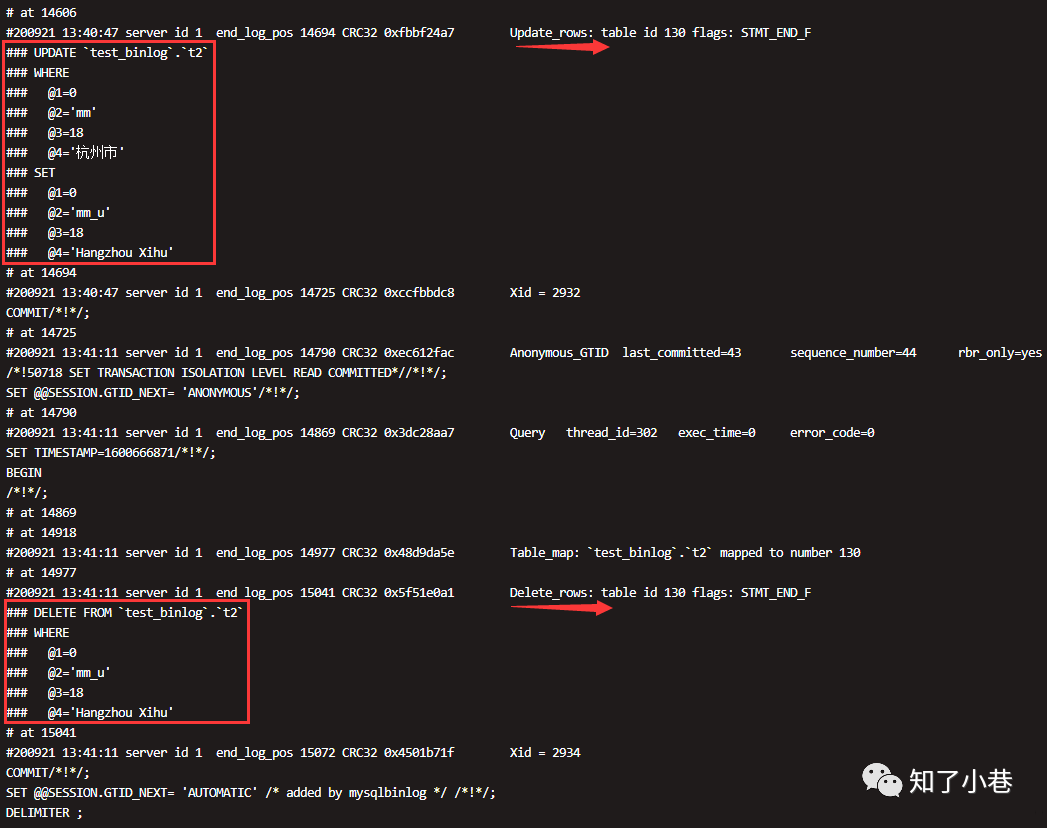
查看binlog文件:mysql-bin.000011。
# mysqlbinlog mysql-bin.000011
...
# at 14918
#200921 13:41:11 server id 1  end_log_pos 14977 CRC32 0x48d9da5e        Table_map: `test_binlog`.`t2` mapped to number 130
# at 14977
#200921 13:41:11 server id 1  end_log_pos 15041 CRC32 0x5f51e0a1        Delete_rows: table id 130 flags: STMT_END_F

BINLOG '
9zxoXxMBAAAAOwAAAIE6AAAAAIIAAAAAAAEAC3Rlc3RfYmlubG9nAAJ0MgAEAw8DDwRkAJABDl7a
2Ug=
9zxoXyABAAAAQAAAAME6AAAAAIIAAAAAAAEAAgAE//AAAAAABG1tX3USAAAADQBIYW5nemhvdSBY
aWh1oeBRXw==
'/*!*/;
...
使用时间范围以及人类友好的形式输出:
# mysqlbinlog --no-defaults --database=test_binlog --base64-output=decode-rows -v --start-datetime='2020-09-21 13:30:00' --stop-datetime='2020-09-21 21:00:00' mysql-bin.000011 | more
MySQL主从原理与canal
canal源码地址:
https://github.com/alibaba/canal
分布式数据库同步系统otter:
https://github.com/alibaba/otter
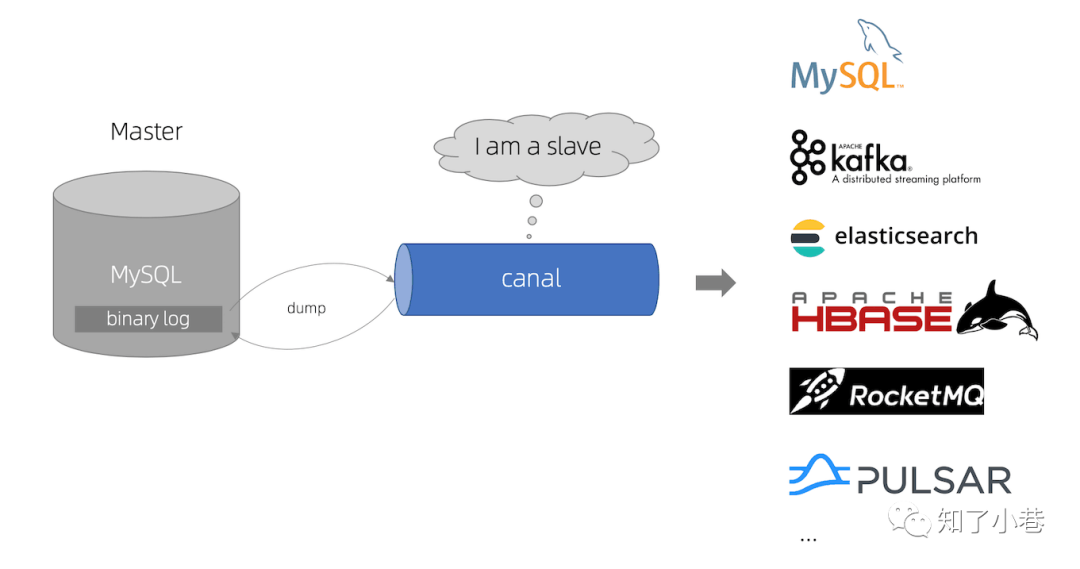
canal,主要用途是基于MySQL数据库增量日志解析,提供增量数据订阅和消费。
同类CDC组件,maxwell:
https://github.com/zendesk/maxwell
debezium:
https://github.com/debezium/debezium
flink-cdc-connectors:
https://github.com/ververica/flink-cdc-connectors
查看binlog事件:
mysql> show binlog events;
+------------------+-----+----------------+-----------+-------------+---------------------------------------+
| Log_name         | Pos | Event_type     | Server_id | End_log_pos | Info                                  |
+------------------+-----+----------------+-----------+-------------+---------------------------------------+
| mysql-bin.000001 |   4 | Format_desc    |         1 |         123 | Server ver: 5.7.28-log, Binlog ver: 4 |
| mysql-bin.000001 | 123 | Previous_gtids |         1 |         154 |                                       |
| mysql-bin.000001 | 154 | Stop           |         1 |         177 |                                       |
+------------------+-----+----------------+-----------+-------------+---------------------------------------+
3 rows in set (0.00 sec)
可以指定具体的binlog文件:
mysql> show binlog events in mysql-bin.000011;
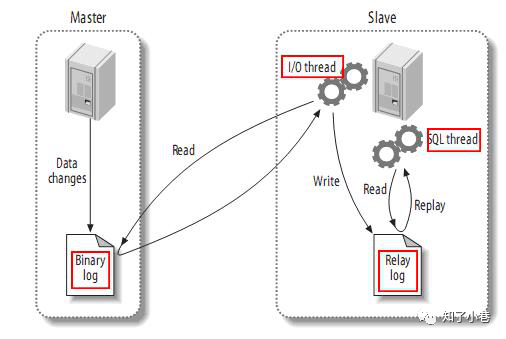
MySQL主备复制原理:
MySQL master将数据变更写入二进制日志(binary log,其中记录叫做二进制日志事件binary log events,可以通过上面show binlog events进行查看)。MySQL slave将master的binary log events拷贝到它的中继日志(relay log)。MySQL slave重放relay log中的事件。canal工作原理:
canal模拟MySQL slave的交互协议,伪装自己为MySQL slave,向MySQL master发送dump协议。MySQL master收到dump请求,开始推送binary log给slave(即canal)。canal解析binary log对象(原始为byte流)。canal支持多语言:
canal特别设计了client-server模式,交互协议使用protobuf 3.0, client端可采用不同语言实现不同的消费逻辑。canal作为MySQL binlog增量获取和解析工具,可将变更记录投递到MQ系统中,比如Kafka/RocketMQ,可以借助于MQ的多语言能力。
显示MySQL master的状态:
mysql> show master status;
+------------------+----------+--------------+------------------+-------------------+
| File             | Position | Binlog_Do_DB | Binlog_Ignore_DB | Executed_Gtid_Set |
+------------------+----------+--------------+------------------+-------------------+
| mysql-bin.000011 |    15072 |              |                  |                   |
+------------------+----------+--------------+------------------+-------------------+
1 row in set (0.00 sec)
单机canal server部署配置运行
$ wget https://github.com/alibaba/canal/releases/download/canal-1.1.4/canal.deployer-1.1.4.tar.gz
$ tar zxvf canal.deployer-1.1.4.tar.gz
[...deployer]$ ls
bin  conf  lib  logs
$ ls
canal_local.properties  canal.properties  example  logback.xml  metrics  spring
$ ls example/
h2.mv.db  instance.properties  meta.dat
h2.mv.db和meta.dat是canal运行之后生成的元文件。
配置文件conf/canal.properties是canal的全局配置;conf/example/instance.properties是canal管理的一个测试实例的单独配置。
canal.properties内容比较多,这里是主要变动的配置:
$ vi canal.properties
canal.serverMode = kafka

canal.mq.servers = 192.168.11.101:9092,192.168.11.102:9092,192.168.11.103:9092
canal.mq.retries = 3
example/instance.properties
$ vi example/instance.properties
canal.instance.mysql.slaveId=2

canal.instance.master.address=192.168.11.22:3306
canal.instance.master.journal.name=mysql-bin.000011
canal.instance.master.position=3084

# username/password
canal.instance.dbUsername=root
canal.instance.dbPassword=xxxxxxxx

# table regex
canal.instance.filter.regex=test_binlog\\..*

# mq config
canal.mq.topic=mysql_binlog_example
canal.mq.partitionsNum=3
canal.mq.partitionHash=test_binlog.t1:id,.*\\..*
启动canal并查看日志
$ ls bin/
canal.pid  restart.sh  startup.bat  startup.sh  stop.sh
$ sh bin/startup.sh

$ ls logs/
canal  example

$ tail -n 5 logs/canal/canal.log
2020-09-16 16:04:17.257 [main] INFO  com.alibaba.otter.canal.deployer.CanalLauncher - ## set default uncaught exception handler
2020-09-16 16:04:17.308 [main] INFO  com.alibaba.otter.canal.deployer.CanalLauncher - ## load canal configurations
2020-09-16 16:04:17.333 [main] INFO  com.alibaba.otter.canal.deployer.CanalStarter - ## start the canal server.
2020-09-16 16:04:17.370 [main] INFO  com.alibaba.otter.canal.deployer.CanalController - ## start the canal server[192.168.11.22(192.168.11.22):11111]
2020-09-16 16:04:18.923 [main] INFO  com.alibaba.otter.canal.deployer.CanalStarter - ## the canal server is running now ......

$ ls logs/example/
2020-09-14  2020-09-15  2020-09-16  2020-09-17  example.log  meta.log
kafka和CanalKafkaClientExample
Kafka测试集群版本2.0.0,客户端版本2.0.1。
kafka topic
kafka集群部署(略)。
这里用了Kafka-Eagle来管理和监控Kafka。
https://www.kafka-eagle.org/
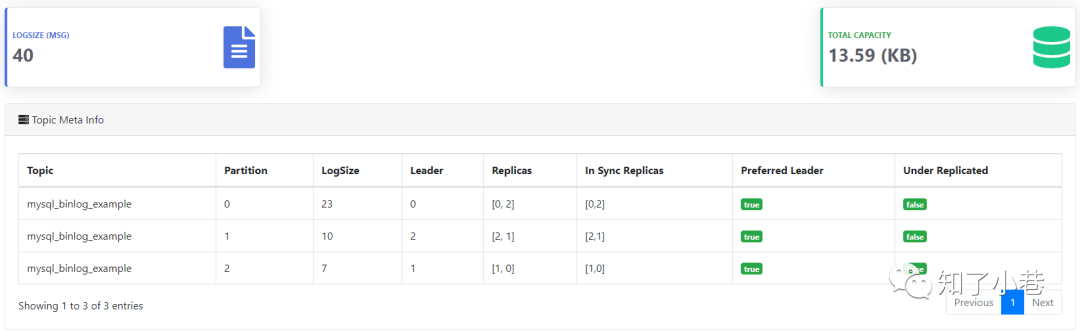
查看topic:mysql_binlog_example
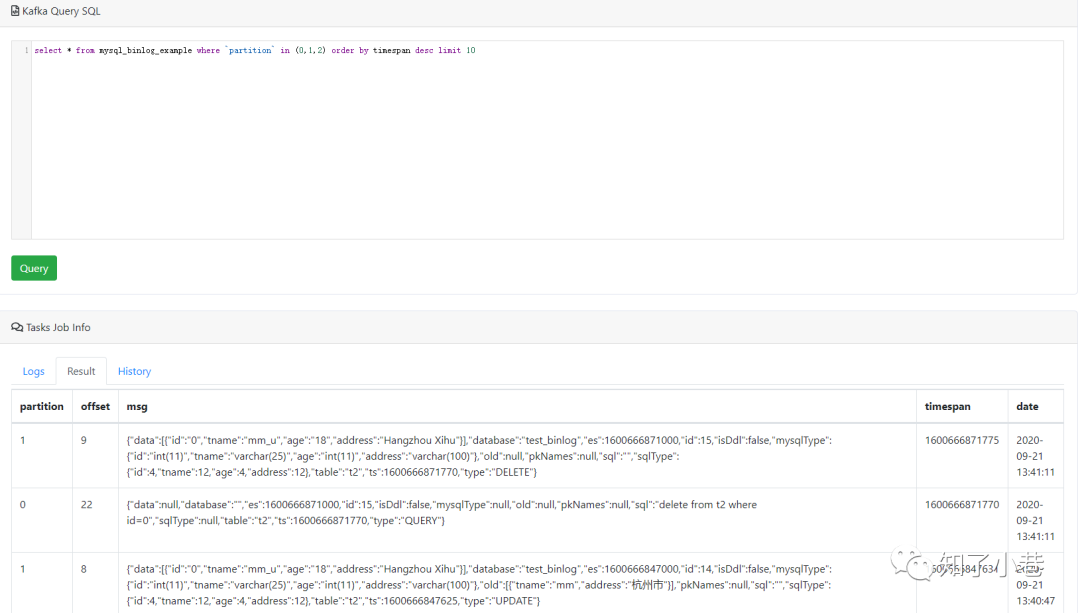
使用Kafka Query SQL查询最近的10条binlog日志(可用like语法进行筛选):
select * from mysql_binlog_example where `partition` in (0,1,2) order by timespan desc limit 10
CanalKafkaClientExample
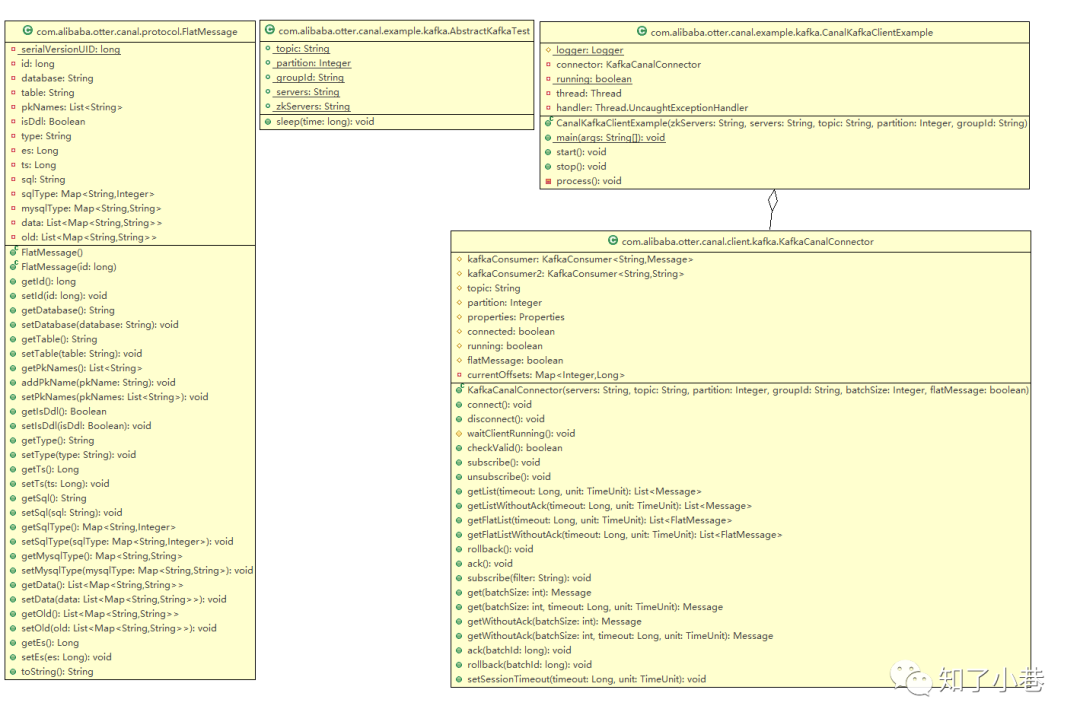
Kafka集群的客户端配置,如topic、groupId、servers。现在版本的Kafka客户端不需要zkServers。
AbstractKafkaTest源码:
public abstract class AbstractKafkaTest extends BaseCanalClientTest {

    public static String  topic     = "mysql_binlog_example";
    public static Integer partition = null;
    public static String  groupId   = "g4";
    public static String  servers   = "192.168.11.101:9092,192.168.11.102:9092,192.168.11.103:9092";
    public static String  zkServers = "192.168.11.101:2181,192.168.11.102:2181,192.168.11.103:2181";

    public void sleep(long time) {
        try {
            Thread.sleep(time);
        } catch (InterruptedException e) {
        }
    }
}
CanalKafkaClientExample源码(有改动):
public class CanalKafkaClientExample {

    protected final static Logger           logger  = LoggerFactory.getLogger(CanalKafkaClientExample.class);

    private KafkaCanalConnector             connector;

    private static volatile boolean         running = false;

    private Thread                          thread  = null;

    private Thread.UncaughtExceptionHandler handler = (t, e) -> logger.error("parse events has an error", e);

    // KafkaCanalConnector flatMessage=true 消息时JSON字符串
    public CanalKafkaClientExample(String zkServers, String servers, String topic, Integer partition, String groupId){
        connector = new KafkaCanalConnector(servers, topic, partition, groupId, null, true);
    }

    public static void main(String[] args) {
        try {
            final CanalKafkaClientExample kafkaCanalClientExample = new CanalKafkaClientExample(AbstractKafkaTest.zkServers,
                AbstractKafkaTest.servers,
                AbstractKafkaTest.topic,
                AbstractKafkaTest.partition,
                AbstractKafkaTest.groupId);
            logger.info("## start the kafka consumer: {}-{}", AbstractKafkaTest.topic, AbstractKafkaTest.groupId);
            kafkaCanalClientExample.start();
            logger.info("## the canal kafka consumer is running now ......");
            Runtime.getRuntime().addShutdownHook(new Thread(() -> {
                try {
                    logger.info("## stop the kafka consumer");
                    kafkaCanalClientExample.stop();
                } catch (Throwable e) {
                    logger.warn("##something goes wrong when stopping kafka consumer:", e);
                } finally {
                    logger.info("## kafka consumer is down.");
                }
            }));
            while (running)
                ;
        } catch (Throwable e) {
            logger.error("## Something goes wrong when starting up the kafka consumer:", e);
            System.exit(0);
        }
    }

    public void start() {
        Assert.notNull(connector, "connector is null");
        // process()
        thread = new Thread(this::process);
        thread.setUncaughtExceptionHandler(handler);
        thread.start();
        running = true;
    }

    public void stop() {
        if (!running) {
            return;
        }
        running = false;
        if (thread != null) {
            try {
                thread.join();
            } catch (InterruptedException e) {
                // ignore
            }
        }
    }

    private void process() {
        while (!running) {
            try {
                Thread.sleep(1000);
            } catch (InterruptedException e) {
            }
        }

        while (running) {
            try {
                connector.connect();
                connector.subscribe();
                while (running) {
                    try {
                        // getFlatListWithoutAck 这里是FlatMessage
                        List<FlatMessage> messages = connector.getFlatListWithoutAck(100L, TimeUnit.MILLISECONDS); // 获取message
                        if (messages == null) {
                            continue;
                        }
                        for (FlatMessage message : messages) {
                            long batchId = message.getId();
                            logger.info(batchId + "-----" + message.toString());
                        }

                        connector.ack(); // 提交确认
                    } catch (Exception e) {
                        logger.error(e.getMessage(), e);
                    }
                }
            } catch (Exception e) {
                logger.error(e.getMessage(), e);
            }
        }

        connector.unsubscribe();
        connector.disconnect();
    }
}
KafkaCanalConnector#getFlatListWithoutAck
@Override
public List<FlatMessage> getFlatListWithoutAck(Long timeout, TimeUnit unit) throws CanalClientException {
    waitClientRunning();
    if (!running) {
        return Lists.newArrayList();
    }

    // poll(long)方法已经过时了
    ConsumerRecords<String, String> records = kafkaConsumer2.poll(unit.toMillis(timeout));

    currentOffsets.clear();
    for (TopicPartition topicPartition : records.partitions()) {
        currentOffsets.put(topicPartition.partition(), kafkaConsumer2.position(topicPartition));
    }

    if (!records.isEmpty()) {
        List<FlatMessage> flatMessages = new ArrayList<>();
        for (ConsumerRecord<String, String> record : records) {
            String flatMessageJson = record.value();
            // 这里直接解析canal发到Kafka的binlog日志(JSON字符串)
            FlatMessage flatMessage = JSON.parseObject(flatMessageJson, FlatMessage.class);
            flatMessages.add(flatMessage);
        }

        return flatMessages;
    }
    return Lists.newArrayList();
}
控制台启动消费端,日志输出
2020-09-21 11:42:06.467 [main] INFO  c.a.otter.canal.example.kafka.CanalKafkaClientExample - ## start the kafka consumer: mysql_binlog_example-g4
2020-09-21 11:42:06.489 [main] INFO  c.a.otter.canal.example.kafka.CanalKafkaClientExample - ## the canal kafka consumer is running now ......
2020-09-21 11:42:08.292 [Thread-1] INFO  org.apache.kafka.clients.consumer.ConsumerConfig - ConsumerConfig values:
  ......
  value.deserializer = class org.apache.kafka.common.serialization.StringDeserializer

2020-09-21 11:42:08.731 [Thread-1] INFO  org.apache.kafka.common.utils.AppInfoParser - Kafka version : 2.0.1
2020-09-21 11:42:08.731 [Thread-1] INFO  org.apache.kafka.common.utils.AppInfoParser - Kafka commitId : fa14705e51bd2ce5
2020-09-21 11:42:08.907 [Thread-1] INFO  org.apache.kafka.clients.Metadata - Cluster ID: RWSVpwFFQgiQ5QQIOL-Odw
2020-09-21 11:42:08.908 [Thread-1] INFO  o.a.kafka.clients.consumer.internals.AbstractCoordinator - [Consumer clientId=consumer-1, groupId=g4] Discovered group coordinator test-hadoop-103.xxxxx:9092 (id: 2147483645 rack: null)
2020-09-21 11:42:08.916 [Thread-1] INFO  o.a.kafka.clients.consumer.internals.ConsumerCoordinator - [Consumer clientId=consumer-1, groupId=g4] Revoking previously assigned partitions []
2020-09-21 11:42:08.916 [Thread-1] INFO  o.a.kafka.clients.consumer.internals.AbstractCoordinator - [Consumer clientId=consumer-1, groupId=g4] (Re-)joining group
2020-09-21 11:42:08.929 [Thread-1] INFO  o.a.kafka.clients.consumer.internals.AbstractCoordinator - [Consumer clientId=consumer-1, groupId=g4] Successfully joined group with generation 3
2020-09-21 11:42:08.931 [Thread-1] INFO  o.a.kafka.clients.consumer.internals.ConsumerCoordinator - [Consumer clientId=consumer-1, groupId=g4] Setting newly assigned partitions [mysql_binlog_example-2, mysql_binlog_example-1, mysql_binlog_example-0]
2020-09-21 11:42:09.153 [Thread-1] INFO  c.a.otter.canal.example.kafka.CanalKafkaClientExample - 10-----FlatMessage [id=10, database=test_binlog, table=t2, isDdl=false, type=UPDATE, es=1600658620000, ts=1600658620430, sql=, sqlType={tname=12, id=4, age=4}, mysqlType={tname=varchar(25), id=int(11), age=int(11)}, data=[{tname=yyyyy-updated, id=3, age=188}], old=[{tname=yyyyyy}]]
2020-09-21 11:42:09.153 [Thread-1] INFO  c.a.otter.canal.example.kafka.CanalKafkaClientExample - 11-----FlatMessage [id=11, database=test_binlog, table=t2, isDdl=false, type=UPDATE, es=1600659007000, ts=1600659007604, sql=, sqlType={tname=12, id=4, age=4}, mysqlType={tname=varchar(25), id=int(11), age=int(11)}, data=[{tname=yyyyy-updated2, id=3, age=188}], old=[{tname=yyyyy-updated}]]
2020-09-21 11:42:09.157 [Thread-1] INFO  c.a.otter.canal.example.kafka.CanalKafkaClientExample - 10-----FlatMessage [id=10, database=, table=t2, isDdl=false, type=QUERY, es=1600658620000, ts=1600658620430, sql=update t2 set tname='yyyyy-updated' where id=3, sqlType=null, mysqlType=null, data=null, old=null]
2020-09-21 11:42:09.157 [Thread-1] INFO  c.a.otter.canal.example.kafka.CanalKafkaClientExample - 11-----FlatMessage [id=11, database=, table=t2, isDdl=false, type=QUERY, es=1600659007000, ts=1600659007604, sql=update t2 set tname='yyyyy-updated2' where id=3, sqlType=null, mysqlType=null, data=null, old=null]
2020-09-21 13:36:22.041 [Thread-1] INFO  c.a.otter.canal.example.kafka.CanalKafkaClientExample - 12-----FlatMessage [id=12, database=test_binlog, table=t2, isDdl=true, type=ALTER, es=1600666581000, ts=1600666582031, sql=alter table t2 add column(address varchar(100)), sqlType=null, mysqlType=null, data=null, old=null]
2020-09-21 13:37:48.068 [Thread-1] INFO  c.a.otter.canal.example.kafka.CanalKafkaClientExample - 13-----FlatMessage [id=13, database=, table=t2, isDdl=false, type=QUERY, es=1600666668000, ts=1600666668062, sql=insert into t2 (tname, age, address) values ('mm', 18, '杭州市'), sqlType=null, mysqlType=null, data=null, old=null]
2020-09-21 13:37:48.071 [Thread-1] INFO  c.a.otter.canal.example.kafka.CanalKafkaClientExample - 13-----FlatMessage [id=13, database=test_binlog, table=t2, isDdl=false, type=INSERT, es=1600666668000, ts=1600666668062, sql=, sqlType={address=12, tname=12, id=4, age=4}, mysqlType={address=varchar(100), tname=varchar(25), id=int(11), age=int(11)}, data=[{address=杭州市, tname=mm, id=0, age=18}], old=null]
2020-09-21 13:40:47.630 [Thread-1] INFO  c.a.otter.canal.example.kafka.CanalKafkaClientExample - 14-----FlatMessage [id=14, database=, table=t2, isDdl=false, type=QUERY, es=1600666847000, ts=1600666847625, sql=update t2 set tname='mm_u', address='Hangzhou Xihu' where id=0, sqlType=null, mysqlType=null, data=null, old=null]
2020-09-21 13:40:47.634 [Thread-1] INFO  c.a.otter.canal.example.kafka.CanalKafkaClientExample - 14-----FlatMessage [id=14, database=test_binlog, table=t2, isDdl=false, type=UPDATE, es=1600666847000, ts=1600666847625, sql=, sqlType={address=12, tname=12, id=4, age=4}, mysqlType={address=varchar(100), tname=varchar(25), id=int(11), age=int(11)}, data=[{address=Hangzhou Xihu, tname=mm_u, id=0, age=18}], old=[{address=杭州市, tname=mm}]]
2020-09-21 13:41:11.776 [Thread-1] INFO  c.a.otter.canal.example.kafka.CanalKafkaClientExample - 15-----FlatMessage [id=15, database=, table=t2, isDdl=false, type=QUERY, es=1600666871000, ts=1600666871770, sql=delete from t2 where id=0, sqlType=null, mysqlType=null, data=null, old=null]
2020-09-21 13:41:11.778 [Thread-1] INFO  c.a.otter.canal.example.kafka.CanalKafkaClientExample - 15-----FlatMessage [id=15, database=test_binlog, table=t2, isDdl=false, type=DELETE, es=1600666871000, ts=1600666871770, sql=, sqlType={address=12, tname=12, id=4, age=4}, mysqlType={address=varchar(100), tname=varchar(25), id=int(11), age=int(11)}, data=[{address=Hangzhou Xihu, tname=mm_u, id=0, age=18}], old=null]
canal.admin
从源码启动canal.admin管理后台;
canal/admin/admin-web/src/main/java/com/alibaba/otter/canal/admin/CanalAdminApplication.java
修改配置文件canal/admin/admin-web/src/main/resources/application.yml,变更MySQL数据库连接和用户名密码。
下面是登录canal server的用户名和密码。
canal:
  adminUser: admin
  adminPasswd: admin
canal.adimin的登录用户名密码默认admin/123456。WEBUI登录地址:
http://localhost:8089/#/canalServer/nodeServers
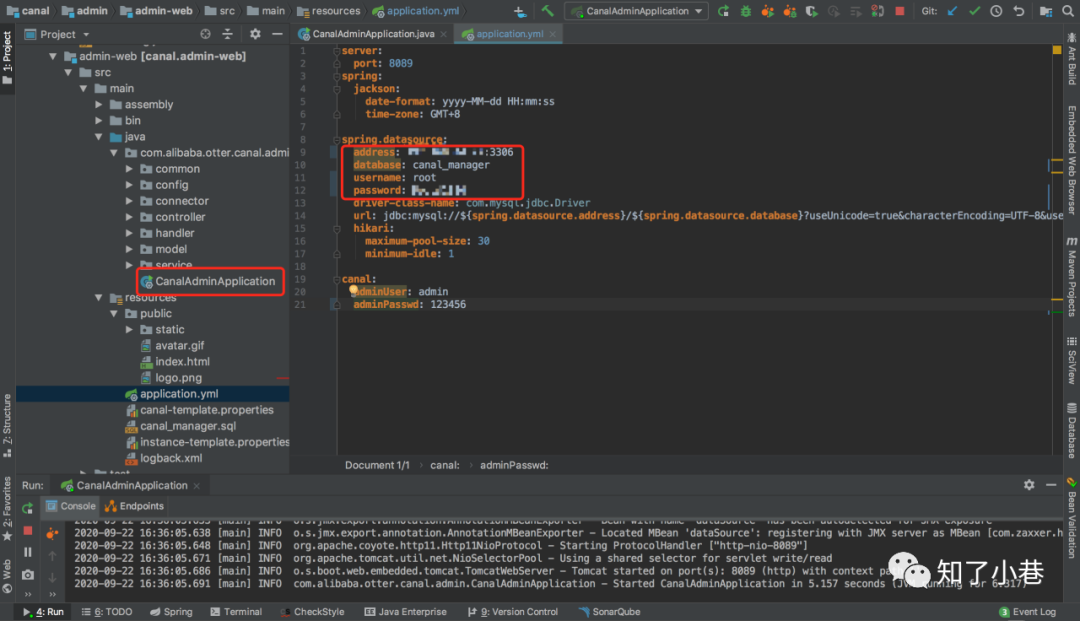
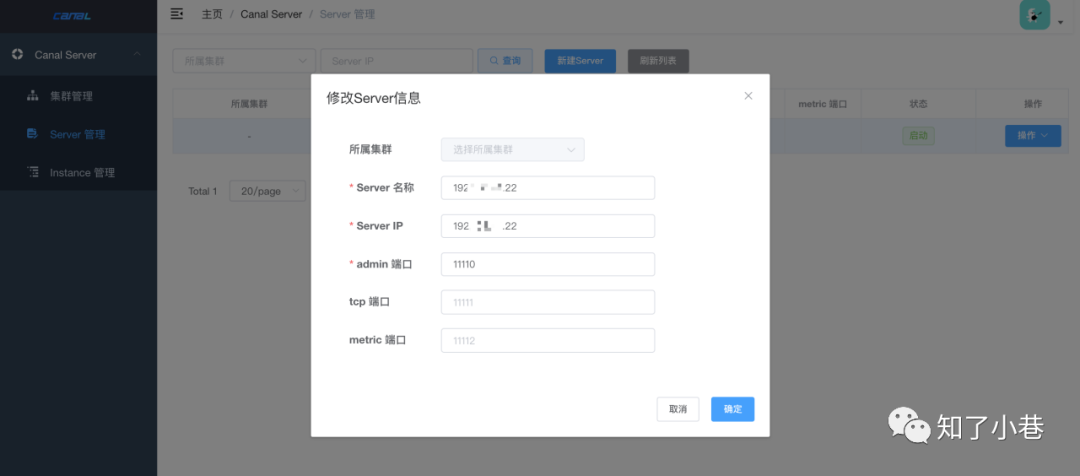
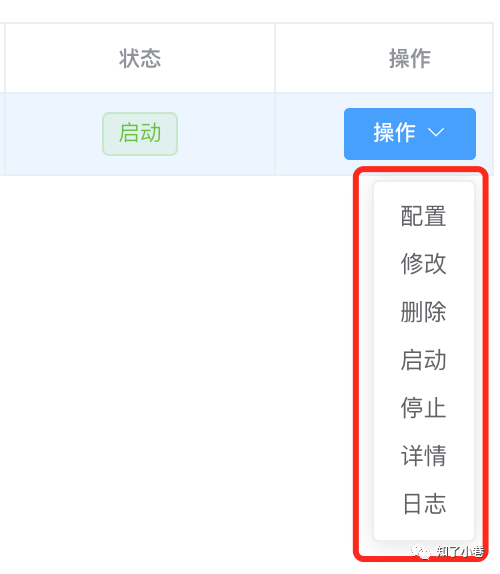
上图展示的是可以对canal server做的操作,如果是之前已经在服务端配置好了,原样拷贝过来;用起来非常方便。
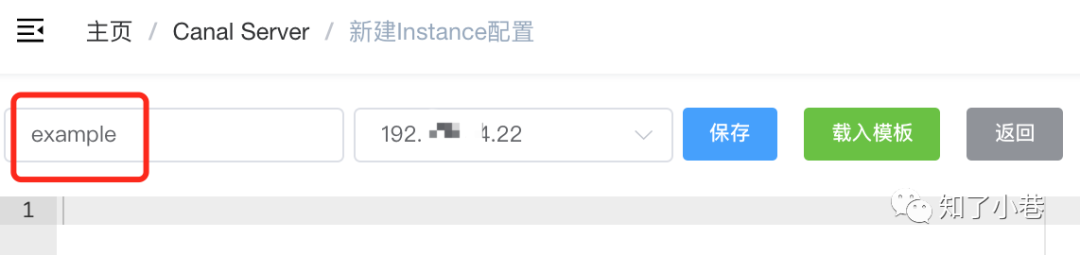
创建Instance;Instance的启动和停止是有问题的、没反应;但是日志是可以查看的。
canal集群HA配置
停止IP-22的单节点canal:
com.alibaba.otter.canal.deployer.CanalLauncher
[...deployer]$ sh bin/stop.sh
重点配置canal.properties:
canal.zkServers = 192.168.11.101:2181,192.168.11.102:2181,192.168.11.103:2181

#canal.instance.global.spring.xml = classpath:spring/memory-instance.xml
#canal.instance.global.spring.xml = classpath:spring/file-instance.xml
canal.instance.global.spring.xml = classpath:spring/default-instance.xml

# 此处不起作用,仍然会在Instance example下面生成h2.mv.db
canal.instance.tsdb.enable = false
以上配置是在原来单机canal server的基础上新增加的配置,服务器上的配置是要修改的。
example/instance.properties配置不用动,两台机器Instance的名称和目录保持一致。
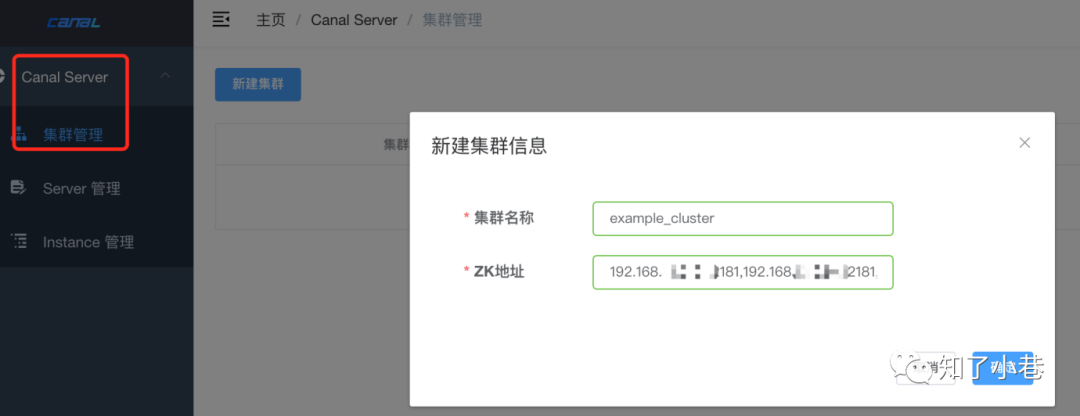
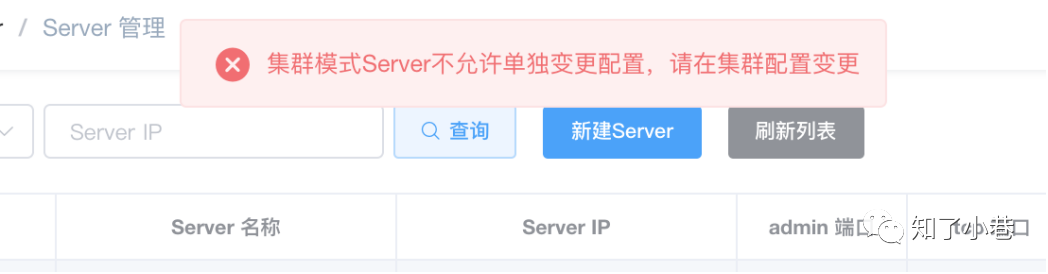
把原先单机节点的Server和Instance删除,重新创建。需要注意配置是在集群处进行添加修改。Instance创建为集群下的Instance。
可以把之前单机的元数据信息删除掉:
rm h2.mv.db meta.dat
需要注意hosts映射。
在服务器两台机器分别启动canal.server。
下面是HA切换的情况下,收到的重复消息。
2020-09-23 17:18:40.245 [Thread-1] INFO  c.a.otter.canal.example.kafka.CanalKafkaClientExample - 2-->FlatMessage [id=2, database=, table=t1, isDdl=false, type=QUERY, es=1600852719000, ts=1600852720029, sql=insert into t1(tname, age) values ('aaaaassss', 33), sqlType=null, mysqlType=null, data=null, old=null]
2020-09-23 17:19:25.139 [Thread-1] INFO  c.a.otter.canal.example.kafka.CanalKafkaClientExample - 1-->FlatMessage [id=1, database=, table=t1, isDdl=false, type=QUERY, es=1600852719000, ts=1600852764933, sql=insert into t1(tname, age) values ('aaaaassss', 33), sqlType=null, mysqlType=null, data=null, old=null]

2020-09-23 17:30:08.303 [Thread-1] INFO  c.a.otter.canal.example.kafka.CanalKafkaClientExample - 3-->FlatMessage [id=3, database=, table=t1, isDdl=false, type=QUERY, es=1600853408000, ts=1600853408287, sql=update t1 set age=555 where id=13, sqlType=null, mysqlType=null, data=null, old=null]
2020-09-23 17:31:32.979 [Thread-1] INFO  c.a.otter.canal.example.kafka.CanalKafkaClientExample - 1-->FlatMessage [id=1, database=, table=t1, isDdl=false, type=QUERY, es=1600853408000, ts=1600853492939, sql=update t1 set age=555 where id=13, sqlType=null, mysqlType=null, data=null, old=null]
实验表明HA是正常切换的,但是切换后会“重复”消费切换前的最后一条消息数据,实际情况是切换后的canal server Instance又往kafka发送了一条数据,而且是每次切换都会重发。
另外Instance配置:
# table regex
canal.instance.filter.regex=test_binlog
canal只会发出type=QUERY的binlog,创建表结构的信息是没有的,比如创建新表t3。
2020-09-23 18:00:08.284 [Thread-1] INFO c.a.otter.canal.example.kafka.CanalKafkaClientExample - 2-->FlatMessage [id=2, database=, table=t3, isDdl=false, type=QUERY, es=1600855208000, ts=1600855208263, sql=insert into t3(tname, height) values('哈哈', 175), sqlType=null, mysqlType=null, data=null, old=null]
regex的问题后续再研究。
【END】