



作者系深圳某数据治理厂商,有10余年IT从业经验,在数据仓库,传统数据库和大数据领域有丰富的实战经验。
在阿里云某私有云的项目中,遇到了需要在E-MapReduce集群节点外使用客户端的需求,而目前在集群管理中只提供了通过Gateway新建一台ECS来满足。但是,由于客户方ECS资源已经申请,所以无法使用Gateway,基于此,通过对E-MapReduce的官方文档和社群资源学习,深入集群了解,特开发一套部署客户端程序。
(PS:在华为FIHD大数据平台,星环和CDH等大数据平台的管理界面都提供了下载客户端安装包并能实现一键安装部署。希望下个版本能有这样的功能。)
E-MapReduce客户端安装和卸载工具,主要用于集群外的ECS(已经存在)中需要使用hadoop,hive等客户端命令工具。
目前云平台提供的gateway只能重新创建ECS进行部署,而不支持在已经创建的Ecs中部署。
主要涉及的程序:
[root@iZ1cr01rx0b6j12dir0qaxZ chyl20]# ls -ltrtotal 12-rw-r--r-- 1 root root 13 Oct 10 14:38 pwd.txt-rwxr-xr-x 1 root root 1195 Oct 11 10:32 uninstall_emr_client.sh-rwxr-xr-x 1 root root 3337 Oct 11 10:32 install_emr_client.sh
其中install_emr_client.sh的程序内容:
#!/usr/bin/bashif [ $# != 2 ]thenecho "Usage: sh $0 master_ip master_password_file(store root password plaintext)"echo "such as: sh $0 172.30.XXX.XXX opt/chyl20/pwd.txt"exit 1;fimasterip=${1}masterpwdfile=${2}client_dir="/opt/emr_client/"if ! type sshpass >/dev/null 2>&1; thenyum install -y sshpassfiif ! type java >/dev/null 2>&1; thenyum install -y java-1.8.0-openjdkfi[ -d ${client_dir} ] && echo "Please uninstall the installed client!" && exit 1echo "Start to create file path..."mkdir -p ${client_dir}mkdir -p etc/ecmecho "Start to copy package from ${masterip} to local client(${client_dir})..."echo " -copying hadoop"sshpass -f ${masterpwdfile} scp -r -o 'StrictHostKeyChecking no' root@${masterip}:/usr/lib/hadoop-current ${client_dir}echo " -copying zookeeper"sshpass -f ${masterpwdfile} scp -r root@${masterip}:/usr/lib/zookeeper-current ${client_dir}echo " -copying hive"sshpass -f ${masterpwdfile} scp -r root@${masterip}:/usr/lib/hive-current ${client_dir}echo " -copying spark"sshpass -f ${masterpwdfile} scp -r root@${masterip}:/usr/lib/spark-current ${client_dir}echo " -extra-jars"sshpass -f ${masterpwdfile} scp -r root@${masterip}:/opt/apps/extra-jars ${client_dir}echo "Start to link usr/lib/\${app}-current to ${client_dir}\${app}..."[ -L usr/lib/hadoop-current ] && unlink usr/lib/hadoop-currentln -s ${client_dir}hadoop-current usr/lib/hadoop-current[ -L usr/lib/zookeeper-current ] && unlink usr/lib/zookeeper-currentln -s ${client_dir}zookeeper-current usr/lib/zookeeper-current[ -L usr/lib/hive-current ] && unlink usr/lib/hive-currentln -s ${client_dir}hive-current usr/lib/hive-current[ -L usr/lib/spark-current ] && unlink usr/lib/spark-currentln -s ${client_dir}spark-current usr/lib/spark-currentecho "Start to copy conf from ${masterip} to local client(/etc/ecm)..."sshpass -f ${masterpwdfile} scp -r root@${masterip}:/etc/ecm/hadoop-conf etc/ecm/hadoop-confsshpass -f ${masterpwdfile} scp -r root@${masterip}:/etc/ecm/zookeeper-conf etc/ecm/zookeeper-confsshpass -f ${masterpwdfile} scp -r root@${masterip}:/etc/ecm/hive-conf etc/ecm/hive-confsshpass -f ${masterpwdfile} scp -r root@${masterip}:/etc/ecm/spark-conf etc/ecm/spark-confecho "Start to copy environment from ${masterip} to local client(/etc/profile.d)..."sshpass -f ${masterpwdfile} scp root@${masterip}:/etc/profile.d/hdfs.sh etc/profile.d/sshpass -f ${masterpwdfile} scp root@${masterip}:/etc/profile.d/zookeeper.sh etc/profile.d/sshpass -f ${masterpwdfile} scp root@${masterip}:/etc/profile.d/yarn.sh etc/profile.d/sshpass -f ${masterpwdfile} scp root@${masterip}:/etc/profile.d/hive.sh etc/profile.d/sshpass -f ${masterpwdfile} scp root@${masterip}:/etc/profile.d/spark.sh etc/profile.d/if [ -L usr/lib/jvm/java ]thenunlink usr/lib/jvm/javafiecho "" >>/etc/profile.d/hdfs.shecho export JAVA_HOME=/usr/lib/jvm/jre-1.8.0 >>/etc/profile.d/hdfs.shecho "Start to copy host info from ${masterip} to local client(/etc/hosts)"sshpass -f ${masterpwdfile} scp root@${masterip}:/etc/hosts etc/hosts_bakcat etc/hosts_bak | grep emr | grep cluster >>/etc/hosts! egrep "^hadoop" etc/group >& /dev/null && groupadd hadoop! egrep "^hadoop" etc/passwd >& /dev/null && useradd -g hadoop hadoopecho "Install EMR client successfully!"
uninstall_emr_client.sh程序内容:
#!/usr/bin/bashif [ $# != 0 ]thenecho "Usage: sh $0 "exit 1;ficlient_dir="/opt/emr_client/"echo "Start to delete path..."[ -d ${client_dir} ] && rm -rf ${client_dir}echo "Start to delete link /usr/lib/\${app}-current..."[ -L /usr/lib/hadoop-current ] && unlink /usr/lib/hadoop-current[ -L /usr/lib/zookeeper-current ] && unlink /usr/lib/zookeeper-current[ -L /usr/lib/hive-current ] && unlink /usr/lib/hive-current[ -L /usr/lib/spark-current ] && unlink /usr/lib/spark-currentecho "Start to delete conf..."[ -d /etc/ecm ] && rm -rf /etc/ecmecho "Start to delete environment..."[ -f /etc/profile.d/hdfs.sh ] && rm -rf /etc/profile.d/hdfs.sh[ -f /etc/profile.d/zookeeper.sh ] && rm -rf /etc/profile.d/zookeeper.sh[ -f /etc/profile.d/yarn.sh ] && rm -rf /etc/profile.d/yarn.sh[ -f /etc/profile.d/hive.sh ] && rm -rf /etc/profile.d/hive.sh[ -f /etc/profile.d/spark.sh ] && rm -rf /etc/profile.d/spark.shecho "Start to remove host info..."sed -i "/emr/d" /etc/hostsecho "Start to remove user..."egrep "^hadoop" /etc/passwd >& /dev/null && userdel -r hadoopegrep "^hadoop" /etc/group >& /dev/null && groupdel hadoopecho "Uninstall EMR client successfully!"
pwd.txt中存放密码明文即可。
创建后给程序授权755
安装执行:
sh install_emr_client.sh 172.30.1*2.1*3 /opt/chyl20/pwd.txt
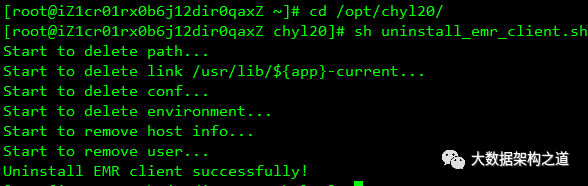
卸载执行:
sh uninstall_emr_client.sh
安装后重新连接会话,或重新打开一个PTY
验证
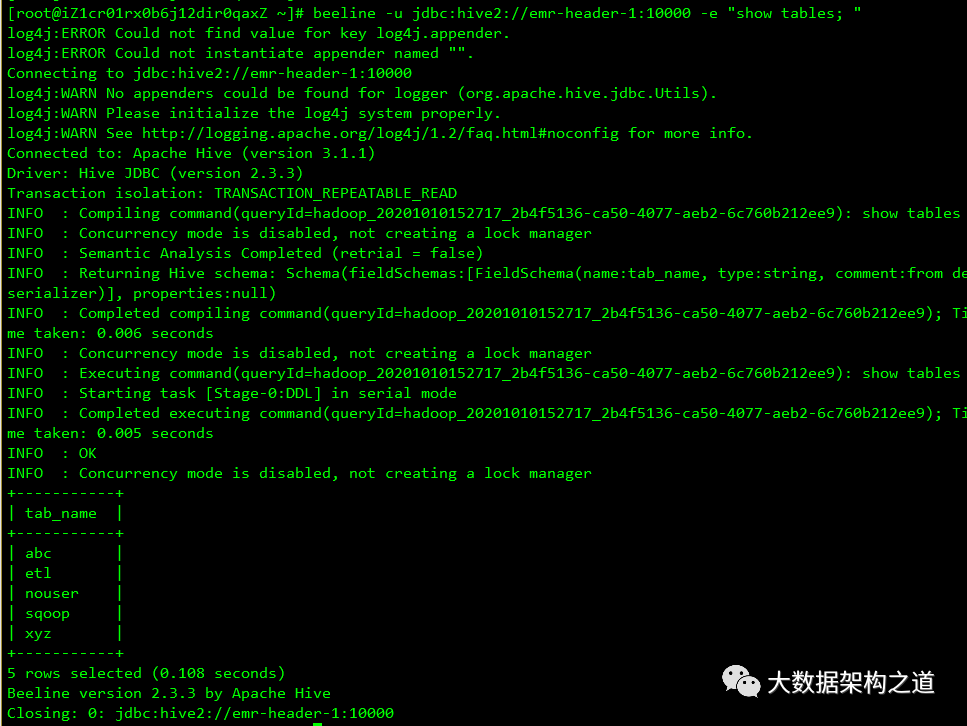
运行hive
beeline -u jdbc:hive2://emr-header-1:10000 -e "show tables; " -n hadoop -p hadoop
运行hadoop
hadoop jar /usr/lib/hadoop-current/share/hadoop/mapreduce/hadoop-mapreduce-examples*.jar pi 10 10

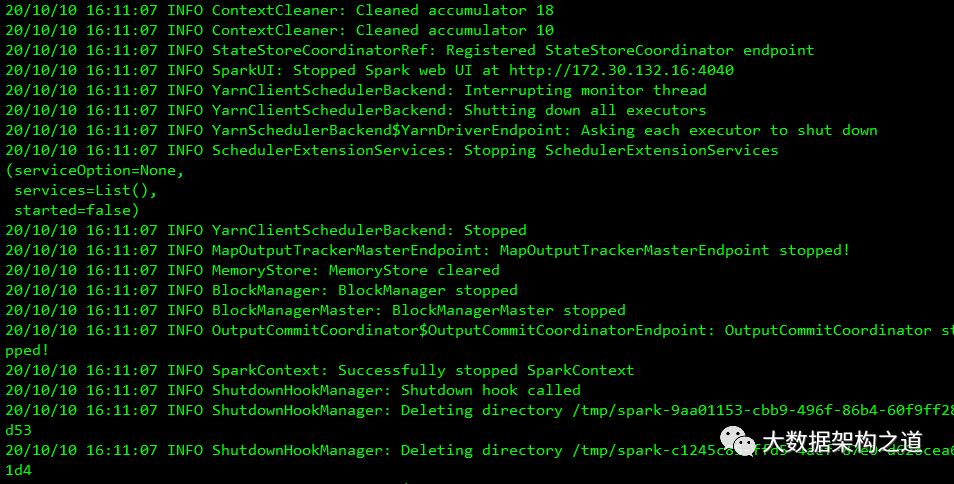
运行spark
spark-submit --name spark-pi --class org.apache.spark.examples.SparkPi --master yarn /usr/lib/spark-current/examples/jars/spark-examples_2.11-2.4.3.jar
文章转载自大数据架构之道,如果涉嫌侵权,请发送邮件至:contact@modb.pro进行举报,并提供相关证据,一经查实,墨天轮将立刻删除相关内容。
