



一、简介
LVM是Logical Volume Manager(逻辑卷管理)的简写,它是Linux环境下对磁盘分区进行管理的一种机制,它由Heinz Mauelshagen在Linux 2.4内核上实现,于1998年发布到Linux社区中,它允许你在Linux系统上用简单的命令行管理一个完整的逻辑卷管理环境。
二、版本 [root@localhost ~]# rpm -qa | grep lvm lvm2-2.02.171-8.el7.x86_64 lvm2-libs-2.02.171-8.el7.x86_64 [root@localhost ~]# cat /etc/centos-release CentOS Linux release 7.4.1708 (Core) [root@localhost ~]# uname -a Linux localhost.localdomain 3.10.0-693.el7.x86_64 #1 SMP Tue Aug 22 21:09:27 UTC 2017 x86_64 x86_64 x86_64 GNU/Linux [root@localhost ~]# getconf LONG_BIT 64 |
三、LVM 模块
Physical volume (PV)、Volume group (VG)、Logical volume(LV)、 Physical extent (PE),下面用一个简单的图即可说明物理卷、卷组、逻辑卷他们之间的关系。
LVM详解
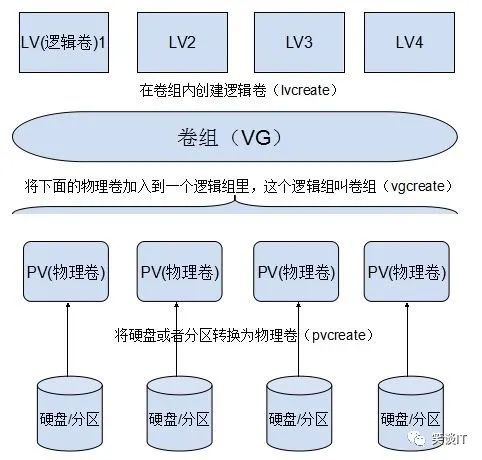
(1)物理磁盘被格式化为PV,空间被划分为一个个的PE
(2)不同的PV加入到同一个VG中,不同PV的PE全部进入到了VG的PE池内
(3)LV基于PE创建,大小为PE的整数倍,组成LV的PE可能来自不同的物理磁盘
(4)LV现在就直接可以格式化后挂载使用了
(5)LV的扩充缩减实际上就是增加或减少组成该LV的PE数量,其过程不会丢失原始数据
四、LVM中四个概念
①PE(Physical Extend) 物理拓展
②PV(Physical Volume) 物理卷
③VG(Volume Group) 卷组
④LV(Logical Volume) 逻辑卷
五、具体操作
1. 分区(本实验环境使用的是一块新磁盘/dev/sdb)
[root@localhost ~]# echo "- - -" > sys/class/scsi_host/host0/scan [root@localhost ~]# echo "- - -" > sys/class/scsi_host/host1/scan [root@localhost ~]# echo "- - -" > sys/class/scsi_host/host2/scan [root@localhost ~]# fdisk -l /dev/sd[a-z]
Disk /dev/sda: 10.7 GB, 10737418240 bytes, 20971520 sectors Units = sectors of 1 * 512 = 512 bytes Sector size (logical/physical): 512 bytes / 512 bytes I/O size (minimum/optimal): 512 bytes / 512 bytes Disk label type: dos Disk identifier: 0x00006218
Device Boot Start End Blocks Id System /dev/sda1 * 2048 2099199 1048576 83 Linux /dev/sda2 2099200 20971519 9436160 8e Linux LVM
Disk /dev/sdb: 21.5 GB, 21474836480 bytes, 41943040 sectors Units = sectors of 1 * 512 = 512 bytes Sector size (logical/physical): 512 bytes / 512 bytes I/O size (minimum/optimal): 512 bytes / 512 bytes |
[root@localhost ~]# fdisk /dev/sdb Welcome to fdisk (util-linux 2.23.2).
Changes will remain in memory only, until you decide to write them. Be careful before using the write command.
Device does not contain a recognized partition table Building a new DOS disklabel with disk identifier 0x8ba99087.
Command (m for help): n Partition type: p primary (0 primary, 0 extended, 4 free) e extended Select (default p): p Partition number (1-4, default 1): First sector (2048-41943039, default 2048): Using default value 2048 Last sector, +sectors or +size{K,M,G} (2048-41943039, default 41943039): Using default value 41943039 Partition 1 of type Linux and of size 20 GiB is set
Command (m for help): t Selected partition 1 Hex code (type L to list all codes): 8e Changed type of partition 'Linux' to 'Linux LVM'
Command (m for help): w The partition table has been altered!
Calling ioctl() to re-read partition table. Syncing disks. [root@ZhongH100 ~]# |
2. 将物理分区与硬盘创建为物理卷(pvcreate)
[root@localhost ~]# pvcreate /dev/sdb1 Physical volume "/dev/sdb1" successfully created. [root@localhost ~]# pvs PV VG Fmt Attr PSize PFree /dev/sda2 centos lvm2 a-- <9.00g 0 /dev/sdb1 lvm2 --- <20.00g <20.00g [root@localhost ~]# pvdisplay --- Physical volume --- PV Name /dev/sda2 VG Name centos PV Size <9.00 GiB / not usable 3.00 MiB Allocatable yes (but full) PE Size 4.00 MiB Total PE 2303 Free PE 0 Allocated PE 2303 PV UUID LuRivA-ncqN-UapH-ZTCI-nzKd-0RPF-ztgJOE
"/dev/sdb1" is a new physical volume of "<20.00 GiB" --- NEW Physical volume --- PV Name /dev/sdb1 VG Name PV Size <20.00 GiB Allocatable NO PE Size 0 Total PE 0 Free PE 0 Allocated PE 0 PV UUID dvkJ37-OWnz-UnDt-mIWy-zLtZ-PZaP-19emQY |
3. 将物理卷(pv)创建为卷组(vgcreate),名为app
[root@localhost ~]# vgcreate app /dev/sdb1 Volume group "app" successfully created [root@localhost ~]# vgdisplay --- Volume group --- VG Name centos System ID Format lvm2 Metadata Areas 1 Metadata Sequence No 3 VG Access read/write VG Status resizable MAX LV 0 Cur LV 2 Open LV 2 Max PV 0 Cur PV 1 Act PV 1 VG Size <9.00 GiB PE Size 4.00 MiB Total PE 2303 Alloc PE / Size 2303 / <9.00 GiB Free PE / Size 0 / 0 VG UUID PZkeqB-IlIN-1zMs-vFDe-cvjC-hO6E-iFSo0d
--- Volume group --- VG Name app System ID Format lvm2 Metadata Areas 1 Metadata Sequence No 1 VG Access read/write VG Status resizable MAX LV 0 Cur LV 0 Open LV 0 Max PV 0 Cur PV 1 Act PV 1 VG Size <20.00 GiB PE Size 4.00 MiB Total PE 5119 Alloc PE / Size 0 / 0 Free PE / Size 5119 / <20.00 GiB VG UUID jvQU3M-UJPH-oSq1-JpYQ-VXSi-7r28-pWzl5J |
4. 在卷组里创建逻辑卷并格式化、挂载使用
[root@localhost ~]# lvcreate -l +100%FREE -n app app Logical volume "app" created. [root@localhost ~]# lvs LV VG Attr LSize Pool Origin Data% Meta% Move Log Cpy%Sync Convert app app -wi-a----- <20.00g root centos -wi-ao---- <8.00g swap centos -wi-ao---- 1.00g [root@localhost ~]# lvdisplay --- Logical volume --- LV Path /dev/centos/swap LV Name swap VG Name centos LV UUID gc5laV-daIC-Pmyt-2BFq-CZuI-DdfI-docvOm LV Write Access read/write LV Creation host, time localhost, 2020-09-13 11:22:34 +0800 LV Status available # open 2 LV Size 1.00 GiB Current LE 256 Segments 1 Allocation inherit Read ahead sectors auto - currently set to 8192 Block device 253:1
--- Logical volume --- LV Path /dev/centos/root LV Name root VG Name centos LV UUID 2fVDXK-4dRU-kc01-ucsn-Dkue-UBGx-to5c1s LV Write Access read/write LV Creation host, time localhost, 2020-09-13 11:22:34 +0800 LV Status available # open 1 LV Size <8.00 GiB Current LE 2047 Segments 1 Allocation inherit Read ahead sectors auto - currently set to 8192 Block device 253:0
--- Logical volume --- LV Path /dev/app/app LV Name app VG Name app LV UUID R9hyC3-rfOG-exG6-Q93Y-TRw9-pb1e-lO5ikF LV Write Access read/write LV Creation host, time localhost.localdomain, 2020-09-13 13:25:43 +0800 LV Status available # open 0 LV Size <20.00 GiB Current LE 5119 Segments 1 Allocation inherit Read ahead sectors auto - currently set to 8192 Block device 253:2 [root@localhost ~]# mkfs.xfs /dev/app/app meta-data=/dev/app/app isize=512 agcount=4, agsize=1310464 blks = sectsz=512 attr=2, projid32bit=1 = crc=1 finobt=0, sparse=0 data = bsize=4096 blocks=5241856, imaxpct=25 = sunit=0 swidth=0 blks naming =version 2 bsize=4096 ascii-ci=0 ftype=1 log =internal log bsize=4096 blocks=2560, version=2 = sectsz=512 sunit=0 blks, lazy-count=1 realtime =none extsz=4096 blocks=0, rtextents=0 [root@localhost ~]# mkdir /app [root@localhost ~]# mount /dev/app/app /app/ [root@localhost ~]# df -TH Filesystem Type Size Used Avail Use% Mounted on /dev/mapper/centos-root xfs 8.6G 1.1G 7.6G 13% / devtmpfs devtmpfs 945M 0 945M 0% /dev tmpfs tmpfs 956M 0 956M 0% /dev/shm tmpfs tmpfs 956M 9.1M 947M 1% /run tmpfs tmpfs 956M 0 956M 0% /sys/fs/cgroup /dev/sda1 xfs 1.1G 150M 914M 15% /boot tmpfs tmpfs 192M 0 192M 0% /run/user/0 /dev/mapper/app-app xfs 22G 34M 22G 1% /app 5. 修改fstab分区表,确保在系统重启后app目录可实现自动挂载并跳过自检 [root@localhost ~]# vi /etc/fstab # # /etc/fstab # Created by anaconda on Sun Sep 13 11:22:35 2020 # # Accessible filesystems, by reference, are maintained under '/dev/disk' # See man pages fstab(5), findfs(8), mount(8) and/or blkid(8) for more info # /dev/mapper/centos-root / xfs defaults 0 0 UUID=c03efe2e-f7fb-462c-9c61-f4fbee77f77f /boot xfs defaults 0 0 /dev/mapper/centos-swap swap swap defaults 0 0 /dev/app/app /app xfs defaults 0 0 [root@localhost ~]# mount -a |
