



背景
Android应用开发中大部分是手机App的开发。对于焦点的关注一般比较少,基本就是一些抢夺焦点、事件不响应的问题。而在一些非触摸设备比如电视的应用中,是通过遥控器的上下左右按键进行焦点的移动及选择的,所以焦点的控制就是一个非常重要的技术点了。本文就是对应用中焦点的原理及控制进行初探。(文中只对上下左右这四个方向键产生的事件进行解析,像类似tab按键的焦点移动不在本文范围内,毕竟大多数遥控器是没有类似tab按键的。参考Android8.0的源码)
本文主要内容:
初始焦点的获取。
焦点的转换。
App开发中的问题及应用
初始焦点的获取
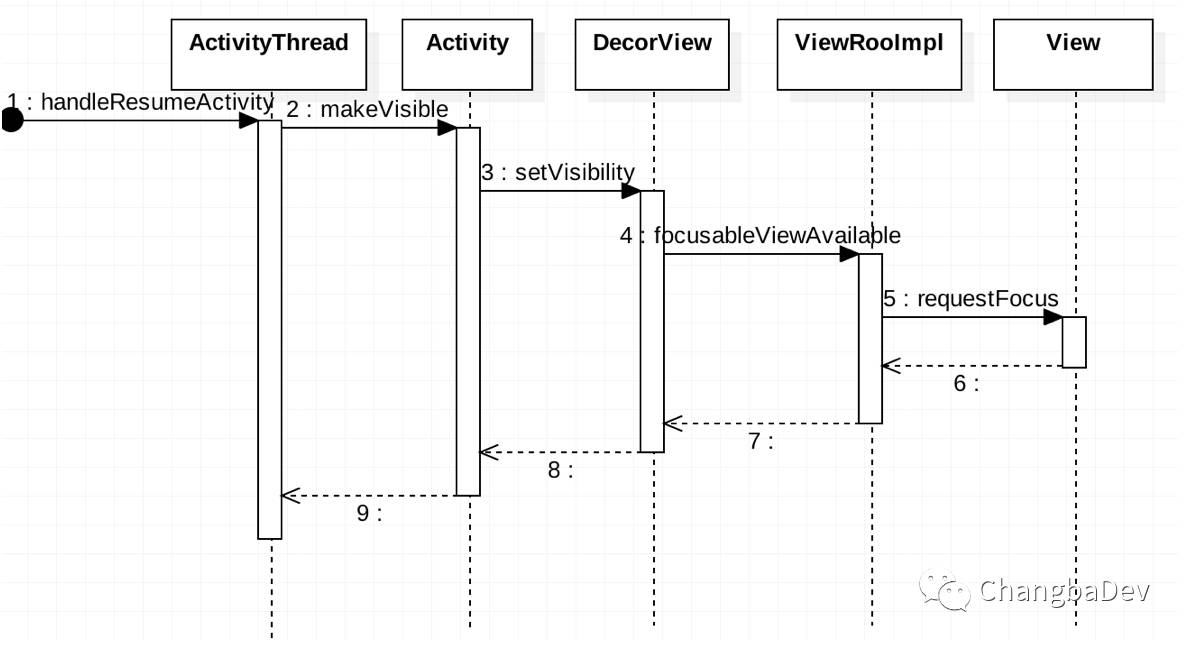
当进入一个页面即Activity打开的时候,会执行ActivityThread的 handleResumeActivity方法,这个是在Activity的启动过程当中调用的。在该方法中会调用Activity:MakeVisible(),之后是DecorView的setVisibility。DecorView是Activity的根布局,是一个FrameLayout。所以是执行的View中的方法setFlags。然后递归调用mParent.focusableViewAvailable(this),最终执行到ViewRootImpl中,调用View.requestLayout()。
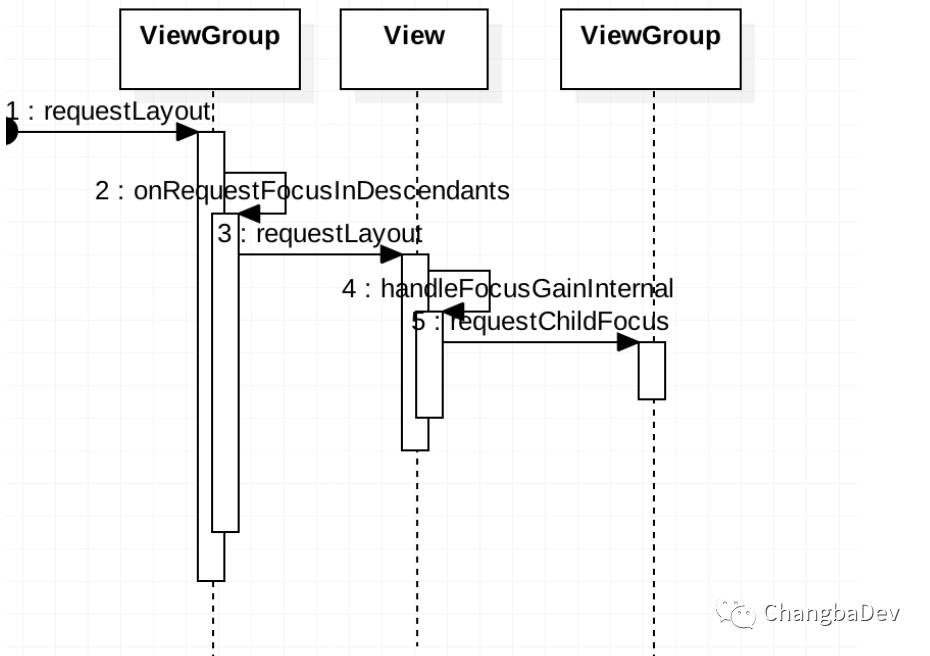
之后就是requestLayout的过程了,ViewGroup调用requestLayout,根据descendantFocusability来决定是否继续调用子View的requestLayout。descendantFocusability有三个取值,FOCUSBLOCKDESCENDANTS、FOCUSBEFOREDESCENDANTS和FOCUSAFTERDESCENDANTS。FOCUSBLOCKDESCENDANTS代表子View无法获取焦点,所以结果就是当前的ViewGroup会获取了焦点(如果可以的话)。FOCUSBEFOREDESCENDANTS代表先看当前ViewGroup是否可以获取焦点,如果不可以的话再调用子View的requestLayout。FOCUSAFTERDESCENDANTS的话就是先调用子View的requestLayout,如果没有可以获取焦点的View则执行自己的super.requestLayout。最终在一个View获取焦点的时候,还会递归调用父布局requestChildFocus。父布局会保存当前获取焦点的子view。这个属性会在之后的查找中发挥作用。
焦点的转换及查找
焦点的移动是通过遥控器的按键产生keyEvent。系统通过处理各个按键事件最终改变焦点的。ViewRootImpl中包含SyntheticInputStage、ViewPostImeInputStage、NativePostImeInputStage等事件处理器。这些处理器组成责任链。如果事件没有被消耗掉,则会依次传递处理。其中ViewPostImeInputStage是处理View相关事件的。我们就从它开始说起。
ViewRootImpl.java
private int processKeyEvent(QueuedInputEvent q) {

    final KeyEvent event = (KeyEvent)q.mEvent;

    // Deliver the key to the view hierarchy.
    if (mView.dispatchKeyEvent(event)) {
        return FINISH_HANDLED;
    }
   ...

    // Handle automatic focus changes.
    if (event.getAction() == KeyEvent.ACTION_DOWN) {
        if (groupNavigationDirection != 0) {
            if (performKeyboardGroupNavigation(groupNavigationDirection)) {
                return FINISH_HANDLED;
            }
        } else {
            if (performFocusNavigation(event)) {
                return FINISH_HANDLED;
            }
        }
    }
    return FORWARD;
}
整个处理过程在processKeyEvent方法中,首先是按键事件的分发dispatchKeyEvent,ViewGroup中的该方法是递归调用焦点子View的dispatchKeyEvent(上边说过,每个ViewGroup会保存有焦点的子view)。
ViewGroup.java
public boolean dispatchKeyEvent(KeyEvent event) {
    …
    if ((mPrivateFlags & (PFLAG_FOCUSED | PFLAG_HAS_BOUNDS))
            == (PFLAG_FOCUSED | PFLAG_HAS_BOUNDS)) {
        if (super.dispatchKeyEvent(event)) {
            return true;
        }
    } else if (mFocused != null && (mFocused.mPrivateFlags & PFLAG_HAS_BOUNDS)
            == PFLAG_HAS_BOUNDS) {
        if (mFocused.dispatchKeyEvent(event)) {
            return true;
        }
    }
    …
    return false;
}
可以看到按键事件是一路按照有焦点的“树枝”来传递的,mFocused就是有焦点的子View。如果事件在某一层被消耗掉了的话需要返回true。View中默认的处理就是响应keylistener和调用onKeyDown、onKeyUp等方法。
ViewRootImpl.java
private boolean performFocusNavigation(KeyEvent event) {
    int direction = 0;
    switch (event.getKeyCode()) {//第一点
        case KeyEvent.KEYCODE_DPAD_LEFT:
            if (event.hasNoModifiers()) {
                direction = View.FOCUS_LEFT;
            }
            break;
        case KeyEvent.KEYCODE_DPAD_RIGHT:
            if (event.hasNoModifiers()) {
                direction = View.FOCUS_RIGHT;
            }
            break;
        case KeyEvent.KEYCODE_DPAD_UP:
            if (event.hasNoModifiers()) {
                direction = View.FOCUS_UP;
            }
            break;
        case KeyEvent.KEYCODE_DPAD_DOWN:
            if (event.hasNoModifiers()) {
                direction = View.FOCUS_DOWN;
            }
            break;
        case KeyEvent.KEYCODE_TAB:
            if (event.hasNoModifiers()) {
                direction = View.FOCUS_FORWARD;
            } else if (event.hasModifiers(KeyEvent.META_SHIFT_ON)) {
                direction = View.FOCUS_BACKWARD;
            }
            break;
    }
    if (direction != 0) {
        View focused = mView.findFocus();//第二点
        if (focused != null) {
            View v = focused.focusSearch(direction);
            if (v != null && v != focused) {
                …
                if (v.requestFocus(direction, mTempRect)) {
                    playSoundEffect(SoundEffectConstants
                            .getContantForFocusDirection(direction));
                    return true;
                }
            }

            // Give the focused view a last chance to handle the dpad key.
            if (mView.dispatchUnhandledMove(focused, direction)) {
                return true;
            }
        } else {
            if (mView.restoreDefaultFocus()) {
                return true;
            }
        }
    }
    return false;
}
寻找焦点的流程,首先是将事件转换为相应的direction,获取当前的焦点View。这也是个递归调用的过程,利用父布局存储有焦点的子View。之后就是调用focusSearh来查找下一个焦点。
View.java
public View focusSearch(@FocusRealDirection int direction) {
    if (mParent != null) {
        return mParent.focusSearch(this, direction);
    } else {
        return null;
    }
}
ViewGroup.java
public View focusSearch(View focused, int direction) {
    if (isRootNamespace()) {
        // root namespace means we should consider ourselves the top of the
        // tree for focus searching; otherwise we could be focus searching
        // into other tabs.  see LocalActivityManager and TabHost for more info.
        return FocusFinder.getInstance().findNextFocus(this, focused, direction);
    } else if (mParent != null) {
        return mParent.focusSearch(focused, direction);
    }
    return null;
}
ViewRootImpl.java
public View focusSearch(View focused, int direction) {
    checkThread();
    if (!(mView instanceof ViewGroup)) {
        return null;
    }
    return FocusFinder.getInstance().findNextFocus((ViewGroup) mView, focused, direction);
}
View的focusSearch一般就是调用父布局的focusSearch,直到最顶端的ViewRootImpl。当然ViewGroup中的focusSearch也有一些不同。会判断是否已经是Root层,如果是则也会调用FocusFinder来处理。反之就是View的默认实现了。
FocusFinder.java
private View findNextFocus(ViewGroup root, View focused, Rect focusedRect, int direction) {
    View next = null;
    ViewGroup effectiveRoot = getEffectiveRoot(root, focused);
    if (focused != null) {
        next = findNextUserSpecifiedFocus(effectiveRoot, focused, direction);
    }
    if (next != null) {
        return next;
    }
    ArrayList<View> focusables = mTempList;
    try {
        focusables.clear();
        effectiveRoot.addFocusables(focusables, direction);
        if (!focusables.isEmpty()) {
            next = findNextFocus(effectiveRoot, focused, focusedRect, direction, focusables);
        }
    } finally {
        focusables.clear();
    }
    return next;
}
FocusFinder首先是调用findNextUserSpecifiedFocus看用户是否设置了nextFocusXXId,如果设置了则直接返回对应的View,反之则会执行findNextFocus方法来寻找。
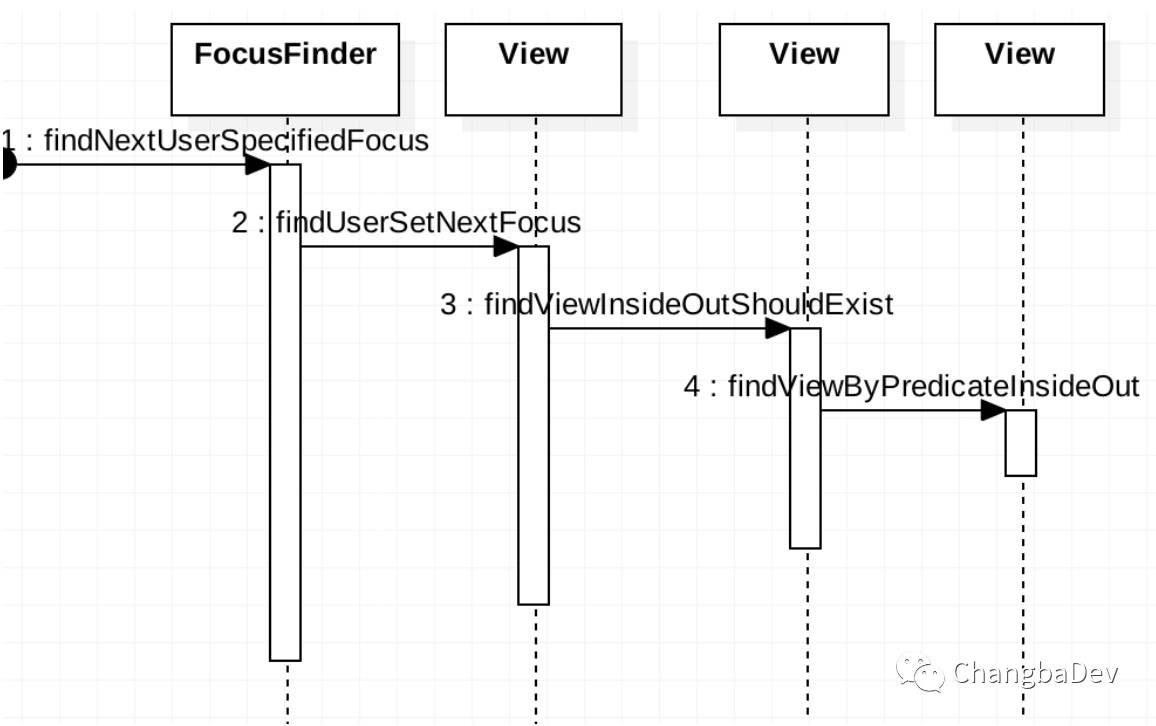
上图是寻找nextFocusXXId对应View的调用过程。其中findViewByPredicateInsideOut就是根据nextFocusXXId来寻找相应的View。寻找的方式是从当前View开始寻找,如果是ViewGroup则递归遍历子View来寻找对应Id的View,是View的话则判断当前Id是否一致。如果没有找到对应Id的View则从父布局再继续寻找,因自己已经寻找过了,所以跳过自己。
所以寻找方向是从当前View往上逐步遍历的,直到根View。如果有相同的Id的View,那么寻找到一定是离当前View最近的一个。在应用时需注意Id相同的情况。
View.java
public final <T extends View> T findViewByPredicateInsideOut(
        View start, Predicate<View> predicate) {
    View childToSkip = null;
    for (;;) {
        T view = start.findViewByPredicateTraversal(predicate, childToSkip);
        if (view != null || start == this) {
            return view;
        }

        ViewParent parent = start.getParent();
        if (parent == null || !(parent instanceof View)) {
            return null;
        }

        childToSkip = start;
        start = (View) parent;
    }
}
protected <T extends View> T findViewByPredicateTraversal(Predicate<View> predicate,
        View childToSkip) {
    if (predicate.test(this)) {
        return (T) this;
    }
    return null;
}
ViewGroup.java
protected <T extends View> T findViewByPredicateTraversal(Predicate<View> predicate,
        View childToSkip) {
    if (predicate.test(this)) {
        return (T) this;
    }

    final View[] where = mChildren;
    final int len = mChildrenCount;

    for (int i = 0; i < len; i++) {
        View v = where[i];

        if (v != childToSkip && (v.mPrivateFlags & PFLAG_IS_ROOT_NAMESPACE) == 0) {
            v = v.findViewByPredicate(predicate);

            if (v != null) {
                return (T) v;
            }
        }
    }

    return null;
}
自动寻找焦点的过程首先是确定一个focusedRect,就是原焦点的区域。如果没有原焦点,则会根据direction确定一个区域。方向为上左的时候区域为右下的点,方向为右下的时候怎区域为左上的点。然后,依次比较所有的可获取焦点的View,找出最合适成为下一个焦点的View。
FocusFinder.java
boolean isBetterCandidate(int direction, Rect source, Rect rect1, Rect rect2) {

    // to be a better candidate, need to at least be a candidate in the first
    // place :)
    if (!isCandidate(source, rect1, direction)) {
        return false;
    }

    // we know that rect1 is a candidate.. if rect2 is not a candidate,
    // rect1 is better
    if (!isCandidate(source, rect2, direction)) {
        return true;
    }

    // if rect1 is better by beam, it wins
    if (beamBeats(direction, source, rect1, rect2)) {
        return true;
    }

    // if rect2 is better, then rect1 cant' be :)
    if (beamBeats(direction, source, rect2, rect1)) {
        return false;
    }

    // otherwise, do fudge-tastic comparison of the major and minor axis
    return (getWeightedDistanceFor(
                    majorAxisDistance(direction, source, rect1),
                    minorAxisDistance(direction, source, rect1))
            < getWeightedDistanceFor(
                    majorAxisDistance(direction, source, rect2),
                    minorAxisDistance(direction, source, rect2)));
}
比较算法(其中rect2代表当前最合适的区域,初始是一个最不可能的区域):
1.rect1是否在对应的方向上。rect1是则继续。如果不是则淘汰。
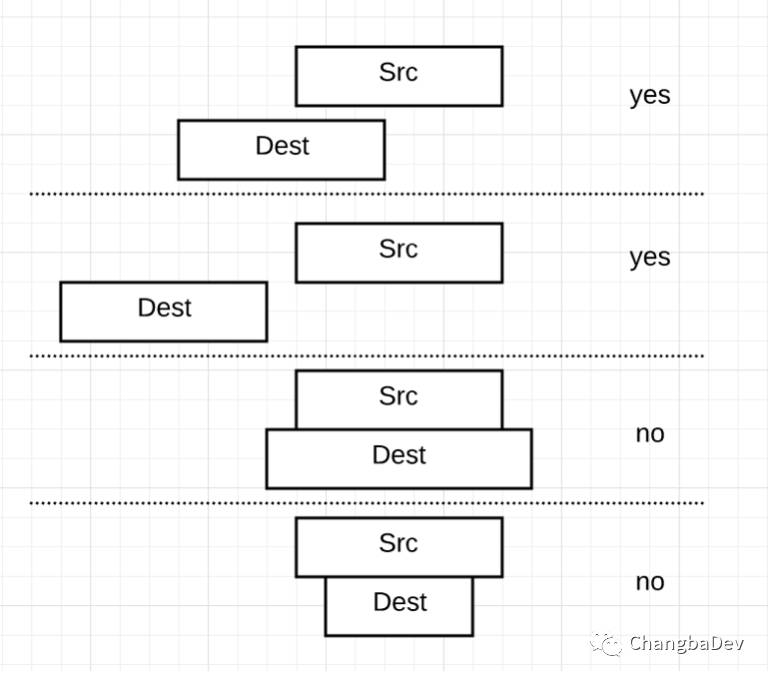
2.如果rect1满足方向上的要求,同样检查下rect2是否满足。一般都会满足,除了初始情况。
3.如果都满足条件,则根据方向上是否重叠及距离来判断谁更合适。
beamBeats比较:
1.如果rect2在对应的方向上,或者rect1不在。则rect1不比rect2合适。
2.如果rect2和原区域在该方向上重合,则rect1胜出。
3.如果左右方向则rect1胜出。
4.竖直方向上,最后则是距离的比较。比如up方向上,是rect1的bottom和src的top之前的距离比较于rect2的top和src的top之间的距离。小的会胜出。对于重合的情况则距离为0。
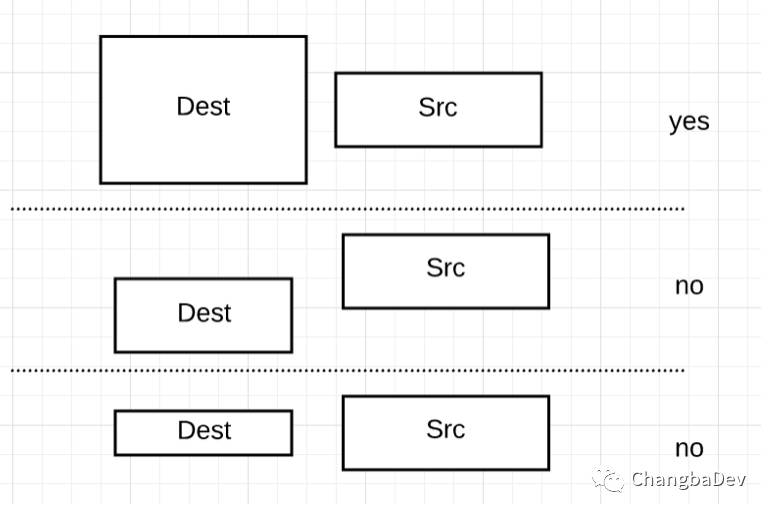
4.两次交换rect1和rect2通过第3步的比较。如果还不能确定谁胜出则进行距离的比较。比如direction为up,rect1的bottom和src的距离为a,rect1和src的左右方向上的中心点的距离为b。则rect1的距离就是 13*a*a+b*b;
int getWeightedDistanceFor(int majorAxisDistance, int minorAxisDistance) {
    return 13 * majorAxisDistance * majorAxisDistance
            + minorAxisDistance * minorAxisDistance;
}
其中13就是一个计算因子,个人理解是direction方向上的距离在整个距离的计算中占据更大的比重。
以上,就是焦点寻找的具体过程了。如果有疑惑的话,可以对照Android的源码一步步,应该会比较好理解一点。
App开发中的问题及解决
一,我们在项目中使用TabWidget +TabHost来实现多fragment的切换。在TabWidget上进行焦点切换的时候会切换fragment(在Android8.0之后只有焦点的变化)。这样在焦点从content切换到TabWidget的时候,如果查找到的焦点不是当前tab的时候,就是出现fragment切换的情况,而这不是我们希望看到的。
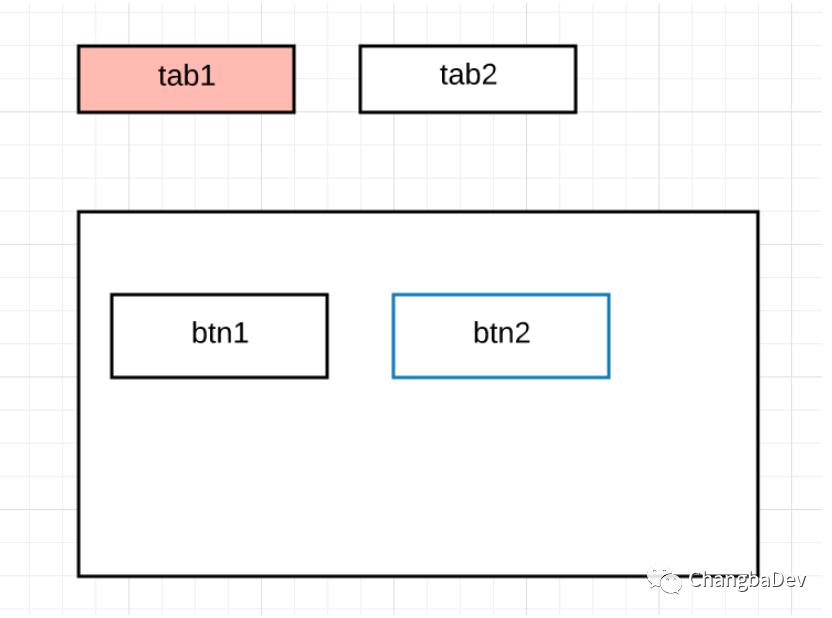
比如上图,当前tab为tab1,当前焦点为btn2。这时按up键时,根据焦点查找算法,tab2会成为下一个焦点。而当焦点获取焦点时,会自动切换当前fragment。而我们的需求是下一个焦点是tab1。这里就要进行一些特殊处理。
方式一:在TabWidget内注册整个view tree的焦点变化的监听,通过焦点变化来重新设置tab。这种方式在没有其他变化的时候是可以实现效果。但是如果有比如放大等效果的话,就是出现两个同时放大的tab。所以我们弃用了。
方式二:重写tabhost的focusSearch方法。根据上边所讲的焦点寻找过程。会先调用持有焦点这个“树枝”上所有View的focusSearch方法。
MyTabhost.java
@Override
public View focusSearch(View focused, int direction) {
    for (WeakReference<IFocusSearchListener> weakReference : mListenerList) {
        IFocusSearchListener listener = weakReference.get();
        if (listener != null) {
            view = listener.focusSearchSelf(focused, direction);
            if (view != null) {
                return view;
            }
        }
    }

    return super.focusSearch(focused, direction);
}
MyTabWidget.java
public View focusSearchSelf(View focused, int direction) {
    if (mLastFocusView != null) {
        View view = FocusFinder.getInstance().findNextFocus((ViewGroup) getRootView(), focused, direction);
        if (ViewUtils.isChildInHierarchy(this, view) && !ViewUtils.isChildInHierarchy(this, focused)) {
                return mLastFocusView;
        }
    }
    return null;
}
看代码MyTabhost中使用了监听模式,MyTabWidget中的focusSearchSelf是具体的实现。依然是使用FocusFinder先寻找一遍,如果找到的焦点是TabWidget的子View,而原焦点不是子View,则直接返回当前tab。这种方式主要是在焦点确认之前来干扰焦点的寻找。这是一个特别重要的方式,同样用于解决下个问题。
二,默认焦点不符合需求的问题
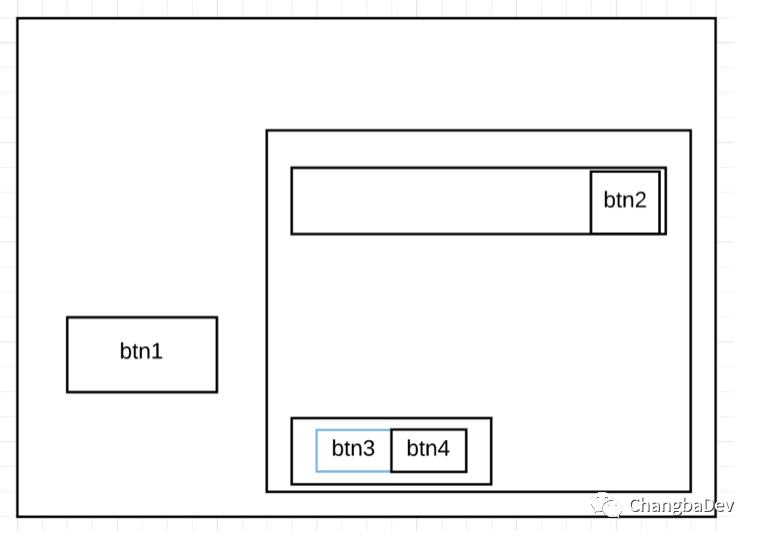
比如上图,右边是一个逻辑上的整体,一个listview+viewgroup的布局。当前焦点是btn3。当按up键时,按逻辑上的关系,我们需要btn2获取焦点,但是根据默认寻找算法,btn1获得了焦点。如果用设置nextFocusUpId的方式,对于listview则非常麻烦,毕竟item的view是会变化的。那么我们同样可以用重写focusSearch方法的方式来解决。 我们需要设置btn3的父布局的focusUpId为ListView的id。默认情况下两个父布局的nextFocusXXId的设置对子view是不管作用的。我们可以这样重写整个布局根view的 focusSearch。
public View focusSearch(View focused, int direction) {
    View next = findNextUserSpecifiedFocus(focused, direction);
    if (next != null &&  next.getVisibility() == View.VISIBLE) {
        ViewGroup group = getNearestSameParent(next, focused);
        if (group != null) {
            next = FocusFinder.getInstance().findNextFocus(group, focused, direction);
        }
    } else {
        next = null;
    }
    return next;
}
首先是通过当前焦点递归寻找看是否有某一层的父布局有设置nextFocusId。如果有则寻找该view和当前焦点共同的最近的父布局。然后用该布局作为FocusFinder的根布局来寻找下个焦点。这么做的目的就是尽量缩小寻找的范围。尽可能的契合逻辑上的合理。
结尾
本文主要就是对焦点的获取和转换进行了原理的阐述,然后根据其中的过程(尤其是focusSearch方法),我们进行控制处理,来达到我们项目中的需求。其中如果有错误,欢迎指证。谢谢~
