



将数据库中的数据导出成csv格式的文件
CSV格式,其要点包括:
(1)字段之间以逗号分隔,数据行之间以\r\n分隔;
(2)字符串以半角双引号包围,字符串本身的双引号用两个双引号表示。
准备一个测试表,随便加了点数据
库名test,表名test
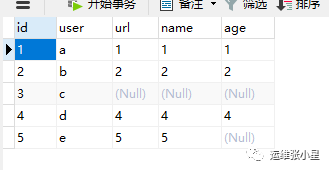
1.使用select .... into outfile的方法
使用命令行导出
fields terminated by描述字段的分隔符,默认情况下是tab字符(\t)
optionally enclosed by描述的是字段的括起字符。
escaped by描述的转义字符。默认的是反斜杠(backslash:\ )
lines terminated by : 行与行之间的分隔
mysql> select * from test into outfile '/tmp/test.csv' fields terminated by "," escaped by '' optionally enclosed by '' lines terminated by '\n' ;
Query OK, 5 rows affected (0.00 sec)
查看数据,空数据会用NULL代替
[root@localhost tmp]# cat test.csv1,a,1,1,12,b,2,2,23,c,NULL,NULL,NULL4,d,4,4,45,e,5,5,NULL
这里不能看到每个字段的名字
如果要看到字段名字
mysql> select * into outfile '/tmp/test1.csv' fields terminated by ',' escaped by '' optionally enclosed by '' lisnes terminated by '\n' from (select 'col1','col2','col3','col4','col5' union select id,user,url,name,age from test) b;Query OK, 6 rows affected (0.00 sec)
这时看到的数据就有字段名字了,这个可以自己改,为了区分开两者不同,我csv文件中的标题换了个名字,数据如下
[root@localhost tmp]# cat test1.csvcol1,col2,col3,col4,col51,a,1,1,12,b,2,2,23,c,NULL,NULL,NULL4,d,4,4,45,e,5,5,NULL
注意:
into outfile这种方法导出的文件,导出路径数据库必须要有权限并且导出的文件之前要不存在(如果没权限报ERROR 1 (HY000): Can't create/write to file '/root/test1.csv' (Errcode: 13 - Permission denied)),防止数据被覆盖(如果有文件报ERROR 1086 (HY000): File '/tmp/test.csv' already exists)
2.使用MySQL命令结合sed的方法
利用mysql的-e参数,可以导出数据,并且可以通过正则对数据进行处理,比如说把上面的NULL换成空字符
[root@localhost tmp]# mysql -uroot -p密码 test -e "select * from test where id > 1" -s |sed -e "s/\t/,/g" -e "s/NULL/ g" -e "s/\n/\r\n/g" > /tmp/test2.csvmysql: [Warning] Using a password on the command line interface can be insecure.#使用-e参数执行命令,-s是去掉输出结果的各种划线#利用sed将字段之间的tab换成,并且将NULL替换成空字符
查看导出数据
[root@localhost tmp]# cat test2.csvid,user,url,name,age2,b,2,2,23,c, , ,4,d,4,4,45,e,5,5,
如果不想要标题行,可以使用-N参数
3.使用mysqldump导出
使用前注意:在使用mysqldump时,需要先查看mysql参数,有个secure_file_priv 参数,这个参数是用来限制mysql导入导出,默认是关闭的,不允许导出,所以要先将这个参数打开
在my.cnf中添加
secure_file_priv = "/tmp"
意思是只允许导入导出发生在/tmp文件夹,""空的话说明不限制,设置完成后记得重启数据库。
然后在进行mysqldump导出
[root@localhost tmp]# mysqldump -uroot -p密码 -t -T/tmp/ test test --fields-terminated-by=',' --fields-escaped-by='' --fields-optionally-enclosed-by=''mysqldump: [Warning] Using a password on the command line interface can be insecure.
test(第一个test) :导出的数据库;
test(第二个test):导出的数据表;
-t :不导出create 语句,只要数据;
-T 指定到处的位置,注意目录权限,注意这里只到目录,默认名字是table_name.txt;
--fields-terminated-by=',':字段分割符;
--fields-enclosed-by='' :字段引号;
查看导出数据
[root@localhost tmp]# cat test.txt1,a,1,1,12,b,2,2,23,c,NULL,NULL,NULL4,d,4,4,45,e,5,5,NULL
第三种方法导出的文件名字后缀为txt,不过格式和前面的是一样的,换成csv后缀放到Excel打开和前面效果是一样的,感觉和第一种方法类似
