Murano服务包括以下组件,基本可以见名知意,注意murano运行在guest VM上执行template与scripts定义的部署动作,无需在hostVM部署。
murano
command-line client
A CLI that communicates with the
murano-api
to publish various cloud-ready applications on new virtual machines.
murano-api service
An OpenStack-native REST API that processes API requests by sending them to the
murano-engine
service via AMQP.
murano-agent service
The agent that runs on guest VMs and executes the deployment plan, a combination of execution plan templates and scripts.
murano-engine service
The workflow component of Murano, responsible for the deployment of an environment.
murano-dashboard service
Murano UI implemented as a plugin for the OpenStack Dashboard.
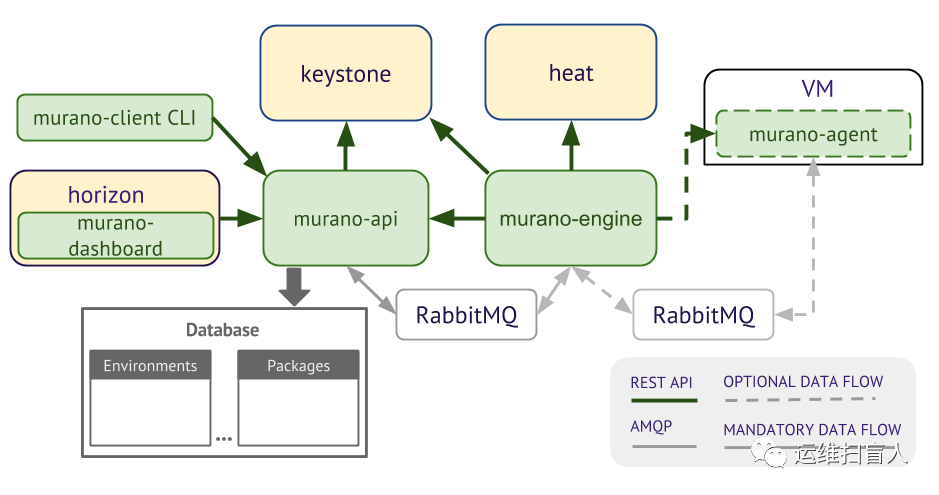
Murano与外部组件交互:
Murano需要通过Orchestration 服务 (Heat) 编排基础资源,例如 servers, volumes, and networks,Murano 基于Murano的应用定义动态创建heat 模板。
用户需要通过Keystone来访问murano API 。
二、创建database
CREATE DATABASE murano;GRANT ALL PRIVILEGES ON murano.* TO 'murano'@'localhost' IDENTIFIED BY 'MURANO_DBPASS';GRANT ALL PRIVILEGES ON murano.* TO 'murano'@'%' IDENTIFIED BY 'MURANO_DBPASS';
三、创建murano user
openstack user create --domain default --password MURANO muranoopenstack role add --project service --user murano admin
四、创建murano service
openstack service create --name murano --description "Application Catalog" application-catalog
openstack endpoint create --region RegionOne application-catalog public http://controller:8082openstack endpoint create --region RegionOne application-catalog internal http://controller:8082openstack endpoint create --region RegionOne application-catalog admin http://controller:8082
apt-get updateapt-get install murano-engine murano-apipip3 install python-muranoclient#====CentOS====#yum install -y openstack-murano-agent openstack-murano-api openstack-murano-engine
root@controller:~# cat etc/murano/murano.conf | egrep -v "^$|^#"[DEFAULT]debug = trueverbose = truetransport_url = rabbit://openstack:RABBIT_PASS@controller:5672/[barbican][cors][database]connection = mysql+pymysql://murano:MURANO_DBPASS@controller/murano[engine][glare][heat][key_manager][keystone]auth_url = http://controller:5000[keystone_authtoken]www_authenticate_uri = http://controller:5000auth_url = http://controller:5000memcached_servers = controller:11211auth_type = passwordproject_domain_name = defaultuser_domain_name = defaultproject_name = serviceusername = muranopassword = MURANO#====此处配置官方文档没有给出,实际测试中必须配置,否者报错“Keyerror”[murano_auth]www_authenticate_uri = http://controller:5000auth_url = http://controller:5000memcached_servers = controller:11211auth_type = passwordproject_domain_name = defaultuser_domain_name = defaultproject_name = serviceusername = muranopassword = MURANO[mistral][murano]url = http://controller:8082[murano_auth][networking]default_dns = 114.114.114.114external_network = providerrouter_name = murano-routercreate_router = true[neutron][oslo_concurrency]lock_path = var/lib/murano/tmp[oslo_messaging_amqp][oslo_messaging_kafka][oslo_messaging_notifications]driver = messagingv2[oslo_messaging_rabbit][oslo_policy][rabbitmq][ssl][stats][vault]
七、生成database tables
su -s bin/sh -c "murano-db-manage upgrade" murano
八、Install Murano Dashboard 
git clone https://github.com/openstack/murano-dashboard.gitcd murano-dashboard/git initpip3 install .cp muranodashboard/local/enabled/_* usr/share/openstack-dashboard/openstack_dashboard/enabled/cd usr/share/openstack-dashboardpython3 manage.py collectstaticpython3 manage.py compresssystemctl restart apache2
使用github源安装时,报错模块缺失,本示例使用另外一个节点在未部署horizon的情况下直接apt安装; apt install python-murano-dashboard时会自动解决依赖,进而install python-heat-dashboard; ubuntu-18.04使用deb包安装时,切记不要添加任何apt sources。
apt install python-heat-dashboardapt install python-murano-dashboard
root@controller:~# vim /etc/openstack-dashboard/local_settingsimport osfrom django.utils.translation import ugettext_lazy as _from horizon.utils import secret_keyfrom openstack_dashboard.settings import HORIZON_CONFIGDEBUG = FalseWEBROOT = '/'ALLOWED_HOSTS = ['*']OPENSTACK_API_VERSIONS = {"identity": 3,"image": 2,"volume": 2,"compute": 2,}LOCAL_PATH = os.path.dirname(os.path.abspath(__file__))SECRET_KEY = secret_key.generate_or_read_from_file('/var/lib/openstack-dashboard/secret_key')CACHES = {'default': {'BACKEND': 'django.core.cache.backends.memcached.MemcachedCache','LOCATION': 'controller:11211', #需修改的内容},}EMAIL_BACKEND = 'django.core.mail.backends.console.EmailBackend'OPENSTACK_HOST = "controller" #需修改的内容OPENSTACK_KEYSTONE_URL = "http://%s:5000/v3" % OPENSTACK_HOST #需修改的内容#ubuntu20.04 apache2.4中KEYSTONE_URL未指明5000端口,报错"Invalid credentials."#OPENSTACK_KEYSTONE_URL = "http://%s/identity/v3" % OPENSTACK_HOSTMURANO_API_URL = 'http://controller:8082' #需添加的内容OPENSTACK_KEYSTONE_BACKEND = {'name': 'native','can_edit_user': True,'can_edit_group': True,'can_edit_project': True,'can_edit_domain': True,'can_edit_role': True,}OPENSTACK_HYPERVISOR_FEATURES = {'can_set_mount_point': False,'can_set_password': False,'requires_keypair': False,'enable_quotas': True}OPENSTACK_CINDER_FEATURES = {'enable_backup': False,}OPENSTACK_NEUTRON_NETWORK = {'enable_router': True,'enable_quotas': True,'enable_ipv6': True,'enable_distributed_router': False,'enable_ha_router': False,'enable_fip_topology_check': True,'supported_vnic_types': ['*'],'physical_networks': [],}OPENSTACK_HEAT_STACK = {'enable_user_pass': True,}IMAGE_CUSTOM_PROPERTY_TITLES = {"architecture": _("Architecture"),"kernel_id": _("Kernel ID"),"ramdisk_id": _("Ramdisk ID"),"image_state": _("Euca2ools state"),"project_id": _("Project ID"),"image_type": _("Image Type"),}IMAGE_RESERVED_CUSTOM_PROPERTIES = []API_RESULT_LIMIT = 1000API_RESULT_PAGE_SIZE = 20SWIFT_FILE_TRANSFER_CHUNK_SIZE = 512 * 1024INSTANCE_LOG_LENGTH = 35DROPDOWN_MAX_ITEMS = 30TIME_ZONE = "UTC"...DEFAULT_THEME = 'ubuntu'WEBROOT='/horizon/'ALLOWED_HOSTS = '*'COMPRESS_OFFLINE = TrueALLOWED_PRIVATE_SUBNET_CIDR = {'ipv4': [], 'ipv6': []}METADATA_CACHE_DIR="/var/cache/murano-dashboard"
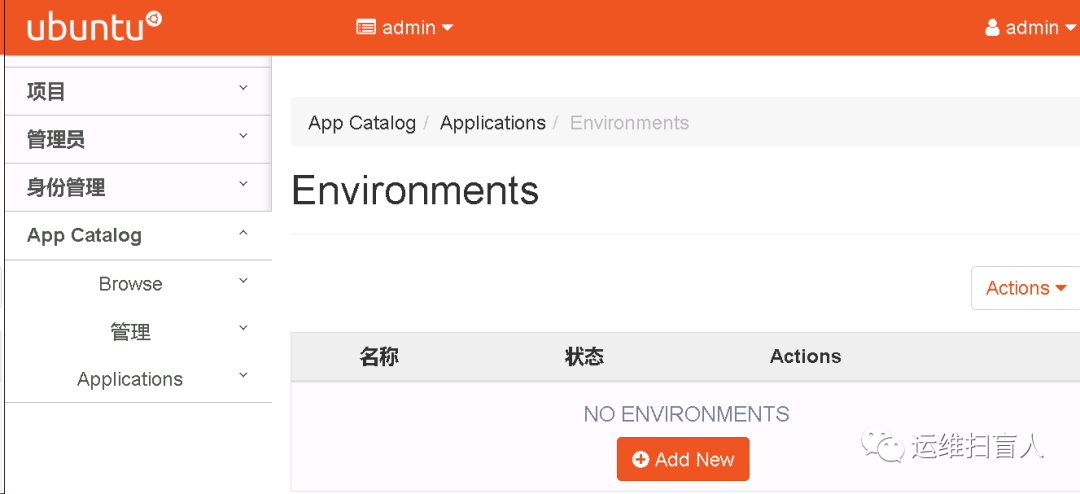
九、Import murano Application
9.1 通过local .zip文件
cd ~/murano#====get source file====#git clone https://opendev.org/openstack/murano-appscd ~/murano/muranopushd ../murano-apps/%APP-NAME%/packagezip -r ~/murano/murano/app.zip *popdtox -e venv -- murano --murano-url http://controller:8082 package-import app.zip
root@controller:~# openstack package import --is-public /root/murano-apps/BIND/package/bind.zipImporting package com.mirantis.network.dns.Bind+----------------------------------+-----------------+-------------------------------+---------------+--------+-----------+-------------+---------+| Id | Name | Fully_qualified_name | Author | Active | Is public | Type | Version |+----------------------------------+-----------------+-------------------------------+---------------+--------+-----------+-------------+---------+| 9baaf1d0f0bd48e983154c13dac6c56f | BIND DNS server | com.mirantis.network.dns.Bind | Mirantis, Inc | | True | Application | |+----------------------------------+-----------------+-------------------------------+---------------+--------+-----------+-------------+---------+
9.2 通过URL
root@controller:~# openstack package import http://openstack-apps-repository/sources/murano-apps/Plone.zipPackage file 'http://openstack-apps-repository/sources/murano-apps/Plone.zip' does not exist, attempting to downloadImporting package org.openstack.apps.plone.PloneServer+----------------------------------+-----------+--------------------------------------+-----------------+--------+-----------+-------------+---------+| Id | Name | Fully_qualified_name | Author | Active | Is public | Type | Version |+----------------------------------+-----------+--------------------------------------+-----------------+--------+-----------+-------------+---------+| 869e5345d26047539f791fef3c3d1d5d | Plone CMS | org.openstack.apps.plone.PloneServer | Evgeniy Mashkin | | False | Application | |+----------------------------------+-----------+--------------------------------------+-----------------+--------+-----------+-------------+---------+
9.3 查看package
root@controller:~# openstack package list+----------------------------------+--------------------+--------------------------------------+-----------------+--------+-----------+-------------+---------+| Id | Name | Fully_qualified_name | Author | Active | Is public | Type | Version |+----------------------------------+--------------------+--------------------------------------+-----------------+--------+-----------+-------------+---------+| b3783e9604da41ccbe92cc574e49fca7 | Apache HTTP Server | com.example.apache.ApacheHttpServer | Mirantis, Inc | | True | Application | || 292f8934d4544defae5bcb72c7810c2e | Apache Tomcat | com.example.apache.Tomcat | Mirantis, Inc | | True | Application | || 9baaf1d0f0bd48e983154c13dac6c56f | BIND DNS server | com.mirantis.network.dns.Bind | Mirantis, Inc | | True | Application | || d00a93864ee7459288700e975724c584 | Cloud Foundry | com.example.paas.CloudFoundry | Mirantis, Inc | | False | Application | || 0b9eca328d8b4a7299e9ff87007136ed | MongoDB | com.example.databases.MongoDB | Huawei, Inc | | False | Application | || 7f9d27ea1b0445df87873acad1b439bd | MySQL | com.example.databases.MySql | Mirantis, Inc | | False | Application | || d4adf5f03d0041c9bff114b8655fddeb | Plone CMS | org.openstack.apps.plone.PloneServer | Evgeniy Mashkin | | False | Application | || 215e8d9799394722b0c970674ddde736 | PostgreSQL | com.example.databases.PostgreSql | Mirantis, Inc | | False | Application | |+----------------------------------+--------------------+--------------------------------------+-----------------+--------+-----------+-------------+---------+
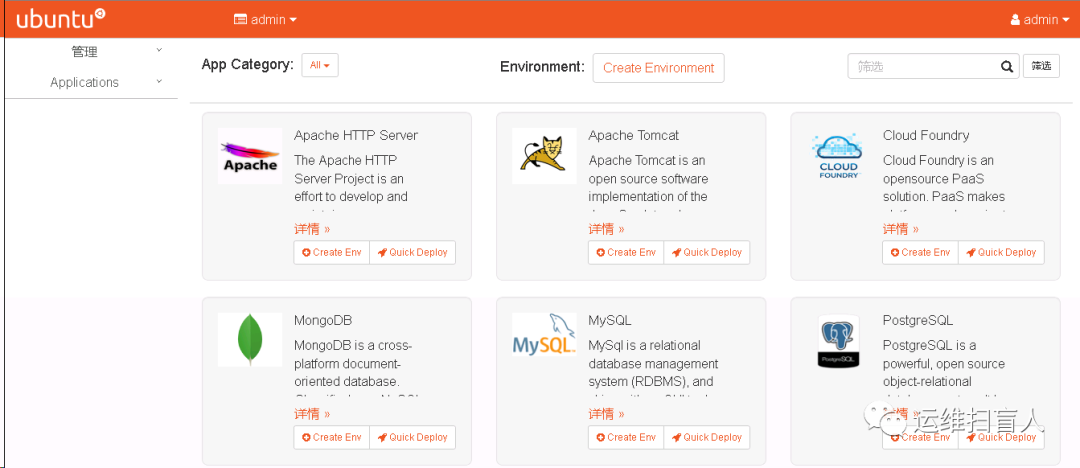
Tips:也可在package目录下打包为zip包,通过dashboard上传。
十、Creat my First Application Package
package目录是按照固定的结构组织的;
一个package目录中至少包含manifest.yaml和Class文件,只要具备这两个文件就可以打包为一个Application Package导入Murano。
10.1 准备maifest文件
mkdir HelloWorld/cd HelloWorldroot@controller:~/HelloWorld# cat manifest.yamlFullName: com.mydomain.HelloWorldType: ApplicationDescription: |A package which demonstratesdevelopment for Muranoby greeting the user.Classes:com.mydomain.HelloWorld: HelloWorld.yaml
FullName:必须是全局唯一的;
Classes:取值只能为Application 或者Library。
10.2 准备class文件
mkdir Classesroot@controller:~/HelloWorld# cat Classes/HelloWorld.yamlName: com.mydomain.HelloWorldExtends: io.murano.ApplicationMethods:deploy:Body:- $reporter: $this.find('io.murano.Environment').reporter- $reporter.report($this, "Hello, World!")
Murano Class严格遵循面向对象的语法格式,Class文件只定义类,用来被murano实例化;
Class中定义了对象的数据结构以及method;
类是可以被继承的,继承类拥有被继承类的全部属性,同时也可以覆盖被继承类的属性;
用户的自定义类可以继承多个Base Class;
Extends:表明我们定义的类继承了io.murano.application这个Base Class;
io.murano.application是由murano开发团队维护的,任何自定义类继承io.murano.application时,都以io.murano.application为前导符;
':'为赋值,Object.Method()表示对象调用某个方法。
#$this表示该类实力化后的一个对象,即表示对实例调用find方法,并为find方法传入io.murano.environment参数,并且将find方法的返回结果取reporter属性,并将这一属性赋值给变量reporter- $reporter: $this.find('io.murano.Environment').reporter#对repoter变量调用report方法,并为report方法传入$thins与"Hello,Word!"两个参数- $reporter.report($this, "Hello, World!")
git clone https://github.com/openstack/murano.git -b stable/victoriamurano-manage --config-file /etc/murano/murano.conf import-package /root/murano/meta/io.murano --updatemurano-manage --config-file /etc/murano/murano.conf import-package /root/murano/meta/io.murano.applications/ --update
root@controller:~# openstack package list+----------------------------------+---------------------------------+---------------------------+----------------+--------+-----------+-------------+---------+| Id | Name | Fully_qualified_name | Author | Active | Is public | Type | Version |+----------------------------------+---------------------------------+---------------------------+----------------+--------+-----------+-------------+---------+|488dff10a75044e787fce00c991ddfdd | Application Development Library | io.murano.applications | Mirantis, Inc. | | True | Library | || 9a4be65543b94df2b54c01003d47857b | Core library | io.murano | murano.io | | True | Library | |+----------------------------------+---------------------------------+---------------------------+----------------+--------+-----------+-------------+---------+
10.2 import package
root@controller:~# openstack package import HelloWorld/hello_world.zip --is-public --version v0.1.0root@controller:~# openstack package list --name com.mydomain.HelloWorld+----------------------------------+-------------------------+-------------------------+-----------+--------+-----------+-------------+---------+| Id | Name | Fully_qualified_name | Author | Active | Is public | Type | Version |+----------------------------------+-------------------------+-------------------------+-----------+--------+-----------+-------------+---------+| d3b27d487f914afe8a5ae04bfb730d70 | com.mydomain.HelloWorld | com.mydomain.HelloWorld | OpenStack | | True | Application | |+----------------------------------+-------------------------+-------------------------+-----------+--------+-----------+-------------+---------+
10.3 创建environment
root@controller:~# openstack environment create My-App+----------------------------------+--------+--------+---------------------+---------------------+| Id | Name | Status | Created | Updated |+----------------------------------+--------+--------+---------------------+---------------------+| c6de90087b2741f4a43283505223ecbc | My-App | ready | 2021-05-14T01:27:35 | 2021-05-14T01:27:35 |+----------------------------------+--------+--------+---------------------+---------------------+
10.4 创建environmrnt session
root@controller:~# openstack environment session create c6de90087b2741f4a43283505223ecbc+-------+----------------------------------+| Field | Value |+-------+----------------------------------+| id | a6ace79f29b84afeb629a12d9f084ab9 |+-------+----------------------------------+
Tips:session使得用户拥有权限可以编辑environment。
10.5 向environment添加app
root@controller:~# openstack environment apps edit --session-id a6ace79f29b84afeb629a12d9f084ab9 c6de90087b2741f4a43283505223ecbc HelloWorld/HelloWord.json
root@controller:~/HelloWorld# cat HelloWord.json[{"op": "add","path": "/-","value": {"?": {"name": "Demo","type": "com.mydomain.HelloWorld","id": "42"}}}]
10.6 部署application
root@controller:~# openstack environment deploy --session-id a6ace79f29b84afeb629a12d9f084ab9 c6de90087b2741f4a43283505223ecbc+------------------+------------------------------------------+| Field | Value |+------------------+------------------------------------------+| acquired_by | a6ace79f29b84afeb629a12d9f084ab9 || created | 2021-05-14T01:27:35 || description_text | || id | c6de90087b2741f4a43283505223ecbc || name | My-App || services | [ || | { || | "?": { || | "name": "Demo", || | "type": "com.mydomain.HelloWorld", || | "id": "42", || | "status": "deploying" || | } || | } || | ] || status | deploying || tenant_id | 89addf8128104abbb50cde0989a35ac9 || updated | 2021-05-14T01:27:35 || version | 0 |+------------------+------------------------------------------+
10.7 查看application状态
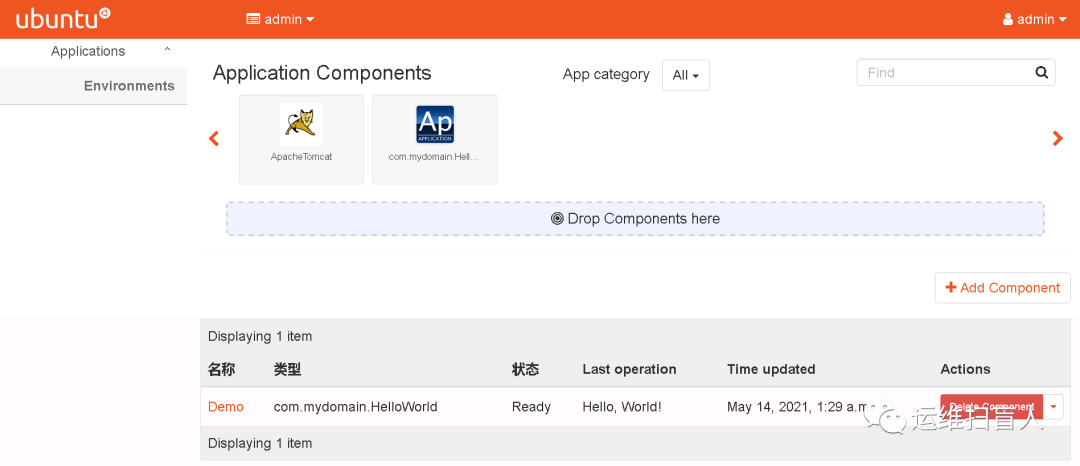
root@controller:~# openstack environment list+----------------------------------+--------+--------+---------------------+---------------------+| Id | Name | Status | Created | Updated |+----------------------------------+--------+--------+---------------------+---------------------+| c6de90087b2741f4a43283505223ecbc | My-App | ready | 2021-05-14T01:27:35 | 2021-05-14T01:29:49 |+----------------------------------+--------+--------+---------------------+---------------------+root@controller:~# openstack environment show c6de90087b2741f4a43283505223ecbc --only-apps+----------+------------------------------------------------------------------------+| Field | Value |+----------+------------------------------------------------------------------------+| services | [ || | { || | "?": { || | "type": "com.mydomain.HelloWorld/0.0.0@com.mydomain.HelloWorld", || | "id": "42", || | "name": "Demo", || | "metadata": null, || | "_actions": {}, || | "status": "ready" || | } || | } || | ] |+----------+------------------------------------------------------------------------+
10.8 添加user input
user input旨在提供最终服务用户一个定义个性化的入口;
user input定义在Class中,通过Properties配置块中;
本例子中的input为username,且为必选的字符串
input值一但定义就可以被method方法调用,例如$this.username
root@controller:~# cat Class/HelloWorld.yamlName: com.yourdomain.HelloWorldExtends: io.murano.ApplicationProperties:username:Usage: InContract: $.string().notNull()Methods:deploy:Body:- $reporter: $this.find('io.murano.Environment').reporter- $reporter.report($this, "Hello, " + $this.username + "!")
root@controller:~# cat HelloWorld.json[{"op": "add","path": "/-","value": {"?": {"name": "Demo","type": "com.yourdomain.HelloWorld","id": "42"},"username": "Alice"}}]
10.9 添加user 接口
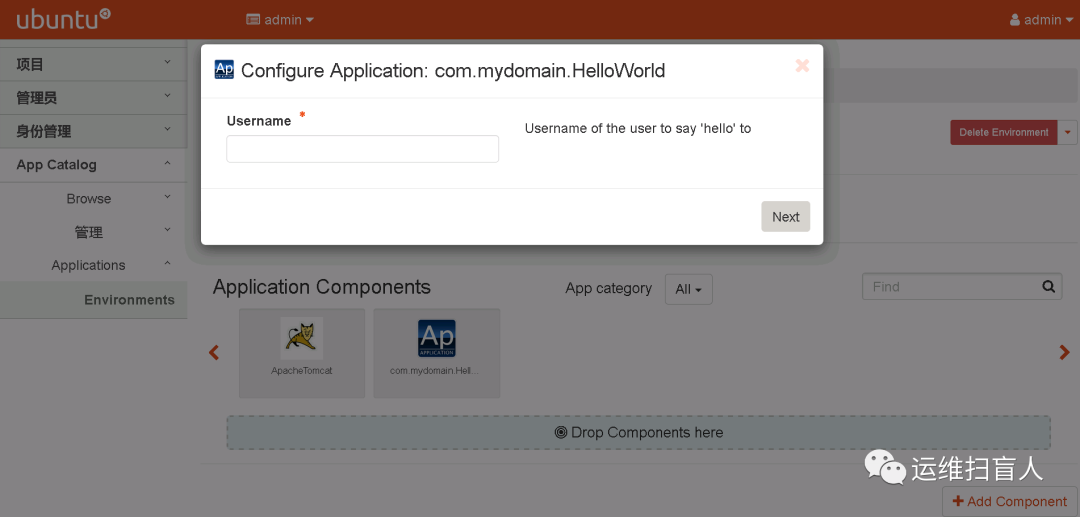
user input可以在UI中定义并且在deploy时传递给input-json,也可以定义为forms在dashboard中输入,而由Murano自动转换为input-json类型;
root@controller:~/HelloWorld# cat UI/ui.yamlApplication:?:type: com.yourdomain.HelloWorldusername: Alice#直接赋值Alice
root@controller:~/HelloWorld# cat UI/ui.yamlApplication:?:type: com.yourdomain.HelloWorldusername: $.step1.usernameForms:- step1:fields:- name: usernametype: stringdescription: Username of the user to say 'hello' torequired: true
10.10 引用namespace
namespace是为了简化Class中重复引用某些类而引入的,namespace通过其中定义的缩写来实现简化代码的目的。
如果某个名称空间使用频繁可以将其定义为默认名称空间。
Namespaces:#默认名称空间=: com.yourdomainstd: io.murano#实际为com.yourdomian默认名称空间Name: HelloWorldExtends: std:ApplicationMethods:deploy:Body:- $reporter: $this.find(std:Environment).reporter- $reporter.report($this, "Hello, World!")
10.11 添加更多详细信息
root@controller:~/HelloWorld# cat manifest.yamlFullName: com.mydomain.HelloWorldType: ApplicationName: 'Hello, World'Description: |A package which demonstratesdevelopment for Muranoby greeting the user.Author: John GuanClasses:com.mydomain.HelloWorld: HelloWorld.yaml
十一、Creating a Plone CMS application package
11.1 Registing Image
11.1.1 From ISO
openstack image create "ubuntu-18.04.5" \--file ubuntu-18.04.5-live-server-amd64.iso \--disk-format iso \--container-format bare \--publicopenstack flavor create ubuntu --disk 10 --vcpus 8 --ram 2048openstack volume create --size 10 --bootable ubuntu-volumeopenstack volume set --bootable ubuntu-volumeopenstack server create --image ubuntu-18.04.5 --flavor ubuntu --nic net-id=6425c1cc-c96c-49f2-96c0-0925209bf61b ubuntu-serveropenstack server add volume ubuntu-server ubuntu-volume --device dev/vdaopenstack server remove volume ubuntu-server ubuntu-volumeopenstack image create --disk-format qcow2 --volume ubuntu-volume ubuntu-serveropenstack server create --image ubuntu-server --flavor ubuntu --nic net-id=6425c1cc-c96c-49f2-96c0-0925209bf61b ubuntu
11.1.2 From Cloud Image
registing image
wget http://cloud-images.ubuntu.com/focal/current/focal-server-cloudimg-amd64.imgwget http://cloud-images.ubuntu.com/bionic/current/bionic-server-cloudimg-amd64.imgopenstack image create "ubuntu-20.04" \--file focal-server-cloudimg-amd64.img \--disk-format qcow2 \--container-format bare \--publicopenstack flavor create m2.large --disk 4 --vcpus 4 --ram 2048 --id 1
chage passwd
apt install libguestfs-toolsroot@controller:~# guestfish --rw -a focal-server-cloudimg-amd64.imgWelcome to guestfish, the guest filesystem shell forediting virtual machine filesystems and disk images.Type: ‘help’ for help on commands‘man’ to read the manual‘quit’ to quit the shell><fs> run100% ⟦▒▒▒▒▒▒▒▒▒▒▒▒▒▒▒▒▒▒▒▒▒▒▒▒▒▒▒▒▒▒▒▒▒▒▒▒▒▒▒▒▒▒▒▒▒▒▒▒▒▒▒▒▒▒▒▒▒▒▒▒▒▒▒▒▒▒▒▒▒▒▒▒▒▒▒▒▒▒▒▒▒▒▒▒▒▒▒▒▒▒▒▒▒▒▒▒▒▒▒▒▒▒▒▒▒▒▒▒▒▒▒▒▒▒▒▒▒▒▒▒▒▒▒▒▒▒▒▒▒▒⟧ 00:00><fs> list-filesystems/dev/sda1: ext4/dev/sda14: unknown/dev/sda15: vfat><fs> mount dev/sda1><fs> vi etc/ssh/sshd_config><fs> vi etc/shadow#否者自动安装murano-agent时会报错找不到该目录。><fs> mkdir /etc/init><fs> quit#生成密码root@controller:~# openssl passwd -1 123$1$IQP6mzMr$HKqDvpP6TjdRHBvqGvbeM
11.2 Create Directory
root@controller:~# mkdir -pv Plone/{Classes,UI,Resources}
11.3 Create manifest.yaml
FullName: com.yourdomain.PloneName: Plone CMSDescription: Simple Plone DeploymentType: ApplicationAuthor: John DoeClasses:com.yourdomain.Plone: plone.yaml
11.4 Create Class.yaml
Namespaces:=: com.yourdomainstd: io.muranores: io.murano.resourcessys: io.murano.systemName: PloneExtends: std:ApplicationProperties:instance:Usage: InContract: $.class(res:Instance)installationPath:Usage: InContract: $.string().notNull()Default: '/opt/plone'defaultPassword:Usage: InContract: $.string().notNull()listeningPort:Usage: InContract: $.int().notNull()Default: 8080Methods:deploy:Body:- $this.instance.deploy()- $script: sys:Resources.string('install-plone.sh')- $script: $script.replace({"$1" => $this.installationPath,"$2" => $this.defaultPassword,"$3" => $this.listeningPort})- type('io.murano.configuration.Linux').runCommand($this.instance.agent, $script)- $environment: $this.find(std:Environment)- $manager: $environment.securityGroupManager- $rules:- FromPort: $this.listeningPortToPort: $this.listeningPortIpProtocol: tcpExternal: true- $manager.addGroupIngress($rules)- $environment.stack.push()- $formatString: 'Plone is up and running at {0}:{1}'- If: $this.instance.assignFloatingIpThen:- $address: $this.instance.floatingIpAddressElse:- $address: $this.instance.ipAddresses.first()- $message: format($formatString, $address, $this.listeningPort)- $environment.reporter.report($this, $message)
注释:
'=:':设置默认namespace
'Extends':表示继承了某个其他类
'Properties':用列表形式定义自定义属性
$.class(res:Instance):约束条件,限定该类必须是resources中的install
$.string().notNull():约束条件,限定为一个非空的字符串
$script: sys:Resources.string('install-plone.sh'):引用部署脚本
$script: $script.replace():脚本变量替换
$rules:配置security group,管理出入站流量
type('io.murano.configuration.Linux').runCommand($this.instance.agent, $script):instance agent执行传入的脚本变量;
type('io.murano.configuration.Linux').runCommand($server.agent, 'sudo apt-get update'):instance agent执行传入的命令变量$formatString:变量定义
format():方法
11.5 Create UI.yaml
Application:?:type: com.yourdomain.Ploneinstance:?:type: io.murano.resources.LinuxMuranoInstancename: $.instanceConfiguration.hostnameimage: $.instanceConfiguration.imageflavor: $.instanceConfiguration.flavorassignFloatingIp: $.instanceConfiguration.assignFloatingIpinstallationPath: $.ploneConfiguration.installationPathdefaultPassword: $.ploneConfiguration.defaultPasswordlisteningPort: $.ploneConfiguration.listeningPortForms:- instanceConfiguration:fields:- name: hostnametype: stringlabel: Host Namedescription: >-Enter a hostname for a virtual machine to be createdinitial: 'plone-vm'required: true- name: imagetype: imageimageType: linuxlabel: Instance imagedescription: >-Select valid image for the application. Image should already be prepared andregistered in glance.- name: flavortype: flavorlabel: Instance flavordescription: >-Select registered in Openstack flavor. Consider that application performancedepends on this parameter.- name: assignFloatingIptype: booleanlabel: Assign Floating IPdescription: >-Check to assign floating IP automatically- ploneConfiguration:fields:- name: installationPathtype: stringlabel: Installation Pathinitial: '/opt/plone'description: >-Enter the path on the VM filesystem to deploy Plone into- name: defaultPasswordlabel: Admin passworddescription: Default administrator's passwordtype: passwordrequired: true- name: listeningPorttype: integerlabel: Listening Portdescription: Port to listen atinitial: 8080
11.6 Create Sources shell
#!/bin/bash#input parametersPL_PATH="$1"PL_PASS="$2"PL_PORT="$3"# Write log. Redirect stdout & stderr into log file:exec &> var/log/runPloneDeploy.log# echo "Update all packages."sudo apt-get update# Install the operating system software and libraries needed to run Plone:sudo apt-get install python-setuptools python-dev build-essential libssl-dev libxml2-dev libxslt1-dev libbz2-dev libjpeg62-dev# Install optional system packages for the handling of PDF and Office files. Can be omitted:sudo apt-get install libreadline-dev wv poppler-utils# Download the latest Plone unified installer:wget --no-check-certificate https://launchpad.net/plone/5.0/5.0.4/+download/Plone-5.0.4-UnifiedInstaller.tgz# Unzip the latest Plone unified installer:tar -xvf Plone-5.0.4-UnifiedInstaller.tgzcd Plone-5.0.4-UnifiedInstaller# Set the port that Plone will listen to on available network interfaces. Editing "http-address" param in buildout.cfg file:sed -i "s/^http-address = [0-9]*$/http-address = ${PL_PORT}/" buildout_templates/buildout.cfg# Run the Plone installer in standalone mode./install.sh --password="${PL_PASS}" --target="${PL_PATH}" standalone# Start Plonecd "${PL_PATH}/zinstance"bin/plonectl start
11.7 Get logo
wget https://docs.openstack.org/murano/victoria/_images/plone-logo.png -O /root/Plone/logo.png
11.8 Input.json
root@controller:~# cat Plone-input.json[{ "op": "add", "path": "/-", "value":{"instance": {"availabilityZone": "nova","name": "Plone-server","image": "31adba60-321d-4d4c-aa75-2638d19c97f3","keyname": "mykey","flavor": "m3.large","assignFloatingIp": false,"?": {"type": "io.murano.resources.LinuxMuranoInstance","id": "44"}},"name": "Plone CMS","?": {"type": "com.yourdomain.Plone","id": "43"}}}]
Tips:可以将UI.yaml中的信息在input.json中给出,省去在部署中提供。
11.9 Deploy Package
openstack package import Plone-edit/openstack environment create Ploneopenstack environment session create fcb63dcf107142b697cc75ff78681544openstack environment apps edit --session-id 52cae4dab5334920aed41b323d699927 fcb63dcf107142b697cc75ff78681544 Plone-input.jsonopenstack environment deploy --session-id 52cae4dab5334920aed41b323d699927 fcb63dcf107142b697cc75ff78681544
11.10 Verify
11.10.1 Automatically generated resources
environment
root@controller:~# openstack environment list+----------------------------------+-------+--------+---------------------+---------------------+| Id | Name | Status | Created | Updated |+----------------------------------+-------+--------+---------------------+---------------------+| fcb63dcf107142b697cc75ff78681544 | Plone | ready | 2021-05-20T03:52:30 | 2021-05-20T04:16:00 |+----------------------------------+-------+--------+---------------------+---------------------+
root@controller:~# openstack environment show fcb63dcf107142b697cc75ff78681544 --only-apps+----------+----------------------------------------------------------------------------+| Field | Value |+----------+----------------------------------------------------------------------------+| services | [ || | { || | "?": { || | "type": "com.yourdomain.Plone/0.0.0@com.yourdomain.Plone", || | "id": "43", || | "name": null, || | "metadata": null, || | "_actions": {}, || | "status": "ready" || | }, || | "instance": { || | "?": { || | "type": "io.murano.resources.LinuxMuranoInstance/0.0.0@io.murano", || | "id": "44", || | "name": null, || | "metadata": null, || | "dependencies": { || | "onDestruction": [ || | { || | "subscriber": "dde895d787c941f89681e1d3e383b7c9", || | "handler": null || | } || | ] || | }, || | "_actions": {} || | }, || | "regionName": null, || | "checkApplicability": true, || | "name": "Plone-server", || | "flavor": "m3.large", || | "image": "31adba60-321d-4d4c-aa75-2638d19c97f3", || | "keyname": "mykey", || | "openstackId": "2f93da96-cc89-418f-a5bc-b979494a1eb7", || | "availabilityZone": "nova", || | "ipAddresses": [ || | "10.0.175.139" || | ], || | "networks": { || | "useEnvironmentNetwork": true, || | "useFlatNetwork": false, || | "customNetworks": [], || | "primaryNetwork": null || | }, || | "assignFloatingIp": false, || | "floatingIpAddress": null, || | "securityGroupName": null, || | "securityGroups": [], || | "sharedIps": [], || | "volumes": {}, || | "blockDevices": [], || | "joinedNetworks": [ || | { || | "network": "e4f5dca06ab44c79bdc4d22f0408ae39", || | "ipList": [ || | "10.0.175.139" || | ] || | } || | ], || | "instanceAffinityGroup": null || | }, || | "installationPath": "/opt/plone", || | "defaultPassword": "Murano_TEST!", || | "listeningPort": 8080 || | } || | ] |+----------+----------------------------------------------------------------------------+
heat stack
root@controller:~# openstack stack list+--------------------------------------+------------------------+----------------------------------+-----------------+----------------------+----------------------+| ID | Stack Name | Project | Stack Status | Creation Time | Updated Time |+--------------------------------------+------------------------+----------------------------------+-----------------+----------------------+----------------------+| 8e7b737d-3f72-42e5-a88f-a21891ad9815 | murano--hacjskowd0egt3 | 89addf8128104abbb50cde0989a35ac9 | UPDATE_COMPLETE | 2021-05-20T03:53:55Z | 2021-05-20T04:15:52Z |+--------------------------------------+------------------------+----------------------------------+-----------------+----------------------+----------------------+
network
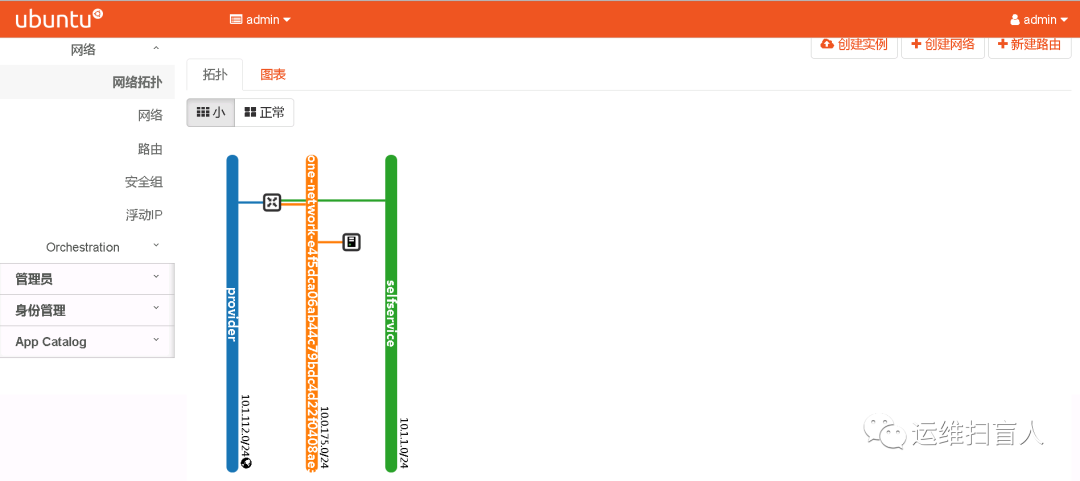
root@controller:~# openstack network list+--------------------------------------+------------------------------------------------+--------------------------------------+| ID | Name | Subnets |+--------------------------------------+------------------------------------------------+--------------------------------------+| de89912b-a007-401f-a6ee-8519370178bb | Plone-network-e4f5dca06ab44c79bdc4d22f0408ae39 | 426a3631-55ca-41fe-b876-ed725538747c |+--------------------------------------+------------------------------------------------+--------------------------------------+
instance
root@controller:~# openstack server list+--------------------------------------+--------------+--------+-------------------------------------------------------------+--------------------+----------+| ID | Name | Status | Networks | Image | Flavor |+--------------------------------------+--------------+--------+-------------------------------------------------------------+--------------------+----------+| 2f93da96-cc89-418f-a5bc-b979494a1eb7 | Plone-server | ACTIVE | Plone-network-e4f5dca06ab44c79bdc4d22f0408ae39=10.0.175.139 | ubuntu-18.04.image | m3.large |+--------------------------------------+--------------+--------+-------------------------------------------------------------+--------------------+----------+
11.10.2 Murano-agent
murano-engine与murano-agent采用AMQP消息队列协议通信;
在murano-dashborad中将镜像标记为murano可用镜像后,在部署package时,关联的instance会自动安装murano-agent;
自动安装的murano-agent配置信息是错误的,需要将RabbitMQ指向真正的RabbitMQ-server;
root@Plone-server:~# cat /etc/murano/agent.conf | egrep -v "^$|^#"[DEFAULT]debug=Trueverbose=Truelog_file = /var/log/murano-agent.logstorage=/var/murano/plansengine_key =[rabbitmq]input_queue = efcb63dcf107142b697cc75ff78681544-h44result_routing_key = -execution-results--hacjskowd0egt3host = CONTROLLER_PROVIDER_IPADDRESSport = 5672ssl = falseinsecure = falseca_certs = '/etc/murano/certs/ca_certs'login = openstackpassword = RABBIT_PASSvirtual_host = /
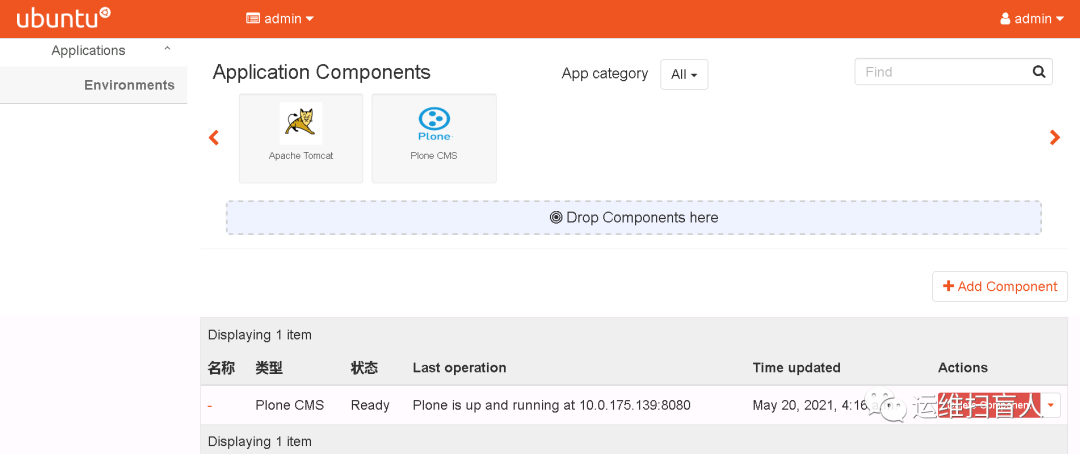
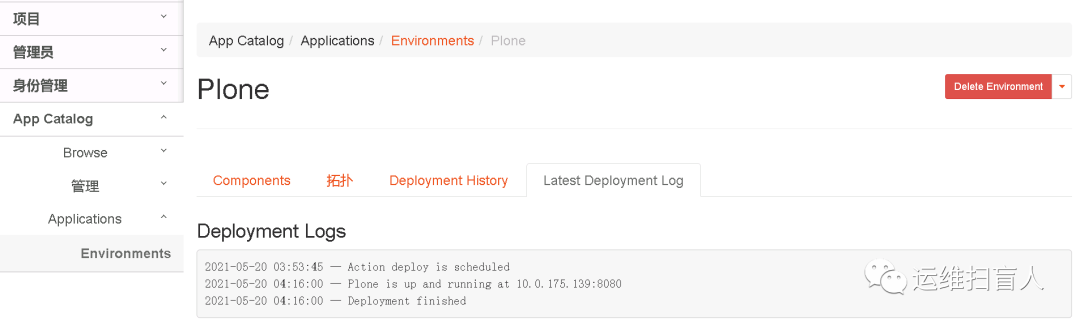
11.10.3 Deploy event
cloud-init log:/var/log/cloud-init-output.log
runinstall log:/var/log/runPloneDeploy.log
dashboard log