Overview
zun-api
An OpenStack-native REST API that processes API requests by sending them to the
zun-compute
over Remote Procedure Call (RPC).
zun-compute
A worker daemon that creates and terminates containers or capsules (pods) through container engine API. Manage containers, capsules and compute resources in local host.
zun-wsproxy
Provides a proxy for accessing running containers through a websocket connection.
zun-cni-daemon
Provides a CNI daemon service that provides implementation for the Zun CNI plugin.
python-zunclient
A command-line interface (CLI) and python bindings for interacting with the Container service.
zun-ui
The Horizon plugin for providing Web UI for Zun.
第一部分 Controller配置
一、创建database
CREATE DATABASE zun;GRANT ALL PRIVILEGES ON zun.* TO 'zun'@'localhost' IDENTIFIED BY 'ZUN_DBPASS';GRANT ALL PRIVILEGES ON zun.* TO 'zun'@'%' IDENTIFIED BY 'ZUN_DBPASS';
二、添加服务用户
openstack user create --domain default --password-prompt zunopenstack role add --project service --user zun admin
三、创建服务
openstack service create --name zun --description "Container Service" container
四、创建服务API endpoints
openstack endpoint create --region RegionOne container public http://controller:9517/v1openstack endpoint create --region RegionOne container internal http://controller:9517/v1openstack endpoint create --region RegionOne container admin http://controller:9517/v1
五、安装配置服务
5.1 创建用户及其安装路径
groupadd --system zunuseradd --home-dir "/var/lib/zun" \--create-home \--system \--shell bin/false \-g zun \zunmkdir -p /etc/zunchown zun:zun etc/zun
5.2 clone程序文件并安装
apt-get install python3-pip git
cd var/lib/zungit clone https://opendev.org/openstack/zun.gitchown -R zun:zun zuncd zunpip3 install -r requirements.txtpython3 setup.py install
TIPs:为了避免pips install超时可以设定pip3 install的下载源;
root@controller-01:/var/lib/zun/zun# cat root/.pip/pip.conf[global]timeout = 6000index-url = http://pypi.douban.com/simpleextra-index-url= http://pypi.douban.com/simple/trusted-host = pypi.douban.com
5.3 准备配置文件样例模板
su -s bin/sh -c "oslo-config-generator --config-file etc/zun/zun-config-generator.conf" zunsu -s /bin/sh -c "cp etc/zun/zun.conf.sample /etc/zun/zun.conf" zunsu -s bin/sh -c "cp etc/zun/api-paste.ini etc/zun" zun
5.4 生成database table
su -s bin/sh -c "zun-db-manage upgrade" zun
5.5 编辑配置文件
root@controller-01:~# cat etc/zun/zun.conf | egrep -v "^$|^#"[DEFAULT]transport_url = rabbit://openstack:RABBIT_PASS@controller[api]host_ip = 172.17.61.21port = 9517[cinder_client][cni_daemon][compute][cors][database]connection = mysql+pymysql://zun:ZUN_DBPASS@controller/zun[docker][glance][glance_client][healthcheck][keystone_auth]memcached_servers = controller:11211www_authenticate_uri = http://controller:5000project_domain_name = defaultproject_name = serviceuser_domain_name = defaultpassword = ZUNusername = zunauth_url = http://controller:5000auth_type = passwordauth_version = v3auth_protocol = httpservice_token_roles_required = Trueendpoint_type = internalURL[keystone_authtoken]memcached_servers = controller:11211www_authenticate_uri = http://controller:5000project_domain_name = defaultproject_name = serviceuser_domain_name = defaultpassword = ZUNusername = zunauth_url = http://controller:5000auth_type = passwordauth_version = v3auth_protocol = httpservice_token_roles_required = Trueendpoint_type = internalURL[network][neutron][neutron_client][oslo_concurrency]lock_path = var/lib/zun/tmp[oslo_messaging_amqp][oslo_messaging_kafka][oslo_messaging_notifications]driver = messaging[oslo_messaging_rabbit][oslo_policy][pci][placement_client][privsep][profiler][quota][scheduler][ssl][volume][websocket_proxy]wsproxy_host = 172.17.61.21wsproxy_port = 6784base_url = ws://controller:6784/[zun_client]
5.6 准备systemd文件
root@controller-01:~# cat lib/systemd/system/zun-api.service[Unit]Description = OpenStack Container Service API[Service]ExecStart = usr/local/bin/zun-apiUser = zun[Install]WantedBy = multi-user.target
root@controller-01:~# cat lib/systemd/system/zun-wsproxy.service[Unit]Description = OpenStack Container Service Websocket Proxy[Service]ExecStart = usr/local/bin/zun-wsproxyUser = zun[Install]WantedBy = multi-user.target
5.7 启动服务
systemctl enable zun-apisystemctl enable zun-wsproxy.servicesystemctl start zun-api.servicesystemctl start zun-wsproxy.service
六、安装配置Kuryr-libnetwork服务
Kuryr libnetwork driver以container image的形式利用neutron为container提供网路插件;
openstack user create --domain default --password-prompt kuryropenstack role add --project service --user kuryr admin
七、安装配置etcd服务
7.1 安装应用
root@controller-01:~# apt-get install etcd
7.2 编辑配置文件
root@controller-01:~# cat etc/default/etcd | egrep -v "^$|^#"ETCD_DATA_DIR="/var/lib/etcd/default.etcd"ETCD_WAL_DIR="/var/lib/etcd/controller/wal"ETCD_LISTEN_PEER_URLS="http://172.17.61.21:2380"ETCD_LISTEN_CLIENT_URLS="http://172.17.61.21:2379,http://127.0.0.1:2379"ETCD_NAME="controller"ETCD_INITIAL_ADVERTISE_PEER_URLS="http://172.17.61.21:2380"ETCD_ADVERTISE_CLIENT_URLS="http://172.17.61.21:2379,http://127.0.0.1:2379"ETCD_INITIAL_CLUSTER="controller=http://172.17.61.21:2380,compute=http://172.17.61.22:2380"ETCD_INITIAL_CLUSTER_TOKEN="etcd-cluster-wanma"ETCD_INITIAL_CLUSTER_STATE="new"
7.3 启动服务
root@controller-01:~# systemctl enable etcd.service^Croot@controller-01:~# systemctl restart etcd.service
7.4 查看状态
root@controller-01:~# etcdctl member listdc07a15a7ebf343: name=compute peerURLs=http://172.17.61.22:2380 clientURLs=http://127.0.0.1:2379,http://172.17.61.22:2379 isLeader=trueb62dcc7369969c7f: name=controller peerURLs=http://172.17.61.21:2380 clientURLs=http://127.0.0.1:2379,http://172.17.61.21:2379 isLeader=falseroot@controller-01:~# etcdctl cluster-healthmember dc07a15a7ebf343 is healthy: got healthy result from http://127.0.0.1:2379member b62dcc7369969c7f is healthy: got healthy result from http://127.0.0.1:2379cluster is healthy
一、安装配置docker
1.1 安装软件包以允许apt通过HTTPS使用存储库
apt-get install \apt-transport-https \ca-certificates \curl \gnupg-agent \software-properties-common
1.2 添加Docker的官方GPG密钥
root@controller-01:~# curl -fsSL https://download.docker.com/linux/ubuntu/gpg | sudo apt-key addOK
root@controller-01:~# sudo apt-key fingerprint 0EBFCD88pub rsa4096 2017-02-22 [SCEA]9DC8 5822 9FC7 DD38 854A E2D8 8D81 803C 0EBF CD88uid [ unknown] Docker Release (CE deb) <docker@docker.com>sub rsa4096 2017-02-22 [S]
1.3 添加仓库
sudo add-apt-repository \"deb [arch=amd64] https://download.docker.com/linux/ubuntu \$(lsb_release -cs) \stable"Hit:1 http://mirrors.aliyun.com/ubuntu bionic InReleaseHit:2 http://mirrors.aliyun.com/ubuntu bionic-security InReleaseHit:3 http://mirrors.aliyun.com/ubuntu bionic-updates InReleaseHit:4 http://mirrors.aliyun.com/ubuntu bionic-proposed InReleaseHit:5 http://mirrors.aliyun.com/ubuntu bionic-backports InReleaseGet:6 https://download.docker.com/linux/ubuntu bionic InRelease [64.4 kB]Hit:7 http://ubuntu-cloud.archive.canonical.com/ubuntu bionic-updates/stein InReleaseGet:8 https://download.docker.com/linux/ubuntu bionic/stable amd64 Packages [17.4 kB]Fetched 81.9 kB in 2s (43.4 kB/s)Reading package lists... Done
1.4 安装docker-ce
sudo apt-get install docker-ce docker-ce-cli containerd.io
root@compute-01:~# docker versionClient: Docker Engine - CommunityVersion: 20.10.5API version: 1.41Go version: go1.13.15Git commit: 55c4c88Built: Tue Mar 2 20:18:05 2021OS/Arch: linux/amd64Context: defaultExperimental: trueServer: Docker Engine - CommunityEngine:Version: 20.10.5API version: 1.41 (minimum version 1.12)Go version: go1.13.15Git commit: 363e9a8Built: Tue Mar 2 20:16:00 2021OS/Arch: linux/amd64Experimental: falsecontainerd:Version: 1.4.4GitCommit: 05f951a3781f4f2c1911b05e61c160e9c30eaa8erunc:Version: 1.0.0-rc93GitCommit: 12644e614e25b05da6fd08a38ffa0cfe1903fdecdocker-init:Version: 0.19.0GitCommit: de40ad0
二、安装配置Kuryr-libnetwork服务
2.1 创建用户及其必要目录
groupadd --system kuryruseradd --home-dir "/var/lib/kuryr" \--create-home \--system \--shell bin/false \-g kuryr \kuryr
mkdir -p /etc/kuryrchown kuryr:kuryr /etc/kuryr
2.2 clone程序文件及安装
apt-get install python3-pipcd /var/lib/kuryrgit clone -b master https://opendev.org/openstack/kuryr-libnetwork.gitchown -R kuryr:kuryr kuryr-libnetworkcd kuryr-libnetworkpip3 install -r requirements.txtpython3 setup.py install
2.3 准备配置文件样例模板
su -s bin/sh -c "./tools/generate_config_file_samples.sh" kuryrsu -s bin/sh -c "cp etc/kuryr.conf.sample etc/kuryr/kuryr.conf" kuryr
2.4 编辑配置文件
root@compute-01:~# cat etc/kuryr/kuryr.conf | egrep -v "^$|^#"[DEFAULT]bindir = /usr/local/libexec/kuryr[binding][neutron]www_authenticate_uri = http://controller:5000auth_url = http://controller:5000username = kuryruser_domain_name = defaultpassword = KURYRproject_name = serviceproject_domain_name = defaultauth_type = password
2.5 准备systemd.service文件
root@compute-01:~# cat /lib/systemd/system/kuryr-libnetwork.service[Unit]Description = Kuryr-libnetwork - Docker network plugin for Neutron[Service]ExecStart = /usr/local/bin/kuryr-server --config-file /etc/kuryr/kuryr.confCapabilityBoundingSet = CAP_NET_ADMINAmbientCapabilities = CAP_NET_ADMIN[Install]WantedBy = multi-user.target
2.6 启动kuryr-libnetwork程序
systemctl enable kuryr-libnetworksystemctl start kuryr-libnetwork
systemctl restart docker
2.7 验证
root@compute-01:~# docker network create --driver kuryr --ipam-driver kuryr --subnet 10.20.0.0/16 --gateway=10.20.0.1 test_net1407ee7de6698712a04f54a14a10ae5432010c2b051f4460e96206695da93d46
root@compute-01:~# docker network listNETWORK ID NAME DRIVER SCOPE94950ff577c3 bridge bridge local4eaa5efff9ba host host localbf7a5162f0d7 none null local1407ee7de669 test_net kuryr local
root@compute-01:~# docker run --net test_net cirros ifconfigUnable to find image 'cirros:latest' locallylatest: Pulling from library/cirrosd0b405be7a32: Pull completebd054094a037: Pull completec6a00de1ec8a: Pull completeDigest: sha256:4e8ac7a10251079ad68188b1aab16f6e94d8708d82d0602953c43ad48c2f08edStatus: Downloaded newer image for cirros:latesteth0 Link encap:Ethernet HWaddr 02:42:EC:BD:0E:0Dinet addr:10.20.1.77 Bcast:10.20.255.255 Mask:255.255.0.0UP BROADCAST RUNNING MULTICAST MTU:1450 Metric:1RX packets:14 errors:0 dropped:0 overruns:0 frame:0TX packets:3 errors:0 dropped:0 overruns:0 carrier:0collisions:0 txqueuelen:1000RX bytes:1212 (1.1 KiB) TX bytes:266 (266.0 B)lo Link encap:Local Loopbackinet addr:127.0.0.1 Mask:255.0.0.0UP LOOPBACK RUNNING MTU:65536 Metric:1RX packets:0 errors:0 dropped:0 overruns:0 frame:0TX packets:0 errors:0 dropped:0 overruns:0 carrier:0collisions:0 txqueuelen:1000RX bytes:0 (0.0 B) TX bytes:0 (0.0 B)
三、安装配置etcd服务
3.1 启动程序
root@compute-01:~# apt-get install etcd
3.2 编辑配置文件
root@compute-01:~# cat /etc/default/etcd | egrep -v "^$|^#"ETCD_DATA_DIR="/var/lib/etcd/default.etcd"ETCD_DATA_DIR="/var/lib/etcd/compute/war"ETCD_LISTEN_PEER_URLS="http://172.17.61.22:2380"ETCD_LISTEN_CLIENT_URLS="http://172.17.61.22:2379,http://127.0.0.1:2379"ETCD_NAME="compute"ETCD_INITIAL_ADVERTISE_PEER_URLS="http://172.17.61.22:2380"ETCD_ADVERTISE_CLIENT_URLS="http://172.17.61.22:2379,http://127.0.0.1:2379"ETCD_INITIAL_CLUSTER="controller=http://172.17.61.21:2380,compute=http://172.17.61.22:2380"ETCD_INITIAL_CLUSTER_TOKEN="etcd-cluster-wanma"ETCD_INITIAL_CLUSTER_STATE="new"
3.3 启动etcd服务
root@compute-01:~# systemctl enable etcd.serviceroot@compute-01:~# systemctl restart etcd.service
3.4 验证etcd服务状态
root@compute-01:~# etcdctl member listdc07a15a7ebf343: name=compute peerURLs=http://172.17.61.22:2380 clientURLs=http://127.0.0.1:2379,http://172.17.61.22:2379 isLeader=trueb62dcc7369969c7f: name=controller peerURLs=http://172.17.61.21:2380 clientURLs=http://127.0.0.1:2379,http://172.17.61.21:2379 isLeader=falseroot@compute-01:~# etcdctl cluster-healthmember dc07a15a7ebf343 is healthy: got healthy result from http://127.0.0.1:2379member b62dcc7369969c7f is healthy: got healthy result from http://127.0.0.1:2379cluster is healthy
四、安装配置zun服务
4.1 创建用户及其必要目录
groupadd --system zunuseradd --home-dir "/var/lib/zun" \--create-home \--system \--shell /bin/false \-g zun \zun
mkdir -p /etc/zunchown zun:zun /etc/zun
mkdir -p /etc/cni/net.dchown zun:zun /etc/cni/net.d
4.2 安装依赖
apt-get install python3-pip git numactl
4.3 clone并安装zun程序
cd /var/lib/zungit clone https://opendev.org/openstack/zun.gitchown -R zun:zun zuncd zunpip3 install -r requirements.txtpython3 setup.py install
4.4 准备配置文件样例模板
su -s /bin/sh -c "oslo-config-generator --config-file etc/zun/zun-config-generator.conf" zunsu -s /bin/sh -c "cp etc/zun/zun.conf.sample /etc/zun/zun.conf" zunsu -s /bin/sh -c "cp etc/zun/rootwrap.conf /etc/zun/rootwrap.conf" zunsu -s /bin/sh -c "mkdir -p /etc/zun/rootwrap.d" zunsu -s /bin/sh -c "cp etc/zun/rootwrap.d/* /etc/zun/rootwrap.d/" zunsu -s /bin/sh -c "cp etc/cni/net.d/* /etc/cni/net.d/" zun
4.5 为zun用户配置sudoer
echo "zun ALL=(root) NOPASSWD: /usr/local/bin/zun-rootwrap /etc/zun/rootwrap.conf *" | sudo tee /etc/sudoers.d/zun-rootwrap
4.6 编辑配置文件
root@compute-01:~# cat /etc/zun/zun.conf | egrep -v "^$|^#"[DEFAULT]capability_scope = globalprocess_external_connectivity = Falsetransport_url = rabbit://openstack:RABBIT_PASS@controllerstate_path = /var/lib/zun[api][cinder_client][cni_daemon][compute]host_shared_with_nova = true[cors][database]connection = mysql+pymysql://zun:ZUN_DBPASS@controller/zun[docker][glance][glance_client][healthcheck][keystone_auth]memcached_servers = controller:11211www_authenticate_uri = http://controller:5000project_domain_name = defaultproject_name = serviceuser_domain_name = defaultpassword = ZUNusername = zunauth_url = http://controller:5000auth_type = passwordauth_version = v3auth_protocol = httpservice_token_roles_required = Trueendpoint_type = internalURL[keystone_authtoken]memcached_servers = controller:11211www_authenticate_uri= http://controller:5000project_domain_name = defaultproject_name = serviceuser_domain_name = defaultpassword = ZUNusername = zunauth_url = http://controller:5000auth_type = password[network][neutron][neutron_client][oslo_concurrency]lock_path = /var/lib/zun/tmp[oslo_messaging_amqp][oslo_messaging_kafka][oslo_messaging_notifications][oslo_messaging_rabbit][oslo_policy][pci][placement_client][privsep][profiler][quota][scheduler][ssl][volume][websocket_proxy][zun_client]
4.7 配置docker
root@compute-01:~# cat /lib/systemd/system/docker.service | egrep -v "^#|^$"[Unit]Description=Docker Application Container EngineDocumentation=https://docs.docker.comAfter=network-online.target firewalld.service containerd.serviceWants=network-online.targetRequires=docker.socket containerd.service[Service]Type=notifyExecStart=/usr/bin/dockerd --group zun -H tcp://compute-01:2375 -H unix:///var/run/docker.sock --cluster-store etcd://controller:2379ExecReload=/bin/kill -s HUP $MAINPIDTimeoutSec=0RestartSec=2Restart=alwaysStartLimitBurst=3StartLimitInterval=60sLimitNOFILE=infinityLimitNPROC=infinityLimitCORE=infinityTasksMax=infinityDelegate=yesKillMode=processOOMScoreAdjust=-500[Install]WantedBy=multi-user.target
4.8 配置containerd
4.8.1 生成配置文件
containerd config default > /etc/containerd/config.toml
4.8.2 获取GID并在配置文件替换为获取到的值
root@compute-01:~# getent group zun | cut -d: -f3996
root@compute-01:~# chown zun:zun /etc/containerd/config.tomlroot@compute-01:~# cat /etc/containerd/config.tomlversion = 2root = "/var/lib/containerd"state = "/run/containerd"plugin_dir = ""disabled_plugins = []required_plugins = []oom_score = 0[grpc]address = "/run/containerd/containerd.sock"tcp_address = ""tcp_tls_cert = ""tcp_tls_key = ""uid = 996gid = 996max_recv_message_size = 16777216max_send_message_size = 16777216[ttrpc]address = ""uid = 0gid = 0[debug]address = ""uid = 0gid = 0level = ""[metrics]address = ""grpc_histogram = false[cgroup]path = ""[timeouts]"io.containerd.timeout.shim.cleanup" = "5s""io.containerd.timeout.shim.load" = "5s""io.containerd.timeout.shim.shutdown" = "3s""io.containerd.timeout.task.state" = "2s"[plugins][plugins."io.containerd.gc.v1.scheduler"]pause_threshold = 0.02deletion_threshold = 0mutation_threshold = 100schedule_delay = "0s"startup_delay = "100ms"[plugins."io.containerd.grpc.v1.cri"]disable_tcp_service = truestream_server_address = "127.0.0.1"stream_server_port = "0"stream_idle_timeout = "4h0m0s"enable_selinux = falseselinux_category_range = 1024sandbox_image = "k8s.gcr.io/pause:3.2"stats_collect_period = 10systemd_cgroup = falseenable_tls_streaming = falsemax_container_log_line_size = 16384disable_cgroup = falsedisable_apparmor = falserestrict_oom_score_adj = falsemax_concurrent_downloads = 3disable_proc_mount = falseunset_seccomp_profile = ""tolerate_missing_hugetlb_controller = truedisable_hugetlb_controller = trueignore_image_defined_volumes = false[plugins."io.containerd.grpc.v1.cri".containerd]snapshotter = "overlayfs"default_runtime_name = "runc"no_pivot = falsedisable_snapshot_annotations = truediscard_unpacked_layers = false[plugins."io.containerd.grpc.v1.cri".containerd.default_runtime]runtime_type = ""runtime_engine = ""runtime_root = ""privileged_without_host_devices = falsebase_runtime_spec = ""[plugins."io.containerd.grpc.v1.cri".containerd.untrusted_workload_runtime]runtime_type = ""runtime_engine = ""runtime_root = ""privileged_without_host_devices = falsebase_runtime_spec = ""[plugins."io.containerd.grpc.v1.cri".containerd.runtimes][plugins."io.containerd.grpc.v1.cri".containerd.runtimes.runc]runtime_type = "io.containerd.runc.v2"runtime_engine = ""runtime_root = ""privileged_without_host_devices = falsebase_runtime_spec = ""[plugins."io.containerd.grpc.v1.cri".containerd.runtimes.runc.options][plugins."io.containerd.grpc.v1.cri".cni]bin_dir = "/opt/cni/bin"conf_dir = "/etc/cni/net.d"max_conf_num = 1conf_template = ""[plugins."io.containerd.grpc.v1.cri".registry][plugins."io.containerd.grpc.v1.cri".registry.mirrors][plugins."io.containerd.grpc.v1.cri".registry.mirrors."docker.io"]endpoint = ["https://registry-1.docker.io"][plugins."io.containerd.grpc.v1.cri".image_decryption]key_model = ""[plugins."io.containerd.grpc.v1.cri".x509_key_pair_streaming]tls_cert_file = ""tls_key_file = ""[plugins."io.containerd.internal.v1.opt"]path = "/opt/containerd"[plugins."io.containerd.internal.v1.restart"]interval = "10s"[plugins."io.containerd.metadata.v1.bolt"]content_sharing_policy = "shared"[plugins."io.containerd.monitor.v1.cgroups"]no_prometheus = false[plugins."io.containerd.runtime.v1.linux"]shim = "containerd-shim"runtime = "runc"runtime_root = ""no_shim = falseshim_debug = false[plugins."io.containerd.runtime.v2.task"]platforms = ["linux/amd64"][plugins."io.containerd.service.v1.diff-service"]default = ["walking"][plugins."io.containerd.snapshotter.v1.devmapper"]root_path = ""pool_name = ""base_image_size = ""async_remove = false
4.8.3 重启docker containerd
root@compute-01:~# systemctl restart containerd
4.9 配置CNI
4.9.1 下载安装CNI lookup plugin
mkdir -p /opt/cni/bincurl -L https://github.com/containernetworking/plugins/releases/download/v0.7.1/cni-plugins-amd64-v0.7.1.tgz | tar -C /opt/cni/bin -xzvf - ./loopback
4.9.2 安装Zun CNI plugin
root@compute-01:~# install -o zun -m 0555 -D /usr/local/bin/zun-cni /opt/cni/bin/zun-cni
4.10 启动zun服务
4.10.1 准备zun服务systemd.service文件
root@compute-01:~# cat /lib/systemd/system/zun-compute.service[Unit]Description = OpenStack Container Service Compute Agent[Service]ExecStart = /usr/local/bin/zun-computeUser = zun[Install]WantedBy = multi-user.target
root@compute-01:~# cat /lib/systemd/system/zun-cni-daemon.service[Unit]Description = OpenStack Container Service CNI daemon[Service]ExecStart = /usr/local/bin/zun-cni-daemonUser = zun[Install]WantedBy = multi-user.target
4.10.2 启动服务
systemctl enable zun-computesystemctl start zun-computesystemctl enable zun-cni-daemonsystemctl start zun-cni-daemon
第三部分 验证
一、安装python-zunclinet配置zun服务
root@controller-01:~# pip3 install python-zunclient
二、验证component安装状态
root@controller-01:~# openstack appcontainer host list+--------------------------------------+------------+-----------+------+------------+| uuid | hostname | mem_total | cpus | disk_total |+--------------------------------------+------------+-----------+------+------------+| 17dfd24a-1b19-46ad-886d-191639bc9c41 | compute-01 | 7976 | 4 | 15 |+--------------------------------------+------------+-----------+------+------------+
root@controller-01:~# openstack appcontainer service list+----+------------+-------------+-------+----------+-----------------+----------------------------+-------------------+| Id | Host | Binary | State | Disabled | Disabled Reason | Updated At | Availability Zone |+----+------------+-------------+-------+----------+-----------------+----------------------------+-------------------+| 1 | compute-01 | zun-compute | up | False | None | 2021-03-26T13:30:17.000000 | nova |+----+------------+-------------+-------+----------+-----------------+----------------------------+-------------------+
三、Launch a Container
3.1 确定可用网络
root@controller-01:~# openstack network list+--------------------------------------+--------------------+--------------------------------------+| ID | Name | Subnets |+--------------------------------------+--------------------+--------------------------------------+| 3c3dd4da-5865-48bf-8cb4-1c5941ca8f86 | kuryr-net-1407ee7d | 4cebae65-eb49-44e3-af52-3677bdbe3c36 || 42adde0f-95d7-49e0-8b69-3a48276b492d | selfservice | b08bf9e9-2488-45d3-98fa-8720ed7f05f5 || e5874e6a-3282-4bd8-b82a-05b998ee0909 | provider | f4bc642c-adb0-48a8-b010-6357dca7f59b |+--------------------------------------+--------------------+--------------------------------------+
root@controller-01:~# openstack subnet list+--------------------------------------+---------------------------+--------------------------------------+---------------+| ID | Name | Network | Subnet |+--------------------------------------+---------------------------+--------------------------------------+---------------+| 4cebae65-eb49-44e3-af52-3677bdbe3c36 | kuryr-subnet-10.20.0.0/16 | 3c3dd4da-5865-48bf-8cb4-1c5941ca8f86 | 10.20.0.0/16 || b08bf9e9-2488-45d3-98fa-8720ed7f05f5 | selfservice | 42adde0f-95d7-49e0-8b69-3a48276b492d | 192.0.2.0/24 || f4bc642c-adb0-48a8-b010-6357dca7f59b | provider | e5874e6a-3282-4bd8-b82a-05b998ee0909 | 10.1.112.0/24 |+--------------------------------------+---------------------------+--------------------------------------+---------------+
3.2 运行一个container
export NET_ID=$(openstack network list | awk '/ selfservice / { print $2 }')
root@controller-01:~# openstack appcontainer run --name container --net network=$NET_ID cirros ping 8.8.8.8+-------------------+---------------------------------------------------------------------------------------------------------------------------------------------------------------------------------------------------------------+| Field | Value |+-------------------+---------------------------------------------------------------------------------------------------------------------------------------------------------------------------------------------------------------+| uuid | a6967e07-2e90-4cf4-9b7c-82ab026921ab || links | [{'href': 'http://controller:9517/v1/containers/a6967e07-2e90-4cf4-9b7c-82ab026921ab', 'rel': 'self'}, {'href': 'http://controller:9517/containers/a6967e07-2e90-4cf4-9b7c-82ab026921ab', 'rel': 'bookmark'}] || name | container || project_id | ded04e0f8ea5491582278519ce380edc || user_id | 6b2cb6a662404f40b02fa00364b70017 || image | cirros || cpu | 1.0 || cpu_policy | shared || memory | 512 || command | ['ping', '8.8.8.8'] || status | Creating || status_reason | None || task_state | None || environment | {} || workdir | None || auto_remove | False || ports | None || hostname | None || labels | {} || addresses | None || image_pull_policy | None || host | None || restart_policy | None || status_detail | None || interactive | False || tty | False || image_driver | docker || security_groups | None || runtime | None || disk | 0 || auto_heal | False || privileged | False || healthcheck | None || registry_id | None || entrypoint | None |+-------------------+---------------------------------------------------------------------------------------------------------------------------------------------------------------------------------------------------------------+
3.3 获取container状态
root@controller-01:~# openstack appcontainer list+--------------------------------------+-----------+--------+---------+------------+-------------+-------+| uuid | name | image | status | task_state | addresses | ports |+--------------------------------------+-----------+--------+---------+------------+-------------+-------+| a6967e07-2e90-4cf4-9b7c-82ab026921ab | container | cirros | Running | None | 192.0.2.149 | [] |+--------------------------------------+-----------+--------+---------+------------+-------------+-------+
3.4 验证container 网络的连通性
root@compute-01:~# docker exec -it 1307e1ae6798 /bin/sh/ # ifconfigeth0 Link encap:Ethernet HWaddr FA:16:3E:85:0B:5Cinet addr:192.0.2.149 Bcast:192.0.2.255 Mask:255.255.255.0UP BROADCAST RUNNING MULTICAST MTU:1450 Metric:1RX packets:169 errors:0 dropped:0 overruns:0 frame:0TX packets:156 errors:0 dropped:0 overruns:0 carrier:0collisions:0 txqueuelen:1000RX bytes:15686 (15.3 KiB) TX bytes:14432 (14.0 KiB)lo Link encap:Local Loopbackinet addr:127.0.0.1 Mask:255.0.0.0UP LOOPBACK RUNNING MTU:65536 Metric:1RX packets:8 errors:0 dropped:0 overruns:0 frame:0TX packets:8 errors:0 dropped:0 overruns:0 carrier:0collisions:0 txqueuelen:1000RX bytes:896 (896.0 B) TX bytes:896 (896.0 B)/ # ping 8.8.8.8PING 8.8.8.8 (8.8.8.8): 56 data bytes64 bytes from 8.8.8.8: seq=0 ttl=109 time=92.071 ms64 bytes from 8.8.8.8: seq=1 ttl=109 time=91.942 ms
TIPs:container会运行为compute节点上的docker ps;
3.5 管理容器
root@controller-01:~# openstack appcontainer stop containerRequest to stop container container has been accepted.root@controller-01:~# openstack appcontainer delete containerRequest to delete container container has been accepted.
第四部分 Zun UI
https://docs.openstack.org/zun-ui/latest/install/index.htmlhttps://github.com/openstack/zun-ui/tree/stable/stein
一、clone程序文件并安装
git clone https://github.com/openstack/zun-uicd zun-ui/git checkout stable/steinpip3 install .cp zun_ui/enabled/* /usr/share/openstack-dashboard/openstack_dashboard/enabled/cd /usr/share/openstack-dashboardpython3 manage.py collectstaticpython3 manage.py compresssystemctl restart apache2
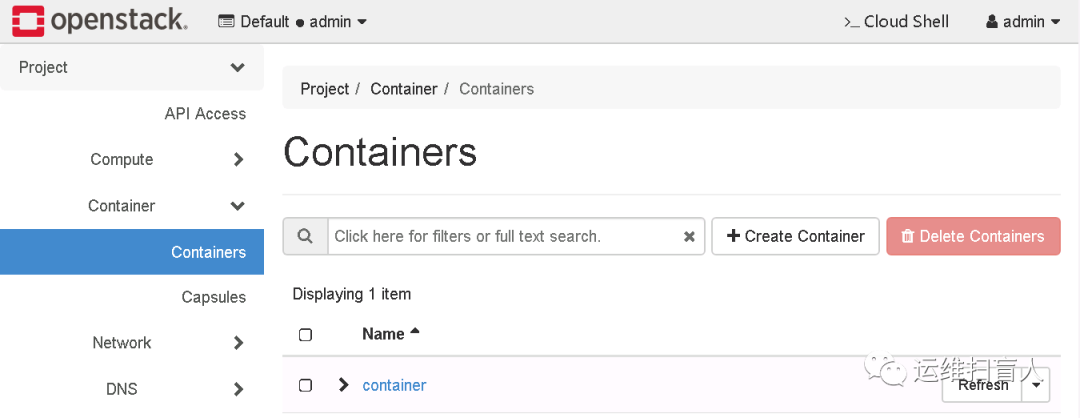
二、验证