为了解决微服务化拆解带来的巨量单体微服务程序导致的应用管理复杂度增加的问题,容器生态圈便诞生了Helm,目前由CNCF社区维护;
Helm将kubernetes的资源(Depolyment、Service、ConfigMap等)打包到一个Charts中,制作完成的Charts将保存到Charts仓库进行存储和分发。
Helm是一个程序包,它包含了运行一个Kubernetes应用所需的镜像、依赖关系和资源定义等等,它类似于yum的rpm;
Helm由Helm客户端、Tiller服务器和Charts仓库组成:
Helm客户端是一个命令行工具,基于gRPC协议与Tiller server交互,实现发送Charts安装以及release的查询或升级卸载;
Tiller server是托管运行于Kuberbetes集群之中的容器化服务应用,监听来自Helm客户端的请求,实现向Kubernetes集群安装Charts、合并Charts和配置以构建一个release、升级卸载Charts;
2.1 安装Helm客户端
[root@k8s-master-01 helm]# wget https://get.helm.sh/helm-v2.17.0-linux-amd64.tar.gz[root@k8s-master-01 helm]# tar -zxvf helm-v2.17.0-linux-amd64.tar.gzlinux-amd64/linux-amd64/README.mdlinux-amd64/LICENSElinux-amd64/helmlinux-amd64/tiller[root@k8s-master-01 helm]# cp linux-amd64/helm usr/local/bin/[root@k8s-master-01 helm]# helm versionClient: &version.Version{SemVer:"v2.17.0", GitCommit:"a690bad98af45b015bd3da1a41f6218b1a451dbe", GitTreeState:"clean"}Error: could not find tiller
2.2 安装Tiller server
[1] 配置RBAC绑定kubernetes集群的管理员角色
[root@k8s-master-01 helm]# kubectl apply -f helm-tiller.yamlserviceaccount/tiller createdclusterrolebinding.rbac.authorization.k8s.io/tiller created
[2] 使用Helm客户端初始化Tiller server
[root@k8s-master-01 helm]# helm init --service-account tillerCreating root/.helmCreating root/.helm/repositoryCreating root/.helm/repository/cacheCreating root/.helm/repository/localCreating root/.helm/pluginsCreating root/.helm/startersCreating root/.helm/cache/archiveCreating root/.helm/repository/repositories.yamlAdding stable repo with URL: https://charts.helm.sh/stableAdding local repo with URL: http://127.0.0.1:8879/charts$HELM_HOME has been configured at root/.helm.Tiller (the Helm server-side component) has been installed into your Kubernetes Cluster.Please note: by default, Tiller is deployed with an insecure 'allow unauthenticated users' policy.To prevent this, run `helm init` with the --tiller-tls-verify flag.For more information on securing your installation see: https://v2.helm.sh/docs/securing_installation/[root@k8s-worker-01 ~]# docker pull ghcr.io/helm/tiller:v2.17.0[root@k8s-master-01 ~]# kubectl get pod -n kube-system -o wideNAME READY STATUS RESTARTS AGE IP NODE NOMINATED NODE READINESS GATEStiller-deploy-7b56c8dfb7-tlrwx 1/1 Running 0 19m 10.244.1.2 k8s-worker-01 <none> <none>[root@k8s-master-01 ~]# helm versionClient: &version.Version{SemVer:"v2.17.0", GitCommit:"a690bad98af45b015bd3da1a41f6218b1a451dbe", GitTreeState:"clean"}Server: &version.Version{SemVer:"v2.17.0", GitCommit:"a690bad98af45b015bd3da1a41f6218b1a451dbe", GitTreeState:"clean"}
[3] 查看Tiller server各kubernetes资源状态
[root@k8s-master-01 ~]# kubectl get deployment tiller-deploy -n kube-system -o wideNAME READY UP-TO-DATE AVAILABLE AGE CONTAINERS IMAGES SELECTORtiller-deploy 1/1 1 1 24m tiller ghcr.io/helm/tiller:v2.17.0 app=helm,name=tiller[root@k8s-master-01 ~]# kubectl get svc tiller-deploy -n kube-system -o wideNAME TYPE CLUSTER-IP EXTERNAL-IP PORT(S) AGE SELECTORtiller-deploy ClusterIP 10.102.87.185 <none> 44134/TCP 24m app=helm,name=tiller[root@k8s-master-01 ~]# kubectl get pod tiller-deploy-7b56c8dfb7-tlrwx -n kube-system -o wideNAME READY STATUS RESTARTS AGE IP NODE NOMINATED NODE READINESS GATEStiller-deploy-7b56c8dfb7-tlrwx 1/1 Running 0 24m 10.244.1.2 k8s-worker-01 <none> <none>
charts是Helm侧程序包,它存储于charts仓库中,kubernetes官方的charts仓库保存了一系列精心制作的charts,默认名称为"stable"。
官方仓库为:https://kubernetes-charts.storage.gooleapis.com
[root@k8s-master-01 ~]# helm repo updateHang tight while we grab the latest from your chart repositories......Skip local chart repository...Successfully got an update from the "stable" chart repositoryUpdate Complete.
[2] 列出stable仓库中的所有charts
[root@k8s-master-01 ~]# helm searchNAME CHART VERSION APP VERSION DESCRIPTIONstable/acs-engine-autoscaler 2.2.2 2.1.1 DEPRECATED Scales worker nodes within agent poolsstable/aerospike 0.3.5 v4.5.0.5 DEPRECATED A Helm chart for Aerospike in Kubernetesstable/airflow 7.13.3 1.10.12 DEPRECATED - please use: https://github.com/airflow-helm/...stable/ambassador 5.3.2 0.86.1 DEPRECATED A Helm chart for Datawire Ambassadorstable/anchore-engine 1.7.0 0.7.3 Anchore container analysis and policy evaluation engine s...stable/apm-server 2.1.7 7.0.0 DEPRECATED The server receives data from the Elastic APM ...stable/ark 4.2.2 0.10.2 DEPRECATED A Helm chart for ark...
[root@k8s-master-01 ~]# helm search redisNAME CHART VERSION APP VERSION DESCRIPTIONstable/prometheus-redis-exporter 3.5.1 1.3.4 DEPRECATED Prometheus exporter for Redis metricsstable/redis 10.5.7 5.0.7 DEPRECATED Open source, advanced key-value store. It is o...stable/redis-ha 4.4.6 5.0.6 DEPRECATED - Highly available Kubernetes implementation o...stable/sensu 0.2.5 0.28 DEPRECATED Sensu monitoring framework backed by the Redis......
[root@k8s-master-01 ~]# helm inspect stable/redis | lessapiVersion: v1appVersion: 5.0.7deprecated: truedescription: DEPRECATED Open source, advanced key-value store. It is often referredto as a data structure server since keys can contain strings, hashes, lists, setsand sorted sets.engine: gotplhome: http://redis.io/icon: https://bitnami.com/assets/stacks/redis/img/redis-stack-220x234.pngkeywords:- redis- keyvalue- databasename: redissources:- https://github.com/bitnami/bitnami-docker-redisversion: 10.5.7
[root@k8s-master-01 ~]# helm install stable/redis -n redis --dry-runWARNING: This chart is deprecatedNAME: redis[root@k8s-master-01 ~]# helm install stable/redis -n redisWARNING: This chart is deprecatedNAME: redisLAST DEPLOYED: Mon Nov 30 13:29:57 2020NAMESPACE: defaultSTATUS: DEPLOYEDRESOURCES:==> v1/ConfigMapNAME DATA AGEredis 3 0sredis-health 6 0s==> v1/Pod(related)NAME READY STATUS RESTARTS AGEredis-master-0 0/1 Pending 0 0sredis-slave-0 0/1 Pending 0 0s==> v1/SecretNAME TYPE DATA AGEredis Opaque 1 0s==> v1/ServiceNAME TYPE CLUSTER-IP EXTERNAL-IP PORT(S) AGEredis-headless ClusterIP None <none> 6379/TCP 0sredis-master ClusterIP 10.101.249.145 <none> 6379/TCP 0sredis-slave ClusterIP 10.106.36.109 <none> 6379/TCP 0s==> v1/StatefulSetNAME READY AGEredis-master 0/1 0sredis-slave 0/2 0sNOTES:This Helm chart is deprecatedGiven the `stable` deprecation timeline (https://github.com/helm/charts#deprecation-timeline), the Bitnami maintained Redis Helm chart is now located at bitnami/charts (https://github.com/bitnami/charts/).The Bitnami repository is already included in the Hubs and we will continue providing the same cadence of updates, support, etc that we've been keeping here these years. Installation instructions are very similar, just adding the _bitnami_ repo and using it during the installation (`bitnami/<chart>` instead of `stable/<chart>`)```bash$ helm repo add bitnami https://charts.bitnami.com/bitnami$ helm install my-release bitnami/<chart> # Helm 3$ helm install --name my-release bitnami/<chart> # Helm 2```To update an exisiting _stable_ deployment with a chart hosted in the bitnami repository you can execute```bash $ helmrepo add bitnami https://charts.bitnami.com/bitnami$ helm upgrade my-release bitnami/<chart>```Issues and PRs related to the chart itself will be redirected to `bitnami/charts` GitHub repository. In the same way, we'll be happy to answer questions related to this migration process in this issue (https://github.com/helm/charts/issues/20969) created as a common place for discussion.** Please be patient while the chart is being deployed **Redis can be accessed via port 6379 on the following DNS names from within your cluster:redis-master.default.svc.cluster.local for read/write operationsredis-slave.default.svc.cluster.local for read-only operationsTo get your password run:export REDIS_PASSWORD=$(kubectl get secret --namespace default redis -o jsonpath="{.data.redis-password}" | base64 --decode)To connect to your Redis server:1. Run a Redis pod that you can use as a client:kubectl run --namespace default redis-client --rm --tty -i --restart='Never' \--env REDIS_PASSWORD=$REDIS_PASSWORD \--image docker.io/bitnami/redis:5.0.7-debian-10-r32 -- bash2. Connect using the Redis CLI:redis-cli -h redis-master -a $REDIS_PASSWORDredis-cli -h redis-slave -a $REDIS_PASSWORDTo connect to your database from outside the cluster execute the following commands:kubectl port-forward --namespace default svc/redis-master 6379:6379 &redis-cli -h 127.0.0.1 -p 6379 -a $REDIS_PASSWORD
[root@k8s-master-01 ~]# helm listNAME REVISION UPDATED STATUS CHART APP VERSION NAMESPACEredis 1 Mon Nov 30 13:29:57 2020 DEPLOYED redis-10.5.7 5.0.7 default
[root@k8s-master-01 ~]# kubectl get pod -o wideNAME READY STATUS RESTARTS AGE IP NODE NOMINATED NODE READINESS GATESredis-master-0 0/1 Pending 0 3m52s <none> <none> <none> <none>redis-slave-0 0/1 Pending 0 3m52s <none> <none> <none> <none>[root@k8s-master-01 ~]# kubectl get svc -o wideNAME TYPE CLUSTER-IP EXTERNAL-IP PORT(S) AGE SELECTORredis-headless ClusterIP None <none> 6379/TCP 3m58s app=redis,release=redisredis-master ClusterIP 10.101.249.145 <none> 6379/TCP 3m58s app=redis,release=redis,role=masterredis-slave ClusterIP 10.106.36.109 <none> 6379/TCP 3m58s app=redis,release=redis,role=slave[root@k8s-master-01 ~]# kubectl get configmap -o wideNAME DATA AGEredis 3 4m2sredis-health 6 4m2s[root@k8s-master-01 ~]# kubectl get pv -o wideNo resources found[root@k8s-master-01 ~]# kubectl get pvc -o wideNAME STATUS VOLUME CAPACITY ACCESS MODES STORAGECLASS AGE VOLUMEMODEredis-data-redis-master-0 Pending 4m11s Filesystemredis-data-redis-slave-0 Pending 4m11s Filesystem
[root@k8s-master-01 ~]# helm delete redisrelease "redis" deleted
4、自定义Helm Charts
charts是Helm使用kubernetes程序包打包格式,一个charts就是一个描述一组kubernets资源的文件集合;
charts是一个遵循特定规范的目录结构:
Chart.yaml:YAML 文件,描述 chart 的概要信息。
README.md:Markdown 格式的 README 文件,相当于 chart 的使用文档,此文件为可选。
LICENSE:文本文件,描述 chart 的许可信息,此文件为可选。
requirements.yaml :chart 可能依赖其他的 chart,这些依赖关系可通过 requirements.yaml 指定。
values.yaml:chart 支持在安装的时根据参数进行定制化配置,而 values.yaml 则提供了这些配置参数的默认值。
templates目录:各类 Kubernetes 资源的配置模板都放置在这里。Helm 会将 values.yaml 中的参数值注入到模板中生成标准的 YAML 配置文件。
templates/NOTES.txt:chart 的简易使用文档,chart 安装成功后会显示此文档内容。与模板一样,可以在 NOTE.txt 中插入配置参数,Helm 会动态注入参数值。
[root@k8s-master-01 helm]# helm create mychartCreating mychart[root@k8s-master-01 helm]# tree mychart/mychart/├── charts├── Chart.yaml├── templates│ ├── deployment.yaml│ ├── _helpers.tpl│ ├── ingress.yaml│ ├── NOTES.txt│ ├── serviceaccount.yaml│ ├── service.yaml│ └── tests│ └── test-connection.yaml└── values.yaml
[root@k8s-master-01 helm]# cat mychart/values.yamlreplicaCount: 1image:repository: ikubernetes/myapptag: v1pullPolicy: IfNotPresentimagePullSecrets: []nameOverride: ""fullnameOverride: ""serviceAccount:create: truename: ""podSecurityContext: {}securityContext: {}service:type: ClusterIPport: 80ingress:enabled: falseannotations: {}hosts:- host: chart-example.localpaths: []tls: []resources:limits:cpu: 100mmemory: 128Mirequests:cpu: 100mmemory: 128MinodeSelector: {}tolerations: []affinity: {}
[3] 检查修改后的charts是否遵循最佳实践且模板格式良好
[root@k8s-master-01 helm]# helm lint mychart==> Linting mychart[INFO] Chart.yaml: icon is recommended1 chart(s) linted, no failures
[root@k8s-master-01 helm]# helm install --name myapp --dry-run --debug ./mychart --set service.type=NodePort[debug] Created tunnel using local port: '46697'[debug] SERVER: "127.0.0.1:46697"[debug] Original chart version: ""[debug] CHART PATH: root/kubernetes-config/helm/mychartNAME: myappREVISION: 1RELEASED: Mon Nov 30 15:00:40 2020CHART: mychart-0.1.0USER-SUPPLIED VALUES:service:type: NodePortCOMPUTED VALUES:affinity: {}fullnameOverride: ""image:pullPolicy: IfNotPresentrepository: ikubernetes/myapptag: v1imagePullSecrets: []ingress:annotations: {}enabled: falsehosts:- host: chart-example.localpaths: []tls: []nameOverride: ""nodeSelector: {}podSecurityContext: {}replicaCount: 1resources:limits:cpu: 100mmemory: 128Mirequests:cpu: 100mmemory: 128MisecurityContext: {}service:port: 80type: NodePortserviceAccount:create: truename: ""tolerations: []HOOKS:---# myapp-mychart-test-connectionapiVersion: v1kind: Podmetadata:name: "myapp-mychart-test-connection"labels:app.kubernetes.io/name: mycharthelm.sh/chart: mychart-0.1.0app.kubernetes.io/instance: myappapp.kubernetes.io/version: "1.0"app.kubernetes.io/managed-by: Tillerannotations:"helm.sh/hook": test-successspec:containers:- name: wgetimage: busyboxcommand: ['wget']args: ['myapp-mychart:80']restartPolicy: NeverMANIFEST:---# Source: mychart/templates/serviceaccount.yamlapiVersion: v1kind: ServiceAccountmetadata:name: myapp-mychartlabels:app.kubernetes.io/name: mycharthelm.sh/chart: mychart-0.1.0app.kubernetes.io/instance: myappapp.kubernetes.io/version: "1.0"app.kubernetes.io/managed-by: Tiller---# Source: mychart/templates/service.yamlapiVersion: v1kind: Servicemetadata:name: myapp-mychartlabels:app.kubernetes.io/name: mycharthelm.sh/chart: mychart-0.1.0app.kubernetes.io/instance: myappapp.kubernetes.io/version: "1.0"app.kubernetes.io/managed-by: Tillerspec:type: NodePortports:- port: 80targetPort: httpprotocol: TCPname: httpselector:app.kubernetes.io/name: mychartapp.kubernetes.io/instance: myapp---# Source: mychart/templates/deployment.yamlapiVersion: apps/v1kind: Deploymentmetadata:name: myapp-mychartlabels:app.kubernetes.io/name: mycharthelm.sh/chart: mychart-0.1.0app.kubernetes.io/instance: myappapp.kubernetes.io/version: "1.0"app.kubernetes.io/managed-by: Tillerspec:replicas: 1selector:matchLabels:app.kubernetes.io/name: mychartapp.kubernetes.io/instance: myapptemplate:metadata:labels:app.kubernetes.io/name: mychartapp.kubernetes.io/instance: myappspec:serviceAccountName: myapp-mychartsecurityContext:{}containers:- name: mychartsecurityContext:{}image: "ikubernetes/myapp:v1"imagePullPolicy: IfNotPresentports:- name: httpcontainerPort: 80protocol: TCPlivenessProbe:httpGet:path:port: httpreadinessProbe:httpGet:path:port: httpresources:limits:cpu: 100mmemory: 128Mirequests:cpu: 100mmemory: 128Mi
[root@k8s-master-01 helm]# helm install --name myapp --debug ./mychart --set service.type=NodePort[debug] Created tunnel using local port: '40040'[debug] SERVER: "127.0.0.1:40040"[debug] Original chart version: ""[debug] CHART PATH: root/kubernetes-config/helm/mychartNAME: myappREVISION: 1RELEASED: Mon Nov 30 15:08:55 2020CHART: mychart-0.1.0USER-SUPPLIED VALUES:service:type: NodePortCOMPUTED VALUES:affinity: {}fullnameOverride: ""image:pullPolicy: IfNotPresentrepository: ikubernetes/myapptag: v1imagePullSecrets: []ingress:annotations: {}enabled: falsehosts:- host: chart-example.localpaths: []tls: []nameOverride: ""nodeSelector: {}podSecurityContext: {}replicaCount: 1resources:limits:cpu: 100mmemory: 128Mirequests:cpu: 100mmemory: 128MisecurityContext: {}service:port: 80type: NodePortserviceAccount:create: truename: ""tolerations: []HOOKS:---# myapp-mychart-test-connectionapiVersion: v1kind: Podmetadata:name: "myapp-mychart-test-connection"labels:app.kubernetes.io/name: mycharthelm.sh/chart: mychart-0.1.0app.kubernetes.io/instance: myappapp.kubernetes.io/version: "1.0"app.kubernetes.io/managed-by: Tillerannotations:"helm.sh/hook": test-successspec:containers:- name: wgetimage: busyboxcommand: ['wget']args: ['myapp-mychart:80']restartPolicy: NeverMANIFEST:---# Source: mychart/templates/serviceaccount.yamlapiVersion: v1kind: ServiceAccountmetadata:name: myapp-mychartlabels:app.kubernetes.io/name: mycharthelm.sh/chart: mychart-0.1.0app.kubernetes.io/instance: myappapp.kubernetes.io/version: "1.0"app.kubernetes.io/managed-by: Tiller---# Source: mychart/templates/service.yamlapiVersion: v1kind: Servicemetadata:name: myapp-mychartlabels:app.kubernetes.io/name: mycharthelm.sh/chart: mychart-0.1.0app.kubernetes.io/instance: myappapp.kubernetes.io/version: "1.0"app.kubernetes.io/managed-by: Tillerspec:type: NodePortports:- port: 80targetPort: httpprotocol: TCPname: httpselector:app.kubernetes.io/name: mychartapp.kubernetes.io/instance: myapp---# Source: mychart/templates/deployment.yamlapiVersion: apps/v1kind: Deploymentmetadata:name: myapp-mychartlabels:app.kubernetes.io/name: mycharthelm.sh/chart: mychart-0.1.0app.kubernetes.io/instance: myappapp.kubernetes.io/version: "1.0"app.kubernetes.io/managed-by: Tillerspec:replicas: 1selector:matchLabels:app.kubernetes.io/name: mychartapp.kubernetes.io/instance: myapptemplate:metadata:labels:app.kubernetes.io/name: mychartapp.kubernetes.io/instance: myappspec:serviceAccountName: myapp-mychartsecurityContext:{}containers:- name: mychartsecurityContext:{}image: "ikubernetes/myapp:v1"imagePullPolicy: IfNotPresentports:- name: httpcontainerPort: 80protocol: TCPlivenessProbe:httpGet:path:port: httpreadinessProbe:httpGet:path:port: httpresources:limits:cpu: 100mmemory: 128Mirequests:cpu: 100mmemory: 128MiLAST DEPLOYED: Mon Nov 30 15:08:55 2020NAMESPACE: defaultSTATUS: DEPLOYEDRESOURCES:==> v1/DeploymentNAME READY UP-TO-DATE AVAILABLE AGEmyapp-mychart 0/1 1 0 1s==> v1/Pod(related)NAME READY STATUS RESTARTS AGEmyapp-mychart-8bd7dff7f-gbxzj 0/1 ContainerCreating 0 1s==> v1/ServiceNAME TYPE CLUSTER-IP EXTERNAL-IP PORT(S) AGEmyapp-mychart NodePort 10.105.22.94 <none> 80:31543/TCP 1s==> v1/ServiceAccountNAME SECRETS AGEmyapp-mychart 1 1sNOTES:1. Get the application URL by running these commands:export NODE_PORT=$(kubectl get --namespace default -o jsonpath="{.spec.ports[0].nodePort}" services myapp-mychart)export NODE_IP=$(kubectl get nodes --namespace default -o jsonpath="{.items[0].status.addresses[0].address}")echo http://$NODE_IP:$NODE_PORT
[root@k8s-master-01 helm]# export NODE_PORT=$(kubectl get --namespace default -o jsonpath="{.spec.ports[0].nodePort}" services myapp-mychart)[root@k8s-master-01 helm]# export NODE_IP=$(kubectl get nodes --namespace default -o jsonpath="{.items[0].status.addresses[0].address}")[root@k8s-master-01 helm]# echo http://$NODE_IP:$NODE_PORThttp://172.17.61.220:31543

[root@k8s-master-01 helm]# helm package ./mychartSuccessfully packaged chart and saved it to: /root/kubernetes-config/helm/mychart-0.1.0.tgz[root@k8s-master-01 helm]# ll mychart-0.1.0.tgz-rw-r----- 1 root root 2824 Nov 30 15:13 mychart-0.1.0.tgz[root@k8s-master-01 helm]# helm install --name myapp2 mychart-0.1.0.tgz --set service.type=NodePortNAME: myapp2LAST DEPLOYED: Mon Nov 30 15:32:38 2020NAMESPACE: defaultSTATUS: DEPLOYEDRESOURCES:==> v1/DeploymentNAME READY UP-TO-DATE AVAILABLE AGEmyapp2-mychart 0/1 1 0 0s==> v1/Pod(related)NAME READY STATUS RESTARTS AGEmyapp2-mychart-78f498b86f-crvx7 0/1 ContainerCreating 0 0s==> v1/ServiceNAME TYPE CLUSTER-IP EXTERNAL-IP PORT(S) AGEmyapp2-mychart NodePort 10.104.92.185 <none> 80:32563/TCP 0s==> v1/ServiceAccountNAME SECRETS AGEmyapp2-mychart 1 0sNOTES:1. Get the application URL by running these commands:export NODE_PORT=$(kubectl get --namespace default -o jsonpath="{.spec.ports[0].nodePort}" services myapp2-mychart)export NODE_IP=$(kubectl get nodes --namespace default -o jsonpath="{.items[0].status.addresses[0].address}")echo http://$NODE_IP:$NODE_PORT
[root@k8s-master-01 helm]# helm serveRegenerating index. This may take a moment.Now serving you on 127.0.0.1:8879[root@k8s-master-01 ~]# helm search localNAME CHART VERSION APP VERSION DESCRIPTIONlocal/mychart 0.1.0 1.0 A Helm chart for Kubernetes
[8] 添加网络仓库
[root@k8s-master-01 helm]# helm repo add incubator https://charts.helm.sh/incubator#或者:[root@k8s-master-01 helm]# helm repo add incubator http://storage.googleapis.com/kubernetes-charts-incubator"incubator" has been added to your repositories[root@k8s-master-01 helm]# helm repo updateHang tight while we grab the latest from your chart repositories......Skip local chart repository...Successfully got an update from the "incubator" chart repository...Successfully got an update from the "stable" chart repositoryUpdate Complete.[root@k8s-master-01 helm]# helm repo listNAME URLstable https://charts.helm.sh/stablelocal http://127.0.0.1:8879/chartsincubator http://storage.googleapis.com/kubernetes-charts-incubator
5.1 安装Elasticsearch
elastic search集群由三类节点组成:客户端节点、master节点和data节点;
客户端节点:也称上载节点,负责由一个或者多个摄取处理器组成的预处理流水线,一般为2个;
master节点:负责轻量级集群范围的相关操作,如创建或删除索引等等,master节点数量=(客户端节点副本数/2)+1,但是至少因该为3;
data节点:负责保存包含编入索引的文档的分片。
5.1.1 使用stable/elasticsearch安装(推荐)
[root@k8s-master-01 helm]# helm fetch stable/nfs-client-provisioner[root@k8s-master-01 helm]# helm install --name nfs-client --set nfs.server=172.17.61.200,nfs.path=/data/pv-nfs stable/nfs-client-provisione
[root@k8s-master-01 helm]# helm fetch stable/elasticsearch[root@k8s-master-01 helm]# helm install --name elasticsearch1 --set image.tag=6.7.0,client.replicas=3,cluster.name=kubernetes,data.persistence.storageClass=nfs-client,master.persistence.storageClass=nfs-client stable/elasticsearch
[3] 查看charts 安装情况
[root@k8s-master-01 ~]# helm listNAME REVISION UPDATED STATUS CHART APP VERSION NAMESPACEelasticsearch1 1 Tue Dec 1 19:29:43 2020 DEPLOYED elasticsearch-1.32.5 6.8.6 defaultnfs-client 1 Tue Dec 1 19:28:17 2020 DEPLOYED nfs-client-provisioner-1.2.11 3.1.0 default
[4]查看kubernetes资源情况
[root@k8s-master-01 helm]# kubectl get statefulsetNAME READY AGEelasticsearch1-data 2/2 107melasticsearch1-master 3/3 107m[root@k8s-master-01 helm]# kubectl get deploymentNAME READY UP-TO-DATE AVAILABLE AGEelasticsearch1-client 3/3 3 3 107mnfs-client-nfs-client-provisioner 1/1 1 1 108m[root@k8s-master-01 helm]# kubectl get podNAME READY STATUS RESTARTS AGEelasticsearch1-client-d8bf5db8c-9jq9l 1/1 Running 1 100melasticsearch1-client-d8bf5db8c-nq2km 1/1 Running 1 100melasticsearch1-client-d8bf5db8c-pwnzd 1/1 Running 1 100melasticsearch1-data-0 1/1 Running 1 97melasticsearch1-data-1 1/1 Running 0 96melasticsearch1-master-0 1/1 Running 1 97melasticsearch1-master-1 1/1 Running 0 95melasticsearch1-master-2 1/1 Running 0 87mnfs-client-nfs-client-provisioner-786566d6c4-kz86z 1/1 Running 0 92m[root@k8s-master-01 helm]# kubectl get svcNAME TYPE CLUSTER-IP EXTERNAL-IP PORT(S) AGEelasticsearch1-client ClusterIP 10.97.244.22 <none> 9200/TCP 107melasticsearch1-discovery ClusterIP None <none> 9300/TCP 107m[root@k8s-master-01 helm]# kubectl get pvNAME CAPACITY ACCESS MODES RECLAIM POLICY STATUS CLAIM STORAGECLASS REASON AGEpvc-3c57206a-fca5-4cc3-995f-0fca3efdfbef 30Gi RWO Delete Bound default/data-elasticsearch1-data-0 nfs-client 107mpvc-67d5fe50-a412-4b75-bc42-5b62de5c1e6a 4Gi RWO Delete Bound default/data-elasticsearch1-master-2 nfs-client 87mpvc-67e407c0-56b2-46bb-82f2-e70ef0a14f89 4Gi RWO Delete Bound default/data-elasticsearch1-master-0 nfs-client 107mpvc-850e6a0b-7849-4762-af87-b257aad510db 4Gi RWO Delete Bound default/data-elasticsearch1-master-1 nfs-client 92mpvc-8bd818e1-0d3e-45b0-91aa-0ff157250321 30Gi RWO Delete Bound default/data-elasticsearch1-data-1 nfs-client 92m[root@k8s-master-01 helm]# kubectl get pvcNAME STATUS VOLUME CAPACITY ACCESS MODES STORAGECLASS AGEdata-elasticsearch1-data-0 Bound pvc-3c57206a-fca5-4cc3-995f-0fca3efdfbef 30Gi RWO nfs-client 107mdata-elasticsearch1-data-1 Bound pvc-8bd818e1-0d3e-45b0-91aa-0ff157250321 30Gi RWO nfs-client 96mdata-elasticsearch1-master-0 Bound pvc-67e407c0-56b2-46bb-82f2-e70ef0a14f89 4Gi RWO nfs-client 107mdata-elasticsearch1-master-1 Bound pvc-850e6a0b-7849-4762-af87-b257aad510db 4Gi RWO nfs-client 96mdata-elasticsearch1-master-2 Bound pvc-67d5fe50-a412-4b75-bc42-5b62de5c1e6a 4Gi RWO nfs-client 87m
[5] 客户端测试
[root@k8s-master-01 helm]# kubectl run cirrors-$RANDOM --rm -it --image=cirros -- shIf you don't see a command prompt, try pressing enter./ # curl http://10.97.244.22:9200{"name" : "elasticsearch1-client-d8bf5db8c-9jq9l","cluster_name" : "kubernetes","cluster_uuid" : "VUo3B5ptSeed6KF7G9rfvA","version" : {"number" : "6.7.0","build_flavor" : "oss","build_type" : "docker","build_hash" : "8453f77","build_date" : "2019-03-21T15:32:29.844721Z","build_snapshot" : false,"lucene_version" : "7.7.0","minimum_wire_compatibility_version" : "5.6.0","minimum_index_compatibility_version" : "5.0.0"},"tagline" : "You Know, for Search"}/ # curl http://elasticsearch1-client.default.svc.cluster.local:9200{"name" : "elasticsearch1-client-d8bf5db8c-nq2km","cluster_name" : "kubernetes","cluster_uuid" : "VUo3B5ptSeed6KF7G9rfvA","version" : {"number" : "6.7.0","build_flavor" : "oss","build_type" : "docker","build_hash" : "8453f77","build_date" : "2019-03-21T15:32:29.844721Z","build_snapshot" : false,"lucene_version" : "7.7.0","minimum_wire_compatibility_version" : "5.6.0","minimum_index_compatibility_version" : "5.0.0"},"tagline" : "You Know, for Search"}
5.1.2 使用stable/elasticsearch安装(自建nfs-provisioner)
https://github.com/helm/charts/tree/master/incubator/elasticsearch
[root@k8s-master-01 helm]# kubectl create namespace logsnamespace/logs created
[2] 下载charts压缩包
[root@k8s-master-01 helm]# helm fetch incubator/elasticsearch[root@k8s-master-01 helm]# ll elasticsearch-1.10.2.tgz-rw-r----- 1 root root 11004 Dec 1 21:27 elasticsearch-1.10.2.tgz
[3] 安装incubator/elasticsearch charts
[root@k8s-master-01 helm]# helm install stable/elasticsearch --set image.tag=6.7.0,client.replicas=3,cluster.name=els,data.persistence.storageClass=ssd,master.persistence.storageClass=ssd
[4] 查看kubernetes资源对象
[root@k8s-master-01 helm]# helm listNAME REVISION UPDATED STATUS CHART APP VERSION NAMESPACEgiddy-mink 1 Wed Dec 2 07:56:35 2020 DEPLOYED elasticsearch-1.32.5 6.8.6 default[root@k8s-master-01 helm]# kubectl get pod -o wideNAME READY STATUS RESTARTS AGE IP NODE NOMINATED NODE READINESS GATESgiddy-mink-elasticsearch-client-7cc48ff69f-4zcvk 1/1 Running 0 9m1s 10.244.3.123 k8s-worker-02 <none> <none>giddy-mink-elasticsearch-client-7cc48ff69f-5hxbd 1/1 Running 0 9m1s 10.244.3.124 k8s-worker-02 <none> <none>giddy-mink-elasticsearch-client-7cc48ff69f-vv8bn 1/1 Running 0 9m1s 10.244.1.61 k8s-worker-01 <none> <none>giddy-mink-elasticsearch-data-0 1/1 Running 0 9m1s 10.244.3.128 k8s-worker-02 <none> <none>giddy-mink-elasticsearch-data-1 1/1 Running 0 4m39s 10.244.1.64 k8s-worker-01 <none> <none>giddy-mink-elasticsearch-master-0 1/1 Running 0 9m1s 10.244.3.127 k8s-worker-02 <none> <none>giddy-mink-elasticsearch-master-1 1/1 Running 0 4m42s 10.244.1.63 k8s-worker-01 <none> <none>giddy-mink-elasticsearch-master-2 1/1 Running 0 3m50s 10.244.3.129 k8s-worker-02 <none> <none>[root@k8s-master-01 helm]# kubectl get deploymentNAME READY UP-TO-DATE AVAILABLE AGEgiddy-mink-elasticsearch-client 3/3 3 3 9m7s[root@k8s-master-01 helm]# kubectl get statefulset -o wideNAME READY AGE CONTAINERS IMAGESgiddy-mink-elasticsearch-data 2/2 13m elasticsearch docker.elastic.co/elasticsearch/elasticsearch-oss:6.7.0giddy-mink-elasticsearch-master 3/3 13m elasticsearch docker.elastic.co/elasticsearch/elasticsearch-oss:6.7.0[root@k8s-master-01 helm]# kubectl get pvNAME CAPACITY ACCESS MODES RECLAIM POLICY STATUS CLAIM STORAGECLASS REASON AGEpvc-167fc413-0257-4010-ae2c-1e0dff74973d 4Gi RWO Delete Bound default/data-giddy-mink-elasticsearch-master-0 ssd 6m23spvc-625d0894-e9ae-4f9d-821f-dd3bf20b2e81 4Gi RWO Delete Bound default/data-giddy-mink-elasticsearch-master-2 ssd 4m6spvc-6277c13c-da09-4d3d-a36e-2077e6ff972c 30Gi RWO Delete Bound default/data-giddy-mink-elasticsearch-data-1 ssd 4m55spvc-9ebb701a-6e24-4f66-b625-25c9a58203d3 30Gi RWO Delete Bound default/data-giddy-mink-elasticsearch-data-0 ssd 6m24spvc-ffc267f6-797a-484b-8f61-6912e0eab6f9 4Gi RWO Delete Bound default/data-giddy-mink-elasticsearch-master-1 ssd 4m58s[root@k8s-master-01 helm]# kubectl get pvcNAME STATUS VOLUME CAPACITY ACCESS MODES STORAGECLASS AGEdata-giddy-mink-elasticsearch-data-0 Bound pvc-9ebb701a-6e24-4f66-b625-25c9a58203d3 30Gi RWO ssd 9m20sdata-giddy-mink-elasticsearch-data-1 Bound pvc-6277c13c-da09-4d3d-a36e-2077e6ff972c 30Gi RWO ssd 4m58sdata-giddy-mink-elasticsearch-master-0 Bound pvc-167fc413-0257-4010-ae2c-1e0dff74973d 4Gi RWO ssd 9m20sdata-giddy-mink-elasticsearch-master-1 Bound pvc-ffc267f6-797a-484b-8f61-6912e0eab6f9 4Gi RWO ssd 5m1sdata-giddy-mink-elasticsearch-master-2 Bound pvc-625d0894-e9ae-4f9d-821f-dd3bf20b2e81 4Gi RWO ssd 4m9s[root@k8s-master-01 helm]# kubectl get svcNAME TYPE CLUSTER-IP EXTERNAL-IP PORT(S) AGEgiddy-mink-elasticsearch-client ClusterIP 10.101.8.214 <none> 9200/TCP 9m27sgiddy-mink-elasticsearch-discovery ClusterIP None <none> 9300/TCP 9m27s
[5] 客户端测试
[root@k8s-master-01 helm]# kubectl run cirrors-$RANDOM --rm -it --image=cirros -- shIf you don't see a command prompt, try pressing enter./ # curl http://giddy-mink-elasticsearch-client.default.svc.cluster.local:9200{"name" : "giddy-mink-elasticsearch-client-7cc48ff69f-4zcvk","cluster_name" : "els","cluster_uuid" : "TtMeBOYBTpSAHVBvF3CbyQ","version" : {"number" : "6.7.0","build_flavor" : "oss","build_type" : "docker","build_hash" : "8453f77","build_date" : "2019-03-21T15:32:29.844721Z","build_snapshot" : false,"lucene_version" : "7.7.0","minimum_wire_compatibility_version" : "5.6.0","minimum_index_compatibility_version" : "5.0.0"},"tagline" : "You Know, for Search"}
[6] nfs-provisioner
[root@k8s-master-01 helm]# kubectl get storageclassNAME PROVISIONER RECLAIMPOLICY VOLUMEBINDINGMODE ALLOWVOLUMEEXPANSION AGEnfs-client cluster.local/nfs-client-nfs-client-provisioner Delete Immediate true 12hssd fuseim.pri/ifs Delete Immediate true 12h
[root@k8s-master-01 helm]# cat nfs-client-provisioner-class.yamlapiVersion: storage.k8s.io/v1kind: StorageClassmetadata:name: ssdallowVolumeExpansion: trueprovisioner: fuseim.pri/ifs # or choose another name, must match deployment's env PROVISIONER_NAME'[root@k8s-master-01 helm]# cat nfs-client-provisioner-deployment.yamlkind: DeploymentapiVersion: apps/v1metadata:name: nfs-client-provisionerspec:replicas: 2strategy:type: Recreateselector:matchLabels:app: nfs-client-provisionertemplate:metadata:labels:app: nfs-client-provisionerspec:serviceAccountName: nfs-client-provisionercontainers:- name: nfs-client-provisionerimagePullPolicy: IfNotPresentimage: quay.io/external_storage/nfs-client-provisioner:latestvolumeMounts:- name: nfs-client-rootmountPath: /persistentvolumesenv:- name: PROVISIONER_NAMEvalue: fuseim.pri/ifs- name: NFS_SERVERvalue: k8s-nfs- name: NFS_PATHvalue: /data/nfs-privisionervolumes:- name: nfs-client-rootnfs:server: k8s-nfspath: /data/nfs-privisioner[root@k8s-master-01 helm]# cat nfs-client-provisioner-servicecount.yamlapiVersion: v1kind: ServiceAccountmetadata:name: nfs-client-provisioner# replace with namespace where provisioner is deployed---kind: ClusterRoleapiVersion: rbac.authorization.k8s.io/v1metadata:name: nfs-client-provisioner-runnerrules:- apiGroups: [""]resources: ["persistentvolumes"]verbs: ["get", "list", "watch", "create", "delete"]- apiGroups: [""]resources: ["persistentvolumeclaims"]verbs: ["get", "list", "watch", "update"]- apiGroups: ["storage.k8s.io"]resources: ["storageclasses"]verbs: ["get", "list", "watch"]- apiGroups: [""]resources: ["events"]verbs: ["create", "update", "patch"]---kind: ClusterRoleBindingapiVersion: rbac.authorization.k8s.io/v1metadata:name: run-nfs-client-provisionersubjects:- kind: ServiceAccountname: nfs-client-provisioner# replace with namespace where provisioner is deployedroleRef:kind: ClusterRolename: nfs-client-provisioner-runnerapiGroup: rbac.authorization.k8s.io---kind: RoleapiVersion: rbac.authorization.k8s.io/v1metadata:name: leader-locking-nfs-client-provisioner# replace with namespace where provisioner is deployedrules:- apiGroups: [""]resources: ["endpoints"]verbs: ["get", "list", "watch", "create", "update", "patch"]---kind: RoleBindingapiVersion: rbac.authorization.k8s.io/v1metadata:name: leader-locking-nfs-client-provisioner# replace with namespace where provisioner is deployedsubjects:- kind: ServiceAccountname: nfs-client-provisioner# replace with namespace where provisioner is deployednamespace: statefulsetroleRef:kind: Rolename: leader-locking-nfs-client-provisionerapiGroup: rbac.authorization.k8s.io
5.2 安装Fluentd
[root@k8s-worker-01 ~]# docker pull registry.cn-qingdao.aliyuncs.com/k8s-elasticsearch/fluentd-elasticsearch:v2.4.0[root@k8s-worker-01 ~]# docker image tag registry.cn-qingdao.aliyuncs.com/k8s-elasticsearch/fluentd-elasticsearch:v2.4.0 gcr.io/google-containers/fluentd-elasticsearch:v2.3.2[root@k8s-worker-02 ~]# docker pull registry.cn-qingdao.aliyuncs.com/k8s-elasticsearch/fluentd-elasticsearch:v2.4.0[root@k8s-worker-02 ~]# docker image tag registry.cn-qingdao.aliyuncs.com/k8s-elasticsearch/fluentd-elasticsearch:v2.4.0 gcr.io/google-containers/fluentd-elasticsearch:v2.3.2
[root@k8s-master-01 helm]# helm install --name fluentd incubator/fluentd-elasticsearch --set elasticsearch.host="elasticsearch1-client.default.svc.cluster.local"[root@k8s-master-01 helm]# kubectl --namespace=default get pods -l "app.kubernetes.io/name=fluentd-elasticsearch,app.kubernetes.io/instance=fluentd"NAME READY STATUS RESTARTS AGEfluentd-fluentd-elasticsearch-7s2pp 1/1 Running 0 20mfluentd-fluentd-elasticsearch-kn74r 1/1 Running 0 20m[root@k8s-master-01 kibana]# kubectl get daemonsetNAME DESIRED CURRENT READY UP-TO-DATE AVAILABLE NODE SELECTOR AGEfluentd-fluentd-elasticsearch 2 2 2 2 2 <none> 109m
[3] 使用客户端测试
[root@k8s-master-01 helm]# kubectl run cirrors-$RANDOM --rm -it --image=cirros -- sh/ # curl http://elasticsearch1-client.default.svc.cluster.local:9200/_cat/indicesyellow open logstash-2020.12.01 GjDubJlsRhWHJoR6scD62g 5 1 5522 0 2.3mb 2.3mb
5.3 安装Kibana
[root@k8s-worker-01 ~]# docker pull registry.cn-qingdao.aliyuncs.com/dlchenmr/kibana-oss:6.6.1[root@k8s-worker-01 ~]# docker image tag registry.cn-qingdao.aliyuncs.com/dlchenmr/kibana-oss:6.6.1 docker.elastic.co/kibana/kibana-oss:6.7.0[root@k8s-worker-02 ~]# docker pull registry.cn-qingdao.aliyuncs.com/dlchenmr/kibana-oss:6.6.1[root@k8s-worker-02 ~]# docker image tag registry.cn-qingdao.aliyuncs.com/dlchenmr/kibana-oss:6.6.1 docker.elastic.co/kibana/kibana-oss:6.7.0
[root@k8s-master-01 helm]# helm fetch stable/kibana
[root@k8s-master-01 kibana]# cat values.yaml | egrep -v '^#|^[[:space:]]*#|^$'image:repository: "docker.elastic.co/kibana/kibana-oss"tag: "6.7.0"pullPolicy: "IfNotPresent"testFramework:enabled: "true"image: "dduportal/bats"tag: "0.4.0"commandline:args: []env: {}envFromSecrets: {}files:kibana.yml:server.name: kibanaserver.host: "0"elasticsearch.hosts: http://elasticsearch1-client.default.svc:9200server.port: 5601deployment:annotations: {}service:type: NodePortexternalPort: 443internalPort: 5601annotations: {}labels: {}selector: {}ingress:enabled: falseserviceAccount:create: falsename:livenessProbe:enabled: falsepath: /statusinitialDelaySeconds: 30timeoutSeconds: 10readinessProbe:enabled: falsepath: /statusinitialDelaySeconds: 30timeoutSeconds: 10periodSeconds: 10successThreshold: 5authProxyEnabled: falseextraContainers: |extraVolumeMounts: []extraVolumes: []resources: {}priorityClassName: ""tolerations: []nodeSelector: {}podAnnotations: {}replicaCount: 1revisionHistoryLimit: 3podLabels: {}dashboardImport:enabled: falsetimeout: 60basePath: /xpackauth:enabled: falseusername: myuserpassword: mypassdashboards: {}plugins:enabled: falsereset: falsevalues:persistentVolumeClaim:enabled: falseexistingClaim: falseannotations: {}accessModes:- ReadWriteOncesize: "5Gi"securityContext:enabled: falseallowPrivilegeEscalation: falserunAsUser: 1000fsGroup: 2000extraConfigMapMounts: []initContainers: {}
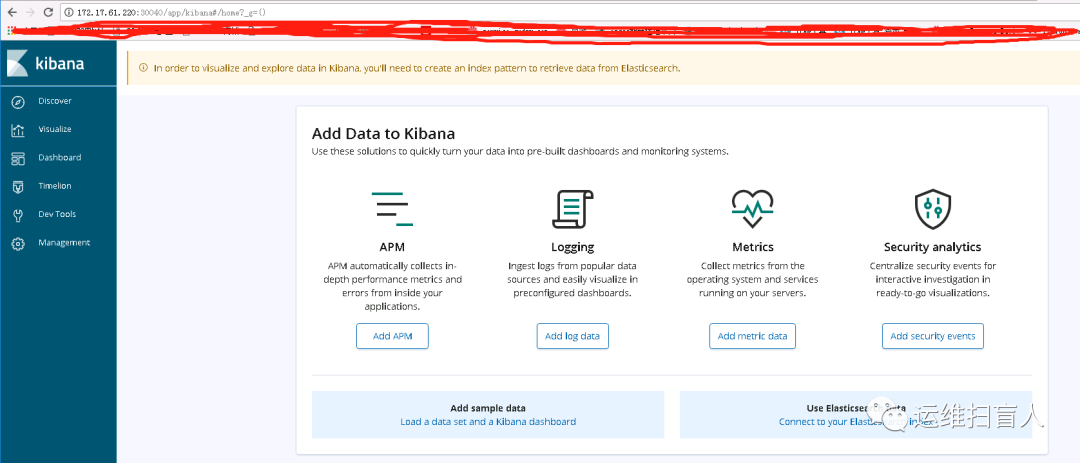
[root@k8s-master-01 kibana]# helm install --name kibana1 stable/kibana -f values.yamlWARNING: This chart is deprecatedNAME: kibana1LAST DEPLOYED: Tue Dec 1 22:24:36 2020NAMESPACE: defaultSTATUS: DEPLOYEDRESOURCES:==> v1/ConfigMapNAME DATA AGEkibana1 1 0skibana1-test 1 0s==> v1/DeploymentNAME READY UP-TO-DATE AVAILABLE AGEkibana1 0/1 1 0 0s==> v1/Pod(related)NAME READY STATUS RESTARTS AGEkibana1-59c97665-x8v7f 0/1 ContainerCreating 0 0s==> v1/ServiceNAME TYPE CLUSTER-IP EXTERNAL-IP PORT(S) AGEkibana1 NodePort 10.101.81.121 <none> 443:30040/TCP 0sNOTES:THE CHART HAS BEEN DEPRECATED!Find the new official version @ https://github.com/elastic/helm-charts/tree/master/kibanaTo verify that kibana1 has started, run:kubectl --namespace=default get pods -l "app=kibana"Kibana can be accessed:* From outside the cluster, run these commands in the same shell:export NODE_PORT=$(kubectl get --namespace default -o jsonpath="{.spec.ports[0].nodePort}" services kibana1)export NODE_IP=$(kubectl get nodes --namespace default -o jsonpath="{.items[0].status.addresses[0].address}")echo http://$NODE_IP:$NODE_PORT[root@k8s-master-01 kibana]# export NODE_PORT=$(kubectl get --namespace default -o jsonpath="{.spec.ports[0].nodePort}" services kibana1)[root@k8s-master-01 kibana]# export NODE_IP=$(kubectl get nodes --namespace default -o jsonpath="{.items[0].status.addresses[0].address}")[root@k8s-master-01 kibana]# echo http://$NODE_IP:$NODE_PORThttp://172.17.61.220:30040
initContainers: {}[root@k8s-master-01 kibana]# kubectl get podNAME READY STATUS RESTARTS AGEkibana1-59c97665-x8v7f 1/1 Running 0 8m[root@k8s-master-01 kibana]# kubectl get svcNAME TYPE CLUSTER-IP EXTERNAL-IP PORT(S) AGEelasticsearch1-client ClusterIP 10.97.244.22 <none> 9200/TCP 3h3melasticsearch1-discovery ClusterIP None <none> 9300/TCP 3h3mkibana1 NodePort 10.101.81.121 <none> 443:30040/TCP 8m14s[root@k8s-master-01 kibana]# helm listNAME REVISION UPDATED STATUS CHART APP VERSION NAMESPACEelasticsearch1 1 Tue Dec 1 19:29:43 2020 DEPLOYED elasticsearch-1.32.5 6.8.6 defaultfluentd 1 Tue Dec 1 21:48:55 2020 DEPLOYED fluentd-elasticsearch-2.0.7 2.3.2 defaultkibana1 1 Tue Dec 1 22:24:36 2020 DEPLOYED kibana-3.2.8 6.7.0 defaultnfs-client 1 Tue Dec 1 19:28:17 2020 DEPLOYED nfs-client-provisioner-1.2.11 3.1.0 default
http://172.17.61.220:30040