



1、用户账户与用户组
1.1 User Account
一般指的独立于kubernetes之外的其他服务管理的用户账号,kubernetes不存在此类用户账号的对象;
1.2 Service Account
隶属于某个特定的namespace,用于让Pod内的容器进程访问其他服务时提供身份认证信息的账号;
每个Pod对象都只有一个服务账户,若创建时未明确指定则Serviceaccount的准入控制器会自动为其附加当前名称空间的默认服务账户;
[root@k8s-master-01 rbac]# kubectl get serviceaccountNAME SECRETS AGEdefault 1 83d[root@k8s-master-01 rbac]# kubectl describe serviceaccount defaultName: defaultNamespace: defaultLabels: <none>Annotations: <none>Image pull secrets: <none>Mountable secrets: default-token-2cbvlTokens: default-token-2cbvlEvents: <none>
[root@k8s-master-01 rbac]# kubectl get serviceaccounts --all-namespaces | grep defaultconfigmap default 1 24ddefault default 1 83ddev default 1 78dingress-nginx default 1 71dkube-node-lease default 1 83dkube-public default 1 83dkube-system default 1 83dsecret default 1 17dstatefulset default 1 10dtesting default 1 111mtomcat-test default 1 71d
1.3 用户组
用户组只是用户账号的逻辑集合,kubernetes存在以下几个特殊的用户组:
system:unauthenticated:未能通过任何一个授权插件检验的账号;
system:authenticated:认证后的用户自动加入的组;
system:serviceaccounts:当前系统上的所有Service Account;
system:serviceaccounts:<namespace>:特定名称空间内的所有Service Account
API请求要么与Useraccount或Serviceaccount绑定要么视为匿名用户请求。
2、认证
2.1 kubernetes支持的认证方式
客户端证书
承载令牌
身份验证代理
HTTP Basic 认证
2.2 创建测试用户提供认证配置文件
生成私钥文件
[root@k8s-master-01 pki]# cd etc/kubernetes/pki/[root@k8s-master-01 pki]# (umask 077; openssl genrsa -out kube-user1.key 2048)Generating RSA private key, 2048 bit long modulus.................+++++.........+++++
创建证书签署请求
[root@k8s-master-01 pki]# openssl req -new -key kube-user1.key -out kube-user1.csr -subj "/CN=kube-user1/O=kubeusers"
使用kubeadmin生成的CA签署证书
[root@k8s-master-01 pki]# openssl x509 -req -in kube-user1.csr -CA ca.crt -CAkey ca.key -CAcreateserial -out kube-user1.crt -days 3650Signature oksubject=/CN=kube-user1/O=kubeusersGetting CA Private Key
验证证书信息
[root@k8s-master-01 pki]# openssl x509 -in kube-user1.crt -text -nooutCertificate:Data:Version: 1 (0x0)Serial Number:93:72:37:df:d0:81:49:b0Signature Algorithm: sha256WithRSAEncryptionIssuer: CN=kubernetesValidityNot Before: Oct 5 02:18:51 2020 GMTNot After : Oct 3 02:18:51 2030 GMTSubject: CN=kube-user1, O=kubeusersSubject Public Key Info:Public Key Algorithm: rsaEncryptionPublic-Key: (2048 bit)Modulus:00:f1:08:99:58:92:99:c1:41:1e:41:e9:15:26:68:b9:2e:bf:b9:9f:2b:a4:78:a0:ac:bc:bd:a1:3e:83:f3:48:f2:89:94:b2:e5:ca:09:76:0e:cf:5a:8e:10:29:69:ce:35:83:8d:58:90:6d:e8:7f:6a:6a:b7:c9:c1:b6:b1:1e:33:dd:ee:e2:ea:67:79:d5:4e:75:71:d4:02:a2:0c:84:2c:54:b5:2d:80:22:1a:95:d6:39:01:fa:4d:a8:bc:fb:86:24:80:36:ec:21:06:17:65:3b:2e:89:8b:2f:f9:96:30:fa:9a:52:1d:09:aa:c2:f7:c4:30:47:e3:81:7f:49:a2:33:df:8f:66:47:86:60:99:1f:4b:fa:fb:aa:d1:16:1b:8c:76:ff:e6:3a:26:f0:63:1b:d7:1c:5c:9f:89:5e:06:0a:06:86:fa:21:f0:5f:00:50:93:08:12:3b:fd:37:25:69:de:dc:50:0e:f4:d8:34:84:8f:a3:69:52:75:f9:42:e8:f7:1e:a4:01:8f:24:e3:00:dd:9e:da:9a:03:22:8c:35:49:b2:44:77:05:e3:32:fa:5f:5a:b1:c1:1d:be:a4:bf:29:6b:85:90:7d:82:09:05:d5:a6:63:7e:ff:6f:af:6e:83:71:d6:96:04:af:08:17:0f:fd:f6:9f:8a:00:f7Exponent: 65537 (0x10001)Signature Algorithm: sha256WithRSAEncryption7b:64:19:1b:93:98:7a:b2:d5:aa:e6:28:0b:7b:6b:b9:a8:b4:a1:49:aa:07:5a:93:23:a1:33:7d:77:9c:54:67:d1:d0:c3:f9:2e:15:1a:0d:a8:bc:00:34:a5:44:48:a4:ee:15:88:7f:96:14:2f:9e:9b:bc:4a:22:30:88:3c:5c:1d:8f:7d:d8:a9:d4:ac:4b:5f:11:3e:f0:32:8b:f9:90:2e:c0:8a:bf:e8:94:b5:aa:1a:20:b8:c5:17:ba:e8:87:d5:4d:76:13:1a:3c:fb:20:86:fa:a2:97:58:1c:f5:f8:12:b4:67:73:d6:8d:20:59:b1:c9:52:b2:ad:67:6d:a3:95:16:e7:f8:3a:bc:f0:5a:e5:2f:ed:7e:6d:7f:d5:7a:fc:99:f2:da:c3:f5:ab:0d:74:bc:91:2c:d0:31:52:9e:b0:cf:94:36:cb:6d:1b:4d:e4:cb:45:c5:d4:17:0a:1f:be:c0:9c:14:82:86:9e:3d:0b:ae:4e:72:8c:32:ac:b4:20:f8:98:66:18:10:a7:b3:a5:a6:30:bd:62:93:f5:93:2f:c9:e7:fb:c9:16:0e:d3:23:fd:f3:e9:0a:a8:d3:4b:82:f9:8c:38:24:53:45:30:b7:d6:05:e3:ff:a9:ff:4f:f3:00:93:0e:55:1b:18:82:b3:d1:5d:02:c2:5b:b1:43
设定集群
[root@k8s-master-01 pki]# kubectl config set-cluster kubernetes --embed-certs=true --certificate-authority=/etc/kubernetes/pki/ca.crt --server="https://10.1.114.220:6443"Cluster "kubernetes" set.
配置客户端证书及其密钥
[root@k8s-master-01 pki]# kubectl config set-credentials kube-user1 --embed-certs=true --client-certificate=/etc/kubernetes/pki/kube-user1.crt --client-key=/etc/kubernetes/pki/kube-user1.keyUser "kube-user1" set.
设定context
[root@k8s-master-01 pki]# kubectl config set-context kube-user1@kubernetes --cluster=kubernetes --user=kube-user1Context "kube-user1@kubernetes" created.
指定要使用的context
[root@k8s-master-01 pki]# kubectl config use-context kube-user1@kubernetesSwitched to context "kube-user1@kubernetes".
使用新用户测试
[root@k8s-master-01 pki]# kubectl get podsError from server (Forbidden): pods is forbidden: User "kube-user1" cannot list resource "pods" in API group "" in the namespace "default"
切换管理员账号
[root@k8s-master-01 pki]# kubectl config use-context kubernetes-admin@kubernetes
3、授权
kubernetes支持的授权插件一般有以下几种:
3.1 Node
3.2 ABAC
3.3 RBAC:Role-Based Access Control
通俗讲RBAC就是将权限的集合与用户的集合进行绑定,实现赋权的过程。
role/rolebindig
仅能作用于一个namespace;
[root@k8s-master-01 rbac]# kubectl create namespace testingnamespace/testing created[root@k8s-master-01 rbac]# cat role.yamlkind: RoleapiVersion: rbac.authorization.k8s.io/v1metadata:name: pods-readernamespace: testingrules:- apiGroups: [""]resources: ["pods", "pods/log"]verbs: ["get", "list", "watch"]---kind: RoleBindingapiVersion: rbac.authorization.k8s.io/v1metadata:name: resources-readernamespace: testingsubjects:- kind: Username: kube-user1apiGroup: rbac.authorization.k8s.ioroleRef:kind: Rolename: pods-readerapiGroup: rbac.authorization.k8s.io[root@k8s-master-01 rbac]# kubectl get role -n testing -o wideNAME CREATED ATpods-reader 2020-10-05T06:46:55Z[root@k8s-master-01 rbac]# kubectl get rolebinding -n testing -o wideNAME ROLE AGE USERS GROUPS SERVICEACCOUNTSresources-reader Role/pods-reader 95s kube-user1
#kube-user1用户已经具有查看pod的权限[root@k8s-master-01 rbac]# kubectl config use-context kube-user1@kubernetesSwitched to context "kube-user1@kubernetes".[root@k8s-master-01 rbac]# kubectl get pods -n testingNo resources found in testing namespace.
cluster/clusterbinding
可以引用集群级别的资源;
[root@k8s-master-01 rbac]# kubectl get nodesError from server (Forbidden): nodes is forbidden: User "kube-user1" cannot list resource "nodes" in API group "" at the cluster scope[root@k8s-master-01 rbac]# cat clusterrole.yamlkind: ClusterRoleapiVersion: rbac.authorization.k8s.io/v1metadata:name: nodes-readerrules:- apiGroups: [""]resources: ["nodes"]verbs: ["get", "list"]---kind: ClusterRoleBindingapiVersion: rbac.authorization.k8s.io/v1metadata:name: cluster-resources-readersubjects:- kind: Username: kube-user1apiGroup: rbac.authorization.k8s.ioroleRef:kind: ClusterRolename: nodes-readerapiGroup: rbac.authorization.k8s.io[root@k8s-master-01 rbac]# kubectl apply -f clusterrole.yamlclusterrole.rbac.authorization.k8s.io/nodes-reader createdclusterrolebinding.rbac.authorization.k8s.io/cluster-resources-reader created
#kube-user1已经具有查看集群node的权限[root@k8s-master-01 rbac]# kubectl config use-context kube-user1@kubernetesSwitched to context "kube-user1@kubernetes".[root@k8s-master-01 rbac]# kubectl get nodesNAME STATUS ROLES AGE VERSIONk8s-master-01 Ready master 83d v1.18.5k8s-worker-01 Ready <none> 83d v1.18.5k8s-worker-02 Ready <none> 82d v1.18.5
aggregation clusterrole
[root@k8s-master-01 rbac]# kubectl apply -f aggre-clusterrole.yamlclusterrole.rbac.authorization.k8s.io/monitoring configuredclusterrole.rbac.authorization.k8s.io/monitoring-endpoints configured[root@k8s-master-01 rbac]# cat aggre-clusterrole.yamlkind: ClusterRoleapiVersion: rbac.authorization.k8s.io/v1metadata:name: monitoringaggregationRule:clusterRoleSelectors:- matchLabels:rabc.example.com/aggregate-to-monitoring: "true"rules: []---kind: ClusterRoleapiVersion: rbac.authorization.k8s.io/v1metadata:name: monitoring-endpointslabels:rabc.example.com/aggregate-to-monitoring: "true"rules:- apiGroups: [""]resources: ["services", "endpoints", "pods"]verbs: ["get", "list", "watch"]
#clusterrole资源对象monitoring拥有了monitoring-endpoints的全部rules[root@k8s-master-01 rbac]# kubectl get clusterrole monitoring -o yamlaggregationRule:clusterRoleSelectors:- matchLabels:rabc.example.com/aggregate-to-monitoring: "true"apiVersion: rbac.authorization.k8s.io/v1kind: ClusterRolemetadata:annotations:kubectl.kubernetes.io/last-applied-configuration: |{"aggregationRule":{"clusterRoleSelectors":[{"matchLabels":{"rabc.example.com/aggregate-to-monitoring":"true"}}]},"apiVersion":"rbac.authorization.k8s.io/v1","kind":"ClusterRole","metadata":{"annotations":{},"name":"monitoring"},"rules":[]}creationTimestamp: "2020-10-05T07:39:33Z"managedFields:- apiVersion: rbac.authorization.k8s.io/v1fieldsType: FieldsV1fieldsV1:f:rules: {}manager: kube-controller-manageroperation: Updatetime: "2020-10-05T07:42:49Z"- apiVersion: rbac.authorization.k8s.io/v1fieldsType: FieldsV1fieldsV1:f:aggregationRule:.: {}f:clusterRoleSelectors: {}f:metadata:f:annotations:.: {}f:kubectl.kubernetes.io/last-applied-configuration: {}manager: kubectloperation: Updatetime: "2020-10-05T07:42:49Z"name: monitoringresourceVersion: "12036320"selfLink: apis/rbac.authorization.k8s.io/v1/clusterroles/monitoringuid: 4f77c2e9-5727-411d-8253-05f7a63a3a3erules:- apiGroups:- ""resources:- services- endpoints- podsverbs:- get- list- watch
系统默认的非资源型URL
[root@k8s-master-01 rbac]# kubectl get clusterrole system:discovery -o yamlapiVersion: rbac.authorization.k8s.io/v1kind: ClusterRolemetadata:annotations:rbac.authorization.kubernetes.io/autoupdate: "true"creationTimestamp: "2020-07-14T04:25:43Z"labels:kubernetes.io/bootstrapping: rbac-defaultsmanagedFields:- apiVersion: rbac.authorization.k8s.io/v1fieldsType: FieldsV1fieldsV1:f:metadata:f:annotations:.: {}f:rbac.authorization.kubernetes.io/autoupdate: {}f:labels:.: {}f:kubernetes.io/bootstrapping: {}f:rules: {}manager: kube-apiserveroperation: Updatetime: "2020-07-14T04:25:43Z"name: system:discoveryresourceVersion: "46"selfLink: apis/rbac.authorization.k8s.io/v1/clusterroles/system%3Adiscoveryuid: 9480a67d-b94f-4257-9276-e55f58617310rules:- nonResourceURLs:- api- api/*- apis- apis/*- healthz- livez- openapi- openapi/*- readyz- version- version/verbs:- get[root@k8s-master-01 rbac]# kubectl get clusterrolebindings system:discovery -o yamlapiVersion: rbac.authorization.k8s.io/v1kind: ClusterRoleBindingmetadata:annotations:rbac.authorization.kubernetes.io/autoupdate: "true"creationTimestamp: "2020-07-14T04:25:43Z"labels:kubernetes.io/bootstrapping: rbac-defaultsmanagedFields:- apiVersion: rbac.authorization.k8s.io/v1fieldsType: FieldsV1fieldsV1:f:metadata:f:annotations:.: {}f:rbac.authorization.kubernetes.io/autoupdate: {}f:labels:.: {}f:kubernetes.io/bootstrapping: {}f:roleRef:f:apiGroup: {}f:kind: {}f:name: {}f:subjects: {}manager: kube-apiserveroperation: Updatetime: "2020-07-14T04:25:43Z"name: system:discoveryresourceVersion: "102"selfLink: apis/rbac.authorization.k8s.io/v1/clusterrolebindings/system%3Adiscoveryuid: 49d8f4fd-6930-4ca7-ab03-df4b33fbdf27roleRef:apiGroup: rbac.authorization.k8s.iokind: ClusterRolename: system:discoverysubjects:- apiGroup: rbac.authorization.k8s.iokind: Groupname: system:authenticated
系统内建的集群级别的资源对象nodes
[root@k8s-master-01 rbac]# kubectl get clusterrole kubeadm:get-nodes -o yamlapiVersion: rbac.authorization.k8s.io/v1kind: ClusterRolemetadata:creationTimestamp: "2020-07-14T04:25:44Z"managedFields:- apiVersion: rbac.authorization.k8s.io/v1fieldsType: FieldsV1fieldsV1:f:rules: {}manager: kubeadmoperation: Updatetime: "2020-07-14T04:25:44Z"name: kubeadm:get-nodesresourceVersion: "182"selfLink: apis/rbac.authorization.k8s.io/v1/clusterroles/kubeadm%3Aget-nodesuid: b0e1f474-a072-478f-b1e7-dd82591069c5rules:- apiGroups:- ""resources:- nodesverbs:- get[root@k8s-master-01 rbac]# kubectl get clusterrolebindings kubeadm:get-nodes -o yamlapiVersion: rbac.authorization.k8s.io/v1kind: ClusterRoleBindingmetadata:creationTimestamp: "2020-07-14T04:25:44Z"managedFields:- apiVersion: rbac.authorization.k8s.io/v1fieldsType: FieldsV1fieldsV1:f:roleRef:f:apiGroup: {}f:kind: {}f:name: {}f:subjects: {}manager: kubeadmoperation: Updatetime: "2020-07-14T04:25:44Z"name: kubeadm:get-nodesresourceVersion: "183"selfLink: apis/rbac.authorization.k8s.io/v1/clusterrolebindings/kubeadm%3Aget-nodesuid: 489840d6-cfca-452a-960e-270bb4f3ff94roleRef:apiGroup: rbac.authorization.k8s.iokind: ClusterRolename: kubeadm:get-nodessubjects:- apiGroup: rbac.authorization.k8s.iokind: Groupname: system:bootstrappers:kubeadm:default-node-token
面向对象的内建clusterrole
[root@k8s-master-01 rbac]# kubectl get clusterrole cluster-admin -o yamlapiVersion: rbac.authorization.k8s.io/v1kind: ClusterRolemetadata:annotations:rbac.authorization.kubernetes.io/autoupdate: "true"creationTimestamp: "2020-07-14T04:25:43Z"labels:kubernetes.io/bootstrapping: rbac-defaultsmanagedFields:- apiVersion: rbac.authorization.k8s.io/v1fieldsType: FieldsV1fieldsV1:f:metadata:f:annotations:.: {}f:rbac.authorization.kubernetes.io/autoupdate: {}f:labels:.: {}f:kubernetes.io/bootstrapping: {}f:rules: {}manager: kube-apiserveroperation: Updatetime: "2020-07-14T04:25:43Z"name: cluster-adminresourceVersion: "45"selfLink: /apis/rbac.authorization.k8s.io/v1/clusterroles/cluster-adminuid: af890173-db09-4929-8226-7bcc19cf50a1rules:- apiGroups:- '*'resources:- '*'verbs:- '*'- nonResourceURLs:- '*'verbs:- '*'[root@k8s-master-01 rbac]# kubectl get clusterrolebindings cluster-admin -o yamlapiVersion: rbac.authorization.k8s.io/v1kind: ClusterRoleBindingmetadata:annotations:rbac.authorization.kubernetes.io/autoupdate: "true"creationTimestamp: "2020-07-14T04:25:43Z"labels:kubernetes.io/bootstrapping: rbac-defaultsmanagedFields:- apiVersion: rbac.authorization.k8s.io/v1fieldsType: FieldsV1fieldsV1:f:metadata:f:annotations:.: {}f:rbac.authorization.kubernetes.io/autoupdate: {}f:labels:.: {}f:kubernetes.io/bootstrapping: {}f:roleRef:f:apiGroup: {}f:kind: {}f:name: {}f:subjects: {}manager: kube-apiserveroperation: Updatetime: "2020-07-14T04:25:43Z"name: cluster-adminresourceVersion: "101"selfLink: /apis/rbac.authorization.k8s.io/v1/clusterrolebindings/cluster-adminuid: 0ef1a0b2-bb66-4002-ba72-65b0d13014f7roleRef:apiGroup: rbac.authorization.k8s.iokind: ClusterRolename: cluster-adminsubjects:- apiGroup: rbac.authorization.k8s.iokind: Groupname: system:masters
4、准入插件
alwaysadmin
alwaysdeny
alwayspullimages
5、Kubernetes Dashboard
5.1 部署HTTPS通信的Dashboard
为secret生成私钥和证书
[root@k8s-master-01 dashboard]# (umask 077; openssl genrsa -out dashboard.key 2048)Generating RSA private key, 2048 bit long modulus....................+++++.................+++++e is 65537 (0x10001)[root@k8s-master-01 dashboard]# openssl req -new -key dashboard.key -out dashboard.csr -subj "/O=iLinux/CN=dashboard"[root@k8s-master-01 dashboard]# openssl x509 -req -in dashboard.csr -CA etc/kubernetes/pki/ca.crt -CAkey etc/kubernetes/pki/ca.key -CAcreateserial -out dashboard.crt -days 3650Signature oksubject=/O=iLinux/CN=dashboardGetting CA Private Key[root@k8s-master-01 dashboard]# kubectl create secret generic kubernetes-dashbaord-certs -n kube-system --from-file=dashboard.crt=./dashboard.crt --from-file=dashboard.key=./dashboard.key -n kube-systemsecret/kubernetes-dashbaord-certs created[root@k8s-master-01 dashboard]# kubectl get secret kubernetes-dashbaord-certs -n kube-systemNAME TYPE DATA AGEkubernetes-dashbaord-certs Opaque 2 101s
创建dashboard的Pod资源对象
# Copyright 2017 The Kubernetes Authors.## Licensed under the Apache License, Version 2.0 (the "License");# you may not use this file except in compliance with the License.# You may obtain a copy of the License at## http://www.apache.org/licenses/LICENSE-2.0## Unless required by applicable law or agreed to in writing, software# distributed under the License is distributed on an "AS IS" BASIS,# WITHOUT WARRANTIES OR CONDITIONS OF ANY KIND, either express or implied.# See the License for the specific language governing permissions and# limitations under the License.apiVersion: v1kind: Namespacemetadata:name: kubernetes-dashboard---apiVersion: v1kind: ServiceAccountmetadata:labels:k8s-app: kubernetes-dashboardname: kubernetes-dashboardnamespace: kubernetes-dashboard---kind: ServiceapiVersion: v1metadata:labels:k8s-app: kubernetes-dashboardname: kubernetes-dashboardnamespace: kubernetes-dashboardspec:ports:- port: 443targetPort: 8443selector:k8s-app: kubernetes-dashboard---apiVersion: v1kind: Secretmetadata:labels:k8s-app: kubernetes-dashboardname: kubernetes-dashboard-certsnamespace: kubernetes-dashboardtype: Opaque---apiVersion: v1kind: Secretmetadata:labels:k8s-app: kubernetes-dashboardname: kubernetes-dashboard-csrfnamespace: kubernetes-dashboardtype: Opaquedata:csrf: ""---apiVersion: v1kind: Secretmetadata:labels:k8s-app: kubernetes-dashboardname: kubernetes-dashboard-key-holdernamespace: kubernetes-dashboardtype: Opaque---kind: ConfigMapapiVersion: v1metadata:labels:k8s-app: kubernetes-dashboardname: kubernetes-dashboard-settingsnamespace: kubernetes-dashboard---kind: RoleapiVersion: rbac.authorization.k8s.io/v1metadata:labels:k8s-app: kubernetes-dashboardname: kubernetes-dashboardnamespace: kubernetes-dashboardrules:# Allow Dashboard to get, update and delete Dashboard exclusive secrets.- apiGroups: [""]resources: ["secrets"]resourceNames: ["kubernetes-dashboard-key-holder", "kubernetes-dashboard-certs", "kubernetes-dashboard-csrf"]verbs: ["get", "update", "delete"]# Allow Dashboard to get and update 'kubernetes-dashboard-settings' config map.- apiGroups: [""]resources: ["configmaps"]resourceNames: ["kubernetes-dashboard-settings"]verbs: ["get", "update"]# Allow Dashboard to get metrics.- apiGroups: [""]resources: ["services"]resourceNames: ["heapster", "dashboard-metrics-scraper"]verbs: ["proxy"]- apiGroups: [""]resources: ["services/proxy"]resourceNames: ["heapster", "http:heapster:", "https:heapster:", "dashboard-metrics-scraper", "http:dashboard-metrics-scraper"]verbs: ["get"]---kind: ClusterRoleapiVersion: rbac.authorization.k8s.io/v1metadata:labels:k8s-app: kubernetes-dashboardname: kubernetes-dashboardrules:# Allow Metrics Scraper to get metrics from the Metrics server- apiGroups: ["metrics.k8s.io"]resources: ["pods", "nodes"]verbs: ["get", "list", "watch"]---apiVersion: rbac.authorization.k8s.io/v1kind: RoleBindingmetadata:labels:k8s-app: kubernetes-dashboardname: kubernetes-dashboardnamespace: kubernetes-dashboardroleRef:apiGroup: rbac.authorization.k8s.iokind: Rolename: kubernetes-dashboardsubjects:- kind: ServiceAccountname: kubernetes-dashboardnamespace: kubernetes-dashboard---apiVersion: rbac.authorization.k8s.io/v1kind: ClusterRoleBindingmetadata:name: kubernetes-dashboardroleRef:apiGroup: rbac.authorization.k8s.iokind: ClusterRolename: kubernetes-dashboardsubjects:- kind: ServiceAccountname: kubernetes-dashboardnamespace: kubernetes-dashboard---kind: DeploymentapiVersion: apps/v1metadata:labels:k8s-app: kubernetes-dashboardname: kubernetes-dashboardnamespace: kubernetes-dashboardspec:replicas: 1revisionHistoryLimit: 10selector:matchLabels:k8s-app: kubernetes-dashboardtemplate:metadata:labels:k8s-app: kubernetes-dashboardspec:containers:- name: kubernetes-dashboardimage: kubernetesui/dashboard:v2.0.4imagePullPolicy: Alwaysports:- containerPort: 8443protocol: TCPargs:- --auto-generate-certificates- --namespace=kubernetes-dashboard# Uncomment the following line to manually specify Kubernetes API server Host# If not specified, Dashboard will attempt to auto discover the API server and connect# to it. Uncomment only if the default does not work.# - --apiserver-host=http://my-address:portvolumeMounts:- name: kubernetes-dashboard-certsmountPath: /certs# Create on-disk volume to store exec logs- mountPath: /tmpname: tmp-volumelivenessProbe:httpGet:scheme: HTTPSpath: /port: 8443initialDelaySeconds: 30timeoutSeconds: 30securityContext:allowPrivilegeEscalation: falsereadOnlyRootFilesystem: truerunAsUser: 1001runAsGroup: 2001volumes:- name: kubernetes-dashboard-certssecret:secretName: kubernetes-dashboard-certs- name: tmp-volumeemptyDir: {}serviceAccountName: kubernetes-dashboardnodeSelector:"kubernetes.io/os": linux# Comment the following tolerations if Dashboard must not be deployed on mastertolerations:- key: node-role.kubernetes.io/mastereffect: NoSchedule---kind: ServiceapiVersion: v1metadata:labels:k8s-app: dashboard-metrics-scrapername: dashboard-metrics-scrapernamespace: kubernetes-dashboardspec:ports:- port: 8000targetPort: 8000selector:k8s-app: dashboard-metrics-scraper---kind: DeploymentapiVersion: apps/v1metadata:labels:k8s-app: dashboard-metrics-scrapername: dashboard-metrics-scrapernamespace: kubernetes-dashboardspec:replicas: 1revisionHistoryLimit: 10selector:matchLabels:k8s-app: dashboard-metrics-scrapertemplate:metadata:labels:k8s-app: dashboard-metrics-scraperannotations:seccomp.security.alpha.kubernetes.io/pod: 'runtime/default'spec:containers:- name: dashboard-metrics-scraperimage: kubernetesui/metrics-scraper:v1.0.4ports:- containerPort: 8000protocol: TCPlivenessProbe:httpGet:scheme: HTTPpath: /port: 8000initialDelaySeconds: 30timeoutSeconds: 30volumeMounts:- mountPath: /tmpname: tmp-volumesecurityContext:allowPrivilegeEscalation: falsereadOnlyRootFilesystem: truerunAsUser: 1001runAsGroup: 2001serviceAccountName: kubernetes-dashboardnodeSelector:"kubernetes.io/os": linux# Comment the following tolerations if Dashboard must not be deployed on mastertolerations:- key: node-role.kubernetes.io/mastereffect: NoSchedulevolumes:- name: tmp-volumeemptyDir: {}
[root@k8s-master-01 dashboard]# kubectl get svc -n kubernetes-dashboardNAME TYPE CLUSTER-IP EXTERNAL-IP PORT(S) AGEdashboard-metrics-scraper ClusterIP 10.111.26.34 <none> 8000/TCP 4m28skubernetes-dashboard ClusterIP 10.103.244.15 <none> 443/TCP 4m28s
注意:1.7版本及之后默认创建的dashboard仅能通过kubectl proxy创建的代理于本机上进行访问,且默认创建的svc为ClusterIP类型的;
[root@k8s-master-01 dashboard]# kubectl proxyStarting to serve on 127.0.0.1:8001
http://localhost:8001/api/v1/namespaces/kubernetes-dashboard/services/https:kubernetes-dashboard:/proxy/
修改默认svc为NodePort
[root@k8s-master-01 dashboard]# kubectl patch svc kubernetes-dashboard -p '{"spec":{"type":"NodePort"}}' -n kubernetes-dashboardservice/kubernetes-dashboard patched[root@k8s-master-01 dashboard]# kubectl get svc -n kubeenetes-dashboardNo resources found in kubeenetes-dashboard namespace.[root@k8s-master-01 dashboard]# kubectl get svc -n kubernetes-dashboardNAME TYPE CLUSTER-IP EXTERNAL-IP PORT(S) AGEdashboard-metrics-scraper ClusterIP 10.111.90.36 <none> 8000/TCP 20mkubernetes-dashboard NodePort 10.100.82.108 <none> 443:32276/TCP 20m
https://172.17.61.220:32276
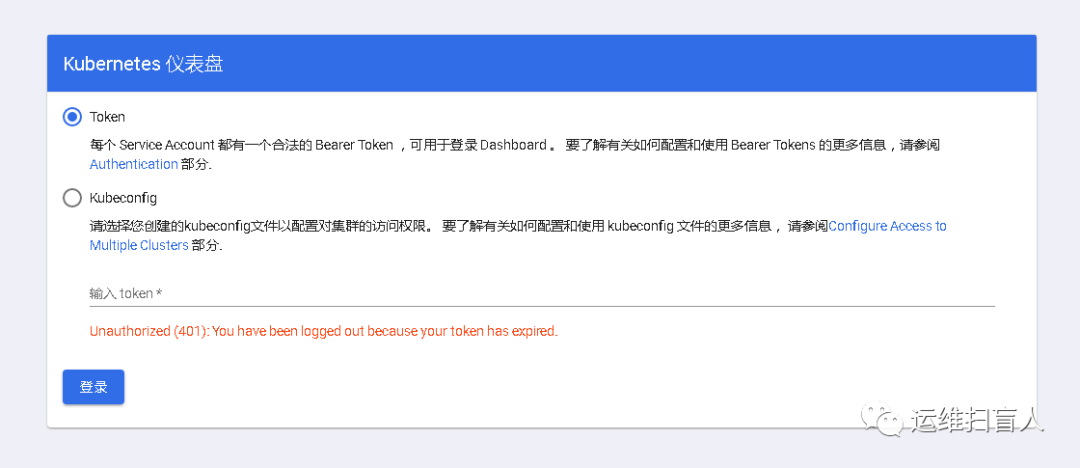
5.2 配置token认证
创建用于管理kubernetes的ServiceAccount
[root@k8s-master-01 dashboard]# kubectl create serviceaccount dashboard-admin -n kube-system
将新建的ServiceAccount与系统内建的cluster-admin集群角色进行绑定
[root@k8s-master-01 dashboard]# kubectl create clusterrolebinding dashboard-damin --clusterrole=cluster-admin --serviceaccount=kube-system:dashboard-admin
获取ServiceAccount的token信息
[root@k8s-master-01 dashboard]# kubectl get secret -n kube-system | grep admindashboard-admin-token-8k5qn kubernetes.io/service-account-token 3 18m[root@k8s-master-01 dashboard]# kubectl describe secrets dashboard-admin-token-8k5qn -n kube-systemName: dashboard-admin-token-8k5qnNamespace: kube-systemLabels: <none>Annotations: kubernetes.io/service-account.name: dashboard-adminkubernetes.io/service-account.uid: c1d7031d-855d-4d0b-9902-d5d963c13fdfType: kubernetes.io/service-account-tokenData====token: eyJhbGciOiJSUzI1NiIsImtpZCI6ImlSdmZUVVFtV3F1d0tialJldE9XUnhJYXRQYnhGVUhYOVhoQ0UxQXJGVGcifQ.eyJpc3MiOiJrdWJlcm5ldGVzL3NlcnZpY2VhY2NvdW50Iiwia3ViZXJuZXRlcy5pby9zZXJ2aWNlYWNjb3VudC9uYW1lc3BhY2UiOiJrdWJlLXN5c3RlbSIsImt1YmVybmV0ZXMuaW8vc2VydmljZWFjY291bnQvc2VjcmV0Lm5hbWUiOiJkYXNoYm9hcmQtYWRtaW4tdG9rZW4tOGs1cW4iLCJrdWJlcm5ldGVzLmlvL3NlcnZpY2VhY2NvdW50L3NlcnZpY2UtYWNjb3VudC5uYW1lIjoiZGFzaGJvYXJkLWFkbWluIiwia3ViZXJuZXRlcy5pby9zZXJ2aWNlYWNjb3VudC9zZXJ2aWNlLWFjY291bnQudWlkIjoiYzFkNzAzMWQtODU1ZC00ZDBiLTk5MDItZDVkOTYzYzEzZmRmIiwic3ViIjoic3lzdGVtOnNlcnZpY2VhY2NvdW50Omt1YmUtc3lzdGVtOmRhc2hib2FyZC1hZG1pbiJ9.elQ7kbNfKvcGibqBMzCecRM_3UL8eaGEz7Lx88YJOnBsZkHtM895rXqrWse7Fq1rUTb-8Rh6rnv7oLBvM-OboVRjRgnFLhPf-XTVrYyK4uzvdFjucjKrrzCb-iMAwKM-9BpAUfSkvBoVeJ8l5p8WKYEW5S1Gt1n_QLUggywLqGOCCujvWldUYp5FbowErhfflW-r1qMSCoEnVkWGNe6iXxHsnjRA2pNeT9qcrRSdUiKy5khi2otKfCn2mwZhayqfqE5FY3M3cJTGb54Yvv3HUVBBf5D35cKjgGlknke3yEscwy1y_c_c1OpPoAWGR7ZIYFKmxGQ4yUsg49QjqPOKzgca.crt: 1025 byt
https://172.17.61.220:32276
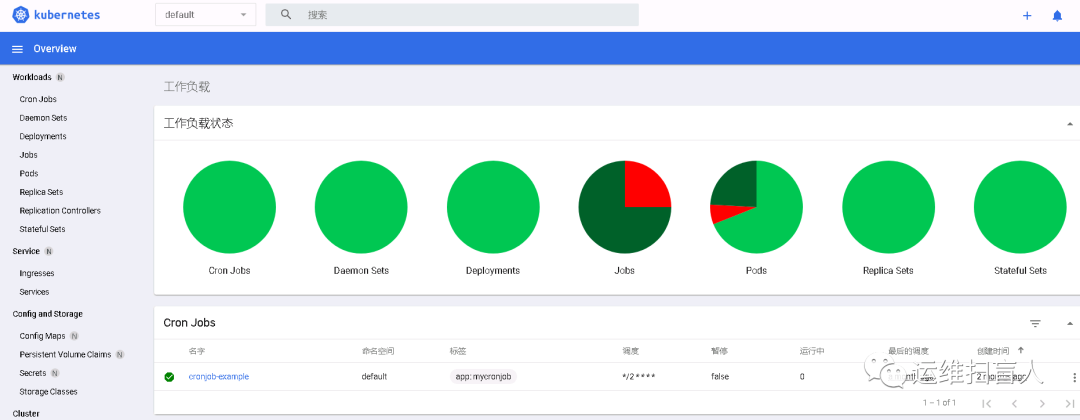
5.3 配置kubeconfig
使用secret token登录用户多有不便,建议使用kubeconfig登录,kubeconfig为认证信息载体保存了证书及其私钥,配置过程与kube-user1用户的配置类似;
获取token
[root@k8s-master-01 pki]# DASH_TOCKEN=$(kubectl get secret dashboard-admin-token-8k5qn -n kube-system -o jsonpath={.data.token} |base64 -d)
设置kubeconfig中的一个集群条目
[root@k8s-master-01 pki]# kubectl config set-cluster kubernetes --embed-certs=true --certificate-authority=/etc/kubernetes/pki/ca.crt --server="https://10.1.114.220:6443"Cluster "kubernetes" set.
设置kubeconfig中的一个用户条目
[root@k8s-master-01 pki]# kubectl config set-credentials kube-user1 --token=$DASH_TOCKEN --kubeconfig=/usr/local/src/dashbord-admin.confUser "kube-user1" set.
设置kubeconfig中的一个上下文条目
[root@k8s-master-01 pki]# kubectl config set-context kube-user1@kubernetes --cluster=kubernetes --user=kube-user1 --kubeconfig=/usr/local/src/dashbord-admin.confContext "kube-user1@kubernetes" created.
设置kubeconfig中的当前上下文
[root@k8s-master-01 pki]# kubectl config use-context kube-user1@kubernetes --kubeconfig=/usr/local/src/dashbord-admin.confSwitched to context "kube-user1@kubernetes".
[root@k8s-master-01 src]# ll /usr/local/src/dashbord-admin.conf-rw------- 1 root root 4810 Oct 10 17:10 /usr/local/src/dashbord-admin.conf
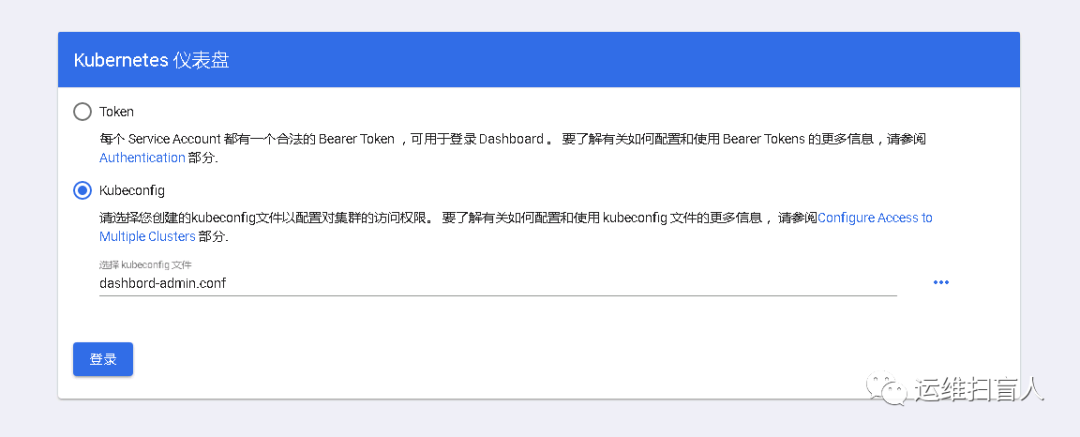
6、准入控制机制
经由认证授权插件分别完成身份认证和授权检查之后,准入控制器将拦截那些创建、删除、和更新相关的操作以强制实现控制器中定义的功能;
6.1 LimitRange与LimitRange准入控制器
LimitRange用于为每个容器指定最小和最大资源用量限制,支持限制容器、Pod和PersistentVolumeClaim;
[root@k8s-master-01 rbac]# cat limitrange.yamlapiVersion: v1kind: LimitRangemetadata:name: cpu-limit-rangespec:limits:- default:cpu: 1000mdefaultRequest:cpu: 1000mmin:cpu: 500mmax:cpu: 2000mmaxLimitRequestRatio:cpu: 4type: Container[root@k8s-master-01 rbac]# kubectl get limitrangeNAME CREATED ATcpu-limit-range 2020-10-15T11:17:00Z
[root@k8s-master-01 rbac]# kubectl run limit-pod1 --image=ikubernetes/myapp:v1 --restart=Neverpod/limit-pod1 created[root@k8s-master-01 rbac]# kubectl describe pod limit-pod1Containers:limit-pod1:Container ID: docker://274bdec0ba91feb1939fc769c89c1d06b566a789a0565b4a490b353cd1562280Image: ikubernetes/myapp:v1Image ID: docker-pullable://ikubernetes/myapp@sha256:9c3dc30b5219788b2b8a4b065f548b922a34479577befb54b03330999d30d513Port: <none>Host Port: <none>State: RunningStarted: Thu, 15 Oct 2020 19:19:40 +0800Ready: TrueRestart Count: 0Limits:cpu: 1Requests:cpu: 1Environment: <none>Mounts:/var/run/secrets/kubernetes.io/serviceaccount from default-token-2cbvl (ro)
验证:在default名称空间创建的Pod对象满足默认CPU值1;
[root@k8s-master-01 rbac]# kubectl run limit-pod2 --image=ikubernetes/myapp:v1 --restart=Never --requests="cpu=400m"Error from server (Forbidden): pods "limit-pod2" is forbidden: minimum cpu usage per Container is 500m, but request is 400m[root@k8s-master-01 rbac]# kubectl run limit-pod3 --image=ikubernetes/myapp:v1 --restart=Never --requests="cpu=3000m"The Pod "limit-pod3" is invalid: spec.containers[0].resources.requests: Invalid value: "3": must be less than or equal to cpu limit
验证:当Podcast对象设定的CPU值大于或者小于LimitRange限定的值时会报错;
6.2 ResourceQuota与ResourceQuota准入控制器
ResourceQuota属于名称空间级别资源,ResourceQuota准入控制器将跟踪名称空间中创建资源的情况,确保不超相应的资源限制;
需要注意的是在namespace中启用了CPU和内存等系统资源的配额之后,用户在创建Podcast对象时必须指定资源需求或资源限制;
资源配额只对那些在ResourceQuota创建之后生成的对象有效,对已经存在的对象不会产生任何限制;
[root@k8s-master-01 rbac]# kubectl create namespace testnamespace/test created[root@k8s-master-01 rbac]# cat resourcequota.yamlapiVersion: v1kind: ResourceQuotametadata:name: quota-examplenamespace: testspec:hard:pods: 5requests.cpu: 1requests.memory: 1Gilimits.cpu: 2limits.memory: 2Gicount/deployments.apps: 1count/deployments.extensions: 1persistentvolumeclaims: 2[root@k8s-master-01 rbac]# kubectl apply -f resourcequota.yaml -n testresourcequota/quota-example configured[root@k8s-master-01 rbac]# kubectl describe quota quota-example -n testName: quota-exampleNamespace: testResource Used Hard-------- ---- ----count/deployments.apps 0 1count/deployments.extensions 0 1limits.cpu 0 2limits.memory 0 2Gipersistentvolumeclaims 0 2pods 0 5requests.cpu 0 1requests.memory 0 1Gi#为了直观了解ResourceQuota的特性,本例子中新创建了一个namespace;
[root@k8s-master-01 rbac]# kubectl run myapp-deploy --image=ikubernetes/myapp:v1 --replicas=1 --namespace=test --requests="cpu=200m,memory=256Mi" --limits="cpu=500m,memory=256Mi"Flag --replicas has been deprecated, has no effect and will be removed in the future.pod/myapp-deploy created[root@k8s-master-01 rbac]# kubectl describe quota quota-example -n testName: quota-exampleNamespace: testResource Used Hard-------- ---- ----count/deployments.apps 0 1count/deployments.extensions 0 1limits.cpu 500m 2limits.memory 256Mi 2Gipersistentvolumeclaims 0 2pods 1 5requests.cpu 200m 1requests.memory 256Mi 1Gi#通过在test名称空间创建deployment后查看配额信息,发现可用资源已经相应减小;
6.3 PodSecurityPolicy与PodSecurityPolicy准入控制器
PodSecurityPolicy(PSP)是集群级别的资源,用于控制用户在配置Pod资源时可以使用的特权类属性;
默认情况下,PSP处于未开启状态,原因是在为创建任何PSP对象时启用此准入控制器将阻止创建任何Podcast对象;
启用PSP准入控制器后若要部署任何Podcast对象,则相关的User Account和Service Account必须获得相应的安全策略权限;
即便启用了PSP准入控制器,PSP也不会生效,而必须由相应的授权插件(如RBAC)将PSP的use操作授权给相应的Role或者ClusterRole,而后与User Account或者Service Account完成绑定;
(A)创建特权PSP
[root@k8s-master-01 rbac]# cat podsecuritypolicy-privileged.yamlapiVersion: policy/v1beta1kind: PodSecurityPolicymetadata:name: privilegedannotations:sccomp.security.alpha.kubernetes.io/allowedProfileNames: '*'spec:privileged: trueallowPrivilegeEscalation: trueallowedCapabilities:- '*'volumes:- '*'hostNetwork: truehostPorts:- min: 0max: 65535hostIPC: truehostPID: truerunAsUser:rule: 'RunAsAny'seLinux:rule: 'RunAsAny'supplementalGroups:rule: 'RunAsAny'fsGroup:rule: 'RunAsAny'
(B)创建非特权的PSP
[root@k8s-master-01 rbac]# cat podsecuritypolicy-restricted.yamlapiVersion: policy/v1beta1kind: PodSecurityPolicymetadata:name: restrictedannotations:sccomp.security.alpha.kubernetes.io/allowedProfileNames: 'docker/default'sccomp.security.beta.kubernetes.io/allowedProfileNames: 'runtime/default'sccomp.security.alpha.kubernetes.io/allowedProfileNames: 'docker/default'sccomp.security.beta.kubernetes.io/allowedProfileNames: 'runtime/default'spec:privileged: falseallowPrivilegeEscalation: falserequiredDropCapabilities:- ALLvolumes:- 'configMap'- 'emptyDir'- 'projected'- 'secret'- 'downwardAPI'hostNetwork: falsehostIPC: falsehostPID: falserunAsUser:rule: 'MustRunAsNonRoot'seLinux:rule: 'RunAsAny'supplementalGroups:rule: 'RunAsAny'ranges:- min: 1max: 65535fsGroup:rule: 'MustRunAs'ranges:- min: 1max: 65535readOnlyRootFilesystem: false#restricted禁止了大部分权限;
(C)创建两类ClusterRole使其具有相应PSP的use权限
[root@k8s-master-01 rbac]# cat psp-podsecurity-clusterrole.yamlkind: ClusterRoleapiVersion: rbac.authorization.k8s.io/v1metadata:name: psp.restrictedrules:- apiGroups: ["policy"]resources: ["podsecuritypolicies"]verbs: ["use"]resourceNames:- restricted---kind: ClusterRoleapiVersion: rbac.authorization.k8s.io/v1metadata:name: psp.privilegedrules:- apiGroups: ["policy"]resources: ["podsecuritypolicies"]verbs: ["use"]resourceNames:- privileged
(D)将ClusterRole与User Account完成绑定
[root@k8s-master-01 rbac]# cat psp-podsecurity-clusterrolebinding.yamlkind: ClusterRoleBindingapiVersion: rbac.authorization.k8s.io/v1metadata:name: privileged-psp-userroleRef:kind: ClusterRolename: psp.privilegedapiGroup: rbac.authorization.k8s.iosubjects:- kind: Groupname: system:mastersapiGroup: rbac.authorization.k8s.io- kind: Groupname: system:nodeapiGroup: rbac.authorization.k8s.io- kind: Groupname: system:serviceaccounts:kube-systemapiGroup: rbac.authorization.k8s.io#privileged与system:node、system:serviceaccounts:kube-system绑定;---kind: ClusterRoleBindingapiVersion: rbac.authorization.k8s.io/v1metadata:name: restricted-psp-userroleRef:kind: ClusterRolename: psp.restrictedapiGroup: rbac.authorization.k8s.iosubjects:- kind: Groupname: system:authenticatedapiGroup: rbac.authorization.k8s.io#retricted与system:authorizzation绑定;
(E)测试
使用kube-user1授权testing名称空间的get、list、create权限;
[root@k8s-master-01 rbac]# kubectl get podsecuritypolicyNAME PRIV CAPS SELINUX RUNASUSER FSGROUP SUPGROUP READONLYROOTFS VOLUMESprivileged true * RunAsAny RunAsAny RunAsAny RunAsAny false *restricted false RunAsAny MustRunAsNonRoot MustRunAs RunAsAny false configMap,emptyDir,projected,secret,downwardAPI
[root@k8s-master-01 rbac]# cat role.yamlkind: RoleapiVersion: rbac.authorization.k8s.io/v1metadata:name: pods-readernamespace: testingrules:- apiGroups: [""]resources: ["pods", "pods/log"]verbs: ["get", "list", "watch","create"]---kind: RoleBindingapiVersion: rbac.authorization.k8s.io/v1metadata:name: resources-readernamespace: testingsubjects:- kind: Username: kube-user1apiGroup: rbac.authorization.k8s.ioroleRef:kind: Rolename: pods-readerapiGroup: rbac.authorization.k8s.io[root@k8s-master-01 rbac]# kubectl config use-context kube-user1@kubernetes[root@k8s-master-01 rbac]# kubectl apply -f podsecurity-pod-test.yamlError from server (Forbidden): error when creating "podsecurity-pod-test.yaml": pods "pod-with-securitycontext" is forbidden: unable to validate against any pod security policy: [spec.containers[0].securityContext.privileged: Invalid value: true: Privileged containers are not allowed]#切换context后创建Pod发现提示securitycontext.privileged is not allowed;
