



目录:
修改密码
附录
恢复正常
附录
以前直接修改mysql.user就ok了,现在不行了,正好虚拟机MySQL的root密码忘记了,就简单记录下:(本方法不适合互联网线上项目,除非你不在意这段时间的损失)
PS:以UbuntuServer为例(CentOS你把配置文件的位置换下就ok了)
坑点:
不能和以前一样直接修改user表了,需要使用新命令
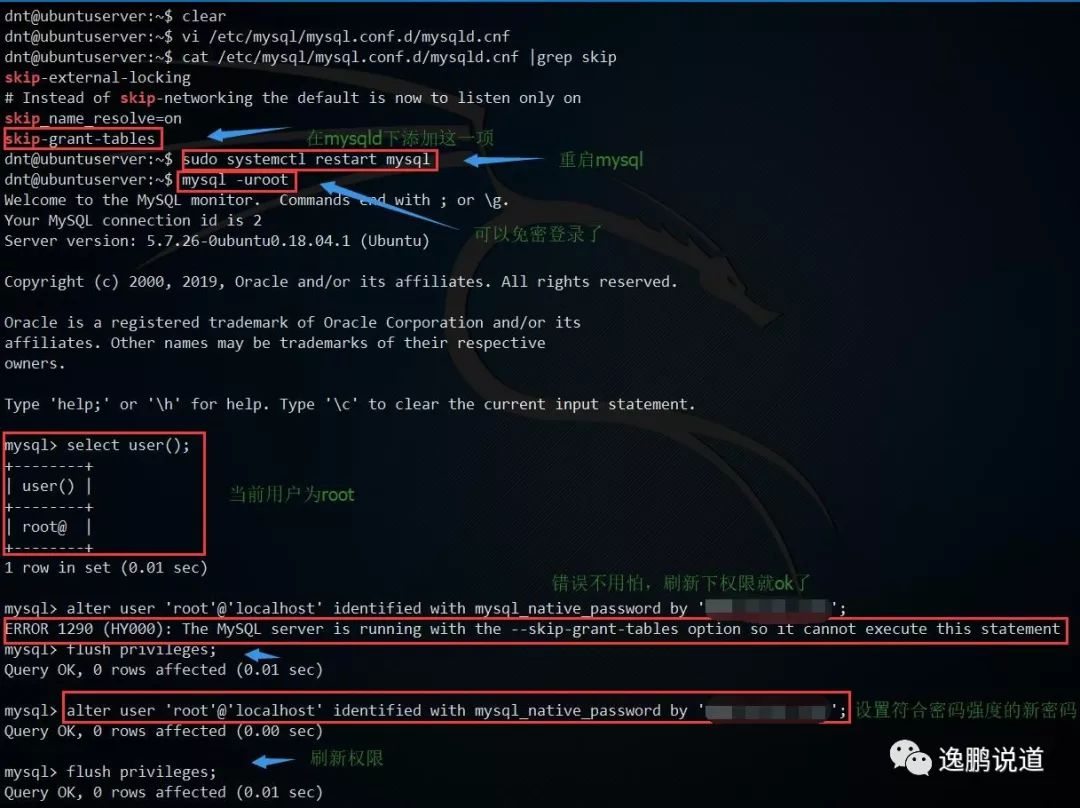
alter user 'root'@'localhost' identified with mysql_native_password by '复合密码强度的新密码';ERROR 1290 (HY000): The MySQL server is running with the --skip-grant-tables option so it cannot execute this statementflush privileges;
修改密码
附录
dnt@ubuntuserver:~$ vi etc/mysql/mysql.conf.d/mysqld.cnfdnt@ubuntuserver:~$ cat etc/mysql/mysql.conf.d/mysqld.cnf |grep skipskip-external-locking# Instead of skip-networking the default is now to listen only onskip_name_resolve=onskip-grant-tablesdnt@ubuntuserver:~$ sudo systemctl restart mysqldnt@ubuntuserver:~$ mysql -urootWelcome to the MySQL monitor. Commands end with ; or \g.Your MySQL connection id is 2Server version: 5.7.26-0ubuntu0.18.04.1 (Ubuntu)Copyright (c) 2000, 2019, Oracle and/or its affiliates. All rights reserved.Oracle is a registered trademark of Oracle Corporation and/or itsaffiliates. Other names may be trademarks of their respectiveowners.Type 'help;' or '\h' for help. Type '\c' to clear the current input statement.mysql> select user();+--------+| user() |+--------+| root@ |+--------+1 row in set (0.01 sec)mysql> alter user 'root'@'localhost' identified with mysql_native_password by 'WWW.baidu.com1';ERROR 1290 (HY000): The MySQL server is running with the --skip-grant-tables option so it cannot execute this statementmysql> flush privileges;Query OK, 0 rows affected (0.01 sec)mysql> alter user 'root'@'localhost' identified with mysql_native_password by 'WWW.baidu.com1';Query OK, 0 rows affected (0.00 sec)mysql> flush privileges;Query OK, 0 rows affected (0.01 sec)mysql> exitBye
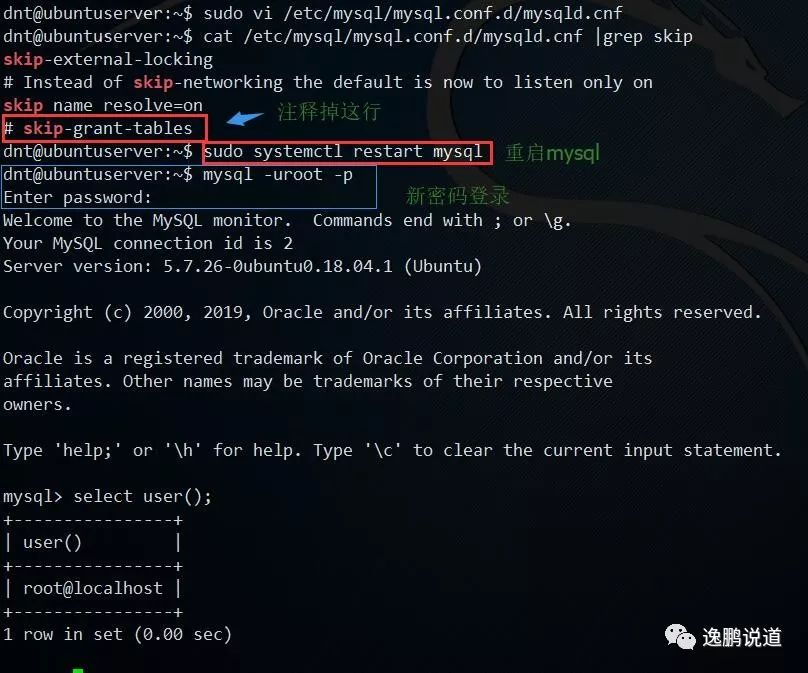
恢复正常
附录
dnt@ubuntuserver:~$ sudo vi etc/mysql/mysql.conf.d/mysqld.cnfdnt@ubuntuserver:~$ cat etc/mysql/mysql.conf.d/mysqld.cnf |grep skipskip-external-locking# Instead of skip-networking the default is now to listen only onskip_name_resolve=on# skip-grant-tablesdnt@ubuntuserver:~$ sudo systemctl restart mysqldnt@ubuntuserver:~$ mysql -uroot -pEnter password:Welcome to the MySQL monitor. Commands end with ; or \g.Your MySQL connection id is 2Server version: 5.7.26-0ubuntu0.18.04.1 (Ubuntu)Copyright (c) 2000, 2019, Oracle and/or its affiliates. All rights reserved.Oracle is a registered trademark of Oracle Corporation and/or itsaffiliates. Other names may be trademarks of their respectiveowners.Type 'help;' or '\h' for help. Type '\c' to clear the current input statement.mysql> select user();+----------------+| user() |+----------------+| root@localhost |+----------------+1 row in set (0.00 sec)
相关文章:
文章转载自逸鹏说道,如果涉嫌侵权,请发送邮件至:contact@modb.pro进行举报,并提供相关证据,一经查实,墨天轮将立刻删除相关内容。
