
211工程院校贵州大学管理学院硕士研究生、全国百强城商行资讯科技部五级专技工程师、互联网金融行业资深DevOps研发工程师、金融科技运维自动化平台研发项目经理。曾在国内多家知名互联网公司 平安科技、微众银行、顺丰科技、魅族任职. 具有多年国内一线互联网公司自动化运维平台设计与开发经验。
1
前言
2
CPU资源限制
[root@localhost ~]# docker run --help | grep cpu--cpu-period int Limit CPU CFS (Completely Fair Scheduler) period--cpu-quota int Limit CPU CFS (Completely Fair Scheduler) quota-c, --cpu-shares int CPU shares (relative weight)--cpus decimal Number of CPUs--cpuset-cpus string CPUs in which to allow execution (0-3, 0,1)--cpuset-mems string MEMs in which to allow execution (0-3, 0,1)
--cpus:用来限制cpu的使用上限
--cpu-period和--cpu-quota:组合起来限制cpu的使用上限,可以使用cpus替代
--cpu-shares:用来设置CPU发生竞争时的权重比例,资源充足时没有效果
--cpset-cpus:设置容器只能使用某个或某几个核心
--cpuset-mems:设置容器使用的内存节点,只有在NUMA架构下才支持,有关NUMA架构的相关知识可参考文档:http://cenalulu.github.io/linux/numa/
2.1
限制CPU的使用率
通过参数--cpus可限制容器可用的CPU使用率上限,若不做限制而直接启动容器,通过stress工具对容器的CPU使用做压力测试,那么最终宿主机的CPU资源将被耗尽,启动压测工具,如下所示:
[root@localhost ~]# docker run --rm -it polinux/stress stress --cpu 2

[root@localhost ~]# docker run --rm --cpus=1.5 -it polinux/stress stress --cpu 2

[root@localhost ~]# ls -l sys/fs/cgroup/cpu/docker/total 0drwxr-xr-x 2 root root 0 Jun 21 18:15 7aad8ce1cd05f7a72d5cdac59bd1666e68b1eb831842ac2cd54a9c3fd3485798-rw-r--r-- 1 root root 0 Jun 20 11:37 cgroup.clone_children--w--w--w- 1 root root 0 Jun 20 11:37 cgroup.event_control-rw-r--r-- 1 root root 0 Jun 20 11:37 cgroup.procs-r--r--r-- 1 root root 0 Jun 20 11:37 cpuacct.stat-rw-r--r-- 1 root root 0 Jun 20 11:37 cpuacct.usage-r--r--r-- 1 root root 0 Jun 20 11:37 cpuacct.usage_percpu-rw-r--r-- 1 root root 0 Jun 20 11:37 cpu.cfs_period_us-rw-r--r-- 1 root root 0 Jun 20 11:37 cpu.cfs_quota_us-rw-r--r-- 1 root root 0 Jun 20 11:37 cpu.rt_period_us-rw-r--r-- 1 root root 0 Jun 20 11:37 cpu.rt_runtime_us-rw-r--r-- 1 root root 0 Jun 20 11:37 cpu.shares-r--r--r-- 1 root root 0 Jun 20 11:37 cpu.stat-rw-r--r-- 1 root root 0 Jun 20 11:37 notify_on_release-rw-r--r-- 1 root root 0 Jun 20 11:37 tasks
[root@localhost 7aad8ce1cd05f7a72d5cdac59bd1666e68b1eb831842ac2cd54a9c3fd3485798]# cat cpu.cfs_period_us100000[root@localhost 7aad8ce1cd05f7a72d5cdac59bd1666e68b1eb831842ac2cd54a9c3fd3485798]# cat cpu.cfs_quota_us150000
以上两个值相除得到的结果正好为1.5,与容器启动时指定的—cpus=1.5一致。
2.2
限制使用指定CPU
通过参数--cpuset-cpus可限制容器始终在某一个或某几个CPU上运行,这是非常有意义的,因为当前的CPU多核架构中,每个CPU核心都有自己的独占缓存,如果频繁的将进程调度在不同的核心上执行,会带来更多的开销;以下在容器启动过程中,设置了--cpuset-cpus选项,并指定容器在运行时使用的CPU的编号为"1"。
[root@localhost ~]# docker run --rm --cpuset-cpus="1" -it polinux/stress stress --cpu 1

2.3
CPU权重设置
默认情况下,所有容器对于CPU使用率的占比都是相同的,通过参数--cpu-shares可以设置CPU利用率权重,默认值为1024且该配置只会在CPU繁忙时才能体现出来,--cpu-shares是一个相对值,每个容器实际能占用多少CPU取决于系统上运行的容器数量。
若在单核CPU宿主机上启动3个容器,第一个容器的--cpu-shares值为1024,另外两个容器的--cpu-shares值为512,当这三个容器中的进程尝试使用100%CPU时,权重设置为1024的容器会使用50%的CPU,计算公式为 1024 (1024 + 512 + 512 ) = 0.5; 另外两个权重为512的容器会使用25%的CPU,计算公式为: 512 (1024 + 512 + 512) = 0.25; 若在此时又添加了一个权重为1024的容器,那么两个权重设置为1024的容器将占用的CPU百分比为33%,计算公式为 1024 (1024 + 1024 + 512 + 512) = 0.33;而另外两个权重设置为512的容器将占用的CPU百分比为16.5%,计算公式为 512 (1024 + 1024 + 512 + 512);简言之,容器CPU使用率占比的计算方法就是将所有容器设置的权重值相加作为分母,每个容器的权重作为分子,相除结果即为CPU的利用率百分比,根据以上描述场景,测试CPU使用率占比,启动三个容器:
[root@localhost ~]# docker run --rm --cpu-shares=1024 --cpuset-cpus=1 -d polinux/stress stress --cpu 1[root@localhost ~]# docker run --rm --cpu-shares=512 --cpuset-cpus=1 -d polinux/stress stress --cpu 1[root@localhost ~]# docker run --rm --cpu-shares=512 --cpuset-cpus=1 -d polinux/stress stress --cpu 1

[root@localhost ~]# docker run --rm --cpu-shares=1024 --cpuset-cpus=1 -d polinux/stress stress --cpu 1
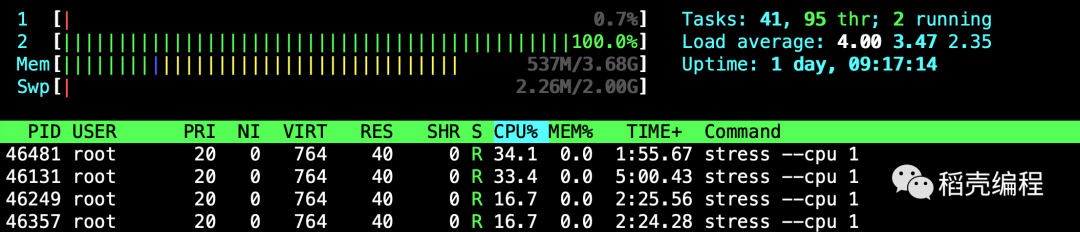
下面再看多核CPU的场景,已知当前宿主机的核数为2,其上运行了两个容器,一个---cpu-shares参数值为1024、另一个设置为512,此时每个容器都能占用一个CPU,且占用情况均为100%,因为当前的CPU资源是足够的,启动容器如下所示:
[root@localhost ~]# docker run --rm --cpu-shares=1024 -d polinux/stress stress --cpu 1[root@localhost ~]# docker run --rm --cpu-shares=512 -d polinux/stress stress --cpu 1

[root@localhost ~]# docker run --rm --cpu-shares=1024 -d polinux/stress stress --cpu 1

3
内存资源限制
Docker在创建容器时所支持的内存限制选项包括:
-- memory:设置内存的使用限额
-- memory-swap:设置内存+swap的使用限额
若不设置--memory和--memory-swap,那么容器可以耗尽宿主机上的所有内存和swap空间;需要注意的是,如果容器耗尽宿主机的内存和swap空间后,容器会因为内存溢出(OOM)而被宿主机杀死,启动容器命令如下:
[root@localhost ~]# docker run --rm -it polinux/stress stress --vm 1 --vm-bytes 8192M

[root@localhost ~]# docker run --rm -it -m 300M polinux/stress stress --vm 1 --vm-bytes 500M


[root@localhost ~]# docker run --rm -it -m 300M polinux/stress stress --vm 1 --vm-bytes 700M

[root@localhost ~]# docker run --rm -it -m 300M --oom-kill-disable polinux/stress stress --vm 1 --vm-bytes 700M
在此情况下,x值是容器能使用的内存大小,y值是容器能使用的内存与swap空间的总和,所以y必须大于x; 容器swap分区大小=y-x,启动容器命令如下
[root@localhost ~]# docker run --rm -it --memory 300M --memory-swap 320M polinux/stress stress --vm 1 --vm-bytes 310M


[root@localhost ~]# docker run --rm -it --memory 300M --memory-swap -1 polinux/stress stress --vm 1 --vm-bytes 2300M


6
结束语