



使用Let's Encrypt申请泛域名证书
使用acme.sh脚本,完成Let's Encrypt证书申请,90天后续期等操作。github地址:https://github.com/acmesh-official/acme.sh
1. 安装acme.sh
curl https://get.acme.sh | sh
2. 给acme.sh 别名,方便使用
~/.acme.sh/
3. 设置acme.sh自动升级
acme.sh --upgrade --auto-upgrade
4. 使用dns模式,获取TXT
acme.sh --issue -d *.example.com --dns --yes-I-know-dns-manual-mode-enough-go-ahead-please
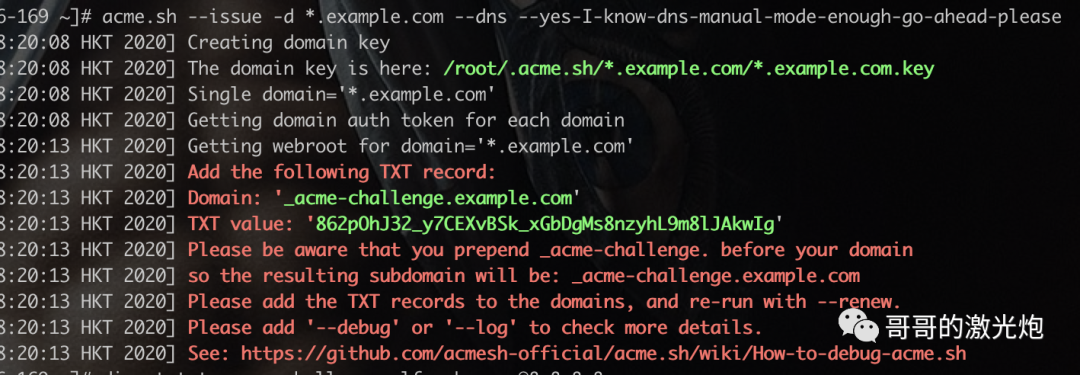
5. 将上面得到TXT记录,填入域名解析
6. 验证TXT解析是否生效
dig -t txt _acme-challenge.example.com @8.8.8.8
7. TXT解析生效后,生成证书
acme.sh --force --renew -d *.example.com --yes-I-know-dns-manual-mode-enough-go-ahead-please
8. 根据域名提供商的API完成证书申请
以阿里万网域名为例,获取AccessKey ID与AccessKey Secret
export Ali_Key=""
export Ali_Secret=""
acme.sh --issue -d *.example.com --dns dns_ali --force
9. 将证书放在需要的位置,默认位于 ~/.acme.sh/example.com
下
使用acme.sh --installcert 来指定目标文件. 并且可以指定 reloadcmd, 当证书更新以后, reloadcmd会被自动调用,让服务器生效.
acme.sh --installcert -d *.example.com \
--key-file /etc/pki/nginx/private/server.key \
--fullchain-file /etc/pki/nginx/server.crt \
--reloadcmd     "service nginx force-reload"
