



AWS ALB Ingress Controller
设计原理
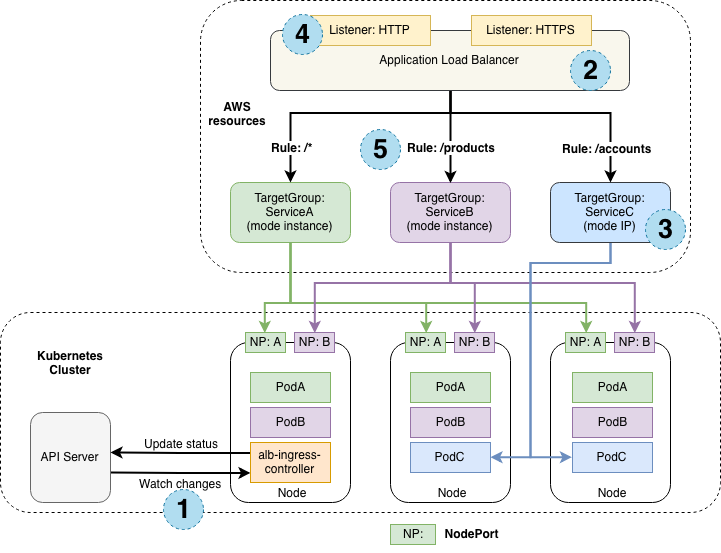
控制器监视来自API服务器的入口事件。当发现满足其要求的Ingress 资源时,它将开始创建AWS资源。
在AWS中为新的当发现满足其要求的Ingress资源创建了一个 ALB(ELBv2)。该ALB可以面向互联网或内部。您也可以使用annotations指定其创建的子网
在AWS中为Ingress资源中描述的每个唯一的Kubernetes服务创建目标组。
为Ingress资源注释中详细说明的每个端口创建侦听器。如果未指定端口,则使用合理的默认值(80或443)。证书也可以通过注释附加。
为Ingress资源中指定的每个路径创建规则。这样可以确保将到特定路径的流量路由到正确的Kubernetes服务。
除了上述内容外,控制器还可以
从k8s中删除Ingress资源后,将删除AWS组件。
当Ingress资源在k8s中更改时,修改AWS组件。
在启动时会组装一个与现有与Ingress相关的现有AWS组件的列表,使您可以恢复是否要重新启动控制器。
Ingress流量
ALB Ingress控制器支持两种流量模式:
Instance
IP
默认情况下,Instance mode使用,用户可以通过 alb.ingress.kubernetes.io/target-type 选择模式。
Instance
Ingress流量从ALB开始,并通过每个服务的NodePort到达Kubernetes节点。这意味着从Ingress资源引用的服务必须公开,以便ALB能够访问。type:NodePort
IP
Ingress流量从ALB开始,直接到达Kubernetes窗格。CNI必须通过ENI上的辅助IP地址支持可直接访问的POD ip
部署ALB控制器
部署RBAC权限
kubectl apply -f rbac.yaml
---
apiVersion: rbac.authorization.k8s.io/v1
kind: ClusterRole
metadata:
  labels:
    app.kubernetes.io/name: alb-ingress-controller
  name: alb-ingress-controller
rules:
  - apiGroups:
      - ""
      - extensions
    resources:
      - configmaps
      - endpoints
      - events
      - ingresses
      - ingresses/status
      - services
    verbs:
      - create
      - get
      - list
      - update
      - watch
      - patch
  - apiGroups:
      - ""
      - extensions
    resources:
      - nodes
      - pods
      - secrets
      - services
      - namespaces
    verbs:
      - get
      - list
      - watch
---
apiVersion: rbac.authorization.k8s.io/v1
kind: ClusterRoleBinding
metadata:
  labels:
    app.kubernetes.io/name: alb-ingress-controller
  name: alb-ingress-controller
roleRef:
  apiGroup: rbac.authorization.k8s.io
  kind: ClusterRole
  name: alb-ingress-controller
subjects:
  - kind: ServiceAccount
    name: alb-ingress-controller
    namespace: kube-system
---
apiVersion: v1
kind: ServiceAccount
metadata:
  labels:
    app.kubernetes.io/name: alb-ingress-controller
  name: alb-ingress-controller
  namespace: kube-system
部署deployment
kubectl apply -f deployment.yaml
# Application Load Balancer (ALB) Ingress Controller Deployment Manifest.
# This manifest details sensible defaults for deploying an ALB Ingress Controller.
# GitHub: https://github.com/kubernetes-sigs/aws-alb-ingress-controller
apiVersion: apps/v1
kind: Deployment
metadata:
  labels:
    app.kubernetes.io/name: alb-ingress-controller
  name: alb-ingress-controller
  # Namespace the ALB Ingress Controller should run in. Does not impact which
  # namespaces it's able to resolve ingress resource for. For limiting ingress
  # namespace scope, see --watch-namespace.
  namespace: kube-system
spec:
  selector:
    matchLabels:
      app.kubernetes.io/name: alb-ingress-controller
  template:
    metadata:
      labels:
        app.kubernetes.io/name: alb-ingress-controller
    spec:
      containers:
        - name: alb-ingress-controller
          args:
            - --ingress-class=alb
            - --cluster-name=xxx    # cluster name
            - --aws-vpc-id=vpc-xxx  # vpc-id
            - --aws-region=xx       # cluster region

            # Enables logging on all outbound requests sent to the AWS API.
            # If logging is desired, set to true.
            # - --aws-api-debug
            # Maximum number of times to retry the aws calls.
            # defaults to 10.
            # - --aws-max-retries=10
          # env:
            # AWS key id for authenticating with the AWS API.
            # This is only here for examples. It's recommended you instead use
            # a project like kube2iam for granting access.
            #- name: AWS_ACCESS_KEY_ID
            #  value: KEYVALUE

            # AWS key secret for authenticating with the AWS API.
            # This is only here for examples. It's recommended you instead use
            # a project like kube2iam for granting access.
            #- name: AWS_SECRET_ACCESS_KEY
            #  value: SECRETVALUE
          # Repository location of the ALB Ingress Controller.
          image: docker.io/amazon/aws-alb-ingress-controller:v1.1.4
      serviceAccountName: alb-ingress-controller
部署一个2048测试一下alb
---
apiVersion: v1
kind: Namespace
metadata:
  name: "2048-game"
---
apiVersion: apps/v1
kind: Deployment
metadata:
  name: "2048-deployment"
  namespace: "2048-game"
spec:
  selector:
    matchLabels:
      app: "2048"
  replicas: 5
  template:
    metadata:
      labels:
        app: "2048"
    spec:
      containers:
      - image: alexwhen/docker-2048
        imagePullPolicy: Always
        name: "2048"
        ports:
        - containerPort: 80
---
apiVersion: v1
kind: Service
metadata:
  name: "service-2048"
  namespace: "2048-game"
spec:
  ports:
    - port: 80
      targetPort: 80
      protocol: TCP
  type: NodePort
  selector:
    app: "2048"
---
apiVersion: extensions/v1beta1
kind: Ingress
metadata:
  name: "2048-ingress"
  namespace: "2048-game"
  annotations:
    kubernetes.io/ingress.class: alb
    alb.ingress.kubernetes.io/scheme: internet-facing
  labels:
    app: 2048-ingress
spec:
  rules:
    - http:
        paths:
          - path: /*
            backend:
              serviceName: "service-2048"
              servicePort: 80
部署成功了以后,查询alb 的负载均衡器
kubectl get ingress/2048-ingress -n 2048-game

NAME           HOSTS   ADDRESS                                                                 PORTS      AGE
2048-ingress   *       example-2048game-2048ingr-6fa0-352729433.region-code.elb.amazonaws.com   80      24h
等待 alb状态为active 时 访问地址example-2048game-2048ingr-6fa0-352729433.region-code.elb.amazonaws.com 就可以玩2048了
aws-alb-ingress-controller 配置详解
查看
https://kubernetes-sigs.github.io/aws-alb-ingress-controller/guide/ingress/annotation/ 官方文档
说一下我常用的配置
kind: Ingress
apiVersion: extensions/v1beta1
metadata:
  name: test-prod-ingress
  namespace: test-prod
  annotations:
    kubernetes.io/ingress.class: alb
    alb.ingress.kubernetes.io/scheme: internet-facing       # 外网ALB
    #alb.ingress.kubernetes.io/scheme: internal        # 内网ALB
    alb.ingress.kubernetes.io/listen-ports: '[{"HTTPS":443}]'   # ALB 开放端口
    alb.ingress.kubernetes.io/certificate-arn: arn:aws:acm:xxxcertificate/xxx   # ALB证书arn
    alb.ingress.kubernetes.io/target-type: ip   # ALB模式ip或者instance
    alb.ingress.kubernetes.io/backend-protocol: HTTP    # ALB连接后端的协议
    alb.ingress.kubernetes.io/healthcheck-path: /heartbeat      # 后端心跳地址,如果心跳不正常,那么ALB会随便选择一个目标组的机器发送流量
    external-dns.alpha.kubernetes.io/hostname: xxx.xxx.com # 这个是通过external-dns 进行r53 域名管理的方法
  labels:
    k8s-app: test-prod-ingress
spec:
  rules:
    - http:
        paths:
          - path: /1*
            backend:
              serviceName: test-1-service
              servicePort: 30000
          - path: /2*
            backend:
              serviceName: test-2-service
              servicePort: 30000
部署external-dns 管理Route53
如果我们的域名用了AWS 的Route53进行管理,那么我们可以通过一个插件external-dns 来对Route53进行管理
部署external-dns
创建一个IAM权限
{
  "Version": "2012-10-17",
  "Statement": [
    {
      "Effect": "Allow",
      "Action": [
        "route53:ChangeResourceRecordSets"
      ],
      "Resource": [
        "arn:aws:route53:::hostedzone/*"
      ]
    },
    {
      "Effect": "Allow",
      "Action": [
        "route53:ListHostedZones",
        "route53:ListResourceRecordSets"
      ],
      "Resource": [
        "*"
      ]
    }
  ]
}
可以附加大的IAM(目前来说external-dns无法删除R53的name记录,所以给最小的就可以 )
{
    "Version": "2012-10-17",
    "Statement": [
        {
            "Effect": "Allow",
            "Action": [
                "route53:*"
            ],
            "Resource": [
                "*"
            ]
        }
    ]
}
列出 OIDC issuer URL
aws eks describe-cluster --name <cluster name> --query "cluster.identity.oidc.issuer" --output text
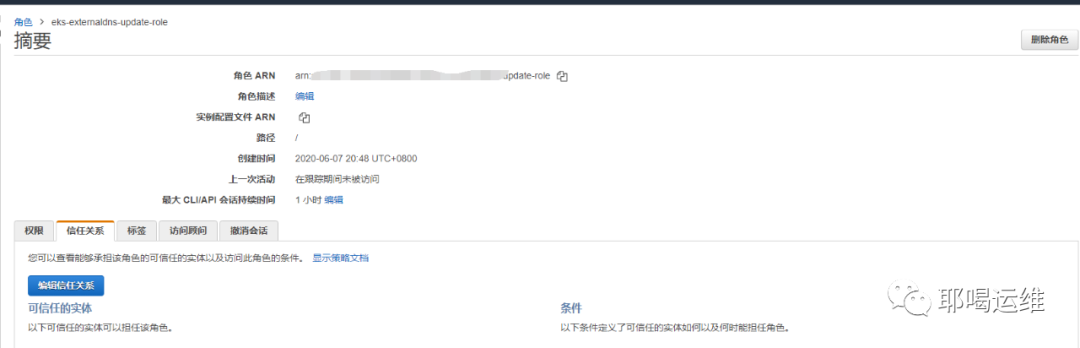
创建角色(role)并且把IAM附加给这个角色
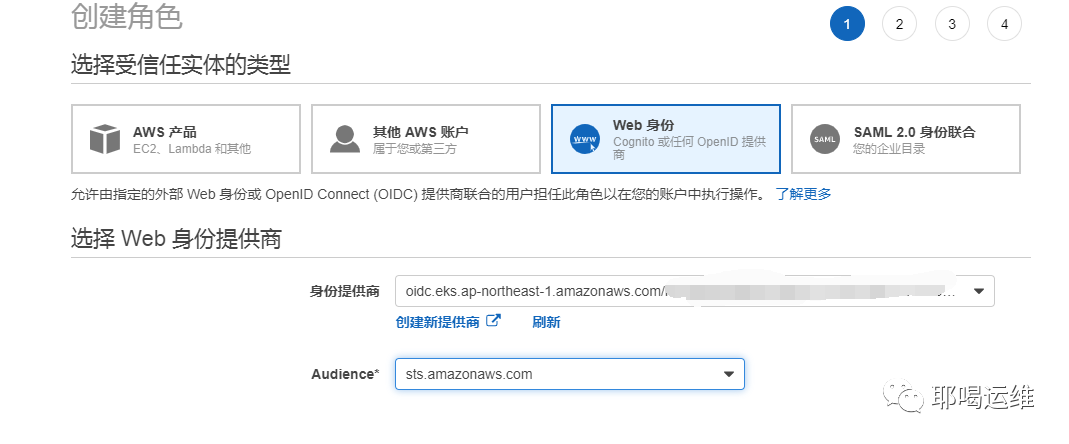
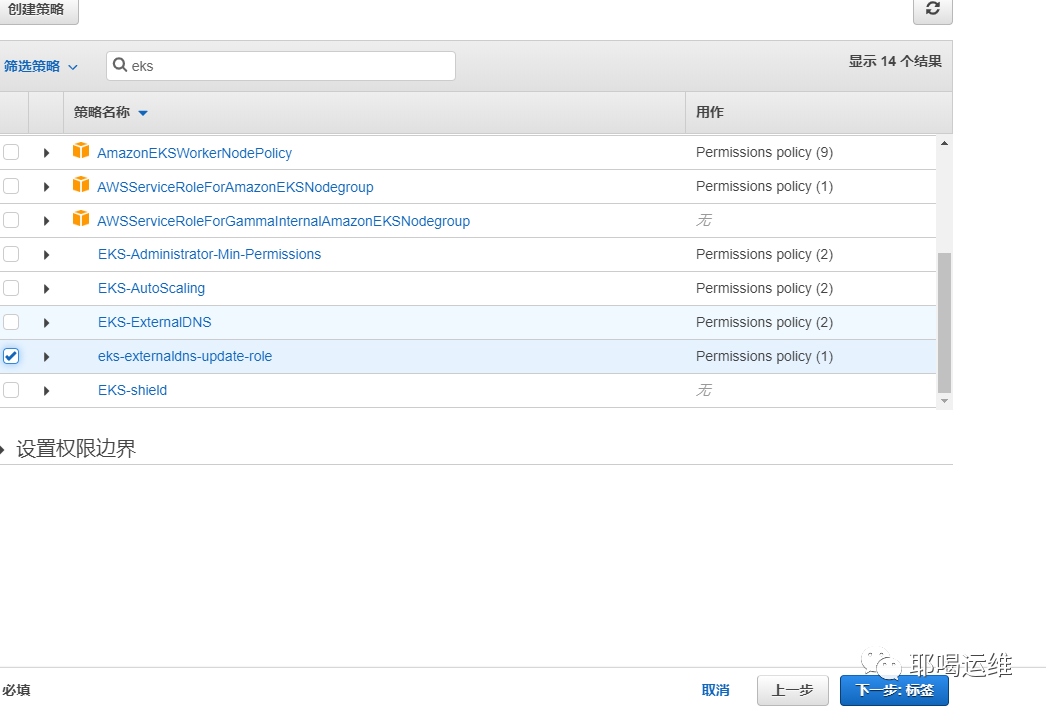
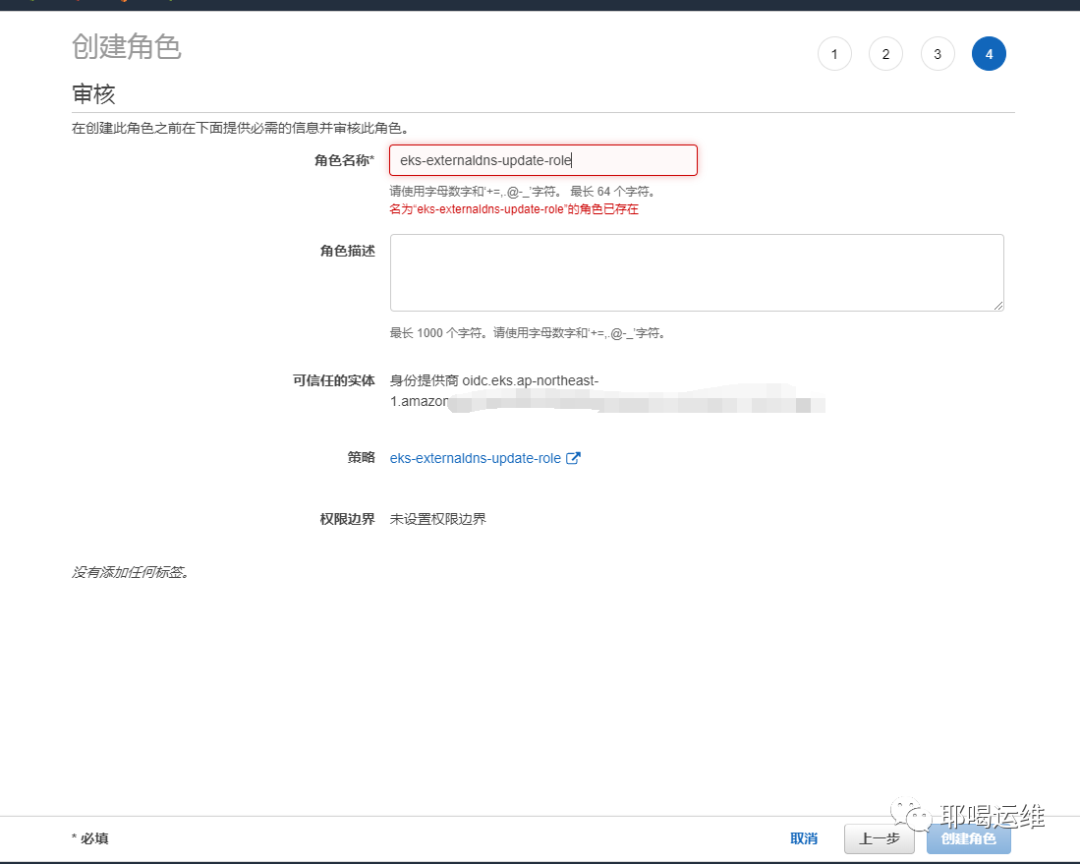
编辑信任关系,并记录ROLE的ARN 地址
apiVersion: v1
kind: ServiceAccount
metadata:
  name: external-dns
  namespace: kube-system
  # If you're using Amazon EKS with IAM Roles for Service Accounts, specify the following annotation.
  # Otherwise, you may safely omit it.
  annotations:
    # Substitute your account ID and IAM service role name below.
    eks.amazonaws.com/role-arn: arn:aws:iam::xxx:role/xxxxxxx

---

apiVersion: rbac.authorization.k8s.io/v1beta1
kind: ClusterRole
metadata:
  name: external-dns
  namespace: kube-system
rules:
- apiGroups: [""]
  resources: ["services","endpoints","pods"]
  verbs: ["get","watch","list"]
- apiGroups: ["extensions"]
  resources: ["ingresses"]
  verbs: ["get","watch","list"]
- apiGroups: [""]
  resources: ["nodes"]
  verbs: ["list","watch"]

---

apiVersion: rbac.authorization.k8s.io/v1beta1
kind: ClusterRoleBinding
metadata:
  name: external-dns-viewer
roleRef:
  apiGroup: rbac.authorization.k8s.io
  kind: ClusterRole
  name: external-dns
subjects:
- kind: ServiceAccount
  name: external-dns
  namespace: kube-system

---

apiVersion: apps/v1
kind: Deployment
metadata:
  name: external-dns
  namespace: kube-system
spec:
  strategy:
    type: Recreate
  selector:
    matchLabels:
      app: external-dns
  template:
    metadata:
      labels:
        app: external-dns
      # If you're using kiam or kube2iam, specify the following annotation.
      # Otherwise, you may safely omit it.
      annotations:
        iam.amazonaws.com/role: arn:aws:iam::xxx:role/xxxxxxx
    spec:
      serviceAccountName: external-dns
      containers:
      - name: external-dns
        image: registry.opensource.zalan.do/teapot/external-dns:latest
        args:
        - --source=service
        - --source=ingress
#        - --domain-filter=nuclearport.com # will make ExternalDNS see only the hosted zones matching provided domain, omit to process all available hosted zones
        - --provider=aws
        - --policy=upsert-only # would prevent ExternalDNS from deleting any records, omit to enable full synchronization
        - --aws-zone-type=public # only look at public hosted zones (valid values are public, private or no value for both)
        - --registry=txt
        - --txt-owner-id=my-hostedzone-identifier
      securityContext:
        fsGroup: 65534 # For ExternalDNS to be able to read Kubernetes and AWS token files
      tolerations:
        - key: "uessystem"
          value: "true"
          effect: "NoSchedule"

我们用上一个2048的项目测试R53是否生效
apiVersion: extensions/v1beta1
kind: Ingress
metadata:
  name: "2048-ingress"
  namespace: "2048-game"
  annotations:
    kubernetes.io/ingress.class: alb
    alb.ingress.kubernetes.io/scheme: internet-facing
    external-dns.alpha.kubernetes.io/hostname: testyehe.xxx.com
  labels:
    app: 2048-ingress
spec:
  rules:
    - http:
        paths:
          - path: /*
            backend:
              serviceName: "service-2048"
              servicePort: 80
监控日志
kubectl logs deployment.apps/external-dns -n kube-system -f
当日志出现
CREATE testyehe.xxx.com A [Id: /hostedzone/xxx]"
time="2020-06-07T13:13:01Z" level=info msg="Desired change: CREATE testyehe.xxx.com TXT [Id: /hostedzone/xxx]"
现在,ALB+R53 已经部署完毕
接下来我们会说一下如何在EKS上使用autoscaler来进行worker节点的动态扩容,并且实现从0开始的动态扩容
