



物理环境部署prometheus +thanos-sidecar
公司内网环境,一些私有云和网络设备的监控在一台物理机部署了prometheus,现在用thanos做prometheus的持久化存储,所以要部署一套物理环境跟上一个文章中的prometheus-operator 中的 thanos 对应
修改prometheus的配置文件添加一个label
global:
  scrape_interval:     60s
  evaluation_interval: 60s
  external_labels:
    prometheus: monitoring/gcp
    prometheus_replica: prometheus-gcp-0
修改prometheus启动文件
[Unit]
Description=Prometheus
Documentation=https://prometheus.io/
After=network.target

[Service]
Type=simple
User=prometheus
ExecStart=/opt/prometheus-2.13.1/bin/prometheus --config.file=/opt/prometheus-2.13.1/cfg/prometheus.yml --storage.tsdb.path=/opt/prometheus-2.13.1/data --web.enable-lifecycle --web.enable-admin-api --storage.tsdb.min-block-duration=2h --storage.tsdb.max-block-duration=2h
Restart=on-failure

[Install]
WantedBy=multi-user.target
下载thanos文件
wget https://github.com/thanos-io/thanos/releases/download/v0.12.2/thanos-0.12.2.linux-amd64.tar.gz

tar -zxvf thanos-0.12.2.linux-amd64.tar.gz -C /opt
ln -s  /opt/thanos-0.12.2.linux-amd64/thanos   /usr/local/bin/thanos
thanos 启动命令
/opt/thanos-0.12.2.linux-amd64/thanos sidecar --prometheus.url=http://localhost:9090 --http-address="0.0.0.0:10902" --grpc-address="0.0.0.0:10901" --tsdb.path=/opt/thanos-0.12.2.linux-amd64/data --objstore.config-file=cfg/thanos-config.yaml
在k8s 的query 中添加 物理节点的ip
apiVersion: apps/v1
kind: Deployment
metadata:
  name: thanos-query
  namespace: monitoring
  labels:
    app: thanos-query
spec:
  replicas: 1
  selector:
    matchLabels:
      app: thanos-query
  template:
    metadata:
      labels:
        app: thanos-query
    spec:
      containers:
      - name: thanos-query
        image: quay.io/thanos/thanos:v0.11.0
        args:
        - query
        - --log.level=debug
        - --query.replica-label=prometheus_replica
        - --query.replica-label=thanos_ruler_replica
        - --store=dnssrv+thanos-store:10901
        - --store=dnssrv+thanos-store-sidecar:10901
        - --store=10.10.0.4:10901  # 新加的物理节点
        ports:
        - name: http
          containerPort: 10902
        - name: grpc
          containerPort: 10901
去thanos query 页面中查看store
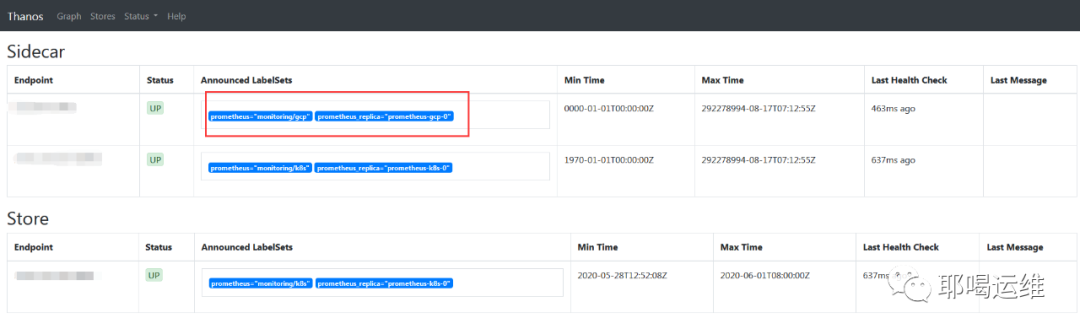
发现可以查看到物理节点
物理节点添加结束
文章转载自耶喝运维,如果涉嫌侵权,请发送邮件至:contact@modb.pro进行举报,并提供相关证据,一经查实,墨天轮将立刻删除相关内容。
