



Morgan Stanley uses Apache Kafka® to publish market data to internal clients and to persist it for replay purposes. We started out using librdkafka
’s C++ API, which maintains C++98 compatibility. C++ is evolving quickly, and we wanted to break away from this compatibility requirement so we could take advantage of new C++ features. This led us to create a new C++ API for Kafka that uses modern C++ features (i.e. C++14 and later). We’ve open sourced this client and hope you enjoy it.
An example producer from librdkafka
First, let’s take a look at an example of the librdkafka
project, slightly stripped for brevity:
// https://github.com/edenhill/librdkafka/blob/master/examples/producer.cpp#include "librdkafka/rdkafkacpp.h"int main (int argc, char **argv) {if (argc != 3) {std::cerr << "Usage: " << argv[0] << " <brokers> <topic>\n";return 1;}std::string brokers = argv[1];std::string topic = argv[2];// Create configuration objectRdKafka::Conf *conf = RdKafka::Conf::create(RdKafka::Conf::CONF_GLOBAL);std::string errstr;// Set bootstrap broker(s).conf->set("bootstrap.servers", brokers, errstr);// Set the delivery report callback.// The callback is only triggered from ::poll() and ::flush().struct ExampleDeliveryReportCb : public RdKafka::DeliveryReportCb {void dr_cb (RdKafka::Message &message) {/* If message.err() is non-zero the message delivery failed permanently for the message. */if (message.err())std::cerr << "% Message delivery failed: " << message.errstr() << std::endl;elsestd::cerr << "% Message delivered to topic " << message.topic_name() <<" [" << message.partition() << "] at offset " << message.offset() << std::endl;}} ex_dr_cb;conf->set("dr_cb", &ex_dr_cb, errstr);// Create a producer instance.RdKafka::Producer *producer = RdKafka::Producer::create(conf, errstr);delete conf;// Read messages from stdin and produce to the broker.std::cout << "% Type message value and hit enter to produce message. (empty line to quit)" << std::endl;for (std::string line; std::getline(std::cin, line);) {// Send/Produce message. This is an asynchronous call,// on success it will only enqueue the message on the internal producer queue.retry:RdKafka::ErrorCode err =producer->produce(/* Topic name */topic,/* Any Partition */RdKafka::Topic::PARTITION_UA,/* Make a copy of the value */RdKafka::Producer::RK_MSG_COPY /* Copy payload */,/* Value */const_cast<char*>(line.c_str()), line.size(),/* Key */NULL, 0,/* Timestamp (defaults to current time) */0,/* Message headers, if any */NULL,/* Per-message opaque value passed to delivery report */NULL);if (err != RdKafka::ERR_NO_ERROR) {std::cerr << "% Failed to produce to topic " << topic << ": " <<RdKafka::err2str(err) << std::endl;if (err == RdKafka::ERR__QUEUE_FULL) {// If the internal queue is full, wait for messages to be delivered and then retry.producer->poll(1000/*block for max 1000ms*/);goto retry;}} else {std::cout << "% Enqueued message (" << line.size() << " bytes) " <<"for topic " << topic << std::endl; } // A producer application should continually serve the delivery report queue by calling poll() at frequent intervals. producer->poll(0);if (line.empty()) break;}/* Wait for final messages to be delivered or fail. */std::cout << "% Flushing final messages..." << std::endl; producer->flush(10*1000 /* wait for max 10 seconds */);if (producer->outq_len() > 0)std::cerr << "% " << producer->outq_len() << "message(s) were not delivered" << std::endl;delete producer;}
This program configures a Kafka producer, sends user-specified messages using the producer, and then waits until all messages are delivered or a timeout occurs. Finally, it closes the producer.
Although this works, it doesn’t take advantage of modern C++ features:
Manual resource management (raw pointers) instead of “Resource Acquisition Is Initialization” (RAII)
Use of event loop with
GOTO
, instead of continuations popularized by AsioCallbacks required to the subclass
RdKafka::DeliveryReportCb
, where a Lambda would have been enough
Modern C++ features allow us to increase performance and usability, such as the following:
Smart pointers help make the lifetime management much easier for shallow-copied messages
Encapsulation hides internal queue management and complicated polling rules
Object-oriented interfaces are used to replace the long parameter lists for functions
A modern Kafka producer
Let’s dive into the modern C++ API that we built: modern-cpp-kafka
, available on GitHub.
Reimplement the previously shown functionality but using the modern-cpp-kafka
API. First, let’s use the synchronous producer:
// https://github.com/morganstanley/modern-cpp-kafka/blob/main/examples/kafka_sync_producer.cc#include "kafka/KafkaProducer.h"#include <iostream>#include <string>int main(int argc, char **argv){if (argc != 3) {std::cerr << "Usage: " << argv[0] << " <brokers> <topic>\n";return 1;}std::string brokers = argv[1];kafka::Topic topic = argv[2];// Create configuration objectkafka::Properties props({{"bootstrap.servers", brokers},{"enable.idempotence", "true"},});// Create a producer instance.kafka::KafkaSyncProducer producer(props);// Read messages from stdin and produce to the broker.std::cout << "% Type message value and hit enter to produce message. (empty line to quit)" << std::endl;for (std::string line; std::getline(std::cin, line);) {// The ProducerRecord doesn't own `line`, it is just a thin wrapperauto record = kafka::ProducerRecord(topic,kafka::NullKey,kafka::Value(line.c_str(), line.size()));// Send the message.try {kafka::Producer::RecordMetadata metadata = producer.send(record);std::cout << "% Message delivered: " << metadata.toString() << std::endl;} catch (const kafka::KafkaException& e) {std::cerr << "% Message delivery failed: " << e.error().message() << std::endl;}if (line.empty()) break;};// producer.close(); No explicit close is needed, RAII will take care of it}
There are several key differences:
RAII is used for lifetime management
Exceptions are used for error handling
Polling and queue management is now hidden
Naming matches the Java API, making it easier to learn if you know the other
The
Properties
instance hasenable.idempotence=true
configured, thus the producer will ensure that messages are successfully sent exactly once and in the original order
But this isn’t perfect yet! The synchronous nature prevents us from sending multiple messages concurrently, and a slower network will quickly degrade the performance of our application. This brings us to the asynchronous producer:
// Create a producer instance.kafka::KafkaAsyncProducer producer(props);// Read messages from stdin and produce to the broker.std::cout << "% Type message value and hit enter to produce message. (empty line to quit)" << std::endl;for (std::string line; std::getline(std::cin, line);) {// The ProducerRecord doesn't own `line`, it is just a thin wrapperauto record = kafka::ProducerRecord(topic,kafka::NullKey,kafka::Value(line.c_str(), line.size()));// Send the message.producer.send(record,// The delivery report handler[](const kafka::Producer::RecordMetadata& metadata, std::error_code ec) {if (!ec)std::cout << "% Message delivered: " << metadata.toString() << std::endl;elsestd::cerr << "% Message delivery failed: " << ec.message() << std::endl;},// The memory block given by record.value() will be copiedkafka::KafkaProducer::SendOption::ToCopyRecordValue);if (line.empty()) break;};
With the asynchronous producer, we can have multiple messages in flight. We no longer have to derive a new class from a library-defined callback type: a regular Lambda can be used instead, improving readability and making the code more concise. The callback now takes std::error_code
instead of RdKafka::ErrorCode
, a more intuitive choice for modern C++ applications.
producer.send(...)
will keep waiting if the internal queue is full (on ERR__QUEUE_FULL
), but only as long as one message is either delivered or a timeout occurs, freeing up space in the internal queue.
Unfortunately, now we have to copy the message. Let’s fix that:
for (auto line = std::make_shared<std::string>();std::getline(std::cin, *line);line = std::make_shared<std::string>()){// The ProducerRecord doesn't own `line`, it is just a thin wrapperauto record = kafka::ProducerRecord(topic,kafka::NullKey,kafka::Value(line->c_str(), line->size()));// Send the message.producer.send(record,// The delivery report handler// Note: Here we capture the shared_pointer of `line`,// which holds the content for `record.value()`.// It makes sure the memory block is valid until the lambda finishes.[line](const kafka::Producer::RecordMetadata& metadata, std::error_code ec) {if (!ec)std::cout << "% Message delivered: " << metadata.toString() << std::endl;elsestd::cerr << "% Message delivery failed: " << ec.message() << std::endl; });if (line->empty()) break;};
Now the message is owned by a smart pointer that gets captured by the Lambda/callback that gets invoked after the message is delivered (or after an error occurs). Therefore, the message is kept alive as long as it is needed.
A modern Kafka consumer
So far, we managed to send some messages. Let’s see if we can consume them! KafkaAutoCommitConsumer
is the simplest of all:
// https://github.com/morganstanley/modern-cpp-kafka/blob/main/examples/kafka_auto_commit_consumer.cc#include "kafka/KafkaConsumer.h"#include <iostream>#include <stream>int main(int argc, char **argv){if (argc != 3) {std::cerr << "Usage: " << argv[0] << " <brokers> <topic>\n";return 1;}std::string brokers = argv[1];kafka::Topic topic = argv[2];// Create configuration objectkafka::Properties props ({{"bootstrap.servers", brokers},});// Create a consumer instance.kafka::KafkaAutoCommitConsumer consumer(props);// Subscribe to topicsconsumer.subscribe({topic});// Read messages from the topic.std::cout << "% Reading messages from topic: " << topic << std::endl;while (true) {auto records = consumer.poll(std::chrono::milliseconds(100));for (const auto& record: records) {// In this example, quit on empty messageif (record.value().size() == 0) return 0;if (!record.error()) {std::cout << "% Got a new message..." << std::endl;std::cout << " Topic : " << record.topic() << std::endl;std::cout << " Partition: " << record.partition() << std::endl;std::cout << " Offset : " << record.offset() << std::endl;std::cout << " Timestamp: " << record.timestamp().toString() << std::endl;std::cout << " Headers : " << kafka::toString(record.headers()) << std::endl;std::cout << " Key [" << record.key().toString() << "]" << std::endl;std::cout << " Value [" << record.value().toString() << "]" << std::endl;} else {// Errors are typically informational, thus no special handling is requiredstd::cerr << record.toString() << std::endl;}}}// consumer.close(); // No explicit close is needed, RAII will take care of it}
This example initializes a KafkaAutoCommitConsumer
, subscribes to a given topic, and consumes messages until it receives an empty one. As expected, the destructor of the consumer properly cleans up its resources.
An interesting detail of this consumer is the scheduling of commits, that is, when the consumer signals to the broker that a given message was successfully consumed. KafkaAutoCommitConsumer
commits its position before each poll (not after the poll), effectively acknowledging the messages received during the previous poll. This ensures that even if the consumer crashes, unprocessed messages will not be acknowledged (assuming processing atomically completes between polls).
To get more control over the scheduling of commits, KafkaManualCommitConsumer
can be used:
// Create a consumer instance.kafka::KafkaManualCommitConsumer consumer(props);// Subscribe to topicsconsumer.subscribe({topic});auto lastTimeCommitted = std::chrono::steady_clock::now();// Read messages from the topic.std::cout << "% Reading messages from topic: " << topic << std::endl;bool allCommitted = true;bool running = true;while (running) {auto records = consumer.poll(std::chrono::milliseconds(100));for (const auto& record: records) {// In this example, quit on empty messageif (record.value().size() == 0) {running = false;break;}if (!record.error()) {std::cout << "% Got a new message..." << std::endl;std::cout << " Topic : " << record.topic() << std::endl;std::cout << " Partition: " << record.partition() << std::endl;std::cout << " Offset : " << record.offset() << std::endl;std::cout << " Timestamp: " << record.timestamp().toString() << std::endl;std::cout << " Headers : " << kafka::toString(record.headers()) << std::endl;std::cout << " Key [" << record.key().toString() << "]" << std::endl;std::cout << " Value [" << record.value().toString() << "]" << std::endl;allCommitted = false;} else {// No special handling is required,// since the consumer will attempt to auto-recover.std::cerr << record.toString() << std::endl;}}if (!allCommitted) {auto now = std::chrono::steady_clock::now();if (now - lastTimeCommitted > std::chrono::seconds(1)) {// Commit offsets for messages polledstd::cout << "% syncCommit offsets: " << kafka::Utility::getCurrentTime() << std::endl;consumer.commitSync(); // or commitAsync()lastTimeCommitted = now;allCommitted = true;}}}
In this example, a manual commit happens roughly once per second. commitSync
waits for commit acknowledgement, while commitAsync
does not.
Summary of modern-cpp-kafka
and basic concepts
The examples above provide an overview of the modern-cpp-kafka
API.
Let’s summarize the basic concepts:
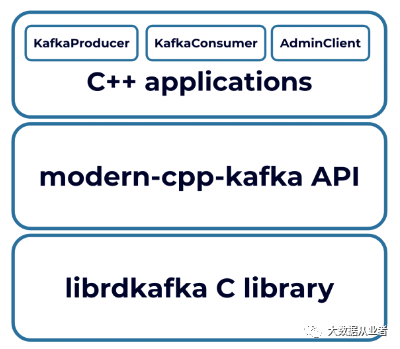
There are three Kafka clients: KafkaProducer
, KafkaConsumer
, and AdminClient
(not shown in this article).
KafkaProducerProducerRecord
: The “message type” for aKafkaProducer
to send, constructed withTopic
,Partition
,Key
,Value
, andHeaders
.Producer::Callback
: The callback method used to provide asynchronous handling of request completion. This method will be called when the record sent to the server has been acknowledged.KafkaAsyncProducer
: Publishes records to the Kafka cluster asynchronously. Eachsend
operation requires a per-messageProducer::Callback
.KafkaSyncProducer
: Publishes records to the Kafka cluster synchronously. Thesend
operation does not return until the delivery is completed.Producer::RecordMetadata
: The metadata for a record that has been acknowledged by the server. It containsTopic
,Partitions
,Offset
,KeySize
,ValueSize
,Timestamp
, andPersistedStatus
. AKafkaAsyncProducer
passes this metadata as an input parameter of theProducer::Callback
.KafkaSyncProducer
returns the metadata with the synchronizedsend
method.KafkaConsumerConsumerRecord
: The message type returned by aKafkaConsumer
instance. It containsTopic
,Partition
,Offset
,Key
,Value
,Timestamp
, andHeaders
.KafkaAutoCommitConsumer
: Automatically commits previously polled offsets on eachpoll
operation.KafkaManualCommitConsumer
: Provides manualcommitAsync
andcommitSync
methods to acknowledge messages.AdminClient
: The administrative client for Kafka that supports managing and inspecting topics. Examples can be found on GitHub.
Conclusion
modern-cpp-kafka
is a header-only C++ library that uses idiomatic C++ features to provide a safe, efficient, and easy way of producing and consuming Kafka messages.
The modern-cpp-kafka
project on GitHub has been thoroughly tested within Morgan Stanley. After we replaced a legacy implementation with it, throughput for a key middleware system improved by 26%.
We are actively maintaining and improving the project. For example, the transactional
interface is on the way and new components, such as streamer
and connector
, are also on the roadmap. If you’re interested in contributing, we’d be very happy to have you involved in the project, whether it’s raising an issue or submitting a PR.
