



最近笔者斥巨资购入了一台联想拯救者笔记本,鬼使神差将操作系统装成了Ubuntu,版本还是当时随手能拿到的老版本14.04.1。整备机器,设置好网络,更改好国内源,想愉快的安装软件的时候,麻烦来了。
更换国内源
操作系统自带的源属于外网,很可能被墙,速度相当慢。
推荐使用阿里源,当然也有清华源、网易源、163源等等
vim etc/apt/sources.listdeb http://mirrors.aliyun.com/ubuntu/bionic main restricted universe multiversedeb-src http://mirrors.aliyun.com/ubuntu/bionic main restricted universe multiversedeb http://mirrors.aliyun.com/ubuntu/bionic-security main restricted universe multiversedeb-src http://mirrors.aliyun.com/ubuntu/bionic-security main restricted universe multiversedeb http://mirrors.aliyun.com/ubuntu/bionic-updates main restricted universe multiversedeb-src http://mirrors.aliyun.com/ubuntu/bionic-updates main restricted universe multiversedeb http://mirrors.aliyun.com/ubuntu/bionic-proposed main restricted universe multiversedeb-src http://mirrors.aliyun.com/ubuntu/bionic-proposed main restricted universe multiversedeb http://mirrors.aliyun.com/ubuntu/bionic-backports main restricted universe multiversedeb-src http://mirrors.aliyun.com/ubuntu/bionic-backports main restricted universe multiverse
apt-get update超时问题
执行update时候,等待许久,发现一直连接不上dl.google.com,原因想必大家都清楚google一直被墙,现象如下:
root@felixzh:~# apt-get updateHit:1 http://mirrors.aliyun.com/ubuntubionic InReleaseHit:2http://archive.ubuntukylin.com:10006/ubuntukylin xenial InReleaseHit:3 http://mirrors.aliyun.com/ubuntubionic-security InReleaseHit:4 http://repo.mysql.com/apt/ubuntutrusty InReleaseHit:5 http://mirrors.aliyun.com/ubuntubionic-updates InReleaseHit:6 http://mirrors.aliyun.com/ubuntubionic-proposed InReleaseHit:7 http://mirrors.aliyun.com/ubuntubionic-backports InReleaseHit:8https://download.docker.com/linux/ubuntu trusty InReleaseGet:9 https://dl.bintray.com/sbt/debian InReleaseIgn:9https://dl.bintray.com/sbt/debian InReleaseHit:10https://dl.bintray.com/sbt/debian Release0% [Connecting to dl.google.com(172.217.194.136)]
解决方法
首先通过站长工具http://ping.chinaz.com/dl.google.com,
查询一个国内访问dl.google.com网站的可以使用的ip,如下:
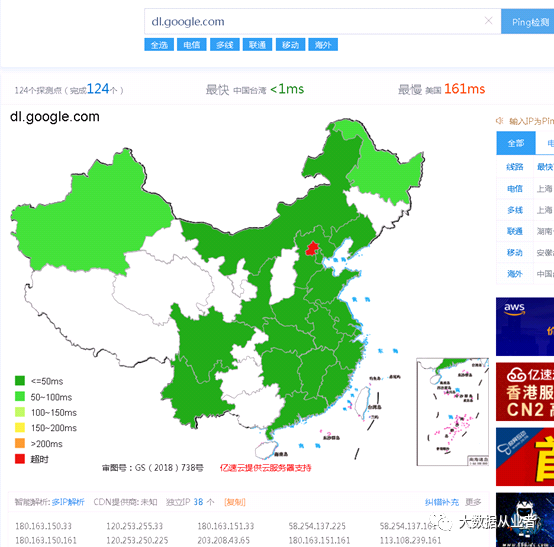
然后,将ip添加到/etc/hosts文件,如下(笔者使用的是180.163.151.161):
sudo vim etc/hosts180.163.151.161 dl.google.com
再次执行update
root@felixzh:~# apt-get updateHit:1 http://dl.google.com/linux/chrome/debstable InReleaseHit:2 http://mirrors.aliyun.com/ubuntubionic InReleaseHit:3http://archive.ubuntukylin.com:10006/ubuntukylin xenial InReleaseHit:4 http://repo.mysql.com/apt/ubuntutrusty InReleaseHit:5 http://mirrors.aliyun.com/ubuntubionic-security InReleaseHit:6 http://mirrors.aliyun.com/ubuntubionic-updates InReleaseHit:7https://download.docker.com/linux/ubuntu trusty InReleaseHit:8 http://mirrors.aliyun.com/ubuntubionic-proposed InReleaseHit:9 http://mirrors.aliyun.com/ubuntubionic-backports InReleaseGet:10https://dl.bintray.com/sbt/debian InReleaseIgn:10https://dl.bintray.com/sbt/debian InReleaseHit:11https://dl.bintray.com/sbt/debian ReleaseReading package lists... Done
至此,就可以愉快的安装更新系统软件了!
文章转载自大数据从业者,如果涉嫌侵权,请发送邮件至:contact@modb.pro进行举报,并提供相关证据,一经查实,墨天轮将立刻删除相关内容。
