



让我们一起了解下,备份数据需要重视什么?
1.数据库版本
说明:由于版本差异,可能会造成在使用诸如mysql,mysqldump 异常。切记命令使用路径匹配备份所属实例的basedir,防止备份或还原异常。一定程度决定了备份数据的有效性。
2.备份用户所需必要权限。
说明:
(1.对于DB级用户权限粒度和规范需要做好。一般划分为:应用账号,管理员账号,备份账号,复制账号。每种账号对应权限需严格界定。防止篡权,带来审计难度和生产事故。
(2.备份账号一般需 select,create,alter,show view,show trigger,lock权限
3.备份方式
说明:
(1.物理备份 如使用“大名鼎鼎的”innobackup
(2.逻辑备份 mysqldump,mydumper, (升级版mysqldump)mysqlpump
(3.备份方式影响线上用户体验。例如锁时长,并发性能。
4.备份策略:
说明:全量备份,增量备份。决定了备份和恢复时长。
5.备份数据量
说明:备份数据的大小影响备份耗时和恢复时长。也在一定程度上决定备份方式。
6.备份粒度:
说明:基于实例级,数据库级还是表级备份。备份粒度决定了备份数据的完整性和恢复时长。
7.备份内容
说明:包括库表数据,binlog 文件
恢复数据需要重视如下几点:
1.先认识如下两个概念 RTO和RPO
RTO (Recovery Time Objective,复原时间目标)是数据中心可容许服务中断的时长
RPO (Recovery Point Objective,复原点目标)是指从系统/生产数据恢复到何种程度。
这两种目标决定了数据的可靠性和可用性。如上介绍的备份方式,策略,粒度,内容等均影响这两个指标。
作者仅抛砖引玉,展示一种备份和还原数据的自动化脚本。(读者可完善如上提及的备份重视事项)
我们开始一段测试过程:
环境说明:
192.128.220.128:3306 MySQL-5.7.26 主库
192.168.220.129:3306 MySQL-5.7.26 恢复数据实例
# 128 现有数据
root@localhost:mysql 5.7.26-log 10:37:45> select * from jiale.test01;
+----+----------+------+
| id | name | age |
+----+----------+------+
| 1 | t1 | 30 |
| 2 | t2 | 40 |
| 3 | t3 | 33 |
| 4 | houhao | 30 |
| 5 | zhuqiang | 30 |
+----+----------+------+
5 rows in set (0.00 sec)
# 利用脚本备份库表数据
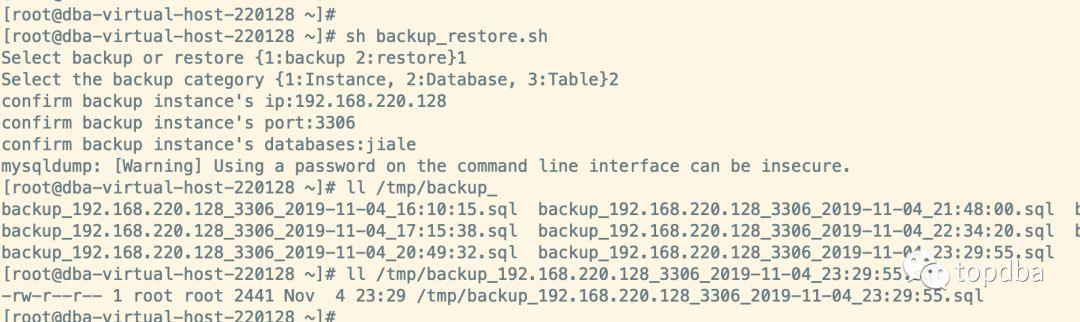
# 129 实例上还原数据
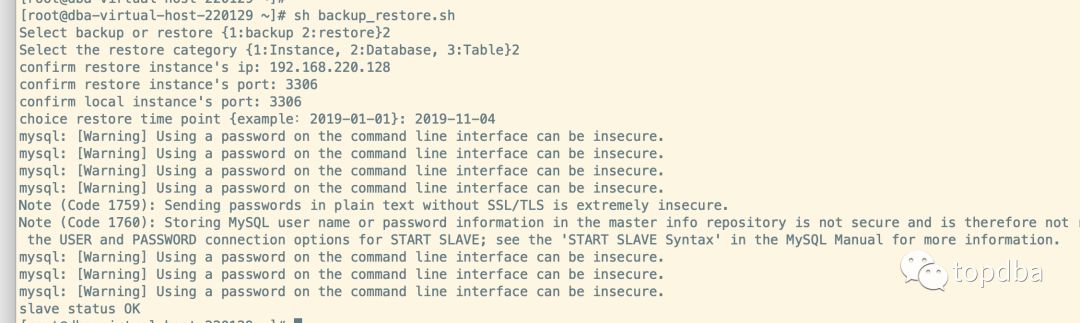
root@localhost:mysql 5.7.26-log 10:37:50> select * from jiale.test01;
+----+----------+------+
| id | name | age |
+----+----------+------+
| 1 | t1 | 30 |
| 2 | t2 | 40 |
| 3 | t3 | 33 |
| 4 | houhao | 30 |
| 5 | zhuqiang | 30 |
+----+----------+------+
5 rows in set (0.00 sec)
#128 新增一条数据
root@localhost:jiale 5.7.26-log 10:37:47> insert into test01 (name,age) values ('chenlei','29');
Query OK, 1 row affected (0.00 sec)
#129 查看复制状态和数据完整性
root@localhost:mysql 5.7.26-log 10:42:56> select * from jiale.test01;
+----+----------+------+
| id | name | age |
+----+----------+------+
| 1 | t1 | 30 |
| 2 | t2 | 40 |
| 3 | t3 | 33 |
| 4 | houhao | 30 |
| 5 | zhuqiang | 30 |
| 6 | chenlei | 29 |
+----+----------+------+
6 rows in set (0.00 sec)
root@localhost:mysql 5.7.26-log 11:30:02> show slave status\G
*************************** 1. row ***************************
Slave_IO_State: Waiting for master to send event
Master_Host: 192.168.220.128
Master_User: replic
Master_Port: 3306
Connect_Retry: 60
Master_Log_File: mysql-bin.000001
Read_Master_Log_Pos: 402
Relay_Log_File: mysql-relay-bin.000002
Relay_Log_Pos: 607
Relay_Master_Log_File: mysql-bin.000001
Slave_IO_Running: Yes
Slave_SQL_Running: Yes
Replicate_Do_DB:
Replicate_Ignore_DB:
Replicate_Do_Table:
Replicate_Ignore_Table:
Replicate_Wild_Do_Table:
Replicate_Wild_Ignore_Table:
Last_Errno: 0
Last_Error:
Skip_Counter: 0
Exec_Master_Log_Pos: 402
Relay_Log_Space: 806
Until_Condition: None
Until_Log_File:
Until_Log_Pos: 0
Master_SSL_Allowed: No
Master_SSL_CA_File:
Master_SSL_CA_Path:
Master_SSL_Cert:
Master_SSL_Cipher:
Master_SSL_Key:
Seconds_Behind_Master: 0
Master_SSL_Verify_Server_Cert: No
Last_IO_Errno: 0
Last_IO_Error:
Last_SQL_Errno: 0
Last_SQL_Error:
Replicate_Ignore_Server_Ids:
Master_Server_Id: 128
Master_UUID: 806af1e2-feb2-11e9-9b92-525400bdf400
Master_Info_File: mysql.slave_master_info
SQL_Delay: 0
SQL_Remaining_Delay: NULL
Slave_SQL_Running_State: Slave has read all relay log; waiting for more updates
Master_Retry_Count: 86400
Master_Bind:
Last_IO_Error_Timestamp:
Last_SQL_Error_Timestamp:
Master_SSL_Crl:
Master_SSL_Crlpath:
Retrieved_Gtid_Set: 806af1e2-feb2-11e9-9b92-525400bdf400:1
Executed_Gtid_Set: 63dbac8c-feb4-11e9-87d3-52540005ae6e:1-7,
806af1e2-feb2-11e9-9b92-525400bdf400:1
Auto_Position: 1
Replicate_Rewrite_DB:
Channel_Name:
Master_TLS_Version:
1 row in set (0.00 sec)
代码如下:
#!/bin/bash
##################################
# File Name:backup_restore.sh
# Author:zhangjiale
# Version:V1.0
# Description:backup or restore operation
#备份
function backup(){
read -p "Select the backup category {1:Instance, 2:Database, 3:Table}" BACKUP_LEVEL
function instance_level_backup(){
pass
}
function schema_level_backup(){
read -p "confirm backup instance's ip:" IP
read -p "confirm backup instance's port:" PORT
read -p "confirm backup instance's databases:" DB
export BACKUP_IP=$IP
export BACKUP_PORT=$PORT
export BACKUP_DATABASES=$DB
export BASEDIR=`ps -ef|grep -w $BACKUP_PORT|grep basedir |awk '{print $10}' |awk -F '=' '{print $2}'`
export MYSQLDUMP="${BASEDIR}/bin/mysqldump"
export global MYSQL="${BASEDIR}/bin/mysql"
export SOCKET=`ps -ef|grep -w $BACKUP_PORT|grep basedir |awk '{print $(NF-1)}' |awk -F '=' '{print $2}'`
# 这边还需要判断是否开启gtid_mode
$MYSQLDUMP -uroot -proot -S $SOCKET --set-gtid-purged=OFF --single-transaction --master-data=2 --triggers --routines --events --add-drop-database -B $BACKUP_DATABASES >/tmp/backup_${BACKUP_IP}_${BACKUP_PORT}_`date "+%F_%H:%M:%S"`.sql
}
function table_level_backup(){
pass
}
if [[ "$BACKUP_LEVEL" == "1" ]];then
instance_level_backup
elif [[ "$BACKUP_LEVEL" == "2" ]]; then
schema_level_backup
elif [[ "$BACKUP_LEVEL" == "3" ]]; then
table_level_backup
fi
}
# 还原
function restore()
{
# 确认还原是基于实例级,库级,还是表级。
read -p "Select the restore category {1:Instance, 2:Database, 3:Table}" RESTORE_LEVEL
function instance_level_restore(){
pass
}
function schema_level_restore(){
read -p "confirm restore instance's ip: " RESTOREIP
read -p "confirm restore instance's port: " RESTOREPORT
read -p "confirm local instance's port: " LOCALPORT
read -p "choice restore time point {example:2019-01-01}: " RESTORETIME
export BASEDIR=`ps -ef|grep -w $LOCALPORT|grep basedir |awk '{print $10}' |awk -F '=' '{print $2}'`
export MYSQL="${BASEDIR}/bin/mysql"
export PATCH_NAME="${RESTOREIP}_${RESTOREPORT}_${RESTORETIME}"
export RESTORE_FILE=$(find tmp -name "backup_$PATCH_NAME*.sql")
# 重置从库binlog,并导入备份数据
$MYSQL --defaults-file=/data/mysqldata/mysql3306/my.cnf.3306 -uroot -proot -S data/mysqldata/mysql3306/sock/mysql.sock -e "reset master;stop slave;"
$MYSQL --defaults-file=/data/mysqldata/mysql3306/my.cnf.3306 -uroot -proot -S data/mysqldata/mysql3306/sock/mysql.sock < $RESTORE_FILE
# 确认备份文件和位置
MASTER_BINLOG_FILE=`head -100 $RESTORE_FILE |grep -i 'change master' |awk -F "MASTER_LOG_FILE=" '{print $2}' |awk '{print $1}' |sed s'/.$//'`
MASTER_LOG_POS=`head -100 $RESTORE_FILE |grep -i 'change master' |awk -F "MASTER_LOG_FILE=" '{print $2}'|awk -F '=' '{print $2}'|sed s'/.$//'`
# 判断gtid模式是否开启
function create_replication_relation(){
export GTID_MODE=`$MYSQL -uroot -proot -S data/mysqldata/mysql3306/sock/mysql.sock -e "show variables like 'gtid_mode'" |sed '1d' |awk '{print $2}'`
if [[ $GTID_MODE == "ON" ]];then
$MYSQL -uroot -proot -S data/mysqldata/mysql3306/sock/mysql.sock -e "CHANGE MASTER TO MASTER_HOST='$RESTOREIP',MASTER_USER='replic',MASTER_PASSWORD='replic@hot',master_auto_position=1;"
else
$MYSQL -uroot -proot -S data/mysqldata/mysql3306/sock/mysql.sock -e "CHANGE MASTER TO MASTER_HOST='$RESTOREIP',MASTER_USER='replic',master_port="$RESTOREPORT",MASTER_PASSWORD='replic@hot',MASTER_LOG_FILE='$MASTER_BINLOG_FILE',MASTER_LOG_POS=$MASTER_LOG_POS;"
fi
# 开启复制,并确认复制状态是否正常
$MYSQL -uroot -proot -S data/mysqldata/mysql3306/sock/mysql.sock -e "start slave;"
SLAVE_IO_STATUS=`$MYSQL -uroot -proot -S data/mysqldata/mysql3306/sock/mysql.sock -e "show slave status\G;" |grep -w "Slave_IO_Running"|awk -F ":" '{print $2}'|awk '{gsub(/^\s+|\s+$/, "");print}'`
SLAVE_SQL_STATUS=`$MYSQL -uroot -proot -S data/mysqldata/mysql3306/sock/mysql.sock -e "show slave status\G;" |grep -w "Slave_SQL_Running"|awk -F ":" '{print $2}'|awk '{gsub(/^\s+|\s+$/, "");print}'`
[[ $SLAVE_IO_STATUS == "Yes" ]] && [[ $SLAVE_SQL_STATUS == "Yes" ]] && echo "slave status OK " || echo "slave status Error"
}
create_replication_relation
}
function table_level_restore(){
pass
}
if [[ "$RESTORE_LEVEL" == "1" ]];then
instance_level_restore
elif [[ "$RESTORE_LEVEL" == "2" ]]; then
schema_level_restore
elif [[ "$RESTORE_LEVEL" == "3" ]]; then
table_level_backup
fi
}
read -p "Select backup or restore {1:backup 2:restore}" OPERATE_TYPE
if [[ "$OPERATE_TYPE" == "1" ]];then
backup
elif [[ "$OPERATE_TYPE" == "2" ]];then
restore
fi
看完代码的你,是不是有所启发?欢迎各位一起探讨此议题和代码内容。
本文分享自微信公众号 - topdba,如有侵权,请联系 service001@enmotech.com 删除。
