



oracle 打补丁
在dba的日常工作当中有一项十分重要的工作就是给数据库打补丁,Oracle官方会在每个季度出一个补丁包, 针对一些数据库基础版本存在的bug进行修复的工作。
Oracle在每个季度会发布两种包,一种是CPU(critical patch update),一种是PSU(patch set update )。CPU是针对一些安全隐患出的包,PSU是针对数据库某个版本的一些bug出的补丁包。CPU包当中最新的包会包含之前出的一些包,所以针对于CPU只需要打最新的包就行。PSU有些是存在依赖关系的,想要打一些PSU包的时候需要打一些其他版本的辅助包。PSU包当中会包含CPU包。
数据库信息:
ip: 192.168.1.20
sid: orcl
version: 11.2.0.1
psu id: 12419378
首先要明确一点的是,想要下载对应的psu包的话,需要又mos账号。在补丁栏中选取对应的数据库版本和操作系统版本,oracle会给出对应一些版本和系统的建议包,我们现在选用的就是Oracle的建议包
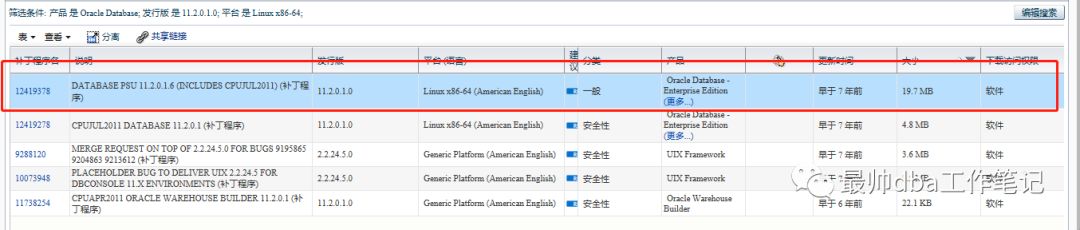
这个版本当中修复了如下的一些bug
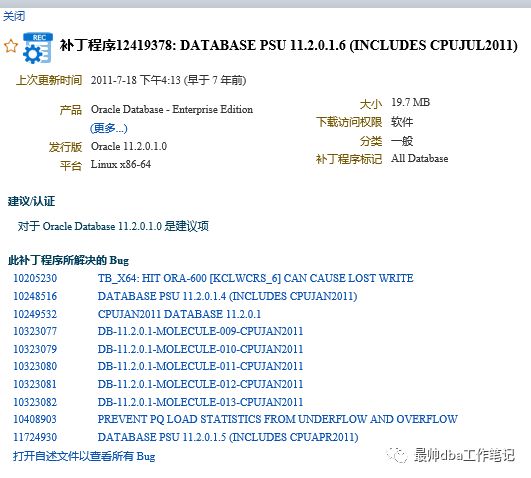
我们将这个包下下来
p12419378_112010_Linux-x86-64.zip
unzip p12419378_112010_Linux-x86-64.zip
这个时候会出现一个12419378的目录,这个就是我们之后要用到的psu包。
将数据库和监听关闭。注意这里的操作十分的重要,一定要将数据库和监听关闭,否则会引起报错。
SQL>shutdown immediate;
$lscnrctl stop
之后进行opatch的验证
在每一个psu包当中都会有一个readme.xml的文件,这个文件是一个指南手册,在打补丁之前一定要读读这个文件,这个文件会告诉你这个psu包需要使用什么版本的opatch进行操作。
opatch放在$ORACLE_HOME/OPatch/opatch 下
我们可以使用sh $ORACLE_HOME/OPatch/optach version 查看对应的opatch版本
$ sh $ORACLE_HOME/OPatch/optach version
11.1.0.6.0
我们查看一下这个psu当中的readme.html给出的opatch版本

目前我们版本不足所以需要升级opatch包。
下载地址在 https://updates.oracle.com/download/6880880.html
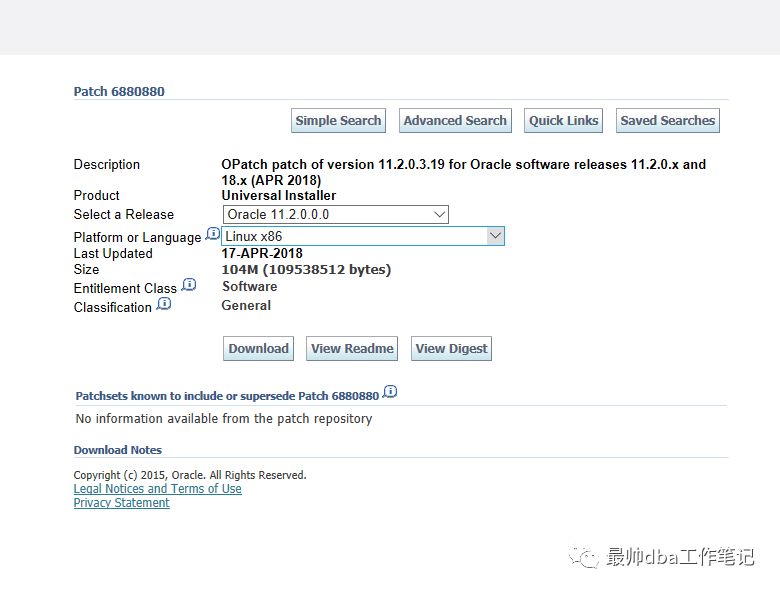
我们选取11.2.0.0版本,基于环境linux x86-64bit的环境,得到的opatch的版本将会是11.2.0.3.14
得到的包名为p6880880_112000_Linux-x86-64.zip
unzip p6880880_112000_Linux-x86-64.zip
会得到一个OPatch的文件
$ mv OPatch $ORACLE_HOME/OPatch
$ cd $ORACLE_HOME/OPatch

此时运行optach apply ,我们发现现在没有报错,并且正常执行。
oracle@source 12419378]$ sh /oracle/app/oracle/product/OraHome/OPatch/opatch apply
Oracle Interim Patch Installer version 11.2.0.3.19
Copyright (c) 2018, Oracle Corporation. All rights reserved.
Oracle Home : /oracle/app/oracle/product/OraHome
Central Inventory : /oracle/app/oraInventory
from : /oracle/app/oracle/product/OraHome/oraInst.loc
OPatch version : 11.2.0.3.19
OUI version : 11.2.0.1.0
Log file location : /oracle/app/oracle/product/OraHome/cfgtoollogs/opatch/opatch2018-08-21_18-55-43PM_1.log
Verifying environment and performing prerequisite checks...
OPatch continues with these patches: 12419378
Do you want to proceed? [y|n]
y
User Responded with: Y
All checks passed.
Provide your email address to be informed of security issues, install and
initiate Oracle Configuration Manager. Easier for you if you use your My
Oracle Support Email address/User Name.
Visit http://www.oracle.com/support/policies.html for details.
Email address/User Name:
You have not provided an email address for notification of security issues.
Do you wish to remain uninformed of security issues ([Y]es, [N]o) [N]: y
Please shutdown Oracle instances running out of this ORACLE_HOME on the local system.
(Oracle Home = '/oracle/app/oracle/product/OraHome')
Is the local system ready for patching? [y|n]
y
User Responded with: Y
Backing up files...
Applying interim patch '12419378' to OH '/oracle/app/oracle/product/OraHome'
ApplySession: Optional component(s) [ oracle.client, 11.2.0.1.0 ] not present in the Oracle Home or a higher version is found.
Patching component oracle.rdbms.rsf, 11.2.0.1.0...
Patching component oracle.rdbms.dbscripts, 11.2.0.1.0...
Patching component oracle.rdbms, 11.2.0.1.0...
Patching component oracle.oraolap, 11.2.0.1.0...
Patching component oracle.rdbms.deconfig, 11.2.0.1.0...
Patching component oracle.javavm.server, 11.2.0.1.0...
Patching component oracle.precomp.common, 11.2.0.1.0...
Patching component oracle.network.rsf, 11.2.0.1.0...
Patching component oracle.network.listener, 11.2.0.1.0...
Patching component oracle.rdbms.dv.oc4j, 11.2.0.1.0...
Patching component oracle.sdo.locator, 11.2.0.1.0...
Patching component oracle.sysman.console.db, 11.2.0.1.0...
Patching component oracle.sysman.oms.core, 10.2.0.4.2...
Patching component oracle.rdbms.dv, 11.2.0.1.0...
Patching component oracle.xdk.rsf, 11.2.0.1.0...
Patching component oracle.ldap.rsf.ic, 11.2.0.1.0...
Patching component oracle.ldap.rsf, 11.2.0.1.0...
Patching component oracle.sysman.plugin.db.main.repository, 11.2.0.1.0...
OPatch found the word "warning" in the stderr of the make command.
Please look at this stderr. You can re-run this make command.
Stderr output:
ins_precomp.mk:19: warning: overriding commands for target `pcscfg.cfg'
/oracle/app/oracle/product/OraHome/precomp/lib/env_precomp.mk:2091: warning: ignoring old commands for target `pcscfg.cfg'
/oracle/app/oracle/product/OraHome/precomp/lib/ins_precomp.mk:19: warning: overriding commands for target `pcscfg.cfg'
/oracle/app/oracle/product/OraHome/precomp/lib/env_precomp.mk:2091: warning: ignoring old commands for target `pcscfg.cfg'
Patch 12419378 successfully applied.
OPatch Session completed with warnings.
Log file location: /oracle/app/oracle/product/OraHome/cfgtoollogs/opatch/opatch2018-08-21_18-55-43PM_1.log
我们发现一些warning 的信息,但是这些信息无关紧要,查看一下日志

在对软件打完补丁之后,下一步使用数据库的内置脚本进行补丁升级。
$ sqlplus / as sysdba
SQL>startup
SQL>@?/rdbms/admin/catbundle.sql psu apply
这个时候会执行大量的脚本,会有很多的刷频,最终会将所有的过程全部都写到一个日志文件当中:

现在我们的打补丁工作就告一段落了。
我们验证一下数据库有没有打到补丁:
首先通过opatch查看我们打了哪个补丁:
$ ./opatch lspatches
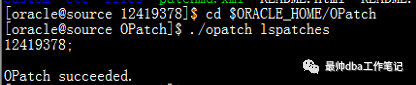
查看打的补丁的信息
$ ./opatch lsinv
[oracle@source OPatch]$ ./opatch version
OPatch Version: 11.2.0.3.19
OPatch succeeded.
[oracle@source OPatch]$ ./opatch lsinv
Oracle Interim Patch Installer version 11.2.0.3.19
Copyright (c) 2018, Oracle Corporation. All rights reserved.
Oracle Home : /oracle/app/oracle/product/OraHome
Central Inventory : /oracle/app/oraInventory
from : /oracle/app/oracle/product/OraHome/oraInst.loc
OPatch version : 11.2.0.3.19
OUI version : 11.2.0.1.0
Log file location : /oracle/app/oracle/product/OraHome/cfgtoollogs/opatch/opatch2018-08-21_22-22-59PM_1.log
Lsinventory Output file location : /oracle/app/oracle/product/OraHome/cfgtoollogs/opatch/lsinv/lsinventory2018-08-21_22-22-59PM.txt
--------------------------------------------------------------------------------
Local Machine Information::
Hostname: source
ARU platform id: 226
ARU platform description:: Linux x86-64
Installed Top-level Products (1):
Oracle Database 11g 11.2.0.1.0
There are 1 products installed in this Oracle Home.
Interim patches (1) :
Patch 12419378 : applied on Tue Aug 21 19:07:43 CST 2018
Unique Patch ID: 13769952
Created on 8 Jul 2011, 02:47:43 hrs PST8PDT
Bugs fixed:
9068088, 9363384, 8865718, 8898852, 8801119, 9054253, 8725286, 8974548
9093300, 8909984, 8755082, 8780372, 9952216, 8664189, 8769569, 7519406
9302343, 9471411, 8822531, 7705591, 8650719, 10205230, 9637033, 8883722
8639114, 8723477, 8729793, 8919682, 8856478, 9001453, 8733749, 8565708
8735201, 8684517, 8870559, 8773383, 8981059, 8812705, 9488887, 12534742
8813366, 12534743, 9242411, 12534745, 12534746, 12534747, 8822832
12534748, 8897784, 8760714, 12534749, 8775569, 8671349, 8898589, 9714832
8642202, 9011088, 9369797, 9170608, 9165206, 8834636, 8891037, 8431487
8570322, 8685253, 8872096, 8718952, 8799099, 12534750, 9032717, 9399090
12534751, 12534752, 9713537, 9546223, 12534753, 12534754, 8588519
8783738, 12534755, 12534756, 8834425, 9454385, 8856497, 8890026, 8721315
10248516, 8818175, 8674263, 10249532, 9145541, 8720447, 9272086, 9467635
9010222, 9102860, 9197917, 8991997, 8661168, 8803762, 12419378, 8769239
9654983, 8706590, 8546356, 10408903, 8778277, 9058865, 8815639, 11724991
9971778, 9971779, 9027691, 9454036, 9454037, 9454038, 8761974, 9255542
9275072, 8496830, 8702892, 8818983, 8475069, 8875671, 9328668, 8891929
8798317, 9971780, 8782959, 8774868, 8820324, 8544696, 8702535, 9952260
9406607, 8268775, 9036013, 9363145, 8933870, 8405205, 9467727, 8822365
9676419, 11724930, 8761260, 8790767, 8795418, 8913269, 8717461, 8861700
9531984, 8607693, 8780281, 8330783, 8784929, 8780711, 9341448, 9015983
10323077, 8828328, 9119194, 10323079, 8832205, 8717031, 8665189, 9482399
9676420, 9399991, 8821286, 8633358, 9321701, 9655013, 9231605, 8796511
9167285, 8782971, 8756598, 8703064, 9390484, 9066116, 9007102, 9461782
10323080, 10323081, 10323082, 8753903, 8505803, 9382101, 9352237, 9216806
8918433, 11794163, 9057443, 8790561, 11794164, 8733225, 8795792, 11794165
11794167, 9067282, 8928276, 8837736, 9210925
在数据库当中查看补丁的信息:
select * from dba_registry_history;

目前这个打补丁的工作就已经完成了。
注意:
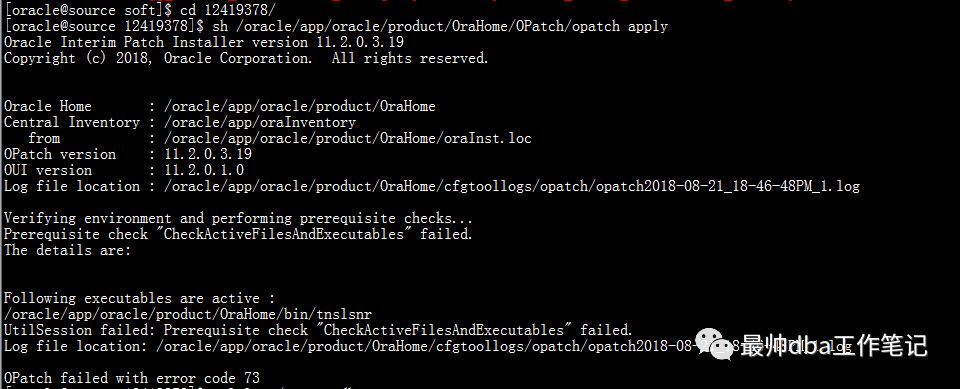
1.前面一再强调,在打补丁的时候一定要关掉数据库,当在数据库运行的情况下,执行opatch apply会有以下报错
2.opatch版本过低导致apply的时候出现报错
oracle@source 12419378]$ sh /oracle/app/oracle/product/OraHome/OPatch/opatch apply
Invoking OPatch 11.1.0.6.0
Oracle Interim Patch Installer version 11.1.0.6.0
Copyright (c) 2007, Oracle Corporation. All rights reserved.
Oracle Home : /oracle/app/oracle/product/OraHome
Central Inventory : /oracle/app/oraInventory
from : /oracle/app/oracle/product/OraHome/oraInst.loc
OPatch version : 11.1.0.6.0
OUI version : 11.2.0.1.0
Log file location : /oracle/app/oracle/product/OraHome/cfgtoollogs/opatch/opatch2018-08-21_18-24-23PM_1.log
ApplySession failed: Patch ID is null.
System intact, OPatch will not attempt to restore the system
OPatch failed with error code 73
还有一种情况是当opatch版本不支持,执行opath apply 的时候将会抛出一个报错是
Prerequisite check “CheckMinimumOPatchVersion” failed
这个根据版本而异,处理方法是相同的。
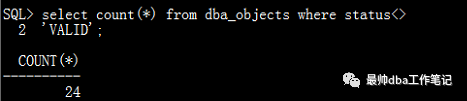
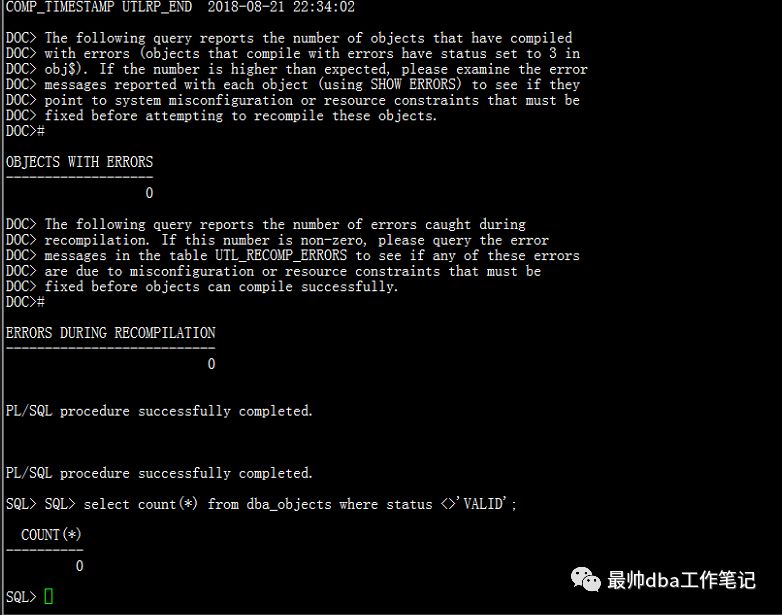
3.打完补丁过后可能会导致一些object失效,我们根据需要去将一些object重新生效。
此时用到的脚本是数据库当中的utlrp.sql
SQL>@?/rdbms/admin/utlrp.sql
THAT'S ALL
BY CUI PEACE!!!!!
本文分享自微信公众号 - 最帅dba工作笔记,如有侵权,请联系 service001@enmotech.com 删除。
