



MYSQL数据库的备份恢复
MySQL从备份的时机可分为
cold backup ,hot backup , warm backup
hot backup 是指在数据库运行中直接备份,不需要关闭数据库。
cold backup 是指在备份的时候需要拷贝相关的数据库物理文件。
warm backup 实在数据库运行是进行,对数据库操作有轻微的影响。
从备份的方法可分为
物理备份,逻辑备份
逻辑备份 生成可以访问的sql文件或者是txt文件
(例如:mysqldump ,select * from tablename into outfile 'xxx'; )
这种备份是指备份后的文件内容是可读的,一般是文本文件,内容一般是sql语句或者是实际的数据。
这种方法适用于升级和迁移等操作,恢复的时间比较长。
裸文件备份 直接拷贝底层文件
(例如:xtrabackup)数据库既可以处于运行状态,也可以处于停止状态。
逻辑备份详细介绍
select * from tablename into outfile '/xxx/xxx.txt';
在这种备份之后,会生成一个文件在指定目录下,但是导出的这个目录必须是有一定权限的,必须要具有mysql权限。
也可以使用where的筛选将数据库部分导出

导入的时候
当不清楚命令的用法的时候可以使用
mysql> ? load data
例如以下方法
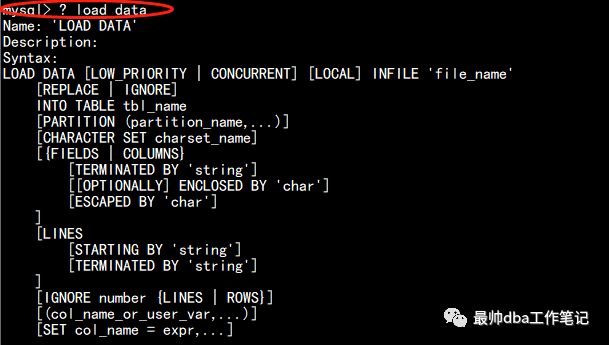
load data infile '/xxx/xxx' into table test.mytab;
这种方法适用于将导出一个表的数据。
mysqldump
MySQLdump是最常用的备份方法:
MySQLdump是MySQL 自带的命令工具,其备份手段灵活,常常使用它做全库备份(当然也可以根据需要进行不同粒度的备份如:表,库,表空间等),其适用于各种存储引擎。但是唯一不足的是锁表
运行mysqldump需要一定的权限,如备份表的最低权限为select,备份视图需要show view 权限,备份触发器需要有trigger 权限。
语法如下:
这种语法是全库备份
mysqldump --single-transaction -uroot -poracle -A >/data/mysq/all.bak
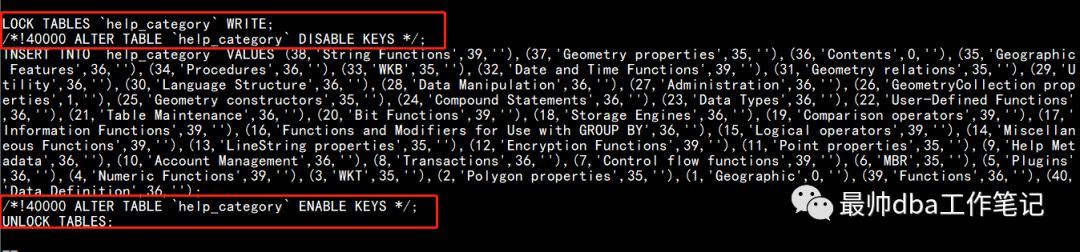
可以从备份出的文件当中看出,在备份每一个表的时候,需要把数据库的每一个表提前会lock table tablename write ;会把对应的表进行写锁。
alter table table_name disable/enable keys
这个要注意的是,mysqldump在进行这个操作的时候是针对myisam存储引擎生效,这样disable keys之后再插入数据速度会有大幅度提升,之后再enable keys。这里切记,针对innodb存储引擎来说,这种操作是没有效果的。
可以通过实验测试一下:
MYSQL>show create table mytab;
| mytab | CREATE TABLE `mytab` (
`id` int(10) unsigned NOT NULL AUTO_INCREMENT,
`c1` int(11) NOT NULL DEFAULT '0',
`c2` int(11) NOT NULL DEFAULT '0',
`c3` int(11) NOT NULL DEFAULT '0',
`c4` int(11) NOT NULL DEFAULT '0',
`c5` timestamp NOT NULL DEFAULT CURRENT_TIMESTAMP ON UPDATE CURRENT_TIMESTAMP,
`c6` varchar(200) NOT NULL DEFAULT '',
PRIMARY KEY (`id`),
KEY `in_mytab` (`c5`)
) ENGINE=InnoDB AUTO_INCREMENT=50001 DEFAULT CHARSET=utf8 |
该张表的存储引擎是innodb的存储引擎
我们查看一下表结构和对应的索引等信息:
mysql> desc mytab;
+-------+------------------+------+-----+-------------------+-----------------------------+
| Field | Type | Null | Key | Default | Extra |
+-------+------------------+------+-----+-------------------+-----------------------------+
| id | int(10) unsigned | NO | PRI | NULL | auto_increment |
| c1 | int(11) | NO | | 0 | |
| c2 | int(11) | NO | | 0 | |
| c3 | int(11) | NO | | 0 | |
| c4 | int(11) | NO | | 0 | |
| c5 | timestamp | NO | MUL | CURRENT_TIMESTAMP | on update CURRENT_TIMESTAMP |
| c6 | varchar(200) | NO | | | |
+-------+------------------+------+-----+-------------------+-----------------------------+
7 rows in set (0.00 sec)
我们可以看到c5列是有一个索引的
当我们根据c5为条件进行查询的时候,我们可以发现执行计划当中是走索引的。
mysql>explain select * from mytab where c5 = '0000-00-00 00:00:00';
+----+-------------+-------+------+---------------+----------+---------+-------+-------+-------+
| id | select_type | table | type | possible_keys | key | key_len | ref | rows | Extra |
+----+-------------+-------+------+---------------+----------+---------+-------+-------+-------+
| 1 | SIMPLE | mytab | ref | in_mytab | in_mytab | 4 | const | 25128 | NULL |
+----+-------------+-------+------+---------------+----------+---------+-------+-------+-------+
1 row in set (0.00 sec)
果然是走索引的,这时我们使其索引失效:alter table mytab disable keys;
mysql> alter table mytab disable keys;
Query OK, 0 rows affected, 1 warning (0.01 sec)
执行成功再次通过索引查询
mysql> explain select * from mytab where c5='0000-00-00 00:00:00';
+----+-------------+-------+------+---------------+----------+---------+-------+-------+-------+
| id | select_type | table | type | possible_keys | key | key_len | ref | rows | Extra |
+----+-------------+-------+------+---------------+----------+---------+-------+-------+-------+
| 1 | SIMPLE | mytab | ref | in_mytab | in_mytab | 4 | const | 25128 | NULL |
+----+-------------+-------+------+---------------+----------+---------+-------+-------+-------+
我们发现貌似并没有什么变化。
然而myisam存储引擎表的话,我们看下是什么情况
mysql> show create table mytab_myisam
mytab_myisam | CREATE TABLE `mytab_myisam` (
`id` int(10) unsigned NOT NULL AUTO_INCREMENT,
`c1` int(11) NOT NULL DEFAULT '0',
`c2` int(11) NOT NULL DEFAULT '0',
`c3` int(11) NOT NULL DEFAULT '0',
`c4` int(11) NOT NULL DEFAULT '0',
`c5` timestamp NOT NULL DEFAULT CURRENT_TIMESTAMP ON UPDATE CURRENT_TIMESTAMP,
`c6` varchar(200) NOT NULL DEFAULT '',
PRIMARY KEY (`id`),
KEY `in_mytab` (`c5`), 这里忽略这个索引,因为这个表是根据mytab的sql语句创建的,并不影响该实验效果。
KEY `in_myisam` (`c5`)
) ENGINE=MyISAM AUTO_INCREMENT=50001 DEFAULT CHARSET=utf8 |
这里发现mytab_myisam的索引也是c5
我们先根据索引查询一次数据
mysql> explain select * from mytab_myisam where c5='0000-00-00 00:00:00';
+----+-------------+--------------+------+--------------------+------+---------+------+------+-------------+
| id | select_type | table | type | possible_keys | key | key_len | ref | rows | Extra |
+----+-------------+--------------+------+--------------------+------+---------+------+------+-------------+
| 1 | SIMPLE | mytab_myisam | ALL | in_mytab,in_myisam | NULL | NULL | NULL | 2000 | Using where |
+----+-------------+--------------+------+--------------------+------+---------+------+------+-------------+
1 row in set (0.00 sec)
我们发现这个是走索引的,我们使其失效
mysql> alter table mytab_myisam disable keys;
Query OK, 0 rows affected (0.00 sec)
mysql>
mysql> explain select * from mytab_myisam where c5='0000-00-00 00:00:00';
+----+-------------+--------------+------+---------------+------+---------+------+------+-------------+
| id | select_type | table | type | possible_keys | key | key_len | ref | rows | Extra |
+----+-------------+--------------+------+---------------+------+---------+------+------+-------------+
| 1 | SIMPLE | mytab_myisam | ALL | NULL | NULL | NULL | NULL | 2000 | Using where |
+----+-------------+--------------+------+---------------+------+---------+------+------+-------------+
1 row in set (0.00 sec)
我们发现,这个索引失效了。所以只会针对myisam存储引擎生效。
备份出某个数据库
mysqldump --singletransaction -uroot -poracle test > data/back/test.bak
备份出某个用户的某个表
mysqldump --singletransaction -uroot -poracle test t >/data/back/test_t.bak
根据条件筛选出想要导出的数据行:
mysqldump --single-transaction -uroot -poracle test t -w id=3 >/data/back/test_t_3.bak
备份只有表结构没有数据:
mysqldump --single-transaction -uroot -poracle test t -d >/data/back/test_t_trc.bak
备份只有数据没有表结构:
mysqldump --single-transaction -uroot -poracle test t -t > /data/back/test_t_data.bak
恢复,恢复的过程是比较简单的,在恢复的时候,只需要将其反向重定向到数据库中,并且只需要指定一个Database name即可。
mysql -uroot -poracle test </data/backup/test.bak
这里注意的是如果是丢失了一张表,但是有一个库的备份文件,依旧是可以将其恢复的。
那么这里突发奇想,如果手动编辑备份文件,可不可以将其恢复到数据库中呢?这里通过实验支撑。
mysql> select * from b;
+----+
| id |
+----+
| 1 |
| 2 |
| 3 |
| 4 |
| 5 |
| 6 |
+----+
6 rows in set (0.00 sec)
这张表是在test库下的,有6行数据,我们查看备份文件:
DROP TABLE IF EXISTS `b`;
/*!40101 SET @saved_cs_client = @@character_set_client */;
/*!40101 SET character_set_client = utf8 */;
CREATE TABLE `b` (
`id` char(10) NOT NULL,
PRIMARY KEY (`id`)
) ENGINE=InnoDB DEFAULT CHARSET=utf8;
/*!40101 SET character_set_client = @saved_cs_client */;
--
-- Dumping data for table `b`
--
LOCK TABLES `b` WRITE;
/*!40000 ALTER TABLE `b` DISABLE KEYS */;
INSERT INTO `b` VALUES ('1'),('2'),('3'),('4'),('5'),('6');
/*!40000 ALTER TABLE `b` ENABLE KEYS */;
UNLOCK TABLES;
我们注意这段数据行,数据行是一段insert 操作,我们试图将其多加一个值
insert into `b` values ('1'),('2'),('3'),('4'),('5'),('6'),('7');
这个时候我们去将表删掉去恢复一次
mysql> drop table b;
Query OK, 0 rows affected (0.01 sec)
mysql> show tables;
+----------------+
| Tables_in_test |
+----------------+
| mytab |
| mytab_myisam |
| r |
| t |
+----------------+
4 rows in set (0.00 sec)
将数据导入
[root@dgsource backup]# mysql -uroot -poracle test < /data/backup/test.bak
Warning: Using a password on the command line interface can be insecure.
查看数据库中b表的数据。
mysql> select * from b;
+----+
| id |
+----+
| 1 |
| 2 |
| 3 |
| 4 |
| 5 |
| 6 |
| 7 |
+----+
7 rows in set (0.00 sec)
我们发现是多了一条的。所以是可以手动编辑备份文件的。
在以数据库为单位的时候恢复需要注意的是:在恢复的时候,如果一个数据库丢失需要创建一个数据库作为恢复所需的目标,实验如下
mysql> drop database test;
Query OK, 5 rows affected (0.03 sec
[root@dgsource backup]# mysql -uroot -poracle test < /data/backup/test_new.bak
Warning: Using a password on the command line interface can be insecure.
ERROR 1049 (42000): Unknown database 'test'
这里甩出一个报错是没有database test ,所以我们要创建一个database test
mysql> create database test ;
Query OK, 1 row affected (0.00 sec)
mysql>
mysql> exit
Bye
[root@dgsource backup]# mysql -uroot -poracle test < /data/backup/test_new.bak
Warning: Using a password on the command line interface can be insecure.
[root@dgsource backup]# mysql -uroot -poracle
Warning: Using a password on the command line interface can be insecure.
Welcome to the MySQL monitor. Commands end with ; or \g.
Your MySQL connection id is 35
Server version: 5.6.16-log MySQL Community Server (GPL)
Copyright (c) 2000, 2014, Oracle and/or its affiliates. All rights reserved.
Oracle is a registered trademark of Oracle Corporation and/or its
affiliates. Other names may be trademarks of their respective
owners.
Type 'help;' or '\h' for help. Type '\c' to clear the current input statement.
mysql> use test
Reading table information for completion of table and column names
You can turn off this feature to get a quicker startup with -A
Database changed
mysql> show tables;
+----------------+
| Tables_in_test |
+----------------+
| b |
| mytab |
| mytab_myisam |
| r |
| t |
+----------------+
5 rows in set (0.00 sec)
我们发现,数据库恢复成功~~~
THAT'S ALL
ORDER BY CUI PEACE
本文分享自微信公众号 - 最帅dba工作笔记,如有侵权,请联系 service001@enmotech.com 删除。
