



背景
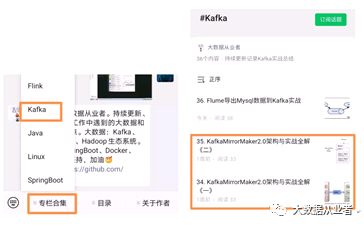
最近有项目需要调研MirrorMaker2.0,之前已经发布两篇文章(侧重于概念、理论)。本文主要侧重于实战演练,利用mm2.0模拟实现两个Kafka集群的双活方案。需要查看之前发文的可以到公众号专栏合集中查看,如图:
环境说明
两台服务器,每台服务器部署一个单节点Kafka集群。
服务器主机名 | 集群别名 |
felixzh1 | A |
felixzh2 | B |
Kafka version | 2.7.1 |
Zookeeper version | Kafka内置版本 |
Kafka参数配置
主机felixzh1:
auto.create.topics.enable=falsebroker.id=0listeners=PLAINTEXT://felixzh1:9092
主机felixzh2:
auto.create.topics.enable=falsebroker.id=0listeners=PLAINTEXT://felixzh2:9092
启动Zookeeper&Kafka服务
nohup bin/zookeeper-server-start.shconfig/zookeeper.properties 2>&1 &nohup bin/kafka-server-start.shconfig/server.properties 2>&1 &
主机felixzh1:

主机felixzh2:

创建测试Topic
bin/kafka-topics.sh --zookeeperlocalhost:2181 --topic test --partitions 1 --replication-factor 1 –create
主机felixzh1:

主机felixzh2:

MirrorMaker2.0参数配置
注意:两个集群配置相同
[root@felixzh1 kafka_2.12-2.7.1]# cat config/connect-mirror-maker.properties# Licensed to the Apache Software Foundation (ASF) under A or more# contributor license agreements. See the NOTICE file distributed with# this work for additional information regarding copyright ownership.# The ASF licenses this file to You under the Apache License, Version 2.0# (the "License"); you may not use this file except in compliance with# the License. You may obtain a copy of the License at## http://www.apache.org/licenses/LICENSE-2.0## Unless required by applicable law or agreed to in writing, software# distributed under the License is distributed on an "AS IS" BASIS,# WITHOUT WARRANTIES OR CONDITIONS OF ANY KIND, either express or implied.# See the License for the specific language governing permissions and# limitations under the License.# see org.apache.kafka.clients.consumer.ConsumerConfig for more details# Sample MirrorMaker 2.0 top-level configuration file# Run with ./bin/connect-mirror-maker.sh connect-mirror-maker.properties# specify any number of cluster aliasesclusters = A, B# connection information for each cluster# This is a comma separated host:port pairs for each cluster# for e.g. "A_host1:9092, A_host2:9092, A_host3:9092"A.bootstrap.servers = felixzh1:9092B.bootstrap.servers = felixzh2:9092# enable and configure individual replication flowsA->B.enabled = true# regex which defines which topics gets replicated. For eg "foo-.*"A->B.topics = .*A->B.groups = .*B->A.enabled = trueB->A.topics = .*B->A.groups = .*# Setting replication factor of newly created remote topicsreplication.factor=1############################# Internal Topic Settings ############################## The replication factor for mm2 internal topics "heartbeats", "B.checkpoints.internal" and# "mm2-offset-syncs.B.internal"# For anything other than development testing, a value greater than 1 is recommended to ensure availability such as 3.checkpoints.topic.replication.factor=1heartbeats.topic.replication.factor=1offset-syncs.topic.replication.factor=1# The replication factor for connect internal topics "mm2-configs.B.internal", "mm2-offsets.B.internal" and# "mm2-status.B.internal"# For anything other than development testing, a value greater than 1 is recommended to ensure availability such as 3.offset.storage.replication.factor=1status.storage.replication.factor=1config.storage.replication.factor=1# customize as needed# replication.policy.separator = _# sync.topic.acls.enabled = false# emit.heartbeats.interval.seconds = 5#########################felixzh#######################################refresh.topics.enabled = truerefresh.topics.interval.seconds = 30refresh.groups.enabled = truerefresh.groups.interval.seconds = 30sync.topic.configs.enabled = truesync.topic.acls.enabled = falsesync.group.offsets.enabled = truesync.group.offsets.interval.seconds = 30
启动MirrorMaker2.0服务
[root@felixzh1 kafka_2.12-2.7.1]#bin/connect-mirror-maker.sh config/connect-mirror-maker.properties --clusters A[root@felixzh2 kafka_2.12-2.7.1]#bin/connect-mirror-maker.sh config/connect-mirror-maker.properties --clusters B
查看Topic列表
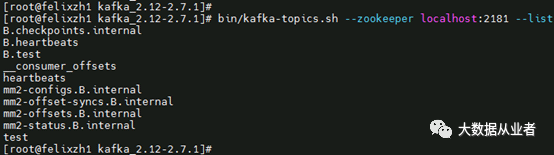
主机felixzh1:
[root@felixzh1 kafka_2.12-2.7.1]#bin/kafka-topics.sh --zookeeper localhost:2181 --list
主机felixzh2:
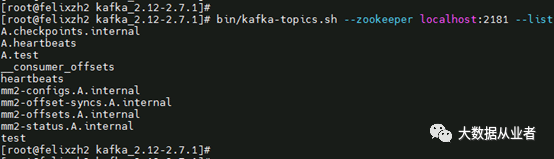
[root@felixzh2 kafka_2.12-2.7.1]#bin/kafka-topics.sh --zookeeper localhost:2181 --list
测试1:数据同步
说明:写集群A (topic:test),消费集群B(topic:A.test)
主机felixzh1:
[root@felixzh1 kafka_2.12-2.7.1]#bin/kafka-console-producer.sh --broker-list felixzh1:9092 --topic test

主机felixzh2:
[root@felixzh2 kafka_2.12-2.7.1]#bin/kafka-console-consumer.sh --bootstrap-server felixzh2:9092 --topic A.test--from-beginning

结论:集群A(topic:test)数据已经同步到集群B(topic:A.test)
测试2:消费者组offset同步
说明:使用group组test消费集群A(topic:test),查看集群B消费者组offset信息
主机felixzh1:
[root@felixzh1 kafka_2.12-2.7.1]#bin/kafka-console-consumer.sh --bootstrap-server felixzh1:9092 --topic test--group test

[root@felixzh1 kafka_2.12-2.7.1]#bin/kafka-consumer-groups.sh --bootstrap-server felixzh1:9092 --all-groups –describe

主机felixzh2:
[root@felixzh2 kafka_2.12-2.7.1]#bin/kafka-consumer-groups.sh --bootstrap-server felixzh2:9092 --all-groups –describe

结论:集群A消费者组offset信息已经同步到集群B。
文章转载自大数据从业者,如果涉嫌侵权,请发送邮件至:contact@modb.pro进行举报,并提供相关证据,一经查实,墨天轮将立刻删除相关内容。
