



Windows Heap概述
进程默认堆。每个进程启动的时候系统会创建一个默认堆。比如
LocalAlloc
或者GlobalAlloc
也是从进程默认堆上分配内存。你也可以使用GetProcessHeap
获取进程默认堆的句柄,然后根据用这个句柄去调用HeapAlloc
达到在系统默认堆上分配内存的效果。C++
编程中常用的是malloc
和new
去申请内存,这些由CRT库提供方法。而根据查看在VS2010
之前(包含),CRT库会使用HeapCreate
去创建一个堆,供CRT库自己使用。在VS2015
以后CRT库的实现,并不会再去创建一个单独的堆,而使用进程默认堆。 (VS2013
的CRT源码我并未查看,有兴趣的可以看看VS2013
默认的CRT库采用的是进程默认堆还是新建的堆)。自建堆。这个泛指程序通过
HeapCreate
去创建的堆,然后利用HeapAlloc
等API去操作堆,比如申请空间。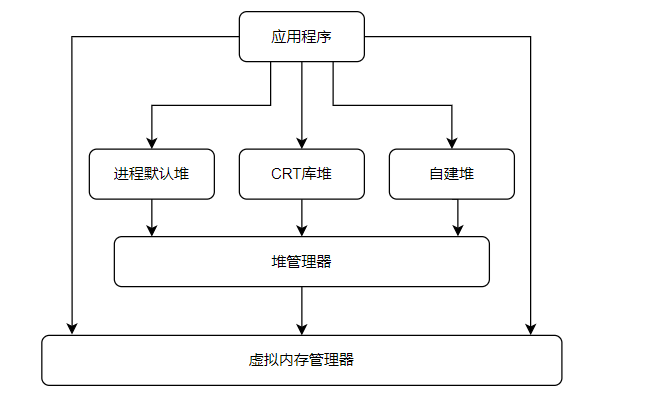
那么堆管理器
是通过调用虚拟管理器的一些方法进行堆管理的实现,比如VirtualAlloc
之类的函数。同样应用程序也可以直接使用VirtualAlloc
之类的函数对内存进行使用。
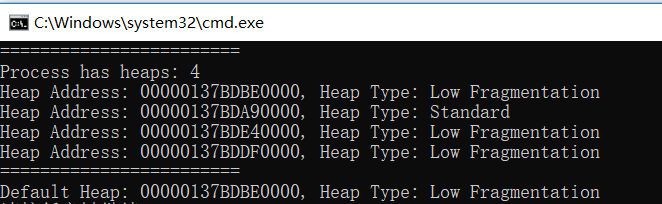
#include <windows.h>#include <iostream>#include <intsafe.h>using namespace std;const char* GetHeapTypeString(HANDLE pHandle){ULONG ulHeapInfo;HeapQueryInformation(pHandle,HeapCompatibilityInformation,&ulHeapInfo,sizeof(ulHeapInfo),NULL);switch (ulHeapInfo){case 0:return "Standard";case 1:return "Look Aside List";case 2:return "Low Fragmentation";}return "Unknow type";}void PrintAllHeaps(){DWORD dwNumHeap = GetProcessHeaps(0, NULL);if (dwNumHeap == 0){cout << "No Heap!" << endl;return;}PHANDLE pHeaps;SIZE_T uBytes;HRESULT Result = SIZETMult(dwNumHeap, sizeof(*pHeaps), &uBytes);if (Result != S_OK) {return;}pHeaps = (PHANDLE)malloc(uBytes);dwNumHeap = GetProcessHeaps(dwNumHeap, pHeaps);cout << "Process has heaps: " << dwNumHeap << endl;for (int i = 0; i < dwNumHeap; ++i){cout << "Heap Address: " << pHeaps[i]<< ", Heap Type: " << GetHeapTypeString(pHeaps[i]) << endl;}return;}int main(){cout << "========================" << endl;PrintAllHeaps();cout << "========================" << endl;HANDLE hDefaultHeap = GetProcessHeap();cout << "Default Heap: " << hDefaultHeap<< ", Heap Type: " << GetHeapTypeString(hDefaultHeap) << endl;return 0;}
堆的内存分配策略
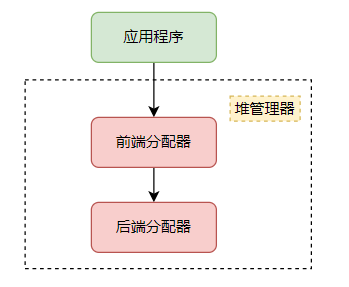
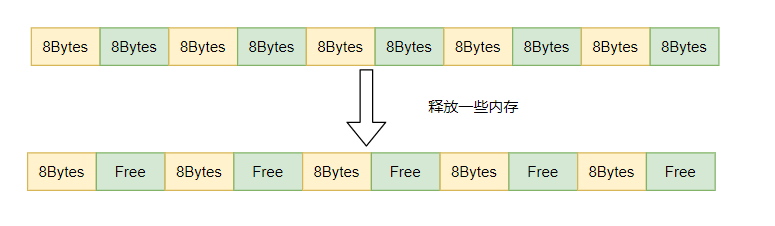
旁视列表 (Look Aside List)
低碎片 (Low Fragmentation)
前端分配器之旁视列表
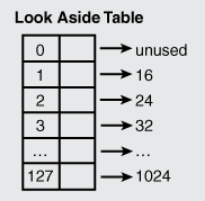
前端分配器之低碎片
| 数据Index | 堆块递增粒度 | 堆块字节范围 |
|---|---|---|
| 0~31 | 8 | 8~256 |
| 32~47 | 16 | 272~512 |
| … | … | … |
| 112-127 | 512 | 8704~16384 |
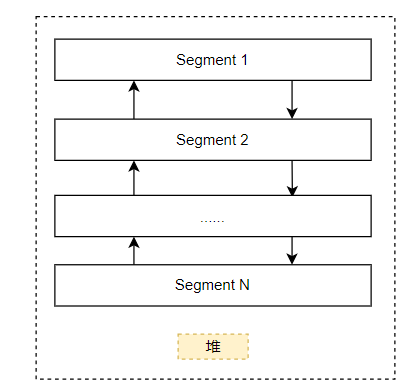
后端分配器
前置的元数据
: 这里主要存储有当前块的大小
,前一个块的大小
,当前块的状态
等。用户数据区
: 这段内存才是用户申请并且使用的内存。当然这块数据可能比你申请的内存要大一些,因为32位下面最小的分配粒度是8字节
。这也是为什么有时候程序有时候溢出了几个字符,好像也没有导致程序异常或者崩溃的原因。后置的元数据
: 这个一般用于调试所用。一般发布的时候不会占用这块空间。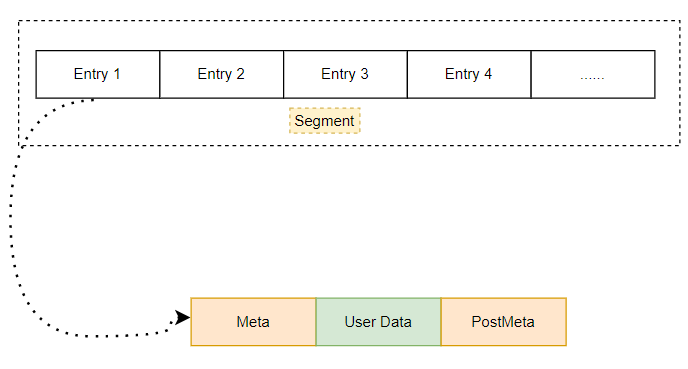
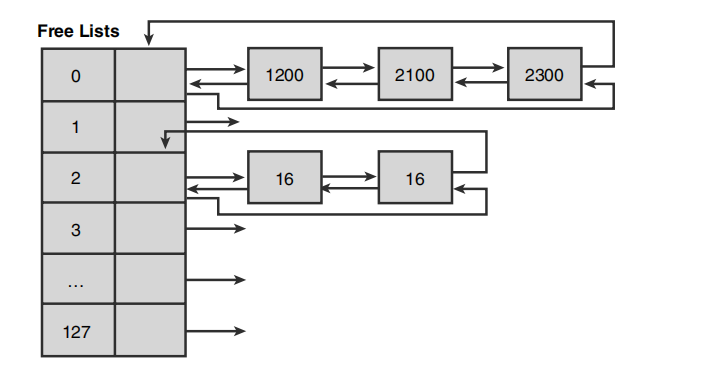
那么哪些块
是可以直接使用的呢?这就涉及到这些块元数据中的状态
,可以表明这个块是否被占用,如果是空闲
状态则可以使用。
Windbg查看进程中的堆
进程堆信息查看
0:000> dt _PEB @$peb......+0x088 NumberOfHeaps : 3......+0x090 ProcessHeaps : 0x77756660 -> 0x00fa0000 Void......
0:006> dd 0x7775666077756660 00fa0000 014b0000 02e10000 0000000077756670 00000000 00000000 00000000 0000000077756680 00000000 00000000 00000000 0000000077756690 00000000 00000000 00000000 00000000777566a0 00000000 00000000 00000000 00000000777566b0 00000000 00000000 00000000 00000000777566c0 ffffffff ffffffff 00000000 00000000777566d0 00000000 020007d0 00000000 00000000
0:000> !heap -s......LFH Key : 0x8302caa1Termination on corruption : ENABLEDHeap Flags Reserv Commit Virt Free List UCR Virt Lock Fast(k) (k) (k) (k) length blocks cont. heap-----------------------------------------------------------------------------00fa0000 00000002 1128 552 1020 178 21 1 1 0 LFH014b0000 00001002 60 12 60 1 2 1 0 002e10000 00001002 1188 92 1080 4 4 2 0 0 LFH-----------------------------------------------------------------------------
0:006> !heap -a 00fa0000Index Address Name Debugging options enabled1: 00fa0000Segment at 00fa0000 to 0109f000 (00089000 bytes committed)Flags: 00000002ForceFlags: 00000000Granularity: 8 bytesSegment Reserve: 00100000Segment Commit: 00002000DeCommit Block Thres: 00000800DeCommit Total Thres: 00002000Total Free Size: 0000597fMax. Allocation Size: 7ffdefffLock Variable at: 00fa0248Next TagIndex: 0000Maximum TagIndex: 0000Tag Entries: 00000000PsuedoTag Entries: 00000000Virtual Alloc List: 00fa009c03321000: 00100000 [commited 101000, unused 1000] - busy (b), tail fillUncommitted ranges: 00fa008c01029000: 00076000 (483328 bytes)FreeList[ 00 ] at 00fa00c0: 00ffcf40 . 00ff329000ff3288: 00208 . 00010 [100] - free00fb1370: 00060 . 00010 [100] - free00fb10a0: 00020 . 00010 [100] - free00fa6c40: 00088 . 00010 [100] - free00fa8e98: 00010 . 00010 [100] - free00fafa78: 000d0 . 00018 [100] - free00faea20: 00138 . 00018 [100] - free00fafc38: 00030 . 00020 [100] - free00ff4570: 00128 . 00028 [100] - free00faeeb8: 00058 . 00028 [100] - free00faf0c8: 00060 . 00028 [100] - free00fad980: 00050 . 00028 [100] - free00fb83f0: 00050 . 00040 [100] - free00faed78: 00030 . 00080 [100] - free00feebd8: 000e8 . 00080 [100] - free00faeb80: 00050 . 000d0 [100] - free00ff0398: 00148 . 000d8 [100] - free00fafed0: 000b0 . 000f0 [100] - free00fb8130: 00210 . 00270 [100] - free00fef460: 00808 . 003c8 [100] - free00ffcf38: 003c8 . 2c0a8 [100] - freeSegment00 at 00fa0000:Flags: 00000000Base: 00fa0000First Entry: 00fa0498Last Entry: 0109f000Total Pages: 000000ffTotal UnCommit: 00000076Largest UnCommit:00000000UnCommitted Ranges: (1)Heap entries for Segment00 in Heap 00fa0000address: psize . size flags state (requested size)00fa0000: 00000 . 00498 [101] - busy (497)00fa0498: 00498 . 00108 [101] - busy (100)00fa05a0: 00108 . 000d8 [101] - busy (d0)......01029000: 00076000 - uncommitted bytes.
查看Segment
0:006> dt _HEAP_SEGMENT 00fa0000ntdll!_HEAP_SEGMENT+0x000 Entry : _HEAP_ENTRY+0x008 SegmentSignature : 0xffeeffee+0x00c SegmentFlags : 2+0x010 SegmentListEntry : _LIST_ENTRY [ 0xfa00a4 - 0xfa00a4 ]+0x018 Heap : 0x00fa0000 _HEAP+0x01c BaseAddress : 0x00fa0000 Void+0x020 NumberOfPages : 0xff+0x024 FirstEntry : 0x00fa0498 _HEAP_ENTRY+0x028 LastValidEntry : 0x0109f000 _HEAP_ENTRY+0x02c NumberOfUnCommittedPages : 0x76+0x030 NumberOfUnCommittedRanges : 1+0x034 SegmentAllocatorBackTraceIndex : 0+0x036 Reserved : 0+0x038 UCRSegmentList : _LIST_ENTRY [ 0x1028ff0 - 0x1028ff0 ]
查看申请的内存地址
0:000> !address 0x00fb5440Building memory map: 00000000Mapping file section regions...Mapping module regions...Mapping PEB regions...Mapping TEB and stack regions...Mapping heap regions...Mapping page heap regions...Mapping other regions...Mapping stack trace database regions...Mapping activation context regions...Usage: HeapBase Address: 00fa0000End Address: 01029000Region Size: 00089000 ( 548.000 kB)State: 00001000 MEM_COMMITProtect: 00000004 PAGE_READWRITEType: 00020000 MEM_PRIVATEAllocation Base: 00fa0000Allocation Protect: 00000004 PAGE_READWRITEMore info: heap owning the address: !heap 0xfa0000More info: heap segmentMore info: heap entry containing the address: !heap -x 0xfb5440
0:000> !heap -x 0xfb5440Entry User Heap Segment Size PrevSize Unused Flags-----------------------------------------------------------------------------00fb5438 00fb5440 00fa0000 00fad348 10 - b LFH;busy
0:000> dt _HEAP_ENTRY 00fb5438ntdll!_HEAP_ENTRY+0x000 UnpackedEntry : _HEAP_UNPACKED_ENTRY+0x000 Size : 0xa026+0x002 Flags : 0xdc ''+0x003 SmallTagIndex : 0x83 ''+0x000 SubSegmentCode : 0x83dca026+0x004 PreviousSize : 0x1b00+0x006 SegmentOffset : 0 ''+0x006 LFHFlags : 0 ''+0x007 UnusedBytes : 0x8b ''+0x000 ExtendedEntry : _HEAP_EXTENDED_ENTRY+0x000 FunctionIndex : 0xa026+0x002 ContextValue : 0x83dc+0x000 InterceptorValue : 0x83dca026+0x004 UnusedBytesLength : 0x1b00+0x006 EntryOffset : 0 ''+0x007 ExtendedBlockSignature : 0x8b ''+0x000 Code1 : 0x83dca026+0x004 Code2 : 0x1b00+0x006 Code3 : 0 ''+0x007 Code4 : 0x8b ''+0x004 Code234 : 0x8b001b00+0x000 AgregateCode : 0x8b001b00`83dca026
结构中
Size
的值是0xa026
和之前命令中看到的大小0x10
不一样,这个是因为Windows对这些元数据做了编码,需要用堆中的一个编码数据做异或操作才能得到真实的值。具体方法笔者试过,在这里不在赘述,可以在参考文章中获取方法。Size
是2字节
描述,那么最大可以描述的大小应该为0xffff
,但是之前不是说最大的块可以是0x7FFF0
(524272字节
), 应该不够存储啊?这个也和第一个问题有关联,在通过上述方法计算出的Size
之后还需要乘以8, 才是真正的数据大小。
Windows 自建堆的使用建议
保护组件
更有效的内存管理
进行本地访问
减少线程同步的开销
迅速释放堆栈
总结和参考
参考
《Windows核心编程》
《Windows高级调试》
Windows Heap Chunk Header Parsing and Size Calculation: https://stackoverflow.com/questions/28483473/windows-heap-chunk-header-parsing-and-size-calculation
Understanding the Low Fragmentation Heap: http://www.illmatics.com/Understanding_the_LFH.pdf
WINDOWS 10SEGMENT HEAP INTERNALS: https://www.blackhat.com/docs/us-16/materials/us-16-Yason-Windows-10-Segment-Heap-Internals-wp.pdf
