



一、场景说明
public class Producer extends Thread {public Producer(String topic, Boolean isAsync) {Properties props = new Properties();props.put(ProducerConfig.BOOTSTRAP_SERVERS_CONFIG, KafkaProperties.KAFKA_SERVER_URL + ":" + KafkaProperties.KAFKA_SERVER_PORT);props.put(ProducerConfig.CLIENT_ID_CONFIG, "DemoProducer");props.put(ProducerConfig.KEY_SERIALIZER_CLASS_CONFIG, IntegerSerializer.class.getName());props.put(ProducerConfig.VALUE_SERIALIZER_CLASS_CONFIG, StringSerializer.class.getName());//初始化KafkaProducerproducer = new KafkaProducer<>(props);this.topic = topic;this.isAsync = isAsync;}public void run() {int messageNo = 1;while (true) {String messageStr = "Message_" + messageNo;long startTime = System.currentTimeMillis();if (isAsync) { // Send asynchronously//异步发送消息producer.send(new ProducerRecord<>(topic,messageNo,messageStr), new DemoCallBack(startTime, messageNo, messageStr));}...++messageNo;}}}
二、获取元数据流程图
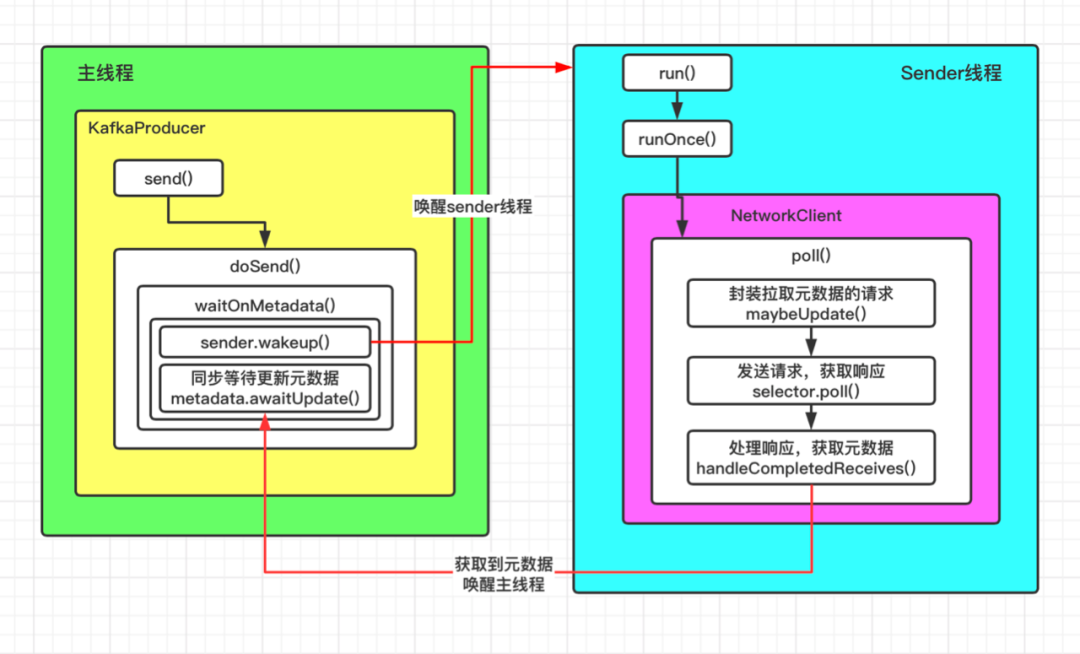
这里重点分析主线程和Sender线程的切换,集群元数据的获取是通过Sender线程完成的。
三、过程源码解析
1、KafkaProducer通过send方法最终调用了doSend方法,生产者生产的消息就是通过这个方法发送给客户端的,截取部分代码如下:
private Future<RecordMetadata> doSend(ProducerRecord<K, V> record, Callback callback) {TopicPartition tp = null;try {throwIfProducerClosed();// first make sure the metadata for the topic is availableClusterAndWaitTime clusterAndWaitTime;try {//TODO 步骤一:同步等待获取元数据(在这个方法中主线程会阻塞,并唤醒sender线程)clusterAndWaitTime = waitOnMetadata(record.topic(), record.partition(), maxBlockTimeMs);} catch (KafkaException e) {if (metadata.isClosed())throw new KafkaException("Producer closed while send in progress", e);throw e;}}...}
doSend方法中通过调用waitOnMetadata来同步等待获取元数据,会阻塞主线程,直到获取到元数据或者超时,该方法代码如下:
private ClusterAndWaitTime waitOnMetadata(String topic, Integer partition, long maxWaitMs) throws InterruptedException {//拉取元数据,第一次进来是拉取不到的,metadata只有配置的bootstrap.servers信息Cluster cluster = metadata.fetch();if (cluster.invalidTopics().contains(topic))throw new InvalidTopicException(topic);//将指定的topic添加到元数据metadata.add(topic);//获取指定topic的分区数,第一次进来是没有topic的信息的,所以也获取不到分区数,partitionsCount为nullInteger partitionsCount = cluster.partitionCountForTopic(topic);if (partitionsCount != null && (partition == null || partition < partitionsCount))return new ClusterAndWaitTime(cluster, 0);long begin = time.milliseconds();long remainingWaitMs = maxWaitMs;long elapsed;//循环,直到获取集群元数据,或者超时do {if (partition != null) {log.trace("Requesting metadata update for partition {} of topic {}.", partition, topic);} else {log.trace("Requesting metadata update for topic {}.", topic);}metadata.add(topic);//获取当前元数据的版本号int version = metadata.requestUpdate();//唤醒sender线程sender.wakeup();try {//阻塞等待元数据//退出等待有两种方式:1)达到等待的时间;2)被其他线程唤醒了metadata.awaitUpdate(version, remainingWaitMs);} catch (TimeoutException ex) {// Rethrow with original maxWaitMs to prevent logging exception with remainingWaitMsthrow new TimeoutException(String.format("Topic %s not present in metadata after %d ms.",topic, maxWaitMs));}//如果线程被唤醒,说明已经可以获取到元数据了cluster = metadata.fetch();//花费的时间elapsed = time.milliseconds() - begin;//如果超时,抛异常if (elapsed >= maxWaitMs) {throw new TimeoutException(partitionsCount == null ?String.format("Topic %s not present in metadata after %d ms.",topic, maxWaitMs) :String.format("Partition %d of topic %s with partition count %d is not present in metadata after %d ms.",partition, topic, partitionsCount, maxWaitMs));}metadata.maybeThrowExceptionForTopic(topic);//计算剩余时间remainingWaitMs = maxWaitMs - elapsed;//获取分区数partitionsCount = cluster.partitionCountForTopic(topic);} while (partitionsCount == null || (partition != null && partition >= partitionsCount));return new ClusterAndWaitTime(cluster, elapsed);}
该方法中通过一个do...while循环不断尝试获取元数据,我们看几段重要的代码:
//获取当前元数据的版本号int version = metadata.requestUpdate();
a .获取当前元数据的版本号,是一个递增的值,客户端每更新一次元数据,就同时更新一次版本号;
//唤醒sender线程sender.wakeup();
b.唤醒Sender线程,集群的元数据就是通过Sender线程获取到的
//阻塞等待元数据metadata.awaitUpdate(version, remainingWaitMs);
c.阻塞主线程,等待更新元数据,结束等待的条件有两个:
被其它线程唤醒
达到等待时间
awaitUpdate方法的代码如下:
public synchronized void awaitUpdate(final int lastVersion, final long timeoutMs) throws InterruptedException {long currentTimeMs = time.milliseconds();//最后期限=当前时间+等待时间long deadlineMs = currentTimeMs + timeoutMs < 0 ? Long.MAX_VALUE : currentTimeMs + timeoutMs;time.waitObject(this, () -> {// Throw fatal exceptions, if there are any. Recoverable topic errors will be handled by the caller.maybeThrowFatalException();//直到最新的版本号>给定的版本号,方法返回return updateVersion() > lastVersion || isClosed();}, deadlineMs);if (isClosed())throw new KafkaException("Requested metadata update after close");}
2、既然唤醒了Sender线程来获取元数据,那就看一下它的run方法,内部调用了runOnce方法,代码如下:
void runOnce() {//前面关于事务的代码先不看...long currentTimeMs = time.milliseconds();long pollTimeout = sendProducerData(currentTimeMs);//TODO 真正执行网络操作的都是NetworkClient这个组件// 包括发送请求,接收响应,处理响应// 就是通过这个方法拉取的元数据client.poll(pollTimeout, currentTimeMs);}
这里client的实现类是NetworkClient,是一个执行网络操作的组件,通过它的poll方法来获取元数据:
@Overridepublic List<ClientResponse> poll(long timeout, long now) {//ensureActive();//List<ClientResponse> 如果abortedSends不为空,说明已经连接broker并获取了响应,直接处理//第一次进来abortedSends为空,不走这个分支if (!abortedSends.isEmpty()) {// If there are aborted sends because of unsupported version exceptions or disconnects,// handle them immediately without waiting for Selector#poll.List<ClientResponse> responses = new ArrayList<>();handleAbortedSends(responses);completeResponses(responses);return responses;}//TODO 步骤一:封装一个拉取元数据的请求long metadataTimeout = metadataUpdater.maybeUpdate(now);try {//TODO 步骤二:发送请求,进行复杂的网络操作,这里用的就是java的NIOthis.selector.poll(Utils.min(timeout, metadataTimeout, defaultRequestTimeoutMs));} catch (IOException e) {log.error("Unexpected error during I/O", e);}// process completed actionslong updatedNow = this.time.milliseconds();List<ClientResponse> responses = new ArrayList<>();//将请求返回的响应放到responses集合handleCompletedSends(responses, updatedNow);//TODO 步骤三:处理响应,响应里面就会有我们需要的元数据handleCompletedReceives(responses, updatedNow);handleDisconnections(responses, updatedNow);handleConnections();handleInitiateApiVersionRequests(updatedNow);handleTimedOutRequests(responses, updatedNow);completeResponses(responses);return responses;}
这个方法主要分三步:
封装一个拉取元数据的请求
向服务端发送请求,获取响应
处理响应,获取响应中的集群元数据信息
看一下具体的代码:
步骤一:
//TODO 步骤一:封装一个拉取元数据的请求long metadataTimeout = metadataUpdater.maybeUpdate(now);
这里metadataUpdater的实现类是DefaultMetadataUpdater,是NetworkClient类的一个内部类,其maybeUpdate方法如下:
private long maybeUpdate(long now, Node node) {//获取连接的NodeIdString nodeConnectionId = node.idString();//判断网络连接是否已经建立好,如果已经建立好,执行下面的代码(第二次进来时网络已经建立好了)//第一次进来,网络连接显然是没有建立好的if (canSendRequest(nodeConnectionId, now)) {Metadata.MetadataRequestAndVersion requestAndVersion = metadata.newMetadataRequestAndVersion();this.inProgressRequestVersion = requestAndVersion.requestVersion;//构建一个拉取目标topic元数据的请求MetadataRequest.Builder metadataRequest = requestAndVersion.requestBuilder;log.debug("Sending metadata request {} to node {}", metadataRequest, node);//发送拉取元数据的请求sendInternalMetadataRequest(metadataRequest, nodeConnectionId, now);return defaultRequestTimeoutMs;}if (isAnyNodeConnecting()) {return reconnectBackoffMs;}//第一次进来由于没有建立好网络连接,走的是这个分支,初始化一个连接if (connectionStates.canConnect(nodeConnectionId, now)) {log.debug("Initialize connection to node {} for sending metadata request", node);//初始化一个到给定节点的网络连接,其实只绑定了OP_CONNECT事件initiateConnect(node, now);return reconnectBackoffMs;}return Long.MAX_VALUE;}
当do...while循环第一次走到这个方法时,由于没有和给定节点建立连接,所以会先初始化一个网络连接;第二次进入到这个方法时,会执行下面的代码:
if (canSendRequest(nodeConnectionId, now)) {Metadata.MetadataRequestAndVersion requestAndVersion = metadata.newMetadataRequestAndVersion();this.inProgressRequestVersion = requestAndVersion.requestVersion;//构建一个拉取目标topic元数据的请求MetadataRequest.Builder metadataRequest = requestAndVersion.requestBuilder;log.debug("Sending metadata request {} to node {}", metadataRequest, node);//添加拉取元数据的请求sendInternalMetadataRequest(metadataRequest, nodeConnectionId, now);return defaultRequestTimeoutMs;}
先构建一个拉取元数据的MetadataRequest请求,然后通过sendInternalMetadataRequest方法将这个请求转为ClientRequest请求
void sendInternalMetadataRequest(MetadataRequest.Builder builder, String nodeConnectionId, long now) {//创建一个拉取元数据的请求ClientRequest clientRequest = newClientRequest(nodeConnectionId, builder, now, true);//保存要发送的请求doSend(clientRequest, true, now);}
然后通过doSend方法将这个请求放到inFlightRequests里面,这里面保存的是已发送但是没有返回响应的请求,默认值最多保存5个请求,然后将这个请求放到发送队列等待Selector的poll方法处理。注意这里的Selector并不是JavaNIO中的那个Selector,而是kafka自己定义的。
private void doSend(ClientRequest clientRequest, boolean isInternalRequest, long now, AbstractRequest request) {String destination = clientRequest.destination();RequestHeader header = clientRequest.makeHeader(request.version());if (log.isDebugEnabled()) {int latestClientVersion = clientRequest.apiKey().latestVersion();if (header.apiVersion() == latestClientVersion) {log.trace("Sending {} {} with correlation id {} to node {}", clientRequest.apiKey(), request,clientRequest.correlationId(), destination);} else {log.debug("Using older server API v{} to send {} {} with correlation id {} to node {}",header.apiVersion(), clientRequest.apiKey(), request, clientRequest.correlationId(), destination);}}Send send = request.toSend(destination, header);InFlightRequest inFlightRequest = new InFlightRequest(clientRequest,header,isInternalRequest,request,send,now);//把这个拉取元数据的请求放到inFlightRequests里面,// 这个里面存储的是已发送请求,但是未返回响应的请求,默认最多5个this.inFlightRequests.add(inFlightRequest);//把请求放到发送队列等待poll方法处理selector.send(send);}
步骤二:
//TODO 步骤二:发送请求,进行复杂的网络操作this.selector.poll(Utils.min(timeout, metadataTimeout, defaultRequestTimeoutMs));
poll方法的部分代码如下,这里用的就是Java的NIO,其中nioSelector才是Java中的Selecotr对象:
@Overridepublic void poll(long timeout) throws IOException {.../* check ready keys */long startSelect = time.nanoseconds();//获取已经准备好io的selectionKey(channel)个数int numReadyKeys = select(timeout);long endSelect = time.nanoseconds();this.sensors.selectTime.record(endSelect - startSelect, time.milliseconds());if (numReadyKeys > 0 || !immediatelyConnectedKeys.isEmpty() || dataInBuffers) {//获取所有准备好的selectionKeySet<SelectionKey> readyKeys = this.nioSelector.selectedKeys();...// Poll from channels where the underlying socket has more data//遍历selectionKey进行处理pollSelectionKeys(readyKeys, false, endSelect);// Clear all selected keys so that they are included in the ready count for the next selectreadyKeys.clear();//处理IO操作pollSelectionKeys(immediatelyConnectedKeys, true, endSelect);immediatelyConnectedKeys.clear();} else {madeReadProgressLastPoll = true; //no work is also "progress"}long endIo = time.nanoseconds();this.sensors.ioTime.record(endIo - endSelect, time.milliseconds());...}
其中处理IO操作的是pollSelectionKeys方法,截取部分关键代码如下:
@Overridepublic void poll(long timeout) throws IOException {.../* check ready keys */long startSelect = time.nanoseconds();//获取已经准备好io的selectionKey(channel)个数int numReadyKeys = select(timeout);long endSelect = time.nanoseconds();this.sensors.selectTime.record(endSelect - startSelect, time.milliseconds());if (numReadyKeys > 0 || !immediatelyConnectedKeys.isEmpty() || dataInBuffers) {//获取所有准备好的selectionKeySet<SelectionKey> readyKeys = this.nioSelector.selectedKeys();// Poll from channels that have buffered data (but nothing more from the underlying socket)if (dataInBuffers) {keysWithBufferedRead.removeAll(readyKeys); //so no channel gets polled twiceSet<SelectionKey> toPoll = keysWithBufferedRead;keysWithBufferedRead = new HashSet<>(); //poll() calls will repopulate if neededpollSelectionKeys(toPoll, false, endSelect);}//遍历selectionKey进行处理pollSelectionKeys(readyKeys, false, endSelect);// Clear all selected keys so that they are included in the ready count for the next selectreadyKeys.clear();pollSelectionKeys(immediatelyConnectedKeys, true, endSelect);immediatelyConnectedKeys.clear();} else {madeReadProgressLastPoll = true; //no work is also "progress"}...//将stageReceives结构中的NetworkReceive对象放到completeReceive集合中//stageReceives:Map<KafkaChannel,Deque<NetworkReceive>>//completeReceive:List<NetworkReceive>addToCompletedReceives();}
关键方法有pollSelectionKeys和addToCompletedReceives,其中pollSelectionKeys用来接收服务端返回的响应,并将响应封装成NetworkReceive保存到数据结构中;addToCompletedReceives用来将NetworkReceive对象放到特定的集合中,最后统一进行处理。
void pollSelectionKeys(Set<SelectionKey> selectionKeys,boolean isImmediatelyConnected,long currentTimeNanos) {for (SelectionKey key : determineHandlingOrder(selectionKeys)) {//获取对应的KafkachannelKafkaChannel channel = channel(key);long channelStartTimeNanos = recordTimePerConnection ? time.nanoseconds() : 0;boolean sendFailed = false;...try {/* complete any connections that have finished their handshake (either normally or immediately) *///如果key对应的是连接事件,走这个分支if (isImmediatelyConnected || key.isConnectable()) {/*** TODO 核心代码* 最后完成网络连接的代码,如果之前初始化的时候,没有完成网络连接,这里会完成网络连接*/if (channel.finishConnect()) {//连接成功后,把brokerId放到连接成功的集合中this.connected.add(channel.id());this.sensors.connectionCreated.record();SocketChannel socketChannel = (SocketChannel) key.channel();log.debug("Created socket with SO_RCVBUF = {}, SO_SNDBUF = {}, SO_TIMEOUT = {} to node {}",socketChannel.socket().getReceiveBufferSize(),socketChannel.socket().getSendBufferSize(),socketChannel.socket().getSoTimeout(),channel.id());} else {continue;}}...//如果是接收返回的响应,走这个方法attemptRead(key, channel);...//如果是发送数据,走这个分支if (channel.ready() && key.isWritable() && !channel.maybeBeginClientReauthentication(() -> channelStartTimeNanos != 0 ? channelStartTimeNanos : currentTimeNanos)) {Send send;try {//TODO 往服务端发送消息//方法里面消息被发送出去,并移除OP_WRITE事件send = channel.write();} catch (Exception e) {sendFailed = true;throw e;}if (send != null) {//TODO 将响应添加到completedSendsthis.completedSends.add(send);this.sensors.recordBytesSent(channel.id(), send.size());}}...}
这里接收返回响应的方法是attemptRead(key, channel),具体的逻辑是:如果KafkaChannel注册的是读事件,就从channel中不断地读取数据,并将NetworkReceive对象添加到stageReceive数据结构中,这是一个Map,key是KafkaChannel,value是一个NetworkReceive队列
private void attemptRead(SelectionKey key, KafkaChannel channel) throws IOException {//如果是读请求if (channel.ready() && (key.isReadable() || channel.hasBytesBuffered()) && !hasStagedReceive(channel)&& !explicitlyMutedChannels.contains(channel)) {//接收服务端的响应(本质也是一个请求)//NetworkReceive代表的就是服务端返回来的响应NetworkReceive networkReceive;while ((networkReceive = channel.read()) != null) {madeReadProgressLastPoll = true;//不断地读取数据,将这个响应放到stagedReceive队列中addToStagedReceives(channel, networkReceive);}if (channel.isMute()) {outOfMemory = true; //channel has muted itself due to memory pressure.} else {madeReadProgressLastPoll = true;}}}
步骤三:
//TODO 步骤三:处理响应,响应里面就会有我们需要的元数据handleCompletedReceives(responses, updatedNow);
handleCompletedReceives方法代码如下,如果是关于元数据信息的响应,则执行handleCompletedMetadataResponse方法:
private void handleCompletedReceives(List<ClientResponse> responses, long now) {//遍历completedReceives集合中的NetworkReceivefor (NetworkReceive receive : this.selector.completedReceives()) {//获取brokeridString source = receive.source();//获取指定broker最后一个没有返回响应的请求InFlightRequest req = inFlightRequests.completeNext(source);//解析服务端返回的响应Struct responseStruct = parseStructMaybeUpdateThrottleTimeMetrics(receive.payload(), req.header,throttleTimeSensor, now);...//TODO 如果是关于元数据信息的响应if (req.isInternalRequest && body instanceof MetadataResponse)metadataUpdater.handleCompletedMetadataResponse(req.header, now, (MetadataResponse) body);else if (req.isInternalRequest && body instanceof ApiVersionsResponse)handleApiVersionsResponse(responses, req, now, (ApiVersionsResponse) body);elseresponses.add(req.completed(body, now));}}
截取部分handleCompletedMetadataResponse方法,其主要作用就是更新元数据:
public void handleCompletedMetadataResponse(RequestHeader requestHeader, long now, MetadataResponse response) {...if (response.brokers().isEmpty()) {log.trace("Ignoring empty metadata response with correlation id {}.", requestHeader.correlationId());this.metadata.failedUpdate(now, null);//如果响应中有broker信息,则更新元数据} else {//TODO 更新元数据,注意这里调用的是ProducerMetadata的update方法// 里面通过notifyALL()方法来唤醒前面等待的线程this.metadata.update(inProgressRequestVersion, response, now);}inProgressRequestVersion = null;}
注意Metadata的update方法:
public synchronized void update(int requestVersion, MetadataResponse response, long now) {Objects.requireNonNull(response, "Metadata response cannot be null");if (isClosed())throw new IllegalStateException("Update requested after metadata close");if (requestVersion == this.requestVersion)this.needUpdate = false;elserequestUpdate();this.lastRefreshMs = now;this.lastSuccessfulRefreshMs = now;//更新元数据信息时,会将version值+1this.updateVersion += 1;String previousClusterId = cache.cluster().clusterResource().clusterId();this.cache = handleMetadataResponse(response, topic -> retainTopic(topic.topic(), topic.isInternal(), now));//获取响应中的cluster集群元数据Cluster cluster = cache.cluster();maybeSetMetadataError(cluster);this.lastSeenLeaderEpochs.keySet().removeIf(tp -> !retainTopic(tp.topic(), false, now));String newClusterId = cache.cluster().clusterResource().clusterId();if (!Objects.equals(previousClusterId, newClusterId)) {log.info("Cluster ID: {}", newClusterId);}//更新所有监听集群元数据的对象的元数据信息clusterResourceListeners.onUpdate(cache.cluster().clusterResource());log.debug("Updated cluster metadata updateVersion {} to {}", this.updateVersion, this.cache);}
关键步骤:this.updateVersion += 1;更新了元数据的version,此时更新后的version > 未更新前的verison,前面阻塞等待元数据的方法就会返回,从而继续执行KafkaProducer.waitOnMetadata方法后面的逻辑:
//如果线程被唤醒,说明已经可以获取到元数据了cluster = metadata.fetch();...//重新获取分区数partitionsCount = cluster.partitionCountForTopic(topic);
至此,客户端就获取了集群的元数据信息,继续执行KafkaProducer.doSend方法后面的逻辑,继续向服务端发送数据。
总结:
kafka获取集群元数据是通过Sender线程完成的
在获取集群元数据的过程中,主线程会阻塞,直到拿到元数据或者等待超时
NetworkClient是Kafka进行网络操作的组件,拉取集群元数据的过程中进行了封装请求,发送请求和处理响应
元数据的版本号在拉取集群元数据的过程中起到了至关重要的作用
Kafka网络通信采用了JavaNIO
