





硬件准备
型号:SSG-1029P-NES32R 主板:X11DSF-E CPU:2x Intel(R) Xeon(R) Gold 6252 CPU @ 2.10GHz(Turbo 频率高达 3.70 GHz),总共 96 个虚拟内核 RAM:8x Micron Technology 36ASF4G72PZ-2G9E2 32GB DDR4 DIMM,即总共 256 GB,配置为 2400 MT/s 但能够达到 2933 MT/s 磁盘:8x INTEL SSDPEYKX040T8 NVMe 驱动器,每个 4TB 其他磁盘:64GB SATA SSD 板载网络:2x Intel Corporation Ethernet Controller 10G X550T [8086:1563] PCIe 以太网卡:Mellanox Technologies MT27700 系列 [ConnectX-4] [15b3:1013] 带有两个 QSFP 端口,每个端口均能达到 100 Gbps
型号:SSG-1029P-NMR36L 主板:X11DSF-E CPU:Intel(R) Xeon(R) Gold 6138 CPU @ 2.00GHz(Turbo 频率高达 3.70 GHz),总共 80 个虚拟内核 RAM:8x SK Hynix HMA84GR7CJR4N-WM 32GB DDR4 DIMM,即总共 256 GB,配置为 2666 MT/s 但能够达到 2933 MT/s 磁盘:32 个 SAMSUNG MZ4LB3T8HALS NVMe 驱动器,每个 3.84 TB(未使用) 其他磁盘:64GB SATA SSD 板载网络:2x Intel Corporation Ethernet Controller 10G X550T [8086:1563] PCIe 以太网卡:Mellanox Technologies MT27700 系列 [ConnectX-4] [15b3:1013] 带有两个 QSFP 端口,每个端口均能达到 100 Gbps
测试软件
CEPH 集群
active的,剩下的一个作为
standby。请注意:对于生产 Ceph 集群,多个
active的 MDS 服务器仍然可能会存在一些问题,所以请慎用!!!
:/ mnt/cephfs ceph name=admin,_netdev 0 0
IO500 基准测试
带宽测试阶段
difficulty级别的写入都需要 5 分钟,使用 POSIX 进行文件系统访问。在
easy模式下,每个 ior 进程使用一个文件,并以 256 KiB 的传输大小顺序完成写入。在
hard模式下,所有进程都写入同一文件的交错部分,使用47008 字节传输大小和“jumpy”线性访问(lseek() 对其他进程要写入的字节,写入 47008 字节,重复循环)。在这两种情况下,每个进程最后只执行一次 fsync() 调用,即基本上不受队列深度限制。
hardI/O 模式确实很麻烦:每次写入都会导致一个RADOS对象的部分修改,该对象以前曾被另一个客户机修改,并且正在可能被另一个客户机同时修改,因此写入必须以原子方式执行。缺少fsync()调用(最后除外)也无济于事:fsync()保证数据访问稳定的存储,但此测试关心的是客户端之间的数据一致性,这是完全不同的事情,在兼容POSIX的文件系统中无法关闭。
IOPS 测试阶段
difficulty,每个进程在“创建”阶段创建大量的测试文件(最多一百万个),然后在测试的“统计”阶段检查所有文件,然后在“删除”阶段删除所有文件. 在每个阶段结束时,都会执行“sync”命令并统计其运行时间。
hard测试与
easy测试的不同之处在于以下几个方面:
easy
测试中每个文件都是空的,在“创建”阶段写入 3901 个字节,然后在hard
测试中读回;每个进程在简单的情况下获得一个唯一的工作目录,在 hard
测试中使用一个共享目录。
原始存储性能
fio --filename=/dev/XXX --direct=1 --fsync=1 --rw=write --bs=4k --numjobs=YYY --iodepth=1 --runtime=60 --time_based --group_reporting --name=4k-sync-write-YYY
kworker/4:1H-kblockd”内核线程消耗。因此,让 CPU 达到尽可能高的时钟频率是合理的。
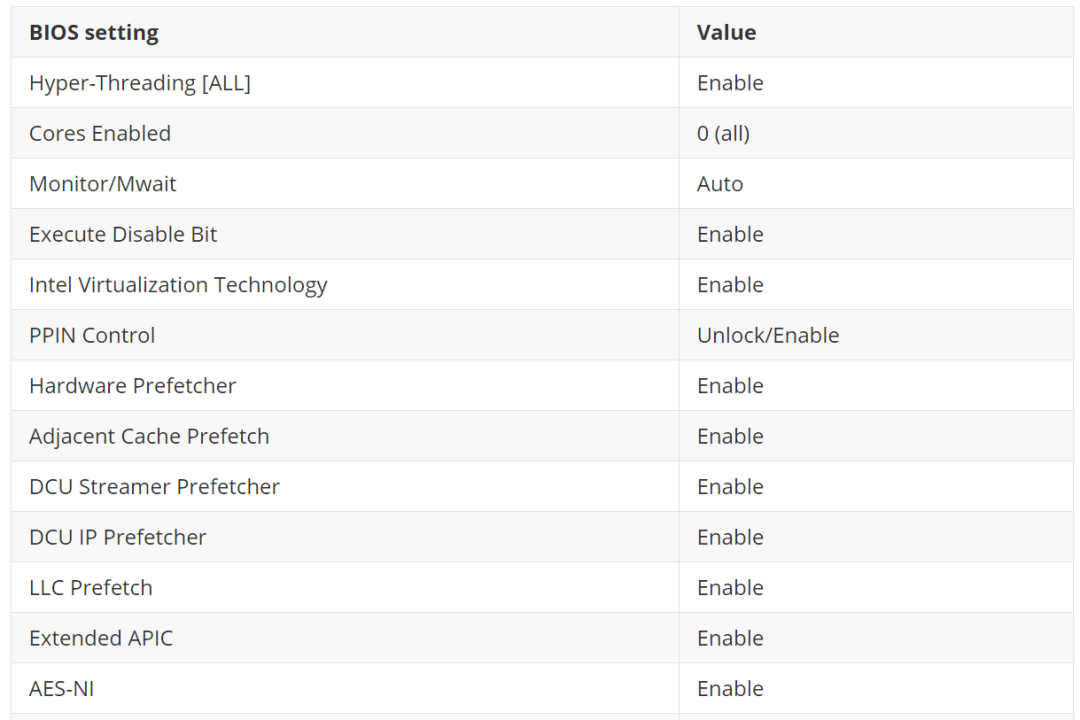
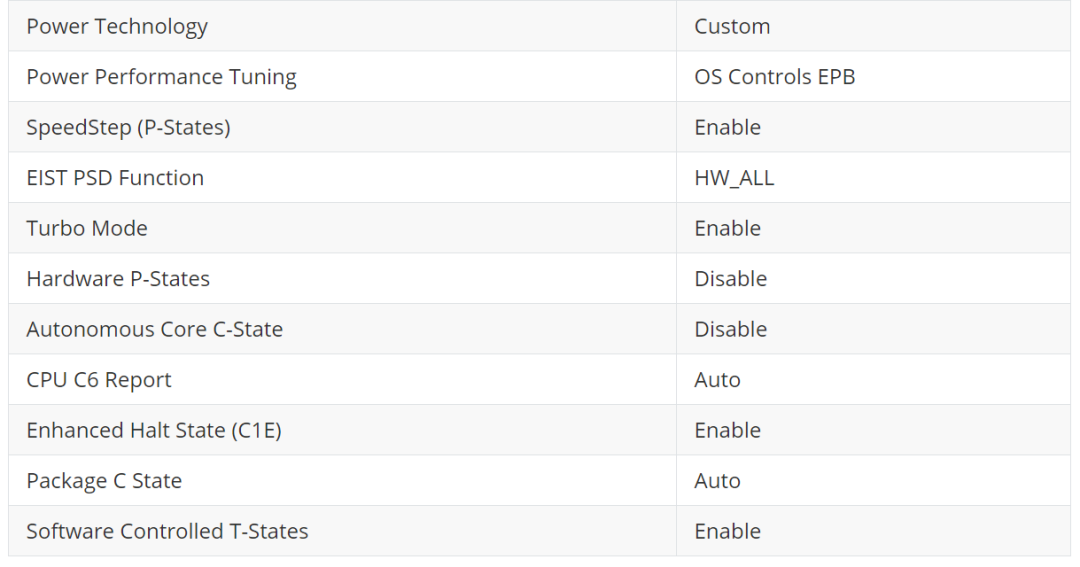
网络性能
iperf -s -p 9999iperf -c 10.10.49.33 -p 9999,其中 10.10.49.33 是服务器 IP
在 RBD 设备上测量 4k 大小的写入 IOPS; 只是ping另一个主机。
fio --ioengine=rbd --pool=rbd_benchmark --rbdname=rbd0 --direct=1 --fsync=1 --rw=write --bs=4k --numjobs=1 --iodepth=1 --runtime=60 --time_based --group_reporting --name=4k-sync-write-1
grep MHz proc/cpuinfo | sort | tail -n 4在 fio 的命令来确认。
cpupower frequency-set -g performance)上将 CPU 频率调节器更改为“performance” ,情况就会改善:2369 IOPS。
优化网络延迟
cpupower idle-info”,从它转换出来需要 0.133 毫秒。接下来的状态是 C1E、C1 和“CPUIDLE CORE POLL IDLE”(不节省任何电量),所有这些状态都需要不到 0.01 毫秒才能退出。
cpupower idle-set -D 11”实际上意味着“禁用所有需要超过 0.011 毫秒才能退出的空闲状态”。结果:ping 时间下降到 0.054 毫秒,但 fio 基准测试仅产生 2079 IOPS - 比以前更糟。这可能是因为不在 C6 中的内核会降低 CPU 可用的最大频率,而且,在这个“fio”基准测试中,达到可能的最高频率实际上更为重要。
正式运行IO500基准测试
io500.sh”。在文件的开始,有一个“
io500_mpiargs”变量,默认设置为“
-np 2”,表示“在本地运行两个进程”。为了测试分布式操作是否有效,将该变量更改为“
-np 4 -mca btl ^openib -mca btl_tcp_if_include 10.10.49.0/24 -oversubscribe -H 10.10.49.2,10.10.49.33 --allow-run-as-root”,以便在两个客户端节点中的每个节点上启动两个进程。
-mca btl ^openib”参数从 OpenMPI 尝试的传输列表中排除 InfiniBand。这是必须的,因为 Mellanox 网卡理论上支持 InfiniBand,但是在这个集群中还没有配置 InfiniBand。基准测试不需要在 worker 之间发送大量数据,因此回退到 TCP 是可以接受的。
-mca btl_tcp_if_include 10.10.49.0/24”参数指定在 OpenMPI 基准测试期间要使用的网络。如果没有这个参数,OpenMPI 有时会选择其中一台主机上的 docker0 接口作为主要的,并尝试从其他节点连接到 172.17.0.1,这会失败。
stonewall-time设置为 30 秒。
[global]`
`datadir = mnt/cephfs/default`
`drop-caches = TRUE`
`drop-caches-cmd = usr/local/bin/drop_caches
[debug]`
`stonewall-time = 30
/usr/local/bin/drop_caches脚本的内容是:
#!/bin/sh`
`echo 3 > proc/sys/vm/drop_caches`
`ssh 10.10.49.33 echo 3 ">" proc/sys/vm/drop_caches
是否禁用 C6
[RESULT] BW   phase 1            ior_easy_write                6.021 GiB/s : time  35.83 seconds
[RESULT] BW   phase 2            ior_hard_write                0.068 GiB/s : time  43.69 seconds
[RESULT] BW   phase 3             ior_easy_read                5.144 GiB/s : time  46.86 seconds
[RESULT] BW   phase 4             ior_hard_read                0.219 GiB/s : time  13.52 seconds
[RESULT] IOPS phase 1         mdtest_easy_write               10.334 kiops : time  32.09 seconds
[RESULT] IOPS phase 2         mdtest_hard_write                5.509 kiops : time  45.68 seconds
[RESULT] IOPS phase 3                      find              123.770 kiops : time   4.71 seconds
[RESULT] IOPS phase 4          mdtest_easy_stat               31.086 kiops : time  10.67 seconds
[RESULT] IOPS phase 5          mdtest_hard_stat               30.733 kiops : time   8.19 seconds
[RESULT] IOPS phase 6        mdtest_easy_delete                4.868 kiops : time  68.13 seconds
[RESULT] IOPS phase 7          mdtest_hard_read                5.734 kiops : time  43.88 seconds
[RESULT] IOPS phase 8        mdtest_hard_delete                3.443 kiops : time  75.07 seconds
[SCORE] Bandwidth 0.822726 GiB/s : IOPS 12.6286 kiops : TOTAL 3.22333
[RESULT] BW   phase 1            ior_easy_write                5.608 GiB/s : time  35.97 seconds
[RESULT] BW   phase 2            ior_hard_write                0.101 GiB/s : time  36.17 seconds
[RESULT] BW   phase 3             ior_easy_read                4.384 GiB/s : time  47.43 seconds
[RESULT] BW   phase 4             ior_hard_read                0.223 GiB/s : time  16.30 seconds
[RESULT] IOPS phase 1         mdtest_easy_write               10.614 kiops : time  31.73 seconds
[RESULT] IOPS phase 2         mdtest_hard_write                4.884 kiops : time  43.06 seconds
[RESULT] IOPS phase 3                      find              157.530 kiops : time   3.47 seconds
[RESULT] IOPS phase 4          mdtest_easy_stat               26.136 kiops : time  12.88 seconds
[RESULT] IOPS phase 5          mdtest_hard_stat               30.081 kiops : time   6.99 seconds
[RESULT] IOPS phase 6        mdtest_easy_delete                5.122 kiops : time  65.74 seconds
[RESULT] IOPS phase 7          mdtest_hard_read                7.689 kiops : time  27.35 seconds
[RESULT] IOPS phase 8        mdtest_hard_delete                3.382 kiops : time  64.18 seconds
[SCORE] Bandwidth 0.86169 GiB/s : IOPS 13.0773 kiops : TOTAL 3.35687
[RESULT] BW   phase 1            ior_easy_write                7.058 GiB/s : time  38.88 seconds
[RESULT] BW   phase 2            ior_hard_write                0.074 GiB/s : time  39.40 seconds
[RESULT] BW   phase 3             ior_easy_read                7.933 GiB/s : time  34.78 seconds
[RESULT] BW   phase 4             ior_hard_read                0.172 GiB/s : time  16.97 seconds
[RESULT] IOPS phase 1         mdtest_easy_write               11.416 kiops : time  34.38 seconds
[RESULT] IOPS phase 2         mdtest_hard_write                5.492 kiops : time  43.10 seconds
[RESULT] IOPS phase 3                      find              169.540 kiops : time   3.71 seconds
[RESULT] IOPS phase 4          mdtest_easy_stat               41.339 kiops : time   9.50 seconds
[RESULT] IOPS phase 5          mdtest_hard_stat               47.345 kiops : time   5.00 seconds
[RESULT] IOPS phase 6        mdtest_easy_delete                8.997 kiops : time  43.63 seconds
[RESULT] IOPS phase 7          mdtest_hard_read                9.854 kiops : time  24.02 seconds
[RESULT] IOPS phase 8        mdtest_hard_delete                3.213 kiops : time  75.66 seconds
[SCORE] Bandwidth 0.919144 GiB/s : IOPS 16.6569 kiops : TOTAL 3.91281
[RESULT] BW   phase 1            ior_easy_write                5.983 GiB/s : time  39.96 seconds
[RESULT] BW   phase 2            ior_hard_write                0.100 GiB/s : time  37.91 seconds
[RESULT] BW   phase 3             ior_easy_read                7.413 GiB/s : time  31.65 seconds
[RESULT] BW   phase 4             ior_hard_read                0.232 GiB/s : time  16.26 seconds
[RESULT] IOPS phase 1         mdtest_easy_write                9.793 kiops : time  35.57 seconds
[RESULT] IOPS phase 2         mdtest_hard_write                4.845 kiops : time  36.70 seconds
[RESULT] IOPS phase 3                      find              147.360 kiops : time   3.57 seconds
[RESULT] IOPS phase 4          mdtest_easy_stat               50.768 kiops : time   6.86 seconds
[RESULT] IOPS phase 5          mdtest_hard_stat               50.125 kiops : time   3.55 seconds
[RESULT] IOPS phase 6        mdtest_easy_delete                7.763 kiops : time  44.87 seconds
[RESULT] IOPS phase 7          mdtest_hard_read               13.135 kiops : time  13.54 seconds
[RESULT] IOPS phase 8        mdtest_hard_delete                3.699 kiops : time  50.04 seconds
[SCORE] Bandwidth 1.00608 GiB/s : IOPS 16.918 kiops : TOTAL 4.12563
调整 MDS
修剪后的 MDS MDS 报告超大缓存 客户端无法响应缓存压力
[RESULT] BW   phase 1            ior_easy_write                5.442 GiB/s : time 314.02 seconds
[RESULT] BW   phase 2            ior_hard_write                0.099 GiB/s : time 363.64 seconds
[RESULT] BW   phase 3             ior_easy_read                7.838 GiB/s : time 215.95 seconds
[RESULT] BW   phase 4             ior_hard_read                0.231 GiB/s : time 155.15 seconds
[RESULT] IOPS phase 1         mdtest_easy_write               11.423 kiops : time 431.68 seconds
[RESULT] IOPS phase 2         mdtest_hard_write                5.518 kiops : time 328.02 seconds
[RESULT] IOPS phase 3                      find              120.880 kiops : time  55.76 seconds
[RESULT] IOPS phase 4          mdtest_easy_stat                0.866 kiops : time 5694.08 seconds
[RESULT] IOPS phase 5          mdtest_hard_stat                2.072 kiops : time 873.55 seconds
[RESULT] IOPS phase 6        mdtest_easy_delete                1.972 kiops : time 2500.54 seconds
[RESULT] IOPS phase 7          mdtest_hard_read                1.925 kiops : time 940.46 seconds
[RESULT] IOPS phase 8        mdtest_hard_delete                3.304 kiops : time 549.71 seconds
[SCORE] Bandwidth 0.99279 GiB/s : IOPS 4.51093 kiops : TOTAL 2.11622
[RESULT] BW   phase 1            ior_easy_write                5.274 GiB/s : time 322.44 seconds
[RESULT] BW   phase 2            ior_hard_write                0.105 GiB/s : time 348.94 seconds
[RESULT] BW   phase 3             ior_easy_read                7.738 GiB/s : time 217.92 seconds
[RESULT] BW   phase 4             ior_hard_read                0.239 GiB/s : time 153.87 seconds
[RESULT] IOPS phase 1         mdtest_easy_write               10.692 kiops : time 429.36 seconds
[RESULT] IOPS phase 2         mdtest_hard_write                5.318 kiops : time 324.34 seconds
[RESULT] IOPS phase 3                      find              211.550 kiops : time  29.85 seconds
[RESULT] IOPS phase 4          mdtest_easy_stat               44.120 kiops : time 104.05 seconds
[RESULT] IOPS phase 5          mdtest_hard_stat               29.881 kiops : time  57.72 seconds
[RESULT] IOPS phase 6        mdtest_easy_delete                6.993 kiops : time 656.42 seconds
[RESULT] IOPS phase 7          mdtest_hard_read                9.773 kiops : time 176.46 seconds
[RESULT] IOPS phase 8        mdtest_hard_delete                2.949 kiops : time 586.78 seconds
[SCORE] Bandwidth 1.0071 GiB/s : IOPS 15.4197 kiops : TOTAL 3.94071
消除客户端瓶颈
创建一个新的客户端实例,而不是共享安装相同集群的客户端的现有实例。
/etc/network/interfaces:
iface enp216s0f0np0 inet manual
    up sbin/ip link add link enp216s0f0np0 name enp216s0f0mv0 type macvlan mode bridge

allow-hotplug enp216s0f0mv0
iface enp216s0f0mv0 inet static
    address 10.10.49.2/24
/usr/local/bin/drop_caches”脚本修改如下:
#!/bin/sh

ssh 10.10.49.2 echo 3 ">" proc/sys/vm/drop_caches
ssh 10.10.49.33 echo 3 ">" proc/sys/vm/drop_caches
-np 32 -oversubscribe -H 10.10.49.3,10.10.49.4,... --allow-run-as-root”。事实上,使用 30 秒的stonewall计时器,基准测试的某些阶段,例如“mdtest_hard_stat”,变得太短(少于 4 秒),结果不可靠和可重复。因此,从现在开始,基准测试使用 300 秒的stonewall计时器运行。
[RESULT] BW   phase 1            ior_easy_write               11.307 GiB/s : time 372.62 seconds
[RESULT] BW   phase 2            ior_hard_write                0.383 GiB/s : time 352.78 seconds
[RESULT] BW   phase 3             ior_easy_read               15.144 GiB/s : time 277.94 seconds
[RESULT] BW   phase 4             ior_hard_read                0.931 GiB/s : time 145.10 seconds
[RESULT] IOPS phase 1         mdtest_easy_write               14.032 kiops : time 472.96 seconds
[RESULT] IOPS phase 2         mdtest_hard_write                9.891 kiops : time 313.09 seconds
[RESULT] IOPS phase 3                      find              231.190 kiops : time  42.10 seconds
[RESULT] IOPS phase 4          mdtest_easy_stat               55.821 kiops : time 118.89 seconds
[RESULT] IOPS phase 5          mdtest_hard_stat               79.348 kiops : time  39.03 seconds
[RESULT] IOPS phase 6        mdtest_easy_delete                9.597 kiops : time 691.54 seconds
[RESULT] IOPS phase 7          mdtest_hard_read               16.702 kiops : time 185.42 seconds
[RESULT] IOPS phase 8        mdtest_hard_delete                8.507 kiops : time 366.75 seconds
[SCORE] Bandwidth 2.79532 GiB/s : IOPS 25.7583 kiops : TOTAL 8.48544
[RESULT] BW   phase 1            ior_easy_write               11.459 GiB/s : time 350.88 seconds
[RESULT] BW   phase 2            ior_hard_write                0.373 GiB/s : time 354.69 seconds
[RESULT] BW   phase 3             ior_easy_read               16.011 GiB/s : time 250.28 seconds
[RESULT] BW   phase 4             ior_hard_read                0.930 GiB/s : time 142.02 seconds
[RESULT] IOPS phase 1         mdtest_easy_write               15.894 kiops : time 441.59 seconds
[RESULT] IOPS phase 2         mdtest_hard_write               10.690 kiops : time 313.34 seconds
[RESULT] IOPS phase 3                      find              174.440 kiops : time  59.44 seconds
[RESULT] IOPS phase 4          mdtest_easy_stat               55.944 kiops : time 125.46 seconds
[RESULT] IOPS phase 5          mdtest_hard_stat               66.896 kiops : time  50.07 seconds
[RESULT] IOPS phase 6        mdtest_easy_delete                9.371 kiops : time 748.99 seconds
[RESULT] IOPS phase 7          mdtest_hard_read               19.120 kiops : time 175.18 seconds
[RESULT] IOPS phase 8        mdtest_hard_delete                9.948 kiops : time 340.54 seconds
[SCORE] Bandwidth 2.82402 GiB/s : IOPS 25.8226 kiops : TOTAL 8.53953
扩展 MDS
即使单个 MDS 守护进程无法充分利用硬件,也可能希望稍后在同一节点上启动更多活动的 MDS 守护进程以充分利用可用内核和内存。此外,对于集群上的工作负载,在同一节点上使用多个活动 MDS 而不是过度配置单个 MDS 会提高性能,这可能会变得很明显。
/etc/ceph/ceph.client.admin.keyring. 之后,执行以下命令,替换正确的主机名而不是依然是
croit-host-25作为新的 MDS 的名称。
# sudo -u ceph -s bin/bash
$ mkdir var/lib/ceph/mds/ceph-croit-host-25a
$ ceph-authtool --create-keyring var/lib/ceph/mds/ceph-croit-host-25a/keyring --gen-key -n mds.croit-host-25a
$ ceph auth add mds.croit-host-25a osd "allow rwx" mds "allow" mon "allow profile mds" -i var/lib/ceph/mds/ceph-croit-host-25a/keyring
$ cat var/lib/ceph/mds/ceph-croit-host-25a/keyring
$ mysql croit
MariaDB [croit]> insert into service values(NULL, 5, 'mds', NULL, 'croit-host-25a', '[mds.croit-host-25a]\nkey = AQA9jn1f7oyKDRAACIJ0Kj8e8D1C4z4p8hU2WA==\n', 'enabled', NOW(), NULL);
[and the remaining keys]
ceph fs set cephfs max_mds 16
[RESULT] BW   phase 1            ior_easy_write               13.829 GiB/s : time 325.93 seconds
[RESULT] BW   phase 2            ior_hard_write                0.373 GiB/s : time 365.60 seconds
[RESULT] BW   phase 3             ior_easy_read               16.204 GiB/s : time 278.80 seconds
[RESULT] BW   phase 4             ior_hard_read                0.920 GiB/s : time 148.24 seconds
[RESULT] IOPS phase 1         mdtest_easy_write               25.154 kiops : time 594.93 seconds
[RESULT] IOPS phase 2         mdtest_hard_write               13.227 kiops : time 316.73 seconds
[RESULT] IOPS phase 3                      find              391.840 kiops : time  48.88 seconds
[RESULT] IOPS phase 4          mdtest_easy_stat              153.305 kiops : time  97.61 seconds
[RESULT] IOPS phase 5          mdtest_hard_stat               93.870 kiops : time  44.63 seconds
[RESULT] IOPS phase 6        mdtest_easy_delete               20.886 kiops : time 716.49 seconds
[RESULT] IOPS phase 7          mdtest_hard_read               28.205 kiops : time 148.53 seconds
[RESULT] IOPS phase 8        mdtest_hard_delete               10.496 kiops : time 401.73 seconds
[SCORE] Bandwidth 2.96175 GiB/s : IOPS 42.959 kiops : TOTAL 11.2798
没有效果的“优化”
额外的 OSD参数
调整 OSD 内存目标
调整网络 MTU
调整 TCP 参数
net.core.rmem_max=33554432
net.core.wmem_max=33554432
net.ipv4.tcp_rmem=4096 65536 33554432
net.ipv4.tcp_wmem=4096 131072 33554432
[RESULT] BW   phase 1            ior_easy_write               12.905 GiB/s : time 351.74 seconds
[RESULT] BW   phase 2            ior_hard_write                0.382 GiB/s : time 354.09 seconds
[RESULT] BW   phase 3             ior_easy_read               16.459 GiB/s : time 275.82 seconds
[RESULT] BW   phase 4             ior_hard_read                0.926 GiB/s : time 145.97 seconds
[RESULT] IOPS phase 1         mdtest_easy_write               24.030 kiops : time 637.19 seconds
[RESULT] IOPS phase 2         mdtest_hard_write               12.289 kiops : time 331.97 seconds
[RESULT] IOPS phase 3                      find              252.270 kiops : time  76.87 seconds
[RESULT] IOPS phase 4          mdtest_easy_stat               95.420 kiops : time 160.47 seconds
[RESULT] IOPS phase 5          mdtest_hard_stat               97.223 kiops : time  41.96 seconds
[RESULT] IOPS phase 6        mdtest_easy_delete               16.660 kiops : time 919.06 seconds
[RESULT] IOPS phase 7          mdtest_hard_read               15.179 kiops : time 268.76 seconds
[RESULT] IOPS phase 8        mdtest_hard_delete                8.265 kiops : time 497.80 seconds
[SCORE] Bandwidth 2.9435 GiB/s : IOPS 33.1105 kiops : TOTAL 9.87222
增加 MDS 日志最大段
[RESULT] BW   phase 1            ior_easy_write               12.733 GiB/s : time 335.69 seconds
[RESULT] BW   phase 2            ior_hard_write                0.374 GiB/s : time 348.14 seconds
[RESULT] BW   phase 3             ior_easy_read               17.026 GiB/s : time 256.40 seconds
[RESULT] BW   phase 4             ior_hard_read                0.932 GiB/s : time 139.58 seconds
[RESULT] IOPS phase 1         mdtest_easy_write               26.622 kiops : time 575.94 seconds
[RESULT] IOPS phase 2         mdtest_hard_write               12.984 kiops : time 328.36 seconds
[RESULT] IOPS phase 3                      find              341.760 kiops : time  57.34 seconds
[RESULT] IOPS phase 4          mdtest_easy_stat              107.865 kiops : time 142.15 seconds
[RESULT] IOPS phase 5          mdtest_hard_stat              103.463 kiops : time  41.21 seconds
[RESULT] IOPS phase 6        mdtest_easy_delete               14.181 kiops : time 1081.19 seconds
[RESULT] IOPS phase 7          mdtest_hard_read               15.855 kiops : time 268.90 seconds
[RESULT] IOPS phase 8        mdtest_hard_delete                8.702 kiops : time 493.00 seconds
[SCORE] Bandwidth 2.94821 GiB/s : IOPS 35.5994 kiops : TOTAL 10.2447
消除 KSWAPD 瓶颈
posix.odirect = True”在
[global]配置文件的部分,或在特定阶段的部分)通过
O_DIRECT标志绕过页面缓存。然而,它实际上使每个 IOR 阶段的得分变得更糟,即与预期效果完全相反。
numa=fake=8”内核命令行参数在两个客户端上创建了一组假 NUMA 节点。结果:这对 IOR 阶段没有帮助(所以 kswapd 不是瓶颈),但伤害了“find“和大多数基于 mdtest 的阶段。
[RESULT] BW   phase 1            ior_easy_write               13.674 GiB/s : time 342.55 seconds
[RESULT] BW   phase 2            ior_hard_write                0.381 GiB/s : time 355.32 seconds
[RESULT] BW   phase 3             ior_easy_read               16.784 GiB/s : time 278.14 seconds
[RESULT] BW   phase 4             ior_hard_read                0.925 GiB/s : time 146.32 seconds
[RESULT] IOPS phase 1         mdtest_easy_write               23.718 kiops : time 578.62 seconds
[RESULT] IOPS phase 2         mdtest_hard_write               11.818 kiops : time 326.18 seconds
[RESULT] IOPS phase 3                      find              261.800 kiops : time  67.14 seconds
[RESULT] IOPS phase 4          mdtest_easy_stat              101.016 kiops : time 135.85 seconds
[RESULT] IOPS phase 5          mdtest_hard_stat               69.404 kiops : time  55.54 seconds
[RESULT] IOPS phase 6        mdtest_easy_delete               18.087 kiops : time 758.75 seconds
[RESULT] IOPS phase 7          mdtest_hard_read               26.474 kiops : time 145.60 seconds
[RESULT] IOPS phase 8        mdtest_hard_delete                9.933 kiops : time 390.60 seconds
[SCORE] Bandwidth 2.99932 GiB/s : IOPS 35.3655 kiops : TOTAL 10.2991
什么也不做
[RESULT] BW   phase 1            ior_easy_write               13.359 GiB/s : time 455.21 seconds
[RESULT] BW   phase 2            ior_hard_write                0.376 GiB/s : time 338.87 seconds
[RESULT] BW   phase 3             ior_easy_read               16.634 GiB/s : time 366.70 seconds
[RESULT] BW   phase 4             ior_hard_read                0.934 GiB/s : time 136.30 seconds
[RESULT] IOPS phase 1         mdtest_easy_write               24.508 kiops : time 606.63 seconds
[RESULT] IOPS phase 2         mdtest_hard_write               12.352 kiops : time 329.28 seconds
[RESULT] IOPS phase 3                      find              288.930 kiops : time  65.53 seconds
[RESULT] IOPS phase 4          mdtest_easy_stat              109.363 kiops : time 135.95 seconds
[RESULT] IOPS phase 5          mdtest_hard_stat               98.175 kiops : time  41.43 seconds
[RESULT] IOPS phase 6        mdtest_easy_delete               18.731 kiops : time 793.72 seconds
[RESULT] IOPS phase 7          mdtest_hard_read               26.504 kiops : time 153.46 seconds
[RESULT] IOPS phase 8        mdtest_hard_delete               10.293 kiops : time 397.73 seconds
[SCORE] Bandwidth 2.9722 GiB/s : IOPS 38.4718 kiops : TOTAL 10.6933
扩容集群进行基准测试
[RESULT] BW   phase 1            ior_easy_write               12.982 GiB/s : time 391.63 seconds
[RESULT] BW   phase 2            ior_hard_write                0.383 GiB/s : time 349.43 seconds
[RESULT] BW   phase 3             ior_easy_read               16.991 GiB/s : time 304.82 seconds
[RESULT] BW   phase 4             ior_hard_read                0.923 GiB/s : time 145.14 seconds
[RESULT] IOPS phase 1         mdtest_easy_write               23.997 kiops : time 600.49 seconds
[RESULT] IOPS phase 2         mdtest_hard_write               11.300 kiops : time 335.35 seconds
[RESULT] IOPS phase 3                      find              345.570 kiops : time  52.66 seconds
[RESULT] IOPS phase 4          mdtest_easy_stat              113.218 kiops : time 127.28 seconds
[RESULT] IOPS phase 5          mdtest_hard_stat               99.407 kiops : time  38.12 seconds
[RESULT] IOPS phase 6        mdtest_easy_delete               19.261 kiops : time 748.14 seconds
[RESULT] IOPS phase 7          mdtest_hard_read               28.119 kiops : time 134.76 seconds
[RESULT] IOPS phase 8        mdtest_hard_delete               10.485 kiops : time 364.02 seconds
[SCORE] Bandwidth 2.97168 GiB/s : IOPS 39.5523 kiops : TOTAL 10.8414
[RESULT] BW   phase 1            ior_easy_write               10.775 GiB/s : time 344.10 seconds
[RESULT] BW   phase 2            ior_hard_write                0.374 GiB/s : time 359.87 seconds
[RESULT] BW   phase 3             ior_easy_read               16.431 GiB/s : time 224.47 seconds
[RESULT] BW   phase 4             ior_hard_read                0.925 GiB/s : time 145.59 seconds
[RESULT] IOPS phase 1         mdtest_easy_write               25.422 kiops : time 641.73 seconds
[RESULT] IOPS phase 2         mdtest_hard_write               12.040 kiops : time 324.63 seconds
[RESULT] IOPS phase 3                      find              374.070 kiops : time  54.06 seconds
[RESULT] IOPS phase 4          mdtest_easy_stat              101.753 kiops : time 160.33 seconds
[RESULT] IOPS phase 5          mdtest_hard_stat               78.571 kiops : time  49.74 seconds
[RESULT] IOPS phase 6        mdtest_easy_delete               19.180 kiops : time 850.58 seconds
[RESULT] IOPS phase 7          mdtest_hard_read               25.747 kiops : time 151.80 seconds
[RESULT] IOPS phase 8        mdtest_hard_delete                9.840 kiops : time 399.77 seconds
[SCORE] Bandwidth 2.79783 GiB/s : IOPS 38.1085 kiops : TOTAL 10.3257
更改 PG 的数量
[RESULT] BW   phase 1            ior_easy_write               13.373 GiB/s : time 349.24 seconds
[RESULT] BW   phase 2            ior_hard_write                0.376 GiB/s : time 361.25 seconds
[RESULT] BW   phase 3             ior_easy_read               16.557 GiB/s : time 282.76 seconds
[RESULT] BW   phase 4             ior_hard_read                0.912 GiB/s : time 148.76 seconds
[RESULT] IOPS phase 1         mdtest_easy_write               20.689 kiops : time 793.92 seconds
[RESULT] IOPS phase 2         mdtest_hard_write               11.058 kiops : time 344.35 seconds
[RESULT] IOPS phase 3                      find              333.310 kiops : time  60.70 seconds
[RESULT] IOPS phase 4          mdtest_easy_stat              143.516 kiops : time 114.45 seconds
[RESULT] IOPS phase 5          mdtest_hard_stat              104.899 kiops : time  36.30 seconds
[RESULT] IOPS phase 6        mdtest_easy_delete               19.006 kiops : time 864.21 seconds
[RESULT] IOPS phase 7          mdtest_hard_read               23.765 kiops : time 160.23 seconds
[RESULT] IOPS phase 8        mdtest_hard_delete                9.188 kiops : time 417.02 seconds
[SCORE] Bandwidth 2.95176 GiB/s : IOPS 38.4369 kiops : TOTAL 10.6516
升级至Octopus版本
night版本,并使用它将集群升级到 Ceph Octopus(版本 15.2.5)。这确实导致了一些差异:
[RESULT] BW   phase 1            ior_easy_write               13.656 GiB/s : time 347.14 seconds
[RESULT] BW   phase 2            ior_hard_write                0.332 GiB/s : time 356.28 seconds
[RESULT] BW   phase 3             ior_easy_read               16.740 GiB/s : time 282.90 seconds
[RESULT] BW   phase 4             ior_hard_read                0.790 GiB/s : time 149.64 seconds
[RESULT] IOPS phase 1         mdtest_easy_write               26.457 kiops : time 436.90 seconds
[RESULT] IOPS phase 2         mdtest_hard_write               12.974 kiops : time 335.61 seconds
[RESULT] IOPS phase 3                      find              413.790 kiops : time  38.46 seconds
[RESULT] IOPS phase 4          mdtest_easy_stat              117.764 kiops : time  98.16 seconds
[RESULT] IOPS phase 5          mdtest_hard_stat               90.990 kiops : time  47.85 seconds
[RESULT] IOPS phase 6        mdtest_easy_delete               20.957 kiops : time 551.56 seconds
[RESULT] IOPS phase 7          mdtest_hard_read               25.622 kiops : time 169.94 seconds
[RESULT] IOPS phase 8        mdtest_hard_delete                9.646 kiops : time 453.91 seconds
[SCORE] Bandwidth 2.7817 GiB/s : IOPS 40.9341 kiops : TOTAL 10.6708
[RESULT] BW   phase 1            ior_easy_write               15.608 GiB/s : time 343.82 seconds
[RESULT] BW   phase 2            ior_hard_write                0.333 GiB/s : time 356.22 seconds
[RESULT] BW   phase 3             ior_easy_read               14.657 GiB/s : time 368.92 seconds
[RESULT] BW   phase 4             ior_hard_read                0.783 GiB/s : time 151.37 seconds
[RESULT] IOPS phase 1         mdtest_easy_write               25.044 kiops : time 557.53 seconds
[RESULT] IOPS phase 2         mdtest_hard_write               11.682 kiops : time 326.95 seconds
[RESULT] IOPS phase 3                      find              394.750 kiops : time  45.04 seconds
[RESULT] IOPS phase 4          mdtest_easy_stat              121.566 kiops : time 114.85 seconds
[RESULT] IOPS phase 5          mdtest_hard_stat               91.986 kiops : time  41.52 seconds
[RESULT] IOPS phase 6        mdtest_easy_delete               19.932 kiops : time 700.49 seconds
[RESULT] IOPS phase 7          mdtest_hard_read               21.683 kiops : time 176.15 seconds
[RESULT] IOPS phase 8        mdtest_hard_delete                8.189 kiops : time 471.37 seconds
[SCORE] Bandwidth 2.77798 GiB/s : IOPS 38.2382 kiops : TOTAL 10.3065
剩余瓶颈
最后的话:Ceph 有很多可调参数。但是,本次环境中只需要其中之一(mds 缓存内存限制)。其余的优化都是关于调整 Linux 操作系统、规划集群和创建足够多的客户端。而不必要的调优化往往带来的可能是反面的影响而非正面的影响。
https://croit.io/blog/ceph-performance-test-and-optimization https://docs.ceph.com
了解新钛云服
新钛云服荣膺第四届FMCG零售消费品行业CIO年会「年度数字化服务最值得信赖品牌奖」
新钛云服三周岁,公司月营收超600万元,定下百年新钛的发展目标
当IPFS遇见云服务|新钛云服与冰河分布式实验室达成战略协议
新钛云服正式获批工信部ISP/IDC(含互联网资源协作)牌照
新钛云服,打造最专业的Cloud MSP+,做企业业务和云之间的桥梁
往期技术干货
刚刚,OpenStack 第 19 个版本来了,附28项特性详细解读!
OpenStack与ZStack深度对比:架构、部署、计算存储与网络、运维监控等

点👇分享

戳👇在看
