暂无图片
暂无图片
暂无图片
暂无图片
暂无图片

mongoDB数据库操作

糟老头修炼记 2020-05-07
518

1.MongoDB的安装

无需下载源文件,可以直接用apt-get命令进行安装:

    su hadoop #切换到hadoop 
    sudo apt-get update #更新软件源,hadoop用户的密码是“hadoop”
    sudo apt-get install mongodb  #y遇到是否继续提示时,请输入“y

    查看MongoDB版本:

      sudo mongo -version

      输出版本信息,表明安装成功,截图如下:

       

      启动和关闭mongodb命令如下:

        sudo service mongodb start
        sudo service mongodb stop

        输入以下命令查看是否启动成功:

          sudo service mongodb start  #先启动mongodb
          sudo pgrep mongo -l #注意:-l是英文字母l,不是阿拉伯数字1


          2. 使用MongoDB

            sudo mongo

            输入mongo进入shell命令模式,默认连接的数据库是test数据库,在此之前一定要确保已经启动了MongoDB,否则会出现错误,启动之后运行成功,如下截图:


              创建和切换学生系统数据库:
              use student

              创建集合Student:

              Mongodb没有单独创建集合名的命令,在插入数据的时候,Mongodb会自动创建对应的集合。MongoDB也不用去设计表,避免了像关系型数据库设计表时的麻烦和复杂。

              插入数据:

                1.  var data =[{Sno:95001,Sname:"liyong",Ssex:"male",Sage:20,
                    Sdept:"CS"},{Sno:95002,Sname:"liuchen",Ssex:"female",
                    Sage:19,Sdept:"IS"},{Sno:95003,Sname:"wangmin",Ssex:"female",
                    Sage:18,Sdept:"MA"},{Sno:95004,Sname:"zhangli",Ssex:"male",
                    Sage:19,Sdept:"IS"}];
                2. db.Student.insert(data);

                结果:


                  查询数据:
                  db.Student.find();//查询所有的数据
                  db.Student.find({Sno:95002});//条件查询


                    删除数据:
                    db.Student.remove({Sno:95004});

                      修改数据:将学号95001的学生的年龄改成22岁
                      db.Student.update({Sno:95001},{$set:{Sage:22}});

                         创建和更新内联数据:给每个学生添加课程和成绩
                        db.Student.update({Sno:95001},{$set:{Course:{Cno:1,Grade:92}}})



                          查看结果:
                          db.Student.find();//查询所有学生的信息
                          db.Student.find({Sno:95002});//条件查询,查询学号为95002的学生信息


                           3.Student文档如下:

                          1.

                            1. {
                            2. “name”:“zhangsan”,
                            3. “score”:{
                            4. “English”:69,
                            5. “Math”:86,
                            6. “Computer”:77
                            7. }
                            8. }
                            9. {
                            10. “name”:“lisi”,
                            11. “score”:{
                            12. “English”:55,
                            13. “Math”:100,
                            14. “Computer”:88
                            15. }
                            16. }

                              用Mongo shell设计出student集合.启动MongoDB客户端(退出指令为quit();)
                              mongo


                                首先切换到student集合:
                                use student

                                  其次定义包含上述两个文档的数组:
                                  var stus=[ {"name":"zhangsan","scores":{"English":69,"Math":86,
                                  "Computer":77}},{"name":"lisi","score":{"English":55,"Math":100,
                                  "Computer":88}}]


                                    插入数据库;
                                    db.student.insert(stus)


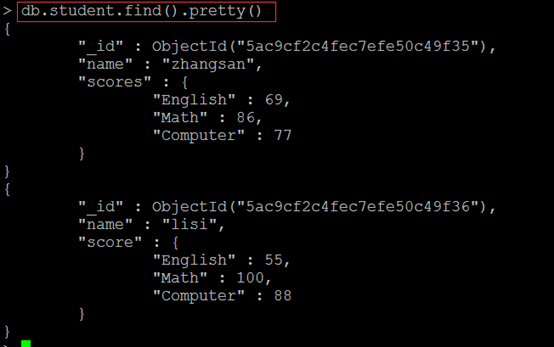
                                      find()方法输出两个学生的信息;
                                      db.student.find().pretty()


                                        find函数查询zhangsan 的所有成绩(只显示score列):
                                        db.student.find({"name":"zhangsan"},{"_id":0,"name":0})


                                          修改lisi的Math成绩,改为95
                                          db.student.update({"name":"lisi"},{"$set":{"score.Math":95}})
                                          db.student.find({"name":"lisi"},{"_id":0,"name":0})


                                          4.用MongoDB的JAVA客户端编程

                                          添加数据:English:45Math:89 Computer:100

                                            1.      {
                                            2. “name”:“scofield”,
                                            3. “score”:{
                                            4. “English”:45,
                                            5. “Math”:89,
                                            6. “Computer”:100
                                            7. }
                                            8. }

                                            代码:

                                              1.  import java.util.ArrayList;
                                              2. import java.util.List;
                                              3.
                                              4. import org.bson.Document;
                                              5. import com.mongodb.MongoClient;
                                              6. import com.mongodb.client.MongoCollection;
                                              7. import com.mongodb.client.MongoDatabase;
                                              8.
                                              9. publicclass mongo_insert {
                                              10.
                                              11. /**
                                              12. * @param args
                                              13. */
                                              14. publicstaticvoid main(String[] args){
                                              15. //TODO Auto-generated method stub
                                              16. //实例化一个mongo客户端
                                              17. MongoClient mongoClient=newMongoClient("localhost",27017);
                                              18. //实例化一个mongo数据库
                                              19. MongoDatabase mongoDatabase =mongoClient.getDatabase("student");
                                              20. //获取数据库中某个集合
                                              21. MongoCollection<Document> collection = mongoDatabase.getCollection("student");
                                              22. //实例化一个文档,内嵌一个子文档
                                              23. Document document=newDocument("name","scofield").
                                              24. append("score",newDocument("English",45).
                                              25. append("Math",89).
                                              26. append("Computer",100));
                                              27. List<Document> documents =newArrayList<Document>();
                                              28. documents.add(document);
                                              29. //将文档插入集合中
                                              30. collection.insertMany(documents);
                                              31. System.out.println("文档插入成功");
                                              32. }
                                              33.}

                                               获取scofield的所有成绩成绩信息(只显示score列)

                                                1.  import java.util.ArrayList;
                                                2. import java.util.List;
                                                3.
                                                4. import org.bson.Document;
                                                5. import com.mongodb.MongoClient;
                                                6. import com.mongodb.client.MongoCollection;
                                                7. import com.mongodb.client.MongoCursor;
                                                8. import com.mongodb.client.MongoDatabase;
                                                9. import com.mongodb.client.model.Filters;
                                                10.importstatic com.mongodb.client.model.Filters.eq;
                                                11.publicclass mongo_query {
                                                12.
                                                13. /**
                                                14. * @param args
                                                15. */
                                                16. publicstaticvoid main(String[] args){
                                                17. //TODO Auto-generated method stub
                                                18. //实例化一个mongo客户端
                                                19. MongoClient mongoClient=newMongoClient("localhost",27017);
                                                20. //实例化一个mongo数据库
                                                21. MongoDatabase mongoDatabase =mongoClient.getDatabase("student");
                                                22. //获取数据库中某个集合
                                                23. MongoCollection<Document> collection = mongoDatabase.getCollection("student");
                                                24. //进行数据查找,查询条件为name=scofield, 对获取的结果集只显示score这个域
                                                25. MongoCursor<Document> cursor=collection.find(newDocument("name","scofield")).
                                                26. projection(newDocument("score",1).append("_id",0)).iterator();
                                                27. while(cursor.hasNext())
                                                28. System.out.println(cursor.next().toJson());
                                                29. }
                                                30.}


                                                文章转载自糟老头修炼记,如果涉嫌侵权,请发送邮件至:contact@modb.pro进行举报,并提供相关证据,一经查实,墨天轮将立刻删除相关内容。

                                                评论