



SVG: 可缩放矢量,是用XML来描述二维图形和绘图程序的语言
参考网页:www.w3school.com.cn
https://d3js.org
慕课课程《数据可视化》李春芳
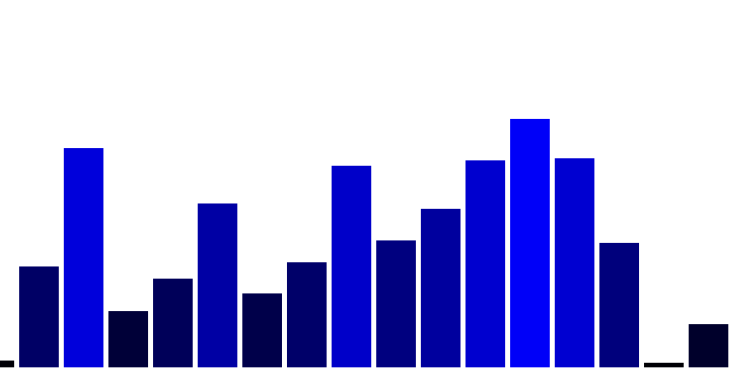
绘制javascript直方图:
<!DOCTYPE html><html lang="en"><head><meta charset="UTF-8"><title>javascript直方图</title></head><body>this is a javascript<svg id="svg01" width=800 height=600><!--<rect x="10" y="10" width="200" height="300" fill="blue"/>--></svg><script>var w = window.innerWidth|| document.documentElement.clientWidth|| document.body.clientWidth;var h = window.innerHeight|| document.documentElement.clientHeight|| document.body.clientHeight;w=w*0.98;h=h*0.98;var svg=document.getElementById("svg01");svg.setAttribute("width",w);svg.setAttribute("height",h);var rec=new Array();for(var i=0;i<30;i++){rec[i]=document.createElement("rect");svg.appendChild(rec[i]);var rec_h=Math.random()*255;rec[i].outerHTML="<rect x="+(i*w/30)+" y="+(400-rec_h)+" width="+(w/30-5)+" height="+rec_h+" fill='rgb(0,0,"+rec_h+")'>"}</script></body></html>
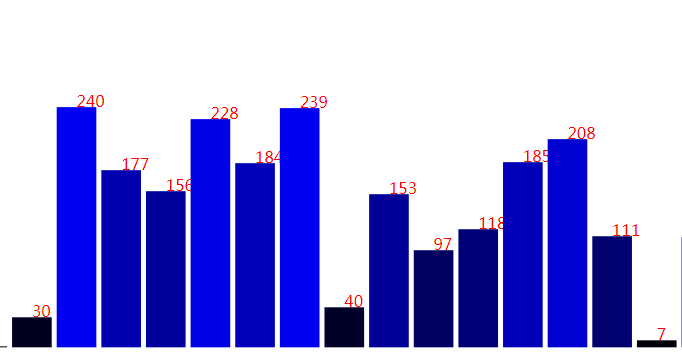
为javascript直方图添加文字:
<!DOCTYPE html><html lang="en"><head><meta charset="UTF-8"><title>javascript直方图</title></head><body>this is a javascript<svg id="svg01" width=800 height=600><!--<rect x="10" y="10" width="200" height="300" fill="blue"/>--><!--<text x="20" y="20" fill="red">hello</text>--></svg><script>var w = window.innerWidth|| document.documentElement.clientWidth|| document.body.clientWidth;var h = window.innerHeight|| document.documentElement.clientHeight|| document.body.clientHeight;w=w*0.98;h=h*0.98;var svg=document.getElementById("svg01");svg.setAttribute("width",w);svg.setAttribute("height",h);var rec=new Array();var txt=new Array();for(var i=0;i<30;i++){rec[i]=document.createElement("rect");txt[i]=document.createElement("text");svg.appendChild(rec[i]);svg.appendChild(txt[i]);var rec_h=Math.floor(Math.random()*255);rec[i].outerHTML="<rect x="+(i*w/30)+" y="+(400-rec_h)+" width="+(w/30-5)+" height="+rec_h+" fill='rgb(0,0,"+rec_h+")'>"txt[i].outerHTML="<text x="+(i*w/30+(w/30-5)/2)+" y="+(400-rec_h)+" fill='red'>"+rec_h+"</text>"}</script></body></html>
SVG绘制直线:
<!DOCTYPE html><html lang="en"><head><meta charset="UTF-8"><title>javascript直方图</title></head><body>this is a javascript<svg id="svg01" width=800 height=600><!--<rect x="10" y="10" width="200" height="300" fill="blue"/>--><!--<text x="20" y="20" fill="red">hello</text>--><!--<line x1="0" y1="0" x2="500" y2="700" stroke="red"/>--></svg><script>/*屏幕分辨率*/var w = window.innerWidth|| document.documentElement.clientWidth|| document.body.clientWidth;var h = window.innerHeight|| document.documentElement.clientHeight|| document.body.clientHeight;w=w*0.98;h=h*0.98;var svg=document.getElementById("svg01");svg.setAttribute("width",w);svg.setAttribute("height",h);var lineX=document.createElement("lineX");svg.appendChild(lineX);/*line.outerHTML="<line x1='0' y1='0' x2='500' y2='500' stroke='green'/>"*/lineX.outerHTML="<line x1=0 y1="+h/2+" x2="+w+" y2="+h/2+" stroke='black'/>";var lineY=document.createElement("lineY");svg.appendChild(lineY);lineY.outerHTML="<line x1="+w/2+" y1=0 x2="+w/2+" y2="+h+" stroke='black'/>";</script></body></html>
绘制结果是 坐标轴
绘制直线时,颜色填充用 stroke
绘制直方图和文字时,颜色填充用 fill
常量 变 变量:"+...+"
文章转载自糟老头修炼记,如果涉嫌侵权,请发送邮件至:contact@modb.pro进行举报,并提供相关证据,一经查实,墨天轮将立刻删除相关内容。
