上篇文章提到,PostgreSQL的对象包括tablespace、database、schema、table、index、sequence等,其中tablespace和database在操作系统层面都是存放数据文件的实体目录,schema是逻辑概念的命名空间,而table、index等则会以数据文件的方式存放在对应的tablespace和database的目录里。
往期相关文章:
从Oracle到PG-PostgreSQL数据库体系结构概述
从Oracle到PG-PostgreSQL对象的逻辑结构关系
相对于Oracle的datafile形式,PostgreSQL的数据文件的目录结构似乎要复杂得多,这个和MySQL在database下存储数据文件有一点点相似。
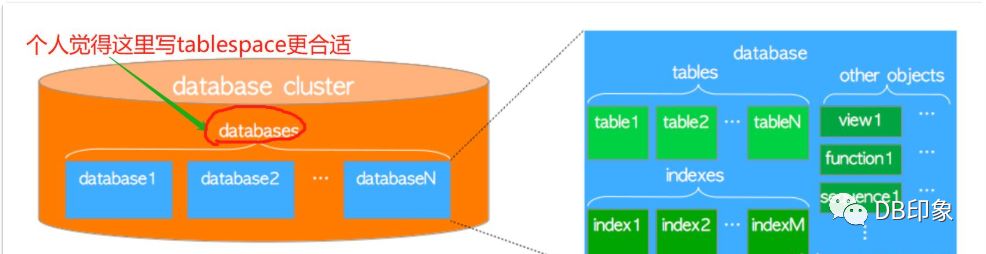
下面这个图来自Hironobu SUZUKI的技术文档“The Internals of PostgreSQL”中的Logical structure of a database cluster章节:
The Internals of PostgreSQL
for database administrators and system developers
http://www.interdb.jp/pg/pgsql01.html
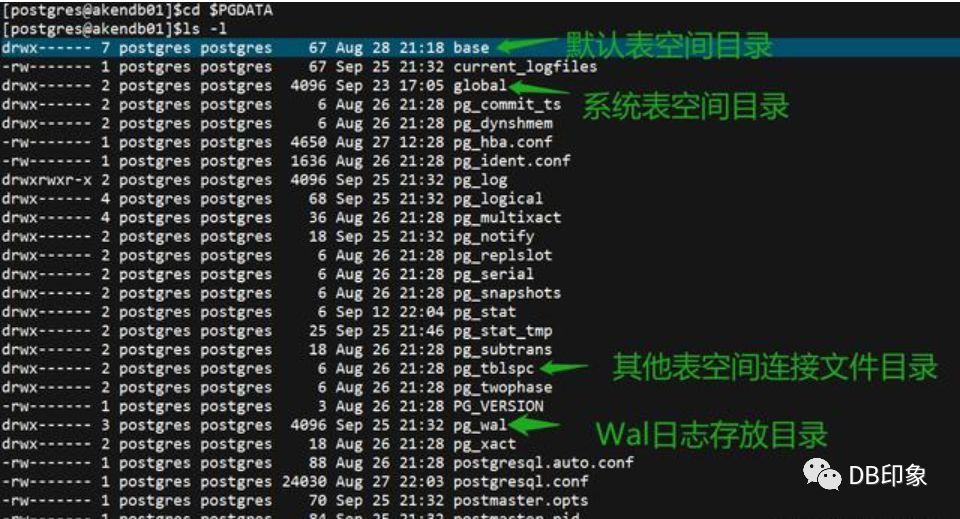
PostgreSQL在进行db初始化之后,会在PGDATA下产生以下目录文件,下面是我使用源码编译安装pg-11.5的例子:
更多详情可查看PostgreSQL官档:
https://www.postgresql.org/docs/11/storage-file-layout.html
PostgreSQL-11.5官档第68章关于PGDATA路径下的目录结构的介绍:
 pg-11.5 $PGDATA目录
下面我们进入base这个默认表空间目录
[postgres@akendb01]$pwd/aken/data/pgsql/1105/data/base[postgres@akendb01]$ls -ltotal 60drwx------ 2 postgres postgres 8192 Aug 26 21:28 1drwx------ 2 postgres postgres 8192 Aug 26 21:28 13286drwx------ 2 postgres postgres 8192 Sep 25 21:54 13287drwx------ 2 postgres postgres 8192 Sep 25 22:10 16386drwx------ 2 postgres postgres 8192 Aug 29 21:16 16387[postgres@akendb01]$
发现base里面有5个子目录,实际上分别代表pg集簇实例里面的5个database,这些database默认都存放在pg_default这个表空间里面(即这里的base)。
[postgres@akendb01]$psqlpsql (11.5)Type "help" for help.(postgres@[local]:5432)[postgres]#\l --查看当前实例的database。List of databasesName | Owner | Encoding | Collate | Ctype | Access privileges-----------+----------+----------+---------+-------+-----------------------akendb01 | postgres | UTF8 | C | C |akendb02 | postgres | UTF8 | C | C |postgres | postgres | UTF8 | C | C |template0 | postgres | UTF8 | C | C | =c/postgres +| | | | | postgres=CTc/postgrestemplate1 | postgres | UTF8 | C | C | =c/postgres +| | | | | postgres=CTc/postgres(5 rows)(postgres@[local]:5432)[postgres]#
接着查看某个表的数据文件存放路径:database=akendb01,schema=public,tablename=table01。
(postgres@[local]:5432)[postgres]#\c akendb01You are now connected to database "akendb01" as user "postgres".(postgres@[local]:5432)[akendb01]#\dtList of relationsSchema | Name | Type | Owner--------+---------+-------+--------public | table01 | table | aken01(1 row)
直接通过表名的方式查看:
(postgres@[local]:5432)[akendb01]#select pg_relation_filepath('table01'::regclass);pg_relation_filepath----------------------base/16386/32797 --这里的32797表示该表的filenode id(1 row)(postgres@[local]:5432)[akendb01]#exit[postgres@akendb01]$cd $PGDATA/base/16386/[postgres@akendb01]$ls -l *32797*-rw------- 1 postgres postgres 8192 Sep 22 10:58 32797-rw------- 1 postgres postgres 16384 Sep 12 22:04 32797_fsm-rw------- 1 postgres postgres 0 Sep 12 22:01 32797_vm[postgres@akendb01]$
2.通过oid的方式,这里的pg表的oid类似Oracle的object_id,而filenode则类似Oracle的data_object_id,表示该表的真正路径。
默认情况下,pg中表的oid的初始值和filenode id相等,当执行过truncate、vacuum full等操作后filenode会发生变化。
--查看表的oid和filenode id:
(postgres@[local]:5432)[akendb01]#select relname,oid,relfilenode from pg_class where relname='table01';relname | oid | relfilenode---------+-------+-------------table01 | 32797 | 32797(1 row)(postgres@[local]:5432)[akendb01]#
--通过oid查看表数据文件路径:
(postgres@[local]:5432)[akendb01]#select pg_relation_filepath(32797);pg_relation_filepath----------------------base/16386/32797(1 row)(postgres@[local]:5432)[akendb01]#
--对表执行truncate操作
(postgres@[local]:5432)[akendb01]#truncate table01;TRUNCATE TABLE(postgres@[local]:5432)[akendb01]#select relname,oid,relfilenode from pg_class where relname='table01';relname | oid | relfilenode---------+-------+-------------table01 | 32979 | 49166(1 row)
可以看到,当发生truncate操作后,表的filenode id发生了变化,由原来的32979变成了49166。
再次查看table01的数据文件路径:
(postgres@[local]:5432)[akendb01]#select pg_relation_filepath(32979);pg_relation_filepath----------------------base/16386/49166(1 row)(postgres@[local]:5432)[akendb01]#
可以看到,filenode id代表的是表的实际路径,table01的数据文件路径跟着filenode发生了变化。
最后,借用Hironobu SUZUKI大师的一张图来总结一下PostgreSQL的物理文件结构:
 图片来源:http://www.interdb.jp/pg/pgsql01.html#_1.2.
---本文完---